Overview

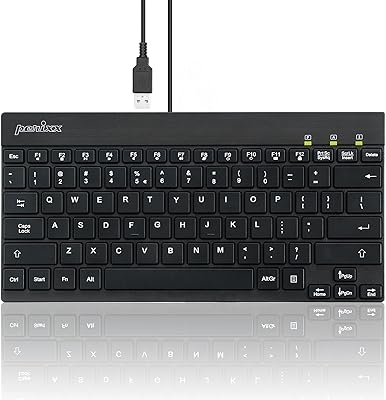
The Perixx PERIBOARD-326 Mini Backlit USB Keyboard sits in a crowded budget category, but earns its place with a handful of practical strengths. Its most recognizable trait is the low-profile chiclet design — keys that sit flat and shallow, much like what you would find on a laptop. There is no software to install, no driver disc to dig out of a drawer; plug it in and start typing. With a 4.4-star average across nearly a thousand ratings and a top-300 ranking in its category, it has clearly earned real-world trust. That said, keep expectations grounded — this is a functional everyday keyboard, not a premium mechanical board or a gaming tool.
Features & Benefits

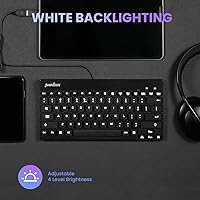
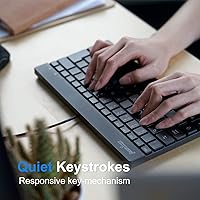
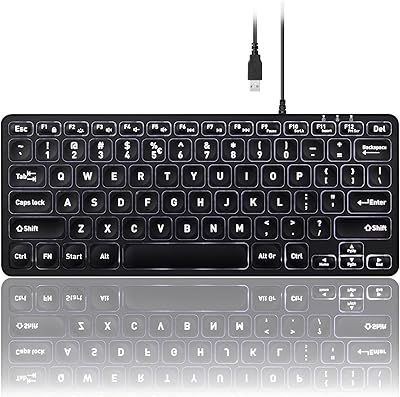
The most immediately useful thing about this compact backlit keyboard is exactly what the name promises: a genuine backlight that makes it usable in dim conditions without squinting. The single white light is bright and even, though it has one fixed brightness setting — no dimming option available. Dropping the number pad trims the footprint to just under 11 inches wide, which noticeably cuts the distance your right hand travels to reach the mouse. The cable runs nearly five feet, practical for desktop setups where USB ports are tucked around the back. Keys are quiet and shallow — a scissor-switch feel that some find crisp, and others find a touch too soft.

Best For

The Perixx tenkeyless board suits a specific type of user well. If you work in a space where the lights are often low — a home office after hours, a dorm room, a bedroom desk — the always-on backlight earns its keep in a way that feels practical rather than flashy. People with tight desk setups will appreciate how much room opens up without the number pad pushing the mouse further right. It also works nicely as a spare or travel keyboard you can slip into a bag without much thought, since it weighs under a pound. Mac users should look elsewhere, but for straightforward Windows typing, this mini USB keyboard delivers without drama.

User Feedback

Buyers who have spent time with this compact backlit keyboard tend to highlight two things: the clean typing feel and how much better their desk looks without a number pad hogging space. The backlighting receives consistent praise for being bright and even across the keys. Where feedback turns critical, the fixed backlight brightness is a common sticking point — users who want a softer glow at night have no option to dim it. The non-detachable cable also draws occasional complaints from those who care about tidy cable routing. Mac layout support is absent, which is worth knowing before you buy. Longer-term owners frequently report the keys remain responsive after months of regular use.

Pros

  • Backlit keys make typing in dim rooms genuinely comfortable without any complicated setup.
  • Dropping the number pad noticeably reduces desk clutter and keeps the mouse within easy reach.
  • Scissor-switch keys are quieter than standard membrane boards, which is welcome in shared spaces.
  • The nearly five-foot cable is long enough to reach ports on tower desktops without an extension.
  • Plug-and-play setup works immediately on Windows — no drivers, no software, no account required.
  • At under a pound, this mini USB keyboard is easy to move between desks or carry in a bag.
  • The flat, low-profile build suits anyone already comfortable typing on a laptop keyboard.
  • Clean black design fits most desk setups without looking out of place.
  • Strong long-term durability reported by buyers who have used it daily for months.
  • Competitive value for a backlit tenkeyless wired keyboard in this price range.

Cons

  • Backlight brightness cannot be adjusted — one fixed level, no dimming for nighttime use.
  • No Mac layout support makes this board a non-starter for Apple users.
  • The cable is non-detachable, which limits cable management options for tidy desk builds.
  • Scissor-switch keys feel too shallow for typists who prefer deeper key travel and tactile feedback.
  • No number pad will frustrate users who regularly handle data entry or spreadsheet work.
  • Windows-only compatibility rules out Chrome OS, Linux, and Mac users without workarounds.
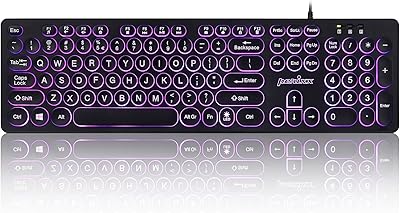
  • No backlighting color options — buyers wanting RGB or even warm white lighting get no choice here.
  • The Perixx tenkeyless board offers no media keys or shortcut row, which some users may miss.
  • Lightweight build can feel less planted on the desk compared to heavier full-size keyboards.
  • No wireless option available for users who prefer a cable-free workspace.

Ratings

The scores below reflect AI-driven analysis of verified global buyer reviews for the Perixx PERIBOARD-326 Mini Backlit USB Keyboard, with spam, bot activity, and incentivized feedback actively filtered out before scoring. Each category captures the honest consensus — where users consistently praised something, the score reflects it; where a real pain point kept surfacing, that is reflected too. The result is a balanced picture designed to help you decide, not to sell you.

Value for Money
88%
Buyers repeatedly note that the price-to-feature ratio feels fair, particularly given the built-in backlighting and tenkeyless layout — two features that often cost more on competing boards. For a secondary desk keyboard or a first upgrade from a bundled OEM board, most users feel they got more than expected.
A small segment of buyers felt the fixed backlight and Windows-only compatibility narrowed the value proposition, especially for anyone who later discovered they needed Mac support or brightness adjustment that simply is not there.
Typing Experience
76%
24%
Users who transitioned from laptop keyboards found the scissor-switch feel immediately familiar and comfortable for long writing sessions. The quiet actuation is a recurring positive in shared office environments where a clacking mechanical keyboard would be unwelcome.
Typists coming from deeper, tactile mechanical keyboards consistently flag the shallow key travel as unsatisfying — some describe it as feeling slightly mushy under fast, forceful typing. This is a real dividing line in user feedback, and the score reflects that split honestly.
Backlighting Quality
73%
27%
The white LED illumination is notably even across all keys, which buyers working in dim home offices or late-night desk setups appreciate. Several reviewers specifically mention being able to type comfortably without a desk lamp, which was the exact problem they needed solved.
The inability to dim or adjust brightness is the single most repeated complaint about this compact backlit keyboard. Users who work in very dark rooms at night find the fixed level too bright for comfort, and there is simply no workaround short of covering the board.
Build Quality
74%
26%
For a keyboard in this price tier, the construction feels more solid than many buyers anticipated. The base does not flex under normal typing pressure, and the keycaps maintain their legends without visible fading after extended daily use according to longer-term reviewers.
The chassis is lightweight plastic and does feel that way if you pick it up or press firmly on the edges. A few buyers noted slight wobble on uneven surfaces due to the minimal rubber feet, which can be distracting during longer sessions.
Desk Footprint
91%
The tenkeyless layout genuinely transforms smaller desk setups — users consistently report their mouse sitting meaningfully closer after switching, reducing shoulder strain during extended work. For anyone on a compact desk or dual-monitor setup, the freed-up real estate is immediately noticeable.
Buyers who regularly enter numerical data quickly discovered that the absent number pad slows them down considerably. A handful of reviewers admitted they had underestimated how often they used the numpad before switching to the Perixx tenkeyless board.
Setup & Compatibility
82%
18%
Windows users universally praise the zero-effort setup — plug in, start typing. There are no drivers to hunt down, no firmware updates to install, and no companion app demanding an account. For shared office machines or computers with restricted admin access, this is a genuine practical advantage.
Compatibility effectively ends at Windows. Mac users who purchased without checking find themselves with unusable key labels and unmapped shortcuts, and there is no official fix. Chrome OS and Linux users report mixed results depending on distribution.
Cable Quality & Length
71%
29%
The approximately five-foot cable is long enough to comfortably reach the rear USB ports of a desktop tower sitting on the floor, which is a specific pain point that shorter cables on competing budget boards frequently cause. Reviewers with tower desktops consistently mention this as a well-considered detail.
The non-detachable cable frustrates users who care about desk cable management, and there is no option to route or replace it. The cable itself is not braided or reinforced, and a few buyers with high-traffic setups noted signs of wear near the connector after extended use.
Key Stability & Accuracy
78%
22%
Individual key stability is solid — keys do not rattle side-to-side or feel loose under normal typing conditions. Buyers using this mini USB keyboard for writing-heavy work report a low typo rate once they have adjusted to the shorter key travel.
Fast typists occasionally report that the shallow profile causes accidental key grazes when moving between rows quickly. This is less about the keyboard being poorly made and more about the inherent trade-off of low-profile key design at this price point.
Portability
84%
Under a pound and slim enough to slide into most laptop bags, this board travels well for users who move between a home desk and an office workstation. Several buyers specifically purchased it as a take-to-work keyboard to avoid using shared peripherals.
The non-detachable cable becomes an awkward coiling problem when packing the keyboard, and there is no cable management slot or velcro tie included. It is portable, but not as neatly packable as a wireless alternative would be.
Noise Level
83%
Consistently described as quiet relative to standard membrane and mechanical alternatives, this board works well in environments where keyboard noise is a consideration — open-plan offices, library study sessions, or households where others are sleeping nearby.
It is not silent. Users in extremely quiet environments or on voice calls without noise-cancelling headsets note that the keystrokes are still audible. Expectations should be calibrated to quiet-for-a-keyboard, not whisper-quiet.
Aesthetics & Design
79%
21%
The flat, matte black finish reads as clean and professional on most desk setups. Buyers who prioritize a minimal, uncluttered workspace consistently mention the design as a reason they chose this board over bulkier or more visually aggressive options.
The design is functional rather than distinctive — there is nothing here that will turn heads or suit a themed desk build. Users looking for stylish keycap options or alternative colorways will find no official options available.
Durability Over Time
77%
23%
A meaningful number of long-term buyers report the keyboard performing consistently after six months to a year of daily use, with keys retaining their responsiveness and the backlight remaining functional. For a budget-tier board, this longer-term reliability is genuinely encouraging.
There are scattered reports of individual keys becoming less responsive over time, particularly high-frequency keys like the spacebar and backspace. The sample size of very long-term reviewers is smaller, so confidence in multi-year durability is harder to assess with certainty.

Suitable for:

The Perixx PERIBOARD-326 Mini Backlit USB Keyboard is a smart pick for Windows users who want a no-fuss typing experience in low-light conditions without paying a premium for features they will never use. Home office workers who keep late hours or work in dimly lit rooms will find the always-on white backlight genuinely practical — not just decorative. The tenkeyless layout makes a real difference on smaller desks, pulling the mouse closer and reducing arm strain over a long workday. It also fits well as a secondary keyboard for a shared workstation, a spare for a media PC, or a lightweight board to toss in a bag when working from different locations. Casual typists who are already comfortable with laptop-style keys will adapt quickly and likely appreciate the quiet, low-profile feel from day one.
Not suitable for:

The Perixx PERIBOARD-326 Mini Backlit USB Keyboard will disappoint buyers who need anything beyond basic Windows functionality. Mac users are out from the start — there is no Mac layout, and the key labeling will create friction immediately. Anyone who frequently works with spreadsheets, accounting software, or data entry will miss the number pad more than they expect after switching. Enthusiasts who want tactile mechanical feedback, customizable RGB lighting, or adjustable backlight brightness will find this board too limited; the backlight has one fixed brightness level and that is the end of the story. Gamers looking for anti-ghosting, polling rate control, or dedicated macro keys should also look elsewhere — this compact backlit keyboard was never designed with those demands in mind. Finally, users who prefer thick, weighty keyboards with a pronounced typing angle may find the flat, shallow profile physically uncomfortable for longer sessions.
Specifications

  • Layout: Tenkeyless design omits the number pad, resulting in a more compact footprint suitable for smaller desks.
  • Dimensions: The keyboard measures 10.87″ long by 5.43″ wide by 0.55″ tall, keeping it notably flat and space-efficient.
  • Weight: At 13.4 oz (0.84 lb), this is a lightweight board that is easy to reposition or carry between workstations.
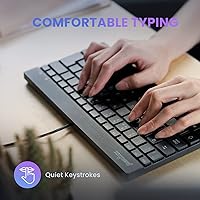
  • Key Type: Low-profile scissor-switch keys provide a shallow travel depth and quieter actuation compared to standard membrane keyboards.
  • Backlighting: Single-color white LED backlighting illuminates all keys evenly, with no color customization or brightness adjustment available.
  • Connection: Connects via a standard USB-A plug with no wireless option or Bluetooth capability.
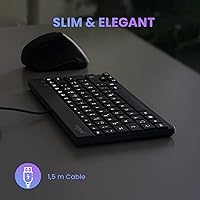
  • Cable Length: The permanently attached USB cable measures approximately 4.9 ft (1.5 m), sufficient to reach rear ports on most desktop towers.
  • Cable Type: The cable is non-detachable, meaning it cannot be swapped out for a different length or style.
  • OS Support: Compatible with Windows 7, 8, 10, and later versions; Mac and Chrome OS are not officially supported.
  • Setup: Fully plug-and-play on supported Windows systems — no drivers, companion software, or account registration required.
  • Color: Available in black with a matte finish that resists obvious smudging during everyday use.
  • Brand: Manufactured by Perixx, a peripheral brand with a focused lineup of compact and accessible input devices.
  • Model Number: The official model designation is PERIBOARD-326, with item number 11607 used for product identification.
  • Sales Rank: Ranked in the top 300 in the Computer Keyboards category on Amazon, reflecting consistent buyer demand.
  • Rating: Holds a 4.4 out of 5 average rating based on approximately 971 verified customer ratings.
  • Target Use: Designed for everyday office and home typing tasks, not optimized for gaming, programming macros, or high-speed data entry.
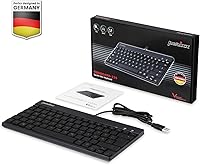
  • Package Contents: The box includes the keyboard itself and a printed user manual; no extra accessories or keycap pullers are included.

Related Reviews

Perixx PERIBOARD-317R Wired Backlit Keyboard
78%
93%
Key Readability
74%
Backlighting Quality
61%
Typing Feel
68%
Build Quality
82%
Setup & Compatibility
More
Perixx PERIBOARD-332
81%
83%
Typing Comfort
74%
Build Quality
69%
Backlighting Quality
91%
Compact Design & Portability
67%
Cross-Platform Compatibility
More
Perixx PERIBOARD-333RGB Wired Backlit USB Keyboard
85%
88%
Typing Comfort & Responsiveness
84%
RGB Backlighting Customization
79%
Build Quality & Durability
91%
Value for Money
83%
Multimedia Key Functionality
More
Perixx PERIBOARD-409H Mini USB Keyboard
75%
93%
Space Efficiency
79%
Built-in USB Hubs
63%
Typing Feel
88%
Setup & Compatibility
74%
Build Quality
More
Perixx PERIBOARD-525
79%
83%
Build Quality
78%
Typing Experience
71%
Touchpad Responsiveness
63%
Touchpad Size & Usability
74%
USB Hub Functionality
More
Perixx PERIBOARD-517 Washable USB Keyboard
74%
88%
Washability & Water Resistance
74%
Build Quality
52%
Typing Feel
77%
Cable & Connectivity
83%
Keycap Durability
More
Perixx PERIBOARD-210C Wired USB-C Keyboard
84%
88%
Typing Experience
83%
Build Quality
91%
Quietness of Keys
87%
Compatibility
85%
Portability
More
Perixx PERIBOARD-505H Wired Mini Keyboard with Trackball
86%
92%
Value for Money
87%
Trackball Performance
85%
Ease of Use
80%
Build Quality
91%
Compact Design
More
Perixx PERIBOARD-636B Ergonomic Wireless Keyboard
76%
78%
Ergonomic Comfort
61%
Typing Feel
88%
Noise Level
83%
Wireless Reliability
81%
Wrist Rest Quality
More
Perixx PERIBOARD-426 Wired Mini Low Profile Keyboard
82%
92%
Value for Money
88%
Typing Comfort
78%
Build Quality
95%
Ease of Setup
89%
Portability
More

FAQ

The backlight stays on whenever the keyboard is connected and the computer is powered. There is no auto-off timer, sleep mode for the backlight, or brightness toggle — it is simply on or off depending on whether the board is plugged in.

Not well, unfortunately. The Perixx PERIBOARD-326 Mini Backlit USB Keyboard is designed specifically for Windows and does not include a Mac-compatible key layout. Keys like Option and Command are not labeled, and some system shortcuts will not map correctly without remapping software.
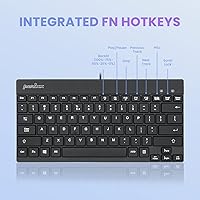
The feel is closer to a laptop keyboard than a traditional desktop board. The keys have a shallower travel depth, so if you are used to a deeper, clicky keystroke you may need a short adjustment period. Typists who already use laptop keyboards tend to adapt quickly and often prefer the quieter sound.

For most setups, yes. The cable runs just under five feet, which covers the distance from a desk surface to a tower sitting on the floor beside it in typical arrangements. If your tower is unusually far away or in a separate cabinet, you might need a USB extension cable.

No — the brightness is fixed at a single level with no adjustment. This is one of the more commonly noted trade-offs with this mini USB keyboard. If a dimmer backlight for nighttime use is important to you, you would need to look at a different model that offers brightness controls.

It can handle light casual gaming, but it was not built for that purpose. There is no anti-ghosting beyond basic key combinations, no polling rate specification, and no dedicated macro or media keys. For serious gaming sessions, a keyboard designed with those features in mind would serve you much better.

Feedback from longer-term owners is generally positive on durability. Many report the keys feeling consistent and responsive after months of regular daily typing. The build quality is appropriate for the price point — solid enough for everyday use, though it is not built with the reinforced materials you would find on a premium board.

Yes, completely. Plug it into a Windows machine and it is recognized immediately as a standard HID keyboard — no driver disc, no download, no account needed. This makes it especially convenient for shared computers or situations where you do not have admin access to install software.

The physical number pad is absent by design — that is what makes this a tenkeyless keyboard. You can still type numbers using the top row of number keys, which are present as on any standard keyboard. If you regularly do bulk data entry and rely on the numpad layout for speed, that workflow will be interrupted.

The low-profile key design actually makes surface cleaning easier than on taller keyboards — there are fewer deep gaps for dust and debris to collect in. A can of compressed air and a microfiber cloth handle most maintenance. The keys are not easily removed for deep cleaning, so heavy debris buildup between keys would be harder to address thoroughly.