Overview

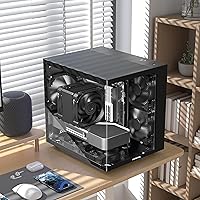
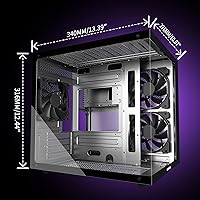
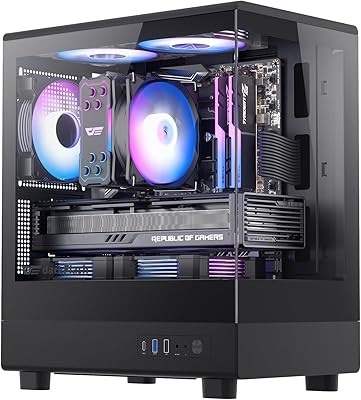
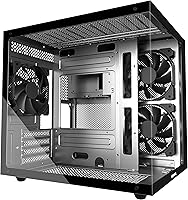
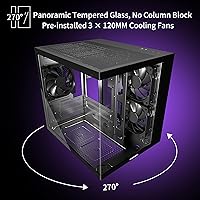
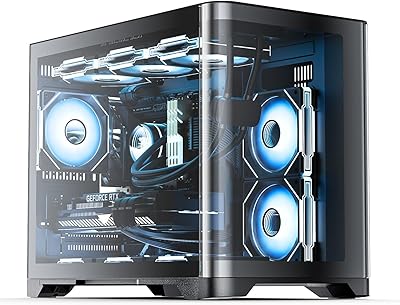
The MOROVOL V3 Micro-ATX Tower PC Case is a compact build that punches well above its weight visually. Three sides of tempered glass wrap around the chassis, giving you a 270° panoramic view of everything inside — a feature you'd normally expect to pay considerably more for. Measuring 13.39 x 10.87 x 12.44 inches and weighing just under 11 pounds, this Micro-ATX case sits comfortably on a desk without dominating it. MOROVOL also built in an A/B dual-chamber layout, keeping the PSU and storage tucked behind the motherboard tray, away from the components you actually want to show off.
Features & Benefits

The triple-panel glass is the obvious headline, but the A/B chamber design does equally important work behind the scenes — literally. By isolating the PSU and hard drives in a separate rear compartment, heat from those components doesn't bleed into the main build area. Three fans come pre-installed, and the case can support up to seven total, which leaves real room to grow your cooling setup over time. The magnetic top dust filter is a small but genuinely useful touch; it pulls off cleanly, cleans up fast, and snaps back without any fussing. Bottom-mount PSU placement rounds things out by keeping the center of gravity low and cable routing more manageable.

Best For

This Micro-ATX case is a strong pick for first-time PC builders who want their rig to look impressive without stretching the budget into Lian Li or Phanteks territory. If you're running RGB RAM, a colorful GPU, or an AIO cooler you want on display, the panoramic glass makes that investment visible from almost any angle. It also fits well in home offices or bedroom setups where desk space is limited. Builders planning gradual upgrades — adding more fans or eventually a liquid-cooling radiator — will appreciate that the case grows with you rather than boxing you in from day one.

User Feedback

Across 152 ratings, the V3 tower holds a 4.4-star average and ranks among the top 150 cases in its category on Amazon — respectable numbers for a relatively new entrant. Buyers consistently praise the glass coverage and the clean look the A/B layout produces on the visible side. The sticking point for some builders, though, is cable management clearance: if you're running a full-size modular PSU with thick cables, the rear compartment gets tight. The bundled fans work fine for a basic build, but many users swap them out for RGB alternatives fairly quickly. A few reviewers also noted that the plastic I/O panel feels slightly out of place against the otherwise solid metal chassis.

Pros

  • Triple-panel 270-degree tempered glass delivers a panoramic internal view rarely found at this price tier.
  • The A/B dual-chamber layout keeps PSU heat isolated, so the visible build side stays cleaner thermally and visually.
  • Three fans come pre-installed, so you can power on and test your build without buying anything extra first.
  • Supports up to seven fans total, leaving real room for cooling upgrades as your build evolves.
  • The magnetic top dust filter removes and reattaches without tools — a genuinely useful quality-of-life feature.
  • Bottom-mount PSU placement keeps the center of gravity low and makes cable routing to the motherboard more natural.
  • Compact 13.39 x 10.87 x 12.44-inch footprint fits comfortably on most desks without crowding peripherals.
  • The metal chassis feels solid and resists flex during transport or component swaps.
  • Liquid-cooling radiator support means you are not locked out of AIO upgrades down the road.
  • At this price point, the combination of glass coverage, dual-chamber design, and pre-installed fans is hard to match.

Cons

  • The rear cable management channel is shallow — full-size modular PSUs with thick cables make closing the back panel a real struggle.
  • Stock fans are basic fixed-speed units with no RGB and limited airflow; most builders replace them quickly.
  • The plastic front I/O panel feels noticeably cheaper than the surrounding metal chassis and can sit slightly misaligned.
  • Only the top panel includes a dust filter; front and bottom vents accumulate dust faster than a fully filtered case would.
  • No USB-C port on the front I/O is an increasingly hard omission to overlook as modern peripherals become standard.
  • Under sustained gaming loads, the stock fans become audible and there is no built-in way to tune their speed profile.
  • The included assembly manual is light on detail, which can frustrate first-time builders during front-panel header routing.
  • Longer graphics cards may require clearance checks before purchasing — not all modern GPUs fit without constraints.
  • Only two front USB ports total, which feels lean for builders running headsets, controllers, and storage simultaneously.
  • Some units arrive with minor edge imperfections on the glass panels, suggesting quality control is not perfectly consistent.

Ratings

The MOROVOL V3 Micro-ATX Tower PC Case has been scored below by our AI system after analyzing verified buyer reviews from global markets, with spam, bot-generated, and incentivized feedback actively filtered out. The scores reflect what real builders actually experienced — the genuine wins and the frustrating trade-offs alike. Both strengths and recurring pain points are weighted transparently so you can make a confident, informed decision.
Tempered Glass Quality
88%
The triple-panel glass coverage is consistently one of the most praised aspects of this case. Builders report that the panels feel solid, resist minor fingerprints better than expected at this price tier, and give a genuinely wide view of internal components from multiple angles.
A small number of buyers noted hairline imperfections on panel edges out of the box, and the glass does show smudges under bright desk lighting. It is not tool-free to remove, which makes deep cleaning a minor inconvenience.
Airflow & Thermal Performance
76%
24%
The A/B dual-chamber layout earns real praise for keeping the visible build area cleaner both thermally and visually. Users running mid-range GPUs report acceptable temperatures without immediately needing fan upgrades, especially in well-ventilated rooms.
The three included fans are adequate but move relatively little air under sustained gaming loads. Builders with power-hungry GPUs or overclocked CPUs frequently report needing to swap in higher-static-pressure fans within a few weeks of completing their build.
Cable Management
61%
39%
The A/B chamber design at least hides PSU cables and storage drives from the visible side, which makes the finished build look tidy through the glass panels. Builders using compact or semi-modular power supplies report a manageable rear compartment.
This is the V3 tower's most consistent complaint. The rear cable management channel is shallow, and full-size modular PSUs with thick sleeved cables can make closing the back panel a genuine struggle. Builders should plan PSU selection carefully before purchasing.
Build Quality & Materials
73%
27%
The metal chassis feels sturdy for the price bracket — panels don't flex noticeably when moving the case, and the overall fit and finish on the main frame is competitive with cases costing more. The tempered glass mounting points feel secure once assembled.
The plastic front I/O panel is the weak link. Several buyers noted it feels noticeably cheaper than the rest of the chassis and sits slightly misaligned on some units. It does not inspire confidence during repeated USB plug-and-unplug cycles over time.
Value for Money
91%
For the price, the combination of panoramic glass, dual-chamber layout, and three pre-installed fans is genuinely hard to match among competing compact cases. Builders consistently describe it as getting a premium-looking result without premium-level spending.
The value story weakens slightly if you factor in the near-inevitable fan upgrade many builders end up purchasing. Add that cost in and the real-world total edges closer to some more established competitors that include better stock fans from the start.
Ease of Assembly
78%
22%
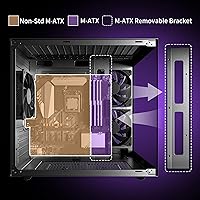
First-time builders appreciate the relatively straightforward layout and the fact that the case arrives with fans already installed. Standoffs are pre-installed for Micro-ATX boards, which removes one common frustration for newcomers working through their first build.
The manual is sparse and relies heavily on diagrams that lack detail for tricky steps like front panel header routing. Experienced builders will be fine, but newer users may find themselves cross-referencing YouTube guides to finish the job cleanly.
Fan Quantity & Upgradability
83%
Supporting up to seven fans in a Micro-ATX footprint is a genuine selling point for builders who want to scale cooling over time. The case accommodates both additional case fans and liquid-cooling radiators, giving real flexibility for future upgrades.
The three stock fans are basic fixed-speed units with no RGB and limited airflow headroom. They do the minimum job but feel like placeholders rather than a finished cooling solution, and most builders with any aesthetic ambition replace them quickly.
Dust Filtration
81%
19%
The magnetic top dust filter is one of those small details that makes a real difference over months of ownership. It pulls off without tools, rinses clean in seconds, and snaps back firmly — no rattling, no losing tiny screws, no frustration.
Only the top panel gets a dust filter. The front intake and bottom PSU vent are unfiltered, meaning dust accumulation in those areas requires more frequent internal cleaning than a fully filtered case would demand.
Front I/O Connectivity
67%
33%
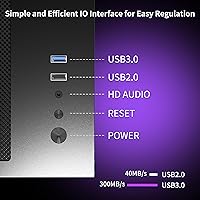
Having both USB 3.0 and USB 2.0 ports on the front panel covers the basics well for most desktop setups. The USB 3.0 port in particular handles fast thumb drive transfers and external SSD connections without needing to reach around to the back of the machine.
Power users will notice the absence of a USB-C port immediately — it is increasingly standard on cases in this category. Two USB ports total also feels lean for anyone running multiple peripherals like headsets, controllers, and storage simultaneously.
Aesthetics & Visual Design
89%
The panoramic glass layout is a legitimate visual differentiator. Builders who invest in RGB lighting, colorful RAM, or a vibrant GPU cooler get a genuinely striking result that looks far more expensive than the build cost suggests from across a room.
The all-black exterior with no accent lines or textured paneling looks fairly plain when the PC is powered off. Without RGB components inside to carry the visual weight, the case itself contributes little to the overall aesthetic.
Compact Footprint
86%
At just over 13 inches tall and under 11 inches wide, this Micro-ATX case fits comfortably on most desks without crowding monitors or peripherals. Users in small apartments or shared home-office setups specifically call out the manageable desk presence as a key reason they chose it.
The compact size naturally imposes limits. Longer graphics cards can be a tight fit depending on the model, and builders hoping to install a large tower CPU cooler should check clearance specs carefully before committing to their components.
Noise Levels
69%
31%
At idle and light workloads, the V3 tower runs quietly. The stock fans spin at modest RPMs under low demand, which makes it a reasonable choice for quiet home-office environments during non-gaming hours or light productivity tasks.
Under sustained gaming loads, the stock fans audibly ramp up and the noise profile becomes noticeable. Without fan curves or PWM control over the included fans, there is limited ability to tune the balance between cooling and acoustics without replacing them.
Radiator & Liquid Cooling Support
72%
28%
The case can accommodate liquid-cooling radiators, which is a meaningful capability for a compact Micro-ATX chassis. Builders planning an AIO cooler upgrade down the road do not need to abandon the case entirely to make that transition.
Radiator support comes with real spatial constraints given the compact dimensions. Larger 240mm radiator configurations require careful planning and may conflict with tall RAM modules or specific GPU mounting orientations depending on the components chosen.
Packaging & Out-of-Box Experience
77%
23%
Most buyers report the case arriving well-protected with foam padding around the glass panels. The fans come pre-installed rather than bagged separately, which saves assembly time and reduces the risk of misplacing small hardware pieces during an excited first build.
A few buyers reported minor scratches on glass edges, suggesting the inner foam protection could be more precisely cut. The included hardware bag is thin — standoffs and screws are provided but just barely, with no meaningful spares included for mistakes.

Suitable for:

The MOROVOL V3 Micro-ATX Tower PC Case is an excellent fit for first-time builders who want their rig to look impressive without spending at the level of established boutique brands like Lian Li or Phanteks. If you're planning a Micro-ATX build around RGB RAM, a colorful GPU, or an AIO cooler and want all of that visible from multiple angles, the panoramic glass setup genuinely delivers on that promise. It works particularly well as a desktop case in smaller spaces — a bedroom gaming setup, a compact home office, or a shared apartment desk — where you want visual impact without the physical bulk of a full or mid-tower. Budget-conscious builders who plan to grow their system over time will also appreciate the headroom for up to seven total fans and liquid-cooling radiator support, meaning the case can keep up as the hardware inside improves. Anyone prioritizing a tidy-looking build on a tight budget will find the A/B chamber design does real work in hiding the messy parts from view.
Not suitable for:

The MOROVOL V3 Micro-ATX Tower PC Case is a harder sell for experienced builders who prioritize airflow performance and acoustic control over aesthetics, since the stock fans offer limited tunability and the thermal headroom under sustained heavy loads is modest at best. If you are running a high-TDP GPU or planning to overclock aggressively, you will likely need to invest in fan upgrades almost immediately — factoring that in shifts the real cost closer to competitors that ship with better stock cooling. Power users who rely on multiple front-panel USB connections simultaneously will find two ports limiting, and the absence of a USB-C port is an increasingly noticeable omission for modern peripherals. Builders who own full-size modular PSUs with thick cable runs should approach this case with caution, as the rear cable management space is genuinely tight and can make the final assembly frustrating. Those who want a case that looks striking even when powered off, without relying on RGB components inside to carry the visual weight, may also find the plain black exterior underwhelming.
Specifications

  • Form Factor: The case is a Micro-ATX tower designed to accommodate Micro-ATX motherboards in a compact desktop footprint.
  • Dimensions: External dimensions measure 13.39″ long by 10.87″ wide by 12.44″ tall, making it a genuinely compact tower for desk placement.
  • Weight: The assembled case weighs approximately 10.73 pounds, reflecting a metal chassis construction with three tempered glass panels.
  • Side Panels: Three-panel 270° tempered glass wraps the front, left side, and right side of the chassis for wide-angle internal visibility.
  • Chamber Design: An A/B dual-zone layout physically separates the PSU and storage compartment from the main motherboard and GPU chamber.
  • Pre-installed Fans: The case ships with 3 fans already mounted, allowing a complete build to be powered on without additional fan purchases.
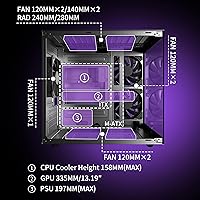
  • Max Fan Support: The chassis supports up to 7 fans in total across all mounting positions, accommodating significant cooling expansion.
  • Cooling Method: The case supports both air cooling and liquid cooling, including radiator mounting for AIO cooler installations.
  • PSU Mount: The power supply mounts at the bottom of the case in a dedicated rear chamber, keeping it thermally isolated from main components.
  • Drive Bays: Storage support includes 2x 2.5″ SSD bays and 2x 3.5″ HDD bays for a flexible combination of solid-state and traditional drives.
  • Front I/O: The front panel provides 1x USB 3.0 port and 1x USB 2.0 port for external device connectivity and data transfer.
  • Dust Filter: A magnetic dust filter is fitted on the top panel and can be removed and reattached without tools for quick cleaning.
  • Material: The main chassis is constructed from steel sheet metal, with all visible side panels made from tempered glass.
  • Color: The case is available in black, with a consistent matte-black finish across the metal frame and internal surfaces.
  • Motherboard Support: Compatible with Micro-ATX motherboard form factor only; Mini-ITX and ATX boards are not officially supported in this chassis.
  • PSU Compatibility: The bottom-mount PSU bay accommodates standard ATX power supplies, though cable clearance is tighter with full-size modular units.
  • Availability Date: The V3 model was first made available in December 2023, making it a relatively recent addition to MOROVOL's case lineup.

Related Reviews
MOROVOL P5 Mid Tower ATX PC Case
75%
83%
Airflow Performance
88%
Value for Money
71%
Build Quality
58%
Noise Levels
84%
Ease of Assembly
More
Jonsbo Z20 Micro-ATX Mini Tower Case
80%
93%
Build Quality & Materials
91%
Portability & Carrying Handle
78%
Internal Layout & Compatibility
89%
GPU Clearance & Large Component Support
87%
Cooling Support & Thermal Flexibility
More
darkFlash DB330M Micro-ATX PC Case
86%
88%
Cooling Performance
91%
Design and Aesthetics
90%
Ease of Setup
85%
Build Quality
89%
Value for Money
More
MOROVOL R7 ATX Gaming PC Case
84%
86%
Build Quality
89%
Cooling Performance
91%
Ease of Setup
85%
Design and Aesthetics
77%
Fan Noise
More
AsiaHorse Pegasus Micro ATX PC Case
85%
91%
Build Quality
88%
Cooling Performance
89%
Interior Space & Cable Management
85%
Aesthetics & Design
83%
USB Type-C Port
More
ASUS A21 Micro ATX PC Case
84%
92%
Cable Management
89%
Airflow Efficiency
85%
Build Quality
90%
Interior Space & Compatibility
87%
Design Aesthetics
More
Zalman S3 ATX Mid-Tower PC Case
74%
83%
Value for Money
71%
Build Quality
58%
Airflow & Cooling Performance
86%
Ease of Assembly
67%
Acrylic Side Panel
More
Vetroo AL800 Mid Tower ATX PC Case
76%
78%
Build Quality
84%
Tempered Glass Panel
76%
Airflow Performance
61%
Fan Included & Expandability
69%
Cable Management
More
Antec VSK3000E Micro ATX Mini Tower Case
82%
89%
Build Quality
91%
Value for Money
68%
Cooling Performance
85%
Ease of Installation
80%
Port Availability
More
Montech X5M Micro ATX Gaming PC Case
85%
90%
Cooling Performance
88%
Ease of Assembly
84%
Build Quality
89%
Design & Aesthetics
91%
GPU Compatibility
More

FAQ

It is strictly Micro-ATX. Despite some listing confusion caused by related MOROVOL models that support ATX, the V3 tower is designed and sized for Micro-ATX boards only. Double-check your motherboard's form factor before purchasing.

Honestly, it is the most common frustration builders mention. The rear channel is shallow, and if you are using a full-size modular PSU with thick or braided cables, closing the back panel can be a real fight. Compact or semi-modular PSUs fit much more comfortably. If you already own a bulky PSU, factor in some extra patience during the build.

The three stock fans are not RGB — they are plain black fixed-speed units. They are also not PWM-controlled, so you cannot tune their speed curve through your motherboard. Most builders who want RGB or better airflow performance swap them out fairly quickly, but they are perfectly functional for a basic first boot.

MOROVOL lists compatibility with standard GPU lengths typical of Micro-ATX builds, but you should verify clearance for your specific card, especially if it is a triple-fan model with a longer PCB. Cards around 310–320mm are generally reported to fit, but always cross-reference your GPU's exact dimensions before assuming it will clear.

Yes, the case does support radiator mounting for AIO coolers. However, space constraints in a compact chassis mean you should verify mounting position compatibility with your specific AIO and check whether tall RAM modules or your GPU's position will interfere with the radiator and tube routing before buying.

The panels feel reasonably solid for the price tier and are mounted securely once the case is assembled. That said, tempered glass on budget cases should always be handled carefully — avoid dropping or applying pressure to panel edges. A few buyers have reported minor edge chips on arrival, so inspect the panels before installing any components.

Yes on both counts. The magnetic attachment is strong enough that it does not rattle or shift during normal use, and removing it for cleaning takes about two seconds. Just pull it off, rinse it under water, let it dry, and snap it back. It is one of the more practical details on this case.

It is genuinely desk-friendly. At just over 13 inches tall and under 11 inches wide, it sits comfortably alongside a monitor without dominating the workspace. Most users who bought it specifically for desk placement report it fits well even on smaller desks.

The overall layout is straightforward and the pre-installed fans save a few steps. The main challenge for beginners is the sparse manual — it uses diagrams that do not explain front-panel header routing clearly. Having a YouTube build guide open on a second screen is genuinely recommended if this is your first build.

The I/O panel is the weak spot of an otherwise decent chassis. It is made from plastic rather than metal, and some units arrive with a slight misalignment that is visible up close. It functions fine for plugging in USB devices, but it does not feel as premium as the rest of the case and may loosen over time with frequent use.