Overview

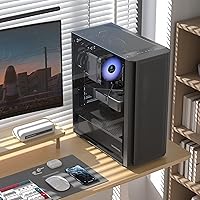
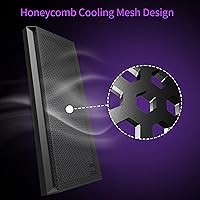
The MOROVOL P5 Mid Tower ATX PC Case enters a crowded budget segment with a clear identity: prioritize airflow without asking builders to spend more than they need to. The defining feature is its honeycomb mesh front panel, which sets the thermal tone before you even install a single component. For those who want to see their build lit up, a tempered glass side panel adds visual appeal that usually costs more at this tier. Four fans come preinstalled, so you're not hunting for extras before your first boot. In a market full of plasticky, fan-free enclosures at similar prices, this mid tower enclosure makes a solid first impression.

Features & Benefits

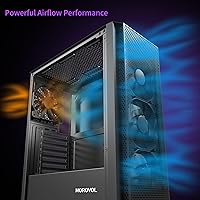
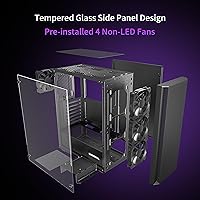
The mesh front panel does genuine work here — it's not just aesthetic. Paired with four preinstalled fans drawing air from the front, thermals stay manageable for most entry-level builds without extra investment. Those fans are basic units rather than high-static-pressure performers, so expect functional rather than exceptional cooling. The side panel is real tempered glass, which scratches easily during assembly but holds up well once your build is complete. What's genuinely useful is 360mm radiator support up front, meaning you're not locked out of a liquid cooling upgrade later. A magnetic top dust filter and stable square feet round out some thoughtful quality-of-life touches.

Best For

This mesh ATX case is an easy recommendation for first-time builders who want a functional enclosure without worrying about sourcing extras. If you're putting together a home or student PC and airflow matters more to you than a light show, it's a practical, clutter-free pick. It also suits forward-thinking builders: the radiator clearance means you won't need a new case if you upgrade to liquid cooling down the road. Standard ATX components fit without drama, accommodating most tower coolers and modern mid-range GPUs comfortably. The one group it doesn't serve well is anyone needing ITX or E-ATX support, or builders who want RGB fans included from the start.

User Feedback

Buyers generally find the MOROVOL P5 quick to assemble, with most noting that cable management is workable but tight behind the motherboard tray — not unusual at this price. Airflow praise is consistent: people are frequently surprised by how well this mid tower enclosure manages component temperatures given what they spent. The included fans do attract noise complaints at higher RPMs, which is worth knowing if you're building in a quiet room. A handful of buyers mentioned glass panel scratches occurring during installation, so handling it carefully pays off. The single USB 3.0 port draws occasional criticism from users expecting two, but for the majority of everyday builds it simply hasn't been a dealbreaker.

Pros

  • Four fans come preinstalled, so most builders can post on day one without any extra purchases.
  • The honeycomb mesh front panel delivers noticeably better airflow than solid-panel cases at the same price.
  • Tempered glass side panel lets you show off your components without paying mid-range case prices.
  • A 360mm front radiator slot means this mid tower enclosure can grow with your build if you switch to liquid cooling.
  • The magnetic top dust filter is a genuinely useful feature that most competitors skip at this price tier.
  • Standard ATX compatibility means virtually any mainstream motherboard drops right in without fitment issues.
  • Square rubber feet keep the case planted firmly on a desk, which is a small but welcome touch.
  • Assembly is straightforward enough that first-time builders rarely report major frustrations during the process.
  • At its price point, getting real tempered glass rather than acrylic is a meaningful material upgrade.

Cons

  • The included fans become noticeably loud at higher RPMs, which can disrupt quiet work or sleep environments.
  • Only one USB 3.0 port on the front panel feels limiting as peripherals increasingly rely on faster connections.
  • Cable management space behind the motherboard tray is tight, which can frustrate builders going for a clean look.
  • The tempered glass panel is prone to scratching during installation if you are not careful handling it.
  • Included fans are basic, non-PWM units with no speed control, limiting thermal tuning without replacement hardware.
  • No RGB fans are included, so builders wanting a lit interior will need to budget for replacements.
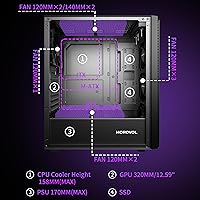
  • GPU clearance tops out around 320mm, which blocks some longer high-end graphics cards from fitting.
  • Build quality of the plastic front panel feels noticeably less premium than the metal chassis suggests overall.

Ratings

Our AI scoring system analyzed verified global buyer reviews for the MOROVOL P5 Mid Tower ATX PC Case, actively filtering out incentivized, duplicate, and bot-generated feedback to surface what real builders actually experienced. The scores below reflect a balanced synthesis of both the strengths that repeatedly earned praise and the pain points that came up consistently enough to matter. Nothing has been glossed over — if users ran into a real issue, it shows up in the numbers.

Airflow Performance
83%
The honeycomb mesh front panel combined with four intake fans produces noticeably cooler component temperatures than similarly priced solid-panel cases. Builders running mid-range GPUs and Ryzen or Intel Core processors consistently reported temperatures staying in a comfortable range during extended gaming sessions.
The preinstalled fans are basic units without high static pressure, so airflow gains are more about the open mesh design than fan quality. Builders with hotter components like high-TDP GPUs may still need to swap the stock fans for better performers.
Value for Money
88%
Getting four fans, a tempered glass panel, a magnetic dust filter, and front radiator support at this price tier is genuinely hard to match among competing enclosures. Most buyers felt the feature-to-cost ratio was one of the strongest arguments for this mid tower enclosure.
The value calculation shifts if you end up replacing the included fans for noise or performance reasons, since that adds cost the initial price did not signal. Builders who need RGB lighting also face an immediate additional expense the asking price implies is already covered.
Build Quality
71%
29%
The steel chassis feels solid and holds its shape well during assembly, and the overall structural rigidity is better than some competing plastic-heavy cases at the same price. Most buyers were satisfied with how the finished build felt once everything was installed.
The plastic front panel trim feels noticeably cheaper than the chassis itself, and some buyers reported slight panel flex. A few users also noted that the manufacturing tolerances on screw holes were inconsistent, which added minor frustration during the build process.
Noise Levels
58%
42%
Under light loads or at idle, the included fans are relatively quiet and unlikely to disturb most users. For a basic home office PC or a system that rarely hits full CPU and GPU load simultaneously, noise is manageable.
At higher RPMs the stock fans become clearly audible, which is a known tradeoff with non-PWM budget fans lacking speed control. Builders who work or sleep near their PC and run demanding workloads regularly found the noise irritating enough to prompt fan replacements.
Ease of Assembly
84%
The internal layout is well thought out for a first-time builder, with clearly positioned standoffs, logical drive bay placement, and enough room to work without constantly shifting components. Most buyers completed their first build in this case without needing to look up troubleshooting guides.
The included manual is basic and skips some steps that beginners might need spelled out more clearly. Cable routing behind the motherboard tray requires patience, and a few buyers noted that the retention clips for the side panel could be more intuitive to operate.
Cable Management
63%
37%
The case does include cable routing cutouts and a moderate amount of space behind the motherboard tray, which is enough for a clean build with a modular power supply and tidy cables. Builders who planned their cable routing in advance generally ended up with presentable results.
The clearance behind the tray is tight by modern standards, especially with thick cable bundles from non-modular power supplies. Experienced builders used to more spacious mid towers found the cable management experience more constrictive than expected at this price.
Tempered Glass Panel
74%
26%
The genuine tempered glass side panel provides a noticeably cleaner view of the interior than acrylic alternatives, and buyers appreciated being able to show off their components without paying a premium for the privilege. The fit and finish of the panel itself was considered acceptable for the price.
The glass scratches easily during installation, and a handful of buyers reported hairline marks after their first build despite being careful. The panel retention mechanism is functional but feels less refined than on cases even slightly higher up the price ladder.
Thermal Headroom
76%
24%
Front 360mm radiator support gives this mesh ATX case genuine upgrade potential, and builders who planned liquid cooling from the start found the internal clearances workable without major modifications. The bottom PSU mount also helps keep hot air from the power supply away from sensitive components.
While the radiator slot exists, installing a 360mm AIO requires removing all four preinstalled fans, which adds steps and means the case ships without a ready-made liquid cooling bracket system. Thermal headroom for very high-end builds is limited by the 320mm GPU cap.
Compatibility
79%
21%
Standard ATX motherboards, most popular tower air coolers up to about 158mm, and a wide range of mid-range GPUs all fit without issue in the MOROVOL P5. For builders using common components from mainstream product lines, compatibility concerns are minimal.
The official ATX-only stance means Micro-ATX builders are left to gamble on fitment without manufacturer confirmation. Builders with longer flagship GPUs or oversized coolers need to measure carefully before committing, as the clearances leave little buffer room.
Dust Filtration
81%
19%
The magnetic top dust filter is easy to remove, clean, and reinstall without tools, which makes routine maintenance genuinely painless. Builders who run their systems in dusty rooms or on carpeted floors appreciated having this protection built in rather than as a paid add-on.
Dust filtration only covers the top panel magnetically; the front mesh relies on the honeycomb structure itself with no removable filter layer, meaning front fan and radiator areas will accumulate dust faster and require more frequent manual cleaning.
IO Panel
61%
39%
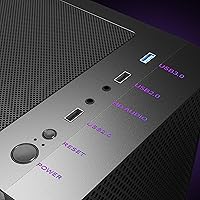
The front IO placement is accessible and the audio jacks work reliably, which covers the basics well for most users plugging in headsets or USB peripherals throughout their day. The USB 3.0 port transfers files quickly and is positioned conveniently at the top of the case.
Having only one USB 3.0 port is a real limitation for builders who regularly plug in external drives, controllers, or other accessories simultaneously. Many buyers felt this was the one area where the case clearly cut corners compared to similarly priced competitors offering dual USB 3.0 headers.
Aesthetics
72%
28%
The clean black exterior and mesh front give this mid tower enclosure a restrained, modern look that suits home office setups and minimalist gaming battlestations equally well. The tempered glass side window adds a finished feel without making the design feel overdone.
Without RGB fans or integrated lighting, the interior looks plain compared to competitors that include even basic addressable fans at a similar price point. Builders who want a visually impactful system will need to budget extra for aftermarket lighting components.
Stability & Footprint
86%
The square rubber feet do a solid job of keeping the case planted on a desk, and the chassis does not wobble or shift during cable connections or peripheral swaps. The weight distribution with a bottom-mounted PSU keeps the center of gravity sensibly low.
The footprint is slightly wider than the slimmest mid towers in this class, which can be a minor issue on compact desks. A few buyers noted that the rubber feet showed wear after extended use on rough surfaces, though this did not affect stability meaningfully.

Suitable for:

The MOROVOL P5 Mid Tower ATX PC Case is an easy fit for first-time builders who want to get a system up and running without sourcing a fan kit separately or worrying whether their mid-range ATX motherboard will fit. Students and home office users who need a stable, thermally competent enclosure on a tight budget will find that this case checks the essential boxes without demanding compromises on airflow. It also works well for casual gamers who care more about keeping component temperatures in check than running an RGB light show. Builders who are already planning a liquid cooling upgrade later will appreciate that a 360mm front radiator slot is already waiting for them, making this mesh ATX case a reasonable long-term home for a growing build. If your component list is standard — a mainstream GPU, a tower air cooler, a full-size ATX board — this case was essentially designed around exactly that kind of build.

Not suitable for:

The MOROVOL P5 Mid Tower ATX PC Case is not the right call for builders who demand silent operation, since the included fans can get audible under load and there is no built-in fan controller to dial things back. Anyone building a high-end workstation or enthusiast gaming rig with a large triple-slot GPU should verify clearance carefully, as the 320mm GPU limit will rule out some longer flagship cards. Builders who want RGB aesthetics out of the box will need to spend extra on replacement fans, which somewhat undermines the value proposition. This mid tower enclosure also does not support Micro-ATX or Mini-ITX boards officially, so small form factor enthusiasts should look elsewhere. If cable management is a priority and you plan on a particularly complex wiring job, the limited space behind the motherboard tray may test your patience. Those needing dual USB 3.0 front ports for regular peripheral use may find the single USB 3.0 header quietly frustrating over time.

Specifications

  • Form Factor: Mid Tower design accommodates standard ATX builds with enough internal clearance for most mainstream component configurations.
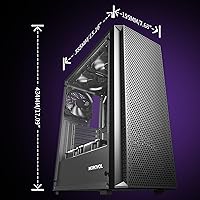
  • Dimensions: The case measures 15.16 x 7.68 x 17.09 inches, providing a footprint comparable to most mid tower enclosures on the market.
  • Weight: At 11.97 pounds unloaded, this mid tower enclosure is typical for a chassis combining metal, plastic, and tempered glass construction.
  • Motherboard Support: Officially supports ATX form factor motherboards; Micro-ATX and Mini-ITX compatibility is not listed by the manufacturer.
  • Front Panel: Honeycomb mesh front panel promotes consistent airflow intake and provides passive dust filtration through its perforated structure.
  • Side Panel: Left side panel is tempered glass, offering a clear view of internal components without the haze of acrylic alternatives.
  • Preinstalled Fans: Ships with 4 non-RGB cooling fans installed at the front intake positions, ready for use without additional purchases.
  • Max Radiator: Supports up to a 360mm radiator mounted at the front, enabling straightforward all-in-one liquid cooler upgrades in the future.
  • GPU Clearance: Maximum graphics card length is 320mm, which fits most mid-range and upper-mid-range GPUs but may exclude some flagship triple-slot cards.
  • CPU Cooler Height: Accommodates CPU air coolers up to 158mm tall, covering nearly all popular tower coolers including most high-performance dual-tower units.
  • IO Ports: Front IO includes one USB 3.0 port and two USB 2.0 ports, along with standard headphone and microphone audio jacks.
  • Power Supply: Power supply mounts at the bottom of the case, which helps lower the center of gravity and keeps PSU heat away from other components.
  • Dust Filtration: A magnetic dust filter sits on top of the case and can be removed and cleaned without tools, protecting components from debris buildup.
  • Drive Bays: Internal storage support includes both 2.5-inch SSD and 3.5-inch HDD mounting positions for flexible storage configurations.
  • Materials: Chassis is constructed from a combination of steel, plastic paneling, and tempered glass for the side window.
  • Stability: Square rubber feet are used at the base to keep the case stationary on flat surfaces and reduce vibration transfer to the desk.
  • Color: Available in black with a matching mesh front and dark-tinted tempered glass side panel for a consistent aesthetic.
  • Cooling Config: The case supports a maximum of 8 fans total across front, top, and rear mounting positions for builders who want expanded airflow.

Related Reviews

Vetroo AL800 Mid Tower ATX PC Case
76%
78%
Build Quality
84%
Tempered Glass Panel
76%
Airflow Performance
61%
Fan Included & Expandability
69%
Cable Management
More
SAMA S40 Mid Tower ATX PC Case

79%
88%
Airflow Performance
83%
Included Fan Quality
79%
Build Quality & Finish
92%
GPU Compatibility
61%
Cable Management
More
darkFlash DS900 ATX Mid-Tower PC Case
84%
89%
Cooling Performance
88%
Build Quality
91%
Ease of Installation
85%
Design & Aesthetics
92%
Value for Money
More
SZSKYING ATX Mid-Tower PC Gaming Case
85%
92%
Cooling Performance
85%
Build Quality
88%
Aesthetic Design
74%
Cable Management
78%
Ease of Setup
More
KEDIERS K4 ATX Mid Tower PC Case
80%
91%
Value for Money
93%
Aesthetic Design
74%
Build Quality
72%
Cooling Performance
84%
Ease of Assembly
More
Zalman S3 ATX Mid-Tower PC Case
74%
83%
Value for Money
71%
Build Quality
58%
Airflow & Cooling Performance
86%
Ease of Assembly
67%
Acrylic Side Panel
More
Zalman S2 ATX Mid-Tower PC Case
83%
88%
Cooling Performance
80%
Build Quality
85%
Ease of Setup
70%
Cable Management
92%
Value for Money
More
Zalman S4 Mid-Tower ATX PC Case

81%
88%
Airflow and Cooling
80%
Build Quality and Materials
92%
Ease of Installation
60%
Acrylic Panel Durability
70%
Cable Management
More
darkFlash DRX70 ATX Mid-Tower PC Case
74%
83%
Value for Money
78%
Airflow Performance
89%
Ease of Assembly
67%
RGB Lighting
71%
Build Quality & Materials
More
Zalman Chronix Mid Tower ATX PC Case
78%
88%
Aesthetic Design
74%
Build Quality
83%
Included ARGB Fans
86%
Cooling Potential
84%
Internal Clearance
More

FAQ

The manufacturer officially lists ATX as the supported motherboard standard, and Micro-ATX compatibility is not confirmed in the product documentation. Physically, many Micro-ATX boards will fit inside a mid tower chassis, but you should verify standoff placement before committing.

Yes, the front of the case supports up to a 360mm radiator, so a standard 360mm all-in-one cooler should fit without issue. Just keep in mind you will need to remove the preinstalled fans from the front to mount the radiator there.

No, the four preinstalled fans are standard non-RGB units. They move air effectively for basic builds, but if you want a lit interior you will need to purchase RGB fans separately and swap them out.

They are functional but not quiet. At higher RPMs the fans generate a noticeable hum, which is pretty typical for budget case fans. If you are building in a bedroom or a quiet workspace, replacing them with PWM fans you can control might be worth the extra spend.

Most likely yes. The case accommodates GPUs up to 320mm in length, and both of those cards typically fall within that range. That said, always double-check the exact length of your specific card variant, since some factory-overclocked models can run slightly longer.

It is genuine tempered glass, which gives you a clearer view of your components compared to acrylic. The trade-off is that it scratches more easily during installation, so handle it carefully when assembling your build.

It is workable but not generous. Most builders report being able to route cables cleanly, though it gets tight with thicker cable bundles or modular PSU cables. Routing cables neatly will take some patience, especially for first-time builders.

No, the top dust filter uses a magnetic attachment, so you can lift it off with one hand and rinse it under water. It is one of the more practical quality-of-life features on this enclosure.

The case supports up to 8 fans across all mounting positions, including front, top, and rear locations. The four preinstalled fans occupy the front, leaving room to add exhaust fans at the top and rear if you want to build out a more complete airflow setup.

The case allows CPU coolers up to 158mm tall, and the NH-D15 in its standard configuration sits right at or just above that limit depending on the orientation. It is worth checking the exact installed height of your cooler before purchasing, as tall dual-tower coolers can be a tight fit or may not clear the side panel.