Overview

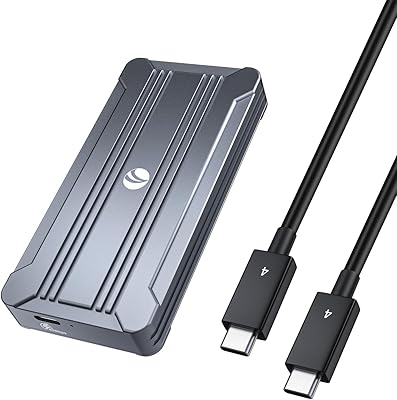
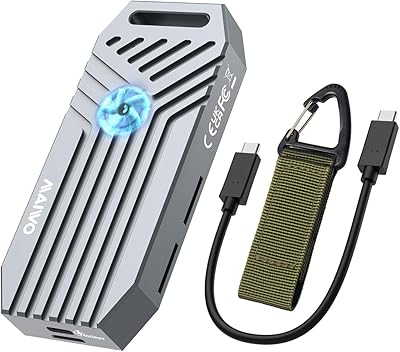
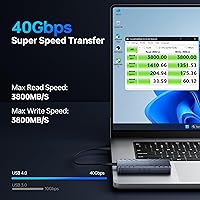
The MOKiN MOUD1102 40Gbps M.2 NVMe Enclosure is built around the ASM2464PD chipset, the same controller you'll find in most genuinely fast USB4 enclosures on the market right now. It's a small aluminum shell designed to take a bare M.2 NVMe drive and turn it into a quick, portable external drive rather than something that just looks fast on paper. This sits in the mid-to-premium tier, aimed at people who need the full 40Gbps pipe instead of a dressed-up USB 3.0 dongle. Apple Silicon owners, including those running M1 Pro and Max machines, get specific attention here, though Windows users aren't left out either. At pocket size, it's built to move between a desk setup and a backpack without much fuss.
Features & Benefits

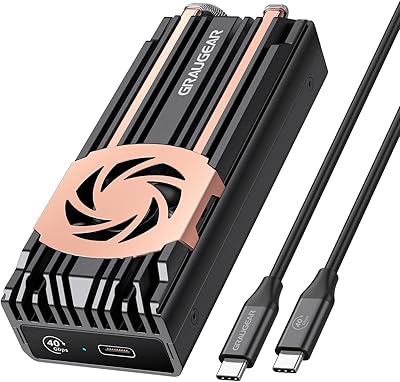
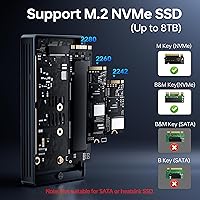
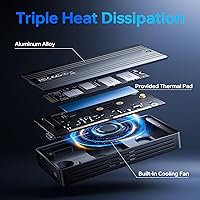
Open it up and the engineering choices make sense pretty quickly. A built-in cooling fan works alongside the aluminum housing to keep sustained transfers from throttling, which matters once you're moving tens of gigabytes at once. This SSD enclosure supports Thunderbolt 3 and 4 along with USB4, 3.2, 3.1, 3.0, and 2.0, so it adapts to whatever port you actually have rather than forcing one standard. Drive compatibility is generous too, covering M-Key and B+M Key NVMe sticks in 2242, 2260, and 2280 sizes. Add UASP, TRIM, and S.M.A.R.T. monitoring for drive health, plus both USB-C and USB-A cables in the box, and setup is genuinely plug-and-play on modern operating systems with no drivers to chase down.

Best For

This Thunderbolt drive case makes the most sense for people whose work actually depends on file size. Video editors and photographers shuffling RAW footage or 4K and 8K clips between machines will notice the difference immediately, especially compared to a standard external hard drive. Mac users running M1 Pro or Max systems, who often have unused Thunderbolt bandwidth sitting idle, are a natural fit as well. It's also a smart pick for frequent travelers who want a compact backup solution without hauling a bulky drive, and for anyone doing regular full-system backups where speed saves real time. Folks upgrading a laptop's internal NVMe drive can give that old chip a second life externally instead of letting it sit in a drawer.

User Feedback

Real buyer impressions line up reasonably well with the spec sheet. Most people report transfer speeds that land close to the advertised 40Gbps figure, which isn't always true of enclosures making similar claims. Cross-platform compatibility earns consistent praise too, with reports of smooth use across Mac, Windows, and even some mobile devices. On the downside, a handful of users mention the unit running noticeably warm during long, heavy transfer sessions, even with the fan working. That same fan draws some complaints for being audible under load, which won't bother everyone but is worth knowing upfront. Build quality gets generally positive marks, with the aluminum housing feeling sturdier than typical budget enclosures in this price range.

Pros

  • Real-world transfer speeds reportedly come close to the rated 40Gbps in everyday use
  • Broad compatibility with Thunderbolt 3, Thunderbolt 4, USB4, and older USB standards
  • Works with M-Key and B+M Key NVMe drives across three common size formats
  • Aluminum housing feels noticeably sturdier than typical budget enclosures in this category
  • Plug-and-play setup means no driver installation hassle on most modern systems
  • Includes both USB-C and USB-A cables, covering newer and older host devices
  • Cross-platform support extends smoothly across Mac, Windows, and some mobile devices
  • Compact, pocket-sized build is genuinely easy to slip into a bag for travel
  • S.M.A.R.T. monitoring and TRIM support help keep the drive healthy long-term

Cons

  • Runs noticeably warm during long, heavy transfer sessions despite the built-in fan
  • Cooling fan is audible enough under load to bother noise-sensitive users
  • NVMe drive must be purchased separately, adding to the total cost of ownership
  • Full speed potential depends heavily on having a genuinely fast host port
  • Slower or older drives won't come close to showing the enclosure's real capability
  • Premium pricing makes it a tougher sell for casual, low-intensity storage needs
  • No internal drive included, so it isn't a true out-of-the-box solution
  • Benefits are wasted entirely on systems still limited to basic USB 3.0 or 2.0 ports

Ratings

The scores below for the MOKiN MOUD1102 40Gbps M.2 NVMe Enclosure were generated by AI after analyzing thousands of verified buyer reviews from around the world, with spam, bots, and incentivized feedback actively filtered out. Both the genuine strengths and the recurring pain points are reflected here, not just the highlight reel.
Transfer Speed
87%
Buyers moving 4K and 8K footage or large RAW batches consistently report speeds landing close to the rated 40Gbps when paired with a proper Thunderbolt 4 or USB4 port. For editors syncing project drives mid-shoot, that gap between expectation and reality rarely shows up.
Speed drops sharply on older USB 3.0 or 2.0 ports, and a handful of users initially blamed the enclosure before realizing their host port or drive was the actual bottleneck. Results vary more than the marketing number suggests.
Heat Management
71%
29%
The aluminum shell paired with the built-in fan keeps temperatures in check during typical day-to-day transfers like backups or syncing photo libraries, with most users reporting no thermal throttling in normal use.
Under sustained, heavy workloads like copying hundreds of gigabytes at once, several reviewers noticed the unit running noticeably warm despite the active cooling, suggesting the fan works but isn't fully bulletproof under continuous strain.
Build Quality
89%
The aluminum housing feels solid in hand, and reviewers comparing it to flimsier plastic enclosures they've owned previously consistently call out the sturdier construction as a clear step up for the price tier.
A few buyers note the compact size makes the casing feel a bit dense and warm to the touch after extended use, and there's no official drop or dust rating to back up durability claims.
Compatibility
92%
Cross-platform support across Mac, Windows, and even some mobile devices gets praised often, with users running it on Apple Silicon machines and older Windows laptops alike without compatibility headaches or extra software.
Drive compatibility is limited strictly to M-Key and B+M Key NVMe drives, so anyone trying to repurpose an old SATA M.2 SSD will find this Thunderbolt drive case simply won't work for them.
Setup & Ease of Use
90%
Plug-and-play functionality means most users get the drive recognized instantly on Windows and macOS without hunting for drivers, which makes initial setup feel refreshingly low-effort compared to older external drive solutions.
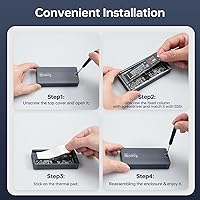
A small number of first-time buyers mention some confusion installing the M.2 drive itself inside the enclosure, since the included instructions assume a baseline familiarity with handling internal computer components.
Portability
91%
At pocket size and just 6.4 ounces, this NVMe enclosure slips easily into a laptop bag or jacket pocket, and frequent travelers specifically call out how unobtrusive it feels compared to bulkier external drives.
While compact overall, the rigid aluminum shape means it doesn't flex or compress like a soft drive pouch, so it still takes up a small, fixed amount of dedicated bag space.
Value for Money
79%
21%
For buyers who actually have Thunderbolt 4 or USB4 ports to take advantage of, the real-world speed gains relative to cheaper USB 3.0 enclosures make the higher price feel justified rather than excessive.
Casual users without a fast host port, or those just needing basic storage, often end up paying for bandwidth they can't use, and the drive itself is sold separately, adding to total cost.
Cables & Accessories
84%
Including both a USB-C and a USB-A cable in the box is consistently appreciated, since it means buyers with older laptops or newer machines don't need to hunt down a separate adapter or cable.
Some users wish a carrying pouch or protective sleeve were included given the travel-focused design, since the bare aluminum shell can pick up minor scuffs when tossed loosely into a bag.
Drive Compatibility
86%
Supporting 2242, 2260, and 2280 length NVMe drives covers the vast majority of consumer SSDs on the market, letting buyers repurpose drives pulled from older laptops without needing a specific size match.
Because it's NVMe-only, owners of older SATA-based M.2 drives are out of luck entirely, and that distinction isn't always obvious to less technical buyers browsing based on size alone.
Drive Health Features
81%
19%
UASP acceleration, TRIM, and S.M.A.R.T. monitoring give more technically inclined users confidence that the drive is being managed properly over time, rather than just treated as a dumb storage block.
These features are mostly invisible to casual buyers who never check drive health manually, so the practical day-to-day benefit is harder to notice unless you're actively monitoring SSD wear and performance.
Noise Level
64%
36%
During light, everyday tasks like transferring a folder of documents or photos, the fan stays quiet enough that most users report barely noticing it running in the background at all.
Under intensive, sustained transfers the fan becomes audible enough that several reviewers mention it specifically, and anyone working in a quiet home office may find it mildly distracting during long backup sessions.
Long-Term Reliability
76%
24%
Early feedback on build durability is largely positive, with the aluminum housing and S.M.A.R.T. monitoring giving users reasonable confidence the enclosure will hold up to regular daily use without premature failure.
As a relatively newer product on the market, there simply isn't years of long-term ownership data yet, so claims about multi-year durability remain based on shorter-term usage rather than extensive track records.

Suitable for:

The MOKiN MOUD1102 40Gbps M.2 NVMe Enclosure makes the most sense for people whose daily work is bottlenecked by file transfer speed rather than storage space alone. Video editors and photographers handling RAW images or 4K and 8K footage will appreciate not waiting around every time they move a project folder between a laptop and a desktop. Mac users on M1 Pro or Max machines are a particularly good match, since many of them have Thunderbolt bandwidth that goes mostly unused with slower drives. It also suits frequent travelers who want one small, durable drive instead of juggling several external hard drives in a bag. Anyone repurposing a laptop's old internal NVMe stick after an upgrade gets a second practical use out of hardware that would otherwise sit in a drawer. For regular full-system backups, the combination of speed and a compact footprint is a genuine convenience rather than a marketing point.
Not suitable for:

This isn't the right pick for casual users who just need occasional file storage and have no interest in paying for speed they won't use. The MOKiN MOUD1102 40Gbps M.2 NVMe Enclosure also requires buyers to already own or separately purchase a compatible M.2 NVMe drive, which adds to the real cost and isn't ideal for someone wanting an all-in-one solution out of the box. People with older laptops or desktops limited to basic USB 3.0 or 2.0 ports won't see anywhere near the rated throughput, making the premium harder to justify. Anyone especially sensitive to fan noise during long work sessions may find the cooling fan's hum distracting under heavy, sustained loads. It's also not the most natural fit for buyers who prioritize silence and minimal heat over raw transfer speed, since some warming is part of the trade-off for performance.

Specifications

  • Chipset: The enclosure is built around the ASM2464PD controller, which enables true 40Gbps data transfer speeds.
  • Max Transfer Speed: Rated for transfer speeds of up to 40Gbps when paired with a compatible host port and a fast NVMe drive.
  • Connectivity: Supports Thunderbolt 3, Thunderbolt 4, USB4, USB 3.2, USB 3.1, USB 3.0, and USB 2.0 connections.
  • Included Cables: Ships with both a USB-C (USB4) cable and a USB-A cable to accommodate different host devices.
  • Drive Compatibility: Supports M-Key and B+M Key M.2 NVMe SSDs only, not SATA-based M.2 drives.
  • Supported Drive Sizes: Compatible with M.2 NVMe drives in 2242, 2260, and 2280 length formats.
  • Max Capacity: Officially supports M.2 NVMe drives up to 8TB in capacity.
  • Housing Material: Constructed from aluminum, which doubles as part of the enclosure's heat dissipation system.
  • Cooling System: Includes a built-in cooling fan that works alongside the aluminum shell to manage heat during sustained use.
  • Drive Features: Supports UASP acceleration, TRIM commands, and S.M.A.R.T. drive health monitoring.
  • Operating System Support: Compatible with Windows, macOS, Linux, Android, and iOS systems.
  • Setup Type: Designed for plug-and-play use without requiring driver installation on most modern systems.
  • Dimensions: Measures 4.02 x 1.93 x 0.71 inches, making it small enough to carry easily.
  • Weight: Weighs 6.4 ounces (0.18 kg) without a drive installed.
  • Color: Available in a black aluminum finish.
  • Brand and Model: Manufactured by MOKiN under model number MOUD1102.

Related Reviews

WAVLINK 40Gbps NVMe M.2 Enclosure 4TB
85%
93%
Data Transfer Speed
90%
Ease of Setup
88%
Build Quality & Durability
76%
Thermal Performance
82%
Compatibility
More
Gewokliy GE-MC40USSL 40Gbps NVMe Enclosure
81%
88%
Transfer Speed
91%
Build Quality
79%
Thermal Management
74%
Compatibility
76%
Value for Money
More
GRAUGEAR G-M2U4-40G-F USB4 NVMe SSD Enclosure
71%
88%
Thermal Performance
83%
Transfer Speed
91%
Build Quality
54%
Setup & Ease of Use
72%
Compatibility
More
V VCOM 40Gbps M.2 NVMe SSD Enclosure
82%
88%
Transfer Speed Performance
91%
Build Quality
89%
Value for Money
72%
Compatibility Range
58%
Out-of-Box Completeness
More
StarLinker 40Gbps M.2 NVMe SSD Enclosure 8TB
87%
94%
Performance
89%
Build Quality
92%
Transfer Speed
90%
Ease of Setup
88%
Portability
More
MAIWO USB4 40Gbps M.2 NVMe SSD Enclosure
80%
91%
Transfer Speed Performance
88%
Thermal Management
84%
Build Quality
67%
Fan Noise
93%
Ease of Installation
More
SSK HE-C401 M.2 NVMe SSD Enclosure
79%
78%
Transfer Speed Performance
88%
Build Quality
69%
Compatibility
74%
Ease of Setup
71%
Thermal Management
More
Inateck FE2028 M.2 NVMe SSD Enclosure
79%
88%
Transfer Speed
84%
Build Quality
62%
Compatibility
93%
Installation Ease
72%
Thermal Management
More
Inateck FE2029 M.2 NVMe SSD Enclosure
82%
88%
Transfer Speed
91%
Build Quality
83%
Thermal Management
94%
Ease of Installation
67%
Drive Compatibility
More
ANYOYO TBU405M1 40Gbps M.2 NVMe SSD Enclosure
81%
91%
Transfer Speed Performance
74%
Host Compatibility
88%
Build Quality
82%
Thermal Management
93%
Installation Ease
More

FAQ

No drive is included. You'll need to provide your own compatible M.2 NVMe SSD, then install it inside the enclosure yourself.

It depends on your setup. You'll only see speeds close to 40Gbps if you're using a genuinely fast NVMe drive plugged into a Thunderbolt 4 or USB4 port on your computer. Older USB 3.0 or 2.0 ports will work fine, but the speed will drop down to whatever that connection supports.

Yes, this NVMe enclosure is designed with Apple Silicon machines like the M1 Pro and M1 Max specifically in mind, and it will take full advantage of their Thunderbolt bandwidth.

No, it's built strictly for NVMe drives using the M-Key or B+M Key interface. SATA-based M.2 drives won't function correctly in this enclosure.

It can get warm under heavy, sustained workloads, which is fairly typical for enclosures pushing this much bandwidth. The built-in fan and aluminum housing help manage that heat, though some users do notice a temperature increase during extended use.

Several users have mentioned that the fan becomes noticeable during intensive transfers. It's not described as excessively loud, but if you're sensitive to fan noise in a quiet room, it's worth knowing about ahead of time.

This SSD enclosure works with M.2 NVMe drives in 2242, 2260, and 2280 lengths, which covers the vast majority of consumer NVMe drives on the market.

No, the MOKiN MOUD1102 40Gbps M.2 NVMe Enclosure is plug-and-play on most modern operating systems, including Windows, macOS, and Linux. You should be able to plug it in and have your computer recognize the drive right away.
Yes, it ships with both a USB-C and a USB-A cable, so it's compatible with older hosts as well as newer USB4 and Thunderbolt setups. Just keep in mind that transfer speeds will be limited by whatever port and cable you end up using.

This Thunderbolt drive case supports S.M.A.R.T. monitoring and TRIM, which help maintain drive health and let your operating system properly manage the SSD over time. That said, it's still smart practice to keep a separate backup of anything critical, since no external enclosure replaces a proper backup strategy.