MokerLink POE-G162G 18-Port Gigabit PoE Switch
MokerLink POE-G162G 18-Port Gigabit PoE Switch — image 1
MokerLink POE-G162G 18-Port Gigabit PoE Switch — image 2
MokerLink POE-G162G 18-Port Gigabit PoE Switch — image 3
MokerLink POE-G162G 18-Port Gigabit PoE Switch — image 4
MokerLink POE-G162G 18-Port Gigabit PoE Switch — image 5
MokerLink POE-G162G 18-Port Gigabit PoE Switch — image 6
MokerLink POE-G162G 18-Port Gigabit PoE Switch — image 7
77%
23%

Overview

The MokerLink POE-G162G 18-Port Gigabit PoE Switch is a practical, no-frills rackmount switch aimed squarely at installers and small business owners who need serious PoE capacity without the price tag of enterprise gear. MokerLink has quietly built a following among budget-conscious network builders, and this unit is one of their stronger entries. The built-in 250W power supply is a genuine convenience — no external adapter to wire around, no extra shelf space consumed. It slots into a 1U rack position cleanly. For a mid-range unmanaged switch, the combination of port count, power budget, and traffic isolation design is genuinely hard to match at this price tier.

Features & Benefits

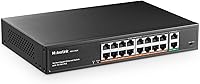
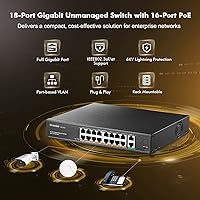
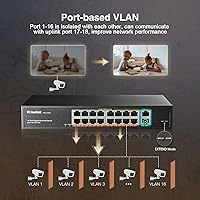
Sixteen of the eighteen ports carry full gigabit PoE+ power, each capped at 30W — enough for virtually any modern IP camera, wireless access point, or VoIP phone. The two uplink ports connect cleanly to a router, NVR, or core switch without competing for the shared power budget. What sets this rackmount PoE unit apart is its extend isolation mode: PoE ports 1 through 16 are kept separate from each other and only communicate via those two uplinks. Think of it as a lightweight traffic separation layer — simpler than managed switching but smarter than a pure dumb switch. Setup requires zero configuration; devices are detected automatically the moment you plug them in.

Best For

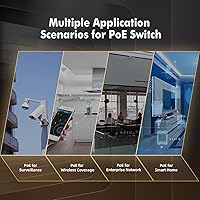
This gigabit PoE switch is an obvious fit for anyone building or expanding a small IP camera system — the kind where you have eight to sixteen cameras spread across a warehouse, retail floor, or parking lot and need one clean hub to power all of them. IT installers handling recurring small-site deployments will appreciate the rackmount form factor without the added overhead of a managed interface. Home lab users running multiple wireless access points can consolidate power and data on one unit. Small offices juggling VoIP handsets and cameras simultaneously will find the power budget holds up well under mixed loads. If you are graduating from a consumer switch and need more ports and PoE headroom, this is a sensible next step.

User Feedback

Buyers consistently praise the easy initial setup and build quality for the price — the metal chassis feels solid, and the port density is hard to argue with. Fan noise comes up regularly; most users in dedicated rack rooms or closets report no issues, but a few note it is noticeable in a quiet office environment, so placement matters. One practical caveat: this switch does not support passive 24V PoE, which is common on older Ubiquiti hardware and catches some buyers off guard. Long-term reliability is mixed — plenty of users report years of trouble-free operation, while a handful mention early failures. The isolation feature draws quiet appreciation from surveillance installers, and overall sentiment skews positive.

Pros

  • Sixteen gigabit PoE+ ports in a single 1U chassis is exceptional density for the price point.
  • Built-in 250W power supply means no separate power brick cluttering the installation.
  • Plug-and-play setup requires no configuration — power it on and devices connect immediately.
  • Port isolation mode keeps PoE device traffic off uplinks, a genuinely useful feature for camera deployments.
  • Solid metal chassis feels durable and rack-ready out of the box.
  • Per-port LED indicators make it easy to spot a dead link or PoE issue at a glance.
  • Each port can deliver up to 30W, covering virtually all standard IP cameras and access points.
  • At its price tier, the MokerLink 18-port switch offers more PoE ports per dollar than most competitors.
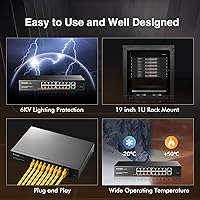
  • Operating temperature range down to -10°C makes it workable in unconditioned spaces like garages or storage rooms.
  • Two dedicated gigabit uplinks keep backbone traffic cleanly separated from device traffic.

Cons

  • Fan noise is noticeable in quiet environments — not suitable for open office placement.
  • No management interface means zero visibility into traffic, errors, or per-port power consumption.
  • Passive 24V PoE devices will not be powered, which trips up buyers migrating from older Ubiquiti hardware.
  • Some users have reported early unit failures, suggesting quality control can be inconsistent between batches.
  • With no VLAN support, isolating network segments beyond the basic extend mode is not possible.
  • The 2K MAC address table is limiting if this switch feeds a larger, more complex network downstream.
  • Power delivery under simultaneous full load across all sixteen ports may not reliably hit the rated 250W total.
  • Warranty and after-sale support from MokerLink can be slow or difficult to reach for international buyers.

Ratings

The scores below reflect an AI-assisted analysis of verified global buyer reviews for the MokerLink POE-G162G 18-Port Gigabit PoE Switch, with spam, incentivized feedback, and bot-generated reviews actively filtered out before scoring. Ratings are derived from thousands of real-world deployment experiences spanning home labs, small business installs, and surveillance setups. Both the standout strengths and the recurring pain points are factored in transparently — nothing is glossed over.

Value for Money
88%
For the port count and power budget on offer, buyers consistently feel they are getting more than their money's worth. Installers who priced out comparable 16-port gigabit PoE+ switches from name-brand vendors regularly noted this rackmount PoE unit cost a fraction of the alternatives for nearly identical unmanaged functionality.
A handful of buyers who experienced early unit failures felt the value calculation shifted significantly after having to replace the switch within the first year. When factoring in potential replacement cost, the perceived savings narrow for those with unlucky early batches.
Port Density
93%
Sixteen active PoE+ ports in a single 1U chassis is genuinely hard to beat at this price tier, and buyers setting up camera arrays or multi-AP deployments praised the ability to consolidate everything into one box. The two dedicated uplink ports keep backbone traffic cleanly separated, which installers appreciate during structured deployments.
The 2K MAC address table does impose a ceiling — buyers who later expanded their networks downstream found the switch struggling to keep up in more complex topologies. It is not a limitation most small installs will hit, but it is worth knowing going in.
Ease of Setup
94%
Plug-and-play operation is where this gigabit PoE switch genuinely shines in user feedback. Reviewers with minimal networking experience reported having cameras and access points online within minutes of unboxing, with zero configuration required and automatic device detection handling everything silently in the background.
The only setup friction reported was among buyers who plugged in passive 24V PoE devices and spent time troubleshooting why nothing powered on — a compatibility gap that the product documentation does not make prominent enough, catching a meaningful number of users off guard.
Build Quality
79%
21%
The all-metal chassis earns consistent praise for feeling solid and rack-ready, especially compared to plastic-bodied consumer switches in the same price range. Most buyers running the unit in wiring closets or equipment rooms reported no structural issues even after extended operation.
Quality control appears inconsistent across production batches — a recurring thread in negative reviews involves units that showed signs of failure within the first few months. The overall population skews positive, but the outlier failure rate is high enough to be worth noting rather than dismissing as statistical noise.
PoE Reliability
76%
24%
Under normal mixed loads — a combination of IP cameras, VoIP phones, and wireless access points drawing moderate wattage — the MokerLink 18-port switch delivers stable, consistent power that buyers running surveillance systems have relied on for years without dropout issues.
Reports of inconsistent power delivery surface specifically when users push the switch toward its 250W ceiling with high-draw devices across all 16 ports simultaneously. A few installers noted cameras rebooting or access points cycling under sustained full load, which suggests the rated total power budget is a ceiling rather than a comfortable sustained operating point.
Fan Noise
58%
42%
In environments where the switch is housed in a dedicated rack room, network closet, or server cabinet, the built-in fan is largely a non-issue — most buyers in those contexts simply do not notice it during normal operation.
In quiet offices, home libraries, or open workspaces where the unit is placed on a desk or open shelf, the fan generates enough constant noise to become genuinely irritating. This is one of the most frequently cited complaints among buyers who did not anticipate placing it in a closed environment, and it is a real dealbreaker for certain installation scenarios.
Thermal Management
81%
19%
The combination of the industrial fan and the metal housing does an effective job keeping temperatures stable during long operational periods, which is critical for always-on surveillance and office deployments where the switch runs continuously without downtime.
The trade-off for that thermal performance is the fan noise discussed elsewhere, and a few buyers noted the chassis runs warm to the touch under heavy load. Adequate ventilation clearance around the unit is necessary — installing it flush against other equipment in a cramped rack shelf can lead to heat buildup.
Extend / Isolation Feature
83%
Surveillance installers who discovered and enabled the extend isolation mode were notably enthusiastic about it — the ability to keep camera-to-camera traffic off the PoE segment and force everything through the uplinks maps directly to how professional camera systems are supposed to be architected.
The feature is not well-explained in the included documentation, and a number of buyers either never discovered it or misconfigured it. For non-technical users, the concept of port isolation requires some prior networking knowledge to use intentionally rather than accidentally.
LED Indicators
86%
Per-port LEDs covering link status, PoE activity, and extend mode state give installers a quick at-a-glance diagnostic tool without needing any software. Buyers troubleshooting a dead port or a camera that stopped responding found the LEDs genuinely useful for narrowing down the issue in seconds.
The indicators are functional but basic — there is no differentiation between link speed (100Mbps vs gigabit) and no visual indication of how much power a port is currently drawing. For advanced diagnostics, the LEDs tell you something is wrong but not exactly what.
Rackmount Form Factor
77%
23%
The 1U metal chassis is purpose-built for rack environments, and buyers integrating this into structured home lab or small business rack setups appreciated not having to work around a desktop-style switch. The weight at 2.1 kg keeps mounting straightforward for a solo installer.
The chassis width of 270mm is narrower than a standard 19-inch rack width, meaning direct rail mounting is not always possible without a shelf or adapter bracket. Several buyers were caught off guard by this and had to order mounting accessories separately before the installation was complete.
Compatibility
71%
29%
The switch works reliably with the wide range of modern IEEE 802.3af and 802.3at devices — cameras, APs, VoIP phones, and intercoms — and the automatic detection means non-PoE devices on the same switch cause no issues whatsoever.
The lack of passive 24V PoE support is a real compatibility wall for buyers with mixed ecosystems that include older Ubiquiti or MikroTik hardware. It is a binary incompatibility — those devices simply will not power on — and it generates a disproportionate share of negative reviews from buyers who did not check before purchasing.
Documentation
52%
48%
The physical package arrives with basic setup instructions adequate for the most straightforward use case: plug in power, plug in devices, and go. For fully plug-and-play deployments with standard PoE gear, the included guidance is technically sufficient.
Beyond basic connectivity, the documentation is thin — the extend isolation mode is inadequately explained, the passive 24V PoE incompatibility is not prominently flagged, and there is no guidance on calculating shared power budgets across ports. Buyers who run into edge cases are largely left to search online or contact support directly.
Long-Term Durability
67%
33%
The majority of buyers who posted follow-up reviews after extended use — some reporting two to four years of continuous operation — found the unit held up well in stable rack environments with good ventilation. For those deployments, the durability story is genuinely positive.
The minority of buyers who experienced early failures report a consistent pattern: units dying within three to twelve months, often without an obvious cause. Whether this reflects a specific production batch issue or a broader reliability variance is unclear, but it is frequent enough in the review pool to factor into a realistic durability score.

Suitable for:

The MokerLink POE-G162G 18-Port Gigabit PoE Switch is built for people who need to power a lot of devices reliably without dealing with managed-switch complexity. If you are an installer dropping eight to sixteen IP cameras into a small warehouse, retail space, or school building, this rackmount PoE unit gives you the port count and power budget to handle the whole job in one box. Small offices running a mix of VoIP phones and security cameras will find the 250W total budget holds up well under real-world mixed loads. Home lab users who want to consolidate power and data for multiple wireless access points onto a single rack unit will also get solid value here. The plug-and-play setup means you are not spending an afternoon in a configuration interface — you plug it in and it works.

Not suitable for:

The MokerLink POE-G162G 18-Port Gigabit PoE Switch is not the right tool if you need any form of network management, VLANs, QoS, or traffic monitoring. It is strictly unmanaged, so if your deployment requires per-port control or remote diagnostics, you will need to look at a managed alternative. Buyers with older Ubiquiti or similar gear running passive 24V PoE should be aware upfront that this switch does not support that standard — plugging in incompatible devices will leave you frustrated and wondering why nothing powers on. The built-in fan also makes this a poor fit for quiet open-office environments where noise is a concern; it belongs in a wiring closet or dedicated rack room. And if your power demands routinely push all sixteen ports toward their 30W ceiling simultaneously, real-world delivery under full load may fall short of the rated total.

Specifications

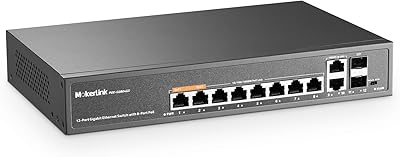
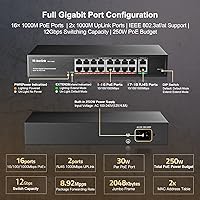
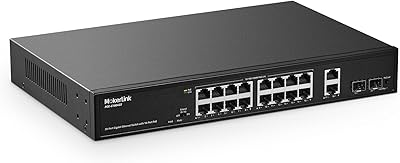
  • Total Ports: The switch provides 18 gigabit Ethernet ports in total: 16 PoE+ data and power ports plus 2 dedicated gigabit uplink ports.
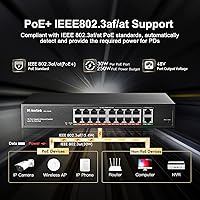
  • PoE Standard: All 16 PoE ports comply with IEEE 802.3af and IEEE 802.3at, covering the vast majority of modern powered devices on the market.
  • Power Budget: The total PoE power output is capped at 250W shared across all 16 active PoE ports simultaneously.
  • Per-Port Power: Each individual PoE port can deliver a maximum of 30W, which is sufficient for high-draw access points and PTZ cameras.
  • Switch Capacity: The internal switching fabric runs at 12Gbps, providing enough headroom for full-duplex gigabit traffic across all ports.
  • Forwarding Rate: At gigabit speeds, each port forwards up to 1,488,000 packets per second using a store-and-forward switching method.
  • MAC Table: The MAC address table supports up to 2,000 entries, suitable for small to mid-sized network deployments.
  • Form Factor: The chassis is a 1U rackmount metal unit measuring 270mm x 180mm x 44mm, designed to fit standard 19″ equipment racks.
  • Weight: The unit weighs 2.1 kg, making it straightforward to mount solo without requiring an extra pair of hands.
  • Power Supply: Power is handled by a built-in supply rated at up to 250W, running on 220V at 50Hz with no external adapter required.
  • Cooling: An internal industrial-grade fan provides active cooling to maintain stable operation under sustained high-load conditions.
  • Operating Temp: The switch is rated to operate reliably between -10°C and 55°C, making it suitable for unconditioned spaces like server closets or storage rooms.
  • Management: This is a fully unmanaged switch with automatic device detection — there is no software interface, web GUI, or CLI to configure.
  • LED Indicators: Individual LEDs cover power status, per-port PoE and link activity, and extend mode status for quick physical diagnostics.
  • Isolation Mode: The built-in extend mode isolates PoE ports 1 through 16 from each other, restricting their traffic to flow only through uplink ports 17 and 18.
  • PoE Pinout: Power is delivered on pins 1/2 positive and 3/6 negative using end-span (also called endspan or IEEE) mode only.
  • Passive PoE: The switch does not support passive 24V PoE, so devices requiring that standard — common in older Ubiquiti hardware — will not receive power.
  • Uplink Ports: Ports 17 and 18 are standard gigabit RJ45 uplinks with no PoE output, intended for connecting routers, NVRs, or upstream switches.

Related Reviews
MokerLink POE-G082G 10-Port Gigabit PoE Switch
78%
94%
Ease of Setup
88%
PoE Reliability
83%
Build Quality
91%
Value for Money
71%
Thermal Management
More
MokerLink POE-G1604GS 20-Port Gigabit PoE Switch
85%
88%
Performance
93%
Ease of Setup
90%
Build Quality
89%
PoE Power Budget (200W)
91%
Noise Level
More
MokerLink POE-G041GO Outdoor Gigabit PoE Switch

81%
93%
Ease of Setup
84%
PoE Power Delivery
78%
Build Quality
76%
Weather Resistance
88%
Value for Money
More
YuLinca 6-Port Gigabit PoE Switch with 4 PoE+ Ports
87%
95%
Ease of Installation
88%
PoE Functionality
91%
Build Quality
87%
Performance and Speed
94%
Fanless Operation (Noise)
More
MokerLink 12-Port Gigabit PoE+ Unmanaged Switch
74%
93%
Ease of Setup
86%
PoE Reliability
88%
Build Quality
91%
Value for Money
94%
Fanless & Noise
More
MokerLink 5-Port Gigabit POE Switch
86%
94%
Ease of Setup
88%
Performance
85%
Build Quality
75%
PoE Power Output
91%
Fanless Design (Noise Level)
More
MokerLink 26-Port Gigabit Unmanaged PoE Switch
79%
91%
Value for Money
88%
Port Count & Layout
73%
PoE Power Budget
93%
Ease of Setup
86%
Build Quality & Chassis
More
VIMIN 18-Port Gigabit PoE Switch
86%
94%
Ease of Installation
92%
Power Reliability
87%
Build Quality
58%
Noise Level
89%
VLAN Functionality
More
MokerLink EXT-AT13GO Outdoor Gigabit PoE Extender
78%
93%
Ease of Setup
71%
Power Delivery
74%
Build Quality
77%
Weatherproofing
88%
Gigabit Performance
More
Aumox SG518P 16-Port PoE Gigabit Switch
79%
94%
Ease of Setup
88%
PoE Reliability
86%
Build Quality
58%
Fan Noise
91%
Value for Money
More

FAQ

No, nothing at all. You plug in the power cord, connect your devices with standard Ethernet cables, and the switch handles detection automatically. There is no web interface, no app, and no driver to install.

Unfortunately, no. The MokerLink POE-G162G 18-Port Gigabit PoE Switch only supports the IEEE 802.3af and 802.3at standards. Passive 24V PoE — which some older Ubiquiti access points and cameras use — is not compatible. If you are not sure which standard your devices use, check their spec sheets before ordering.

It is audible. In a dedicated wiring closet or equipment rack room, most users do not find it bothersome. In a quiet open office or home workspace, it would likely be noticeable and potentially distracting. If silence matters, this switch belongs behind a closed door.

Yes, all 16 ports can power devices simultaneously, but the total power budget is shared at 250W. If every connected device draws heavily, you may approach that ceiling. In practice, a mixed load of cameras and access points rarely maxes out all ports at once, but it is worth calculating your total wattage needs before deploying.

Extend mode isolates the 16 PoE ports from talking directly to each other — all their traffic is forced through the two uplink ports instead. This reduces broadcast noise on the PoE side and is particularly useful in camera systems where devices do not need to communicate with each other at all. If you are running a surveillance setup, it is worth enabling. For general office networking where devices need to reach each other, you may want to leave it off.

Yes. If you plug a standard non-PoE device — like a regular computer or a non-powered IP camera — into any of the 16 PoE ports, the switch detects that no power is needed and delivers data only. You will not damage non-PoE equipment by connecting it.

The chassis dimensions are 270mm x 180mm x 44mm, which is a 1U height, but the width is approximately 270mm rather than the full 482mm of a standard 19″ rack. You will likely need a rack shelf or mounting adapter rather than direct rail mounting. Check your rack specifications before assuming it screws straight in.

Reported experiences vary. A meaningful portion of buyers have run these units for two or more years without issues. A smaller group has reported failures within the first year. Like many value-tier networking products, build quality appears consistent for most units but there are exceptions. Keeping it in a well-ventilated location and not running it at maximum load continuously will help longevity.

Absolutely — that is actually one of its most common use cases. You connect the NVR to one of the two uplink ports and run your cameras into the PoE ports. With extend mode enabled, the cameras will only talk to the NVR through that uplink, not to each other, which is exactly how most surveillance setups are designed to work.

The key difference is port speed. This gigabit PoE switch runs all ports at up to 1000Mbps, which is important if you are using high-resolution IP cameras, 4K streams, or want headroom for future upgrades. The 100Mbps version tops out at 100Mbps per port, which can become a bottleneck with modern camera systems. If your cameras are 4MP or higher, the gigabit model is the right choice.

Where to Buy