Overview

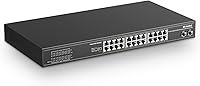
The MokerLink 26-Port Gigabit Unmanaged PoE Switch sits in a sweet spot for small business owners and prosumer network builders who need serious port density without the overhead of managed switch configuration. Twenty-four PoE+ ports and two SFP uplinks in a 1U fanless chassis is genuinely competitive at this price tier — you get gigabit speeds across every port, a 300W total PoE budget, and a dead-simple plug-and-play setup that requires zero CLI knowledge. The tradeoff worth knowing upfront: fanless designs run silent, but that silence comes with thermal considerations if you are pushing the switch hard in a warm, poorly ventilated space.
Features & Benefits

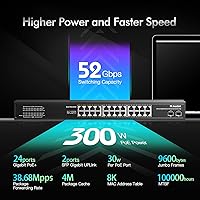
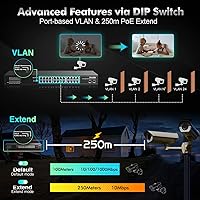
This fanless rackmount switch backs its port count with a 52Gbps switching fabric and 38.7Mpps forwarding rate — enough headroom that all 24 ports can run at full gigabit simultaneously without bottlenecking each other. PoE delivery follows IEEE 802.3af and 802.3at standards, so most IP cameras, access points, and VoIP phones connect without adapters. A physical DIP switch enables port-based VLAN isolation across ports 1–24 and basic QoS prioritization on ports 1–8 — useful features, though buyers expecting full managed-switch control should understand these are hardware-toggle functions, not software-defined rules. Ports 17–24 also support an extend mode that stretches PoE coverage to 250 meters at 10Mbps, which is a real asset for perimeter camera installations.

Best For

This unmanaged PoE switch makes the most sense for anyone deploying a meaningful number of PoE devices — think IP cameras around a warehouse, access points across a multi-room office, or VoIP handsets throughout a small business — and wants the whole thing in a rack without hiring a network engineer. The plug-and-play setup genuinely is as simple as it sounds: power it on, connect devices, done. The 250-meter extend mode is a legitimate differentiator for anyone running long cable runs. That said, if you are planning to saturate all 24 ports with high-draw devices, do the math first — 24 cameras at 15W each already exceeds the 300W cap, and that is before you add access points.

User Feedback

With over 760 ratings averaging 4.4 stars, the MokerLink 26-port switch has enough real-world feedback to read as credible, not curated. Easy installation and solid build quality come up consistently in positive reviews — the metal chassis holds up, and buyers appreciate not needing to configure anything. The recurring criticism centers on power planning: several users discovered the 300W ceiling was tighter than expected when mixing cameras and access points at higher wattages. A handful of IT-experienced reviewers also note the VLAN feature is quite basic — enough for simple isolation, not for complex network policies. Heat under sustained full load is worth monitoring in warm server rooms, though most users report no issues in normal operating conditions.

Pros

  • Twenty-four PoE+ ports and two SFP uplinks in a single 1U chassis is exceptional density at this price point.
  • Plug-and-play setup means cameras and access points are live within minutes, no configuration required.
  • All 24 ports run true gigabit simultaneously thanks to the 52Gbps non-blocking switching fabric.
  • The extend mode stretches PoE coverage to 250 meters, eliminating the need for extra injectors on long camera runs.
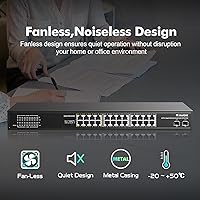
  • Fanless operation keeps equipment closets and home office racks completely silent under normal loads.
  • Solid all-metal chassis feels noticeably more durable than plastic alternatives at comparable prices.
  • IEEE 802.3af and 802.3at compliance ensures broad out-of-the-box compatibility with mainstream PoE devices.
  • Port-based VLAN isolation provides basic network segmentation without needing a managed switch.
  • Universal AC input (100–240V) makes this unmanaged PoE switch straightforward to deploy internationally.
  • Over 760 verified ratings averaging 4.4 stars signals reliable, consistent real-world performance across diverse installs.

Cons

  • No web interface or SNMP support means zero remote visibility into port status or PoE draw.
  • The 300W total power budget fills up fast — mix of high-draw cameras and access points can hit the ceiling quickly.
  • VLAN and QoS are DIP-switch only; there is no way to adjust settings without physical access to the unit.
  • Passive 24V PoE devices are not supported, which catches some buyers with older Ubiquiti hardware off guard.
  • Chassis runs noticeably hot under sustained heavy load, especially in warm or poorly ventilated rack environments.
  • Extend mode drops ports 17–24 to 10Mbps, which is inadequate for high-bitrate 4K camera streams.
  • SFP uplinks are gigabit-only, limiting backbone upgrade paths for faster network tiers.
  • No per-port power draw indicators make diagnosing underpowered devices a process of elimination.
  • QoS prioritization is limited to ports 1–8 only, leaving the remaining 16 ports without any traffic priority control.
  • Long-term reliability data is still limited, as the product has only been on the market since mid-2021.

Ratings

The MokerLink 26-Port Gigabit Unmanaged PoE Switch has been scored across 12 performance and usability categories by our AI rating system, which analyzed verified global buyer reviews while actively filtering out incentivized, bot-generated, and duplicate feedback. The scores below reflect the honest consensus from real installers, small business owners, and prosumer network builders — strengths and frustrations included.
Value for Money
91%
For a 24-port PoE+ gigabit switch with SFP uplinks in a metal rackmount chassis, buyers consistently describe this as one of the stronger value propositions in its class. Installers running multi-camera or multi-WAP jobs note that the per-port cost is hard to beat without stepping down to 100Mbps-only alternatives.
A handful of buyers who later needed traffic monitoring or port mirroring felt they had outgrown this switch faster than expected, making the initial savings feel less significant over a two-year horizon.
Port Count & Layout
88%
Twenty-four PoE+ ports plus two SFP uplinks in a 1U form factor is a genuinely useful configuration for small business deployments. The physical layout is straightforward, and having dedicated uplink ports means the PoE pool is not diluted by uplink traffic.
Some users noted that the SFP uplink ports are gigabit-only, which limits future-proofing for higher-speed backbone connections. A 10G uplink option at this tier would have made the switch a longer-term asset.
PoE Power Budget
73%
27%
The 300W total budget comfortably handles mixed deployments — a typical small office setup of 12 cameras at 15W each and 6 access points at 13W each sits around 258W, leaving a reasonable headroom buffer. For mid-density installations, most buyers report no power-related issues.
Push toward a fully loaded 24-port deployment with higher-draw devices and the ceiling becomes a real constraint. Running 24 ports at the full 30W IEEE 802.3at maximum would require 720W — far beyond what this switch can supply, meaning careful load planning is non-negotiable.
Ease of Setup
93%
This is where the unmanaged fanless rackmount switch consistently earns its highest praise. Non-technical buyers — property managers, retail store owners, small office administrators — report having cameras and access points online within minutes of unboxing, with no software, driver, or configuration required.
The simplicity is also a ceiling: there is no web interface to verify port status, check PoE draw, or troubleshoot a misbehaving device remotely. When something goes wrong, the only diagnostics available are the front-panel LED indicators.
Build Quality & Chassis
86%
The all-metal housing feels reassuringly solid for the price point, and the 1U rackmount profile fits standard server cabinets cleanly. Buyers who have used cheaper plastic-chassis alternatives at similar price points tend to notice and appreciate the difference immediately.
A few long-term reviewers noted minor paint wear around port edges after extended use, and the included rackmount kit is functional but not the most robust. Nothing structural, but worth noting for installations where aesthetics matter.
Thermal Management
69%
31%
Fanless operation is a genuine advantage in noise-sensitive environments — home offices, libraries, and quiet server closets all benefit from the complete absence of fan hum. For lightly to moderately loaded deployments in climate-controlled spaces, thermal performance is consistently reported as fine.
Under heavy sustained load in warm or poorly ventilated spaces, the chassis gets noticeably hot to the touch. A small number of users in warmer climates or densely packed racks report intermittent instability that resolved when airflow around the unit was improved — something to plan for before mounting.
Gigabit Throughput Performance
87%
The 52Gbps switching capacity means all 24 ports can run at full gigabit simultaneously without any internal bottleneck — a spec that actually matters in camera-heavy deployments where multiple high-bitrate streams are running concurrently. Users report clean, stable throughput in practice.
Performance expectations should remain calibrated to the unmanaged category. There are no traffic shaping controls beyond the basic DIP-switch QoS on ports 1–8, so heavy mixed-traffic environments may still experience congestion that a managed switch could otherwise mitigate.
VLAN Functionality
62%
38%
For buyers who simply want to isolate their camera network from their main LAN without buying a managed switch, the DIP-switch VLAN feature does accomplish basic port-level isolation across ports 1–24. It works, and for that narrow use case, users report it behaves predictably.
IT-experienced reviewers are clear: this is hardware-toggle isolation, not 802.1Q tagged VLAN support. You cannot assign VLAN IDs, create trunks, or configure inter-VLAN routing. Anyone expecting managed-switch-style VLAN flexibility will be disappointed and should budget for a step up.
QoS Prioritization
66%
34%
The port-based QoS on ports 1–8 is useful for small setups where VoIP phones or latency-sensitive video feeds need consistent priority over bulk data traffic. Users running mixed VoIP and data networks on a tight budget report audible call quality improvements after assigning phones to these ports.
QoS here is binary and port-based — either a port gets priority or it does not. There is no DSCP marking, bandwidth throttling, or per-device granularity. For anything beyond basic traffic segregation, this implementation is too coarse to rely on.
Extend Mode (Long-Range PoE)
84%
The 250-meter extend mode on ports 17–24 is one of the more practically useful features on this fanless rackmount switch, particularly for perimeter surveillance installations where cameras sit far from the central closet. Several installers specifically purchased this unit because it eliminated the need for additional PoE injectors or mid-span equipment.
The speed drops to 10Mbps in extend mode, which is fine for standard IP camera streams but inadequate for high-bitrate 4K feeds or any application requiring reliable gigabit speeds at distance. The tradeoff is well-documented, but buyers should verify their camera bitrate requirements first.
PoE Device Compatibility
83%
IEEE 802.3af and 802.3at compliance means this unmanaged PoE switch works out of the box with the vast majority of IP cameras, wireless access points, and VoIP phones on the market. Buyers mixing brands and device generations report broad compatibility without adapter headaches.
The switch explicitly does not support passive 24V PoE, which rules out older Ubiquiti hardware running in passive mode. A small but vocal segment of reviewers ran into this after purchase — worth double-checking if your existing equipment predates 802.3af compliance.
LED Indicators & Diagnostics
58%
42%
The front-panel LEDs for power, link activity, and 1000Mbps status do their job for basic health checks — you can tell at a glance whether a port has a live gigabit connection or is sitting idle. For straightforward installations, this is usually enough.
There is no PoE wattage indication, no per-port power draw display, and no way to see total power consumption without external metering. Troubleshooting a device that is not powering on correctly is largely a process of elimination rather than informed diagnosis.
Reliability & Longevity
81%
19%
The MokerLink 26-port switch has been available since mid-2021, and longer-term reviewers who have had units running continuously for two-plus years mostly report stable, trouble-free operation. The absence of fan bearings — a common failure point in competing units — likely contributes to the generally positive long-term reliability feedback.
The sample of truly long-term reviews is still relatively limited for definitive conclusions. A handful of units appear to have failed within the first year, though it is unclear whether these were edge cases, installation environment issues, or early batch quality variations.

Suitable for:

The MokerLink 26-Port Gigabit Unmanaged PoE Switch is built for installers, small business owners, and technically confident prosumers who need to power and connect a meaningful number of PoE devices without touching a command line. If you are deploying a security camera system across a mid-sized property, rolling out wireless access points in a multi-room office, or consolidating VoIP handsets under one roof, this fanless rackmount switch covers the hardware side cleanly and affordably. It fits naturally into 1U rack enclosures, so IT contractors who build out equipment closets for retail stores, clinics, or small warehouses will find the form factor immediately practical. The 250-meter extend mode on ports 17–24 is a genuine installation asset for anyone running cameras along building perimeters or across large open spaces where pulling new cable is not an option. Silence-sensitive environments — a reception desk server closet, a home office rack, a library network room — also benefit directly from the completely fanless design.
Not suitable for:

The MokerLink 26-Port Gigabit Unmanaged PoE Switch is the wrong tool for anyone who needs real network visibility or granular traffic control. If your setup requires port mirroring, SNMP monitoring, LLDP-MED, or software-defined VLAN tagging, this switch simply does not offer those capabilities — the VLAN and QoS functions are physical DIP-switch toggles, not configurable policies. Network administrators managing dynamic environments where device assignments change regularly will find the lack of a web interface frustrating rather than liberating. The 300W total power budget is also a hard ceiling that rules out fully saturated high-draw deployments: running 20 or more IEEE 802.3at devices simultaneously at or near their 30W maximums is not realistic on this hardware without careful load balancing. Buyers in warm climates or cramped, poorly ventilated rack enclosures should also think twice — without active cooling, sustained heavy loads can push chassis temperatures into uncomfortable territory. If you anticipate outgrowing basic plug-and-play within a year or two, investing in an entry-level managed switch now will likely save money and frustration in the long run.
Specifications

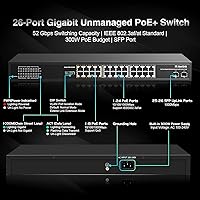
  • Total Ports: The switch provides 26 ports in total: 24 PoE+ RJ45 gigabit ports and 2 dedicated gigabit SFP uplink ports.
  • PoE Standards: Supports IEEE 802.3af (up to 15.4W per port) and IEEE 802.3at (up to 30W per port) for broad PoE device compatibility.
  • PoE Power Budget: Total PoE power output is capped at 300W shared across all 24 active PoE ports simultaneously.
  • Switching Capacity: The non-blocking switching fabric delivers 52Gbps of total switching capacity, allowing all ports to run at full gigabit concurrently.
  • Forwarding Rate: Packet forwarding throughput reaches 38.7Mpps, ensuring low-latency data transfer under heavy multi-device loads.
  • Packet Buffer: Onboard packet buffer memory is 4MB, which helps smooth out short bursts of congestion across connected devices.
  • MAC Address Table: Supports up to 8,000 MAC address entries, sufficient for complex multi-device small business network deployments.
  • Extend Mode: Ports 17–24 support an extend mode that stretches PoE signal reach to 250 meters over Cat5e or better cabling, operating at 10Mbps in this mode.
  • VLAN Support: Port-based VLAN isolation is available across ports 1–24 via DIP switch, with all downlink ports able to communicate through uplink ports 25 and 26.
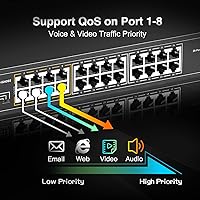
  • QoS: Hardware-level QoS traffic prioritization is available on ports 1–8, enabled via DIP switch to forward latency-sensitive traffic preferentially.
  • Cooling System: The unit is fully fanless, relying on passive heat dissipation through dual-side ventilation slots in the metal chassis.
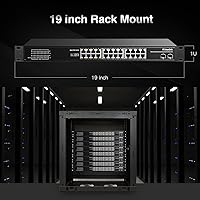
  • Form Factor: Designed as a 1U rackmount unit compatible with standard 19-inch server racks; a rackmount kit is included in the box.
  • Dimensions: The chassis measures 445 × 285 × 45mm (L × W × H), occupying a single rack unit of vertical space.
  • Weight: The unit weighs 3.2kg, making it manageable for solo rack installation without additional equipment.
  • Power Input: Accepts universal AC input ranging from 100V to 240V at 50 or 60Hz, suitable for use in North America, Europe, and most other regions.
  • Operating Temperature: Rated for continuous operation between -20°C and 50°C, covering most indoor commercial and residential environments.
  • Chassis Material: The enclosure is constructed from metal, providing structural rigidity and passive heat conduction compared to plastic-chassis alternatives.
  • LED Indicators: Each port has individual LED indicators showing power status, link and data activity, and 1000Mbps connection confirmation.
  • Pin Assignment: PoE power delivery uses pins 1 and 2 as positive and pins 3 and 6 as negative, following the standard 802.3af and 802.3at end-span pin-out.
  • What's Included: The package contains the switch unit, a power cord, a quick installation manual, and a rackmount kit with mounting ears and screws.

Related Reviews

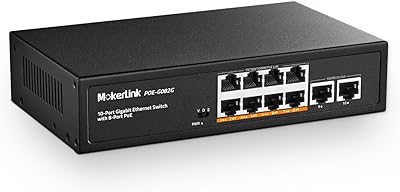
MokerLink POE-G082G 10-Port Gigabit PoE Switch
78%
94%
Ease of Setup
88%
PoE Reliability
83%
Build Quality
91%
Value for Money
71%
Thermal Management
More
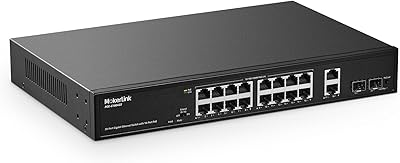
MokerLink POE-G1604GS 20-Port Gigabit PoE Switch
85%
88%
Performance
93%
Ease of Setup
90%
Build Quality
89%
PoE Power Budget (200W)
91%
Noise Level
More
MokerLink POE-G041GO Outdoor Gigabit PoE Switch
81%
93%
Ease of Setup
84%
PoE Power Delivery
78%
Build Quality
76%
Weather Resistance
88%
Value for Money
More
YuLinca 6-Port Gigabit PoE Switch with 4 PoE+ Ports
87%
95%
Ease of Installation
88%
PoE Functionality
91%
Build Quality
87%
Performance and Speed
94%
Fanless Operation (Noise)
More
MokerLink 5-Port Gigabit POE Switch
86%
94%
Ease of Setup
88%
Performance
85%
Build Quality
75%
PoE Power Output
91%
Fanless Design (Noise Level)
More
MokerLink 12-Port Gigabit PoE+ Unmanaged Switch
74%
93%
Ease of Setup
86%
PoE Reliability
88%
Build Quality
91%
Value for Money
94%
Fanless & Noise
More
MokerLink POE-G162G 18-Port Gigabit PoE Switch
77%
88%
Value for Money
93%
Port Density
94%
Ease of Setup
79%
Build Quality
76%
PoE Reliability
More
MokerLink EXT-AT13GO Outdoor Gigabit PoE Extender
78%
93%
Ease of Setup
71%
Power Delivery
74%
Build Quality
77%
Weatherproofing
88%
Gigabit Performance
More
MokerLink 3-Port Gigabit PoE Passthrough Switch
86%
94%
Ease of Installation
88%
PoE Performance (Power Output)
85%
Build Quality
92%
Compact Design
90%
Value for Money
More
MokerLink 8-Port Outdoor Gigabit PoE Switch
81%
93%
Ease of Setup
84%
Build Quality
81%
PoE Performance
77%
Weather Resistance
89%
Gigabit Throughput
More

FAQ

None at all. The MokerLink 26-Port Gigabit Unmanaged PoE Switch is completely plug-and-play — you power it on, connect your devices with Ethernet cables, and it works. There is no web interface, no app, and no CLI to navigate. For most buyers, that simplicity is exactly the point.
It depends on how much power your cameras draw. If you are using standard 802.3af cameras pulling around 10–13W each, 24 ports comfortably fits within the 300W ceiling. However, if you plan to use higher-draw 802.3at devices at or near 30W per port, you will hit the limit well before filling all 24 ports. Always add up the watt ratings on your specific devices before committing.

No — this fanless rackmount switch only supports standard 802.3af and 802.3at PoE, not passive 24V PoE. If you have older Ubiquiti hardware configured to run in passive mode, it will not receive power from this switch. You would need a PoE injector or a switch that explicitly supports passive 24V alongside the standard protocols.

Ports 17–24 have a DIP-switch-activated extend mode that lets you run PoE over cable runs up to 250 meters instead of the usual 100-meter limit. The tradeoff is that the port speed drops to 10Mbps in this mode. That is fine for most standard IP camera streams, but if you are running high-bitrate 4K cameras, check that your camera's average bitrate fits comfortably within 10Mbps before using extend mode.

Not quite. The VLAN function here is a simple hardware-toggle that physically isolates ports 1–24 from each other while keeping them all able to reach the two SFP uplink ports. There are no 802.1Q VLAN tags, no VLAN IDs to assign, and no inter-VLAN routing. It is useful for basic segmentation — like keeping cameras off your main LAN — but it is not a substitute for managed switch VLAN functionality.

Heat is worth taking seriously here because there are no fans to actively move air. In a well-ventilated rack with moderate load, the chassis runs warm but not alarmingly so. In a tightly enclosed cabinet with poor airflow and a heavy PoE load, it can get quite hot. Leave at least one U of clearance above and below the unit, ensure the cabinet has some ventilation, and avoid placing it directly above other heat-generating equipment.

Yes, both SFP ports can run simultaneously, and they operate at gigabit speeds. The switch accepts standard gigabit SFP modules — both single-mode and multi-mode fiber modules from third-party brands generally work fine, as do copper SFP modules if you prefer an RJ45 uplink. Just confirm the module's speed rating is 1Gbps, since 10G SFP+ modules are not compatible.

Not directly. The front-panel LEDs only show link status and speed — there are no per-port wattage indicators or a total power consumption display. If you want to monitor PoE draw in real time, you would need an external smart PDU with power metering or a managed PoE switch that reports wattage per port through a web interface.

Only ports 1–8 support the QoS priority function, activated via DIP switch. The remaining ports (9–24) operate in standard best-effort mode with no traffic prioritization. If you are running VoIP phones or latency-sensitive video feeds, plug those devices into ports 1–8 to take advantage of the QoS feature and leave higher-numbered ports for cameras or data devices.

The box includes the switch, a power cord, a quick installation guide, and a rackmount kit with mounting brackets and screws. You should be ready to rack-mount it without buying anything extra, assuming you have a standard 19-inch rack. You will need your own Ethernet cables and SFP modules if you plan to use the fiber uplinks.

Where to Buy