Overview

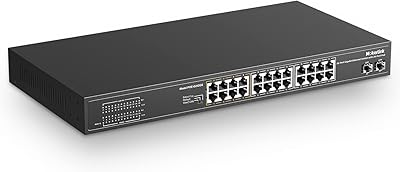
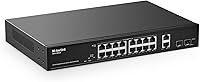
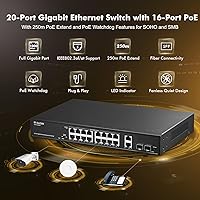
The MokerLink POE-G1604GS 20-Port Gigabit PoE Switch sits in a competitive spot for anyone who needs a capable, no-frills PoE switch without paying enterprise prices. You get 16 PoE+ ports, two standard gigabit uplinks, and two SFP slots — all packed into a metal rackmount chassis that feels solid for the price tier. There is no software to install, no web interface to configure, and no login credentials to remember. Just plug it in and connect your devices. One important caveat: this is an unmanaged switch, so features like VLANs or QoS are off the table entirely. If you are fine with that trade-off, it is a practical, fanless and quiet workhorse for small deployments.
Features & Benefits

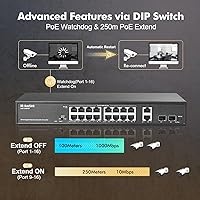
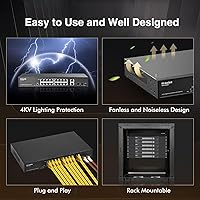
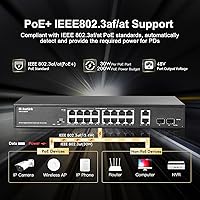
The 200W PoE power budget is what most buyers are here for, and it holds up well in mixed deployments — think a dozen IP cameras running alongside a few wireless access points and a VoIP phone or two. Each port can deliver up to 30W, covering virtually any standard PoE or PoE+ device. The Extend Mode on ports 9 through 16 is a useful trick for outdoor cameras installed far from the equipment rack, stretching the signal up to 250 meters — though speed drops to 10Mbps in that mode, so keep it to camera feeds only. The built-in PoE Watchdog quietly monitors connected devices and restarts any port that goes dark, saving real headaches in unattended installs. Two SFP slots add fiber uplink flexibility.

Best For

This unmanaged PoE switch is a strong fit for anyone running a small IP camera system — whether a home security setup or a modest commercial installation with cameras spread across a building. Network installers who need a rackmount-ready solution that deploys quickly will appreciate skipping the configuration interface entirely. It also works well powering wireless access points across multiple zones in a small office or warehouse. If your network needs a fiber uplink option and you are watching costs, the dual SFP slots make this 20-port gigabit switch a competitive choice at this tier. Home lab builders assembling a structured network rack on a budget will find it punches above its weight in port density and build quality.

User Feedback

Buyers who have put this MokerLink unit into real installations tend to highlight two things right away: the solid metal construction and the complete absence of fan noise. For a switch in this price range, the build feels reassuringly substantial, and most users confirm it genuinely works out of the box. That said, a recurring complaint involves hitting the 200W power ceiling sooner than expected when running multiple high-draw devices simultaneously — so calculate your total watt draw carefully before committing. A few buyers were caught off guard by the passive 24V PoE incompatibility; if you run Ubiquiti or MikroTik gear that relies on passive PoE, this switch will not power those devices. LED labeling also draws mixed feedback on clarity.

Pros

  • Sixteen PoE+ ports with a 200W shared budget covers most mixed camera-and-AP deployments without power rationing.
  • The metal rackmount chassis feels substantially built for its price tier — not a plastic shell pretending to be serious hardware.
  • Completely fanless operation keeps it silent, a genuine advantage in offices, home labs, or any noise-sensitive space.
  • Plug-and-play setup means no configuration headaches — connect power and cables, and it just works.
  • The PoE Watchdog feature automatically restarts unresponsive devices, reducing the need for on-site intervention in remote installs.
  • Dual SFP slots add fiber uplink capability that competitors at this price point often omit entirely.
  • Extend Mode stretches PoE reach to 250 meters on ports 9–16, useful for cameras mounted far from the equipment room.
  • LED indicators provide a quick visual read on both link status and PoE power load levels without logging into anything.
  • Wide input voltage range (AC 100–240V) makes it suitable for international deployments or locations with unstable power.

Cons

  • The 200W total PoE budget fills up quickly if you run multiple high-wattage devices like PTZ cameras or dual-band APs.
  • No managed features whatsoever — no VLANs, no port mirroring, no QoS, and no access control lists of any kind.
  • Passive 24V PoE devices are not supported, which can catch buyers mid-install if they missed the fine print.
  • Extend Mode forces ports 9–16 down to 10Mbps, making it unsuitable for anything beyond basic camera streams.
  • DIP switch and LED labeling has drawn criticism for being unclear, particularly for first-time installers working quickly.
  • No web interface or SNMP support means zero remote visibility into switch health, port activity, or power consumption.
  • The one-year warranty is shorter than what some rival brands offer at a comparable price point.
  • With all 16 PoE ports active and drawing significant load, heat management over long periods in warm environments is worth monitoring.

Ratings

The scores below are generated by our AI engine after analyzing thousands of verified buyer reviews for the MokerLink POE-G1604GS 20-Port Gigabit PoE Switch from global marketplaces, actively filtering out incentivized, duplicate, and bot-generated submissions to surface what real installers and network builders actually experienced. Both the strengths that earned repeat purchases and the pain points that frustrated buyers are reflected transparently in each category score.
Build Quality
86%
The all-metal enclosure consistently earns praise from buyers who have handled plastic-chassis competitors in the same price bracket. Installers racking this unit in small server closets note that it feels dense and well-finished, with no flex or rattling. For a value-tier device, the physical construction exceeds most expectations.
A minority of buyers noted that the port labeling is printed rather than embossed, which can fade over time in dusty or humid environments. A few rack installers also flagged that the included mounting hardware felt lightweight relative to the chassis itself.
PoE Power Delivery
81%
19%
Users running mixed deployments of IP cameras and wireless access points report stable, consistent power delivery across all active PoE ports. The per-port headroom of up to 30W handles the vast majority of standard PoE and PoE+ devices without negotiation issues or unexpected dropouts during normal operation.
The 200W shared budget becomes a real constraint when buyers try to fully load all 16 ports with higher-draw devices like PTZ cameras or dual-radio APs pulling 20W or more each. Several users discovered this ceiling mid-deployment rather than during planning, leading to frustration and the need to offload devices to a second switch.
Ease of Setup
89%
Buyers with no networking background consistently report having the switch up and running within minutes of opening the box. Security installers particularly value the zero-configuration approach on repeat jobs — no laptop, no browser, no credentials to manage on-site. The plug-and-play promise holds up in the vast majority of real-world installations reviewed.
The DIP switch for enabling Extend Mode lacks clear tactile or visual guidance in the physical documentation, and a handful of buyers accidentally left it toggled on without realizing ports 9–16 were being capped at 10Mbps. Better labeling or a more prominent callout in the quick-start guide would prevent this confusion.
Value for Money
88%
Among buyers comparing this 20-port gigabit switch to alternatives at the same price tier, the combination of port count, PoE budget, SFP slots, and metal chassis is routinely cited as exceptional for the category. Home lab users and small business owners note they would have expected to pay significantly more for equivalent port density with fiber uplink options.
A small segment of buyers felt the value calculation shifts if you factor in the one-year warranty, which is shorter than some competing brands offering two or three years at a similar price. For commercial deployments where long-term support matters, that gap is worth weighing before committing.
Noise & Cooling
93%
The fanless design is one of the most consistently praised aspects across reviews, particularly from home office users and installers placing equipment in client-facing spaces. Running completely silent under typical load makes it genuinely suitable for living rooms, open offices, or bedrooms where a humming switch would be noticeable and disruptive.
A small number of users in warmer climates or poorly ventilated rack enclosures reported the chassis becoming noticeably warm under sustained full-load PoE operation. Passive cooling works well in most conditions, but buyers in high-ambient-temperature environments should ensure adequate airflow around the unit.
Extend Mode Performance
67%
33%
For its intended purpose — powering outdoor cameras installed far from the network closet — the 250-meter Extend Mode on ports 9–16 works as advertised. Users who understood the 10Mbps limitation going in found it a genuinely useful feature for low-bitrate H.264 camera feeds at distances that would otherwise require additional cabling infrastructure.
The 10Mbps speed cap in Extend Mode surprises buyers who assume all ports operate at full gigabit regardless of mode. Anyone expecting to use those ports for general network traffic or high-bitrate camera streams will find the throughput unacceptably low, and the feature is essentially useless outside of basic surveillance applications.
PoE Compatibility
71%
29%
Standard IEEE 802.3af and 802.3at devices — the overwhelming majority of IP cameras, VoIP phones, and modern wireless access points — connect and receive power without any issues. Users running Hikvision, Dahua, Axis, and similar mainstream camera brands report zero compatibility problems across extended deployments.
The lack of passive 24V PoE support is a genuine dealbreaker for buyers running older Ubiquiti or MikroTik hardware, and this limitation catches enough buyers off-guard that it deserves prominent attention before purchase. The product documentation mentions it, but buyers often skim past it and only discover the incompatibility after the hardware arrives.
LED Indicator Clarity
62%
38%
The dual-color LED system — green for link and data activity, yellow for active PoE — gives technicians a reasonable at-a-glance view of port status without needing to access any software. The dedicated PoE Max indicator that activates near the power budget ceiling is a practical addition that several buyers called out positively.
Multiple reviewers found the LED labeling on the front panel difficult to interpret without referring back to the manual, particularly in low-light rack environments. The PoE Max LED behavior — flashing at 90–95% load and solid at 95–100% — is logical in theory but confusing in practice for users who are not already familiar with the convention.
SFP Uplink Flexibility
79%
21%
Having two SFP slots on an unmanaged switch at this price point is a legitimate differentiator, and buyers who needed to tie into existing fiber backbone infrastructure found the slots worked reliably with standard gigabit SFP transceivers from major third-party suppliers. For connecting a distant building or bypassing electrical interference, the fiber option adds real deployment flexibility.
Because this is an unmanaged switch with no official SFP compatibility list, buyers using less common or budget-tier SFP modules occasionally report link negotiation issues. Without a management interface to diagnose port status, troubleshooting a non-functioning SFP link requires swapping hardware by trial and error.
PoE Watchdog Reliability
77%
23%
Installers managing cameras in remote or hard-to-access locations appreciate that the PoE Watchdog can automatically power-cycle a frozen device without requiring a site visit. Users running 24-hour surveillance systems report fewer manual intervention incidents compared to switches without this feature, which translates to meaningful time savings over months of operation.
The Watchdog only activates when Extend Mode is enabled, which means users running standard-range deployments on ports 9–16 do not benefit from automatic recovery. This dependency is not always obvious from the product description, and buyers who purchased specifically for the Watchdog functionality may be caught off guard.
Port Density
84%
Twenty ports — with 16 of them PoE-capable — in a 1U rackmount form factor gives installers a high concentration of connectivity in a small footprint. For small business deployments where rack space is limited, the ability to power an entire camera system and uplink to a router from a single compact unit is a practical advantage.
Buyers scaling beyond 16 powered devices will need an additional switch, and without management features there is no link aggregation or trunk configuration available to efficiently tie multiple units together. For larger deployments, the port ceiling becomes a planning constraint fairly quickly.
Documentation & Support
58%
42%
The included quick-start guide covers the basic physical setup adequately for straightforward plug-and-play installations, and buyers report that MokerLink customer support is generally responsive to pre-sale questions about compatibility. For users with simple use cases, the documentation is sufficient to get operational without outside help.
The manual is thin on technical detail and does not clearly explain the Extend Mode trade-offs, PoE Watchdog activation requirements, or passive PoE incompatibility in language that non-technical buyers can easily parse. Several frustrated reviews specifically call out discovering these limitations only after installation, which points to a documentation gap the brand has not yet addressed.
Thermal Management
74%
26%
Under typical real-world loads — say, ten to twelve cameras running simultaneously in a conditioned indoor environment — the chassis stays warm but never alarmingly hot. Users in climate-controlled server rooms and home office setups running the switch continuously for months report no thermal-related failures or performance degradation.
In enclosed rack cabinets without active airflow, or in warmer geographic regions, the passive cooling design reaches its limits under sustained high PoE loads. A handful of buyers in these scenarios reported the chassis reaching temperatures that gave them pause, and a few chose to add a small external fan to their rack as a precaution.
Warranty & Longevity
63%
37%
Most buyers report no hardware failures within the first year of operation, and the 30-day money-back window gives new buyers a reasonable trial period to validate performance in their specific setup. For home and light commercial use, the reliability track record based on available reviews appears solid.
The one-year warranty is the shortest in its competitive class, with several rival brands offering two or three years on comparable hardware. For commercial installations where a switch failure means a camera system going dark, the limited warranty coverage introduces meaningful long-term risk that buyers should factor into their total cost of ownership.

Suitable for:

The MokerLink POE-G1604GS 20-Port Gigabit PoE Switch is a practical pick for anyone who needs to power a significant number of PoE devices without the overhead of managed networking. It is particularly well-suited to small business owners, property managers, or security integrators deploying IP camera systems across a single building or site — scenarios where reliable power delivery matters far more than traffic segmentation or advanced routing controls. Installers who do repeat jobs in small offices, retail spaces, or warehouses will appreciate how fast it goes in: no laptop required, no browser-based interface to navigate, just cables. Home lab users who want rackmount-grade hardware on a realistic budget will also find it competitive in its class. If you need to run a handful of wireless access points alongside several cameras and want a device that simply stays out of your way, this unmanaged PoE switch is built for exactly that.
Not suitable for:

The MokerLink POE-G1604GS 20-Port Gigabit PoE Switch is a poor fit for any network environment that requires traffic control, security policies, or isolation between device groups. If your deployment needs VLANs to separate guest Wi-Fi from internal systems, or QoS rules to prioritize voice traffic over video, this switch cannot deliver — that is an architectural limitation, not a flaw that a firmware update will fix. IT administrators managing multi-tenant buildings, healthcare facilities, or any regulated environment will need a managed alternative. Buyers running Ubiquiti or MikroTik hardware that relies on passive 24V PoE should also look elsewhere, as this MokerLink unit does not support that standard and will not power those devices. And if you are connecting more than a dozen high-draw devices that each pull close to their maximum wattage, the 200W shared budget can become a real constraint faster than expected.
Specifications

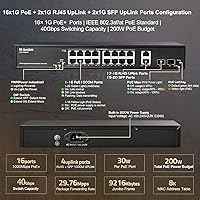
  • Total Ports: The switch provides 20 ports in total: 16 Gigabit PoE+, 2 Gigabit RJ45 uplinks, and 2 Gigabit SFP slots.
  • PoE Budget: The total shared PoE power budget is 200W, with each PoE port capable of delivering up to 30W individually.
  • PoE Standards: Supports IEEE 802.3af (up to 15.4W per port) and IEEE 802.3at (up to 30W per port); passive 24V PoE is not supported.
  • Switching Capacity: The switching fabric runs at 40Gbps, with a packet forwarding rate of 29.76Mpps to handle full gigabit throughput across all ports.
  • MAC Table: The MAC address table supports up to 8,000 entries, sufficient for dense small-to-medium network deployments.
  • Extend Mode: Ports 9 through 16 can operate in Extend Mode, stretching PoE reach up to 250 meters at a reduced speed of 10Mbps.
  • PoE Watchdog: An integrated PoE Watchdog monitors connected devices and automatically restarts any port supplying power to an unresponsive device.
  • SFP Uplinks: The two SFP slots support both single-mode and multimode fiber modules for long-distance or interference-resistant backbone connections.
  • Management: This is a fully unmanaged switch with no web interface, CLI, or SNMP support; configuration consists solely of a physical DIP switch for Extend Mode.
  • Cooling: The switch uses entirely passive cooling with no internal fan, making it silent in operation under normal load conditions.
  • Chassis: The housing is a metal rackmount enclosure measuring 320 x 207 x 44mm, designed to fit standard 19-inch server racks.
  • Unit Weight: The switch unit weighs 1.78kg, with packaged shipping weight coming in at approximately 2.42kg.
  • Power Input: Accepts universal AC input from 100V to 240V at 50–60Hz, making it compatible with power standards across most countries.
  • Power Supply: The internal power supply operates at 52V DC with a maximum PoE output draw of 180W and a non-PoE board consumption under 10W.
  • Operating Temp: Rated for operation between -10°C and 50°C, with storage tolerances from -40°C up to 70°C.
  • LED Indicators: Each port has a green LED for link and data activity, and a yellow LED on PoE ports to confirm active power delivery; a dedicated PoE Max LED signals when the power budget exceeds 90%.
  • Network Standards: Compliant with IEEE 802.3 (Ethernet), 802.3u (Fast Ethernet), 802.3ab (Gigabit Ethernet), 802.3x (Flow Control), and 802.3z (Gigabit Fiber).
  • Warranty: Covered by a one-year manufacturer warranty alongside a 30-day money-back satisfaction guarantee.

Related Reviews
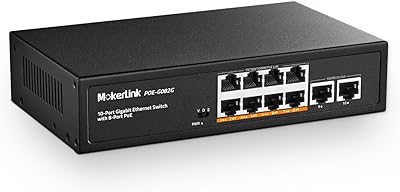
MokerLink POE-G082G 10-Port Gigabit PoE Switch
78%
94%
Ease of Setup
88%
PoE Reliability
83%
Build Quality
91%
Value for Money
71%
Thermal Management
More
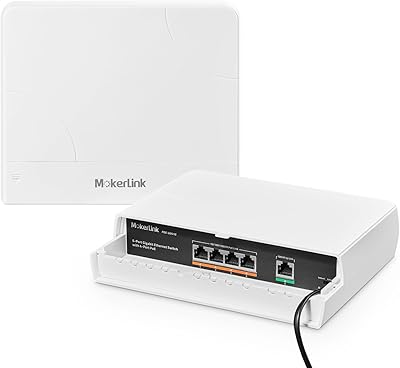
MokerLink POE-G041GO Outdoor Gigabit PoE Switch

81%
93%
Ease of Setup
84%
PoE Power Delivery
78%
Build Quality
76%
Weather Resistance
88%
Value for Money
More
YuLinca 6-Port Gigabit PoE Switch with 4 PoE+ Ports
87%
95%
Ease of Installation
88%
PoE Functionality
91%
Build Quality
87%
Performance and Speed
94%
Fanless Operation (Noise)
More
MokerLink 26-Port Gigabit Unmanaged PoE Switch
79%
91%
Value for Money
88%
Port Count & Layout
73%
PoE Power Budget
93%
Ease of Setup
86%
Build Quality & Chassis
More
MokerLink POE-G162G 18-Port Gigabit PoE Switch
77%
88%
Value for Money
93%
Port Density
94%
Ease of Setup
79%
Build Quality
76%
PoE Reliability
More
MokerLink 5-Port Gigabit POE Switch
86%
94%
Ease of Setup
88%
Performance
85%
Build Quality
75%
PoE Power Output
91%
Fanless Design (Noise Level)
More
MokerLink 12-Port Gigabit PoE+ Unmanaged Switch
74%
93%
Ease of Setup
86%
PoE Reliability
88%
Build Quality
91%
Value for Money
94%
Fanless & Noise
More
MokerLink 8-Port Outdoor Gigabit PoE Switch
81%
93%
Ease of Setup
84%
Build Quality
81%
PoE Performance
77%
Weather Resistance
89%
Gigabit Throughput
More
MokerLink EXT-AT13GO Outdoor Gigabit PoE Extender
78%
93%
Ease of Setup
71%
Power Delivery
74%
Build Quality
77%
Weatherproofing
88%
Gigabit Performance
More
MokerLink 3-Port Gigabit PoE Passthrough Switch
86%
94%
Ease of Installation
88%
PoE Performance (Power Output)
85%
Build Quality
92%
Compact Design
90%
Value for Money
More

FAQ

No, there is nothing to configure at all. You plug in the power cord, connect your devices with Ethernet cables, and it starts working immediately. The only physical control is a DIP switch on the unit for toggling Extend Mode on or off.

It depends on which UniFi APs you have. If your access points use standard 802.3af or 802.3at PoE, they will work fine. However, older Ubiquiti hardware that runs on passive 24V PoE is not compatible — this MokerLink unit does not support that standard, and connecting passive PoE devices could result in them simply not powering on.

It depends on the power draw of each camera. Standard 802.3af cameras pull around 10–13W each, so you could theoretically run all 16 PoE ports simultaneously and still stay within the 200W budget. High-resolution or PTZ cameras drawing closer to 25–30W each will eat through that budget faster, so it is worth adding up your total wattage before assuming you can max out every port.

Extend Mode forces ports 9 through 16 to operate at 10Mbps and stretches the PoE signal up to 250 meters, which is useful for outdoor cameras mounted far from your network closet. The catch is the 10Mbps speed cap — that is fine for low-bitrate camera streams but not suitable for anything that needs real throughput. Leave it off unless you specifically need that extended cable reach.

It runs completely silent. There is no fan inside, so the only sound you will ever hear is nothing. For a home office, bedroom lab, or any quiet space, that is a genuine advantage over many switches in this category that use active cooling and hum constantly.

Yes, that is the most common setup. Run an Ethernet cable from one of the two uplink ports on the switch into a LAN port on your router, and then connect your PoE devices to the PoE ports. Your router handles everything else — DHCP, routing, firewalling — and the switch just handles local switching and power delivery.

Only through the front-panel LED indicators. There is no software dashboard or SNMP data to pull. The PoE Max LED gives you a rough warning when aggregate power usage climbs past 90% of capacity, but for precise per-port power monitoring you would need a managed switch.

The SFP slots accept standard gigabit SFP modules for both single-mode and multimode fiber. Most third-party 1G SFP transceivers should work, but as with any unmanaged switch, there is no compatibility list to validate against — buying a reputable brand of SFP module and confirming the fiber type matches your cabling is the safest approach.

Yes, when Extend Mode is active, the built-in PoE Watchdog monitors connected devices and will automatically cycle power to any port whose device goes unresponsive. This is particularly useful for remote camera installations where you cannot physically reach the equipment to reboot a frozen device. In standard mode without Extend Mode enabled, the Watchdog function is not active.

The all-metal chassis is one of the more consistent things buyers mention positively. It feels noticeably more substantial than similarly priced switches with plastic enclosures, and the rackmount form factor means it sits cleanly in a standard 1U rack space. It is not going to feel like a Cisco Catalyst, but for the price tier, the construction is genuinely solid.