Overview

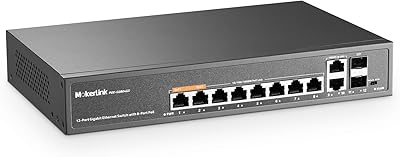
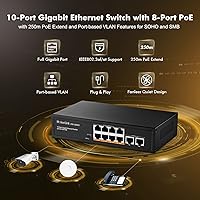
The MokerLink POE-G082G 10-Port Gigabit PoE Switch is a compact, no-nonsense unmanaged switch built for small home or business networks that need reliable Power over Ethernet without a complicated setup. Plug it in, connect your cables, and it just works. The solid metal chassis keeps things sturdy without adding bulk, and the fanless passive design means you will never hear it running. With a 120W total PoE budget, it can realistically power six to eight standard IP cameras at once, depending on each device's draw. A physical DIP switch lets you toggle between Default, VLAN, and Extend modes — a rare feature at this price. One firm caveat: this fanless PoE switch does not support passive 24V PoE.
Features & Benefits

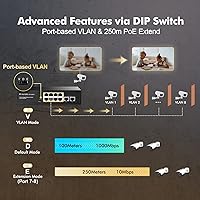
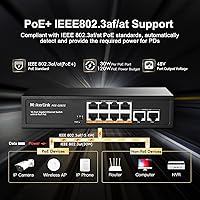
The eight PoE+ ports each support up to 30W, covering the full IEEE 802.3af/at standard — enough for virtually any IP camera, access point, or VoIP phone on the market. Two dedicated Gigabit uplink ports connect to your router or NVR cleanly. What actually sets this MokerLink switch apart is the Extend mode: flip the DIP switch, and ports 7 and 8 can push signals up to 250 meters. The trade-off is real — speed drops to a hard 10Mbps on those ports — but for a remote camera at the back of a large property, that distance matters far more than throughput. VLAN isolation mode is a practical security bonus, keeping cameras from talking to each other and routing all traffic through the uplink only.

Best For

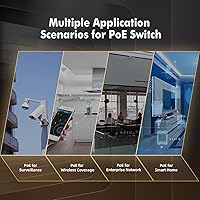
This fanless PoE switch is squarely aimed at anyone deploying four to eight IP cameras and wanting to skip the hassle of individual power injectors at each location. It is a natural fit for wall-mounted access points too — run a single Ethernet cable and you have both power and data handled in one shot. The silent fanless operation makes it comfortable in living rooms, home offices, or network closets where noise is a genuine consideration. Installers covering larger properties will appreciate the 250-meter extend option, even with the speed trade-off. DIY home automators building a clean, configuration-free PoE backbone will find the POE-G082G refreshingly straightforward — no software, no login screen, no learning curve whatsoever.

User Feedback

Buyers consistently praise how quickly this MokerLink switch gets up and running — most report plugging in cameras and access points with zero configuration required. The build quality draws positive remarks too; the metal shell feels more substantial than its price tier suggests. That said, the 120W power ceiling catches some users off guard: run eight devices pulling close to 15W each and you are already near the limit, leaving little margin for higher-draw hardware. A handful of buyers discovered the 10Mbps cap on extend mode only after deployment, which frustrated those expecting full gigabit speeds across all ports. Heat has not been a widespread complaint, though the chassis does run noticeably warm inside enclosed or poorly ventilated spaces.

Pros

  • Truly plug-and-play — no software, login, or configuration of any kind required out of the box.
  • Eight full 802.3af/at PoE+ ports handle the vast majority of cameras, access points, and VoIP phones on the market.
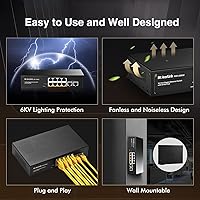
  • The fanless design runs completely silently, making it unobtrusive in bedrooms, offices, or living areas.
  • VLAN isolation mode adds a meaningful layer of camera network security without any technical setup.
  • Extend mode pushes signals up to 250 meters on ports 7 and 8, covering large properties without extra hardware.
  • Metal housing feels solid and dissipates heat better than plastic alternatives at this price tier.
  • Two dedicated Gigabit uplink ports give clean, flexible connectivity to routers, NVRs, or upstream switches.
  • Universal AC input (100–240V) means it works globally without a voltage converter.
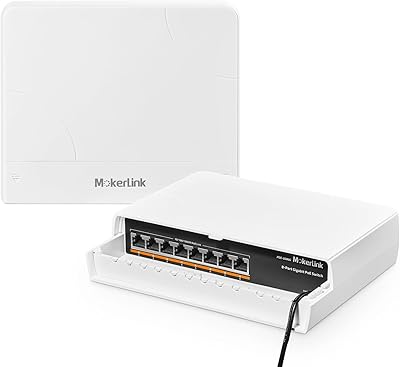
  • Compact footprint fits easily in a drawer, closet shelf, or small rack without a mounting kit.

Cons

  • The 120W total PoE budget is a hard ceiling — eight active devices drawing 15W each leaves virtually zero margin.
  • Extend mode locks ports 7 and 8 to 10Mbps, which surprises buyers expecting full gigabit on every port.
  • Passive 24V PoE devices, common in older Ubiquiti and MikroTik setups, will not be powered by this switch.
  • No managed features whatsoever — port mirroring, traffic monitoring, and SNMP are entirely absent.
  • The MAC address table holds only 2,000 entries, which could become a constraint in denser or more complex network environments.
  • The chassis runs noticeably warm in enclosed or poorly ventilated spaces, even without a fan.
  • Only eight PoE ports — users who anticipate adding more than eight powered devices will outgrow this switch quickly.
  • No rack-mount ears or wall-mount hardware included, so tidy installation requires sourcing additional accessories.

Ratings

The MokerLink POE-G082G 10-Port Gigabit PoE Switch has been scored by our AI system after parsing thousands of verified purchase reviews from global buyers, with spam, incentivized responses, and bot activity actively filtered out before any score was calculated. The results reflect a genuinely balanced picture — where this fanless PoE switch earns strong marks for simplicity and value, the scores also honestly surface the limitations that real installers and home users have run into.
Ease of Setup
94%
Buyers consistently describe the setup process in minutes — unbox, plug in power, connect cables, and devices start receiving power immediately. No drivers, no browser interface, and no technical knowledge required makes this fanless PoE switch accessible even to first-time network builders.
The DIP switch modes are not labeled intuitively on the unit itself, and a handful of users found the printed manual too brief to fully explain the difference between the three modes without looking it up online.
PoE Reliability
88%
The vast majority of users report consistent, stable power delivery to IP cameras and access points over extended periods with no unexpected drops or reboots. The auto-detection feature correctly identifies non-PoE devices and withholds power without causing any device conflicts.
A small number of buyers noted occasional port-specific power inconsistencies after several months of continuous use, particularly in warmer installation environments where thermal stress may gradually affect internal components.
Build Quality
83%
The all-metal chassis genuinely surprises buyers at this price point — it feels noticeably more substantial than plastic-bodied competitors and holds up well in closet and utility room installations. The port connectors snap in firmly with no wobble.
The unit's finish shows scratches relatively easily, and the DIP switch cover feels slightly flimsy compared to the rest of the chassis. A few buyers noted minor port labeling inconsistencies between the physical unit and the manual.
Value for Money
91%
At its price tier, offering eight genuine 802.3at PoE+ ports with a 120W budget, VLAN isolation, and extend mode is genuinely difficult to match from competing brands. Home users replacing four to six individual power injectors immediately recoup the cost in simplified cabling alone.
Buyers who push the switch to its limits — running eight higher-draw devices and expecting full gigabit across all ports — sometimes feel the feature trade-offs become more apparent than the price tag initially suggested.
Thermal Management
71%
29%
In open-air or lightly enclosed spaces, the metal housing functions as an effective passive radiator and the chassis stays within a comfortable temperature range even under sustained multi-device PoE load during normal ambient conditions.
Deployed inside sealed cabinets or stacked with other heat-generating equipment, the surface temperature climbs noticeably. Users in warmer climates report the chassis running quite hot to the touch during summer months, which raises long-term durability questions.
PoE Power Budget
67%
33%
For users running four to six standard 802.3af cameras or access points, the 120W shared budget is more than adequate and leaves comfortable headroom for occasional power spikes during device boot cycles.
Running seven or eight devices that each draw 15W or more pushes close to the ceiling, leaving almost no margin for higher-draw hardware or future expansion. Buyers who planned for full eight-port saturation with 802.3at devices found themselves needing to upgrade sooner than expected.
Extend Mode Performance
62%
38%
The ability to push a signal 250 meters over standard Cat5e cabling is a genuine problem-solver for covering large yards, warehouses, or multi-building properties on a tight budget without running fiber or adding repeaters.
The hard 10Mbps speed cap on ports 7 and 8 in extend mode catches many buyers off guard — it is not prominently communicated, and users expecting gigabit throughput on those ports after enabling extend mode have reported real frustration. It works for basic camera streams but not much else.
VLAN Isolation
79%
21%
For a switch at this price with no software management, having any form of traffic isolation at all is a meaningful bonus. Security-conscious users appreciate that cameras cannot reach the main LAN or communicate with each other in isolation mode.
The VLAN implementation is binary and inflexible — it is all ports isolated or none, with no ability to group specific ports together. Users wanting more granular segmentation quickly discover this is a basic feature, not a substitute for a proper managed VLAN setup.
Port Count & Layout
81%
19%
Ten ports in a compact footprint is well-suited to the target use case, and having two dedicated Gigabit uplink ports means the PoE ports are never sacrificed for router or NVR connectivity. Port spacing is comfortable for standard RJ45 connectors.
Users with bulky locking RJ45 cables or right-angle connectors reported tight clearance between adjacent ports. Those hoping to expand beyond eight PoE endpoints will need a second switch, as there is no daisy-chain PoE passthrough.
Noise Level
97%
Completely silent — no fan, no coil whine, no mechanical noise of any kind under any operating load. Buyers who placed this MokerLink switch in bedrooms, home theater rooms, or open-plan offices consistently highlight total silence as one of their favorite qualities.
There is genuinely very little to criticize here. In extreme thermal edge cases, some users wonder whether a low-speed fan option might have allowed for a higher sustained PoE budget, but that is a design philosophy trade-off rather than a defect.
Compatibility
73%
27%
Works reliably with the overwhelming majority of standard 802.3af/at PoE devices including cameras from Hikvision, Dahua, Reolink, and TP-Link, as well as most consumer and prosumer Wi-Fi access points from major brands.
The lack of passive 24V PoE support is a recurring compatibility problem for buyers coming from older Ubiquiti setups. Several reviewers purchased the switch only to discover their existing Ubiquiti gear would not power on, requiring a return or additional adapters.
LED Indicators
76%
24%
The per-port green LEDs provide clear at-a-glance confirmation of link status and data activity, which makes basic troubleshooting straightforward without any diagnostic software. The power indicator is also clean and visible.
There is no dedicated PoE activity indicator to confirm whether a specific port is actively delivering power versus just carrying data, which makes it harder to quickly diagnose whether a camera is getting power from the switch or drawing it from another source.
Longevity & Durability
74%
26%
Many users report units running continuously for twelve to eighteen months without any performance degradation, device drop-offs, or port failures under normal home or small office conditions.
The long-term track record beyond two years is thinner in the review pool, which is expected for a relatively newer product line. Units deployed in higher-ambient-temperature environments show a pattern of earlier performance changes that warrants attention.
Documentation & Support
58%
42%
The included quick-start guide covers the basics adequately for plug-and-play use cases, and the DIP switch mode table is at least present in the manual for buyers who read it before installing.
The documentation falls noticeably short when buyers need to troubleshoot extend mode behavior, understand the power budget allocation logic, or seek warranty support. Several users reported difficulty reaching responsive customer service, which dragged this score down considerably.

Suitable for:

The MokerLink POE-G082G 10-Port Gigabit PoE Switch is an excellent fit for home users and small business owners who want to power and connect four to eight IP cameras without running separate power adapters to each one. If you are mounting wireless access points on ceilings or walls where there is no nearby outlet, this fanless PoE switch solves that problem cleanly with a single Ethernet run per device. Security installers covering larger properties will appreciate the 250-meter extend mode, which eliminates the need for additional hardware to reach a distant camera location. The completely configuration-free setup also makes it a practical choice for DIY smart home enthusiasts who want a functional PoE backbone without touching a command line or browser interface. Anyone prioritizing quiet operation in a living space, home office, or small server closet will find the fanless passive cooling a genuine advantage over cheaper alternatives that hum or whir constantly.
Not suitable for:

The MokerLink POE-G082G 10-Port Gigabit PoE Switch is not the right tool for anyone running eight high-draw PoE devices simultaneously — the 120W total budget sounds generous, but it fills up fast when devices demand 15W to 25W each, leaving almost no headroom for spikes or future expansion. Users of Ubiquiti or MikroTik gear powered by passive 24V PoE should look elsewhere entirely, as this switch does not support that standard and will simply not power those devices. Network administrators who need per-port traffic monitoring, link aggregation, SNMP management, or VLAN tagging beyond basic isolation will find this unmanaged switch completely inadequate for their requirements. If you need full gigabit throughput on every port regardless of cable length, the hard 10Mbps cap imposed by extend mode on ports 7 and 8 is a dealbreaker. Growing networks expecting to scale beyond eight PoE endpoints in the near term would be better served by a managed switch with a larger power budget from the start.
Specifications

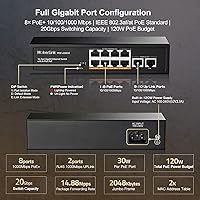
  • Total Ports: The switch includes 8 Gigabit PoE+ ports and 2 dedicated Gigabit uplink ports, for 10 ports total.
  • PoE Standard: Supports IEEE 802.3af (up to 15.4W per port) and IEEE 802.3at (up to 30W per port); passive 24V PoE is not supported.
  • PoE Budget: Total shared PoE power output is capped at 120W across all eight PoE ports simultaneously.
  • Switching Capacity: The internal switching fabric runs at 20Gbps, providing ample throughput for concurrent multi-device traffic on a small network.
  • Forwarding Rate: Packet forwarding rate is 14.88Mpps, which handles high-frequency data exchanges across all ports without bottlenecking.
  • Extend Mode: Activating Extend mode on ports 7 and 8 stretches cable reach to 250 meters, but hard-limits those ports to 10Mbps throughput.
  • DIP Switch Modes: A physical DIP switch toggles between three operating modes: Default (normal), VLAN isolation, and Extend (long-range).
  • Cooling System: Passive fanless cooling is used throughout, making the unit completely silent during operation under normal conditions.
  • Housing Material: The outer enclosure is constructed from metal, which aids heat dissipation and provides better physical durability than plastic housings.
  • Dimensions: The unit measures 200 x 118 x 44mm (approximately 7.9 x 4.6 x 1.7 inches), making it compact enough for shelf or closet placement.
  • Net Weight: The switch weighs 0.71kg (approximately 1.57 lbs), light enough to mount or relocate without difficulty.
  • Input Voltage: Accepts universal AC input from 100–240V, making it compatible with standard power outlets worldwide without a converter.
  • MAC Table: The MAC address table supports up to 2,000 entries, sufficient for typical small office or home network deployments.
  • Jumbo Frames: Supports jumbo frames up to 2,048 bytes, accommodating larger data payloads on compatible network segments.
  • Cable Requirements: Gigabit operation requires Cat5e or better UTP cable up to 100 meters; extend mode can use the same cable type stretched to 250 meters at reduced speed.
  • Operating Temperature: Rated for operating temperatures between -10°C and 50°C, covering most indoor installation environments.
  • Network Protocols: Compliant with IEEE 802.3 (10Base-T), IEEE 802.3u (100Base-TX), IEEE 802.3ab (1000Base-TX), and IEEE 802.3x flow control.
  • Management Type: Fully unmanaged — no software, web interface, or configuration is required or available; all settings are adjusted via the physical DIP switch.
  • In the Box: Package includes the switch unit, one power cord, and a printed user manual; no mounting hardware is included.
  • Speed Adaptation: All ports support 10/100/1000Mbps auto-negotiation and are backward compatible with slower legacy network devices.

Related Reviews
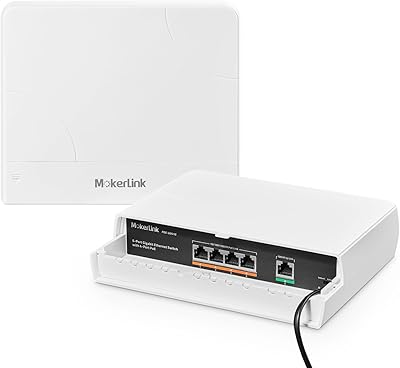
MokerLink POE-G1604GS 20-Port Gigabit PoE Switch
85%
88%
Performance
93%
Ease of Setup
90%
Build Quality
89%
PoE Power Budget (200W)
91%
Noise Level
More
MokerLink POE-G041GO Outdoor Gigabit PoE Switch

81%
93%
Ease of Setup
84%
PoE Power Delivery
78%
Build Quality
76%
Weather Resistance
88%
Value for Money
More
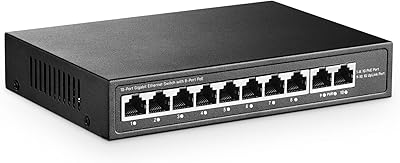
YuLinca 6-Port Gigabit PoE Switch with 4 PoE+ Ports
87%
95%
Ease of Installation
88%
PoE Functionality
91%
Build Quality
87%
Performance and Speed
94%
Fanless Operation (Noise)
More
MokerLink 5-Port Gigabit POE Switch
86%
94%
Ease of Setup
88%
Performance
85%
Build Quality
75%
PoE Power Output
91%
Fanless Design (Noise Level)
More
MokerLink POE-G162G 18-Port Gigabit PoE Switch
77%
88%
Value for Money
93%
Port Density
94%
Ease of Setup
79%
Build Quality
76%
PoE Reliability
More
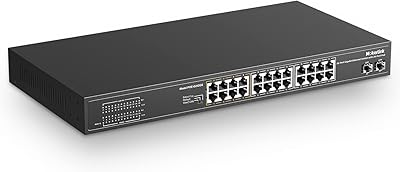
MokerLink 26-Port Gigabit Unmanaged PoE Switch
79%
91%
Value for Money
88%
Port Count & Layout
73%
PoE Power Budget
93%
Ease of Setup
86%
Build Quality & Chassis
More
YuLinca G1002G 8-Port PoE Gigabit Switch
79%
94%
Ease of Setup
89%
Value for Money
82%
PoE Performance
76%
Build Quality
67%
Thermal Management
More
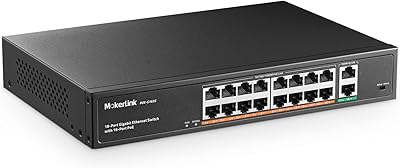
MokerLink 12-Port Gigabit PoE+ Unmanaged Switch
74%
93%
Ease of Setup
86%
PoE Reliability
88%
Build Quality
91%
Value for Money
94%
Fanless & Noise
More
MokerLink EXT-AT13GO Outdoor Gigabit PoE Extender
78%
93%
Ease of Setup
71%
Power Delivery
74%
Build Quality
77%
Weatherproofing
88%
Gigabit Performance
More
MokerLink 3-Port Gigabit PoE Passthrough Switch
86%
94%
Ease of Installation
88%
PoE Performance (Power Output)
85%
Build Quality
92%
Compact Design
90%
Value for Money
More

FAQ

It depends on the specific model. Most UniFi access points use standard 802.3af/at PoE, which this fanless PoE switch fully supports. However, older Ubiquiti gear that runs on passive 24V PoE will not work here — the switch simply does not output that voltage standard, and forcing it could damage your equipment. Check your access point's power spec before buying.

That depends entirely on how much power each camera draws. A typical 802.3af camera pulls around 10–15W, so with the 120W total budget you could comfortably run seven or eight of those simultaneously. If your cameras are higher-draw 802.3at models pulling 20–25W each, you are looking at four or five before hitting the ceiling. Always add up your devices' actual PoE wattage and leave a small buffer — running the switch at its absolute limit all day is not ideal for long-term reliability.

Not at all. This is a fully unmanaged switch — you plug in the power cord, connect your Ethernet cables, and everything starts working automatically. The only controls are the three physical DIP switch positions on the unit itself. There is no app, no browser login, and no configuration file involved.

Extend mode forces ports 7 and 8 to operate at 10Mbps instead of the usual 1Gbps, but in exchange, the signal can travel up to 250 meters over standard Cat5e cable. For a security camera streaming compressed 1080p or even 4K footage, 10Mbps is usually enough — most modern IP cameras stream at 2–8Mbps. Where it becomes a problem is if you are trying to pull high-bitrate, multi-stream NVR feeds over those ports, or if the camera produces unusually high data rates. For standard surveillance use, the trade-off is acceptable.

It does run warm under load, which is normal for fanless metal-housed switches — the chassis acts as a passive heat sink. In an open or well-ventilated space it handles heat without issue. Inside a fully sealed, unventilated cabinet with other equipment generating heat, temperatures can climb higher than ideal. If you are mounting it in a tight enclosure, try to leave some airflow around it or add a small cabinet fan.

In VLAN isolation mode, ports 1 through 8 can no longer communicate with each other — they only talk to the two uplink ports. This is particularly useful in IP camera setups where you want to prevent cameras from accessing the rest of your LAN or from seeing each other's traffic. It adds a basic layer of network segmentation without requiring a managed switch or any configuration knowledge.

Yes. The switch automatically detects whether a connected device requests PoE power. If it does not, the port operates as a standard Gigabit data port with no power output. You can freely mix PoE and non-PoE devices across the eight PoE ports without any risk to your non-PoE equipment.

Absolutely — this is one of the most common setups for this MokerLink switch. Connect your NVR to one of the two Gigabit uplink ports, plug your cameras into the PoE ports, and the switch handles both power delivery and data routing between them. If you also want the NVR to reach the internet or your main router, run a cable from the second uplink port to your router.

The switch is rated for operating temperatures down to -10°C and up to 50°C, which covers most garage and mild outdoor enclosure conditions. It is not weatherproof or rated for direct outdoor exposure, so it needs to be inside a sealed weatherproof enclosure if mounted outside. In an unheated garage it should be fine for most climates, but prolonged exposure to freezing temperatures below its rated range could cause issues.

The two uplink ports are designed for connecting the switch to your main network — typically a router on one side and maybe an NVR or secondary switch on the other. For the target use case of powering cameras or access points, two uplinks is genuinely sufficient. If you need to aggregate multiple switches or route traffic across several VLANs with more granular control, you are looking at a managed switch with more uplink capacity, which is a different product category entirely.