Overview

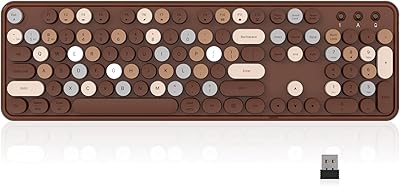
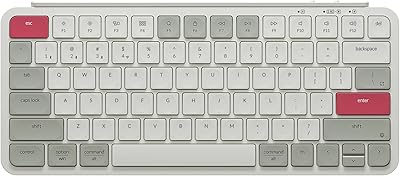
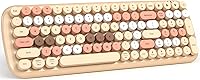
The MOFII Candy BT Wireless Bluetooth Keyboard enters a crowded budget wireless market with a clear identity: retro typewriter aesthetics wrapped in a soft milk tea colorway that genuinely stands out on a desk. It launched in late 2022 and has quietly built a following, now sitting above 2,000 ratings with a 4.3-star average — respectable for any budget peripheral. Unlike most compact wireless boards, it keeps the full 100-key layout intact, numpad included. Running on replaceable batteries with an auto sleep mode, it is designed for everyday use without demanding much from the buyer beyond the initial setup.
Features & Benefits

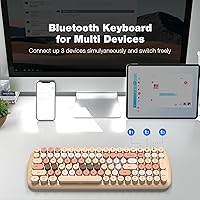
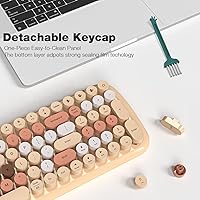
Switching between devices is where this retro Bluetooth keyboard earns its keep. Bluetooth 5.1 handles pairing up to three devices — laptop, tablet, phone — and channel switching is quick enough that you barely break stride. The full 100-key layout is a genuine differentiator; most boards at this price drop the numpad to shrink the footprint, but this one does not. The round, removable keycaps look great and can be pulled off for cleaning when needed. A built-in auto sleep mode kicks in during idle periods, and a small LED in the corner warns you before the batteries die. Wireless range stretches to around 6 meters, covering most rooms without signal issues.

Best For

This typewriter-style keyboard makes the most sense for home office users who care about how their desk looks but are not trying to spend heavily on peripherals. It is also a natural fit for iPad and iPhone users who want a physical keyboard for writing emails, taking notes, or light creative work — the multi-device pairing lets you jump between phone and tablet without re-pairing every time. Casual typists, students, and remote workers who prioritize aesthetics and convenience over the precise feel of a mechanical board will find it hits a comfortable middle ground. It also works well as a visually distinct gift for anyone putting together a styled workspace.

User Feedback

Buyers consistently praise the visual appeal — the milk tea colorway photographs well and the round keycaps make a real impression straight out of the box. Pairing is described as easy and reliable by most. The typing feel is where opinions split: touch typists used to flat keycaps or mechanical switches often find the round profile takes some adjustment, and the key travel is noticeably shallow. Battery drain has come up as a concern among heavier users, though the low-battery LED does help with planning. A handful of buyers mention occasional Bluetooth dropout when switching devices. Keycap shine developing over time has also been flagged, though it is not a widespread complaint.

Pros

  • Distinctive milk tea colorway and round keycaps make for one of the most visually appealing keyboards at this price tier.
  • Bluetooth 5.1 pairs quickly across Mac, Windows, iOS, and Android without any driver installation.
  • Three-device pairing lets you switch between a laptop, tablet, and phone without re-pairing each time.
  • Full 100-key layout with numpad is rare for a wireless board in this price range.
  • Typing sound is noticeably quieter than the retro aesthetic suggests, making it usable in shared spaces.
  • Auto sleep mode helps stretch battery life for light to moderate daily users.
  • Low-battery LED indicator gives you enough advance warning to swap cells before getting caught short.
  • Round keycaps are removable, making the board easy to clean and potentially customizable.
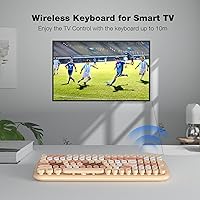
  • Wireless range of around 6 meters handles most room-to-device distances without signal issues.
  • Broad OS compatibility means it works across mixed-device households without any configuration headaches.

Cons

  • Round keycap profile causes a noticeable adjustment period for touch typists used to flat or mechanical keyboards.
  • ABS keycaps develop a greasy shine on heavy-use keys within a few months of daily typing.
  • Battery drain is faster than expected for heavier users, and running on replaceable cells adds ongoing cost.
  • Occasional Bluetooth dropout during device switching has been reported frequently enough to be a real concern.
  • Key travel is shallow, which increases miskey rate during fast or pressured typing sessions.
  • Function key behavior is inconsistent across operating systems and is poorly documented in the included materials.
  • The pairing channel buttons are small and unlabeled clearly, causing confusion during initial multi-device setup.
  • Saved device pairings can drop after extended periods of inactivity, requiring users to re-pair from scratch.
  • At nearly 1.7 pounds with a wide footprint, it is bulkier than truly portable compact keyboards for commuters.
  • The retro aesthetic is specific enough that it will clash with minimal or dark desk themes.

Ratings

The MOFII Candy BT Wireless Bluetooth Keyboard has been scored by our AI rating system after analyzing thousands of verified global buyer reviews, with spam, bot-submitted, and incentivized feedback actively filtered out. Scores reflect the full picture — what real users genuinely love and where frustrations consistently surface — so you can make an informed decision without sifting through hundreds of reviews yourself. Both the standout strengths and the recurring pain points are weighed proportionally in every category below.
Design & Aesthetics
93%
The milk tea colorway and round retro keycaps make this one of the most visually distinctive keyboards at its price point. Buyers frequently mention it as a desk centerpiece that draws compliments, and the soft pastel tones photograph exceptionally well for home office setups shared on social media.
The aesthetic is very specific — buyers who prefer a minimal or dark desk theme may find the colorway clashes with their setup. A small number of users feel the retro look does not translate as well in person as it does in product photos.
Build Quality
71%
29%
For a budget ABS plastic keyboard, the shell feels reasonably solid and does not flex noticeably during normal typing. Most buyers report no creaking or rattling straight out of the box, which is a common issue at this price tier.
ABS plastic has its limits, and longer-term users report that the keycaps begin to develop a greasy shine after several months of daily use. The overall construction feels light — which aids portability but does reduce the sense of durability.
Typing Experience
62%
38%
The round keycaps have a novelty that casual typists genuinely enjoy, and the quieter-than-expected sound profile makes this board usable in shared spaces like open offices or libraries without drawing attention.
Touch typists and anyone coming from flat-profile or mechanical keyboards will need an adjustment period, and some never fully adapt. Key travel is shallow, and the round edges can cause more miskeys than expected during fast typing sessions.
Bluetooth Connectivity
79%
21%
Bluetooth 5.1 delivers fast initial pairing across macOS, iOS, Windows, and Android without needing drivers or software. Switching between three saved devices is quick enough for practical daily use, especially for users who alternate between a laptop and iPad throughout the day.
A recurring thread in user feedback involves occasional dropout when switching between devices, requiring a manual reconnect. While not universal, it appears frequently enough to flag — particularly for users on Windows machines.
Multi-Device Pairing
81%
19%
The three-device pairing setup is genuinely useful for anyone managing a multi-screen or multi-device workflow. Users who pair it to a Mac, an iPhone, and an iPad simultaneously find the channel-switching fast and mostly reliable for day-to-day task switching.
The pairing process, while straightforward for tech-comfortable users, has confused a subset of buyers who found the documentation unclear. A few noted that saved device slots occasionally need to be re-paired after the keyboard sits unused for extended periods.
Battery Life
58%
42%
The auto sleep mode does a reasonable job of stretching battery life for light to moderate users, and the low-battery LED indicator gives enough advance warning to plan a replacement without being caught off guard.
Heavy daily users report going through batteries faster than expected, which adds up over time given this uses replaceable cells rather than a rechargeable built-in. The product listing is vague about exact battery specs, leaving buyers to discover runtime on their own.
Wireless Range
84%
The roughly 6-meter effective range is more than adequate for typical desk setups and even couch-to-TV distances. Users working in open studio or living room environments report stable signal without needing to keep the keyboard close to the paired device.
In environments with high wireless interference — dense apartment buildings, offices with many active Bluetooth devices — a few users noted reduced effective range and occasional lag. This is a Bluetooth limitation generally, not specific to this board, but worth noting.
Keycap Durability
61%
39%
The round keycaps are removable, which makes cleaning straightforward and opens the door for future customization if compatible replacements are sourced. Buyers who clean their keyboards regularly report the legends staying intact for a reasonable period.
Keycap shine is a recurring complaint among users who type heavily for several hours a day. The ABS material wears visibly faster than PBT alternatives, and the legends on high-frequency keys like the spacebar and common letters show wear within months for power users.
Compatibility
88%
Cross-platform support without any driver installation is a genuine convenience win. Buyers consistently praise how quickly the keyboard just works across macOS, iPad OS, Windows, and Android — making it a reliable choice for mixed-device households.
A handful of function key behaviors differ across operating systems and are not clearly documented, which has frustrated a few Mac-specific users expecting dedicated media controls to map correctly out of the box.
Portability
76%
24%
At just under 1.7 pounds with a footprint that fits in most laptop bags, this retro Bluetooth keyboard travels reasonably well for its full 100-key size. Users who move between home and office report it is manageable without being burdensome.
It is larger and heavier than truly portable compact keyboards, which matters for frequent travelers. The physical dimensions make it less suited for tight commuter bags compared to tenkeyless or 65-percent alternatives.
Value for Money
86%
At its price point, buyers widely agree this typewriter-style keyboard punches above its weight on visual impact and feature count. Getting Bluetooth 5.1, three-device pairing, a full 100-key layout, and a distinctive aesthetic together in one affordable package is hard to argue against for casual users.
The value calculation shifts if you are a heavy daily typist — the typing feel and keycap longevity do not hold up as well under sustained professional use. In that context, spending slightly more on a board with better switches and PBT keycaps makes more sense.
Setup & Ease of Use
89%
First-time Bluetooth keyboard users consistently describe the setup as painless. The keyboard powers on, enters pairing mode quickly, and most devices detect it within seconds — no app, no dongle, no account required.
The physical labeling of the pairing channel buttons is small and easy to miss, and a few buyers initially struggled to understand how to switch between saved device slots without consulting third-party tutorials.
Sound Profile
77%
23%
Buyers expecting a loud, clacky typewriter experience are often pleasantly surprised by how quiet this keyboard actually is. The sound is soft and muted — much more office-appropriate than the retro styling might suggest.
For buyers who specifically wanted that satisfying typewriter clack, the subdued sound profile can feel like a letdown. The round keycaps create the look but not the acoustics of a vintage typing machine.

Suitable for:

The MOFII Candy BT Wireless Bluetooth Keyboard was built for a specific kind of buyer, and for that buyer it genuinely delivers. If you are putting together a home office setup and want something that looks considered and intentional without a hefty price tag, this retro Bluetooth keyboard fits that brief well. It is also a practical choice for anyone who regularly switches between an iPad, a phone, and a laptop — the three-device pairing means you are not re-pairing from scratch every time you change context. Students, writers, and remote workers who type for moderate stretches each day will find the round keycaps perfectly functional, even if they take a short adjustment period. iPhone and iPad users in particular benefit from the plug-and-play compatibility — no app downloads, no dongles, just a fast Bluetooth handshake. It also makes a genuinely thoughtful gift for someone who cares about desk aesthetics, since the milk tea colorway is distinctive enough to feel personal without being polarizing.
Not suitable for:

The MOFII Candy BT Wireless Bluetooth Keyboard is a harder sell if your work depends on sustained, high-speed typing for several hours a day. The round keycap profile and shallow key travel divide opinion sharply among touch typists — people who have spent years on flat-profile or mechanical keyboards often find the adjustment uncomfortable and the miskey rate frustrating under pressure. The ABS keycaps also show wear faster than expected with heavy daily use, developing a noticeable shine on high-frequency keys within a few months. If reliable, uninterrupted Bluetooth is non-negotiable for your workflow, the occasional dropout reports during device switching are worth taking seriously before committing. This typewriter-style keyboard also runs on replaceable batteries rather than a rechargeable cell, which is a recurring annoyance for heavy users who burn through batteries faster than anticipated. Finally, buyers who prefer a minimal, dark, or professional desk aesthetic may find the pastel colorway simply does not fit their setup, no matter how well the keyboard performs otherwise.
Specifications

  • Brand: Manufactured by MOFII under the model designation Candy BT, also referenced as SK-646BT.
  • Connectivity: Uses Bluetooth 5.1 for wireless pairing, with no USB dongle or wired connection required.
  • Multi-Device Support: Stores up to 3 device pairings simultaneously, switchable via dedicated channel keys on the keyboard.
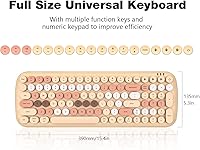
  • Key Count: Full 100-key layout including a numeric keypad, function row, and standard navigation cluster.
  • Keycap Style: Round, removable ABS keycaps designed in a retro typewriter style, available in a Milk Tea Colorful colorway.
  • Wireless Range: Effective operating range is approximately 6 meters (20 feet) under typical indoor conditions.
  • Power Source: Powered by replaceable batteries (AAA type commonly used in this form factor); no built-in rechargeable cell.
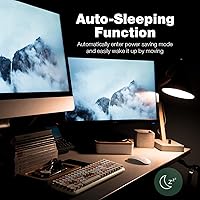
  • Auto Sleep: Keyboard enters a power-saving sleep state automatically during inactivity and wakes instantly on any keypress.
  • Battery Indicator: A dedicated LED light in the top-right corner illuminates to signal low battery before power is fully depleted.
  • Compatible OS: Works across macOS, iOS (iPad OS and iPhone), Windows, and Android without requiring driver installation.
  • Material: Housing and keycaps are constructed from Acrylonitrile Butadiene Styrene (ABS) plastic.
  • Dimensions: Measures 15.9″ in length by 15.9″ in width by 5.5″ in height as listed by the manufacturer.
  • Weight: Weighs approximately 1.65 pounds, making it a full-size board that is portable but not ultralight.
  • Backlighting: Supports single-color keyboard backlighting; specific color and brightness levels are not detailed by the manufacturer.
  • Key Profile: Round-top keycap profile inspired by vintage typewriter keys, which differs noticeably from standard flat OEM profiles.
  • Release Date: First made available for purchase in October 2022 through Amazon and select retail channels.
  • Style: Retro aesthetic designed to appeal to buyers building visually styled home office or creative workspaces.

Related Reviews

Links9+ Wireless Bluetooth Keyboard
86%
89%
Typing Comfort
85%
Build Quality
78%
Connectivity Stability
90%
Battery Life
91%
Design & Aesthetics
More
Logitech K480 Wireless Bluetooth Keyboard
86%
88%
Ease of Device Switching
81%
Bluetooth Connectivity
85%
Build Quality
72%
Ergonomics and Comfort
92%
Battery Life
More
MOFII Wireless Keyboard and Mouse Combo
84%
94%
Ease of Setup
85%
Ergonomics and Comfort
90%
Wireless Connectivity
88%
Design and Aesthetics
83%
Battery Life
More
Rii RT518S Wireless Keyboard
75%
78%
Trackpad Responsiveness
83%
Dual-Mode Connectivity
61%
Build Quality
67%
Backlight Quality
81%
Battery Life
More
Cherry GENTIX BT Wireless Bluetooth Mouse
85%
91%
Multi-Device Support
89%
Battery Life
84%
Usability/Ergonomics
92%
Connectivity/Compatibility
80%
Build Quality
More
Lenovo Multi-Device Wireless Keyboard ZG38C05810
83%
88%
Multi-Device Switching
83%
Typing Feel & Key Response
92%
Portability & Form Factor
76%
Battery Life
91%
USB-C Charging Convenience
More
Keychron K4 Bluetooth Wireless Mechanical Keyboard
86%
91%
Build Quality
88%
Battery Life
85%
Typing Experience
90%
Connectivity & Versatility
82%
RGB Backlighting
More
Keychron B1 Pro Wireless Bluetooth Keyboard
86%
88%
Overall Performance
91%
Typing Experience
93%
Battery Life
89%
Portability & Size
84%
Build Quality
More
UBOTIE Portable Bluetooth Wireless Mini Keyboard
87%
91%
Bluetooth Connectivity
87%
Typing Comfort
94%
Portability
80%
Battery Life
88%
Multi-Device Support
More
Kenkor K08 Universal Wireless Bluetooth Keyboard
84%
91%
Portability & Design
80%
Typing Comfort
88%
Battery Life
85%
Connectivity & Range
92%
Compatibility with Devices
More

FAQ

Yes, it pairs directly with iPad via Bluetooth — no app or adapter needed. Just hold the pairing button for the channel you want to use, find the keyboard in your iPad's Bluetooth settings, and you are connected in under a minute. It works with both older and current iPad models running iPadOS.

The MOFII Candy BT Wireless Bluetooth Keyboard runs on replaceable AAA batteries. Battery life varies a lot depending on how heavily you type and whether the backlight is active — light users report several weeks, while heavy daily typists may find themselves replacing batteries more frequently. The onboard low-battery LED gives you a heads-up before it dies completely.
Yes, once you have paired three devices across the three available channels, switching is just a matter of pressing the corresponding channel key. The reconnection is quick in most cases, though a handful of users have noted occasional delays when switching to a device that has been idle for a while.

It is genuinely different. The round keycaps have a curved top surface that takes some getting used to if you are a trained touch typist — your fingers do not always land exactly where expected at first. Casual typists tend to adapt quickly, but if you type fast and heavily all day, the shallow key travel and round profile may cause more miskeys than you are used to.

Surprisingly quiet, actually. Most buyers expect a loud clack based on the typewriter-inspired design and are relieved to find it is much softer than anticipated. It is not silent, but the sound level is well within acceptable range for most open-plan offices or shared rooms.

Yes, this retro Bluetooth keyboard is fully compatible with Windows and macOS without any driver setup. Keep in mind that some function key behaviors differ between operating systems, and the documentation does not always make those differences clear — a quick search for the specific shortcut you need usually resolves any confusion.

Yes, the round keycaps are removable. A standard keycap puller works fine, or you can carefully pop them off by hand. This makes cleaning under the keys straightforward. Replacement keycaps need to match the round profile, so standard flat OEM replacements will not look or sit right.

It does have a single-color backlight. Turning it off when you do not need it is one of the easiest ways to extend your battery life, which is worth doing if you are using the keyboard in a well-lit room during the day.

Each of the three pairing channels has a dedicated key on the keyboard, usually labeled with a Bluetooth icon and a number. To pair a new device on a channel, hold that channel key until the pairing indicator flashes, then connect from your device's Bluetooth settings menu. After the initial setup, you just press the channel key briefly to switch.

It is a reasonable gift choice for a casual user. The pairing process is simple enough for most people, and the broad device compatibility means it will work with whatever phone, tablet, or computer the recipient owns. The visual appeal is a genuine selling point — the colorway is distinctive enough to feel like a considered gift rather than a generic accessory. Just note that the multi-device switching setup might need a quick walk-through for someone who is not comfortable with Bluetooth pairing.