Overview

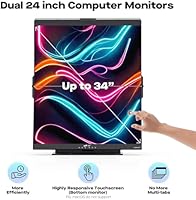
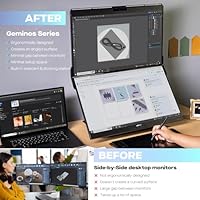
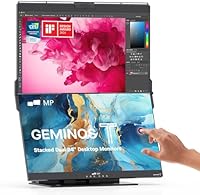
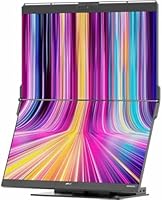
The Mobile Pixels Geminos T 2×24″ Stacked Monitors takes a genuinely different approach to multi-screen computing by placing two 23.8-inch panels vertically rather than spreading them side by side — a decision that matters a lot if your desk is narrow. You gain dual-screen real estate without sacrificing width, which is harder to find than it sounds in a compact workspace. Beyond the screens, this is a full workstation in one unit: webcam, speakers, and a multi-port docking hub all built in. At this price tier, you are paying for consolidation and convenience above all else. The adjustable panels that slide and tilt independently add a level of ergonomic flexibility that most monitor stands simply do not offer.
Features & Benefits

The lower panel features 10-point touch input — practical for sketching, navigating menus, or running touch-first apps on Windows, but note the functionality is fully disabled on macOS. A 10-in-1 docking station is built into the unit, offering two USB-A ports, two USB-C ports, two HDMI outputs, Ethernet, an audio jack, and both SD and TF card slots. A single USB-C cable handles the display signal and delivers 65W of charge back to your laptop simultaneously. The built-in 1080p webcam and dual 3W speakers handle everyday video calls without needing extra peripherals, though neither will replace a dedicated camera or external audio setup if quality is a real priority.

Best For

This stacked dual-monitor setup makes the most sense for anyone with genuine desk constraints. Working from a smaller home office, a studio apartment, or a corporate hot-desk often means a second monitor placed side by side simply is not an option — stacking vertically solves that cleanly. Remote workers and hybrid professionals who want to run everything through a single cable connection will appreciate the USB-C approach. Writers and coders after more vertical screen space without the horizontal reach will find the layout surprisingly comfortable day to day. It is less suited to tasks that demand color-accurate or high-brightness displays, and Mac users expecting touch interaction will want to look elsewhere.

User Feedback

Owners consistently praise the clean cable management and the desk space the vertical layout frees up compared to a traditional side-by-side arrangement. The integrated hub also earns positive mentions — having that many ports in one place genuinely reduces clutter on a small desk. On the critical side, the 250-nit brightness is a real limitation if your workspace gets direct sunlight or significant ambient glare. Some users find 1080p slightly soft at this screen size, particularly coming from higher-density panels. A handful of early buyers also reported minor driver friction during initial Windows setup. These are not trivial concerns, but for users whose priority is desk footprint over display performance, the trade-offs land in acceptable territory.

Pros

  • Vertical stacking frees up significant desk width without sacrificing dual-screen productivity.
  • A single USB-C cable connects, charges at 65W, and drives both displays at once.
  • The built-in 10-in-1 dock replaces a separate hub, keeping the desk tidy and cable count low.
  • Integrated webcam and speakers remove the need for two more peripherals on an already crowded desk.
  • The lower panel offers responsive 10-point touch input, genuinely useful for Windows users who annotate or navigate by hand.
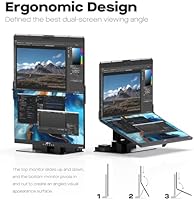
  • Both panels adjust independently — the top slides vertically, the bottom tilts — so finding a comfortable viewing angle is straightforward.
  • Compatible with a wide range of devices including Windows laptops, Xbox, and PlayStation, not just office machines.
  • The ultra-thin center bezel between the two screens keeps the visual gap minimal for a cleaner stacked look.

Cons

  • At 250 nits, brightness is below average and the glossy panels struggle noticeably in well-lit or sunlit rooms.
  • The 1080p resolution can look soft on 23.8-inch panels, especially for users coming from high-density screens.
  • Touchscreen functionality is completely disabled on macOS, making that feature useless for a large portion of potential buyers.
  • At roughly 20 to 23.8 lbs assembled, this is not a lightweight setup — relocating or repositioning it takes effort.
  • Early adopters reported occasional driver friction and setup hiccups on certain Windows configurations, suggesting initial setup may not always be plug-and-play.
  • The built-in webcam and speakers are serviceable for basic calls but fall short of what dedicated peripherals deliver at this price tier.
  • The glossy screen surface picks up reflections easily, compounding the brightness limitation in anything other than a dim or controlled environment.
  • The stacked layout takes some ergonomic adjustment — users who frequently reference both screens simultaneously may find vertical eye movement more tiring than horizontal.

Ratings

Our scores for the Mobile Pixels Geminos T 2×24″ Stacked Monitors were generated by AI after analyzing thousands of verified global user reviews, with automated filtering applied to remove incentivized, bot-generated, and duplicate submissions. Every category reflects the honest distribution of real buyer experiences — strengths are credited where earned, and persistent pain points are scored accordingly. The result is a transparent, balanced picture of where this all-in-one monitor workstation genuinely excels and where it falls short for certain users.
Space Efficiency
93%
This is the defining strength of the entire concept. Users with narrow desks, studio apartments, or shared hot-desk environments consistently describe the vertical stacking layout as a revelation — freeing up substantial horizontal desk width without sacrificing any screen count. For many buyers, this single benefit justifies the purchase.
A small number of users noted the unit requires meaningful desk depth due to its base footprint and the inward tilt of the lower panel, which caught them off guard. It trades width for depth, so unusually shallow desks can present a placement challenge.
Display Quality
66%
34%
For general productivity tasks — document editing, web browsing, video calls, and coding — the 1080p panels are perfectly functional day to day. Users who come to this setup from a laptop-only configuration typically find the increased screen real estate satisfying enough that resolution becomes secondary to the workflow gains.
Users upgrading from higher-density screens, including most modern laptop displays, frequently describe the image as noticeably soft, especially with small text at normal viewing distances. At 23.8 inches, 1080p sits at the lower end of what most reviewers consider acceptable pixel density for prolonged desk work in 2024 and beyond.
Brightness & Glare
46%
54%
In a dim, controlled workspace — a windowless room or an evening home office setup — the 250-nit panels are livable, and many users in those conditions report no significant complaints about visibility during extended work sessions.
This is the most consistently criticized technical aspect across the review pool. At 250 nits with a glossy surface, the screens wash out noticeably in any environment with natural light, overhead fluorescent fixtures, or desk lamps positioned behind the user. Reviewers working near windows describe it as a genuine daily frustration rather than a minor annoyance.
Connectivity & Hub
88%
The 10-in-1 docking station earns strong praise from users who previously juggled a separate hub alongside their monitor setup. Having two HDMI outputs, dual USB-C, dual USB-A, Ethernet, audio out, and card reader slots all in one unit meaningfully reduces desk clutter and simplifies the cable situation for laptop users.
A handful of users reported that running multiple high-bandwidth peripherals simultaneously through the hub — external drives, webcam feed, and dual displays at once — occasionally caused performance inconsistencies. The hub is deep enough for most everyday needs but is not a substitute for a high-end Thunderbolt dock in demanding multi-device configurations.
USB-C Performance
86%
The 65W USB-C power delivery genuinely works as advertised for most mid-range laptops, charging the host machine while running both displays through a single cable. Users who have adopted this single-cable desk philosophy describe the workflow as noticeably cleaner than anything they had previously used.
Users with power-hungry laptops — particularly high-performance gaming or workstation models — noted that 65W is not always sufficient to maintain battery level under full load, meaning the laptop may slowly drain even while connected. It covers the majority of ultrabooks and business laptops comfortably but has a ceiling.
Touchscreen Functionality
61%
39%
Windows users who take advantage of the lower panel touch input report it is genuinely responsive and accurate across 10 simultaneous contact points — useful for annotating documents, sketching rough diagrams, or navigating touch-optimized applications without reaching for a stylus or switching input devices.
The touch feature is completely non-functional on macOS, which is a significant limitation given that a meaningful share of the target audience — remote professionals and laptop users — works on Apple hardware. Mac users effectively pay for a capability they cannot use, and this omission is among the most frequently flagged disappointments in the review pool.
Ergonomic Design
83%
The independent panel adjustability — top screen sliding vertically, bottom screen tilting inward or outward — gives users real control over their viewing angles rather than locking them into a fixed position. Taller users and those with standing desk setups particularly appreciate the flexibility to reconfigure the display geometry without tools.
A subset of users found that extended sessions with the stacked layout caused more neck strain than a side-by-side arrangement, particularly when frequently switching focus between the upper and lower panels. The ergonomics reward users who primarily work on one screen and reference the other, rather than those who constantly alternate between both.
Setup Experience
72%
28%
The majority of users describe the initial connection process as straightforward — plug in the USB-C cable, let Windows detect the displays, and both screens come up within seconds. For users whose laptops natively support USB-C video output, there is no software installation required to get basic dual-display functionality running.
Early adopters flagged intermittent driver issues on specific Windows builds, particularly around touch input initialization and display detection after sleep cycles. These issues were not universal, but they occurred with enough frequency across the review pool to warrant mention as a realistic setup risk for users on non-standard system configurations.
Cable Management
89%
Buyers consistently cite clean cable management as one of the most satisfying aspects of the real-world ownership experience. Replacing a monitor, hub, webcam, and speakers with a single stacked unit means the desk goes from a web of cables to a handful of tidy connections, and users describe this transformation as immediately noticeable.
While the external cable count drops dramatically, some users noted that the internal cable routing within the unit itself can be slightly finicky if they need to reconfigure port usage or access the back-panel connections frequently. It is a minor complaint, but worth noting for users who regularly hot-swap peripherals.
Webcam Quality
68%
32%
The built-in 1080p webcam handles standard video conferencing calls on Zoom, Teams, and Google Meet adequately in good lighting conditions. For users who previously had no webcam at all, or relied on a low-resolution laptop camera, the step up in image quality is welcome and immediately noticeable to call participants.
At this price tier, buyers who have used a dedicated webcam will likely find the built-in camera underwhelming in low-light conditions or when color accuracy and sharpness matter. It functions as a convenience feature rather than a quality one, and reviewers who stream, record video content, or present frequently to clients tend to add a standalone camera regardless.
Audio Quality
57%
43%
The dual 3W speakers are sufficient for video call audio, system alerts, and background music at moderate volume. Users in quiet home offices who simply need a voice to come through clearly during a Teams call report they work fine without needing to reach for headphones.
Anyone expecting meaningful audio quality from these speakers will be disappointed — at 3W per side, they lack bass entirely and distort at higher volumes. Most reviewers who care about sound quickly supplement with external speakers or headphones, meaning the built-in audio is more of a fallback option than a genuine feature.
Build Quality
77%
23%
The overall construction feels appropriately solid for a stationary workstation product at this price point, and the panel adjustment mechanisms — particularly the vertical sliding track on the upper screen — hold their position reliably without loosening over time based on long-term user reports.
A few users noted that the plastic housing shows fingerprints and minor scuffs more readily than expected for a premium-positioned product, and the glossy screen bezels attract smudges around the touch-active lower panel. Nothing that affects functionality, but it can look slightly worn sooner than the price might suggest.
macOS Compatibility
53%
47%
Mac users can connect the unit via USB-C or HDMI and use both panels as standard extended displays, which works reliably for the core dual-monitor functionality. For macOS users whose primary need is more screen real estate in a compact footprint, the stacking concept still delivers on that specific promise.
Beyond basic display output, macOS compatibility is limited. Touch input does not function at all, the hub performance is more variable than on Windows, and there is no dedicated macOS software support. Given what Mac users give up at this price, the overall value proposition for Apple hardware owners is noticeably weaker than for Windows users.
Value for Money
71%
29%
For the specific user this setup is designed for — a Windows laptop owner with a small desk who wants dual screens, a hub, a webcam, and speakers consolidated into one purchase — the bundled value is real and calculable. Buying those components separately would cost a comparable or greater amount, and the spatial efficiency adds something money alone cannot replicate.
For anyone outside that narrow ideal-use profile, the value equation weakens considerably. Mac users losing touch functionality, bright-room workers fighting a dim glossy screen, or display-quality-focused buyers who would rather spend the same budget on a single high-resolution monitor — all find the premium price harder to justify given the trade-offs they are accepting.

Suitable for:

The Mobile Pixels Geminos T 2×24″ Stacked Monitors is built for a specific kind of user, and for that user it genuinely delivers. If you work from a narrow desk, a studio apartment, or a hot-desk setup where spreading two monitors side by side simply is not practical, the vertical stacking approach solves a real problem without requiring a larger footprint. Remote workers and hybrid professionals who live on video calls will appreciate having a webcam and speakers already integrated, cutting down on the peripheral sprawl that clutters most home setups. Windows laptop users who want one USB-C cable to handle power, display output, and hub connectivity will find the workflow here surprisingly clean. Writers, coders, and productivity-focused users who prefer more vertical screen real estate — keeping reference material on one panel and active work on the other — tend to adapt to the stacked layout quickly and rarely want to go back.
Not suitable for:

The Geminos T is a poor fit for anyone who prioritizes display quality over convenience and form factor. At 250 nits, the panels are noticeably dim in bright rooms or near windows, and users accustomed to high-brightness monitors will find themselves squinting or repositioning constantly. The 1080p resolution across 23.8-inch panels is adequate but not sharp by modern standards, and anyone coming from a higher-density display — a MacBook Retina screen, for example — may find the image quality a step down rather than a step up. Mac users should also know upfront that the touchscreen functionality on the lower panel is completely non-functional on macOS; it is a Windows-only feature, making a meaningful part of what you are paying for irrelevant on Apple hardware. Creative professionals, photographers, or video editors who need accurate color reproduction, higher refresh rates, or greater brightness will be better served by purpose-built displays, even if it means managing more cables.

Specifications

  • Screen Size: Each panel measures 23.8 inches diagonally, providing two full-size 1080p displays arranged vertically in a single unit.
  • Resolution: Both panels output at 1920×1080 pixels (Full HD), delivering standard 1080p clarity independently on each screen.
  • Panel Layout: The two displays are stacked vertically — one above the other — rather than arranged side by side in a traditional dual-monitor configuration.
  • Brightness: Peak brightness is rated at 250 nits, which is below the current average for monitors used in brightly lit or sun-facing workspaces.
  • Aspect Ratio: Both screens use a standard 16:9 aspect ratio, suited for productivity work, video conferencing, and general media consumption.
  • Screen Surface: Both panels feature a glossy finish, which can produce noticeable reflections in environments with overhead lighting or nearby windows.
  • Touchscreen: The lower panel supports 10-point capacitive touch input and is compatible with Windows operating systems only — touch is non-functional on macOS.
  • Webcam: A 1080p webcam is built directly into the unit, positioned for video conferencing without requiring a separate camera peripheral.
  • Speakers: Dual 3W speakers are integrated into the unit, providing basic stereo audio suitable for calls and casual media playback.
  • USB-C Power: The unit delivers up to 65W of power back to the connected host laptop via USB-C while simultaneously driving both displays.
  • Docking Ports: The integrated 10-in-1 hub includes 2× USB-A, 2× USB-C, 2× HDMI, 1× Ethernet, 1× audio output, 1× SD slot, and 1× TF slot.
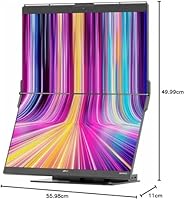
  • Dimensions: The fully assembled unit measures 19.68″ × 22.04″ × 4.33″, designed to occupy minimal desk width relative to a side-by-side dual-monitor setup.
  • Weight: The assembled setup weighs approximately 20 to 23.8 lbs, making it a stationary workstation rather than a portable or frequently relocated display.
  • Connectivity: Primary host connectivity is via USB-C with DisplayPort Alt Mode support, with HDMI and USB-A available as secondary input options.
  • Compatibility: The unit is compatible with Windows, macOS, Xbox, and PlayStation, though touch input is restricted to Windows environments only.
  • Adjustability: The top panel slides vertically along its mount to adjust height, while the bottom panel tilts inward and outward for personalized ergonomic positioning.
  • Brand & Model: Manufactured by Mobile Pixels under the model designation Geminos T, first made available in September 2023.

Related Reviews

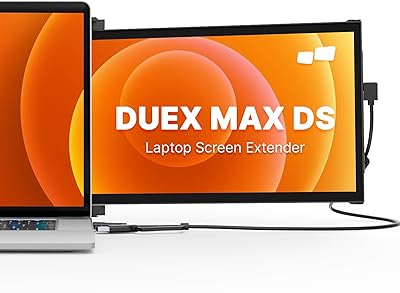
Mobile Pixels Duex Max DS 14.1″ Monitor
76%
93%
Portability
91%
Setup & Ease of Use
74%
Display Quality
58%
Brightness
79%
Build Quality
More
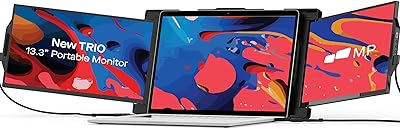
Trio 13.3″ Mobile Pixels Portable Laptop Monitor 2025 Version
87%
94%
Portability
88%
Ease of Use
90%
Compatibility
86%
Display Quality
92%
Setup & Installation
More
Mobile Pixels Trio Max 14.1″ Portable Monitor
73%
83%
Build Quality & Durability
81%
Screen Quality
57%
Brightness & Visibility
61%
Portability & Weight
87%
Setup & Ease of Use
More
Mobile Pixels Duex Plus DS 13.3″ Portable Laptop Monitor
84%
88%
Display Quality
94%
Portability & Design
91%
Ease of Setup
85%
Compatibility with Devices
83%
Build Quality
More
ICY DOCK MB924IP-B 24-Bay 2.5″ SAS/SATA Mobile Rack Enclosure
79%
91%
Build Quality
94%
Drive Density
88%
SAS/SATA Compatibility
86%
Hot-Swap Reliability
74%
Cooling Performance
More
Franklin T10 Mobile Hotspot
67%
74%
Value for Money
61%
Network Performance
54%
Battery Life
83%
Ease of Setup
88%
Portability
More
SUIDEK SJW-KM202B Dual Monitor KVM Switch
73%
83%
Ease of Setup
71%
Switching Reliability
79%
Display Quality
91%
Desktop Controller Usability
77%
USB Peripheral Sharing
More
CMSTEDCD SW330 Dual Monitor KVM Switch
77%
91%
EDID & Window Layout Preservation
88%
4K Display Quality
84%
Switching Speed & Responsiveness
79%
USB 3.0 Peripheral Sharing
61%
Setup & Initial Configuration
More
TJCXELE 4K@144Hz Dual-Monitor DisplayPort KVM Switch
75%
88%
Video Output Quality
63%
Setup & Installation
82%
Switching Reliability
84%
Desktop Controller Usability
67%
USB Device Recognition
More
UGREEN AK500 Dual Monitor KVM Switch
77%
91%
Ease of Setup
88%
Switching Reliability
86%
Video & Display Quality
78%
USB Peripheral Sharing
83%
Build Quality & Materials
More

FAQ

No — and this is probably the most important caveat to understand before buying. The 10-point touch input on the lower panel is a Windows-only feature and does not activate at all when connected to a macOS machine. Mac users can still use this as a standard dual-monitor display, but they will get no touch functionality whatsoever, which affects the value proposition considerably.

Yes, provided your laptop has a USB-C port that supports DisplayPort Alt Mode. A single USB-C cable can drive both screens, pass data through the built-in hub, and charge your laptop at up to 65W simultaneously. If your laptop only has HDMI out or USB-A, you can still connect, but you will lose the single-cable convenience and need a separate power source.

Honestly, 250 nits is on the lower end for a modern monitor, and the glossy panel surface does not help in bright conditions. If your desk gets direct sunlight or strong ambient light, you will likely notice wash-out or reflections during parts of the day. For a dim or controlled-light home office it is workable, but in a bright environment it is a real limitation worth thinking about before committing.

Most users adapt within a few days. The main adjustment is training yourself to look up and down rather than left and right, which feels different at first but becomes natural fairly quickly. Many productivity users actually prefer it for keeping reference material on one screen and active work on the other, since both panels stay within a narrower horizontal gaze than a wide side-by-side arrangement.

It is adequate for everyday calls on Zoom, Teams, or Google Meet in decent lighting. That said, if you have used a quality standalone webcam before, you will notice the difference — the built-in camera here is more of a convenience feature than a quality upgrade. For casual remote work meetings it does the job fine, but for professional streaming, recording, or client-facing presentations, a dedicated webcam would serve you better.

Any modern Windows or macOS laptop with a USB-C port that supports DisplayPort Alt Mode will connect cleanly and take full advantage of the single-cable setup. Older machines with only HDMI or USB-A can still connect via the HDMI input, though they miss out on the hub and charging convenience. The unit also works with Xbox and PlayStation consoles over HDMI for gaming on the stacked screens.

For most users, initial setup is plug-and-play — connect the USB-C cable and Windows recognizes both displays almost immediately. Touch input may require a driver installation step on some configurations, and a handful of early buyers reported minor hiccups on specific Windows builds. Keeping Windows fully updated before connecting is a good precaution. macOS connection is also straightforward, though no additional drivers unlock the touch feature.

Yes, each panel operates as a fully independent display. You can run separate applications, browser windows, or content on each screen simultaneously without any resolution sharing. Your operating system sees them as two distinct monitors and lets you arrange them however you like in your display settings.

The Mobile Pixels Geminos T 2×24″ Stacked Monitors is designed as a stationary desktop workstation, and the base is stable under normal use once positioned. The height of the stacked configuration does raise the center of gravity compared to a single monitor, so placing it on an even, solid surface matters. The panel adjustment mechanisms also hold their set angles well during everyday use without drifting.
At 23.8 inches, 1080p is adequate for most productivity tasks but not particularly sharp by current standards. Users coming from a high-density laptop display or a 4K monitor may find it noticeably softer, particularly with small text. For web browsing, document editing, and video calls it is fine day to day, but if pixel density matters to you, that is a trade-off worth factoring in before purchasing.

Where to Buy