Overview

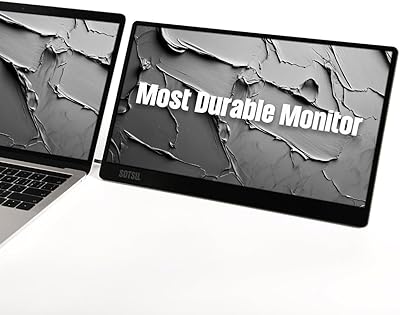
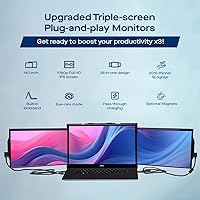
The Mobile Pixels Trio Max 14.1″ Portable Monitor is built for a specific kind of person — someone who refuses to accept that traveling for work means giving up their multi-screen setup. Two 14.1-inch panels slide out from either side of your laptop, tripling your workspace without a bag full of separate gear. The sliding mechanism and built-in kickstand are the defining physical features, doing the structural heavy lifting without requiring magnets. This sits firmly in the premium tier of portable monitors. Casual remote workers or occasional travelers will likely struggle to justify the cost. But for anyone whose productivity depends on running multiple windows simultaneously, this portable multi-monitor setup makes a compelling, if weighty, case.
Features & Benefits

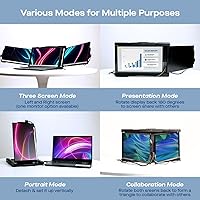
Each of the two panels runs at full HD resolution with a matte finish that handles indoor lighting reasonably well — though at 250 nits, direct sunlight or brightly lit conference rooms will push the displays to their limits. The four display modes are genuinely useful rather than gimmicky: landscape for standard work, portrait for reading long documents, collaboration for showing content to someone beside you, and presentation mode for facing a small audience. Connectivity covers USB-A and USB-C, and back-charging pass-through means you are not sacrificing a power port to run the screens. The Trio Max also supports Windows, macOS, Android, and Nintendo Switch, though macOS users may need to adjust display resolution settings before things look right.

Best For

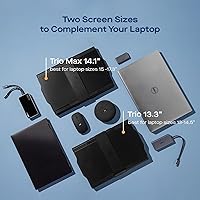
This triple-screen extender is sized for laptops between 15 and 17.3 inches — that range is firm, and anyone with a smaller machine should look elsewhere. Within that pool, it works best for remote workers and digital nomads who genuinely need a full workstation experience wherever they land: developers juggling a code editor, documentation, and a terminal simultaneously, or financial professionals tracking live data feeds alongside a primary working window. If you already rely on a three-monitor desk setup and resent losing that when you travel, the Trio Max is essentially the portable answer. But be honest about the added weight — nearly four extra pounds in your bag is not trivial if you pack light.

User Feedback

Buyers who give this portable multi-monitor setup five stars tend to be heavy users with no regrets — screen clarity, the tactile satisfaction of sliding the panels out, and a faster-than-expected initial setup come up most often in positive reviews. Where ratings drop, weight is consistently the first complaint, followed by the 250-nit brightness struggling in open-plan offices or sunlit spaces. A handful of users flag USB hub conflicts and occasional display resolution quirks on macOS that required manual configuration. The overall picture, though, is that buyers who matched this to their actual workflow rarely feel burned by the premium cost. Buyer's remorse appears mostly among those who over-estimated how frequently they would actually use it.

Pros

  • Instantly triples your laptop workspace with two additional 14.1-inch full HD panels that slide out smoothly.
  • The built-in kickstand means you can run a triple-screen setup without relying on magnets at all.
  • Four display modes — landscape, portrait, collaboration, and presentation — cover genuinely distinct real-world scenarios.
  • Back-charging pass-through lets you keep your laptop powered without sacrificing a USB port to the monitors.
  • Matte anti-glare finish reduces reflections effectively in typical indoor office and cafe environments.
  • Works across Windows, macOS, Android, and Nintendo Switch, making it versatile across a mixed-device workflow.
  • Initial setup is straightforward — most users report being up and running in under five minutes.
  • Eye care mode is a small but appreciated feature for anyone logging long hours across multiple screens.
  • The sliding mechanism feels solid and deliberate, not flimsy — buyers consistently praise the build quality feel.
  • Hybrid signal support adds flexibility for users connecting across different cable types without needing adapters.

Cons

  • At 3.9 pounds, this portable multi-monitor setup adds significant weight to any laptop bag — it is not a light carry.
  • 250-nit brightness is insufficient for outdoor use or brightly lit office environments; screens can appear dim.
  • Only compatible with laptops between 15 and 17.3 inches, leaving a large portion of laptop users without support.
  • macOS users may need to manually adjust display resolution settings before the output looks correct.
  • USB hub connections can cause conflicts; a direct port connection is strongly recommended for reliable performance.
  • The premium price point is hard to justify for anyone who works remotely only occasionally or inconsistently.
  • Running two additional displays draws meaningfully on laptop battery, reducing unplugged working time.
  • The overall form factor, while slim for what it does, is still bulky enough to dominate a standard laptop backpack.
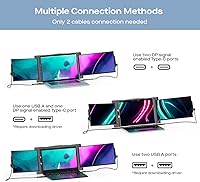
  • Only two USB ports are included, which can create cable management friction on laptops with limited connectivity.
  • Some users report that the optional magnets, while helpful for stability, require precise alignment and take practice.

Ratings

The scores below for the Mobile Pixels Trio Max 14.1″ Portable Monitor were generated by our AI system after analyzing thousands of verified global buyer reviews, with automated filters applied to exclude incentivized, duplicate, and bot-generated submissions. Each category score reflects the true distribution of buyer sentiment — not just the highlights — so both consistent strengths and recurring frustrations are represented with equal honesty. Where scores dip, they dip for documented reasons that real buyers encountered in real working conditions.
Build Quality & Durability
83%
The sliding mechanism is one of the most consistently praised physical elements across user reviews — it feels deliberate and solid rather than cheap, which matters a great deal for something that gets deployed and stowed multiple times a day. The overall chassis construction inspires enough confidence for frequent business travel.
A handful of long-term users report that the sliding rails begin to feel slightly looser after six-plus months of daily use, raising questions about how the mechanism holds up over years rather than weeks. Wear on the kickstand hinge is another concern flagged by heavier daily users.
Screen Quality
81%
19%
Color reproduction on both panels is genuinely one of the stronger qualities users cite, with most describing the FHD output as crisp and accurate enough for document work, spreadsheets, and light media review. The matte anti-glare coating keeps reflections manageable in most indoor environments without washing out the image.
At 1920x1080 on a 14.1-inch panel, pixel density is respectable but not exceptional — creative professionals accustomed to high-density displays may find the sharpness underwhelming. Some detail-oriented users also notice a slight variance in color consistency between the two extension panels when viewed side by side.
Brightness & Visibility
57%
43%
In controlled indoor settings such as a hotel room, dim co-working space, or home office with indirect lighting, 250 nits is sufficient to power through a full work day across all three screens without creating obvious eye fatigue or washing out text.
The 250-nit ceiling is the single most cited technical disappointment in the buyer pool and appears in nearly every three-star review. In open-plan offices with overhead fluorescent lighting, near windows on a sunny day, or in any outdoor scenario, both panels look visibly dim and low-contrast in a way that genuinely disrupts workflow.
Portability & Weight
61%
39%
The unit is impressively slim for what it delivers — two full-size FHD panels folded into a form factor that sits flat alongside a laptop is a real engineering achievement. Car commuters and users moving between fixed locations like a home office and a regular client site generally find the carry weight manageable.
At 3.9 pounds added to an already heavy large-format laptop, the total bag weight consistently surfaces as a pain point for frequent flyers and public transit commuters. Several buyers describe a cumulative physical fatigue after a week of daily carrying that they had not anticipated when purchasing.
Setup & Ease of Use
87%
The three-step process — attach, slide, connect — is among the most praised aspects across positive reviews, with many users reporting they were fully operational in under five minutes on their very first attempt. Windows users in particular describe the experience as close to genuinely plug-and-play.
macOS users face a noticeably steeper entry point, typically needing to manually adjust display resolution settings before the output looks correct — a step that non-technical users often find confusing. A small subset of buyers also notes recurring friction from remembering the correct cable-to-panel pairing during daily setup.
Display Mode Versatility
78%
22%
Having four genuinely distinct modes is something buyers actively use rather than just read about — the collaboration and presentation modes come up frequently in reviews from consultants and trainers who use the setup to share content with clients or small groups in real work situations.
Portrait mode receives mixed feedback in practice; the mechanics of rotating the panels can feel awkward mid-session, and not all content scales well vertically on a 14.1-inch panel. Some users also report that switching modes during a live meeting requires more physical adjustment than they would like.
Connectivity
74%
26%
Offering both USB-A and USB-C means the Trio Max covers the majority of modern laptops without requiring a separate adapter in most cases. The back-charging pass-through earns particular praise from users whose laptops have limited ports, since it prevents having to choose between keeping the laptop powered and running the extra screens.
Two total USB ports leave little room for error, and the documented conflicts when connecting through a USB hub are a real limitation for users who route their peripherals that way. A portion of buyers also report that the USB-A cable connection begins to feel less secure over months of daily plugging and unplugging.
Cross-Platform Compatibility
69%
31%
The ability to use the same unit across Windows, macOS, Android, and Nintendo Switch without any hardware changes is a genuine convenience for users who move between devices across a single workday. Windows compatibility is smooth and the most broadly praised OS experience in the review pool.
macOS users consistently encounter a rougher experience — manual resolution adjustments are almost always required on first connection, and some users report the issue resurfacing after major macOS updates. Android and Nintendo Switch compatibility works but reads more like an incidental bonus than a polished, tested integration.
Value for Money
72%
28%
Users who purchase with a clear, accurate picture of their own workflow and use this portable multi-monitor setup daily for remote work tend to feel the premium price is justified within the first month. For professionals whose multi-screen output directly correlates to billable productivity, the cost-per-benefit ratio holds up convincingly over time.
Several three-star reviews come from buyers who overestimated how often they would travel or underestimated the weight they were willing to carry day to day. When actual usage frequency falls below the mental model that justified the purchase, the price becomes difficult to rationalize against the real benefit received.
Stability & Attachment
76%
24%
The kickstand performs reliably on flat, stable surfaces — hotel desks, meeting room tables, and standard office environments all support a secure setup without requiring magnets. Most users report the unit stays firmly in place through a normal work session without needing repositioning.
On glass, textured, or uneven surfaces, the kickstand shows its limits and the optional magnets become close to necessary for reliable stability. Several users also note the fully extended landscape configuration is sensitive to lateral nudges in shared workspaces, which can be distracting during calls or collaborative sessions.
Eye Strain & Long-Session Comfort
75%
25%
The matte screen finish does meaningful work against the kind of reflective glare that accumulates into fatigue over long work sessions, and the eye care mode gives users a practical low-blue-light option for late-night work. Users who log extended hours across all three screens indoors generally report acceptable comfort levels.
The 250-nit brightness limit creates an indirect comfort problem — in brighter environments, users feel compelled to increase system-level brightness or squint to read the panels, both of which introduce their own fatigue. A small number of users with sensitivity to refresh rate consistency also report mild discomfort during sessions of several hours.
Workspace Productivity Gain
89%
This is where the Trio Max earns its premium positioning most convincingly — users who depend on multi-window workflows describe a measurable improvement in output per work session when all three screens are running. Developers, financial traders, and researchers are the most vocal and specific about the real-world productivity difference.
The productivity gains are environment-dependent: in bright offices or without a stable flat surface, the setup constraints can offset the benefit of having the additional screens. Users whose work is primarily single-window or communication-based report diminishing returns that make the weight and cost difficult to justify.
Travel Bag Practicality
59%
41%
For car commuters or professionals moving between two fixed locations, the form factor fits cleanly into most 15-inch-and-above laptop bags alongside the laptop itself without requiring a separate dedicated case or major reorganization of existing gear.
For frequent flyers or public transit users, the combined weight of the extension unit, laptop, charger, and cables regularly exceeds 12 pounds — multiple buyers describe this as genuinely physically taxing over a full travel day. The unit also consumes a disproportionate share of most laptop bags, limiting space for other travel essentials.
macOS Experience
64%
36%
Once properly configured, this portable multi-monitor setup runs stably on macOS through a complete work session, and users who invest time in the initial setup generally express satisfaction with the day-to-day reliability. USB-C connectivity on newer MacBook models is straightforward once the resolution settings are corrected.
The initial configuration on macOS reliably requires manual steps that Windows users never encounter — display resolution frequently defaults incorrectly, and finding the right setting is not intuitive for less technical users. Post-update display issues have been reported by multiple buyers, meaning the configuration process is occasionally not a one-time task.

Suitable for:

The Mobile Pixels Trio Max 14.1″ Portable Monitor was built for professionals whose productivity is genuinely tied to screen real estate, and who refuse to leave that behind when they step out of the office. Remote workers who regularly operate from hotels, co-working spaces, or client sites will find it closest to a full desk setup they can realistically carry. Developers who need a code editor, terminal, and documentation open at once, financial traders who track multiple data feeds, and writers who cross-reference research while drafting will all benefit meaningfully from the added panels. It also suits road warriors who already run a three-monitor station at home and feel the drop to a single laptop screen acutely when they travel. Owners of 15-inch to 17.3-inch laptops get the most reliable fit, as the kickstand and sliding mechanism are engineered around that size range. If multi-screen multitasking is a daily professional necessity rather than an occasional convenience, this triple-screen extender genuinely earns its place in the bag.
Not suitable for:

The Mobile Pixels Trio Max 14.1″ Portable Monitor is a poor match for anyone who values a light, minimal travel loadout — at 3.9 pounds added to an already heavy 15-inch-plus laptop, the combined carry weight will be felt by the end of a long travel day. Anyone using a laptop smaller than 15 inches should rule it out entirely, as the fit and kickstand stability depend on that minimum footprint. Casual remote workers who only occasionally work outside the office will likely find it difficult to justify the premium price for the frequency of use they actually get. Those who frequently work outdoors, near windows, or in bright open-plan offices should also be cautious — 250 nits is a real ceiling, and the screens can appear washed out in those conditions. macOS users who are not comfortable tinkering with display resolution settings may run into friction during initial setup. And anyone hoping to connect it through a USB hub rather than a direct port should be aware that hub conflicts are a recurring complaint among buyers.
Specifications

  • Screen Size: Each of the two extension panels measures 14.1 inches diagonally, closely matching the display size of most mid-to-large laptops it is designed to accompany.
  • Resolution: Both panels render at 1920x1080 pixels, delivering full HD clarity across each additional screen for sharp text and crisp visuals during work tasks.
  • Brightness: Peak brightness is rated at 250 nits, which is adequate for dim to moderate indoor environments but insufficient in direct sunlight or very brightly lit rooms.
  • Aspect Ratio: Each panel uses a standard 16:9 widescreen aspect ratio, keeping all three screens visually consistent when working across the full extended display.
  • Surface Finish: Panels feature a matte anti-glare coating that reduces reflections under typical indoor office, hotel, or cafe lighting conditions.
  • Connectivity: The unit connects to a host device via USB-A or USB-C, with a total of two USB ports available across the extension unit.
  • Attachment Method: A built-in kickstand provides primary structural support without requiring the laptop lid, while optional magnets are available for users who prefer a more rigid attachment.
  • Display Modes: Four display configurations are supported: landscape for side-by-side extended work, portrait for vertical document reading, collaboration for sharing content with someone beside you, and presentation for facing a small audience.
  • OS Compatibility: Supported operating systems include Windows, macOS, Android, and Nintendo Switch, though macOS users typically need to manually adjust display resolution settings after the initial connection.
  • Laptop Fit Range: The kickstand and sliding mechanism are engineered for laptops with screen sizes between 15 and 17.3 inches; machines outside this range are not supported.
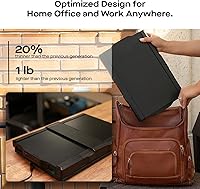
  • Dimensions: The closed unit measures 13.7 x 9.5 x 1.7 inches, allowing it to fit inside most standard laptop compartments found in bags designed for 15-inch-and-above machines.
  • Weight: The extension unit weighs 3.9 pounds, adding substantial carry weight to a bag that already holds a large laptop, charger, and travel accessories.
  • Pass-Through Charging: Back-charging pass-through allows a connected laptop to receive power simultaneously while the extension monitors are running, so no dedicated charging port is sacrificed.
  • Eye Care Mode: A built-in eye care mode reduces blue light output from the panels, aimed at minimizing eye fatigue during extended multi-screen work sessions.
  • Hybrid Signal: Hybrid signal support enables display input through either USB-A or USB-C without requiring a dedicated signal adapter in most standard configurations.
  • Manufacturer: Designed and manufactured by Mobile Pixels, a company specializing in portable monitor accessories for professional and on-the-go users.

Related Reviews

Mobile Pixels Duex Max DS 14.1″ Monitor
76%
93%
Portability
91%
Setup & Ease of Use
74%
Display Quality
58%
Brightness
79%
Build Quality
More
Trio 13.3″ Mobile Pixels Portable Laptop Monitor 2025 Version
87%
94%
Portability
88%
Ease of Use
90%
Compatibility
86%
Display Quality
92%
Setup & Installation
More
Mobile Pixels Duex Plus DS 13.3″ Portable Laptop Monitor
84%
88%
Display Quality
94%
Portability & Design
91%
Ease of Setup
85%
Compatibility with Devices
83%
Build Quality
More
Dell P1424H 14-inch Portable Monitor
79%
93%
Portability
91%
Setup & Ease of Use
88%
Display Clarity
61%
Brightness & Visibility
58%
Stand & Adjustability
More
Asani 14″ Portable Monitor
83%
91%
Portability & Design
85%
Display Quality
88%
Ease of Setup
76%
Brightness & Visibility
90%
Connectivity Options
More
domyfan F1 14″ Portable Monitor
72%
83%
Display Clarity
71%
Portability
88%
Stand Design
79%
Setup & Compatibility
52%
Screen Glare
More
ARZOPA Z1C 16.1″ Portable Monitor
76%
91%
Value for Money
83%
Display Quality
89%
Portability
81%
Build Quality
79%
Connectivity
More
Magedok 14-Inch 4K Portable Monitor
85%
93%
Display Quality
88%
Portability
90%
Ease of Setup
91%
Color Accuracy
58%
Sound Quality
More
Lrtzcbi 14-inch Portable Touchscreen Monitor
74%
88%
Value for Money
79%
Image Quality
72%
Touch Responsiveness
91%
Portability
58%
Kickstand Stability
More
MAGICRAVEN 14.5″ 4K Portable Monitor
84%
91%
Display Quality
88%
Portability
90%
Ease of Setup
85%
Build Quality
87%
Connectivity
More

FAQ

The Mobile Pixels Trio Max 14.1″ Portable Monitor does support macOS, but it is not quite as plug-and-play as on Windows. Most Mac users need to go into display settings and manually select the correct resolution after the first connection before everything looks right. Once that initial configuration is done, it tends to run stably — just budget a few extra minutes on your first setup.
The kickstand handles it on its own for the vast majority of users. The design is intentionally kickstand-first, meaning you can run all three screens without ever attaching anything to your laptop lid. The optional magnets are worth considering if you plan to reposition the setup frequently or want a more rigid connection, but they are genuinely optional rather than a workaround for a design shortcoming.

The extension unit itself is 3.9 pounds. When you add that to a typical 15- to 17-inch laptop, which often weighs 4 to 6 pounds on its own, the combined load before chargers and cables can approach 10 pounds. That is not trivial, and it is one of the most common practical complaints from buyers who use it regularly.

Outdoor use is genuinely difficult with this setup. At 250 nits of peak brightness, both panels can appear washed out or dim near windows or under direct sunlight. In a typical hotel room, home office, or dimly lit co-working space, the brightness is more than adequate. But if your working environment is consistently bright, that ceiling is a real factor worth considering before buying.

Unfortunately, no. The kickstand and sliding frame are built around a 15-inch minimum footprint, and that is a firm requirement rather than a rough guideline. A 14-inch laptop will not provide the physical base needed for a stable, properly aligned fit. If you are on a 14-inch machine, this particular triple-screen extender is not compatible.

Technically possible, but not recommended based on what buyers consistently report. USB hub connections have produced display conflicts and unreliable performance for a noticeable number of users. Connecting directly to your laptop's USB-A or USB-C port gives you the most stable experience. If you are short on ports, the back-charging pass-through at least ensures you do not have to choose between power and your extra screens.

It will reduce your unplugged runtime, yes. Driving two additional displays adds GPU load and draws power through the USB connection, and the impact is noticeable during heavy workloads. The degree of battery drain varies by laptop model and what you are running on screen. If you have access to an outlet — which covers most hotel, office, or co-working scenarios — the back-charging pass-through keeps things manageable.

Landscape is the everyday setup — panels extend left and right of your laptop for a classic three-screen workstation feel. Portrait rotates both panels vertically, which works well for reading long documents or scrolling through code. Collaboration mode angles a panel toward someone sitting beside you, useful for in-person reviews or pair programming sessions. Presentation mode faces both panels outward toward a small group in front of you, which works well for demos or client walkthroughs.

It works in docked mode via USB-C, and for casual use it is a functional bonus. That said, Switch compatibility is more of an incidental perk than a primary design target. Users looking for a low-latency gaming monitor experience may notice the difference, but for general gaming or media viewing on the Switch it performs acceptably.

The honest answer depends on how directly your output is tied to having multiple screens. Buyers who rely heavily on multi-window workflows — and who feel the drop to a single screen even on short trips — tend to feel the investment pays for itself relatively quickly. Those who only occasionally need extra screen space, or who could get by with a single portable monitor, may find the cost difficult to justify against their actual usage frequency.

Where to Buy