Overview

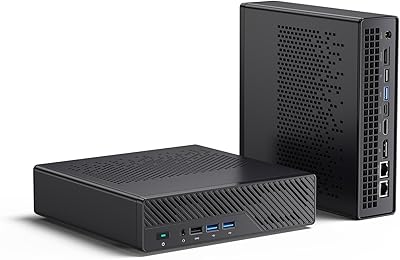
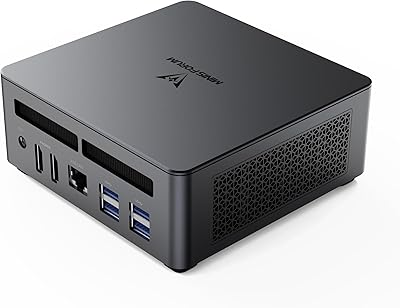
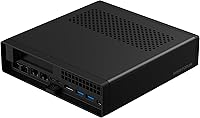
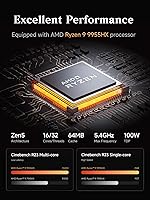
The MINISFORUM MS-A2 Ryzen 9 9955HX Barebone is one of the most ambitious compact PCs to land in 2025, squeezing a 16-core Zen5 processor capable of hitting 5.4GHz into a chassis smaller than most external hard drives. What makes it stand out is the sheer workstation-class ambition packed into that footprint. One thing buyers absolutely must understand upfront: this ships with no RAM, no storage, and no operating system. You are buying the bones of a machine, not a ready-to-run PC. That distinction is critical, and missing it is the single most common source of buyer regret with this compact workstation.
Features & Benefits

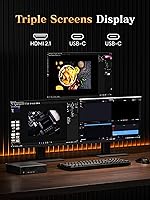
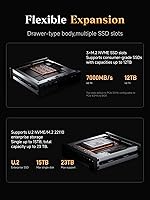
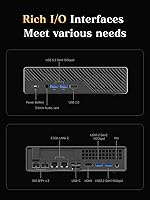
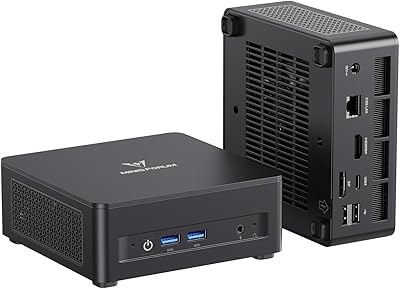
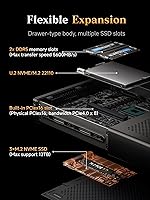
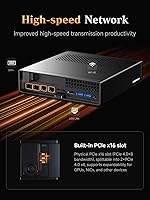
The PCIe x16 expansion slot is arguably the headline feature here — it lets you drop in a half-height discrete GPU or a pro-grade network card, turning this barebone mini PC into something resembling a proper inference node or dense compute appliance. Storage flexibility is equally impressive: three M.2 slots supporting drives up to 22110 length, plus U.2 compatibility and RAID 0/1, means you can build serious capacity without a tower. On the networking side, dual 10GbE SFP+ ports alongside two 2.5GbE connections make it genuinely NAS-competitive. Add DDR5 support up to 96GB, triple-display output at 8K, and active copper-pipe cooling rated for continuous operation, and the spec sheet holds up under scrutiny.

Best For

The MS-A2 is purpose-built for buyers who need real horsepower in a tight space. Home lab builders running TrueNAS, Proxmox, or similar platforms will appreciate the multi-drive and 10GbE combination more than almost any other user group. Content creators who do 3D rendering or heavy video work get a legitimate desktop-class CPU without sacrificing desk space. AI enthusiasts running local LLMs with a discrete GPU slotted into the PCIe bay will find the platform surprisingly capable. It also works well as an edge compute node in small office or IT environments. Budget-focused buyers, casual users, or anyone wanting a plug-and-play experience should look elsewhere.

User Feedback

Early adopters have praised the build quality and port layout, with most noting the chassis feels solid and all the rear-panel connections are logically arranged. Assembly is reported as straightforward for anyone comfortable working with SFF hardware. The thermal system handles sustained workloads well, though a few users noted fan noise increases noticeably under full CPU load. The main friction points involve BIOS maturity — a handful of buyers flagged compatibility quirks with certain RAM kits, and driver support on Linux needed some initial tweaking at launch. Given the premium price for a barebone-only configuration, some reviewers questioned the value unless they already had compatible components on hand.

Pros

  • Dual SFP+ 10GbE ports in a mini PC chassis is almost unheard of and transforms home lab networking builds.
  • The PCIe x16 slot enables real discrete GPU or pro network card expansion — rare at this form factor.
  • 16-core Zen5 CPU delivers genuine workstation throughput without requiring a full tower.
  • Three M.2 slots including 22110 support lets you build serious storage density in a compact footprint.
  • DDR5 support up to 96GB gives the MS-A2 meaningful headroom for VM-heavy and memory-intensive workflows.
  • RAID 0 and RAID 1 support adds data redundancy options without any external hardware.
  • Triple-display output up to 8K makes it a credible multi-monitor workstation platform.
  • Build quality and chassis rigidity are noticeably above average for a mini PC at this price tier.
  • Wi-Fi 6E and four wired LAN ports cover virtually any network topology a power user might deploy.
  • Buyers with existing compatible DDR5 and NVMe components get exceptional capability per dollar spent.

Cons

  • Requires separate purchase of RAM, SSD, and OS — total build cost is significantly higher than the listed price.
  • BIOS maturity at launch was inconsistent, with some DDR5 kits needing firmware updates to stabilize.
  • Fan noise under sustained all-core load is noticeable enough to be disruptive in quiet environments.
  • Linux driver support for Wi-Fi and certain USB functions required manual patching at initial release.
  • U.2 drive support requires a separately purchased adapter, adding cost and internal cable complexity.
  • Long-term reliability data is limited given the May 2025 launch date — durability under 24/7 load is still unproven.
  • Minimal included documentation makes the assembly experience harder for first-time barebone builders.
  • GPU clearance for certain half-height card models is tighter than expected, requiring pre-purchase research.
  • Phase-change thermal compound appears to need a break-in period before thermals fully stabilize.
  • For buyers starting from scratch on components, competing pre-built workstations become a rational alternative.

Ratings

The MINISFORUM MS-A2 Ryzen 9 9955HX Barebone has been put through its paces by early adopters worldwide, and our AI-driven scoring system has analyzed verified purchase reviews across global markets — actively filtering out incentivized, bot-generated, and unverified feedback — to produce the scores below. What emerges is a picture of a genuinely capable compact workstation that rewards technically confident buyers while frustrating those who underestimate what barebone actually means. Both the standout strengths and the real friction points are reflected here without sugarcoating.
CPU Performance
93%
The 16-core Zen5 processor consistently impresses users tackling demanding workloads. Video editors report noticeably faster export times compared to previous-gen mini PCs, and developers running multi-threaded builds say the chip barely breaks a sweat. For a machine this size, the raw throughput is genuinely difficult to fault.
A small number of users noted that sustained all-core workloads over extended periods — think hours-long renders — occasionally trigger modest clock throttling depending on the RAM and chassis airflow configuration. It is not a dealbreaker, but it is worth monitoring with your specific component choices.
Expansion & Upgradability
91%
The PCIe x16 slot is the feature that separates this barebone mini PC from virtually everything else in its size class. Users running local AI inference with a half-height GPU report transformative performance gains, and the ability to split the slot into dual PCIe x4 for network cards adds serious flexibility for home lab builds.
The slot physically accommodates half-height cards without issue, but clearance for full-height cards requires careful measurement and some buyers found certain popular GPU models a tighter fit than expected. Documentation on supported card lengths could be clearer from MINISFORUM.
Networking Capability
94%
Dual SFP+ 10GbE ports in a machine this compact is practically unheard of, and home lab users running TrueNAS or Proxmox are vocal about how much they appreciate it. Self-hosters report saturating 10G links without any driver instability, and the additional dual 2.5GbE ports mean you have four wired interfaces before touching the PCIe slot.
A handful of Linux users noted that SFP+ driver support required manual configuration at launch and was not plug-and-play on certain distributions. Windows users reported no such issues, but if your stack is Linux-first, budget time for initial network setup.
Storage Flexibility
89%
Three M.2 slots with support for the longer 22110 form factor — rare even in full-size desktops — means you can install high-capacity enterprise drives that most compact systems simply cannot accept. Early adopters building NAS-adjacent setups praise the RAID 0/1 support as a meaningful addition for data redundancy without external hardware.
The U.2 support, while technically impressive on paper, requires an adapter that is sold separately and adds cost and complexity. A few buyers also flagged that populating all three slots simultaneously with longer drives requires careful cable management inside the chassis.
Thermal Management
78%
22%
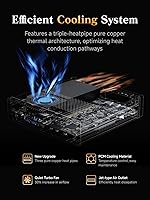
Under moderate workloads, the MS-A2 runs quietly and the copper heat pipe arrangement keeps thermals in a comfortable range. Users doing productivity tasks, light development work, or media playback report the machine staying cool and nearly silent for hours.
Push the CPU hard for extended periods and the turbo fan becomes audible — noticeably so in a quiet room. A few buyers running 24/7 server workloads reported thermal performance stabilizing after a few days of operation, suggesting the phase-change material needs a break-in period, though long-term data is still limited given the recent launch.
Build Quality & Chassis
84%
The chassis feels dense and well-assembled for a mini PC at this price tier. Port placement on the rear panel is logical, and the overall rigidity of the enclosure drew positive comments from users who have handled cheaper compact machines. It does not feel like a cost-cut product on the outside.
The plastic used on certain panel sections feels slightly inconsistent with the premium positioning, and a few buyers noticed minor flex near the top panel when applying pressure during assembly. Nothing structural, but it is the one area where the chassis falls slightly short of its workstation aspirations.
Assembly Experience
76%
24%
For buyers comfortable with SFF PC builds, installing RAM and M.2 drives is described as intuitive, with clearly labeled slots and reasonable internal access. Most users had a working system up within 30 to 45 minutes of component installation.
First-time barebone builders found the experience steeper than expected, and the included documentation is minimal. Compatibility with certain DDR5 SODIMM kits running above JEDEC speeds was inconsistent at launch, and a BIOS update was required to stabilize some configurations.
BIOS Maturity
62%
38%
The core BIOS functionality is present and allows the expected controls for a platform of this type. Users who updated to the latest firmware shortly after purchase reported a noticeably smoother experience with RAM compatibility and boot stability.
Given that this launched in May 2025, the BIOS is still maturing. Several early buyers encountered POST issues with specific RAM kits that were later resolved via firmware updates, and the BIOS UI itself is described as functional but barebones — ironic given the product category. More seasoned homelab users handled this without frustration, but it is a genuine friction point for others.
Display Output
86%
Triple-display support across HDMI and dual USB-C, with output up to 8K resolution, is a legitimate selling point for users running dense multi-monitor workstation setups. Creative professionals who tested 4K at 144Hz on a single display reported clean, stable output without signal issues.
The integrated Radeon 610M handles display duties competently but is not intended for any GPU-accelerated rendering or gaming — buyers expecting even light graphical performance from integrated graphics will be disappointed. Any real GPU workload requires a discrete card through the PCIe slot.
Memory Performance
88%
DDR5 SODIMM support up to 96GB at 5600 MT/s is ahead of most competing mini platforms, and users running memory-hungry applications like virtual machines or large dataset processing report headroom that previously required a full desktop build. The bandwidth improvement over DDR4 is tangible in real workloads.
Not all DDR5 SODIMM kits run at rated XMP speeds without a BIOS update, and a small number of users reported single-channel configurations behaving unexpectedly until firmware was refreshed. Sticking to JEDEC-rated speeds initially is the safer approach until BIOS support matures further.
Software & OS Compatibility
67%
33%
Windows 11 installation is reported as clean and driver coverage is solid out of the box for the majority of core functions. Users running Windows-based server roles and professional applications found the platform fully supported without unusual workarounds.
Linux compatibility is workable but uneven depending on distribution and use case. Wi-Fi 6E and certain USB controller features required manual driver intervention on several popular distros at launch. MINISFORUM has a history of releasing driver updates, but for a machine targeting homelab users, the Linux experience at launch is behind expectations.
Noise Level
71%
29%
At idle and during light tasks, the compact workstation is genuinely quiet — suitable for a desk environment or a home office where noise matters. Users running it as a media server or light NAS report barely noticing it in operation during off-peak hours.
Under sustained CPU load, the fan ramps up to a level several users described as distracting. It is not unusually loud for a high-performance mini PC, but if your workload is consistently heavy, plan for fan noise as a factor, especially in open-plan or shared workspaces.
Value for Money
72%
28%
For buyers who already own compatible DDR5 SODIMM and NVMe drives, the hardware on offer — particularly the 10GbE networking and PCIe expansion — represents a compelling density of capability per dollar. Compared to building an equivalent tower, the cost differential narrows considerably once shared components are factored in.
For buyers starting from scratch, the total cost of ownership climbs steeply once RAM, storage, and an OS license are added. Several reviewers noted this pushes the final build cost into territory where a pre-configured workstation becomes a more rational choice unless the compact form factor is a hard requirement.
Wi-Fi & Bluetooth
81%
19%
Wi-Fi 6E with Bluetooth 5.2 covers modern wireless needs well, and users in environments with congested 2.4GHz and 5GHz bands appreciated the 6GHz band access. Bluetooth pairing with peripherals was described as reliable in day-to-day use.
A handful of Linux users noted Wi-Fi stability required driver patching at launch. For a machine primarily targeting wired networking power users, wireless is more of a convenience feature than a core selling point, and most serious deployments will lean on the wired ports anyway.

Suitable for:

The MINISFORUM MS-A2 Ryzen 9 9955HX Barebone is purpose-built for technically confident buyers who know exactly what they want to build. Home lab enthusiasts running Proxmox, TrueNAS, or similar hypervisor and NAS platforms will find the combination of dual 10GbE SFP+ ports and three M.2 slots almost uniquely compelling at this size. Content creators who do serious 3D rendering or video production and hate the footprint of a full tower will appreciate having genuine workstation-class CPU headroom on their desk. AI developers and researchers who want to run local inference workloads — especially with a half-height discrete GPU slotted into the PCIe x16 bay — will find the platform well-suited to that use case. IT professionals deploying a capable edge node in a rack shelf, closet, or compact server room will also feel right at home here, particularly given the wired networking density. If you already own compatible DDR5 SODIMM and NVMe drives, the value proposition tightens considerably and the build becomes a genuinely smart investment.
Not suitable for:

The MINISFORUM MS-A2 Ryzen 9 9955HX Barebone is the wrong choice for anyone expecting a ready-to-use computer out of the box. It ships with no RAM, no storage, and no operating system — and buyers who overlook that detail will find themselves with an expensive paperweight until they source compatible components separately. Casual home users who just want a quiet desktop for browsing, streaming, or light office work are drastically overpaying for capabilities they will never touch. Gamers hoping the integrated Radeon 610M will handle anything beyond basic display output will be disappointed; real GPU performance requires a discrete card purchased and installed separately. Buyers on a tight all-in budget should run the full math before committing — once DDR5 RAM, NVMe drives, and an OS license are added, the total build cost climbs into territory where a pre-configured workstation starts to look competitive. Linux users who need a fully plug-and-play experience should also be cautious, as driver support for certain features required manual configuration at launch and the BIOS was still maturing as of the initial release window.
Specifications

  • Processor: AMD Ryzen 9 9955HX, 16 cores and 32 threads based on Zen5 architecture, with a boost clock up to 5.4GHz.
  • L3 Cache: 64MB of L3 cache supports large working sets for compute-heavy and multi-threaded workloads.
  • RAM Support: Two DDR5 SODIMM slots support up to 96GB of memory at speeds up to 5600 MT/s; no RAM is included.
  • Storage Slots: Three M.2 slots accommodate 2280, 22110, and U.2 NVMe drives, supporting a combined maximum capacity of approximately 23TB.
  • RAID Support: RAID 0 and RAID 1 configurations are supported natively across the installed storage drives.
  • PCIe Expansion: One PCIe x16 slot is included, with support for splitting into dual PCIe x4 for network cards or half-height professional GPUs.
  • Integrated GPU: AMD Radeon 610M handles display output duties only and is not designed for GPU-accelerated compute or gaming workloads.
  • Display Output: Two HDMI ports and two USB-C ports support up to three simultaneous displays at resolutions up to 8K at 60Hz or 4K at 144Hz.
  • Wired Networking: Two SFP+ 10GbE ports and two 2.5GbE RJ45 ports provide four independent wired network interfaces.
  • Wireless: Wi-Fi 6E and Bluetooth 5.2 are built in for wireless connectivity across the 2.4GHz, 5GHz, and 6GHz bands.
  • Cooling System: Three pure copper heat pipes combined with phase-change thermal compound and a turbo-accelerated fan are rated for continuous 24/7 operation.
  • Operating System: No operating system is included; the buyer must supply and install their own OS independently.
  • Form Factor: Barebone mini PC with dimensions of 9.09 x 9.06 x 4.76 inches and a weight of 6.58 lbs.
  • PCIe Speed: M.2 NVMe drives operate at PCIe 4.0 speeds reaching up to 7000 MB/s sequential read under optimal conditions.
  • USB-C Display: Both USB-C ports are capable of full display output, not limited to data transfer, enabling flexible multi-monitor configurations.
  • Power Design: The barebone chassis includes the motherboard, processor, and cooling system but excludes power supply details in the user-configured bundle.
  • Chassis Material: The enclosure uses a combination of aluminum paneling and reinforced plastic sections measuring approximately 9 inches square in footprint.
  • Bluetooth: Bluetooth 5.2 supports stable pairing with peripherals including keyboards, mice, and audio devices simultaneously.

Related Reviews

MINISFORUM DeskMini MS-A1 AMD Ryzen 9 9950X 64GB DDR5 2TB SSD
88%
95%
Performance
91%
Cooling System
93%
Size & Portability
87%
Upgradeability
89%
Connectivity Options
More
MINISFORUM 790S7 Mini ITX PC AMD Ryzen 9 7940HX
81%
88%
Overall Performance
65%
Thermals and Cooling
80%
Graphics Flexibility
90%
Build Quality
92%
Value for Money
More
MINISFORUM UM890 Pro Mini PC (64GB/1TB)
79%
93%
CPU Performance
74%
Thermal Management
81%
RAM & Memory Speed
89%
Storage Performance
77%
Graphics & Display Output
More
MINISFORUM AI X1 Pro (Ryzen AI 9 HX370, 96GB/2TB)
78%
93%
CPU Performance
81%
AI & NPU Capabilities
94%
Memory Configuration
67%
Integrated GPU & Gaming
89%
Storage & Expandability
More
MINISFORUM UM690L Slim Mini PC, AMD Ryzen 9 6900HX, 32GB RAM, 1TB SSD
87%
91%
Performance
87%
Value for Money
85%
Build Quality
88%
Cooling and Thermals
92%
Connectivity Options
More
MINISFORUM UM790 Pro (64GB/1TB)
79%
91%
Processing Performance
67%
Integrated Graphics
93%
Multi-Display Capability
63%
Thermal Management
84%
Build Quality & Design
More
AMD Ryzen 9 5950X
AMD Ryzen 9 5950X
85%
98%
Multi-Core Rendering
94%
Single-Core Responsiveness
62%
Thermal Management
92%
Platform Upgradability
89%
Value for Creators
More
AMD Ryzen 9 3900XT 12-Core Processor
84%
91%
Performance
94%
Overclocking Potential
89%
Gaming Performance
88%
Multitasking Efficiency
65%
Thermal Management
More
AMD Ryzen 9 7950X
AMD Ryzen 9 7950X
77%
97%
Multi-Core Performance
93%
Single-Core Speed
58%
Thermal Management
71%
Value for Money
88%
Platform Longevity (AM5)
More
AMD Ryzen 9 7900X3D Desktop Processor
79%
93%
Gaming Performance
81%
Multi-Core Productivity
67%
Thermal Management
72%
Value for Money
88%
Platform Longevity
More

FAQ

You need to buy them separately. The MINISFORUM MS-A2 Ryzen 9 9955HX Barebone ships with the processor, motherboard, and cooling system only — no RAM, no SSD, and no operating system. Make sure you budget for DDR5 SODIMM memory and at least one NVMe M.2 drive before placing your order.
The PCIe x16 slot supports half-height professional graphics cards and certain full-height cards, depending on length. It is primarily designed for AI inference accelerators and pro compute cards rather than gaming GPUs. Check the physical dimensions of your intended card carefully before purchasing, as clearance is tighter than in a standard desktop case.

Early adopters running the MS-A2 as a home server report stable thermals under typical server workloads. The copper heat pipe and phase-change thermal compound setup is designed for continuous operation. That said, under sustained full CPU load, the fan does spin up audibly, so placement in a quiet room or enclosed rack shelf is worth considering.

It works with Linux, but expect some initial setup work. At launch, certain features — particularly Wi-Fi and some USB controller functions — required manual driver configuration on popular distributions. Windows users have reported a much smoother out-of-the-box experience. If your stack is Linux-first, factor in time for driver setup.

JEDEC-standard DDR5 SODIMM kits running at 4800 or 5200 MT/s are the safest choice at launch. Some users have successfully run 5600 MT/s kits, but a BIOS update may be required for stability with XMP profiles. Stick with reputable brands like Kingston, Crucial, or G.Skill and check MINISFORUM's compatibility list if one is published for your firmware version.

Yes, all three slots are independently usable simultaneously. The 22110 slot is particularly useful if you want to install longer enterprise-grade NVMe drives. Just be aware that using U.2 drives requires a separate adapter cable, and fitting three drives with longer form factors does require some attention to internal cable routing.

At idle and during light workloads, most users describe it as very quiet — genuinely suitable for a shared office or bedroom desk. The fan ramps up significantly under heavy CPU load, though. If your typical workload involves extended rendering or compilation jobs, the noise during those sessions is noticeable enough that some users prefer to relocate it to a closet or server shelf.

Yes, the slot supports bifurcation into two PCIe x4 connections, which is exactly what dual 10G network cards require. This makes the compact workstation particularly attractive for home lab setups where you want to isolate storage traffic from management traffic across separate interfaces.

Basic PC building experience is enough for most users. Installing DDR5 SODIMM and M.2 drives is straightforward if you have done it before. The main learning curve is sourcing compatible components and applying the correct BIOS settings. If this is your first time building a barebone PC, budget time for research and expect to run a BIOS update before everything runs smoothly.

MINISFORUM typically offers a one-year warranty on their barebone products, but confirm the exact terms for your region at the point of purchase as this can vary by market. Community feedback on their support is mixed — straightforward hardware issues are generally handled adequately, but BIOS and software queries can take longer to resolve. The MINISFORUM user forums are a practical resource for troubleshooting while official support catches up on newer products.

Where to Buy