Overview

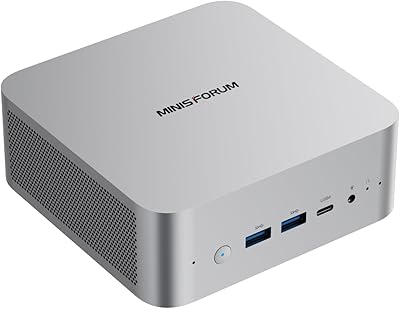
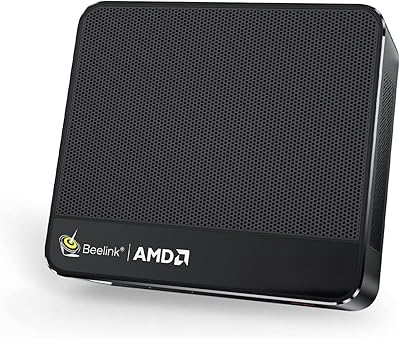
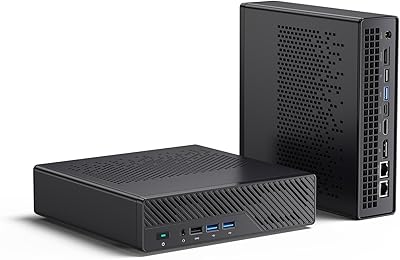
The MINISFORUM MS-A1 Ryzen 7 8700G Mini PC is one of those rare machines that makes you genuinely reconsider what a compact desktop can be. Most mini PCs seal their processors in permanently — this one ships with a socketed AM5 CPU, meaning you can swap the processor down the road as the platform matures. That single fact puts it in a different category from most of the competition. Add dual 2.5G Ethernet and an OcuLink expansion port to the mix, and you have a machine with an unusually enthusiast-grade feature set packed into a footprint barely larger than a hardback book. The price reflects that ambition — this is not a budget box.
Features & Benefits

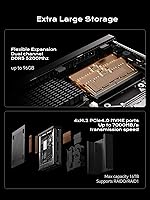
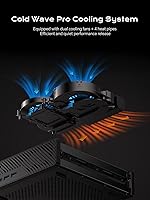
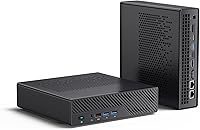
The socketed Ryzen 7 8700G is the headline here, and it is worth pausing on what that actually means: if AMD releases a faster AM5 chip that fits the same socket, you can upgrade without buying a whole new machine — a genuine long-term value proposition. Memory goes up to 96GB across two SO-DIMM slots, which matters for virtualization or heavy multitasking. Four M.2 slots, including two PCIe 4.0x4 lanes capable of 7,000 MB/s transfers, give serious storage flexibility — useful if you are building a media server or running multiple OS environments. The Cold Wave Pro cooling system uses four heat pipes and dual fans, and while the 37dB noise rating sounds optimistic, the hardware at least has the physical mass to back up that claim.

Best For

This mini workstation makes the most sense for a fairly specific type of buyer. Home lab enthusiasts and NAS-adjacent users will appreciate the dual 2.5G networking without needing an external switch. Developers and content creators who routinely push RAM limits will find the path to 96GB genuinely useful. The OcuLink port opens the door to an external GPU if the integrated Radeon 780M — capable for light creative work but not a dedicated gaming solution — starts to feel limiting. Small businesses running edge workloads or kiosk deployments will value the quiet, compact form factor. If you are replacing an older sealed unit, the AM5 platform longevity means this machine has a longer useful life ahead of it than most alternatives.

User Feedback

Early buyers of the MS-A1 tend to land in familiar territory when sharing their experiences. Build quality and port selection come up consistently as positives — the chassis feels solid, and the connectivity options are hard to argue with at this size. Thermal performance gets more mixed signals: some users report quiet operation under moderate loads, while others note the fans ramp up noticeably during sustained CPU-heavy tasks, putting the 37dB claim in perspective. A few buyers flagged BIOS immaturity and driver quirks out of the box, which is not unusual for a newer platform. RAM and storage upgrades are reported as straightforward. The price-to-value debate is real — most feel it is justified, but only if you are actually using the features that genuinely set it apart.

Pros

  • Socketed AM5 CPU means you can upgrade the processor down the road — almost unheard of in mini PCs.
  • RAM expandability up to 96GB gives this compact desktop serious headroom for virtualization and multitasking.
  • Four M.2 slots supporting up to 16TB total storage is exceptional for a machine this size.
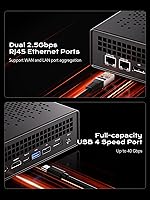
  • Dual 2.5G Ethernet ports eliminate the need for a separate switch when connecting to a NAS.
  • OcuLink expansion port opens a credible path to external GPU performance if integrated graphics fall short.
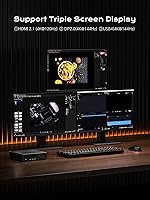
  • Triple-display output via HDMI 2.1, DisplayPort 1.4, and USB-C covers most multi-monitor setups natively.
  • Build quality is consistently praised — the chassis feels solid and well-engineered for its size.
  • Cold Wave Pro cooling provides enough thermal headroom to sustain demanding workloads without throttling.
  • The 187×189×48mm footprint is genuinely compact and frees up meaningful desk or rack space.
  • RAM and storage upgrades are straightforward, with accessible internals that do not require specialist tools.

Cons

  • Integrated Radeon 780M graphics are not suitable for serious gaming or GPU-accelerated creative workloads.
  • No pre-installed consumer OS means first-time builders face an extra setup step before the machine is usable.
  • BIOS firmware can feel immature on early units, occasionally requiring updates to resolve stability issues.
  • Fan noise under sustained CPU load may exceed the advertised 37dB rating in real-world conditions.
  • The premium price is hard to justify for users who will not actually utilize the AM5 upgradability or extra M.2 slots.
  • Wi-Fi is limited to 802.11ac rather than the newer Wi-Fi 6 or 6E standard, which feels dated at this price point.
  • OcuLink eGPU compatibility requires additional hardware investment, adding cost and setup complexity.
  • Some early buyers reported minor quality control inconsistencies, which is worth noting for a machine in this price tier.
  • Relatively limited user review volume makes it harder to draw firm long-term reliability conclusions at this stage.

Ratings

Our AI-generated scores for the MINISFORUM MS-A1 Ryzen 7 8700G Mini PC are built by analyzing verified buyer reviews from global markets, with spam, bot activity, and incentivized feedback actively filtered out before scoring. Each category reflects honest signal from real users — the strengths are genuine, and the frustrations are not glossed over. The result is a transparent picture of where this compact desktop excels and where it falls short of expectations.
CPU Upgradability
93%
The socketed AM5 processor is the single feature that generates the most consistent enthusiasm from buyers. Users who come from a background of building or upgrading desktop PCs immediately recognize the long-term value of being able to swap in a faster chip as AM5 matures, without replacing the entire machine.
A small number of users noted that BIOS compatibility updates are required for newer CPUs, which adds a step that less experienced buyers may not anticipate. The upgrade ceiling is also tied to what AMD releases in the AM5 ecosystem, which is a platform bet rather than a guaranteed roadmap.
Build Quality
88%
Buyers consistently describe the chassis as solid and well-finished for a mini PC at this price tier. The heft relative to its footprint gives it a premium feel, and the port cutouts and panel alignment are reported as tight and consistent across most units.
A handful of buyers reported minor cosmetic inconsistencies on arrival, such as slight panel gaps or scuff marks — suggesting quality control is good but not perfectly uniform. This is a known risk with smaller-run boutique PC brands and worth inspecting on delivery.
Port Selection
91%
The combination of dual 2.5G Ethernet, OcuLink, HDMI 2.1, DisplayPort 1.4, and USB-C video out is genuinely exceptional for a machine this compact. Home lab users and NAS enthusiasts in particular highlight the dual LAN as a feature they would otherwise need separate hardware to replicate.
The USB-A port count — five in total — is adequate but not generous for users with multiple peripherals, and Wi-Fi topping out at 802.11ac feels like a missed opportunity at this price point. A powered USB hub becomes a practical necessity for most desk setups.
Thermal Performance
74%
26%
Under everyday workloads — web development, video calls, document processing, even light video editing — the Cold Wave Pro cooling system keeps things quiet and the chassis barely warm. The four heat pipes give the system enough thermal headroom to handle bursts of CPU activity without throttling.
Under sustained multi-core loads such as long compilation runs or extended rendering tasks, several users report fan speeds climbing noticeably above the advertised 37dB figure. The cooling is competent but the noise rating appears to reflect moderate rather than peak usage, which can be misleading.
RAM Expandability
89%
Having two open SO-DIMM slots and a realistic upgrade path to 96GB is a genuine differentiator versus sealed competitors. Developers running multiple virtual machines or Docker environments particularly appreciate not having to compromise on memory allocation.
The pre-installed 32GB runs in a configuration that may not fully optimize dual-channel bandwidth depending on the kit, and users chasing maximum performance may need to reseat or replace the included modules. DDR5 SO-DIMM pricing at higher capacities also adds to the total cost of ownership.
Storage Flexibility
87%
Four M.2 slots is an almost absurd amount of internal expandability for a machine this size, and buyers building media servers or multi-OS setups consistently flag this as a major practical win. The included 1TB drive is a reasonable starting point, not a limitation.
Only two of the four slots operate at full PCIe 4.0x4 speeds; the third runs at PCIe 3.0x4 and the fourth at PCIe 4.0x1, so buyers planning to maximize all slots should think carefully about which drives go where. Physical access to all four slots also requires a more involved disassembly than accessing just the top two.
Out-of-Box Experience
61%
39%
For technically confident buyers, the lack of a pre-loaded OS is not a problem — installing Windows 11 or Linux is a familiar process, and starting clean is often preferred. The included accessories cover the basics, and initial hardware setup is straightforward.
Buyers expecting a consumer-ready experience out of the box are often caught off guard by the absence of a pre-installed OS. Early BIOS builds on some units also required immediate updates to resolve minor instability issues, adding friction to the first-boot experience for less experienced users.
Integrated Graphics
69%
31%
The Radeon 780M is the strongest integrated GPU available in any mini PC at this class, and it handles 4K video playback, casual gaming, and hardware-accelerated workflows in creative apps without breaking a sweat. For non-gaming productivity users, it is genuinely sufficient.
Anyone expecting to run modern AAA games at comfortable frame rates will hit a wall quickly — the 780M shares system RAM and simply lacks the dedicated VRAM of a discrete card. The OcuLink eGPU option exists but requires additional hardware investment that many buyers have not budgeted for.
Value for Money
72%
28%
For buyers who specifically need the AM5 socket, dual 2.5G networking, and four M.2 slots, the price is defensible — there are very few competing products that offer this combination at any price. The long upgrade runway also amortizes the cost over a longer ownership period.
For buyers who will not use the platform's distinguishing features, the premium feels steep compared to sealed mini PCs delivering comparable everyday performance for significantly less money. The value calculus only works if you are buying into the specific capabilities that justify the cost.
Noise Level
71%
29%
At idle and during light workloads, this compact desktop is genuinely unobtrusive — easy to leave on a desk next to a monitor without noticing it. Users in office environments or quiet rooms report no complaints during typical usage patterns.
The 37dB marketing claim does not reflect behavior under sustained load, where the fans become audible enough to notice in a quiet room. Users who run long renders or compilations regularly may find the noise more intrusive than the spec sheet suggested.
Wireless Connectivity
58%
42%
Wi-Fi 5 covers the basic wireless use case and is stable enough for most office or home environments where a wired connection is not available. For a machine primarily intended for wired operation via its dual Ethernet ports, wireless is arguably secondary.
At a premium price point in 2024, shipping with Wi-Fi 5 rather than Wi-Fi 6 or 6E is a noticeable shortcoming. Buyers on modern Wi-Fi 6E routers who rely on wireless will not get the throughput benefit they are paying for from their networking hardware.
Driver & BIOS Maturity
63%
37%
Once the BIOS is updated to a current release, the platform stabilizes well for most users, and AMD's driver ecosystem for the Ryzen 8000G series is reasonably mature. Linux users in particular report solid kernel support for both the CPU and the integrated GPU.
Early firmware had documented quirks around sleep states, memory compatibility, and USB behavior that required updates to resolve. Buyers who are not comfortable navigating BIOS updates or troubleshooting driver conflicts may find the early ownership period more hands-on than expected.
Upgradeability Ease
82%
18%
Opening the chassis and accessing the SO-DIMM slots and M.2 drives is a relatively painless process that most users describe as easier than expected. The internal layout is logical, and the socketed CPU means future upgrades are a real option rather than a theoretical one.
Accessing all four M.2 slots requires a more complete disassembly than just a bottom panel removal, which adds time and care compared to machines where storage bays are front-accessible. First-time upgraders should consult a teardown guide before diving in.
Footprint & Desk Presence
84%
At 187×189×48mm, this mini workstation disappears on most desks and is genuinely easy to mount behind a monitor or under a desk with an included VESA bracket option. The compact form factor is one of the most consistently praised aspects in user feedback.
The machine is slightly larger and heavier than ultra-compact rivals like Intel NUC-class devices, which matters if you are deploying multiple units in a tight rack or kiosk environment. The weight packaged is also higher than some buyers anticipate from a mini PC.

Suitable for:

The MINISFORUM MS-A1 Ryzen 7 8700G Mini PC is built for buyers who want genuine desktop-class capability without the desk footprint of a full tower. Home lab enthusiasts will find the dual 2.5G Ethernet ports especially practical — you can connect directly to a NAS at full 2.5G speeds without buying an additional switch. Developers and power users who run virtual machines, Docker containers, or memory-intensive workflows will appreciate the path to 96GB of RAM, which is far beyond what most sealed mini PCs allow. Content creators doing video editing or light 3D work will find the Ryzen 7 8700G handles day-to-day rendering tasks comfortably, and the four M.2 slots make it feasible to build out real multi-drive storage without external enclosures. DIY-minded buyers who want to protect their investment will value the socketed AM5 socket above all else — this is one of the very few compact machines you can actually upgrade as faster processors become available. Small businesses deploying quiet, space-saving workstations at branch offices or kiosk setups will also find the form factor and port selection well-matched to those needs.
Not suitable for:

Buyers expecting a capable gaming machine should approach this compact desktop with clear eyes — the integrated Radeon 780M handles casual titles and older games reasonably well, but it is not a substitute for a discrete GPU, and no amount of enthusiasm for the OcuLink port changes the fact that eGPU setups add meaningful cost and bulk. Casual users who simply need a basic home PC for browsing, streaming, and light productivity are paying a significant premium for features they will never use, and a less expensive sealed unit would serve them just as well. The MINISFORUM MS-A1 Ryzen 7 8700G Mini PC also ships without a pre-installed consumer operating system, which means buyers unfamiliar with OS installation may face a steeper setup experience than expected. Those with no interest in future upgrades or home lab tinkering will find the price hard to justify against competitors that offer comparable everyday performance at a lower cost. If BIOS-level configuration, driver troubleshooting, or platform immaturity sounds like a headache rather than an acceptable trade-off, this machine may test your patience in the early ownership period.
Specifications

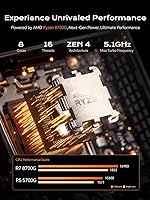
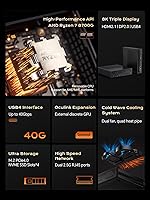
  • Processor: The machine is powered by an AMD Ryzen 7 8700G running at up to 4.2GHz across 8 cores and 16 threads, with a 16MB cache.
  • CPU Socket: The processor sits in a socketed AM5 slot, meaning it can be physically removed and replaced with a compatible AM5 CPU by the user.
  • RAM: Two SO-DIMM slots come pre-installed with 32GB of DDR5-5200 memory, expandable to a maximum of 96GB.
  • Storage Included: A 1TB M.2 2280 NVMe SSD is included from the factory as the primary boot and storage drive.
  • M.2 Expansion: Four M.2 2280 slots are available in total: two PCIe 4.0x4, one PCIe 3.0x4, and one PCIe 4.0x1, supporting up to 16TB of combined storage.
  • Graphics: Graphics are handled by the integrated AMD Radeon 780M GPU, which shares system memory and supports hardware-accelerated video decoding.
  • Display Output: Three simultaneous display outputs are supported: one HDMI 2.1, one DisplayPort 1.4, and one USB-C, with a maximum resolution of 3840×2160.
  • Networking: Two independent RJ45 2.5G Ethernet ports are built in, enabling direct NAS connections or dual-WAN configurations without additional hardware.
  • Wireless: Wi-Fi 802.11ac (Wi-Fi 5) is included for wireless connectivity; no Wi-Fi 6 or 6E support is present on this unit.
  • USB Ports: Five USB ports are provided: three USB 3.2 Gen1 Type-A and two USB 2.0 Type-A, all accessible from the chassis exterior.
  • OcuLink: One OcuLink port is included on the rear panel, enabling connection of a compatible external GPU enclosure for additional graphics performance.
  • Cooling System: The Cold Wave Pro cooling system uses dual fans and four copper heat pipes to manage thermals, rated at approximately 37dB under normal operating conditions.
  • Dimensions: The chassis measures 187×189×48mm, making it slightly more compact than MINISFORUM's previous MS-01 workstation model.
  • Weight: The packaged unit weighs approximately 7.24 lbs, which includes the machine, power adapter, and accessories.
  • Audio: A single 3.5mm combo audio jack is located on the chassis for headphone and microphone connectivity.
  • Operating System: No consumer operating system is pre-installed; buyers need to supply and install their own OS, such as Windows 11 or a Linux distribution.
  • Power Delivery: The unit is powered via an external power adapter; the AM5 platform and Ryzen 7 8700G have a configurable TDP that affects both performance and thermal output.
  • Max Storage: With all four M.2 slots populated using high-capacity drives, the machine supports a theoretical maximum of 16TB of internal SSD storage.

Related Reviews
MINISFORUM UM773 Lite Mini PC
78%
91%
Processing Performance
74%
RAM & Memory
88%
Storage Speed & Capacity
77%
Graphics & Display Output
93%
Connectivity & Ports
More
MINISFORUM MS-A2 Ryzen 9 9955HX Barebone
81%
93%
CPU Performance
91%
Expansion & Upgradability
94%
Networking Capability
89%
Storage Flexibility
78%
Thermal Management
More
MINISFORUM X1-255 Mini PC, AMD Ryzen 7 255, 32GB RAM, 1TB SSD
86%
88%
Performance
91%
Connectivity
83%
Build Quality
87%
Expansion Potential
80%
Cooling System
More
MINISFORUM UM870 Slim Mini PC

80%
91%
Processing Performance
74%
Integrated Graphics
66%
Thermal Management
93%
Multi-Monitor Support
88%
Connectivity & Ports
More
MINISFORUM UM880 Plus Mini PC
78%
91%
CPU Performance
72%
Integrated Graphics
86%
Value for Money
83%
OCuLink Expandability
63%
Thermal Management
More
ACEMAGICIAN Kron Mini K1 Mini PC
73%
83%
Everyday Performance
54%
Gaming Capability
61%
Thermal Management
89%
Display & Connectivity
78%
Value for Money
More
MINISFORUM 790S7 Mini ITX PC AMD Ryzen 9 7940HX
81%
88%
Overall Performance
65%
Thermals and Cooling
80%
Graphics Flexibility
90%
Build Quality
92%
Value for Money
More
MINISFORUM MS-A1 Mini Workstation, 32GB RAM, 1TB SSD
87%
90%
Performance
93%
Multitasking Ability
85%
Build Quality
88%
Cooling Efficiency
91%
Display Support
More
Beelink SER5 MAX 32GB 500GB Mini PC
81%
88%
Everyday Performance
63%
Thermal Management
93%
Display Output
79%
RAM & Memory Speed
84%
Storage Performance
More
ACEMAGICIAN S3A Mini PC (Ryzen 7 5875U, 32GB, 1TB)
79%
91%
Value for Money
88%
Processing Performance
63%
Gaming Capability
89%
Memory & Storage
61%
Thermal Management & Cooling
More
ACEMAGICIAN S3A 32GB 1TB Gaming Mini PC
78%
84%
Everyday Performance
58%
Gaming Capability
81%
Value for Money
67%
Thermal Management
91%
Connectivity & Ports
More

FAQ

Yes, and that is genuinely unusual for a machine this size. The processor sits in a real AM5 socket, so you can remove it with the appropriate tools and install a compatible replacement. Just make sure any CPU you choose is supported by the BIOS version on your unit, as newer chips may require a firmware update first.

The MS-A1 uses standard SO-DIMM DDR5 modules, so you have a reasonable selection to choose from. The slots support up to 96GB total, meaning two 48GB sticks would max it out. Stick to DDR5-5200 or compatible speeds and check that your chosen kit is on MINISFORUM's compatibility list if one is published, since memory compatibility on AM5 platforms can occasionally be finicky.

Casual and older games run fine — the Radeon 780M is one of the stronger integrated GPU options available right now, and it handles titles like esports games or older AAA releases at moderate settings. However, if you are expecting to play demanding modern games at high settings, this is not the right tool for that. The OcuLink port does give you a path to an external GPU, but that adds significant extra cost and is not a plug-and-play solution.

It does not come with a pre-installed consumer OS. You will need to supply your own Windows 11 license or install a Linux distribution yourself. This is common at this tier but worth knowing before you buy, especially if you are expecting an out-of-the-box ready experience.

The quoted noise rating of around 37dB is measured under moderate conditions, and most users find it reasonably quiet during light to medium workloads. Under sustained CPU-heavy tasks, the fans do spin up noticeably. It is not disruptive in most environments, but it is not silent either — if whisper-quiet operation is critical, manage expectations accordingly.

Opening the MS-A1 to access the M.2 slots is fairly straightforward — most users describe it as no more involved than upgrading a typical small-form-factor PC. There are four M.2 slots available, with the included 1TB drive occupying one of them. You can add up to three additional NVMe drives without removing the existing one.

Yes, that is one of the more practical features of this machine. Both RJ45 ports are fully independent 2.5G connections, so you can connect one to your local NAS or storage network and the other to your regular internet router simultaneously. This is particularly useful for home lab setups or any situation where you want to separate network traffic.

OcuLink is a high-bandwidth connector that lets you attach a compatible external GPU enclosure directly to the machine, giving you access to a full-size discrete graphics card without needing a desktop chassis. Most buyers will never use it, but for users who want to add serious GPU performance down the road without buying an entirely new machine, it is a meaningful option. The enclosure itself is a separate purchase.

It does — you can run HDMI, DisplayPort, and USB-C video outputs simultaneously, which covers a three-screen setup natively. All three outputs support up to 4K resolution. Just note that all three displays are driven by the integrated Radeon 780M, so GPU-intensive tasks across three screens will push the integrated graphics harder than a single display would.

The wireless chip tops out at Wi-Fi 5 (802.11ac), which is a bit behind the curve for a machine in this price range. If you are on a Wi-Fi 6 or 6E router and want to take full advantage of it wirelessly, this unit will not keep up on the wireless side. That said, the dual 2.5G wired Ethernet makes wireless connectivity less of a priority for the users this machine is designed for.