Overview

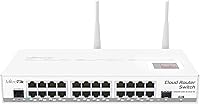
The MikroTik CRS125-24G-1S-2HnD-IN Layer 3 Gigabit Switch is one of those rare networking devices that genuinely consolidates three jobs into one chassis: a fully managed switch, a capable router, and a wireless access point. The engine behind all of it is RouterOS — MikroTik's own operating system that gives administrators granular control over routing protocols, firewall rules, VLANs, and much more. The hardware sits in a rack-mountable metal enclosure, making it a practical fit for small office server rooms or network closets. That said, be clear-eyed going in: this is not consumer gear. If you have never touched RouterOS before, expect a real learning curve.
Features & Benefits

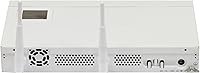
Start with the port count — 24 Gigabit Ethernet ports is a generous spread for a SOHO or branch office deployment, and having an SFP cage on top of that means you can tie into a fiber uplink when needed. The built-in 2.4GHz wireless access point adds convenience, though it tops out at 802.11n, which is worth keeping in mind if Wi-Fi performance is a priority. RouterOS unlocks VLAN segmentation and firewall rules across all ports, and the dedicated Switch menu keeps everyday port management approachable. The microUSB port is a small but useful touch for out-of-band access during configuration or recovery.

Best For

The CRS125 makes the most sense for small-to-medium business environments where running separate boxes for routing, switching, and wireless feels wasteful — both financially and in terms of rack space. IT professionals and network administrators who have already spent time in RouterOS will hit the ground running; the learning investment pays off quickly once the environment is set up. It's also a solid option for budget-conscious offices that need real managed-switch functionality — VLAN support, Layer 3 routing, proper firewall rules — without paying enterprise-tier prices. If you're expecting plug-and-play simplicity, this is not the right device.

User Feedback

Owners of this all-in-one managed switch tend to split neatly into two camps. Experienced network engineers consistently highlight how much value is packed into a single unit — hardware durability gets strong marks too, with the metal chassis holding up well in real office installs. On the other hand, reviewers newer to MikroTik are candid about the configuration complexity; several mention that MikroTik's community forums and official wiki became essential reading just to get basic services running. The 2.4GHz-only wireless also draws recurring criticism — in a world of dual-band and Wi-Fi 6, the radio feels dated. Overall, satisfaction skews high among buyers who knew what they were getting.

Pros

  • Consolidates a 24-port gigabit switch, Layer 3 router, and wireless AP into a single rack-mountable unit.
  • RouterOS provides enterprise-grade control — VLANs, firewall rules, routing protocols — at a fraction of enterprise pricing.
  • The SFP cage adds real fiber uplink flexibility for offices with structured cabling or ISP fiber handoffs.
  • Metal chassis construction feels solid and holds up well in real office and server room environments.
  • The dedicated Switch menu makes everyday port management accessible without needing to touch advanced RouterOS config.
  • MicroUSB management port is a practical touch for out-of-band access during recovery or initial setup.
  • 24 Gigabit ports is a generous count for a SOHO or small branch office deployment at this price tier.
  • Passive PoE input gives installation flexibility in locations where standard power outlets are inconvenient.
  • Buyers with RouterOS experience consistently report this all-in-one managed switch punches well above its weight class.
  • Active MikroTik community forums and thorough official documentation soften the learning curve for determined administrators.

Cons

  • RouterOS has a steep learning curve that genuinely discourages anyone without prior MikroTik or advanced networking experience.
  • 2.4GHz-only wireless is outdated — no dual-band support means the CRS125 cannot serve as a modern standalone Wi-Fi solution.
  • 128MB of RAM is modest and may become a constraint in complex routing or firewall rule-heavy deployments.
  • No built-in PoE output, so powering IP cameras or VoIP phones requires additional hardware.
  • Troubleshooting issues without community forum access can be time-consuming due to sparse in-product guidance.
  • The wireless radio maxes out at 802.11n speeds, limiting throughput for bandwidth-heavy wireless clients.
  • Initial configuration for non-MikroTik users often requires hours of documentation reading before the device is production-ready.
  • No cloud management portal — remote administration requires VPN or manual firewall rules, which adds setup complexity.
  • Buyers migrating from Cisco or Ubiquiti environments report a notable adjustment period to RouterOS logic and terminology.

Ratings

Our AI-generated scores for the MikroTik CRS125-24G-1S-2HnD-IN Layer 3 Gigabit Switch were produced by analyzing verified purchaser reviews from buyers worldwide, with spam, bot-generated, and incentivized feedback actively filtered out before scoring. The results reflect a realistic cross-section of real-world deployment experiences — from seasoned network engineers running complex VLAN topologies to first-time MikroTik buyers who hit walls during initial setup. Both the genuine strengths and the recurring frustrations are transparently represented in every category below.

Value for Money
91%
Among buyers who understood what they were purchasing, the value proposition is consistently described as exceptional. Getting a 24-port managed gigabit switch, a Layer 3 router, and a wireless access point in a single unit at this price tier is genuinely difficult to match from competing brands.
Buyers who underestimated the RouterOS learning curve often feel the value is offset by the time investment required to configure the device properly. For those who end up outsourcing setup to a consultant, the effective cost of ownership rises noticeably.
Build Quality
88%
The metal chassis earns consistent praise from buyers who have installed the CRS125 in server rooms and network closets. Reviewers report no flex, no rattling, and no heat-related issues even after months of continuous operation in enclosed rack environments.
A small number of buyers noted that the unit runs warm under sustained high-traffic loads, and the passive cooling design means there is no active airflow management. In poorly ventilated rack enclosures, this is worth monitoring.
Port Density & Connectivity
89%
Twenty-four Gigabit Ethernet ports plus an SFP cage is a genuinely competitive combination for a SOHO or branch office deployment. The SFP slot in particular is praised by buyers who needed a clean fiber uplink without adding a separate media converter to their rack.
There is no PoE output on any of the Ethernet ports, which surprised several buyers who assumed a managed switch at this level would be able to power IP phones or cameras directly. This forces additional hardware purchases in PoE-dependent environments.
Wireless Performance
53%
47%
The built-in 2.4GHz wireless AP is adequate for low-demand scenarios — a handful of staff devices in a small office, or as a fallback AP during primary wireless maintenance. The 1000mW dual-chain output does give it reasonable range for its frequency band.
In a world of dual-band Wi-Fi 6 access points, the 802.11n 2.4GHz-only radio is a genuine limitation that multiple reviewers call out directly. Buyers who expected the wireless component to carry real office workloads were consistently disappointed, and most end up adding a dedicated AP anyway.
Routing & Switching Capability
93%
For experienced network engineers, the Layer 3 routing and VLAN support in RouterOS is a standout feature. Users managing inter-VLAN routing, static routes, and firewall ACLs across 24 ports report that the device handles real SMB workloads reliably without performance degradation.
The 128MB of RAM sets a ceiling on routing table complexity and connection tracking capacity. In high-throughput or high-session-count environments, a small number of advanced users have reported hitting memory constraints under sustained load.
Ease of Setup
41%
59%
For buyers who have prior RouterOS experience, initial configuration is logical and well-documented. The dedicated Switch menu genuinely simplifies port and VLAN management for those who already know where to look, and the microUSB console port makes early-stage setup accessible even before IP connectivity is established.
This is the most consistently cited pain point across all reviewer segments. Buyers migrating from consumer routers, Ubiquiti gear, or Cisco interfaces often describe the initial configuration as overwhelming. Several reviewers spent multiple days on setup and explicitly recommend MikroTik training resources as a prerequisite.
Management Interface
67%
33%
RouterOS via Winbox (MikroTik's desktop management tool) is functional and powerful once learned. Experienced administrators appreciate the granular control it provides across every aspect of the device — firewall, routing, VLAN, and wireless all managed from a single interface.
The management experience is far from intuitive for newcomers, and there is no modern browser-based dashboard that competes with what Ubiquiti or Netgear offer at similar price points. The learning investment required is real and not trivial for non-MikroTik administrators.
Documentation & Support
62%
38%
MikroTik maintains an extensive official wiki and the community forum is genuinely active, with years of archived solutions covering most common CRS125 configuration scenarios. Buyers who engage with these resources typically resolve issues without needing direct vendor support.
Official manufacturer support is limited compared to enterprise networking vendors — there is no phone support or fast-response ticketing system for end users. Buyers used to Cisco TAC or Ubiquiti's support model find the self-serve documentation approach frustrating when things go wrong in production.
Reliability & Uptime
86%
Long-term owners of the CRS125 report strong uptime figures in real deployments — many citing continuous operation over one to two years without hardware failures or unexpected reboots. The metal chassis and passive thermal design appear to contribute to stable long-term performance.
A small subset of reviewers reported occasional RouterOS software instability after certain firmware updates, requiring a rollback or reconfiguration. While not widespread, it underscores the importance of testing firmware updates in a non-production context before deploying.
VLAN & Segmentation
88%
VLAN support is one of the most praised functional areas among technically informed buyers. The Switch menu makes 802.1Q VLAN assignment approachable, and reviewers managing multi-tenant office setups or segmented guest networks report that the implementation is reliable and consistent.
Configuring VLANs in RouterOS still requires familiarity with MikroTik's specific VLAN bridging model, which changed significantly in later RouterOS versions. Buyers who followed outdated tutorials based on older RouterOS releases frequently ran into configuration mismatches.
Form Factor & Installation
84%
The rack-mountable metal chassis integrates cleanly into standard 19-inch racks, and at 1U height it does not consume excessive rack space for the port count it delivers. IT staff installing it in server rooms consistently describe the physical installation process as straightforward.
At approximately 3.09 lbs the unit is not heavy, but the lack of included rack-mount ears in some regional shipments caught a handful of buyers off guard. Verifying what is included in the specific regional package before ordering is worth doing.
Firmware & Updates
71%
29%
RouterOS receives regular firmware updates from MikroTik, and the all-in-one managed switch benefits from active software development that adds features and security patches over time. Long-term ownership is supported by this ongoing update cycle.
Firmware updates occasionally introduce behavioral changes that affect existing configurations, and MikroTik's changelog communication is not always comprehensive. Administrators in production environments have learned to treat updates with caution and always review community feedback before upgrading.
Scalability
69%
31%
For a small or growing office, the CRS125 has enough port density and routing capability to handle meaningful network growth without immediately requiring a hardware upgrade. The SFP uplink option also future-proofs connectivity to a degree.
128MB of RAM and the fixed port count mean this device has a definite ceiling. Organizations that grow beyond roughly 50 to 75 active network clients, or that need PoE switching at scale, will eventually outgrow it and need to plan for a hardware refresh.

Suitable for:

The MikroTik CRS125-24G-1S-2HnD-IN Layer 3 Gigabit Switch is purpose-built for small-to-medium businesses and IT professionals who want serious network control without deploying three separate devices. If your office needs VLAN segmentation, firewall rules, Layer 3 routing, and a wireless access point all running from a single rack-mountable unit, this is a genuinely strong fit. Network administrators already comfortable with RouterOS will find the configuration environment familiar and the hardware capable well beyond what the price bracket typically delivers. It also suits branch offices or server rooms where rack space is limited — consolidating switching, routing, and wireless into one chassis is a real operational win. Organizations building out cost-effective but professionally managed infrastructure, where someone on staff has the RouterOS expertise to configure it correctly, will get consistent, reliable performance out of the CRS125.
Not suitable for:

Buyers expecting a consumer-style setup experience should look elsewhere — the MikroTik CRS125-24G-1S-2HnD-IN Layer 3 Gigabit Switch is not a device you unbox, plug in, and forget about. RouterOS is a powerful platform, but it has almost no handholding for those unfamiliar with it, and the initial configuration can be genuinely frustrating without prior MikroTik experience or a willingness to spend time in the documentation and community forums. The built-in wireless is also a notable limitation for anyone prioritizing modern Wi-Fi performance — 2.4GHz-only 802.11n simply cannot compete with today's dual-band or Wi-Fi 6 access points, so if wireless is central to your network design, you will need a separate AP regardless. Small home users or anyone running a basic flat network with no VLAN or routing needs will find the feature set overkill and the complexity unwarranted. If RouterOS is completely foreign to you and there is no budget or time for training, a simpler managed switch from a more beginner-friendly vendor will serve you better.
Specifications

  • Manufacturer: This device is designed and produced by MikroTik, a Latvian networking hardware company known for its RouterOS-based products.
  • Model Number: The official model identifier is CRS125-24G-1S-2HnD-IN.
  • Ethernet Ports: The unit includes 24 Gigabit Ethernet ports supporting 10/100/1000 Mbps speeds.
  • SFP Cage: One SFP cage is included for fiber or copper SFP module uplinks.
  • Wireless Standard: The built-in wireless AP operates on 2.4GHz only, supporting 802.11b/g/n with dual-chain 1000mW output.
  • Operating System: The device runs MikroTik RouterOS, a professional-grade network operating system supporting routing, switching, firewall, and wireless management.
  • RAM: The device is equipped with 128MB of onboard RAM.
  • Storage: Internal storage is 128MB, used for RouterOS and configuration data.
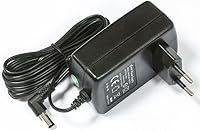
  • Power Input: The unit accepts passive PoE input for flexible power deployment where standard outlets are limited.
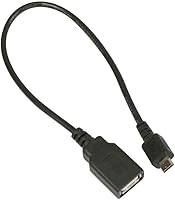
  • Management Port: A microUSB port is provided for out-of-band management, console access, and firmware recovery.
  • Dimensions: The chassis measures 285 x 167 x 44mm, designed for standard rack mounting.
  • Weight: The unit weighs approximately 1400g (around 3.09 lbs) fully assembled.
  • Chassis Material: The enclosure is constructed from metal, providing durability appropriate for office and server room installations.
  • Form Factor: The device is rack-mountable, fitting standard 19-inch network equipment racks.
  • Layer Support: Full Layer 3 switching is supported, enabling inter-VLAN routing, static routes, and firewall rules directly on the device.
  • VLAN Support: The CRS125 supports IEEE 802.1Q VLAN tagging and configuration through the RouterOS Switch menu.
  • Data Transfer Rate: The device supports up to 600 Megabits per second aggregate wireless data transfer rate under 802.11n.
  • Release Date: This product was first made available in January 2014 and remains in active production as of the latest listing data.

Related Reviews

MokerLink 3-Port Gigabit PoE Passthrough Switch
86%
94%
Ease of Installation
88%
PoE Performance (Power Output)
85%
Build Quality
92%
Compact Design
90%
Value for Money
More
KCEVE KC-303X Triple Monitor KVM Switch
78%
88%
Setup & Installation
83%
Video Signal Quality
79%
Switching Speed & Reliability
71%
Remote Controller
81%
USB Peripheral Performance
More
MikroTik CSS326-24G-2S+RM Managed Ethernet Switch
86%
88%
Performance and Reliability
91%
Build Quality
85%
Ease of Setup
90%
Traffic Management Features
87%
Port Versatility (SFP+ and Gigabit)
More
Camgeet KVM Switch 3 Monitors 3 Computers HDMI+2 DisplayPort
88%
95%
Display Resolution Support
93%
Multi-Computer Switching
89%
USB Connectivity
82%
Setup and Installation
91%
Compatibility Across OS
More
StarTech PEXUSB3S3GE USB 3.0 PCIe Card
75%
83%
Ease of Installation
78%
USB Port Performance
57%
Ethernet Reliability
61%
Build Quality
68%
Value for Money
More
AILVLVNG SW330 Dual Monitor KVM Switch
75%
86%
Video Signal Quality
83%
EDID Emulation
79%
Setup & Installation
71%
USB Peripheral Sharing
84%
Switching Speed
More
YuLinca UMG16 16-Port Gigabit Network Switch
80%
92%
Value for Money
83%
Build Quality
96%
Ease of Setup
88%
Port Performance
97%
Noise Level
More
keepLiNK 16-Port Gigabit PoE Unmanaged Switch
81%
91%
Value for Money
93%
Ease of Setup
78%
PoE Power Delivery
84%
Build Quality
71%
Thermal Performance
More
ienRon 10-Port Gigabit Ethernet Switch
81%
93%
Ease of Setup
88%
Network Performance
72%
Build Quality
76%
VLAN Functionality
67%
Thermal Management
More
keepLiNK 48-Port Gigabit PoE Switch
86%
89%
Performance
85%
Ease of Setup
91%
Build Quality
88%
Power Delivery (PoE+)
84%
Security Features
More

FAQ

Honestly, no — not if you are coming from consumer networking gear. The MikroTik CRS125-24G-1S-2HnD-IN Layer 3 Gigabit Switch runs RouterOS, which is a professional-grade platform that expects you to know what you are configuring. If you have MikroTik experience, initial setup is straightforward. If you do not, budget time for reading the official MikroTik wiki and community forum threads before going live.
Technically yes, but practically it depends on your needs. The built-in radio only covers 2.4GHz at 802.11n speeds, which is fine for light traffic in a small space. For a modern office with dual-band expectations or many wireless clients, you will want a dedicated access point alongside the CRS125 — the built-in Wi-Fi is a convenience feature, not a replacement for a proper AP.

Yes, fully. The device supports IEEE 802.1Q VLAN tagging, and you can manage VLAN assignments through the dedicated Switch menu in RouterOS. This is one of the CRS125's genuine strengths — VLAN segmentation is well-supported and does not require workarounds.

RouterOS is MikroTik's own operating system that controls everything — routing, switching, firewall rules, wireless configuration, and more. It is powerful but not intuitive if you are used to simpler web-based interfaces. You do not need to be an expert before buying, but you should be comfortable learning it, or have someone on staff who already is.

Yes, the unit is designed for standard 19-inch rack installation. The metal chassis is appropriately sized for rack deployment, making it a natural fit for server rooms or network closets.

Yes, there is one SFP cage on the unit that accepts standard SFP modules. This allows you to connect to a fiber handoff from your ISP or to link two buildings together over a fiber run — a useful option that many competing devices at this price point omit.

It functions as both. RouterOS allows individual ports to be pulled out of the switch configuration and used as routed interfaces, giving you genuine Layer 3 routing capability. You can run static routes, inter-VLAN routing, and apply firewall rules — it is not limited to pure switching.

The all-in-one managed switch delivers a similar feature set to many enterprise options at a significantly lower price point, largely because RouterOS is a mature and capable platform. The trade-off is that Cisco and similar vendors offer more polished management interfaces, better formal support contracts, and easier onboarding for less technical staff. If budget and feature depth matter more than brand and support ecosystem, the CRS125 holds its own well.

For a typical SOHO or small office deployment — VLANs, basic firewall rules, routing between a few subnets — 128MB is generally sufficient. Where it can feel constrained is in high-complexity environments with many simultaneous routing rules, large routing tables, or heavy connection tracking. For most small business use cases, it is not a practical bottleneck.

It serves as an out-of-band management port, giving you serial console access to the device independent of network connectivity. This is especially useful during initial configuration before IP access is set up, or for recovering a misconfigured device when you can no longer reach it over the network.

Where to Buy