Overview

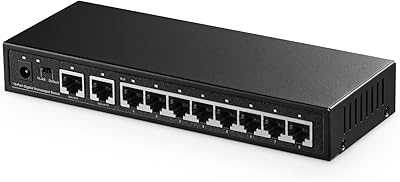
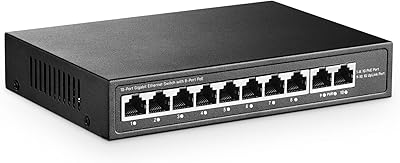
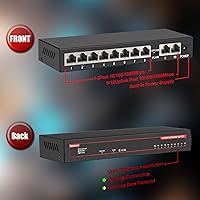
The ienRon 10-Port Gigabit Ethernet Switch is a straightforward, affordable option aimed at home offices and small businesses that have simply run out of wired ports. Eight standard gigabit connections plus two dedicated uplink ports live inside a compact metal shell that weighs just 14 ounces — light enough to tuck behind a monitor or mount on a wall. There's no software to install, no login page to navigate. Plug it in and your devices connect. What separates this switch from most budget alternatives is a VLAN mode toggle on the chassis, a feature that typically costs significantly more elsewhere. For the price, it's a well-rounded package.
Features & Benefits

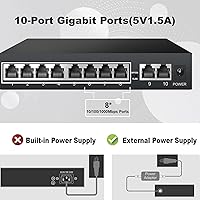
All ten ports run at full gigabit speeds, and each one handles auto MDI/MDIX, so there's no frustration matching cable types. The VLAN mode deserves a plain-language explanation: when switched on, ports 1 through 8 can only talk to the two uplink ports, not to each other. That's useful if you're connecting security cameras or guest devices and want them isolated from your main network without buying a managed switch. Power draw maxes out at 2.5 watts — genuinely low — and IEEE 802.3X flow control keeps traffic from piling up under load. The 4KV lightning protection is a practical bonus in areas prone to power surges. No PoE support, though — worth knowing upfront.

Best For

This gigabit switch is a natural fit for anyone who has maxed out their router's LAN ports and needs a quick, fuss-free expansion. Home users running a mix of computers, smart TVs, printers, and NAS drives will appreciate not needing to touch any settings. In a small office context, the VLAN toggle makes it practical for separating IP cameras or a guest terminal from the rest of the network. The fanless passive cooling means it can sit on a living room shelf or inside a media cabinet without generating noise or requiring airflow clearance. Anyone needing PoE for access points or IP phones will need to look at a different device entirely.

User Feedback

Buyers consistently highlight the ienRon switch for its effortless setup — most report it running within minutes, no manual required. Silent operation earns repeated praise, especially from users who placed it near a desk or entertainment unit. On the critical side, a handful of buyers note that tucking it into an enclosed cabinet without ventilation can cause it to run warm over time, a fair concern for any passively cooled device. The VLAN button gets mixed reactions: technically useful, but not clearly labeled for less experienced users. Build quality earns cautious approval — solid for the price tier, though not comparable to name-brand hardware. A few isolated reports of intermittent connectivity drops after months of use are worth keeping in mind.

Pros

  • All ten ports run at full gigabit speed with zero configuration required out of the box.
  • The completely fanless design makes it genuinely silent — ideal for desks, shelves, and living spaces.
  • A hardware VLAN toggle lets you isolate devices like cameras or guest hardware without a managed switch.
  • Built-in 4KV lightning protection adds meaningful hardware safety in storm-prone or older-wiring environments.
  • Auto MDI/MDIX on every port means any ethernet cable type works without manual adjustments.
  • Power draw of just 2.5 watts at full load adds virtually nothing to your electricity costs.
  • The metal chassis feels noticeably more solid and durable than plastic budget alternatives.
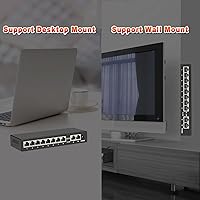
  • Supports both desktop placement and wall mounting with no additional hardware needed.
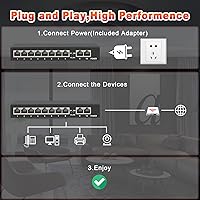
  • Setup takes under two minutes — plug in power and cables, and the switch is immediately operational.
  • Two dedicated uplink ports allow flexible connection to multiple upstream devices or routers.

Cons

  • No PoE output makes it incompatible with access points, IP phones, or powered cameras.
  • The VLAN button has minimal labeling and no visible status indicator, causing confusion for less experienced users.
  • Installing it in enclosed cabinets or tight spaces can lead to heat buildup and potential long-term issues.
  • Some buyers report isolated port failures or intermittent drops after six or more months of continuous use.
  • The proprietary power connector means a lost or damaged adapter is not easy to replace off the shelf.
  • Port labels are faint and difficult to read in low-light environments, complicating cable management.
  • Build quality, while decent for the price, does not match the fit and finish of name-brand networking hardware.
  • The VLAN mode is all-or-nothing — there is no way to assign individual ports to custom network segments.
  • Closely spaced ports can make it difficult to fit bulky ethernet connectors or right-angle adapters side by side.
  • Long-term reliability data is thinner than for established brands, which may concern business-critical deployments.

Ratings

The ienRon 10-Port Gigabit Ethernet Switch scores below are generated by AI after analyzing verified buyer reviews from global marketplaces, with spam, bot-submitted, and incentivized feedback actively filtered out. The result is an honest snapshot of how this switch actually performs in real home offices, small businesses, and network closets — strengths and frustrations included. Where users consistently agree, the scores reflect that consensus; where opinions split, the range is represented fairly.
Ease of Setup
93%
Buyers across all experience levels report having this switch running in under two minutes. There is no app to download, no web interface to configure, and no driver installation — just a power cable and ethernet connections. For non-technical users, that simplicity is the single most praised aspect of ownership.
A small number of buyers who expected more granular control found the lack of any configuration interface limiting. The VLAN button, while simple in theory, comes with minimal labeling and no printed guide explaining its function, which left a few users uncertain whether they had it set correctly.
Network Performance
88%
All ten ports reliably deliver gigabit throughput, and the auto-negotiation handles mixed cable types without any manual adjustment. Users running simultaneous file transfers, 4K streaming, and IP camera feeds report no noticeable bottlenecks under typical home or small office loads.
A handful of buyers noted occasional latency spikes when pushing the switch near its traffic ceiling with many active devices simultaneously. These were not common complaints, but users running demanding workloads — such as NAS-heavy environments — occasionally flagged performance inconsistencies that would not occur on a pricier managed switch.
Build Quality
72%
28%
The metal enclosure feels noticeably more solid than the plastic shells common on competing budget switches. At just over a pound, it sits firmly on a desk without sliding, and the port sockets feel snug rather than loose, which inspires more confidence than the price tag might suggest.
This is still a budget device, and it shows in the finer details. The chassis has minor flex when pressed, port labels are faint and hard to read in low light, and the overall fit of the housing does not feel precision-engineered. Buyers comparing it directly to Netgear or TP-Link hardware at higher prices consistently note the gap in polish.
VLAN Functionality
76%
24%
For a switch in this price range, having a hardware VLAN toggle at all is genuinely useful. Home users who want to isolate security cameras or IoT devices from their main computers can do so with a single button press, no managed switch required. Several technically inclined buyers called it a standout feature for the cost.
The implementation is rigid — it is all-or-nothing, with no ability to assign specific ports to custom segments. Users who understand VLAN concepts but wanted more flexibility found it underwhelming. The button itself is also small and recessed, making it easy to accidentally toggle without realizing it.
Thermal Management
67%
33%
Passive cooling means absolute silence, which matters a lot when the switch lives in a bedroom, living room, or open-plan office. Buyers who placed it on an open desk or mounted it on a wall reported the chassis staying comfortably warm at most, even after days of continuous operation.
Place this switch in an enclosed cabinet or stack it under other equipment and heat becomes a real concern. Several buyers reported warm-to-hot surfaces after extended use in confined spaces, and a few linked this to intermittent connectivity issues over time. It is not designed for enclosed rack deployment without adequate airflow.
Lightning & Surge Protection
82%
18%
The built-in 4KV lightning protection is a meaningful practical feature for users in regions with frequent electrical storms or unstable grid power. Buyers in rural areas and older buildings specifically mentioned this as a deciding factor, noting that previous cheap switches had died after power events.
Protection ratings are difficult for end users to independently verify, and a small number of buyers reported unit failures after significant surge events, suggesting the protection has real-world limits. It should be treated as a supplementary safeguard rather than a replacement for a quality surge protector or UPS.
Port Count & Layout
85%
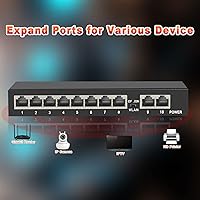
Ten ports in a chassis this compact is a practical configuration. The separation of eight standard ports and two dedicated uplink ports gives a logical physical layout that makes cable management intuitive. Having two uplink options is useful when connecting to more than one upstream device or router.
For users who need more than ten connections, there is no expansion path with this device. The ports are spaced closely together, which means bulky ethernet connectors or right-angle adapters can occasionally block adjacent ports — a minor but recurring frustration mentioned by buyers with dense patch setups.
Power Efficiency
91%
Drawing just 2.5 watts at full load is impressively lean. Buyers who run their home network hardware around the clock appreciated that this switch adds virtually nothing to their electricity bill, and the energy-efficient chip runs cooler than older-generation switches as a side benefit.
There is little to criticize here from a power standpoint. The only caveat is that the power adapter is a proprietary barrel connector, so losing or damaging it requires sourcing a replacement with the correct voltage and polarity — something a couple of buyers discovered the hard way.
Value for Money
89%
At this price, getting gigabit on every port, a metal case, VLAN isolation, and lightning protection in a single device is genuinely competitive. Buyers who previously owned plastic five-port switches at similar prices found this switch to be a clear step up in both features and perceived durability.
The value equation holds up well for typical home use, but buyers who stress-tested it in commercial environments found the limitations of the hardware more apparent over time. A few noted that reliability issues after six to twelve months of heavy use made them question the long-term cost-per-year calculation.
Silent Operation
94%
No fan means no noise — full stop. Buyers who have suffered through the low hum of cheap noisy switches placed in home offices or bedrooms consistently praised this aspect. It is one of the most uniformly positive points across all feedback, with very few dissenting opinions.
The only context where silent operation becomes a mild concern is the flip side of no active cooling. Users who associate fan noise with a device working properly sometimes felt unsure whether the switch was functioning correctly when completely silent, though this is a perception issue rather than a functional one.
Mounting & Placement Flexibility
78%
22%
Both desktop and wall-mount configurations are supported without any additional hardware. The compact footprint means it fits in tight spots that larger switches cannot, and several buyers mounted it cleanly behind desks or inside media consoles with standard screws.
The included mounting hardware is minimal, and the wall-mount points are small. Buyers attempting to mount it on drywall without a solid anchor point found the fit less secure than expected. The power cable exits at the back, which can complicate cable routing in certain wall-mount orientations.
Port Reliability Over Time
69%
31%
For the majority of buyers, ports perform consistently across months of daily use. Most short-term and medium-term owners report zero port failures, and the shielded RJ45 connectors hold up well under regular plug-unplug cycles compared to unshielded alternatives in the same price bracket.
A recurring theme in longer-term reviews is isolated port failures or intermittent link drops appearing after six months or more of continuous use. This is not a widespread issue, but it is consistent enough to be worth noting — particularly for users who rely on every port being active at all times.
VLAN Usability & Labeling
61%
39%
The concept behind the hardware VLAN toggle is sound, and buyers who understood what it did before purchasing used it effectively. Networking enthusiasts appreciated that the feature existed at all, treating it as a bonus tool in a budget package rather than a core expectation.
The execution leaves room for improvement. The button has no clear on/off indicator visible from the front, the manual provides minimal explanation, and some buyers toggled it accidentally without noticing. For less experienced users, it created confusion rather than added value, with several reporting they left it off entirely after giving up trying to understand its behavior.
Compatibility & Cable Support
86%
Auto MDI/MDIX on every port means users can connect devices using either straight-through or crossover cables without thinking about it. This works reliably across the mixed cable inventories most home offices have accumulated over the years, with no buyer reporting compatibility failures from cable type mismatches.
The switch is strictly a Layer 2 device with no PoE output, which is a hard limitation for anyone hoping to power access points, VoIP phones, or PoE cameras directly from it. This is clearly disclosed in the product listing, but buyers who missed that detail during purchase expressed disappointment upon discovering it.

Suitable for:

The ienRon 10-Port Gigabit Ethernet Switch is a strong fit for home users and small office workers who simply need more wired ports without the overhead of managed networking gear. If your router has one or two LAN ports and you're trying to connect a desktop, a NAS drive, a printer, a smart TV, and a few other devices all at once, this switch solves that problem immediately and without any technical knowledge. It works particularly well in living rooms, home offices, and small studios where noise is a concern — the completely silent operation makes it easy to forget it's even running. Users in areas with frequent electrical storms or older wiring will also appreciate the built-in lightning protection, which adds a layer of hardware security that most budget switches skip entirely. Network-curious buyers who want to isolate IoT gadgets or IP cameras from their main computers will find the VLAN toggle a genuinely useful tool, even if its implementation is basic. For anyone prioritizing simplicity, low power draw, and a metal chassis over plastic at an accessible price point, this switch delivers a well-rounded package.
Not suitable for:

The ienRon 10-Port Gigabit Ethernet Switch is not the right choice for anyone whose networking needs go beyond basic plug-and-play expansion. If you need to power access points, VoIP handsets, or IP cameras directly from the switch, the complete absence of PoE support is a hard dealbreaker — no workaround exists at the hardware level. IT professionals or advanced home lab users who want per-port VLAN assignments, traffic monitoring, QoS rules, or any form of remote management will find this device frustratingly limited, as its VLAN feature is a single all-or-nothing toggle rather than a configurable system. Buyers planning to install it inside a sealed network cabinet or stack it in an enclosed rack should also think carefully — without active cooling, heat can accumulate in poorly ventilated spaces and potentially affect long-term reliability. Anyone running a business-critical network where every port must stay stable around the clock may find the occasional long-term port reliability reports concerning enough to justify spending more on a name-brand alternative with a formal warranty and proven support infrastructure.

Specifications

  • Total Ports: The switch provides 10 RJ45 ports in total, consisting of 8 standard gigabit ports and 2 dedicated gigabit uplink ports.
  • Data Transfer Rate: Every port supports a maximum data transfer rate of 1000 Mbps (1 Gbps), enabling full gigabit throughput across all connections simultaneously.
  • Interface Type: All ports use the RJ45 connector standard, compatible with standard Cat5e, Cat6, and Cat6a ethernet cables.
  • Auto MDI/MDIX: Each port supports automatic MDI/MDIX crossover detection, eliminating the need to match straight-through or crossover cable types manually.
  • Flow Control: IEEE 802.3X flow control is implemented across all ports to manage data traffic and reduce packet loss during periods of high network load.
  • VLAN Mode: A physical hardware toggle button on the chassis enables a basic VLAN mode that isolates ports 1 through 8 to communicate only via uplink ports 9 and 10.
  • Lightning Protection: Built-in surge protection is rated to withstand up to 4000 volts, along with an automatic port fuse circuit for short-circuit and overload events.
  • Power Consumption: Maximum power draw under full load is 2.5 watts, achieved through an energy-efficient low-power ethernet chipset.
  • Cooling System: The switch uses entirely passive cooling with no internal fan, relying on the metal enclosure to dissipate heat silently during operation.
  • Case Material: The outer enclosure is constructed from metal with a multi-layer baked varnish finish that provides corrosion resistance in challenging environments.
  • Dimensions: The unit measures 7.87 x 3.94 x 1.97 inches, making it compact enough for desktop placement or standard wall mounting.
  • Weight: The switch weighs 14 ounces (0.4 kg), light enough for wall mounting without requiring heavy-duty anchors.
  • Mounting Options: The chassis supports both flat desktop use and wall mounting, with mounting points built into the underside of the enclosure.
  • Operating Temperature: The switch is rated to operate reliably in ambient temperatures ranging from 5°C to 50°C (41°F to 122°F).
  • PoE Support: This switch does not provide Power over Ethernet output on any port and cannot be used to power PoE-dependent devices such as access points or IP phones.
  • Management Type: The switch is fully unmanaged with no web interface, software, or command-line configuration required or available beyond the physical VLAN toggle button.
  • Duplex Support: All ports support full-duplex and half-duplex auto-negotiation, allowing each connection to operate at its optimal speed without manual configuration.
  • Power Input: The switch is powered via a DC barrel connector adapter; the input adapter is included in the box but uses a proprietary connector specification.

Related Reviews

Binardat G10-082G 10-Port Gigabit Ethernet Switch
86%
88%
Performance
94%
Ease of Setup
86%
Build Quality
91%
VLAN Support
93%
Quiet Operation
More
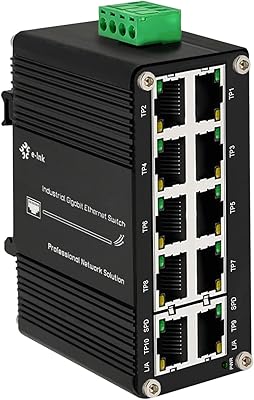
Steloproad 10-Port Industrial Gigabit Switch
82%
88%
Build Quality
91%
Temperature Resilience
93%
Power Input Flexibility
84%
Port Count and Layout
86%
Ease of Installation
More
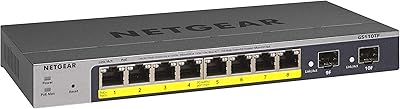
NETGEAR GS110TP 8-Port PoE+ Gigabit Smart Switch
83%
88%
PoE Reliability
83%
Build Quality
79%
Web Management Interface
61%
NETGEAR Insight Cloud App
74%
VLAN & Segmentation
More
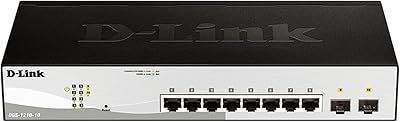
D-Link DGS-1210-10 10-Port Gigabit Smart Managed Switch
88%
88%
Performance & Speed
91%
Build Quality
85%
Ease of Setup
94%
Fanless Design (Noise Level)
90%
Security Features
More
Goalake 16-Port Gigabit Managed Switch
79%
93%
Value for Money
88%
Build Quality
96%
Noise Level
79%
Ease of Initial Setup
66%
Management App Quality
More
STEAMEMO 26-Port Gigabit Ethernet Switch
84%
88%
Performance
91%
Ease of Setup
89%
Build Quality
85%
Network Stability
83%
Energy Efficiency
More
STEAMEMO 16-Port Managed Gigabit Ethernet Switch
78%
91%
Value for Money
88%
Ease of Setup
84%
Build Quality
86%
Network Performance
74%
VLAN Functionality
More
YuLinca G1002G 8-Port PoE Gigabit Switch
79%
94%
Ease of Setup
89%
Value for Money
82%
PoE Performance
76%
Build Quality
67%
Thermal Management
More
VIMIN 10-Port 2.5G Unmanaged Switch
79%
96%
Ease of Setup
89%
Port Performance
84%
Build Quality
67%
Thermal Management
71%
SFP Uplink Usability
More
Binardat 5-Port Gigabit Industrial Ethernet Switch
89%
89%
Performance & Speed
94%
Build Quality & Durability
92%
Noise & Operation
91%
Ease of Installation
90%
Temperature Tolerance
More

FAQ

Not at all. This is a fully unmanaged switch, which means there is no app, no web dashboard, and no configuration interface of any kind. You plug in the power adapter, connect your devices with ethernet cables, and everything comes up automatically. It is genuinely as simple as it sounds.

When the VLAN button is switched on, ports 1 through 8 are isolated from each other and can only communicate through the two uplink ports (9 and 10). In practical terms, this means devices connected to ports 1 through 8 cannot talk directly to each other — they can only reach whatever is connected to the uplink ports, typically your router. This is useful if you want to keep security cameras or guest devices separated from your main computers. If you just want all devices to share the network freely, leave the button off.

No. The ienRon 10-Port Gigabit Ethernet Switch does not support Power over Ethernet (PoE) on any of its ports. If your access point, camera, or VoIP phone requires PoE to operate, you will need either a PoE switch or a separate PoE injector — this device cannot supply power to connected equipment through the cable.
Cat5e is perfectly fine for gigabit speeds over typical home or office distances, so you do not need to replace your existing cables. The switch supports Cat5e, Cat6, and Cat6a, and the auto MDI/MDIX feature means it will work with whatever ethernet cables you already have on hand, regardless of whether they are straight-through or crossover.

It is not ideal. The switch has no fan and relies entirely on passive airflow to stay cool, which works well in open spaces but can lead to heat buildup in sealed or poorly ventilated enclosures. If you do place it inside a cabinet, make sure there is at least some airflow around it. Running it hot over a long period is the most common cause of the intermittent issues some long-term users have reported.

Completely silent. There is no fan inside the unit, so there is genuinely zero noise at any time. This makes it a great fit for bedrooms, living rooms, home recording spaces, or any environment where even a faint electrical hum would be noticeable.

Yes, that is exactly what the two uplink ports are designed for. You can connect up to two upstream devices — whether that is two routers, a router and a modem, or two separate network segments — into ports 9 and 10 simultaneously.

The switch includes built-in protection rated to handle surges up to 4000 volts, along with an automatic fuse circuit that cuts off individual ports in the event of a short circuit or overload to protect the rest of the device. That said, this protection has practical limits and should be treated as a secondary safeguard — pairing it with a quality surge-protected power strip or UPS is still a good idea in storm-prone areas.

The chassis has wall-mount points built in, so wall mounting is supported. Basic mounting hardware is included in the box, though buyers have noted it is fairly minimal. For a secure installation on drywall, using wall anchors appropriate for your wall type is recommended rather than relying solely on what is in the package.

No, each port auto-negotiates its own speed and duplex mode independently. So if you connect a gigabit NAS, a 100Mbps printer, and a gigabit desktop all to the same switch, each device will simply connect at its own best speed without interfering with the others. You do not need to configure anything for mixed-speed environments.