Overview

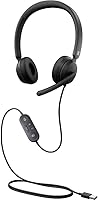
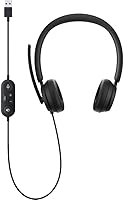
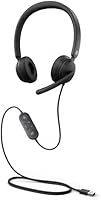
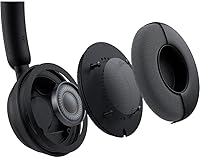
The Microsoft Modern Wired Headset is a practical and reliable solution for remote work and professional calls. This wired headset features noise-canceling technology, ensuring clear communication even in noisy environments. Its lightweight design and comfortable padded earcups make it ideal for all-day wear. USB-A connectivity allows for a quick, plug-and-play setup, meaning there’s no need for complicated installation. Certified for Microsoft Teams, it’s optimized for virtual meetings, offering seamless integration and reliable audio performance. For anyone who spends long hours on calls, this headset promises ease of use and comfort, making it a strong choice for professional environments.

Features & Benefits

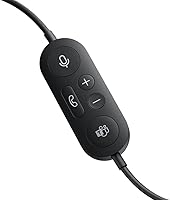
One of the standout features of this headset is its active noise cancellation, which helps filter out background noise for a clearer audio experience. In addition to that, the in-line mute and volume controls provide convenient control during calls. With the integrated Teams button, users can join meetings instantly with just a press, which saves valuable time. The headset’s high-quality stereo speakers are optimized for voice clarity, ensuring every word is crisp. A mute status light is also present, so you can quickly check if your microphone is active or muted, ensuring smooth communication without any surprises.

Best For

This headset is best suited for remote workers, professionals, and anyone who frequently uses Microsoft Teams. Those looking for a comfortable all-day headset for calls will appreciate the lightweight design and padded earcups, making it ideal for long hours. Users who prioritize easy setup will benefit from the USB-A connectivity, which offers a straightforward, plug-and-play experience. Additionally, it’s great for people who value clear voice quality and need reliable background noise reduction during virtual meetings, making it a versatile choice for professional use in office or home settings.

User Feedback

Users consistently highlight the comfort of this headset, especially during long meetings. Many appreciate the noise-canceling microphone, which receives high praise for its ability to cut down on background noise and provide clear communication. However, a few users mention that the cable length could be a bit longer, though it works well for most desk setups. The integration with Microsoft Teams is a key benefit, with many noting how easy it is to use the headset for instant meeting joins. Overall, the headset is well-received for its combination of comfort, functionality, and seamless integration into a professional setting.

Pros

  • This wired headset offers excellent comfort for extended use during long meetings and calls.
  • The noise-canceling microphone is highly praised for clear communication, even in noisy environments.
  • USB-A connectivity ensures a quick and hassle-free plug-and-play setup, ideal for professionals in fast-paced environments.
  • The integrated Teams button provides seamless one-touch meeting joining, improving workflow efficiency.
  • Padded ear cups contribute to its lightweight design, making it easy to wear for hours without discomfort.
  • This device is an excellent choice for remote workers who need a reliable, easy-to-use headset for video conferencing.

Cons

  • Some users find the cable length too short for use in larger or more spacious workspaces.
  • The on-ear design may be uncomfortable for those who prefer over-ear headsets for all-day wear.
  • Not the best choice for users looking for advanced sound quality for music or gaming.
  • While the microphone does well in most scenarios, it may not fully isolate extreme background noise in very busy environments.
  • The wired connection may not be ideal for people seeking the freedom of wireless headphones.
  • A few users report that the headset’s build feels less durable than expected, especially for heavy daily use.

Ratings

After analyzing verified user reviews from various platforms and languages, we’ve compiled the following scores for the Microsoft Modern Wired Headset. All feedback was thoroughly vetted to ensure authenticity, filtering out spam, bots, and incentivized reviews. The following categories reflect both strengths and potential areas for improvement based on a wide range of user experiences worldwide.

Audio Quality
85%
Many users mention that the audio quality is clear and sharp, making it ideal for professional calls and virtual meetings. The stereo speakers deliver a balanced sound, ensuring voice clarity even during long calls or video conferences.
However, some users feel that while the audio quality is good for voice communication, it may not be as immersive for music or multimedia use. A few also pointed out occasional background noise interference when in a loud environment.
Comfort for Long Use
90%
Several buyers note that this wired headset is very comfortable to wear for extended periods. The lightweight design combined with padded earcups provides a snug fit without causing discomfort, even during all-day meetings or video calls.
Some users, however, mentioned that the on-ear design can start to feel tight or uncomfortable after several hours. A few also wished for a more adjustable fit for different head shapes.
Noise Cancellation Performance
88%
The active noise cancellation feature receives positive feedback, especially for users who work in noisy environments. The noise-canceling microphone is praised for reducing background sounds, ensuring clearer and more focused communication during calls.
However, a few reviewers felt that the noise cancellation wasn't as effective in extremely noisy surroundings. In some cases, users mentioned that the feature could be more powerful in blocking out low-frequency background noise.
Ease of Setup
95%
Buyers love how easy it is to set up this headset. The USB-A connectivity ensures a plug-and-play experience, making it a hassle-free addition to their workspace without the need for complicated installation processes or extra software.
A minor drawback for some users is that the USB-A connection limits compatibility with certain newer devices that use USB-C ports. A few users wished for an included adapter for more versatile connectivity.
Microphone Clarity
87%
The noise-canceling microphone gets positive reviews for its clarity. Many users appreciate how it ensures that their voice is clear and crisp, even during group calls or noisy environments, improving the overall communication experience.
Some users reported that while the microphone is clear, it tends to pick up some noise during windy conditions or if the user moves too much. A few also felt that the microphone could be more flexible or adjustable for better positioning.
Integration with Microsoft Teams
92%
This headset is certified for Microsoft Teams, which is a major advantage for professionals who rely on the platform for daily meetings. The integrated Teams button allows for one-touch meeting joining, making it a seamless tool for remote work.
A small number of users noted that the integration with Teams works well, but occasionally requires troubleshooting when switching between devices. Some wished for even more customizable Teams-specific features.
Build Quality
84%
The build quality of this headset is solid for its price point. Users report that the materials feel durable, and the overall construction withstands daily use without any signs of wear and tear.
However, some buyers mentioned that the plastic frame feels a bit flimsy compared to other higher-end headsets. A few also reported that the earcups are prone to creaking after extended use.
Comfort for Short Use
80%
20%
For short meetings or occasional calls, the headset offers a comfortable fit. The padded earcups are a nice touch, and many users find it pleasant to wear for brief periods during quick conversations or check-ins.
That said, a few users noted that the on-ear design becomes uncomfortable after a short while. The lack of full-ear coverage can cause discomfort during shorter sessions too.
Cable Length
72%
28%
Some users appreciate the cable length, feeling that it's long enough to provide flexibility in movement while working at a desk. It gives users the ability to comfortably reach their computer without feeling restricted.
Others felt the cable length was a bit short, especially for those who prefer to stand or move around during calls. It could be limiting in larger workspaces or if the desk is farther away from the computer.
Mute Control Functionality
90%
The in-line mute and volume controls are highly valued by users for their ease of use. Many appreciate the simplicity of adjusting volume or muting the microphone during calls without needing to interact with their device.
A few users mentioned that the mute button is a bit too sensitive and occasionally gets activated unintentionally. Some also reported that the controls can feel a bit stiff at first, but this issue tends to lessen over time.
Value for Money
87%
Users find this headset offers a strong balance of quality and price. Given the range of features like noise cancellation, Microsoft Teams integration, and overall comfort, many feel they’re getting good value for their investment.
However, some users feel that it could be priced more competitively when compared to other headsets in the same category. A few also mentioned that the build quality doesn't quite justify the cost for those on a budget.
Overall Reliability
89%
This headset earns praise for its overall reliability in day-to-day use. The connection is stable, and it performs consistently during video calls, team meetings, and long conference calls.
On the downside, some users mentioned minor connection issues when switching between devices or during longer sessions. The headset could also be more robust for users who tend to use it heavily throughout the day.

Suitable for:

The Microsoft Modern Wired Headset is an excellent choice for professionals who use Microsoft Teams frequently, especially remote workers who rely on video calls and virtual meetings. Its seamless integration with Teams and USB-A plug-and-play setup makes it ideal for individuals seeking an easy-to-use, reliable headset for day-to-day calls. The comfort provided by its padded earcups and the noise-canceling microphone makes it a strong option for those who need a headset for long hours of conferencing, whether for work or online education. Additionally, those looking for a sturdy, no-frills wired headset will appreciate its balance of performance and value.

Not suitable for:

This headset may not be the best fit for individuals who need advanced audio quality for entertainment purposes, such as gaming or music listening, where more immersive sound and higher-end features are required. While the noise-canceling microphone performs well in professional settings, it may not provide sufficient noise isolation in extremely noisy environments. Those who prefer wireless convenience or need a longer cable for large workspaces might find this wired headset limiting. Also, the on-ear design, while comfortable for many, could feel restrictive or uncomfortable to those who prefer over-ear headsets for extended wear.

Specifications

  • Connectivity: Uses USB-A for simple plug-and-play connectivity to PCs, Macs, and laptops.
  • Noise Cancellation: Active noise-canceling microphone reduces background noise for clearer calls.
  • Microphone Type: Features a noise-canceling microphone designed to improve speech clarity during calls.
  • Form Factor: On-ear design provides a balance between comfort and compactness.
  • Weight: Lightweight at 4.8 ounces, ensuring comfort during extended use.
  • Mute Control: In-line mute button allows easy control of microphone status during calls.
  • Volume Control: In-line volume control enables quick adjustments without needing to access the computer.
  • Teams Certification: Certified for seamless integration with Microsoft Teams for smooth video and audio communication.
  • Ear Cups: Padded earcups provide a comfortable fit for all-day use.
  • Speaker Quality: Stereo speakers designed to provide clear, crisp sound during calls and meetings.
  • Mute Status Light: Mute status light provides a visual indicator of the microphone’s mute status.
  • Compatibility: Compatible with most PCs, Macs, and laptops that have USB-A ports.
  • Cable Type: Features a wired connection with a standard USB-A cable for stable performance.
  • Ideal For: Best suited for remote workers and professionals using Microsoft Teams for virtual meetings.
  • Setup: Simple plug-and-play setup with no need for additional drivers or software.
  • Comfort: Lightweight and comfortable design with padded earcups suitable for long hours of use.
  • Dimensions: Compact design ideal for use in tight spaces such as home offices or small meeting rooms.

Related Reviews
Microsoft Modern Webcam
78%
83%
Video Quality
96%
Ease of Setup
67%
Microphone Quality
61%
Low-Light Performance
91%
Privacy Shutter
More
NUROUM HP11DU
NUROUM HP11DU
74%
83%
Microphone Clarity
69%
Comfort & Wearability
67%
Build Quality
78%
Value for Money
76%
Noise Cancellation (Mic-Side)
More
Logitech Zone Wired
Logitech Zone Wired
79%
88%
Microphone Clarity
91%
Call Performance
74%
Comfort & Wearability
83%
Build Quality
67%
Sound Quality for Music
More
Yealink UH34 Wired Headset
85%
89%
Comfort for Long Use
84%
Noise Cancellation Performance
88%
Audio Quality
75%
Compatibility with Devices
86%
Build Quality and Durability
More
Jabra Evolve 10
Jabra Evolve 10
77%
83%
Microphone Clarity
78%
Comfort & Wearability
62%
Build Quality
71%
Audio Playback Quality
94%
Ease of Setup
More
Wantek 602 Wired Headset
77%
83%
Microphone Clarity
79%
Comfort & Wearability
58%
Build Quality & Durability
94%
Plug-and-Play Setup
67%
Noise Cancellation (Mic-Side)
More
Alienware AW520H
Alienware AW520H
75%
88%
Wearing Comfort
83%
Audio Quality
74%
Positional Audio & Dolby Atmos
69%
Microphone Quality
77%
Build Quality & Durability
More
Callez C502EC1 Wired Computer Headset
85%
88%
Audio Quality
91%
Comfort for Long Use
84%
Noise Cancellation Effectiveness
80%
Microphone Flexibility
90%
Compatibility with Devices
More
Blucalm UCH30 USB Wired Headset
88%
91%
Noise Cancellation
88%
Comfort for Long Sessions
95%
Ease of Setup
84%
Build Quality
77%
Microphone Performance
More
Microsoft Modern USB-C Speaker
78%
91%
Call & Voice Clarity
83%
Microphone Performance
94%
Microsoft Teams Integration
58%
Audio Quality for Music & Media
74%
Build Quality & Materials
More

FAQ

Setting up this wired headset is easy and quick. Simply plug the USB-A connector into your computer or laptop, and it will automatically be recognized. There's no need for additional drivers or software—just a plug-and-play setup.

Yes, this headset is certified for Microsoft Teams. It is optimized for seamless integration, allowing you to join meetings with one touch using the dedicated Teams button.

The headset includes in-line controls for both volume adjustment and muting. You can easily control the audio levels and mute the microphone by pressing the dedicated buttons on the inline control module.

Yes, the active noise-canceling microphone is designed to reduce background noise and ensure clearer communication, especially during virtual meetings or calls in busy environments. However, it may not fully block out extremely loud noises.

Many users report that the headset is very comfortable for extended wear. The padded earcups and lightweight design help reduce discomfort, making it suitable for long video calls or meetings.

The cable is typically long enough for most office setups, but some users have mentioned that they feel it could be longer for greater flexibility in larger spaces.

Yes, this headset is compatible with PCs, Macs, and laptops. It can also work with other devices that support USB-A connections, but you might need an adapter for certain devices like tablets or smartphones.

The headset is generally durable for everyday office use, with a lightweight build that makes it portable. However, users have mentioned that it may not be the best for heavy-duty, long-term use in more rugged environments.

If the headset is not recognized, first ensure the USB-A connection is securely plugged in. Try restarting your computer or testing it on another device. If the issue persists, check for updates on your system’s audio drivers.

While the headset provides clear audio for calls and meetings, it may not offer the deep bass or sound quality required for a premium music or gaming experience. It is best suited for professional communication rather than recreational listening.