

Overview

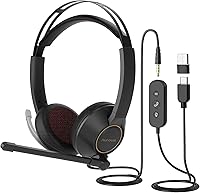
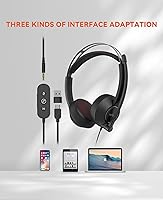
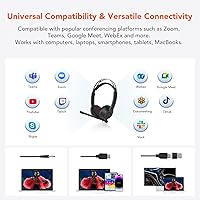
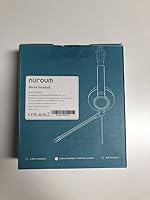
The NUROUM HP11DU is a wired stereo headset that arrived in mid-2024 squarely aimed at remote workers, students, and anyone spending a good chunk of the day on calls. It connects via USB-A, USB-C, or a standard 3.5mm jack, meaning it works with laptops, phones, and tablets without needing drivers or dongles. The on-ear build uses a metal headband with a soft leather sling — a pairing that feels more considered than what you typically find at this price point. Sitting at #709 in Computer Headsets, it has built a respectable following quickly for a relatively new entry in a crowded category.

Features & Benefits

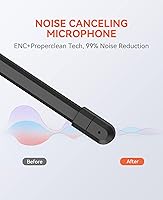
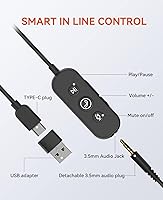
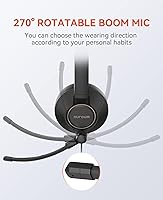
The standout on this wired headset is its microphone setup. The ECM boom mic uses environmental noise cancellation on the mic side, filtering out background sounds before they reach the other end of the call. That distinction matters: this is not noise cancellation for your ears while listening — just cleaner outgoing audio. The boom rotates 270 degrees and works on either side of your head. The in-line remote handles muting, volume, and call controls without touching the computer, which is genuinely useful mid-meeting. One real caveat: those inline controls only function over USB or USB-C. Plug in via 3.5mm alone and you lose that functionality entirely.

Best For

This office headset is a solid pick for anyone doing back-to-back video calls or online classes who is tired of Bluetooth batteries dying at the worst moments. The wired connection keeps things predictable, and the triple-input design means you can move it between your laptop and phone without carrying an adapter kit. It works across Windows, macOS, Linux, and Android, so platform switchers will appreciate the flexibility. Budget-conscious professionals who want decent mic noise filtering without spending significantly more will find it hits a reasonable middle ground. It is less suited to people who want immersive music listening or strong passive isolation while not on calls.

User Feedback

Sitting at a 3.8-star average, the HP11DU draws a divided response. Most positive reviewers highlight how clean their voice sounds on calls and how painless the plug-and-play setup is — no software, no configuration. On the critical side, on-ear pressure fatigue comes up regularly for longer sessions, and some buyers feel the build is less durable than the metal headband suggests. Audio quality for music gets modest marks at best; this headset is clearly tuned for voice. The mic noise cancellation handles keyboards and distant household noise reasonably well, but it will not perform miracles in a genuinely loud shared space. Solid, with real trade-offs worth knowing before buying.

Pros

  • Mic-side ENC filtering keeps your voice clear even with keyboards and household noise in the background.
  • Plug-and-play setup on USB and USB-C — no drivers, no configuration, works instantly.
  • Triple connectivity covers USB-A, USB-C, and 3.5mm, reducing the need for extra adapters.
  • The rotatable boom mic works for both left- and right-sided wear, which many rivals skip.
  • Inline remote handles mute, volume, and call controls without touching your computer mid-meeting.
  • Broad OS support across Windows, macOS, Linux, and Android makes device-switching painless.
  • The wired connection means zero battery anxiety and no Bluetooth drop-out risks.
  • At this price tier, the feature set — especially the ENC mic — is hard to beat for call-focused use.
  • A cloth carrying bag is included, which at least offers basic protection between uses.

Cons

  • On-ear pressure becomes uncomfortable after three or more hours of continuous wear.
  • Inline remote controls are completely disabled when using the 3.5mm jack alone — a significant undisclosed limitation.
  • Cable durability near the inline controller joint has drawn early failure complaints from regular users.
  • Listening audio quality is flat and uninspiring; this office headset is not built for music.
  • The ear cup and cable plastics feel noticeably cheaper than the metal headband implies.
  • ENC noise filtering is microphone-only — it does nothing to reduce the noise you hear while listening.
  • Headband adjustment clicks between fixed positions rather than sliding freely, leaving some users between sizes.
  • In genuinely loud environments, the mic noise filtering reduces rather than eliminates background sound.

Ratings

The NUROUM HP11DU has been evaluated by our AI rating engine after analyzing verified buyer reviews from global markets, with spam, bot activity, and incentivized feedback actively filtered out. Scores reflect the honest spread of real-world experiences — not just the highlights — so both where this wired headset genuinely delivers and where it falls short are represented transparently.

Microphone Clarity
83%
On calls, the mic does a noticeably better job than most wired headsets at this price tier. The ENC filtering handles keyboard clicks and distant background chatter reasonably well, and colleagues frequently report that voices come through clean and natural even in typical home office conditions.
In louder environments — a busy household, a co-working space — the noise filtering starts to struggle. It reduces rather than eliminates intrusive sounds, so buyers expecting studio-quality isolation on the mic side may be underwhelmed.
Comfort & Wearability
69%
31%
For sessions up to two or three hours, most users find the on-ear cushions and the leather sling headband to be genuinely comfortable. The lightweight build at just over 10 ounces means it does not feel heavy on the head during morning calls.
Extended sessions beyond three or four hours are where the on-ear design starts working against you. Pressure points develop around the ears, and the cushions, while soft initially, do not breathe well enough to prevent warmth buildup during long stretches.
Build Quality
67%
33%
The metal headband gives a first impression of durability that many buyers appreciate — it feels more solid than typical plastic headsets in this price range. The included carrying bag also suggests Nuroum put some thought into protecting the headset between uses.
Beyond the headband, the plastic used in the ear cup housing and the cable housing feels noticeably less premium. Several users reported early wear at the cable joint near the inline controller, raising questions about longevity with daily use.
Value for Money
78%
22%
As an affordable dual-ear headset for online classes and conferencing, this office headset punches at a reasonable level. The triple connectivity alone — USB-A, USB-C, and 3.5mm — is a feature set you would usually pay more to get from an established brand.
The value equation depends heavily on use case. If you primarily want a music headset or need premium passive isolation, there are better options nearby in price. The value is real, but it is specifically tied to call-centric use.
Noise Cancellation (Mic-Side)
76%
24%
The AI-based ENC on the microphone side is a genuine differentiator for this price point. In typical home settings — occasional pet noise, distant TV, light keyboard typing — listeners on the other end of a Zoom call will generally hear you clearly without distractions.
It is important to be clear that this is microphone-side noise filtering only, not active noise cancellation for the listener's ears. If you want to block out your environment while you listen, this headset offers no such feature and should not be purchased for that purpose.
Connectivity & Compatibility
88%
The flexibility of USB-A, USB-C, and 3.5mm in one headset is genuinely useful for people who move between devices throughout the day. Cross-platform support covering Windows, macOS, Linux, and Android means almost no one hits a compatibility wall.
The one catch that catches buyers off guard is that the inline controls stop working when using the 3.5mm jack alone. If you plug into a phone headphone port, you lose mute, volume, and call controls entirely — a real limitation not prominently disclosed.
In-Line Remote Usability
74%
26%
When connected via USB or USB-C, the inline remote works reliably for daily use. Being able to mute yourself or adjust volume mid-meeting without touching the computer is a practical time-saver that remote workers tend to rely on heavily.
The controls feel slightly cheap in hand compared to the rest of the headset, and the buttons require a firm press that can feel imprecise. The 3.5mm-only limitation strips this feature entirely, which meaningfully reduces versatility for mobile device users.
Audio Quality (Listening)
61%
39%
For calls and voice conferencing, the audio output is clear and functional. Speech reproduction is accurate enough that you can follow conversations and online lectures without straining, which is exactly what this wired headset is designed to do.
Music listening is where the dynamic drivers reveal their limits. The bass is thin, the soundstage is narrow, and anyone accustomed to a dedicated music headset will find it flat. This is a communication tool first, and the audio signature reflects that clearly.
Boom Mic Flexibility
81%
19%
The 270-degree rotatable boom is one of the more practical design choices here. Left-handed and right-handed users can both position the mic comfortably, and the flexibility to bend it close to your mouth makes a real difference in pickup consistency.
The boom arm is not the sturdiest, and some users note it does not always hold its position firmly after repeated adjustments. It stays where you put it under normal use, but heavy daily bending may loosen it over time.
Setup & Plug-and-Play Experience
91%
Zero driver installation required. Plug in via USB or USB-C and the operating system recognizes it instantly on Windows, macOS, and Linux. For less tech-savvy users — students, older remote workers — this frictionless setup is a genuine relief.
The included documentation is minimal, and the distinction between which features work on which connection type is not clearly explained anywhere in the box. New users can easily lose the inline controls and not understand why.
Headband & Fit Adjustability
72%
28%
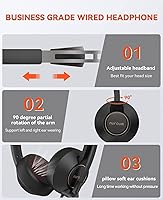
The metal headband with its leather sling design distributes weight reasonably well, and the adjustable sizing covers a wide range of head sizes. Most users find a comfortable fit within the first few minutes of use.
The adjustment mechanism lacks fine-grained control — it clicks between positions rather than sliding freely — which means some users land between sizes and have to settle for slightly too tight or slightly too loose.
Portability
58%
42%
The included cloth carrying bag is a thoughtful addition that protects the headset during transport. For students moving between classrooms or workers occasionally going into an office, having a dedicated bag beats stuffing it into a backpack unprotected.
At its core, this is a wired desk headset and the cord length and overall form factor reflect that. The carrying bag hints at portability, but the cable management when traveling is awkward, and it is not a headset designed for commuting use.
Inline Controls Feature Completeness
66%
34%
When functional, the remote covers the core bases well — mute, volume up and down, play and pause, and call answer and hang-up. For a typical day of video calls, those five functions cover the vast majority of what you actually need to reach for.
The hard cutoff of remote functionality when using 3.5mm is a significant gap in the design. It limits the headset to a basic passive cable experience on mobile devices, removing a key selling point for buyers who expected full control across all connection types.

Suitable for:

The NUROUM HP11DU is a strong fit for remote workers and students who live on video calls and need a reliable, no-fuss communication headset without spending a lot. If your day revolves around Zoom, Skype, Google Meet, or similar platforms, the mic-side noise filtering does a genuinely useful job of keeping background distractions out of your audio. People who switch between a laptop, a tablet, and a desktop throughout the day will appreciate that one headset covers all three connection types — USB-A, USB-C, and 3.5mm — without needing adapters beyond what is already in the box. It also works across Windows, macOS, Linux, and Android, so platform loyalty is not a requirement. For anyone who has been burned by Bluetooth headsets dying mid-call or dropping connection at the wrong moment, the wired reliability here is a genuine practical advantage. Students on a tighter budget who need cleaner audio on both ends of an online class will find it hits a reasonable balance of performance and price.

Not suitable for:

The NUROUM HP11DU is not the right choice if you plan to wear it for five or six hours straight — on-ear designs build pressure over extended sessions, and this one is no exception. If you want to block out your surroundings while you listen, you will be disappointed: there is no active noise cancellation for the ears here, only mic-side filtering to clean up your outgoing audio. Music listeners expecting rich bass or an expansive soundstage should look elsewhere entirely, because the dynamic drivers are tuned for voice clarity, not audio enjoyment. Anyone planning to use this primarily with a smartphone via the 3.5mm jack should know upfront that the inline remote stops working in that configuration — mute, volume, and call controls all go silent, leaving you with a basic passive cable. Buyers who prioritize long-term build durability may also find the ear cup and cable construction less reassuring than the metal headband suggests at first glance.

Specifications

  • Connectivity: The headset connects via USB-A, USB-C, or a standard 3.5mm audio jack, with a USB-C to USB-A adapter included in the box.
  • Microphone Type: An ECM (Electret Condenser Microphone) boom mic with ENC (Environmental Noise Cancellation) and AI-based denoise processing handles outgoing audio.
  • Boom Mic Rotation: The boom arm rotates 270 degrees bidirectionally and can be positioned for use on either the left or right side of the head.
  • Driver Type: Dynamic audio drivers power the listening side of the headset, tuned primarily for voice reproduction rather than music playback.
  • Ear Placement: On-ear design with breathable pillow-soft ear cushions that sit against the outer ear rather than enclosing it.
  • Headband: The headband is constructed from metal with an integrated soft leather sling for weight distribution and comfort during shorter sessions.
  • Weight: The headset weighs 0.29 kg (10.2 oz), keeping it on the lighter end for a wired on-ear communication headset.
  • Dimensions: Overall dimensions measure 6.69 x 5.51 x 1.57 inches when folded in its standard resting position.
  • OS Compatibility: Compatible with Windows, macOS, Linux, and Android operating systems with no driver installation required for USB or USB-C connections.
  • Inline Remote: The inline remote unit supports volume up and down, one-button mute, play and pause, and call answer and hang-up controls.
  • Remote Limitation: Inline remote functionality is only active when connected via USB-A or USB-C; all remote controls are non-functional when using the 3.5mm jack alone.
  • Bluetooth: No Bluetooth capability; this is a fully wired headset with no wireless connectivity option.
  • Water Resistance: Not water resistant; the headset should be kept away from moisture and is not rated for any IP protection standard.
  • In the Box: Package includes the HP11DU headset, an inline remote control cable with 3.5mm female to USB-C connector, a USB-C female to USB-A male adapter, a cloth carrying bag, and a user manual.
  • Ear Cup Style: Stereo dual-ear (full headset) configuration with both ear cups active for balanced audio output during calls and conferencing.
  • Cable Type: Detachable cable system using a 3.5mm female connection at the remote unit, with adapter options for USB-C and USB-A output.
  • Manufacturer: Manufactured by Auditoryworks and sold under the Nuroum brand, with the product first made available in June 2024.

Related Reviews
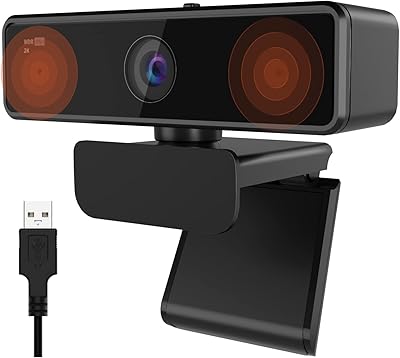
NUROUM V15AFL 2K Webcam
87%
88%
Video Quality
91%
Autofocus Performance
85%
Low-Light Performance
92%
Ease of Setup
80%
Microphone Clarity
More
NUROUM V11 2K Webcam
88%
92%
Video Quality
89%
Audio Quality
94%
Ease of Use
96%
Setup & Installation
78%
Low-Light Performance
More
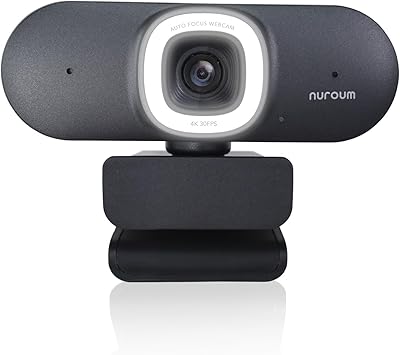
NUROUM V32AFL 4K Webcam with Ring Light
85%
92%
Video Quality
88%
Lighting Performance
85%
Microphone Quality
81%
Ease of Setup
75%
Software Experience
More

FAQ

No software or drivers needed. Plug it into a USB-A or USB-C port and your computer recognizes it within a few seconds on Windows, macOS, and Linux. It is as close to instant as wired headsets get.

For typical home office sounds like keyboard typing, a TV in the next room, or a pet moving around, the ENC mic filtering does a solid job. Colleagues generally report hearing you clearly without noticeable background intrusion. In a genuinely loud shared space, it reduces rather than eliminates noise, so expectations should be realistic.

Unfortunately, no. The inline remote controls only work when the headset is connected via USB-A or USB-C. If you use just the 3.5mm jack — for a phone or a laptop headphone port — the remote becomes a passive cable with no active controls. This is one of the more important limitations to know before buying.

No, and this distinction matters. The noise cancellation here is entirely on the microphone side — it cleans up the audio you send to others on a call. There is no active noise cancellation or passive isolation designed to block what you hear. If blocking out your environment while listening is a priority, this is not the right headset for that purpose.

Most users find it comfortable for sessions up to two to three hours without issue. Beyond that, the on-ear design starts building pressure against the ears, which is a common characteristic of this style of headset. If your workday is wall-to-wall calls with no real breaks, you may find it less comfortable by late afternoon than in the morning.

Yes, it connects directly via the USB-C cable included in the box. The inline remote and all controls work normally in that configuration, and macOS recognizes it without any setup required.

Yes, it is compatible with Android. For the best experience on a phone, use the USB-C connection if your phone supports it, as that keeps the inline remote functional. Using the 3.5mm jack with a phone works for audio but disables all remote controls.

Yes. The boom rotates 270 degrees and can be swung up and away from your mouth when not in use. It also works on either side of the headset, so left-handed and right-handed users can both position it comfortably.

The metal headband feels solid and holds up well. The weaker points tend to be the plastic ear cup housing and the cable near the inline controller, where early wear has been reported by some regular users. It is a functional daily headset, but it is not built to the standard of a premium business headset that is designed to last years of heavy use.

Yes, a cloth carrying bag is included in the box. It is a basic protective pouch rather than a hard case, but it does a reasonable job keeping the headset from getting scratched or tangled when not in use or when moving it between locations.