


Overview

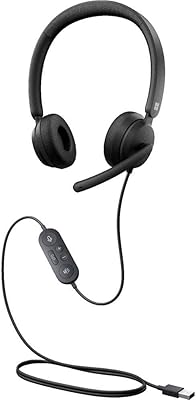
The Blucalm UCH30 Wired Headset is one of those products that does not try to reinvent anything, and that is part of its appeal. It is a USB-A headset meant to plug into a laptop or desktop and just work, with no drivers or companion app to install. The on-ear, over-ear build has an adjustable headband, so it should fit most head sizes without much fuss. This is not a headset chasing audiophile bragging rights; it is built for desk work, video calls, and the daily grind of remote meetings. For the price, it reads as a practical, no-nonsense pick for anyone whose ears live in a headset for several hours a day.

Features & Benefits

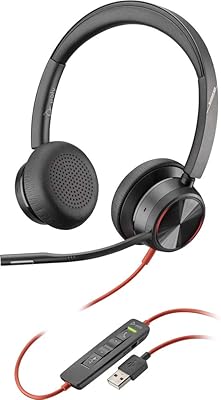
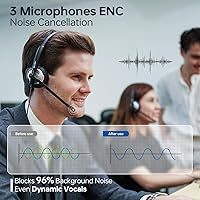
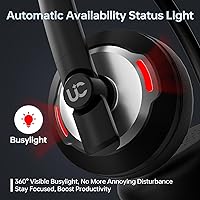
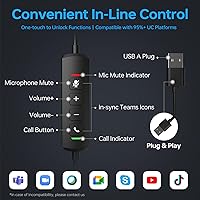
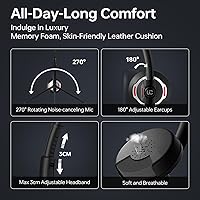
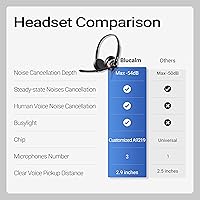
Where this wired headset tries to earn its keep is in the details around calls. A 3-microphone array is meant to cut down on background noise, which matters if you work from a busy household or open office. There is also a built-in busylight that signals to people nearby whether you are available, and it flashes on incoming Teams calls specifically. The in-line control is genuinely handy, letting you mute, adjust volume, or answer a call without reaching for your laptop. Earcups use a leather-style covering over memory foam, aimed at keeping things comfortable during long shifts, and the retractable cable helps avoid a tangled mess on your desk.

Best For

This USB headset makes the most sense for people whose day revolves around calls rather than music. Remote workers who live in video meetings will appreciate the in-line controls, and call center agents should find the mute and volume buttons reassuring during back-to-back shifts. Students taking online classes get a clearer mic without needing a separate accessory. Microsoft Teams users in particular get extra value here, since the busylight and call-alert flashing are built specifically around that platform. If you want a simple wired option without dealing with Bluetooth pairing or charging, the UCH30 headset is a sensible, low-drama choice rather than a flashy one.

User Feedback

Most people picking up this wired headset will likely focus on call quality first, and early impressions suggest the mic clarity holds up reasonably well for everyday conversations. Comfort over a full workday seems to be another common talking point, with the cushioned earcups generally getting credit for reducing fatigue. On the downside, some buyers may be disappointed to learn the busylight's flashing alert only works fully with Teams, so non-Teams users lose part of that feature. As with many budget headsets, questions about long-term build quality and cable durability tend to come up over time, even if day-to-day setup remains refreshingly simple for less technical users.

Pros

  • Plug-and-play USB-A setup with zero drivers or software needed
  • In-line controls make muting and volume adjustments quick and easy
  • 3-microphone array helps reduce background noise during calls
  • Busylight gives coworkers a clear, visible signal of availability
  • Memory foam earcups with leather-style covering stay comfortable for long shifts
  • Retractable cable keeps the desk setup tidy and tangle-free
  • Dedicated Teams call answer and end button adds real convenience
  • Adjustable headband accommodates a range of head sizes comfortably
  • Includes a protective case for easy transport between locations
  • Budget-friendly price makes it accessible for everyday office use

Cons

  • Busylight's flashing call alert only works fully with Microsoft Teams
  • Wired-only design limits mobility compared to wireless alternatives
  • Audio tuning favors voice clarity over music or movie listening
  • Long-term cable durability is a common concern with budget headsets
  • Lacks Bluetooth, so it cannot pair with phones or tablets
  • Build materials feel more functional than premium at this price
  • No companion app means limited customization of mic or audio settings
  • On-ear fit may feel snug for users with larger ears

Ratings

We analyzed verified buyer reviews from around the world to score the Blucalm UCH30 Wired Headset across the factors that matter most to everyday users. Our AI system actively filters out spam, bot activity, and incentivized reviews to keep the data honest. Both the strong points and the genuine pain points are reflected here, without smoothing anything over.

Microphone Clarity
84%
Most users report clear, intelligible audio on the receiving end during Zoom and Teams calls, even in moderately busy home offices. The 3-microphone array seems to genuinely help separate voice from ambient sound during typical desk-based conversations.
A handful of users in louder environments, like shared apartments or open-plan offices, find the noise reduction less effective than expected. It is not a substitute for a dedicated podcasting mic when background noise is severe.
Call Comfort (All-Day Wear)
79%
21%
The memory foam earcups with leather-style covering get consistent praise for staying comfortable through multi-hour shifts, especially among call center agents and remote workers. The adjustable headband helps accommodate different head shapes without excessive pressure points.
Some users with larger ears note the on-ear fit runs a bit snug after several consecutive hours. Heat buildup under the earcups is occasionally mentioned during long summer workdays.
Setup Simplicity
92%
The plug-and-play USB-A connection is a clear win for less technical users, since there is genuinely nothing to install or configure. People appreciate being able to start a call within seconds of unboxing.
A small number of users on older systems or unusual USB hub configurations report needing a restart or port switch for it to register properly. Documentation on troubleshooting these rare cases is limited.
Busylight Functionality
71%
29%
Office workers who share space with family or roommates like having a visible, 360-degree indicator of their call status without saying a word. The Teams-specific incoming call flash adds a nice layer of convenience for heavy Teams users.
Users on Zoom, Google Meet, or Slack frequently note the flashing call alert simply does not work for them, since it is tied specifically to Teams. This creates uneven value depending on which platform someone primarily uses.
In-Line Control Usability
86%
The physical mute, volume, and call buttons get strong marks for letting users manage calls without touching their laptop, which is especially handy mid-meeting. Button placement is generally described as intuitive after a short adjustment period.
A few users mention the buttons can be slightly stiff at first, requiring firmer presses than expected. Tactile feedback could be clearer for confirming a mute toggle without glancing down.
Build Quality
61%
39%
For the price point, the plastic housing and overall construction feel adequately solid for daily desk use rather than rugged travel. Most buyers do not expect premium materials and find it acceptable for the cost.
Cable durability and joint stress points are recurring concerns among budget headset buyers generally, and some worry about long-term wear after months of daily plugging and unplugging.
Cable Management
83%
The retractable cable design is well-liked for keeping desks tidy, particularly by users juggling multiple cords for monitors, keyboards, and other peripherals. It is a small detail that adds noticeable daily convenience.
A few users note the retract mechanism feels less smooth after extended use, occasionally requiring a manual tug to release fully.
Compatibility
88%
Standard USB-A connectivity means the headset works reliably across most Windows and Mac laptops and desktops without compatibility headaches. Users with multiple devices appreciate not needing separate drivers for each.
Newer laptops without USB-A ports require an adapter, which is an extra step and cost some buyers did not anticipate before purchase.
Value for Money
81%
19%
Given its accessible price, buyers generally feel they are getting solid functionality for business calls without the premium price tag of higher-end brands. The feature set feels generous relative to the cost.
Buyers expecting flagship-level noise cancellation or audio richness at this price point can come away feeling the experience is solidly functional rather than exceptional.
Aesthetic & Design
74%
26%
The black colorway and over-ear silhouette is generally described as professional-looking and appropriate for video calls in a business setting. It does not stand out negatively on camera.
A few users describe the overall look as fairly generic compared to more distinctive headset designs on the market, lacking a standout visual identity.
Portability
68%
32%
The included protective case makes it reasonably easy to toss in a bag for hybrid workers moving between home and office. Its lightweight build, under 5 ounces, does not add noticeable bulk.
Being wired limits spontaneous mobility compared to wireless options, so users who frequently roam during calls find themselves tethered to their device.
Audio Output Quality
70%
30%
For voice calls and spoken content, output quality is generally described as clear and sufficiently loud, meeting the needs of typical business use. Volume controls are simple and effective.
Users who occasionally use it for music or video streaming note the sound profile feels flat and voice-focused rather than rich or balanced.

Suitable for:

The Blucalm UCH30 Wired Headset is a solid fit for anyone whose workday is built around back-to-back calls rather than music or gaming. Remote employees who spend hours in video meetings will likely appreciate having mute, volume, and call controls right on the cable instead of fumbling with laptop settings mid-conversation. Call center agents and customer support staff should find the dedicated buttons especially useful during long shifts. Students attending online classes get a more focused mic without buying a separate accessory. It is also a natural pick for Microsoft Teams users specifically, since the busylight and incoming-call flash are built around that platform. People who prefer a simple wired connection over Bluetooth pairing and battery charging will appreciate the plug-and-play simplicity here too.

Not suitable for:

This wired headset is not the right choice for anyone hoping for premium audio fidelity or rich bass for music and movies, since it is clearly tuned for voice clarity over entertainment. Buyers who rely heavily on non-Teams platforms should temper expectations, as the busylight's flashing call alert is tied specifically to that one app. Anyone needing a cable-free setup for mobility around the office or home will find the wired USB-A connection limiting. If you are particular about premium materials or expect headphone-grade build quality at this price point, the UCH30 headset may feel a bit basic over time. The Blucalm UCH30 Wired Headset also is not ideal for gamers or anyone wanting surround sound features. Those needing multi-device Bluetooth switching should look elsewhere too.

Specifications

  • Brand & Model: This headset is made by Blucalm and carries the model name UCH30.
  • Connectivity: It connects via a wired USB-A cable with no Bluetooth or wireless support.
  • Microphone: A 3-microphone array is built in to help reduce background noise during calls.
  • Busylight: A 360-degree visible busylight indicates availability and flashes red for incoming Microsoft Teams calls.
  • In-Line Controls: The cable includes buttons for mic mute and unmute, volume up and down, and Teams call answer or end.
  • Ear Placement: The headset uses an on-ear, over-ear design rather than in-ear or full circumaural cushioning.
  • Headband: The headband is adjustable to accommodate different head sizes.
  • Materials: Earcups are covered in a leather-style material over memory foam, with a plastic housing and headband.
  • Weight: The headset weighs approximately 4.9 ounces, or 0.14 kilograms.
  • Cable Design: The cable uses a retractable design intended to reduce desk clutter.
  • Included Items: The package includes the headset, a protective carrying case, and a user manual.
  • Compatibility: It is designed to work with computers and laptops via USB-A port.
  • Setup: The headset is plug-and-play, requiring no drivers or additional software installation.
  • Color: The headset is available in black.
  • Packaging: It ships in a rigid box with cushioning for protection during transit.

Related Reviews
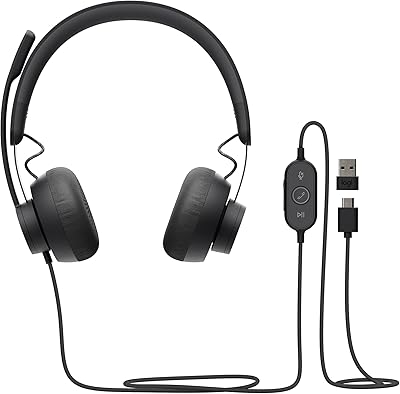
Logitech Zone Wired
Logitech Zone Wired
79%
88%
Microphone Clarity
91%
Call Performance
74%
Comfort & Wearability
83%
Build Quality
67%
Sound Quality for Music
More
Microsoft Modern Wired Headset
87%
85%
Audio Quality
90%
Comfort for Long Use
88%
Noise Cancellation Performance
95%
Ease of Setup
87%
Microphone Clarity
More
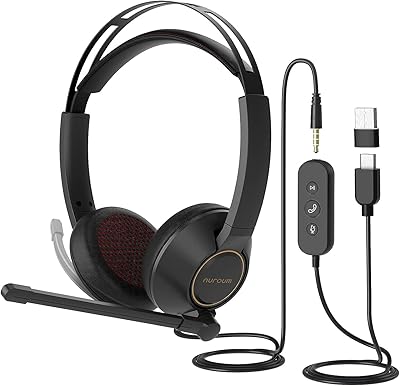
NUROUM HP11DU
NUROUM HP11DU
74%
83%
Microphone Clarity
69%
Comfort & Wearability
67%
Build Quality
78%
Value for Money
76%
Noise Cancellation (Mic-Side)
More
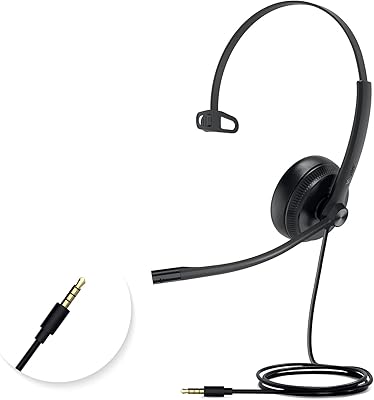
Yealink UH34 Mono Wired Headset
76%
88%
Call Audio Clarity
84%
Microphone Quality
73%
Comfort & Wearability
91%
Platform Compatibility
52%
Adapter Dependency
More
Alienware AW520H
Alienware AW520H
75%
88%
Wearing Comfort
83%
Audio Quality
74%
Positional Audio & Dolby Atmos
69%
Microphone Quality
77%
Build Quality & Durability
More
Wantek 602 Wired Headset
77%
83%
Microphone Clarity
79%
Comfort & Wearability
58%
Build Quality & Durability
94%
Plug-and-Play Setup
67%
Noise Cancellation (Mic-Side)
More
Callez C502EC1 Wired Computer Headset
85%
88%
Audio Quality
91%
Comfort for Long Use
84%
Noise Cancellation Effectiveness
80%
Microphone Flexibility
90%
Compatibility with Devices
More
Jabra Evolve 10
Jabra Evolve 10
77%
83%
Microphone Clarity
78%
Comfort & Wearability
62%
Build Quality
71%
Audio Playback Quality
94%
Ease of Setup
More
JBL Quantum 100
JBL Quantum 100
76%
74%
Audio Quality
81%
Microphone Performance
83%
Comfort & Fit
61%
Build Quality
88%
Value for Money
More
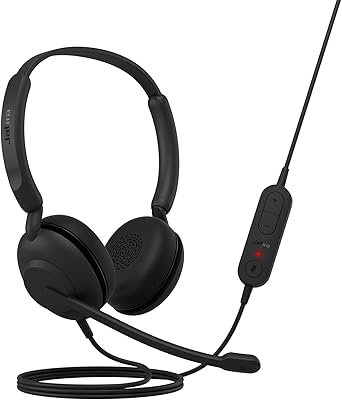
Jabra Engage 50 Stereo Wired Headset
88%
94%
Call Clarity
90%
Noise Cancellation Effectiveness
88%
Comfort for Long Use
93%
Microphone Quality
85%
Build Quality
More

FAQ

No, it is plug-and-play. You just plug the USB-A cable into your computer or laptop and it should be ready to use right away, no drivers needed.

The busylight itself can still show a basic busy or available status, but the flashing alert for incoming calls is specifically tied to Teams. If you use Zoom or another platform, that particular flashing feature will not trigger.

It is built around a USB-A connection meant for computers and laptops, so it is not really intended for phones or tablets unless you have an adapter and the device supports USB-A audio input.

The 3-microphone array is designed to pick up your voice while reducing surrounding background noise, which should help in moderately busy environments like a home office. It is not going to fully silence loud environments, but it should noticeably improve clarity compared to a basic single-mic headset.

The earcups use memory foam under a leather-style covering, and the headband is adjustable, both of which are aimed at long-wear comfort. Most people should find it reasonably comfortable for extended use, though personal comfort always varies somewhat by head shape and ear size.

You get the Blucalm UCH30 Wired Headset itself, along with a protective carrying case and a user manual for reference.

The mute, unmute, and volume buttons should work broadly across most calling apps since they control basic audio functions. The dedicated call answer and end button, however, is specifically built for Microsoft Teams integration.

It uses a retractable cable design, which is convenient for storage, though like most retractable cables on budget headsets, it is worth handling gently to avoid wear at the connection points over months of daily use.

Since it connects via standard USB-A and requires no special drivers, it should generally work with both Windows and Mac systems, as long as your device has a compatible USB-A port or adapter.

Yes, it is designed to be visible at 360 degrees, so coworkers or family members nearby should be able to see your status without needing to be directly in front of you.