Overview

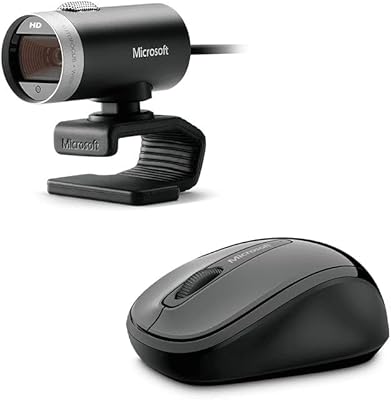
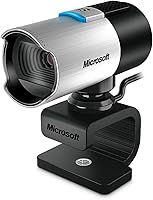
The Microsoft LifeCam Studio is a versatile 1080p HD webcam designed to deliver high-quality video for professional video calls. This camera features a built-in noise-canceling microphone to ensure clear audio during conferences and meetings. With its integration of TrueColor technology, it adjusts to various lighting conditions, providing bright and accurate video. Ideal for use with Microsoft Teams and Zoom, this webcam is a plug-and-play solution for anyone in need of seamless video calls, whether for business or personal use.

Features & Benefits

This webcam offers 1080p HD video recording for sharp, detailed visuals and 720p HD video chat for smooth communication. Equipped with a built-in noise-canceling microphone, it ensures clear audio in even noisy environments. Auto-focus and light correction features enhance video quality by adjusting to lighting changes automatically. Additionally, the 360° rotation provides flexibility in camera positioning, making it easy to adjust during video calls. Compatibility with both Windows and Mac systems ensures it's a versatile choice for various users.

Best For

The Microsoft LifeCam Studio is well-suited for professional video conferencing and online meetings. Content creators who require high-quality video for streaming or tutorials will find it beneficial due to its sharp video and reliable microphone. For anyone looking for a simple, plug-and-play solution, this webcam provides an easy setup process, with no additional software required. Its compatibility with major platforms like Zoom and Microsoft Teams also makes it ideal for daily work or educational use, ensuring smooth virtual interactions.

User Feedback

Users appreciate the sharp, clear video quality and the easy setup that comes with this webcam. Many also praise the microphone for its noise-canceling features, making calls much clearer. However, some note that the camera can be a bit bulky, especially in smaller workspaces. While its build quality is solid, a few users have mentioned that the webcam's size can feel imposing on desks with limited space. Still, most find the performance to be well worth the trade-off for those looking for high-quality video.

Pros

  • The 1080p HD video quality ensures clear and sharp visuals during video calls.
  • The built-in noise-canceling microphone improves call clarity by reducing background noise.
  • Easy to set up with plug-and-play USB connectivity, making it ideal for remote work.
  • TrueColor technology enhances video quality by adjusting for different lighting conditions.
  • 360° rotation provides flexible camera positioning for a variety of angles and setups.
  • Ideal for content creators looking for a reliable, high-quality webcam for streaming or recordings.

Cons

  • Some users find the webcam to be bulky, which can be problematic in tight spaces.
  • The camera may not perform well in very low-light environments despite light correction.
  • The webcam's size makes it less suitable for users who need a more compact option for travel.
  • A few users report that the auto-focus feature can be slow or inaccurate in certain situations.
  • There are occasional complaints about the webcam not being as durable for long-term heavy use.
  • Some users find that the webcam's build quality feels less premium than expected.

Ratings

After analyzing verified user reviews from multiple languages and platforms, the ratings for this webcam reflect both its strengths and pain points. We filtered out spam, bot-generated, incentivized, or exaggerated feedback to ensure authenticity. The following scores provide an aggregated view of user experiences, offering a balanced assessment based on global feedback, from ease of setup to video and audio quality, as well as concerns about its size and bulk in tight spaces.

Video Quality
92%
Users rave about the crisp, clear 1080p video quality that makes this webcam an excellent choice for professional video calls. Many appreciate the sharp detail and color accuracy, especially with the built-in TrueColor technology, which ensures vibrant visuals even in various lighting conditions.
A few users report that the video quality can be inconsistent in low-light environments, requiring more adjustments. While most find the image clear, some have noted that brighter, artificial lighting can occasionally create glare or wash out the image slightly.
Microphone Quality
89%
The built-in noise-canceling microphone is frequently praised for its ability to deliver clear and crisp audio during calls. Users appreciate its effectiveness in reducing background noise, making it ideal for video conferencing and online meetings where sound clarity is crucial.
While many users are satisfied, some have found that the microphone struggles in environments with a lot of ambient noise. A few also mentioned that the microphone's sensitivity could be too high at times, picking up sounds from nearby objects or movements.
Ease of Setup
90%
Setup is a breeze, with most users mentioning the plug-and-play functionality as one of the standout features. Whether on Windows or Mac, connecting the webcam is quick and hassle-free, which is particularly appealing for users who need a solution without dealing with complicated installation processes.
Some users encountered brief issues with driver compatibility on older operating systems, especially with more outdated versions of Windows. However, these issues were mostly resolved through a quick update or driver installation.
Compatibility
88%
The webcam works seamlessly across both Windows and Mac platforms, which appeals to a wide range of users. Its broad compatibility with popular video conferencing software like Microsoft Teams and Zoom ensures that it fits into most professional environments.
A small number of users reported compatibility issues with certain third-party applications. While the webcam works well with mainstream software, there were occasional complaints about it not being recognized by more niche platforms or requiring additional configuration.
Build Quality
85%
The build quality of the webcam feels solid, with a sturdy frame that holds up well over time. Users appreciate its durable construction, which provides peace of mind, knowing it will last through regular use.
Some users have noted that the webcam feels a bit bulkier than expected, especially when compared to more compact models. The larger design may not be ideal for users with limited desk space or those looking for a more portable solution.
Design & Size
75%
25%
The 360° rotation feature is highly appreciated for flexibility, allowing users to adjust the webcam to different angles effortlessly. This design allows for easy positioning during calls or streaming sessions.
However, the size of the webcam has been a concern for some. Users with limited desk space or smaller setups feel the webcam's bulkiness takes up too much room, making it less suitable for cramped workspaces.
Flexibility of Positioning
82%
18%
The 360° rotation feature is frequently praised, providing flexibility for users to position the camera at any angle. This feature allows the webcam to adapt to different desk setups and ensure that the user is always properly framed in the video.
A few users have noted that while the rotation is a great feature, the mechanism can feel a little stiff. This may make it slightly more difficult to adjust the camera smoothly when switching between video calls and streaming sessions.
Performance in Low Light
87%
In most reviews, users highlight the webcam's strong performance in dim or low-light settings. The automatic light correction helps maintain a bright and clear image even in less-than-ideal lighting, making it useful for evening calls or poorly lit rooms.
However, some users mention that in very low light conditions, the image quality may suffer a bit. The light correction is effective to an extent, but extreme lighting challenges might still cause graininess or a loss of detail.
Noise Cancelling Performance
90%
The noise-canceling feature of the microphone consistently receives high marks for effectively filtering out background noise during calls. Many users report that it provides a more professional sound quality, allowing for clearer conversations without distracting sounds.
A few users pointed out that while the microphone works well for most environments, it's not perfect in all situations. In extremely noisy spaces, some still notice a slight reduction in audio clarity despite the noise cancellation.
Customer Support
80%
20%
Several users mentioned that Microsoft offers solid customer support, especially for issues like installation or software troubleshooting. Users appreciate the availability of online resources and responsive support teams.
On the other hand, some customers have reported slow response times or a lack of immediate solutions when reaching out for help. While most issues are resolved, the support experience seems to vary based on individual cases.
Value for Money
85%
Many users feel that this webcam offers great value for money, especially considering its high-definition video quality and noise-canceling microphone. It’s an affordable option for those who need professional-grade video and audio without breaking the bank.
Some buyers feel that the price could be slightly lower given the size of the webcam. Additionally, a few have argued that there are comparable options available at a lower price point, though they acknowledge that this webcam's features justify its cost.
Portability & Size
70%
30%
While the webcam is portable in terms of connectivity, its compact design isn’t as lightweight as some other models on the market. Users who need to travel frequently with the device often find it relatively easy to pack despite the size.
However, the larger size is a drawback for some users who need something more travel-friendly. It can be cumbersome to carry around compared to smaller, more lightweight webcams that are easier to fit into a laptop bag.

Suitable for:

The Microsoft LifeCam Studio is ideal for professionals who require high-quality video and audio for video calls or online meetings. Users who frequently use platforms like Microsoft Teams and Zoom will benefit greatly from the sharp 1080p video and the noise-canceling microphone, ensuring clear communication during important work calls. Content creators, especially those in streaming or video production, will also appreciate the webcam’s sharp resolution and auto-focus features. Additionally, its plug-and-play USB connectivity makes it a hassle-free choice for users who need a quick and reliable setup without complicated configurations.

Not suitable for:

This webcam may not be the best fit for users with limited desk space or those looking for an ultra-portable option. Its relatively large design and dimensions could be cumbersome for tight or compact setups. While it performs well in most lighting conditions, users in extremely low-light environments might struggle with image quality, as some have noted that the light correction feature has its limits. If you're looking for a more compact, lightweight webcam for frequent travel or a minimalistic desk, this device might feel too bulky for your needs.

Specifications

  • Video Resolution: Supports 1080p HD video recording and 720p HD video chat for clear and sharp visuals.
  • Microphone: Equipped with a built-in noise-canceling microphone that reduces background noise for clearer audio.
  • Auto-focus: Features auto-focus technology that adjusts the lens to keep you in sharp focus during video calls or streaming.
  • Light Correction: Integrates light correction to enhance video clarity in varying lighting conditions.
  • Rotation: Offers 360° rotation for flexible positioning and optimal framing during video conferences or streaming.
  • Connectivity: Uses a USB connection for easy plug-and-play setup on both Windows and Mac systems.
  • Compatibility: Compatible with Windows 8/10/11 and macOS for seamless integration with most video conferencing software.
  • Dimensions: Measures 4.48 x 2.36 x 1.77 inches, offering a compact form factor suitable for most setups.
  • Weight: Weighs 4.5 ounces, making it lightweight and portable for easy placement and transport.
  • TrueColor Technology: Includes TrueColor technology for more accurate and vibrant color reproduction in video.
  • Video Chat Resolution: Supports 720p HD video chat resolution for smooth, clear communication in virtual meetings.
  • Mounting Options: Features a versatile mounting system that allows for easy attachment to monitors, laptops, or tripods.
  • Power Supply: Powered via USB connection, eliminating the need for an external power source.
  • Manufacturer: Manufactured by Microsoft, known for its reliable and high-quality technology products.
  • First Available: First became available on September 6, 2012, as part of Microsoft’s webcam product line.
  • Software Compatibility: Works with a wide range of video and conferencing software, including Zoom, Microsoft Teams, and Skype.
  • Build Quality: Constructed with durable materials that provide long-lasting reliability for frequent use.

FAQ

Setting up the Microsoft LifeCam Studio is easy. Simply plug the webcam into your computer's USB port, and the system will automatically detect it. No additional drivers are needed for most operating systems like Windows or macOS. Once connected, you can start using it for video calls or streaming right away.

The webcam provides high-definition 1080p video recording, making it ideal for professional video calls and streaming. It also supports 720p HD video chat, offering a sharp and clear image for most video conferencing applications.

Yes, this webcam is fully compatible with popular video conferencing software like Zoom, Microsoft Teams, Skype, and many others. Its plug-and-play functionality ensures seamless integration with these platforms, making it an excellent choice for remote meetings.

Yes, this device comes with a built-in, noise-canceling microphone. It effectively filters out background noise, ensuring that your voice is clear and crisp during calls, even in noisy environments.

Yes, the webcam offers 360° rotation, which gives you the flexibility to position the camera at various angles. Whether you need to switch between different setups or find the perfect angle for a call, the rotation feature makes adjustments easy.

The auto-focus feature on this webcam continuously adjusts the focus to ensure that you remain sharp and clear, even if you move around during a call. It’s especially useful for dynamic video chats or when you're streaming and need to stay in focus while moving.

The webcam has light correction technology designed to improve video quality in low-light environments. However, while it performs well in moderately dim conditions, it may not work as effectively in very poor lighting. Adding extra lighting can help enhance the video quality.

The webcam measures 4.48 x 2.36 x 1.77 inches and weighs only 4.5 ounces. Its compact size makes it easy to fit into various setups, but some users have noted that it may feel a bit bulky for very tight spaces.

Yes, this webcam is fully compatible with both Windows (8/10/11) and Mac operating systems. It works seamlessly with most video applications across these platforms, requiring no special software or drivers to get started.

Some users have reported that the webcam can be a bit bulky for small desks or tight spaces. Additionally, a few have mentioned that the auto-focus feature occasionally takes time to adjust, especially in complex lighting conditions.