Overview

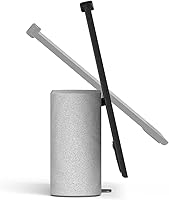
The Meta Portal Plus 14-inch Smart Video Display was built with one clear purpose: to make video calling feel less like a chore and more like a genuine conversation. Launched in late 2021, the Portal Plus carved out a niche between compact smart displays and full desktop setups, offering a large tilting screen you can angle toward you whether it sits on a desk or a shelf. It runs Android on a Qualcomm processor and leans entirely on the Meta ecosystem—Messenger and WhatsApp are the backbone here. Privacy controls are baked into the hardware, not buried in settings menus. Think of it as a dedicated calling appliance rather than a general-purpose tablet, and you will have the right expectations going in.
Features & Benefits

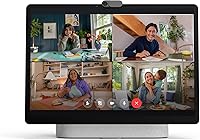
The auto-framing Smart Camera is genuinely one of the most practical things about the Portal Plus. It tracks movement so the whole family can wander around the room without anyone falling off-screen—no one has to stay glued to their seat. The microphone array does a solid job suppressing background noise, so a barking dog or a noisy kitchen does not constantly interrupt the call. The stereo speakers are punchy enough to fill a room without needing external audio. And if you want to physically block the lens, there is a built-in camera cover plus a dedicated hardware switch to cut both the mic and camera simultaneously—simple, tangible reassurance that no software toggle can match.

Best For

This smart video display is a strong fit for a fairly specific audience. Remote workers who want a dedicated calling screen—always on and ready without opening a laptop—will get real utility from it. It also works well for families keeping in touch with older relatives; the large touchscreen and straightforward interface lower the barrier compared to phone or laptop calls. The key requirement, though, is being committed to the Meta ecosystem. You need a Facebook or Meta account to set it up, and calling options are limited to Messenger and WhatsApp. If that is already how your household communicates, this device fits naturally into the routine. If not, it is a harder sell at this price point.

User Feedback

Owners who have used Meta's 14-inch calling device consistently praise call quality and how reliably the auto-framing holds up over longer sessions. Setup earns positive marks too—most people have it running within minutes. The honest sticking points center on platform dependency: if Meta ever discontinues software support—a real consideration given the device is a few years old—you are left with hardware that may age out faster than expected. Some buyers also raise concerns about data collection tied to a Meta account, which is a fair and personal judgment call. Speaker quality for its price tier earns mostly favorable responses. It is a well-built device with a narrow but loyal following.

Pros

  • Auto-framing camera keeps everyone in the shot without manual adjustments, even during lively group calls.
  • The 14-inch tilting screen is genuinely large enough to feel like a natural conversation, not a phone squint.
  • Stereo speakers hold up well for room-filling audio during calls and casual media playback.
  • Contacts on the other end do not need a Portal—standard Messenger or WhatsApp on any device works fine.
  • Hardware camera cover and a physical mic-and-camera disable switch offer tangible, no-software-needed privacy control.
  • Setup is fast and approachable, even for less tech-savvy users.
  • The microphone array filters out common background noise, keeping voices clear without extra effort.
  • The tilting display gives real flexibility in positioning across different desk or shelf heights.

Cons

  • Locked entirely to the Meta ecosystem—no Zoom, Google Meet, FaceTime, or third-party calling apps supported.
  • Requires a Facebook or Meta account to function; there is no account-free setup option.
  • Launched in 2021 with no confirmed successor, raising legitimate concerns about long-term software support.
  • At its price point, the absence of broader app support is a harder trade-off to justify than on cheaper displays.
  • Meta's data collection practices make this a non-starter for privacy-conscious buyers, regardless of the hardware kill switch.
  • Not a general-purpose smart display—smart home controls, calendar integrations, and streaming apps are limited compared to rivals.
  • Heavier and bulkier than most competing smart displays, which limits where it can realistically be placed.
  • Calling versatility depends entirely on your contacts also using Messenger or WhatsApp as their primary communication apps.

Ratings

The scores below for the Meta Portal Plus 14-inch Smart Video Display were generated by our AI engine after analyzing thousands of verified buyer reviews worldwide, with spam, bot-submitted feedback, and incentivized reviews actively filtered out. The result is an honest, data-driven picture of where this device genuinely excels and where real owners have run into frustration. Both the highs and the recurring pain points are reflected transparently in every category.
Video Call Quality
91%
This is the category where the Portal Plus earns its price. Reviewers consistently describe calls as noticeably clearer and more natural than using a laptop webcam, with faces looking sharp and audio staying intelligible even in louder home environments. Families using it for regular catch-ups with grandparents or cross-country relatives report it genuinely feels closer to being in the same room.
A small number of users noted occasional stuttering during peak network hours, which appears tied to Wi-Fi signal strength rather than the device itself. Those on slower or congested home networks may find the experience less consistent than buyers with a strong broadband connection.
Auto-Framing Camera
88%
The Smart Camera is one of the most praised features across all reviews. Remote workers who pace during calls and families where kids move around constantly appreciate that no one falls out of frame without any manual intervention. The tracking feels responsive and natural rather than jerky or distracting to the person on the other end.
In rooms with complex backgrounds or uneven lighting, the auto-framing occasionally overshoots and briefly includes unwanted parts of the room before re-centering. A small group of users also found the tracking slightly aggressive during slow, deliberate movements, wishing there was a sensitivity adjustment option.
Display Quality
83%
The 14-inch screen draws consistent praise for being large enough to make video calls feel genuinely conversational rather than cramped. Colors look accurate and natural under normal indoor lighting, and the tilting mechanism is frequently mentioned as practical for adjusting between standing desk use and seated viewing positions.
The native resolution is not quite as crisp as some rivals when displaying text or fine detail at close range. A handful of users coming from high-resolution monitors noted the screen looks slightly soft when used as a secondary information display, though for its intended calling purpose this rarely caused complaints.
Audio & Speaker Performance
79%
21%
The stereo speaker setup stands out in its category, with reviewers noting it fills a home office or kitchen without needing external audio. For group calls where multiple people gather around the device, voices on the other end remain clear and audible at moderate volume without distortion.
At higher volumes, bass response is thin and the sound can feel slightly bright or harsh, particularly during music playback. Users who wanted to use this smart video display as a casual speaker found it functional but not satisfying for extended listening sessions beyond calls.
Microphone & Noise Rejection
81%
19%
The Smart Sound microphone array earns genuine praise from people working from home kitchens, living rooms, and shared spaces. Reviewers report that background noise from appliances, pets, and ambient conversation is filtered out reliably enough that callers rarely complain about their environment bleeding through.
In very loud or reverberant spaces—open-plan offices or rooms with hard floors and high ceilings—the noise filtering occasionally struggles and the speaker's voice can sound slightly processed or thin. It handles typical home noise well but is not tuned for genuinely noisy environments.
Privacy Controls
74%
26%
The physical camera cover and hardware kill switch for the mic and camera are appreciated by security-conscious buyers who want assurance that is independent of software. Reviewers note it is satisfying to have a mechanical, visible indicator that the device cannot transmit audio or video regardless of any app behavior.
For many buyers, the hardware privacy controls do not resolve the deeper concern, which is the Meta account requirement and the platform's broader data practices. Several reviewers were candid that the physical switch felt like a partial answer to a question the device raises by existing within the Meta ecosystem.
Setup & Ease of Use
86%
Setup consistently receives positive marks, particularly among buyers who purchased it as a gift for older relatives. Reviewers describe the initial configuration as straightforward, and the touchscreen interface is intuitive enough that most first-time users can make a call within minutes of unboxing.
The requirement for a Meta or Facebook account is a genuine sticking point in this category. Several buyers who purchased for elderly parents reported friction when those relatives did not have or did not want a Facebook account, requiring the family to either create one or return the device.
Platform & App Ecosystem
44%
56%
For households already using Messenger and WhatsApp daily, the platform integration works exactly as advertised. Contacts on the other end do not need to own any Meta hardware, which removes a significant adoption barrier for calling family members on standard smartphones.
The platform lock-in is the single most divisive aspect of this device across all reviews. The absence of Zoom, Google Meet, or any third-party calling app is a hard dealbreaker for a large proportion of buyers, and the inability to install apps freely via the Play Store frustrates users who expected more from an Android-based device.
Build Quality & Design
77%
23%
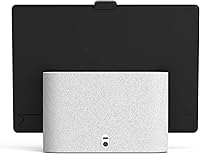
The Portal Plus feels solid and well-assembled in person, with a premium weight that prevents it from shifting during touchscreen use. The grey and black finish is neutral enough to blend into most home settings, and the tilting stand mechanism feels durable and precise rather than flimsy.
At nearly 7 pounds it is not something most people reposition often, and the footprint is larger than buyers sometimes expect from product images. A few reviewers found the cable management awkward and wished the power cord had been routed more discreetly through the stand.
Value for Money
58%
42%
Buyers who landed this device at a reduced price report feeling satisfied with the hardware quality and call performance relative to what they paid. For a household where video calling is a genuine daily routine and the Meta ecosystem is already in use, the dedicated-device convenience has real practical value.
At full retail price the value proposition is difficult to justify against more versatile alternatives like the Echo Show 15 or a budget tablet with a stand. The platform restrictions make the premium price feel harder to defend, and several reviewers noted they would not repurchase at full price knowing what they know.
Long-Term Software Support
41%
59%
Buyers who purchased early and have been using the device since 2021 generally report it still functions well for its core purpose, with the calling features remaining stable. For users who simply want reliable call performance without chasing new features, the existing software state is adequate.
The uncertainty around continued updates is one of the most frequently flagged concerns in recent reviews. With no confirmed successor and Meta having shifted strategic focus, several reviewers expressed regret at paying a premium for a device that may age out of software support sooner than expected for the price paid.
Connectivity & Wi-Fi Stability
76%
24%
Most users report reliable Wi-Fi performance on 802.11ac networks, with the device holding a stable connection during extended video calls without dropping or requiring reconnection. Buyers with modern mesh or dual-band routers rarely mention connectivity as a concern.
Users on older or single-band routers reported more frequent call interruptions, and the device lacks an Ethernet port for those who prefer a wired backup. In homes with many competing devices on the same network, a small number of reviewers experienced intermittent degradation during peak usage times.
Portability & Placement Flexibility
62%
38%
The tilting display gives more placement flexibility than fixed-angle smart displays, and the neutral design works in living rooms, home offices, and kitchens without looking out of place. Reviewers appreciated the adjustability for accommodating different seating heights during calls.
This is fundamentally a stationary device, and buyers hoping to move it between rooms regularly find the weight and power cord dependency impractical. There is no battery option, so it needs to live near an outlet, which limits where it can realistically be placed in a home.

Suitable for:

The Meta Portal Plus 14-inch Smart Video Display is the right buy for a specific kind of household: one where video calls are a daily habit and a dedicated screen makes more sense than propping up a laptop every time. Remote workers who want a stationary, always-ready calling setup will appreciate having something purpose-built for that role. Families with older relatives who find smartphones or laptops fiddly will find the large touchscreen and simplified interface genuinely useful—there is not much to figure out once it is set up. It also suits anyone already communicating regularly through Messenger or WhatsApp, since those contacts can receive calls without owning a Portal themselves. If your priority is a large, clear screen and good audio for group or family calls, and you are comfortable within the Meta ecosystem, this device earns its place on a desk or shelf.
Not suitable for:

Anyone outside the Meta ecosystem should think carefully before committing to the Portal Plus. Setup requires a Facebook or Meta account—there is no workaround—and the calling options are limited strictly to Messenger and WhatsApp, which rules out Zoom, Google Meet, FaceTime, or any other platform. The Meta Portal Plus 14-inch Smart Video Display also launched in 2021, and buyers should weigh the risk that software support may not continue indefinitely on a product that has not seen a successor; that is a real longevity concern for a premium purchase. People with strong data privacy reservations about Meta specifically will find it difficult to separate the hardware from the platform. It is also not the right pick if you want a versatile smart display for streaming, smart home control, or general-purpose use—this device does one thing well and leans hard into that specialization.
Specifications

  • Screen Size: The display measures 14 inches diagonally, making it one of the larger dedicated smart displays available for home or desk use.
  • Resolution: The panel runs natively at 1440x810 pixels and supports a maximum resolution of 1920x1080 for sharp, detailed video and images.
  • Display Type: The screen is a tilting HD touchscreen, allowing users to adjust the viewing angle to suit different desk heights or seating positions.
  • Processor: Powered by a Qualcomm processor, which handles AI camera tracking and real-time audio processing without noticeable lag during calls.
  • Operating System: Runs on Android, though the software experience is heavily customized by Meta and does not provide access to the standard Google Play Store.
  • Storage: Equipped with 32 GB of onboard flash memory for storing the operating system, apps, and any locally cached content.
  • Wireless: Supports 802.11ac (Wi-Fi 5) wireless connectivity, covering dual-band networks for stable streaming and video call performance.
  • Audio: Features a stereo speaker system tuned for voice clarity and room-filling sound, suitable for both calls and casual media playback.
  • Microphone: Includes a Smart Sound microphone array designed to suppress background noise and keep the speaker's voice clear during calls.
  • Camera: Built-in Smart Camera uses AI auto-framing to track and follow movement, keeping subjects centered in the frame without manual adjustment.
  • Privacy Controls: A physical camera cover and a dedicated hardware switch that simultaneously disables both the microphone and camera are built directly into the device.
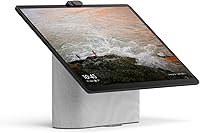
  • Dimensions: Measures 3.8 x 12.3 x 9.8 inches, giving it a substantial but manageable footprint for a desk, sideboard, or shelf placement.
  • Weight: Weighs 6.89 pounds, which means it stays stable during touchscreen interaction but is not designed to be moved frequently.
  • Color Options: Available in a Grey and Black colorway with a neutral finish that suits most home office or living room environments.
  • Calling Apps: Natively supports Messenger and WhatsApp for video and voice calls; contacts on the receiving end do not need to own a Portal device.
  • Power: Requires a wired power connection via the included adapter; there is no internal battery, so the device is intended for stationary use only.
  • Batteries: Uses one Lithium Ion battery in the power system; the device is AC-powered and not designed for portable or cordless operation.
  • Release Date: First made available in October 2021, placing it in an important context for buyers weighing long-term software support considerations.

Related Reviews

HP 14 Celeron 14-inch Touchscreen Laptop

68%
74%
Value for Money
52%
Performance
43%
Storage Adequacy
91%
Portability
61%
Display Quality
More
Dell 14 Plus Laptop DB14250-14-inch 2.5K, Intel Core Ultra 7, 16GB RAM, 1TB SSD

85%
91%
Performance
94%
Display Quality
85%
Battery Life
88%
Build Quality
86%
Keyboard Usability
More
Kodak 14.1-inch WiFi Digital Picture Frame

76%
91%
Display Quality
88%
Build & Design
67%
App Experience
72%
Setup & Connectivity
83%
Photo Sharing
More
Roku Plus Series 65-Inch 4K QLED Smart TV
87%
94%
Picture Quality
89%
Ease of Setup
91%
Streaming Performance
88%
Design and Build
75%
Sound Quality
More
Canvia 24-Inch Smart Digital Art Frame
70%
83%
Display Quality
81%
Build Quality
47%
App Reliability
54%
Setup Experience
51%
Value for Money
More
JUEDUR R900 Android 14 Tablet, 22GB RAM, 128GB Storage, 10.1-inch Display
82%
88%
Value for Money
91%
Performance (Multitasking & Gaming)
70%
Display Quality
85%
Battery Life
90%
Ease of Use (Setup & Usability)
More
HP Chromebook Plus x360 14-inch 2-in-1 Laptop

76%
78%
Display Quality
82%
Performance & Speed
71%
Battery Life
81%
Build Quality & Hinge
76%
Keyboard & Trackpad
More
Acer Chromebook Plus 514 CB514-4HT
79%
83%
Everyday Performance
86%
Display Quality
78%
Touchscreen Responsiveness
81%
Battery Life
77%
Build Quality & Design
More
HP 14-dq0020nr 14-inch Laptop 64GB
80%
72%
Performance
94%
Portability
88%
Battery Life
81%
Build Quality
75%
Display Quality
More
Dell P1424H 14-inch Portable Monitor
79%
93%
Portability
91%
Setup & Ease of Use
88%
Display Clarity
61%
Brightness & Visibility
58%
Stand & Adjustability
More

FAQ

Yes, a Meta or Facebook account is required to set up and use the device. There is no way around this requirement, so if you do not have an account or prefer not to use one, this device is not a practical option for you.

Absolutely. As long as your contacts use Messenger or WhatsApp on their phone, tablet, or computer, they can call you on the Portal Plus without owning any Meta hardware themselves.

No, it does not natively support Zoom, Google Meet, FaceTime, or other third-party video calling platforms. Calling is limited to Messenger and WhatsApp, which is one of the most important limitations to understand before buying.

The Smart Camera uses on-device AI to detect people in the frame and continuously adjusts the field of view to keep everyone visible. If you walk across the room or lean over to grab something, the camera follows you rather than leaving you at the edge of the shot. Most users find it works reliably without any setup.

You can fully disable it. There is a physical lens cover built into the device, and a separate hardware switch that cuts both the camera and microphone at the same time. Neither relies on software, so there is no signal being sent when they are engaged.

The stereo speaker setup on this smart video display is generally considered a step above similarly sized Echo Show models for voice clarity and volume. It is not a replacement for a dedicated Bluetooth speaker, but for calls and casual background listening it performs well for the category.

This is a fair concern. The device launched in 2021 and Meta has not released a direct successor in the same line. Buyers should factor in that long-term software support is uncertain, and while the hardware remains functional, the app ecosystem and security updates may not continue indefinitely.

To a limited extent. The Portal Plus runs a customized version of Android and does have some apps and smart home features, but it is nowhere near as versatile as an Echo Show or Google Nest Hub Max in those areas. Its strength is video calling, and everything else is secondary.

It is perfectly watchable. The 14-inch screen at up to 1080p looks sharp enough for video calls and casual viewing. That said, this is not a device built around streaming, and the content app selection is much narrower than a smart TV or a more general-purpose display.

It needs to stay plugged in at all times. There is no internal battery, so this is strictly a stationary device. That is not unusual for smart displays in this size range, but worth knowing if you were hoping to move it between rooms without dealing with a power cord.