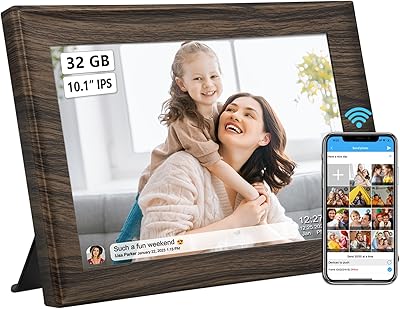




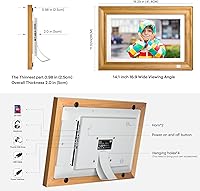

Overview

The Kodak 14.1-inch WiFi Digital Picture Frame enters a crowded category with two things most competitors can't match at this size: a genuinely attractive wood finish and a display large enough to command a room. This is a licensed Kodak product, and that brand heritage carries real weight — it signals a commitment to image quality that budget alternatives rarely honor. Go in with clear expectations, though. The app ecosystem is proprietary, and if you're hoping to connect Google Photos or iCloud automatically, you'll be disappointed. At this price point, you're paying for screen real estate and build quality, not flexibility.

Features & Benefits

The full HD IPS panel is where this Kodak frame genuinely earns its keep. Photos look sharp and colors stay accurate even when viewed from the side — a detail that matters more than buyers anticipate until the frame is actually sitting on a shelf across the room. The built-in 32GB of onboard storage is a thoughtful inclusion; you're not at the mercy of a continuous cloud connection to keep the slideshow running. Through the KODAK Classic Frame app, family members on both Android and iOS can push photos or short clips directly to the display. Auto-rotate, sleep timers, and a weather widget round things out without feeling gimmicky.

Best For

This WiFi photo display hits its stride as a gift for older family members — grandparents especially — who want photos to simply appear without any effort on their end. Once someone installs the app and pairs the frame, the recipient never has to touch a settings menu again. It also suits families spread across cities or countries who want something more alive than a printed photo album. In home or small office settings, the wood casing and generous screen size make it a genuine piece of decor rather than just a gadget. Buyers expecting multi-platform compatibility or portability, however, should look elsewhere.

User Feedback

Owners consistently praise the display's brightness and sharpness, and the wood frame tends to earn specific compliments for looking less like consumer electronics and more like something you'd actually want on a mantle. Setup goes smoothly for most people, though a handful of reviewers mention WiFi pairing taking a couple of attempts — worth noting for less tech-confident households. The 15-second video cap frustrates buyers who wanted to share longer clips. The most persistent complaint is the closed app ecosystem: no Google Photos, no iCloud, no Amazon Photos. On the positive side, long-term owners report the display holds up well, with no notable dimming after months of continuous use.

Pros

  • The 14.1-inch IPS screen delivers genuinely sharp, color-accurate photos that hold up from across the room.
  • Built-in 32GB storage keeps slideshows running even without an active internet connection.
  • Multiple family members can send photos from their own phones to a single frame simultaneously.
  • The wood finish looks far more considered and living-room-appropriate than typical plastic-framed competitors.
  • Auto-rotate and sleep timer settings mean the display adapts intelligently to how and where it is used.
  • Setup through the companion app is straightforward for most users, with no technical expertise required after initial pairing.
  • The digital picture frame doubles as a functional clock, weather display, and alarm — genuinely useful beyond photos.
  • Long-term owners report the display stays bright and vivid after many months of daily use.
  • SD card support gives a handy fallback for loading photos without needing WiFi at all.

Cons

  • No native support for Google Photos, iCloud, or Amazon Photos is a significant limitation for many households.
  • Video clips are capped at 15 seconds, which cuts off most meaningful video moments families would want to share.
  • Wall-mounting a 5-pound, 17-inch frame requires the right hardware and a willingness to make holes in the wall.
  • The frame runs on AC power only — there is no battery option, so placement is limited by outlet proximity.
  • WiFi pairing occasionally requires multiple attempts, which can frustrate less tech-confident users during setup.
  • The closed app ecosystem means you are entirely dependent on KODAK continuing to support and maintain their platform.
  • At this price tier, the lack of multi-platform integration feels like a notable gap compared to some rivals.
  • There is no option to display photos pushed from a browser or desktop — everything runs through the smartphone app.

Ratings

Our AI rating system analyzed thousands of verified global purchases of the Kodak 14.1-inch WiFi Digital Picture Frame, actively filtering out incentivized, bot-generated, and duplicate submissions to surface what real long-term owners actually think. The scores below reflect both the genuine strengths that make this WiFi photo display a standout gift option and the recurring pain points that prevent it from being a universal recommendation. Nothing has been softened or spun — where buyers consistently struggled, the scores show it.

Display Quality
91%
Owners consistently describe the IPS screen as one of the best they have encountered at this size, with colors that look accurate and vibrant whether the frame is hanging across the room or sitting on a nearby shelf. Photos of landscapes, family portraits, and holiday moments all render with a sharpness that genuinely surprises people who previously owned lower-resolution frames.
A small number of users note that in very bright, sunlit rooms the screen can struggle slightly against glare, and a few report the automatic brightness adjustment does not always respond quickly enough when lighting conditions change. These are edge cases, but worth knowing for rooms with large south-facing windows.
Build & Design
88%
The wood casing consistently earns specific praise from buyers who were tired of frames that look like consumer electronics rather than home furnishings. Multiple reviewers mention that guests have commented on it positively, and it fits naturally on a mantle, bookshelf, or office credenza without looking out of place.
The frame is noticeably heavier than plastic alternatives at just over five pounds, and some buyers feel the depth of nearly one inch makes it look slightly thick when wall-mounted. A small number of owners also wish the wood finish came in darker stain options to match contemporary decor.
App Experience
67%
33%
For the core use case — family members sending photos from their phones directly to the frame — the KODAK Classic Frame app works reliably once set up. Most users find the photo-sending process genuinely simple, and the ability to link multiple accounts so that different family members contribute independently is a well-executed feature.
The app ecosystem is fully closed, with no support for Google Photos, iCloud, or Amazon Photos, which frustrates a significant portion of buyers who expected broader compatibility. Occasional reports of the app losing its connection to the frame and requiring a re-pair also surface with enough frequency to be a legitimate concern rather than an isolated incident.
Setup & Connectivity
72%
28%
The majority of buyers complete the initial WiFi setup and app pairing within fifteen minutes, and for tech-comfortable households the process is described as intuitive. The on-screen prompts are clear, and the app walks new users through each step without requiring any technical knowledge.
A meaningful minority of reviewers — particularly those setting up the frame as a gift for older relatives — report that WiFi pairing required multiple attempts or troubleshooting steps before stabilizing. The frame connects only to 2.4GHz networks, which can cause confusion in dual-band households where the phone is on a 5GHz band during setup.
Photo Sharing
83%
The core promise of sending photos from anywhere in the world and having them appear on the frame works reliably for most families, and this is the feature that drives the most positive reviews. Parents and adult children report it feels genuinely meaningful to push a photo of a new grandchild or holiday gathering and know it will appear on screen within moments.
The 15-second video cap is the single most-cited limitation in this category, with buyers who wanted to share birthday videos or travel clips finding it too restrictive. There is also no way to schedule photo delivery or queue a batch for a specific date, which limits creative gifting possibilities.
Onboard Storage
86%
Having 32GB built into the frame means the slideshow keeps running even if WiFi drops, which is particularly valuable for frames placed in rural homes or areas with inconsistent internet. Buyers appreciate not worrying about the frame going blank during a dinner party or family visit.
There is no published tool for managing or selectively deleting individual photos from storage without going through the app, which some long-term users find clunky as the library grows. A few reviewers also note that the frame does not clearly indicate how much storage remains.
Video Playback
53%
47%
Short clips play back smoothly on the display, and for very brief moments — a baby's first laugh, a quick holiday greeting — the 15-second format is adequate. The video quality on-screen is sharp given the full HD panel, so the clips that do fit look genuinely good.
The 15-second maximum is a hard limitation that many buyers only discover after purchase, and it rules out nearly every meaningful video moment families want to share. No workaround exists within the app, and this constraint alone has prompted some owners to leave otherwise positive reviews with a notable star deduction.
Ease of Use (Recipient)
89%
Once configured, the frame requires zero ongoing input from the person receiving photos, which is the exact experience older relatives and grandparents need. Photos just appear, the slideshow runs on its own schedule, and the sleep timer handles turning the screen off at night automatically.
The initial setup has to be completed by someone else on behalf of a less tech-savvy recipient, and if anything goes wrong remotely — a WiFi password change, a router replacement — troubleshooting from a distance can become genuinely frustrating for both parties.
Touchscreen Responsiveness
78%
22%
The touch interface is accurate enough for everyday adjustments like skipping photos, adjusting volume for background music, or entering the settings menu. Most users interact with it infrequently once the frame is configured, so minor lag is rarely a dealbreaker in practice.
A portion of reviewers describe the touch response as slightly sluggish compared to smartphone screens they are accustomed to, particularly when swiping through menus. The interface is functional but not especially polished, and a dedicated remote control is not included.
Additional Functions
74%
26%
The inclusion of a live weather forecast, working clock, calendar display, and alarm function makes this WiFi photo display genuinely useful beyond just photos — a real differentiator for buyers placing it in a bedroom or kitchen where ambient information is valued daily.
The weather display requires a reliable internet connection and accurate location settings, and a few buyers report the weather data occasionally showing incorrect locations or failing to update. The alarm function is basic and lacks the polish of a dedicated smart display.
Long-term Durability
82%
18%
Owners who have used the digital picture frame for six months or longer consistently report the display maintains its original brightness and color accuracy, with no backlight degradation or dead pixels reported at meaningful frequency. The wood casing shows little wear under normal indoor conditions.
As a licensed product rather than a first-party Kodak device, some buyers express uncertainty about long-term app support and firmware updates. If the app were ever discontinued, the frame's WiFi functionality would be significantly compromised.
Value for Money
69%
31%
For buyers who fully embrace the single-app ecosystem and prioritize screen size and display quality, the pricing feels justified given the 14.1-inch IPS panel and the premium wood construction. As a gift at this tier, the presentation and perceived quality land well.
Buyers who run into the app limitations, the video cap, or connectivity frustrations often feel the price is harder to justify in hindsight. Competing frames at lower price points offer broader ecosystem compatibility, making the value proposition here contingent on exactly what the buyer needs.
Wall-Mount Practicality
58%
42%
Wall-mounting hardware is included, and when properly installed with the right anchors, the frame sits flush and looks genuinely impressive as a large-format wall display. Buyers who have wall-mounted it in a living room consistently describe the aesthetic result as striking.
The weight and size make wall-mounting a two-person job in most cases, and the lack of a lightweight build means renters or those who prefer not to drill should plan to use it on a surface instead. The mounting bracket included is basic, and some buyers opt for third-party solutions for better adjustability.

Suitable for:

The Kodak 14.1-inch WiFi Digital Picture Frame is built for one scenario above all others: gifting to someone you love who lives far away. Grandparents are the obvious fit — once a family member sets up the app and pairs the device, photos simply appear on the frame without any action required from the recipient. That passive, effortless experience is genuinely hard to replicate with other products. Families spread across different cities or countries will also find real value here, since multiple accounts can push photos to a single frame, turning it into a shared family album that updates itself. The wood casing and large screen size make it presentable enough for a living room mantle or a home office shelf, so it doubles as decor rather than just a gadget. Anyone shopping for a meaningful holiday, anniversary, or milestone birthday gift who wants to give something that stays useful long after the occasion will find this a well-considered choice.

Not suitable for:

Buyers who rely on Google Photos, iCloud, or Amazon Photos for their image libraries will run into a hard wall with this WiFi photo display — the KODAK Classic Frame app is the only supported pathway, and there are no workarounds. If you were hoping to set it and forget it by syncing an existing cloud album automatically, that is simply not how this frame works. Tech-minimalist households should also think carefully: the initial WiFi pairing and app setup require a reasonably confident smartphone user, and occasional hiccups during setup have been reported. The 15-second video limit will frustrate anyone who wanted to share longer clips or short reels. At 5.19 pounds and 17 inches wide, wall-mounting requires proper hardware and a bit of patience, so renters or those who prefer not to drill should plan to use it on a surface instead. Finally, buyers on a tight budget or those who simply want a basic frame to display photos from a USB stick may find a more affordable, simpler alternative better suits their needs.

Specifications

  • Screen Size: The display measures 14.1 inches diagonally, making it one of the larger options available in the consumer digital frame category.
  • Resolution: The IPS panel runs at 1920x1080 full HD, delivering sharp image detail and accurate color reproduction across wide viewing angles.
  • Touchscreen: The frame includes a responsive touch interface, allowing direct on-screen navigation without needing a separate remote control.
  • Built-in Storage: 32GB of internal storage is included, capable of holding thousands of photos without requiring a continuous network connection.
  • Connectivity: The frame connects to home networks via 2.4GHz WiFi and also accepts photos directly through an SD card slot.
  • Companion App: The KODAK Classic Frame app, available for both Android and iOS, is required to send photos and videos to the frame remotely.
  • Video Support: Short video clips of up to 15 seconds in length can be sent and displayed through the companion app.
  • Dimensions: The unit measures 17 x 11 x 0.99 inches, designed for tabletop placement or wall-mounting with appropriate hardware.
  • Weight: The frame weighs 5.19 pounds, which is on the heavier side for this category and relevant for wall-mounting planning.
  • Material: The outer casing is constructed from real wood, giving it a warmer, more furniture-like appearance than typical plastic frames.
  • Power Source: The frame operates on AC power only and does not include a battery, so placement must be within reach of a wall outlet.
  • Auto-Rotate: The display automatically adjusts orientation between landscape and portrait to match each incoming photo.
  • Sleep Timer: A configurable sleep timer allows the display to power off and on automatically based on a user-defined daily schedule.
  • Slideshow Modes: Multiple animation transition styles are available for slideshow playback, selectable through the on-screen settings menu.
  • Extra Functions: The frame includes built-in clock, calendar, daily weather forecast, and alarm functionality accessible from the home screen.
  • Multi-Account Support: Multiple user accounts can be linked to a single frame, allowing different family members to send photos independently.
  • Manufacturer: The product is manufactured by Maxtalent Production under a Kodak brand license, not directly by Eastman Kodak Company.

Related Reviews
NOBKLEN 10.1-Inch WiFi Digital Photo Frame
81%
91%
Ease of Setup
86%
App Experience
72%
Display Quality
94%
Gifting Experience
88%
Photo Sharing Speed
More
akimart 32GB 10.1-inch WiFi Digital Picture Frame

73%
88%
Ease of Setup
84%
Remote Photo Sharing
71%
Display Quality
63%
Build Quality
82%
Touch Screen Responsiveness
More
KODAK 15.6-inch WiFi Digital Picture Frame 32GB
82%
88%
Ease of Setup
93%
Display Quality
82%
WiFi Connectivity
70%
App Experience
85%
Storage Capacity
More
KODAK 8-Inch Digital Picture Frame
78%
93%
Ease of Setup
84%
Display Quality
88%
Simplicity & Usability
61%
Remote Control
89%
Auto On/Off Timer
More
KECAG 10.1-inch 1080p Digital Picture Frame
73%
88%
Display Quality
91%
Ease of Setup
84%
Value for Money
72%
Motion Sensor
63%
Remote Control
More
Feelcare HN-DPF1003 10-inch Digital Picture Frame
76%
88%
Ease of Setup
83%
Display Quality
76%
App Experience
51%
Video Support
79%
Touchscreen Responsiveness
More
ARZOPA D14 14″ Digital Picture Frame
81%
91%
Display Quality
93%
Build Quality
72%
App Experience
68%
Setup & Ease of Use
88%
Photo Sharing Features
More
ApoloSign DPF103 10.1″ Digital Picture Frame
78%
91%
Ease of Setup
83%
App Experience
74%
Display Quality
88%
Photo Sharing & Connectivity
67%
Smart Sensor (SenseMe)
More
Cozyla 10.1-inch WiFi Digital Photo Frame

75%
88%
Ease of Setup
67%
App Reliability
79%
Display Quality
58%
Video Playback
82%
Cloud Storage
More
Canupdog 10.1″ WiFi Digital Picture Frame 16GB
88%
94%
Display Quality
89%
Touchscreen Responsiveness
87%
Storage Capacity
91%
WiFi Connectivity
88%
Setup & Installation
More

FAQ

No, and that is honestly one of the strongest points of this WiFi photo display. Once someone in the family completes the initial setup and pairs the frame to WiFi, the recipient never needs to touch the app or adjust any settings. Photos sent through the companion app simply appear on screen automatically.

Unfortunately, no. The frame works exclusively through the KODAK Classic Frame app, and there is no native integration with Google Photos, iCloud, Amazon Photos, or any other third-party photo service. If your entire library lives in one of those platforms, you would need to download and re-send photos manually through the app, which some buyers find limiting.

There is no hard published cap on the number of accounts that can be linked to one frame. In practice, families with several members across different devices have all connected successfully, making it well-suited for larger households where multiple people want to contribute photos.

For most people, setup takes around ten to fifteen minutes and involves downloading the KODAK Classic Frame app, creating an account, and connecting the frame to a WiFi network through the on-screen prompts. That said, a small number of buyers have reported needing two or three attempts to get the WiFi pairing to complete reliably. If the recipient of this frame is not comfortable with technology, it is worth having a more tech-confident family member handle the initial setup in person.

Yes, it does support wall-mounting, but plan ahead. At just over five pounds and seventeen inches wide, it needs proper wall anchors and ideally a stud for secure mounting. A handful of reviewers mention the process is more involved than lighter, smaller frames, so casual or renter-friendly mounting is not really an option here.

Any photos already stored in the frame's 32GB internal memory will continue to display normally during a slideshow, even without an internet connection. New photos cannot be received until WiFi is restored, but the frame will not go blank or lose its existing library.

You can send short video clips through the app, but they are capped at 15 seconds each. This is enough for a quick birthday greeting or a funny pet moment, but not suitable for longer clips or anything resembling a full video. It is a meaningful limitation worth knowing before purchasing.

Yes, the frame includes an SD card slot, so you can load photos directly without using WiFi or the app at all. This is a useful fallback if the recipient lives somewhere with unreliable internet, or if you simply want to do a quick initial load of images before gifting the frame.

Based on long-term owner feedback, the display holds up well with no notable dimming reported after extended daily use. The built-in sleep timer is worth configuring to turn the screen off overnight, which is sensible for any display that runs continuously and will help preserve the panel over the long term.

It can be an excellent choice in that context, particularly because the recipient does not need to interact with it at all after setup. The large screen is easy to see from a distance, photos update automatically, and the wood finish tends to look appropriate in bedroom or common room settings. The main practical consideration is ensuring the facility has accessible WiFi that the frame can connect to, since some networks in institutional settings use login portals that are not compatible with smart devices.