

Overview

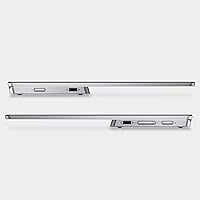
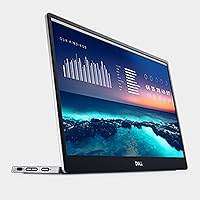
The Dell P1424H 14-inch Portable Monitor is the kind of accessory that makes you wonder how you worked without a second screen while traveling. At 1.3 pounds and barely over half an inch thick, it slips into a laptop bag without adding meaningful bulk — a genuinely rare trait at this size. It sits squarely in the mid-range, competing with portable options from Asus and LG, and Dell's business-grade pedigree is evident in the build and the 3-year advanced exchange warranty that comes standard. Set expectations accordingly: this is a productivity-focused display, not a monitor for creative work or gaming.

Features & Benefits

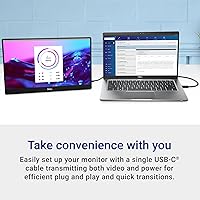
The single most practical thing about this portable monitor is what you do not need: adapters, a wall outlet, extra cables. One USB-C cable handles both video signal and power delivery, cutting setup to about thirty seconds. The IPS panel delivers wide viewing angles so colleagues can see clearly from the side — useful in any shared workspace. At 14 inches and 1080p, pixel density is tight enough that text looks genuinely sharp without scaling tweaks. The Comfortview low blue light filter helps during long sessions. One real caveat: at 300 nits, this display works best indoors. A bright window behind your desk will push its limits noticeably.

Best For

This 14-inch travel display is an easy recommendation for anyone who spends significant time working away from a fixed desk. Consultants, writers, and developers who live out of hotel rooms or co-working spaces will find it fits naturally into their routine. It is also a strong pick for Dell laptop users, where driver compatibility and USB-C power handling tend to be predictable out of the box. If your daily work involves long documents, multiple browser tabs, or side-by-side code windows, the added screen real estate pays off quickly. It is not the right tool for photo editing or video production — color accuracy and brightness are not this display's strengths.

User Feedback

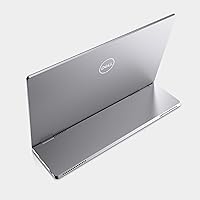
Buyers consistently highlight how quick the setup is — plug in and it works, no software required, no fiddling with display settings. The display clarity gets strong marks for reading-heavy tasks. Where feedback gets more divided is the stand: the built-in kickstand is functional but limited in angle adjustment, and some users rely on a separate stand for extended desk use. Brightness in sunlit rooms comes up repeatedly as a frustration. On the positive side, several reviewers switching from cheaper alternatives note that the build quality and reliability feel a step above. The 3-year warranty also earns specific mentions — buyers appreciate having that safety net for a portable accessory they carry daily.

Pros

  • A single USB-C cable handles both video and power — no adapters, no wall outlet required.
  • At 1.3 pounds, this portable monitor is light enough to forget it is in your bag.
  • Plug-and-play behavior works reliably across most modern Windows and macOS laptops.
  • 1080p at 14 inches delivers genuinely sharp text for reading-heavy and coding workflows.
  • The IPS panel provides wide enough viewing angles for two people to review work side by side.
  • Dell's 3-year advanced exchange warranty offers real peace of mind for a device that travels constantly.
  • Build quality is noticeably more solid than cheaper portable monitors in the same size range.
  • The Comfortview low blue light filter reduces eye fatigue during all-day work sessions.
  • Setup takes under a minute, which matters more than it sounds in shared or temporary workspaces.

Cons

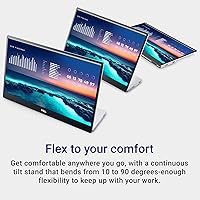
  • The built-in stand offers minimal tilt adjustment and shifts easily on soft or uneven surfaces.
  • The glossy screen produces persistent reflections in bright rooms and near windows.
  • 300 nits is not enough brightness for sunlit environments or outdoor use.
  • No matte screen option is available, limiting usability in environments you cannot control.
  • USB-C-only connectivity leaves users with older hardware needing an adapter anyway.
  • The glossy panel picks up scratches and smudges more readily than expected with regular travel use.
  • Some USB-C ports without full DisplayPort Alt Mode support fail to transmit video at all.
  • Advanced exchange warranty coverage varies significantly by region for international buyers.
  • Color accuracy is mediocre — not a viable option for any color-sensitive professional work.

Ratings

The scores below are generated by AI after analyzing thousands of verified buyer reviews for the Dell P1424H 14-inch Portable Monitor from global sources, with spam, bot activity, and incentivized feedback actively filtered out. The result is an honest, data-driven picture of where this portable display genuinely earns its stripes — and where real users have run into friction. Both strengths and recurring complaints are reflected without softening.

Portability
93%
At 1.3 pounds and barely over half an inch thick, this portable monitor disappears into a laptop bag in a way that bulkier competitors simply cannot match. Frequent flyers and daily commuters consistently call it the lightest capable display they have traveled with, and the form factor genuinely holds up across months of regular use.
A small number of users note that the slim chassis, while impressive, feels slightly flex-prone when packed tightly alongside a laptop. The included sleeve or pouch, depending on configuration, does not always protect the glossy screen adequately during bag-heavy commutes.
Setup & Ease of Use
91%
The single USB-C cable handling both video and power is the feature buyers mention most consistently and most positively. In shared workspaces or client offices, being up and running in under a minute without hunting for power outlets or adapters is a practical advantage that users notice every single day.
Compatibility is not universal — a handful of users report that older USB-C ports without full DisplayPort Alt Mode support fail to transmit video, requiring an adapter after all. This is an edge case, but it has caught enough buyers off guard to be worth knowing before purchase.
Display Clarity
88%
At 1080p across 14 inches, pixel density lands in a sweet spot for text-heavy work. Spreadsheets, code editors, and long documents all render with enough sharpness that extended reading sessions do not feel like a compromise compared to a primary laptop display.
This is not a display built for color-critical tasks, and reviewers doing photo editing or video work report it falls noticeably short of their expectations. Color accuracy and contrast depth are adequate for productivity but unimpressive against even mid-range desktop IPS monitors.
Brightness & Visibility
61%
39%
In a typical indoor office environment or dim hotel room, 300 nits is enough to work comfortably for most of the day. Users in controlled lighting conditions rarely raise brightness as a concern, and the panel looks clean without glare in those settings.
In bright offices with overhead fluorescents, near windows, or anywhere outdoors, the glossy surface and modest brightness become a real problem. Multiple reviewers specifically flag that the screen washes out in sunlit conference rooms, which is a meaningful limitation for a device marketed at mobile professionals.
Stand & Adjustability
58%
42%
The built-in kickstand does its job at a single standard working angle, and for buyers who set up at a desk and rarely reposition, it is adequate enough to not be a daily frustration.
The stand is arguably the most criticized aspect of this display among verified buyers. Tilt range is narrow, there is no height adjustment, and on uneven surfaces like soft couch cushions or angled lap desks it shifts or collapses under minimal pressure. Several users have bought third-party stands specifically to compensate.
Build Quality
83%
The chassis feels more solid than many portable monitors at this size, and Dell's build consistency earns genuine praise from users who have owned cheaper alternatives. The hinge and frame show minimal wear even after several months of daily packing and unpacking.
The glossy panel picks up micro-scratches more readily than users expect, particularly those carrying it without a dedicated sleeve. A few long-term reviewers note that the screen surround develops minor cosmetic scuffs over time with regular bag use.
Connectivity
79%
21%
Having two USB-C ports gives useful flexibility — users can daisy-chain or keep one port free for a peripheral, which is a thoughtful detail for a display this compact. The plug-and-play behavior across Windows and most modern macOS devices is reliable and consistent.
There is no mini HDMI or DisplayPort fallback, which means users with older hardware or specific docking station configurations have fewer options. Those who expected broader compatibility out of the box have occasionally been surprised by the USB-C-only design.
Eye Comfort
77%
23%
The Comfortview low blue light filter draws positive mentions from users who work long hours at a screen. Several remote workers note reduced eye fatigue during all-day sessions compared to their previous portable monitor, which they attribute directly to this feature.
The glossy surface works against eye comfort in certain lighting by producing reflections that require users to constantly reposition. There is no flicker-free certification mentioned, and a small number of users sensitive to screen flicker have flagged mild discomfort during extended use.
Value for Money
72%
28%
The combination of Dell's reliability, the 3-year advanced exchange warranty, and a genuinely well-built chassis makes the price feel justified to buyers who prioritize longevity and support over raw specs. Many reviewers say they paid for peace of mind as much as the hardware itself.
Competing options at lower price points offer comparable or better brightness and include carrying cases, which makes the value calculation harder to defend for buyers not already committed to the Dell ecosystem. Users who encountered the stand limitations feel the price is difficult to justify without a secondary accessory purchase.
Compatibility
84%
Across Dell, Lenovo, and modern MacBook laptops with full USB-C support, this portable monitor works reliably without installing drivers or adjusting display settings manually. Business users in mixed-device environments generally report trouble-free use across the board.
Linux users and those on older Windows machines with partial USB-C implementations have reported intermittent connection drops or the need to manually configure display output. It is not a widespread issue, but compatibility should be confirmed before purchase on non-mainstream setups.
Weight & Dimensions
92%
1.3 pounds is light enough that most users forget it is in their bag entirely, and the slim profile means it stacks flush against a laptop without creating awkward bulk. Travelers specifically praise how little compromise the added screen requires in terms of pack space.
At 14 inches, the screen size is a deliberate trade-off. Users who hoped it would approximate a desktop-style extended display find the usable workspace tighter than expected, particularly when running two application windows side by side.
Warranty & Support
89%
Dell's 3-year advanced exchange warranty is a genuine differentiator in this product category, where most competitors offer one year at best. Buyers who have actually used the support process describe it as fast and low-friction — a meaningful confidence boost for a device that travels constantly.
Some international buyers note that the advanced exchange service terms vary significantly by region, and the same rapid replacement experience is not always available outside core markets. Buyers outside North America or Western Europe should verify coverage terms before relying on this as a deciding factor.
Glossy Screen Performance
55%
45%
In dim, controlled environments the glossy finish produces richer-looking blacks and slightly punchier colors compared to matte alternatives at the same brightness level. Users working in dark hotel rooms or evening home setups occasionally prefer the look.
Reflections are the most polarizing aspect of the screen surface. Users working near windows, in cafes with overhead lighting, or in any environment they cannot fully control report persistent mirror-like glare that substantially degrades usability. A matte option would likely address the majority of negative screen feedback.
Heat Management
81%
19%
During normal use the display stays cool to the touch, which is reassuring for a device frequently resting on laps, desks, or fabric surfaces. Most users report no noticeable warmth even after several continuous hours of use.
When drawing power from a laptop that is itself under load, a few users note that the USB-C power negotiation occasionally causes the host laptop to run slightly warmer than usual. This is a minor concern but relevant to users on battery-sensitive workflows.

Suitable for:

The Dell P1424H 14-inch Portable Monitor was built with one type of buyer in mind: the professional who genuinely works on the move and needs a reliable second screen without adding meaningful weight or setup complexity to their day. Consultants who rotate between client sites, remote workers splitting time between home, cafes, and co-working spaces, and frequent business travelers who live out of carry-on luggage will find this display fits naturally into workflows that would otherwise require compromising with a single small laptop screen. Developers, analysts, and writers whose work centers on reading, writing, and referencing multiple documents simultaneously will appreciate the sharp 1080p rendering at this size, where text stays crisp without any manual scaling adjustments. It is also a particularly sensible choice for anyone already using Dell laptops or docking stations, where USB-C compatibility and power negotiation tend to work without any fuss. If you have ever spent ten minutes rearranging a hotel desk trying to connect a portable monitor before a morning call, the single-cable setup here will feel like a genuine quality-of-life improvement.

Not suitable for:

The Dell P1424H 14-inch Portable Monitor is the wrong tool for buyers whose work demands accurate color reproduction or wide color gamut coverage — photographers, video editors, and graphic designers will find its IPS panel underwhelming in ways that matter professionally. Anyone planning to use this display in bright environments, near windows, or outdoors should seriously reconsider: the 300-nit brightness combined with a glossy panel creates visibility problems in sunlit settings that no software adjustment can fix. Gamers looking for a portable display for high-refresh entertainment will find nothing here to interest them — this monitor was never designed for that purpose, and it shows in the specs. Users who need flexible screen positioning for standing desks, angled lap setups, or shared viewing scenarios will find the stand's limited tilt range genuinely frustrating over time, and the lack of a matte screen option will further frustrate those sensitive to reflections. Finally, buyers expecting the experience of a proper 15-inch or larger extended display should calibrate expectations — 14 inches gives you more room than a laptop alone, but it is a productivity aid, not a desktop replacement.

Specifications

  • Screen Size: The display measures 14 inches diagonally, matching the footprint of most compact laptops for a natural side-by-side working setup.
  • Resolution: Native resolution is 1920x1080 Full HD, delivering a pixel density sharp enough for comfortable text rendering without scaling adjustments.
  • Panel Type: An IPS (In-Plane Switching) panel provides consistent color and contrast across wide horizontal and vertical viewing angles.
  • Aspect Ratio: The display uses a standard 16:9 widescreen aspect ratio, compatible with virtually all modern laptop and desktop output configurations.
  • Brightness: Maximum brightness is rated at 300 nits, which is adequate for controlled indoor environments but limited in high-ambient-light settings.
  • Screen Surface: The panel uses a glossy finish, which enhances perceived contrast in dim conditions but produces noticeable reflections in brightly lit rooms.
  • Connectivity: The monitor connects via USB-C, with both video signal and power delivery transmitted through a single cable — no separate power adapter required.
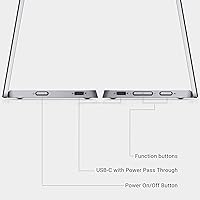
  • USB Ports: Two USB-C ports are available on the unit, allowing for flexible cable routing or daisy-chain setups depending on the host device.
  • Dimensions: The monitor measures 12.69 x 7.98 x 0.56 inches at its slimmest point, making it thin enough to slot alongside a laptop in most standard bags.
  • Weight: The unit weighs 1.3 pounds, placing it among the lighter options in the 14-inch portable monitor category.
  • Eye Care: Dell's Comfortview technology reduces blue light emission from the panel to help minimize eye strain during extended screen time.
  • Voltage: The monitor is rated for 240V AC input, making it compatible with power systems across most international markets when used with appropriate adapters.
  • Warranty: Dell includes a 3-year Advanced Exchange Service warranty, providing next-business-day replacement unit dispatch in covered regions.
  • Model Number: The official Dell model designation is P1424H, used for identifying compatible accessories, firmware updates, and support documentation.
  • Manufacturer: Designed and manufactured by Dell Technologies, a company with an established track record in business-grade display hardware.
  • Driver Requirement: No dedicated driver installation is required; the monitor operates as a plug-and-play display device on most modern operating systems.
  • Release Date: The Dell P1424H was first made available for purchase in June 2023.

Related Reviews
Lrtzcbi 14-inch Portable Touchscreen Monitor
74%
88%
Value for Money
79%
Image Quality
72%
Touch Responsiveness
91%
Portability
58%
Kickstand Stability
More
Magedok 14-Inch 4K Portable Monitor

85%
93%
Display Quality
88%
Portability
90%
Ease of Setup
91%
Color Accuracy
58%
Sound Quality
More
KEEPTIME 14-inch 2K Portable Monitor
84%
89%
Display Quality
94%
Portability
87%
Connectivity Options
91%
Ease of Setup
62%
Audio Performance
More
Magedok MG140-FT02 14-Inch Portable Touchscreen Monitor
74%
91%
Portability
74%
Display Quality
77%
Color Accuracy
63%
Touchscreen Responsiveness
79%
Connectivity & Compatibility
More
KYY X90A 14-inch Portable Laptop Monitor
84%
91%
Display Quality
88%
Portability
94%
Ease of Setup
86%
Viewing Angles
82%
Compatibility
More
ASUS ZenScreen MB14AC 14-inch Portable USB Monitor
85%
92%
Portability
85%
Display Quality
90%
Ease of Setup
74%
Color Accuracy
88%
Connectivity Options
More
InnoView 14-inch OLED Portable Monitor 4K UHD
85%
92%
Display Quality
88%
Portability
90%
Color Accuracy
94%
Response Time (Gaming)
85%
Build Quality
More
ELECROW 14-inch Portable Monitor with Keyboard and RPi5 Adapter
86%
93%
Portability
88%
Battery Life
84%
Screen Quality
91%
Ease of Setup
72%
Keyboard and Touchpad Performance
More
Haiway HW-PM14-1366 14-inch Portable Monitor
80%
78%
Display Quality
89%
Portability & Weight
91%
Setup & Ease of Use
85%
Value for Money
88%
Connectivity Options
More
G-STORY 14-inch Portable Monitor FHD 1080P
84%
94%
Portability & Size
86%
Display Quality
91%
Ease of Setup
85%
Build Quality
88%
Connectivity
More

FAQ

In most cases, no. The Dell P1424H 14-inch Portable Monitor is designed to work with a single USB-C cable that carries both the video signal and power to the display. The catch is that your laptop's USB-C port needs to support DisplayPort Alt Mode — if it only supports charging or data transfer, you will need an adapter. Check your laptop spec sheet before assuming full compatibility.

Yes, it works well with modern MacBooks that have USB-C or Thunderbolt ports. Most users with MacBook Air and MacBook Pro models from 2018 onward report plug-and-play functionality with no manual configuration required. Older MacBooks without USB-C will need a hub or adapter.

The built-in kickstand folds out from the back of the monitor and props it at a fixed working angle. It is stable enough on flat, hard surfaces like desks and tables, but it has very limited tilt range and no height adjustment. On softer or uneven surfaces — think a couch cushion or a slightly angled lap desk — it can shift or tip under light pressure. A number of users end up buying a separate adjustable stand for extended desk setups.

Honestly, it depends on the lighting conditions. At 300 nits with a glossy screen, this portable monitor handles typical indoor office lighting reasonably well. But near a window with direct sunlight, or in a bright cafe, reflections and washout become genuine problems. If your work environment is consistently bright, this is worth factoring into your decision — it is not an outdoor-capable display.

Not directly for video — USB-A does not carry display signals, so a simple USB-A to USB-C cable will not work for video output. You would need a USB-A to HDMI or DisplayPort adapter on the host device side, combined with a separate USB-C cable to the monitor. It is a workable workaround but adds the cable complexity the monitor is specifically designed to avoid.

It generally does on modern distributions, but it is less consistent than on Windows or macOS. Most users on Ubuntu and Fedora with fully USB-C-compliant ports report it working without additional setup. However, some users on older kernel versions or with less common hardware configurations have reported needing to manually configure display output. It is worth testing before relying on it in a production Linux setup.

It is functional for casual video watching — the resolution is fine and the IPS panel has decent viewing angles. That said, the glossy screen can make reflections distracting on a plane or in a bright setting, and color accuracy is not this monitor's strong suit. For occasional travel entertainment it is perfectly usable, but it was not built with media consumption as a priority.

Use a dry or very lightly dampened microfiber cloth and wipe gently. Avoid paper towels, rough fabrics, or any cleaning sprays that contain alcohol or ammonia — these can strip the glossy coating over time. The surface already attracts fingerprints easily, so a microfiber cloth kept in your bag is a practical daily companion with this monitor.

No — Dell's Advanced Exchange Service covers manufacturing defects and hardware failures, not accidental physical damage from drops, impacts, or liquid exposure. What it does offer is fast replacement dispatch when the monitor fails under normal use conditions, which is a meaningful assurance for a device that gets packed and unpacked regularly. For travel damage protection, you would need separate accidental damage coverage.

In theory, daisy-chaining two portable monitors from one USB-C port is possible on hosts that support it, but the Dell P1424H is not specifically marketed or tested for that configuration. Power delivery limitations on the host laptop become a significant constraint, and bandwidth sharing often results in reduced resolution on one or both displays. For a reliable dual-external-monitor setup, a docking station with dedicated outputs is a more dependable approach.