Overview

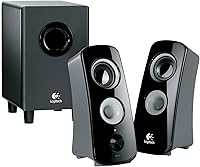
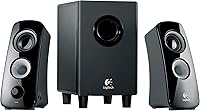
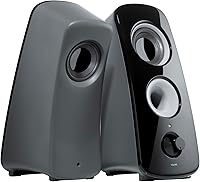
The Logitech Z323 has been a fixture in the budget computer speaker market for years, and its staying power is not accidental. This is a 2.1 system — two compact satellites and a down-firing subwoofer — designed for everyday PC users and casual gamers who want real, room-filling sound without spending a lot. It won't impress audiophiles, but that was never the point. What it delivers is reliable, full-bodied audio at a price tier where most systems skip the subwoofer entirely. Setup takes minutes, with no drivers or software required — just plug in and you're done.

Features & Benefits

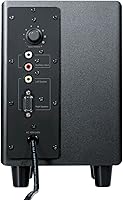
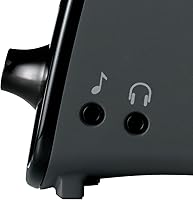
The Z323 system runs on 30 watts of RMS power — split between two satellites and an 18-watt subwoofer — which is more than enough to fill a dorm room or home office without things getting muddy at higher volumes. The down-firing subwoofer design pushes bass outward along the floor, giving the low end a surprising amount of presence for a unit this size. Connectivity is practical: both a 3.5mm and RCA input mean you can hook up a PC, a gaming console, or a phone without adapters. There's also a headphone jack built into the subwoofer, a genuinely useful touch for late-night listening sessions.

Best For

This 2.1 desktop speaker setup makes the most sense for people escaping the flat, thin sound of laptop or monitor speakers. If you're working from home and want your music, video calls, and YouTube to actually sound like something, this is a reasonable upgrade. Casual gamers on a budget will also find it satisfying, because the bass response adds weight to soundtracks and effects in a way purely satellite-based systems can't match. That said, if you need neutral, flat audio for mixing or editing work, the bass-forward tuning here probably isn't the right fit.

User Feedback

With over 4,000 ratings and a 4.4-star average, this Logitech speaker set has earned real trust across a wide range of buyers. The most consistent praise centers on bass output and longevity — people are often surprised by how long these hold up, with some owners reporting years of daily use without issues. On the critical side, the volume knob sits on the subwoofer rather than a desktop controller, which gets frustrating if the unit lives under your desk. Some reviewers also feel the mids and highs lack crispness compared to similarly priced soundbars. Overall, the complaints lean toward preference rather than outright product failures.

Pros

  • Includes a real subwoofer at a price point where most competitors skip it entirely.
  • Setup takes under five minutes with no software or drivers required.
  • Works with PCs, consoles, phones, and media players via dual analog inputs.
  • The built-in headphone jack mutes the speakers automatically — no extra steps needed.
  • Satellite speakers are compact enough to fit neatly on almost any desk configuration.
  • Long-term durability is a genuine strength — many owners report years of trouble-free use.
  • Bass output feels surprisingly substantial given the system's physical size.
  • Logitech's brand reliability gives buyers confidence in after-sales support and build consistency.

Cons

  • Volume knob is on the subwoofer unit — inconvenient when it sits under a desk.
  • No desktop controller or remote is included, which feels like a real omission.
  • Highs and mids lack definition, particularly noticeable with acoustic music or vocals.
  • No optical or USB input limits compatibility with modern TVs and digital audio sources.
  • Bass tuning is heavy-handed, which may fatigue listeners during long sessions.
  • Subwoofer cabinet feels slightly hollow under pressure — build quality is functional, not inspiring.
  • Cable lengths can be restrictive if your subwoofer needs to sit far from your desk.
  • At louder volumes, the upper frequencies develop a mild harshness that becomes distracting.

Ratings

The Logitech Z323 has been rated across 11 key categories by our AI system, which analyzed thousands of verified global buyer reviews while actively filtering out incentivized, duplicate, and bot-generated feedback. Scores reflect the honest consensus of real-world users — office workers, students, gamers, and everyday listeners — with both the standout strengths and the recurring frustrations weighted transparently. No aspect has been glossed over.

Bass Performance
88%
For a compact desktop system, the low-end output consistently surprises people. Users describe a noticeable thump during gaming sessions and a warmth in music playback that makes the system feel larger than it looks. The down-firing port design contributes meaningfully to this, especially when the subwoofer is placed on a hard floor.
The bass tuning skews toward quantity over precision, which bothers some listeners. At higher volumes, the low end can bleed into the mids, making certain tracks sound a little muddy. Users who prefer a tighter, more controlled bass response tend to find the tuning too loose for critical listening.
Treble & Midrange Clarity
63%
37%
For casual listening — background music, YouTube videos, podcast playback — the mids are clear enough to follow vocals and dialogue without fatigue. Most users coming from integrated laptop speakers report a noticeable and welcome improvement in overall presence and definition.
This is the Z323 system's most cited weakness. Highs lack sparkle, and the midrange can sound recessed when compared to similarly priced soundbars or bookshelf speakers. Listeners who play a lot of acoustic music or work in audio production will find the top end unsatisfying and slightly veiled.
Volume & Room-Filling Ability
82%
18%
Thirty watts of continuous power is genuinely sufficient for a bedroom, dorm room, or home office. Users report being able to fill a medium-sized room at moderate volume without the sound becoming thin or strained. It handles casual parties and background listening with no trouble.
Pushing the system toward maximum volume introduces some harshness in the upper frequencies. It is not designed for large open-plan spaces or outdoor use, and buyers who expect concert-level output from a desktop system will be disappointed.
Build Quality
79%
21%
The plastic housing feels sturdy enough for everyday use, and the grilles on the satellite speakers hold up well over time. Long-term owners — some reporting three to five years of daily use — consistently praise the system for not developing rattles, loose connections, or cabinet distortion.
The overall aesthetic and material feel are unmistakably budget-tier. The subwoofer cabinet has some flex when pressed, and the satellite stands, while functional, do not inspire confidence. It looks like what it is — a value product — and nothing about the construction suggests premium craftsmanship.
Ease of Setup
94%
This is one of the system's clearest strengths. Buyers consistently describe getting everything up and running in under five minutes — cables connect intuitively, there are no drivers to install, and no configuration menus to navigate. Non-technical users specifically praise how foolproof the whole process feels.
The cable lengths, while adequate for most standard desk setups, can feel limiting if the subwoofer needs to be placed more than a few feet from the satellites. A small number of users have reported that the cable connections feel slightly loose out of the box, requiring a firm push to seat properly.
Input Versatility
83%
Having both a 3.5mm and an RCA input means the system works with an unusually wide range of source devices without adapters. Users hook it up to PCs, gaming consoles, televisions, phones, and media players interchangeably, making it a genuinely flexible hub for a multi-device desk or entertainment setup.
There is no optical or USB input, which limits compatibility with modern TVs and DACs that lack analog outputs. Buyers expecting to connect it directly to a smart TV via digital audio output will need an external converter, which adds cost and cable clutter.
Headphone Jack Usability
71%
29%
The integrated headphone jack is a practical addition that a surprising number of users rely on daily. Plugging in headphones automatically mutes the speakers, which works cleanly without any fuss — useful for shared apartments or late-night sessions where switching audio output quickly matters.
The jack is located on the subwoofer unit, which is typically tucked under a desk or on the floor. Reaching down to plug in headphones multiple times a day becomes annoying quickly, and several reviewers specifically wished the jack had been placed on one of the satellites or on a desktop control pod instead.
Volume Control Placement
54%
46%
The knob itself works reliably and offers a smooth, consistent adjustment range. Users who position the subwoofer within arm's reach — say, beside the desk rather than underneath it — report no issues and appreciate having a physical dial rather than relying on software volume controls.
This is the most consistently criticized ergonomic decision in the design. When the subwoofer sits under a desk — which is its natural home — adjusting volume means bending down repeatedly. There is no desktop controller or remote, which feels like an oversight for a system clearly designed for desk-bound use.
Gaming Performance
78%
22%
Casual gamers using this 2.1 desktop speaker setup with a PC or console via RCA generally come away satisfied. Explosions, ambient soundscapes, and in-game music all benefit from the subwoofer's presence, and the overall soundstage is wide enough to make single-player experiences feel more involving.
Competitive gamers who depend on precise directional audio cues will find the system's limitations frustrating. The sound imaging is not sharp enough to reliably pinpoint enemy footsteps or off-screen threats, and there is no support for virtual surround formats. It is a casual gaming speaker, not a performance one.
Value for Money
86%
Few systems at this price tier include a subwoofer from a brand with Logitech's track record, and buyers consistently acknowledge they are getting more audio hardware per dollar than most alternatives. The durability factor strengthens the value case further — this is a system people rarely need to replace.
Buyers who spend slightly more can access systems with desktop volume controls, better midrange clarity, or USB connectivity. The Z323 system is excellent value for what it does, but stretching the budget opens the door to meaningfully better feature sets, and some buyers regret not doing so.
Long-Term Durability
87%
Owner longevity is a recurring theme in reviews, and it is one of the most compelling arguments for this system. Users who purchased it five or more years ago describe it still performing reliably day-to-day, with no degradation in driver performance, no buzz, and no connector failures.
A small percentage of buyers have reported driver failures or buzzing in one satellite after extended high-volume use. The warranty coverage is standard rather than exceptional, so buyers who push the system hard over many years may find themselves without recourse if something eventually fails.

Suitable for:

The Logitech Z323 is a smart pick for anyone whose current audio setup is a pair of tinny monitor speakers or nothing at all. Students furnishing a dorm room, remote workers who spend hours on video calls and want music that actually sounds full, and casual gamers who want more sonic depth without building a dedicated audio rig will all find this system punches above its weight class. It works equally well connected to a PC, a Mac, or a gaming console via RCA, making it a genuinely versatile option for a multi-device desk. Buyers who prioritize getting something up and running quickly — no drivers, no apps, no configuration — will appreciate how little friction is involved. If your expectations are grounded in what this price tier can realistically offer, the Z323 system consistently delivers.

Not suitable for:

The Logitech Z323 is not the right choice for anyone who takes audio fidelity seriously. Music producers, podcasters who monitor their own recordings, or listeners who are particular about clear, detailed highs and a neutral midrange will find this 2.1 desktop speaker setup underwhelming. The bass-forward tuning that casual listeners enjoy is exactly what critical listeners find distracting, as it colors the sound in ways that make accurate monitoring impossible. Competitive gamers who rely on precise directional audio to locate enemies by sound alone will also be let down — the imaging simply is not sharp enough for that use case. Anyone hoping to fill a large living room or open-plan space should also look elsewhere, as this system is sized and powered for a desktop environment, not a home theater.

Specifications

  • Speaker Config: 2.1 system consisting of two satellite speakers and one ported, down-firing subwoofer.
  • Total Power: 30 watts RMS total output across the full system at continuous, non-peak levels.
  • Subwoofer Power: The subwoofer unit handles 18 watts of the total 30W RMS power allocation.
  • Satellite Size: Each satellite speaker measures 8.3 x 3.4 x 4.5 inches (height x width x depth).
  • Subwoofer Size: The subwoofer cabinet measures 9.37 x 9.87 x 9.75 inches (length x width x height).
  • Total Weight: The complete system, including subwoofer and both satellites, weighs approximately 7.5 pounds.
  • Inputs: Dual analog inputs: one 3.5mm stereo mini-jack and one RCA stereo input pair.
  • Headphone Jack: A single 3.5mm headphone output is integrated into the subwoofer unit and mutes the speakers when in use.
  • Subwoofer Type: Ported, down-firing subwoofer design channels bass output downward and outward through a rear port for wider dispersion.
  • Power Source: Corded electric power via a standard AC wall outlet — no batteries or USB power bus required.
  • Color: Available in black with a neutral, unobtrusive finish suited to most desktop environments.
  • Model Number: Official Logitech model number is 980-000354, used for warranty registration and replacement part identification.
  • Brand: Manufactured and sold by Logitech, a Swiss-American peripherals company with over 40 years in consumer electronics.
  • BSR Ranking: Ranked #215 in the Computer Speakers category on Amazon, reflecting sustained long-term sales volume.
  • User Rating: Holds a 4.4 out of 5 star average rating across more than 4,300 verified buyer reviews on Amazon.
  • Release Date: First made available for purchase in July 2009, making it one of the longer-running active listings in its category.
  • Discontinued: As of the latest available product data, the system has not been discontinued by Logitech.

Related Reviews

Logitech ERGO K860
Logitech ERGO K860
81%
93%
Ergonomic Comfort
89%
Wrist Rest Quality
84%
Typing Feel & Accuracy
67%
Adjustment Period
81%
Build Quality & Materials
More
Logitech Wireless Touchpad
84%
80%
Performance
85%
Ease of Use
88%
Wireless Connectivity
83%
Build Quality
82%
Ergonomics
More
Logitech X-530
Logitech X-530
75%
82%
Sound Quality
80%
Bass Performance
86%
Dialogue / Center Channel
84%
Surround Imaging
75%
Build Quality
More
Logitech POP Mouse
Logitech POP Mouse
82%
93%
Silent Click Performance
89%
SmartWheel Scrolling
87%
Multi-Device Connectivity
91%
Battery Life
71%
Ergonomics & Hand Fit
More
Logitech Pebble M350
88%
88%
Build Quality
85%
Ergonomics & Comfort
94%
Battery Life
90%
Connectivity Reliability
87%
Tracking Precision
More
Logitech B910 HD Webcam
82%
87%
Video Quality
94%
Ease of Setup
80%
Audio Performance
82%
Build Quality
90%
Compatibility
More
Logitech H540
Logitech H540
78%
83%
Microphone Clarity
78%
Comfort & Fit
74%
Audio Quality
61%
Build Quality & Durability
94%
Plug-and-Play Convenience
More
Logitech Wave Keys for Mac
87%
89%
Ergonomics and Comfort
94%
Bluetooth Connectivity
92%
Battery Life
87%
Ease of Use
90%
Build Quality
More
Logitech Wireless Mouse M275
85%
94%
Battery Life
88%
Ergonomics/Comfort
92%
Ease of Setup
85%
Tracking Performance
83%
Build Quality
More
Logitech MK370 Combo for Business
80%
91%
Wireless Connectivity
93%
Ease of Setup
67%
Keyboard Typing Feel
88%
Mouse Comfort & Silence
74%
Build Quality
More

FAQ

No, the Logitech Z323 is entirely plug-and-play. You connect the satellites to the subwoofer, plug the audio cable into your PC or device, connect the power cord, and it works immediately. There are no drivers to download and no companion app required.

Yes, the RCA input makes it easy to connect to most gaming consoles. If your console outputs analog audio via RCA, you can run a cable directly from it to the subwoofer. Many buyers use the Z323 system this way with satisfying results, though you will need a separate audio adapter if your console only outputs digital or HDMI audio.

The volume knob is on the subwoofer unit itself — not on a separate desktop controller. If you place the subwoofer under your desk, you will need to reach down to adjust volume. This is the most commonly cited frustration among owners, so it is worth factoring into where you plan to position the subwoofer before buying.

Yes. When you plug headphones into the 3.5mm jack on the subwoofer, the satellite speakers mute automatically. Unplugging the headphones restores audio to the speakers. It works cleanly with no extra steps, though the jack's location on the subwoofer means you are reaching down to use it every time.

The bass level is fixed — there is no dedicated bass or treble adjustment on the unit itself. You can use software equalizers on your computer to tame the low end if the default tuning feels too heavy for your taste, but the hardware does not offer any built-in tone controls.

It is actually well-matched for smaller spaces. The 30W RMS output fills a dorm room or bedroom comfortably at moderate volume levels without distortion. You are unlikely to need to push it very hard in a small room, which also means the system's limitations at high volume are less relevant in that context.

Durability is one of this 2.1 desktop speaker setup's strongest points based on real owner feedback. A significant number of buyers report using the same unit for three to five or more years with no degradation in performance. It is not delicate, and with normal use it holds up reliably.

Yes, any phone with a 3.5mm headphone output can connect directly using a standard aux cable. If your phone only has USB-C or Lightning, you will need a small adapter to convert to 3.5mm — these are inexpensive and widely available. There is no Bluetooth, so a physical cable is always required.

It handles movie audio quite well for a desktop setup. The subwoofer adds genuine weight to action sequences and cinematic soundscapes, and dialogue remains intelligible at normal listening volumes. It is not a substitute for a dedicated home theater system, but for watching films at a desk it is a meaningful step up from built-in display speakers.

The down-firing design is intended to work with the subwoofer sitting on a hard, flat surface, which is typically the floor. Placing it on carpet can muffle the bass output somewhat because the port needs a surface to direct the low frequencies outward. A desk surface can work in a pinch, but a hard floor gives you the best bass performance.