


Overview
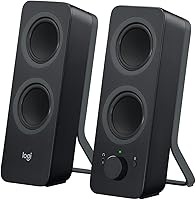
The Logitech Z207 is a practical audio solution for anyone struggling with a cluttered workspace. These desktop speakers sport a slim, vertical profile that fits easily into narrow gaps between monitors or alongside a laptop stand. By focusing on a space-saving design, the manufacturer has created a 2.0 stereo pair that provides an audio upgrade over built-in computer speakers without requiring a bulky subwoofer. It bridges the gap between old-school reliability and modern needs by offering both a stable 3.5mm wired connection and wireless Bluetooth 4.2. This makes it an ideal fit for minimalist desks where surface area is at a premium. As part of a well-known lineup, it brings brand-name reliability to the standard home office setup, ensuring that your daily background music or video calls sound consistently clear.
Features & Benefits
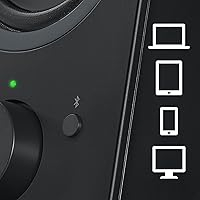
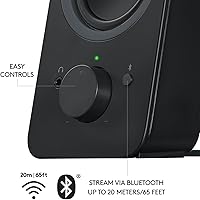
One of the most useful aspects of the Z207 system is the Easy-Switch technology, which lets you stay connected to two devices simultaneously and flip between them just by hitting pause and play. For a compact unit, it manages to avoid sounding thin thanks to an integrated passive radiator that adds a bit of warmth and low-end punch to the audio. All the essential interactions happen right on the front of the right speaker, where a physical volume knob and pairing button are easy to reach. You also get a built-in headphone jack, which is incredibly handy for jumping into a private meeting without having to reach behind your PC. This combination of dual connectivity and tactile controls makes managing your daily audio workflow feel much more intuitive and less of a technical chore.
Best For
This 2.0 stereo pair is a top contender for multitaskers who spend their day jumping between a primary workstation and a smartphone. If you have a narrow desk setup, the slim footprint is a major advantage, allowing you to enjoy stereo separation without sacrificing room for your mouse or keyboard. It is particularly well-suited for office environments where the priority is vocal clarity for video conferences and podcasts rather than floor-shaking bass. Budget-conscious buyers will appreciate getting a functional, attractive set of speakers that do not overcomplicate things with extra wires or software. For those who need clear vocal clarity and a hassle-free wireless setup on a modest budget, these speakers hit a very specific sweet spot that larger, more expensive studio monitors often miss.
User Feedback
Real-world users frequently highlight how quick and stable the Bluetooth pairing feels compared to other entry-level options. The clean, modern aesthetic is another common point of praise, as the matte finish tends to blend in perfectly with contemporary hardware. However, it is important to be realistic about the sound profile; while the audio is crisp, it lacks the deep sub-frequency impact that a dedicated subwoofer would provide. Some listeners find the bass adequate for casual YouTube browsing or background pop music, but movie buffs might find it a bit light for cinematic action. Despite this, the convenience of the tactile controls and the reliable switching between devices make it a highly regarded choice for the price. It remains a solid, dependable pick for general-purpose use where simplicity and style are the main goals.
Pros
- The slim vertical profile saves significant horizontal desk space compared to traditional boxy speakers.
- Logitech Easy-Switch technology allows for near-instant toggling between two simultaneously connected Bluetooth devices.
- Integrated passive radiators help provide a fuller sound and better bass response than standard laptop speakers.
- A front-mounted physical volume knob offers much faster and more intuitive control than software sliders.
- The built-in headphone jack on the front provides a convenient quick-access point for private listening sessions.
- Dual connectivity via Bluetooth and 3.5mm auxiliary input ensures compatibility with almost any modern device.
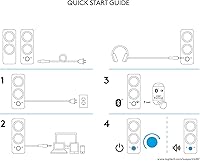
- Setup is entirely plug-and-play, requiring no additional software or complex driver installations to function.
- The matte finish and modern aesthetic blend seamlessly with contemporary office hardware and minimalist decor.
Cons
- The absence of a dedicated subwoofer means the low-end lacks the deep impact required for cinematic gaming.
- A hardwired cable between the left and right units limits the maximum distance for stereo separation.
- The power adapter is somewhat bulky and can easily block adjacent outlets on standard power strips.
- At higher volumes, the audio can occasionally lose some detail and become slightly muddy in the mid-range.
- A lack of backlighting on the main control knob makes it difficult to adjust settings in dark rooms.
- The tall, lightweight design makes the speakers susceptible to tipping over if the desk is bumped hard.
- Using Bluetooth 4.2 instead of a newer standard can result in minor audio latency during high-speed gaming.
- There is a very faint electrical hiss audible through the headphone port when the system is idling at high volume.
Ratings
We analyzed thousands of global verified reviews to see how the Logitech Z207 performs in real-world desktop environments, actively filtering out incentivized or bot-generated noise to ensure accuracy. These AI-driven scores provide a transparent look at both the surprising strengths and the inevitable trade-offs of this compact audio setup, helping you decide if it matches your specific workspace needs.
Desk Ergonomics
Bluetooth Connectivity
Multi-Device Switching
Vocal Clarity
Bass Performance
Build Quality
Control Accessibility
Value for Money
Headphone Integration
Ease of Setup
Aesthetic Design
Suitable for:
The Logitech Z207 is an ideal match for remote professionals and students who need a dependable audio upgrade for a cramped or minimalist desk. Its slim, vertical design is specifically built for users who have very little horizontal clearance between their monitors or peripheral gear. If you constantly juggle audio between a work laptop and a personal smartphone, the Easy-Switch technology makes the transition between these two devices remarkably simple. It is a great choice for those who prioritize crisp vocal clarity during video calls and casual background music over room-shaking power. Ultimately, it serves anyone looking for a no-fuss, brand-name solution that offers both wired and wireless versatility at an entry-level price point.
Not suitable for:
Serious audiophiles or home cinema enthusiasts will likely find the Logitech Z207 lacking, as it lacks the deep sub-bass and wide soundstage provided by larger 2.1 systems. Because there is no dedicated subwoofer, this 2.0 pair is not suitable for users who want a physical, thumping low-end for action-heavy gaming or bass-intensive music genres. Additionally, those with very wide desk setups or massive ultrawide monitors might find the hardwired cable connecting the two speakers to be too short for optimal placement. If your primary goal is high-fidelity music production or immersive movie nights, you would be better served by investing in more substantial bookshelf speakers or a setup with a separate sub.
Specifications
- Total Output: The system delivers 10 Watts of peak power with a continuous rating of 5 Watts RMS.
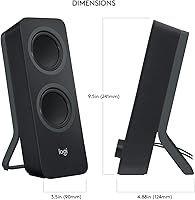
- Dimensions: Each unit measures approximately 9.49″ tall, 3.54″ wide, and 4.88″ deep.
- Weight: The combined weight of the two speakers is roughly 2.9 lbs.
- Bluetooth Version: This audio system utilizes Bluetooth 4.2 for wireless streaming and device pairing.
- Input Interfaces: One 3.5mm auxiliary input is located on the back for traditional wired connections.
- Headphone Jack: A standard 3.5mm headphone output is integrated into the front of the right speaker.
- Audio Channels: This is a 2.0 stereo driver configuration with no external subwoofer.
- Bass Extension: Each cabinet includes one integrated passive radiator to enhance low-frequency response.
- Power Source: The unit is corded-electric and requires a connection to a standard wall outlet.
- User Controls: The right speaker features a front-mounted volume knob that also acts as the power switch.
- Bluetooth Range: The wireless connection remains stable up to a maximum distance of 10 meters.
- Device Switching: Integrated Easy-Switch technology allows the system to pair with up to two Bluetooth devices simultaneously.
- Package Contents: The box includes the two speakers, a user guide, and the necessary power adapter.
- Mounting Type: These units are designed exclusively for tabletop or desktop placement.
- Driver Type: The system uses dynamic drivers to provide full-range audio performance.
Related Reviews

Logitech Pebble M350 Wireless Mouse

Logitech X-530

Logitech ERGO K860

Logitech Wireless Touchpad

Logitech POP Mouse

Logitech M320 Wireless Mouse
Logitech H540

Logitech Slim Bluetooth Combo
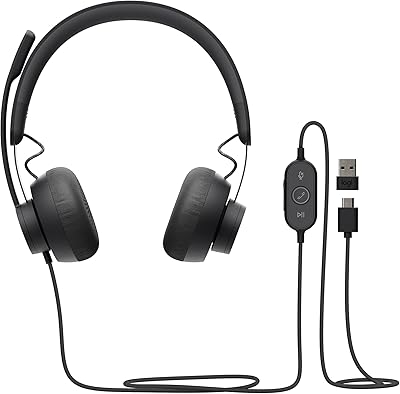
Logitech Zone Wired