Logitech M750 L


Overview
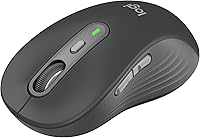
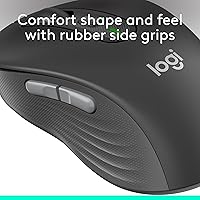
The Logitech M750 L is built for one type of user most mice quietly ignore: someone with genuinely large hands who spends the bulk of the day at a desk. This wireless mouse sits in the mid-range price tier, but it brings ergonomic details that feel more considered than its cost suggests. The contoured shape, rubber side grips, and soft thumb rest add up to real all-day comfort rather than just marketing copy. Two features stand out immediately: the SmartWheel scrolling and near-silent clicks. Pair that with the ability to connect to three devices via Bluetooth, and you have a practical tool that fits busy, multi-platform workflows without demanding much attention.
Features & Benefits
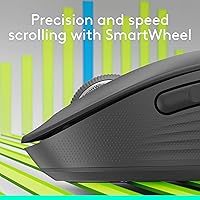
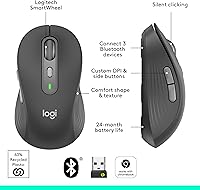
The SmartWheel is genuinely useful — a quick flick switches between careful, click-by-click scrolling for reading documents and fast free-spin mode for blazing through long web pages. The near-silent clicks are not a gimmick; the noise reduction is noticeable enough that coworkers and family members will actually appreciate it. Connecting to a second or third device takes a single button press, and the Logi Flow feature lets you move files between a Mac and a Windows PC without a USB drive. The customizable side buttons can be remapped in the Logi Options+ app, and broad OS support covers everything from Linux to iPadOS.
Best For
This ergonomic mouse is an obvious pick for anyone whose hands feel cramped or fatigued on a standard-sized mouse. It is also a strong match for people who regularly switch between a work laptop, a personal desktop, and a tablet — the three-device pairing handles that without cable juggling. Writers, researchers, and anyone who reads long documents will get real value from the scrolling flexibility. The 24-month battery life removes one recurring annoyance from your day entirely. One firm limitation worth stating upfront: the shape is right-hand only, so left-handed users should look at other options before buying.
User Feedback
Buyers consistently highlight comfort during extended sessions — the contoured shape and rubber grip hold up well after hours of use, and the quiet clicks earn frequent praise from people in open offices or shared home spaces. On the critical side, some users find the scroll wheel feels a touch light or plasticky compared to pricier alternatives, and a handful have reported that the Logi Options+ app can be slow to recognize the mouse or require reinstallation. Left-handed buyers are simply out of luck, which the product does not hide. Overall sentiment is strong, and a clear pattern of repeat Logitech buyers suggests the satisfaction here is genuine.
Pros
- Ergonomic shape genuinely reduces hand and wrist fatigue during long workdays for larger-handed users.
- Near-silent clicks are noticeably quieter in shared offices, video calls, and late-night work sessions.
- SmartWheel switches between precision and fast-scroll modes with a single flick — no menu required.
- Pairs with up to three devices and switches between them instantly with one button press.
- Logi Flow lets you move files between a Mac and a Windows PC without any cables or drives.
- A single AA battery lasts up to two years, eliminating the need to track charging schedules.
- Side buttons are remappable via Logi Options+ to shortcuts that actually match how you work.
- Works natively across Windows, macOS, Linux, ChromeOS, iPadOS, and Android out of the box.
- Rubber side grips hold their texture well over months of daily use without becoming slick.
- Broad OS support means one mouse covers nearly every device in a mixed-platform household or office.
Cons
- Right-hand-only design is a hard exclusion — left-handed users have no variant to choose from.
- No USB-C charging port; the mouse depends entirely on a disposable AA battery with no built-in alternative.
- Logi Options+ can be slow to recognize the mouse after system restarts or Windows updates.
- Custom button settings have been reported to reset following certain app or OS updates.
- Scroll wheel feels hollow and lightweight compared to the more substantial feel of pricier competitors.
- Bluetooth pairing can be inconsistent on Linux machines and some older Android devices.
- Fingerprints and light surface scratches show easily on the plastic top shell over time.
- No onboard battery indicator light; low-battery warnings rely entirely on software notification.
- Large form factor takes up more bag space than compact or travel-oriented wireless mice.
- Users in Bluetooth-congested environments may experience occasional micro-stutters requiring a switch to the RF receiver.
Ratings
The Logitech M750 L earns consistently strong marks from productivity-focused buyers worldwide, and the scores below reflect that — but they also surface the genuine friction points that repeat purchasers mention. These ratings were generated by AI after analyzing thousands of verified global reviews, with spam, bot submissions, and incentivized feedback actively filtered out. The result is an honest, balanced picture of where this ergonomic mouse excels and where it falls short for certain users.
Ergonomics & Comfort
Scroll Wheel (SmartWheel)
Click Noise (SilentTouch)
Multi-Device Connectivity
Battery Life
Build Quality
Customization (Logi Options+)
Wireless Reliability
Tracking Accuracy
Size & Fit (Large Variant)
Software Ecosystem
Value for Money
Portability
OS & Platform Compatibility
Suitable for:
The Logitech M750 L was built with a specific buyer in mind, and if you fit that profile, it delivers on almost every front. If your hands measure on the larger side and you have spent years fighting cramps or wrist fatigue with standard-sized mice, the ergonomic shape here is a genuine relief — not just a marketing claim. It is equally well suited to professionals who work across multiple machines daily: the three-device Bluetooth pairing and Logi Flow file transfer are features that genuinely change how a cross-platform workflow feels. Writers, researchers, and anyone who spends hours scrolling through long documents will appreciate the SmartWheel more than they expect — switching between precise line-by-line navigation and fast free-spin mode on the fly is a small quality-of-life upgrade that adds up over a full workday. People in open offices, shared workspaces, or households with sleeping children will find the near-silent clicks a practical advantage they will not want to give up. And for users who resent the maintenance overhead of rechargeable peripherals, the roughly two-year battery life removes one recurring task from an already full plate.
Not suitable for:
The Logitech M750 L has enough real limitations that it is worth being direct about who should skip it. Left-handed users are simply not the audience here — the contoured shape is purpose-built for right-hand use, and there is no left-handed version in this line, so looking elsewhere is not a preference but a necessity. Users with average or smaller hands may also find the large sizing awkward; the palm rest that feels natural at a bigger hand size can make precise cursor control harder for smaller hands. If you prefer rechargeable mice with a USB-C cable and a battery indicator you can check at a glance, the single-AA setup will frustrate you — there is no getting around the disposable battery dependency. Creative professionals or anyone doing detailed design work requiring high-precision tracking will likely find the optical sensor tuned more for document navigation than fine cursor control. Finally, Linux and ChromeOS users who want full button customization should note that the Logi Options+ app does not support those platforms, which reduces the mouse to its out-of-the-box configuration with no remapping available.
Specifications
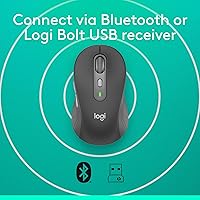
- Connectivity: The mouse connects via Bluetooth or a included USB nano-receiver, giving users flexibility depending on their device and port availability.
- Multi-Device: Up to three devices can be paired simultaneously, with instant switching between them using the dedicated Easy-Switch button on the underside.
- Battery: One AA battery (included) powers the mouse for up to 24 months under typical daily use conditions.
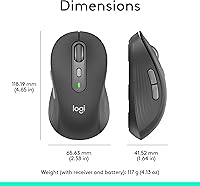
- Weight: The mouse weighs 3.92 oz (111g), making it lightweight relative to its large form factor.
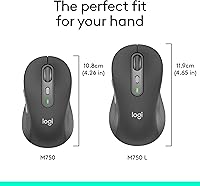
- Dimensions: The body measures approximately 4.67″ in length and 2.61″ in width, sized specifically to accommodate larger hands.
- Scroll Wheel: The SmartWheel supports both precise line-by-line scrolling and high-speed free-spin mode, switchable with a single flick of the wheel.
- Click Noise: SilentTouch technology reduces click noise by approximately 90% compared to a standard mechanical mouse click.
- Side Buttons: Two programmable side buttons can be remapped via the Logi Options+ desktop application on Windows and macOS.
- Sensor: An optical sensor handles movement tracking, tuned for general productivity use on standard desk surfaces and most mouse pads.
- Handedness: The ergonomic contour is designed exclusively for right-handed use; no left-handed variant exists in this product line.
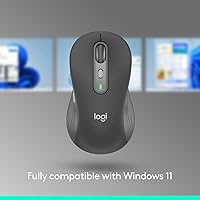
- OS Support: The mouse is compatible with Windows 10 and 11, macOS 10.15 and above, Linux, ChromeOS, iPadOS 13.4 and above, and Android 5.0 and above.
- File Transfer: Logi Flow enables cursor movement and direct file, text, and image transfer between Windows and macOS computers on the same Wi-Fi network.
- Customization App: Full button remapping and advanced settings require the Logi Options+ app, which is supported on Windows and macOS only.
- Color Options: The Graphite colorway is the primary available finish, offering a neutral, professional appearance suited to most desk setups.
- Power Source: The mouse is battery-powered only; there is no built-in rechargeable battery and no USB-C or micro-USB charging port.
- Receiver Storage: No onboard storage slot for the USB nano-receiver is built into the mouse body.
- Size Variant: This model is the Large variant of the M750 family, specifically proportioned for users with hand lengths roughly 19cm and above.
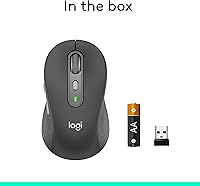
- In-Box Contents: The package includes the mouse, one AA battery, a USB nano-receiver, and a getting-started guide.
Related Reviews
Logitech Signature Wired M520 L for Business
Logitech Signature M650 L
L.O.L. Surprise Kids Smartwatch

Logitech ERGO K860

Logitech Pebble M350 Wireless Mouse

Logitech X-530

Logitech Wireless Touchpad

Logitech POP Mouse
Logitech Slim Bluetooth Combo