Overview

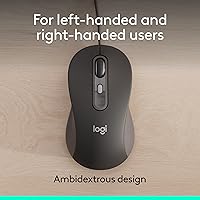
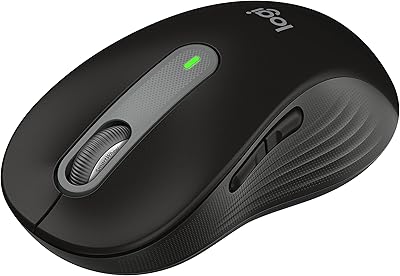
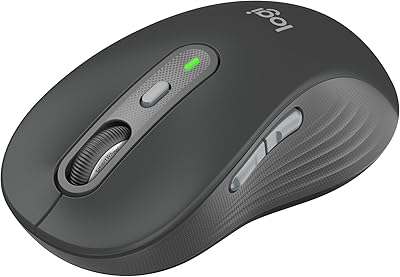
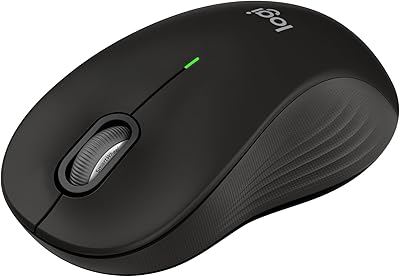
The Logitech Signature Wired M520 L for Business is a reliable, wired optical mouse designed specifically for professional environments. This USB-C plug-and-play device offers seamless setup and quick connectivity. Its compact and lightweight design ensures comfortable use for extended periods, making it a solid choice for office workers. The ambidextrous shape accommodates both left- and right-handed users, enhancing its versatility. Whether you're working at a desk or collaborating in a team setting, this mouse offers consistent performance and ergonomic comfort for all-day use.
Features & Benefits

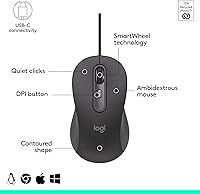
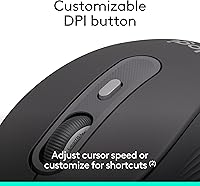
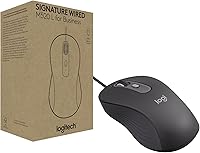
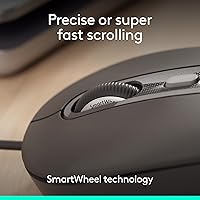
This Logitech mouse is equipped with several features aimed at improving efficiency. The SmartWheel provides fast or precise scrolling, perfect for quickly navigating long documents or making fine adjustments. Quiet Touch technology ensures that clicking sounds are reduced by 90%, which is especially beneficial in shared office spaces. For users who prefer a tailored experience, the customizable DPI button allows for easy adjustments to cursor speed. Additionally, it works across multiple operating systems, including Windows, macOS, ChromeOS, and Linux, making it highly versatile for business environments.

Best For

This wired mouse is best suited for office workers seeking a reliable and quiet solution for daily tasks. It caters to organizations that require a multi-OS compatible device, allowing smooth integration across different systems. Those who prefer the stability of a wired connection will appreciate the consistent performance it offers. Additionally, its ergonomic design and lightweight build make it an ideal choice for both left- and right-handed users who need comfort and support throughout the day, whether for long hours of work or quick tasks.

User Feedback

User reviews highlight the quiet clicks as a major advantage, especially in open-office environments where noise reduction is crucial. Many appreciate the customization options available through Logi Options+, which allow for tailored shortcuts and cursor speed adjustments. The ambidextrous design is generally praised for its comfort and versatility, though some users with larger hands find it a bit small. Overall, users report that this Logitech mouse is a dependable choice for those looking for an efficient, quiet, and ergonomic solution for business tasks.

Pros

  • The wired connection offers consistent reliability with no lag or interference.
  • Users appreciate the quiet operation, making it perfect for open office spaces.
  • The ambidextrous design is comfortable for both left- and right-handed users.
  • USB-C plug-and-play setup is fast and hassle-free, saving valuable time.
  • The customizable DPI button allows for a personalized cursor experience.
  • The ergonomic, compact design is ideal for extended periods of use without discomfort.
  • Its multi-OS compatibility ensures smooth performance across different platforms like Windows, macOS, ChromeOS, and Linux.
  • The mouse is made with 73% post-consumer recycled plastic, appealing to environmentally-conscious buyers.

Cons

  • Some users with larger hands find the small size uncomfortable for extended use.
  • The lack of wireless functionality may be inconvenient for those who prefer a cord-free setup.
  • Although it is compact, the design might feel too small for some users who prefer a larger mouse.
  • The DPI customization is limited, which may not meet the needs of high-performance gamers or designers.
  • It might not be durable enough for heavy, constant use in industrial environments.
  • A few users have noted that the scrolling wheel could be smoother for more precise control.

Ratings

After analyzing user reviews of the Logitech Signature Wired M520 L for Business from multiple platforms and languages, we gathered feedback from authentic, verified users worldwide. Spam, incentivized, or exaggerated reviews have been filtered out to ensure that only high-quality insights contribute to the scores. Both strengths and pain points are reflected in these ratings, providing a balanced view of the product’s performance across a variety of use cases.
Value for Money
91%
Many users feel this wired mouse offers great value for its performance. The balance of quality and affordability makes it a reliable option for office use, especially considering the multi-OS compatibility and quiet operation. It performs well above its price point, especially in business environments.
However, some customers feel the price could be a little lower for a wired mouse. While its features are good, there are budget-friendly alternatives with similar functionality that some users prefer. A few buyers think that the overall value could improve if there were additional features or a more premium build.
Ergonomics and Comfort
88%
The ambidextrous design is a standout feature for many users, as it offers a comfortable grip whether you are left- or right-handed. Its lightweight construction is also appreciated by those who use the mouse for long hours, reducing strain and fatigue. Many office workers note that it stays comfortable throughout the day.
However, some users with larger hands report that the size of the mouse isn't ideal for extended use. The compact design, while great for portability, can feel cramped for people who prefer a more spacious grip. A few have expressed that a larger, more ergonomic shape might be more comfortable for them.
Build Quality
85%
Users are generally pleased with the solid build quality, especially considering its affordable price range. The mouse feels durable and reliable for daily office tasks. The plastic material feels sturdy, and the buttons are responsive, making it suitable for long-term use.
On the downside, some users have mentioned that the plastic material can feel a bit cheap compared to higher-end models. Although it's durable enough for regular office work, it may not withstand more aggressive usage or rough handling. A few users expect a slightly more premium finish given its price.
Setup and Installation
96%
The plug-and-play setup is a major highlight. Users have found the USB-C connectivity incredibly easy, with no need for additional drivers or complicated installation steps. This straightforward setup saves time and is especially appreciated by those using the mouse in busy office environments.
While setup is seamless for most, some users report that it may require troubleshooting for very specific or older operating systems. However, these cases are rare and usually resolved with basic driver updates or operating system adjustments.
Customizability (DPI/Buttons)
84%
The customizable DPI button is a great feature for users who want to adjust their cursor speed for different tasks. This level of control is particularly useful for office work that involves detailed pointing and scrolling. Many users appreciate the flexibility it provides.
However, some users find that the DPI adjustment can be a bit limited in terms of precision. While the button offers some customization, a few have expressed that they would like a wider range of speed settings for more specialized tasks like graphic design or gaming.
Noise Level (Clicking)
93%
The quiet clicking feature is highly praised by users, particularly in open office environments. The 90% reduction in clicking noise makes it ideal for shared workspaces, where noise can be a distraction. This makes the mouse a great choice for people who need a quieter, more professional setup.
Despite the quiet operation, a few users still find the clicking sound noticeable during very intense tasks. While most find the noise reduction satisfactory, some would prefer even quieter mechanisms for the most sound-sensitive work environments.
Software Experience (Logi Options+)
78%
22%
Many users enjoy the customization options provided by the Logi Options+ software. It allows them to personalize button functions, adjust settings, and fine-tune performance. The software enhances the user experience for those who like to customize their devices.
However, some users have reported occasional compatibility issues with Logi Options+. While most find it easy to use, there are instances where the software fails to recognize the mouse or doesn’t offer the full range of features expected. This can be frustrating, especially for those who rely heavily on customization.
Compatibility (Multi-OS)
90%
The wide multi-OS compatibility is one of the strongest selling points. Users appreciate that this wired mouse works seamlessly across Windows, macOS, ChromeOS, and Linux without requiring extra configuration. It is a perfect choice for people who use multiple systems, making it ideal for business environments.
Some users have reported minor lag or compatibility issues with older versions of certain operating systems. While it's mostly plug-and-play, users with very specific setups may need to install additional software or drivers, which can be a slight inconvenience.
Power Efficiency
80%
20%
The power-saving feature is an added bonus, reducing energy consumption by 68%. Users who work long hours appreciate that the mouse is environmentally friendly without sacrificing performance. This feature aligns well with sustainable business practices and helps reduce overall energy usage in office spaces.
On the flip side, a few users have pointed out that the power-saving design sometimes affects the responsiveness of the mouse, especially after long periods of inactivity. While this is not a major issue, it can be a minor inconvenience when restarting the mouse after it enters a low-power mode.
Ambidextrous Design
86%
The ambidextrous design is a great feature, ensuring comfort for both left- and right-handed users. This inclusivity is appreciated by many, as it eliminates the need for specific models for different users. The design is simple yet effective, allowing for versatile use.
However, a few users have mentioned that the shape, while ergonomic, might not be the best fit for everyone. Some left-handed users find that the button layout could be improved to suit their needs more intuitively. While it works well for most, it may not be the perfect fit for all hand sizes.
Size for Large Hands
70%
30%
While the mouse is compact, it works well for people with average hand sizes, providing adequate comfort and grip. The smaller size is beneficial for users who prefer a mouse that doesn’t take up too much space, especially in cluttered workspaces.
For users with larger hands, the size of the mouse can feel cramped. Several users have noted that it’s not the most comfortable option for those who need a larger, more spacious grip. This could be a dealbreaker for individuals who require a bigger mouse for extended use.
Durability Over Time
82%
18%
Users generally find the mouse to be durable and reliable for daily tasks. The sturdy build, along with its strong performance in a business setting, makes it a good long-term choice. It stands up well to regular use, with few complaints about wear and tear.
However, there have been some reports of the mouse’s performance declining over time. Some users have mentioned that the buttons start to feel less responsive or begin to wear out after several months of use. While it’s not a widespread issue, it’s something to consider for long-term reliability.

Suitable for:

The Logitech Signature Wired M520 L for Business is ideal for office workers who need a reliable, quiet, and comfortable mouse for extended use. Its ambidextrous design ensures versatility for both left- and right-handed users, making it a good choice for mixed work environments. This device is particularly suited for those who value a quiet mouse in open office spaces, thanks to its 90% quieter clicks. Additionally, its multi-OS compatibility across Windows, macOS, ChromeOS, and Linux makes it a perfect fit for businesses with diverse operating systems. Users looking for a straightforward, plug-and-play setup will also appreciate the USB-C connectivity, which simplifies installation with no drivers needed.
Not suitable for:

While this wired mouse is a great fit for most office environments, it may not be the best choice for individuals with larger hands. The compact design, while comfortable for average-sized hands, can feel cramped for users who need a larger grip. Additionally, those who require more advanced features or higher customization in their mice, such as specific DPI ranges for gaming or graphic design, might find the customization options a bit limited. This device may also fall short for users who prefer a wireless connection or need a more premium build for rugged, long-term use.

Specifications

  • Connectivity: Uses a wired USB-C connection for fast, plug-and-play setup with no drivers required.
  • Design: Ambidextrous shape offers ergonomic comfort for both left- and right-handed users.
  • Mouse Type: Optical sensor provides accurate tracking for smooth cursor movement.
  • DPI Adjustment: Customizable DPI button allows you to adjust the cursor speed to suit your needs.
  • Scrolling Technology: SmartWheel technology enables either fast scrolling or precise control with the same wheel.
  • Button Count: Equipped with four buttons: left-click, right-click, DPI button, and scroll wheel button.
  • Noise Reduction: Features Quiet Touch technology that reduces clicking noise by up to 90%, ideal for quiet work environments.
  • Compatibility: Works seamlessly across multiple operating systems, including Windows, macOS, ChromeOS, and Linux.
  • Power Efficiency: Designed to consume 68% less energy compared to other wired mice, contributing to energy savings.
  • Material: Made with 73% post-consumer recycled plastic, supporting sustainability and reducing environmental impact.
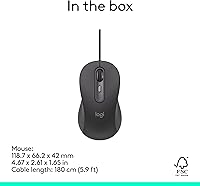
  • Weight: Weighs 5.7 ounces, providing a balanced and comfortable feel during extended use.
  • Dimensions: Measures 5.59 x 2.09 x 0.1 inches, compact enough for easy portability and comfortable handling.
  • Size Suitability: Its compact design may be more suitable for users with medium to smaller hands.
  • Software: Compatible with Logi Options+ software, allowing for further customization of button functions and DPI settings.
  • Build Quality: The device features durable construction to withstand regular office use but may not be suitable for heavy-duty environments.
  • Warranty: Backed by a limited hardware warranty, providing peace of mind for users.

FAQ

Setting up this wired mouse is simple with its USB-C plug-and-play functionality. Just plug the USB-C cable into an available port on your computer, and it will be ready to use instantly, with no additional drivers required.

Yes, this office mouse is fully compatible with multiple operating systems, including Windows, macOS, ChromeOS, and Linux, ensuring seamless use across various devices.

Yes, the mouse includes a customizable DPI button that allows you to adjust the cursor speed to your preference, providing greater control for both everyday use and specialized tasks.

Absolutely! Its ambidextrous design makes it comfortable and easy to use for both left- and right-handed users, providing ergonomic support for all.

The mouse features Quiet Touch technology, reducing clicking noise by up to 90%, making it an excellent choice for open office environments or shared spaces where noise can be distracting.

While the mouse works out of the box, you can use Logi Options+ software to further customize settings, such as DPI and button assignments, allowing you to personalize your experience even more.

This device is made with 73% post-consumer recycled plastic, which helps reduce environmental impact. Additionally, its energy-efficient design consumes 68% less power compared to similar mice, making it a more eco-friendly option.

While this mouse is great for general office and business tasks, its performance is not optimized for gaming. If you're looking for a high-precision, high-speed gaming mouse, you might want to explore models specifically designed for that purpose.

This mouse is built to handle regular office use with a solid design. However, it might not be the best option for environments with heavy, continuous use or extreme conditions, such as industrial settings.

If you're experiencing issues with the scroll wheel, try cleaning it gently to remove any dust or debris. If the problem persists, check for any software updates or try reconnecting the mouse to see if that resolves the issue.