Overview

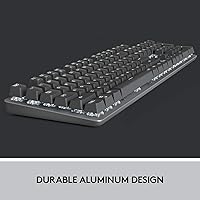
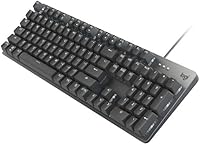
The Logitech K845 Mechanical Keyboard (TTC Blue) sits in an interesting spot — it's a wired, full-size board that launched in 2020 and has quietly accumulated a strong reputation with close to 4,000 ratings. Unlike most keyboards competing at this price, it features an aluminum top case instead of the usual all-plastic construction, which immediately sets a different tone the moment you lift it out of the box. It connects via USB and is built exclusively for Windows, so this isn't a cross-platform or wireless solution. Expect a straightforward 104-key layout with white backlighting — no RGB, no frills, just a solid, dependable typing platform.
Features & Benefits

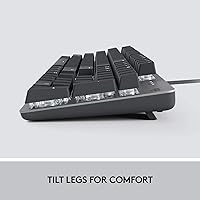
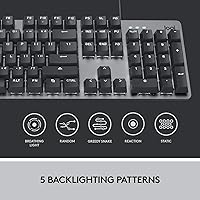
The TTC Blue switches are the heart of the typing experience here. Each keystroke delivers a sharp, satisfying click with a tactile bump that membrane keyboards simply cannot replicate — once you spend a day typing on them, going back feels like pressing into wet cardboard. The aluminum top plate keeps flex to a minimum, giving the board a rigidity that feels more expensive than it is. Tilt legs at two positions let you dial in a comfortable wrist angle, and the slim front edge helps keep fatigue down during long sessions. The white LED backlight covers five patterns — functional and clean without the distraction of color cycling.

Best For

The K845 is a natural fit for heavy typists and data-entry users who want real tactile feedback without committing to a premium-tier price tag. If you're coming from a membrane keyboard, the difference in typing feel is immediate and hard to ignore. It also works reasonably well for casual gaming — the full 104-key layout means nothing is missing — but this Logitech board is not positioned as a serious gaming peripheral, and it shouldn't be. The wired-only, Windows-focused design does draw a firm line: Mac users and anyone who needs multi-device Bluetooth switching should look elsewhere. Durability seekers who want metal over plastic will find a lot to like.

User Feedback

Owners consistently praise the build quality, pointing to the aluminum top case as something that genuinely surprised them given the price tier. The typing feel draws a lot of compliments too. That said, there is one thing buyers mention repeatedly, and it is worth taking seriously: the TTC Blue switches are loud. Not just clickier-than-average loud — genuinely disruptive in a shared or open-plan office. A few users also wish for RGB rather than white-only lighting, though most seem to accept that tradeoff as a design choice rather than a defect. On the durability side, a small number of longer-term owners have flagged keycap legend fading after extended heavy use, which is worth keeping in mind.

Pros

  • Aluminum top case delivers a premium, rigid feel that stands out sharply against all-plastic rivals at this price.
  • TTC Blue switches provide satisfying tactile feedback and click that makes long typing sessions noticeably more comfortable.
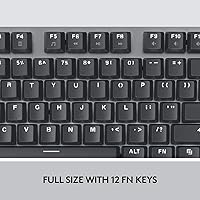
  • Full 104-key layout with numpad means zero compromises for accountants, coders, or spreadsheet-heavy users.
  • Wired USB connection is completely plug-and-play — no drivers, no pairing, no battery to charge.
  • Two tilt-leg positions let you adjust the typing angle to suit your desk height and wrist preference.
  • White LED backlighting covers five patterns and is bright enough for comfortable low-light use.
  • The K845 has built a track record over several years with close to 4,000 ratings, giving buyers real confidence.
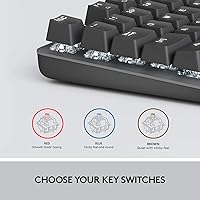
  • Switch variants — Red, Blue, and Brown — let buyers choose the sound and feel profile that suits their environment.
  • Slim front profile reduces wrist extension and helps keep fatigue down during extended work sessions.

Cons

  • TTC Blue switches are loud enough to disrupt shared offices, open-plan workspaces, and video calls.
  • Keycap legends are not double-shot and can visibly fade with heavy daily use over a year or more.
  • No wireless option at all — cable management is non-negotiable with this board.
  • White-only backlight means no color customization, which feels increasingly limited compared to similarly priced competitors.
  • No dedicated software means zero key remapping, macro support, or backlight personalization beyond built-in patterns.
  • Exclusively Windows-compatible — Mac users and cross-platform workflows are simply not supported.
  • No wrist rest is included, and the board is tall enough that one may be necessary for comfortable extended use.
  • Tilt adjustment is limited to two fixed angles, which will not suit every desk height or hand size.
  • Full-size footprint requires meaningful desk space and leaves less room for wide mouse movements.

Ratings

The Logitech K845 Mechanical Keyboard (TTC Blue) has been scored by our AI system after analyzing thousands of verified global user reviews, with spam, incentivized submissions, and bot activity actively filtered out. The ratings below reflect the full picture — where this board genuinely excels and where real buyers have run into limitations. Both the strengths and the frustrations are weighted honestly, so you can make an informed call before purchasing.
Build Quality
91%
The aluminum top case is the detail buyers mention most — it gives the K845 a solidity that feels out of place at this price tier, in the best way possible. Picking it up, there is no flex, no creaking, and no sense that corners were cut on the chassis.
The bottom half of the board is still plastic, which some users notice when they look closely or handle it next to fully aluminum boards. A small number of longer-term owners have also reported that the keycap legends begin to wear and fade after a year or more of heavy daily use.
Typing Experience
88%
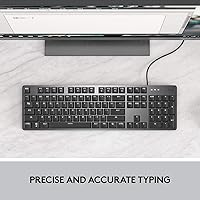
For anyone upgrading from a membrane keyboard, the TTC Blue switches make the difference feel dramatic — each keypress has a distinct tactile bump and an audible click that confirms the actuation without needing to bottom out. Writers and data-entry users in particular tend to find the rhythm addictive over long sessions.
The clicky nature that typists love is also the source of the most consistent complaint: the switches are genuinely loud. In a shared office or open-plan workspace, expect to draw attention — several buyers have noted that colleagues pushed back quickly, prompting a switch to the Brown or Red variants instead.
Noise Level
54%
46%
For solo home offices or private desk setups, the click-clack sound is actually part of the appeal — many users describe it as satisfying and motivating during long writing sessions. It is a deliberate characteristic of Blue-style switches, not a quality defect.
This is probably the single biggest deciding factor buyers overlook before purchasing. The TTC Blue switches are not suitable for quiet environments, shared desks, late-night typing near others, or video calls without a good microphone. Multiple reviewers mention returning the keyboard specifically because of noise complaints from coworkers or family members.
Value for Money
84%
At this price point, finding a full-size mechanical keyboard with an aluminum top case and a reputable brand name behind it is genuinely difficult. Most competing boards in the same range offer all-plastic shells, and the K845 consistently earns praise for punching above its weight in terms of perceived quality.
A handful of buyers feel the lack of RGB lighting and wireless connectivity is hard to justify relative to some newer competitors that have started matching the price while offering more features. For users who want the full modern feature set, the value calculation gets a bit closer.
Switch Quality & Feel
86%
TTC Blue switches provide a consistent, well-defined actuation point that holds up well over time. Users who have owned the board for a year or more generally report that the switches have not developed wobble, mushiness, or inconsistency — they feel much the same as when new.
TTC is not as universally recognized as Cherry MX, and some enthusiasts feel the switches lack a certain refinement in the tactile bump compared to higher-end options. For most users this is a non-issue, but keyboard hobbyists may notice the difference.
Backlighting
67%
33%
The white LED backlight does its job cleanly — five patterns give you enough flexibility for low-light typing without overcomplicating the setup. The illumination is even across all keys and bright enough to read comfortably in a dim room.
White-only lighting is increasingly rare in this price category, and several buyers specifically mention wishing they had checked for RGB before purchasing. It is a deliberate design choice rather than a flaw, but for users who wanted color customization, it is a genuine disappointment that no amount of rationalization fully resolves.
Ergonomics & Comfort
79%
21%
The two-position tilt leg system is more practical than it sounds — being able to choose between a flatter or more elevated angle makes a noticeable difference during extended typing sessions, and buyers who work long hours appreciate having the option. The slim front edge also helps keep wrist extension at a comfortable level.
There is no wrist rest included, and the keyboard is tall enough that some users on flat desks find they want one after extended use. The tilt options are limited to two fixed positions, which may not hit the ideal angle for every user's desk height or hand size.
Key Layout & Completeness
93%
A full 104-key layout with a dedicated numpad, function row, and navigation cluster means nothing has been sacrificed for the sake of a compact footprint. Accountants, spreadsheet-heavy users, and anyone who relies on the numpad daily will not have to retrain any muscle memory.
The full-size layout is also its only layout — there is no tenkeyless or compact option in this line, so desk space is non-negotiable. Users working on smaller desks or wanting more room for mouse movement may find the footprint limiting.
Connectivity & Reliability
88%
Wired USB means plug-and-play with zero latency, no pairing steps, and no battery anxiety. For users who have dealt with wireless dropout or Bluetooth reconnection issues on other keyboards, the simplicity of a wired connection is genuinely appreciated.
There is no wireless option at all, which matters more than it used to as desk setups have become more flexible. Users who want to share the keyboard between a desktop and a laptop, or switch between devices without re-plugging, will find this limitation frustrating.
Platform Compatibility
61%
39%
On Windows, setup is immediate with no drivers required — plug it in and every key works as expected across Windows 7 through 11. For Windows-only users, this is a genuinely friction-free experience.
Mac users are effectively excluded — the key labeling, function row behavior, and modifier layout are all Windows-native, and there is no software to remap keys. Anyone working in a mixed OS environment or on a Mac will need to look elsewhere.
Aesthetic & Desk Presence
77%
23%
The aluminum top plate gives the K845 a clean, professional look that sits comfortably on a work desk without looking like a gaming peripheral. The overall design is understated in a way that ages well and does not clash with most monitor or desk setups.
It is not a head-turner. The design is restrained to the point of being forgettable for users who care about a visually distinctive setup. The white-only backlight and absence of any color accent means it blends in rather than stands out.
Durability Over Time
74%
26%
The structural durability of the board itself holds up well — the aluminum case resists denting and warping, and the switches have not shown degradation in feel for most long-term owners. Overall the board feels built to last several years of regular use.
Keycap legend fading is the most reported long-term issue, with a subset of heavy users noticing the printed characters wearing down after a year or more of daily use. The keycaps are not double-shot, so this is an inherent limitation rather than a manufacturing defect.
Gaming Suitability
69%
31%
The full key layout, responsive TTC Blue switches, and solid build make the K845 a serviceable option for casual gaming. Users who play a mix of strategy games, RPGs, or slower-paced titles tend to find it works well without any real compromises.
Dedicated gamers will quickly notice the absence of anti-ghosting guarantees, no macro support, no per-key RGB, and no dedicated gaming software. It competes poorly against gaming-focused keyboards at similar or slightly higher prices, so it is best treated as a productivity board that can game — not the other way around.
Setup & Out-of-Box Experience
89%
Unboxing and setup take under a minute — plug the USB cable in and it works. No app installation, no firmware update, no account creation. For users who are tired of bloated peripheral software, this no-nonsense approach is a real positive.
The flip side of having no software is having no customization. Key remapping, macro assignment, and backlight control beyond the built-in patterns are all off the table. Power users who want to configure the board to their workflow will hit a hard wall fairly quickly.

Suitable for:

The Logitech K845 Mechanical Keyboard (TTC Blue) is a strong match for anyone who spends a significant portion of their day typing and wants a tangible upgrade from the mushy, indistinct feel of a standard membrane board. Writers, coders, and data-entry professionals working from a private home office will get the most out of the TTC Blue switches — the audible click and tactile confirmation genuinely improve typing rhythm over long sessions. It also works well for Windows users who value a no-fuss, plug-and-play setup and have no interest in managing wireless connections or software ecosystems. If build quality matters to you and you want a board that feels more substantial than its price suggests, the aluminum top case delivers that in a way most plastic competitors at this tier simply cannot match. Casual gamers who want a full 104-key layout and are not chasing RGB lighting or low-latency wireless will also find this Logitech board more than adequate for everyday play.
Not suitable for:

The Logitech K845 Mechanical Keyboard (TTC Blue) is a poor fit for anyone working in a shared, open-plan, or noise-sensitive environment — the TTC Blue switches are genuinely loud, and coworkers, family members, or anyone within earshot will notice. Mac users and anyone who needs to switch between devices without re-plugging a cable should look elsewhere entirely, as this board is built exclusively for Windows with no remapping software and no wireless option. Users who want RGB lighting or any form of color customization will be disappointed — white-only backlighting is a deliberate design choice here, and no software unlocks additional options. Keyboard enthusiasts who prefer premium Cherry MX switches or want hot-swap capability will also find the K845 limiting. And if desk space is tight, the full 104-key footprint leaves no room for compromise — there is no compact or tenkeyless variant available in this line.
Specifications

  • Switch Type: TTC Blue mechanical switches with a clicky, tactile actuation profile designed to provide audible and physical feedback on each keypress.
  • Key Layout: Full-size 104-key layout including a dedicated numeric keypad, function row, and navigation cluster.
  • Top Case Material: Aluminum top plate construction provides structural rigidity and a premium feel compared to standard all-plastic keyboard shells.
  • Connectivity: Wired USB connection with no wireless or Bluetooth option — plug-and-play compatible without additional drivers.
  • Backlight: Single-color white LED backlighting with five selectable lighting patterns for low-light usability.
  • Tilt Adjustment: Two-position adjustable tilt legs allow the keyboard to be set at either a 4-degree or 8-degree incline angle.
  • Dimensions: The keyboard measures 17.12″ in length, 5″ in width, and 1.43″ in height.
  • Weight: The keyboard weighs 2.19 pounds, giving it a reassuringly solid feel on the desk without being difficult to reposition.
  • OS Compatibility: Officially supported on Windows 7, Windows 8, Windows 10, and Windows 11 — no Mac or Chrome OS support indicated.
  • Power Source: Powered entirely through the USB cable connection — no batteries required and no charging needed.
  • Switch Variants: The K845 is available in three switch options — Red (linear), Blue (clicky tactile), and Brown (quiet tactile) — sold as separate SKUs.
  • Model Number: Official Logitech model number is 920-009860, corresponding to the TTC Blue switch variant reviewed here.
  • Brand & Series: Manufactured by Logitech under the K845 series, a line of illuminated mechanical keyboards positioned for productivity and general use.
  • Availability Date: The K845 was first made available in September 2020 and remains an active, non-discontinued product in Logitech's lineup.
  • Keycap Printing: Key legends are pad-printed rather than double-shot, which means characters may show wear on heavily used keys over extended periods.
  • Software Support: No dedicated configuration software is included or required — backlight patterns cycle through a physical key shortcut, and no key remapping is available.
  • Cable Type: The keyboard uses a detachable USB Type-A cable, making it straightforward to replace the cable if it becomes damaged over time.
  • Front Profile: The slim front edge of the board keeps the front height low, which helps reduce wrist extension during extended typing sessions.

Related Reviews

Logitech MX Mechanical
81%
88%
Typing Feel & Switch Quality
91%
Noise Level
86%
Build Quality & Materials
93%
Battery Life
87%
Multi-Device Connectivity
More
Basaltech X60 Lipstick Mechanical Keyboard
78%
93%
Aesthetic & Design
81%
Typing Experience
86%
Build Quality
58%
Noise Level
78%
Backlight & Lighting Controls
More
Logitech POP Keys Mechanical Wireless Keyboard
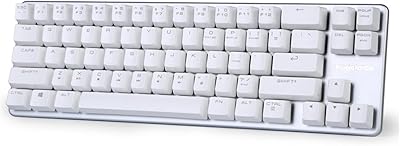
87%
88%
Overall Satisfaction
90%
Typing Comfort
85%
Customization Options
92%
Battery Life
75%
Bluetooth Connectivity
More
Qisan Happy Deals 68-Keys Mechanical Gaming Keyboard Blue Switch
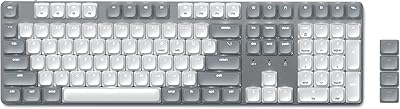
87%
92%
Portability
88%
Ergonomics
85%
Typing Experience
90%
Gaming Performance
87%
Build Quality
More
Logitech Wireless Keyboard K360
87%
95%
Battery Life
92%
Ease of Setup
83%
Typing Comfort
90%
Wireless Connectivity
85%
Build Quality
More
Merdia Wireless Mechanical Keyboard
83%
90%
Connectivity Options
88%
Typing Experience
86%
RGB Customization
84%
Build Quality
91%
Battery Life
More
Satechi SM3 Mechanical Keyboard
86%
92%
Typing Experience
88%
Connectivity
85%
Ergonomics and Comfort
89%
Battery Life
91%
Build Quality
More
Logitech K270 Wireless Keyboard
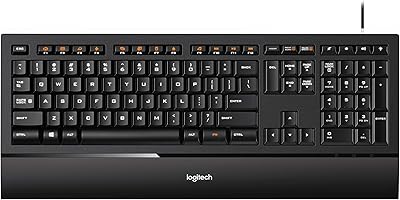
86%
91%
Battery Life
88%
Build Quality
85%
Typing Comfort
83%
Wireless Range
92%
Ease of Setup
More
BOYI K104Pro Retro Mechanical Keyboard
86%
88%
Typing Comfort
94%
Customization Options
85%
Build Quality
91%
RGB Lighting Performance
84%
Ergonomics/Comfort
More
Logitech K480 Wireless Bluetooth Keyboard
86%
88%
Ease of Device Switching
81%
Bluetooth Connectivity
85%
Build Quality
72%
Ergonomics and Comfort
92%
Battery Life
More

FAQ

Not officially. The board is built specifically for Windows, and the key labeling, function row behavior, and modifier layout all reflect that. While you can physically plug it into a Mac via USB and type basic characters, the function keys and some shortcuts will not behave as expected, and there is no software to remap them. If you are on a Mac, you would be better served by a keyboard designed with macOS in mind.

Considerably louder than a membrane or scissor-switch keyboard. The Blue switches produce an audible click on each keystroke — this is intentional and part of their appeal for typists, but it is genuinely disruptive in shared spaces. If you work in an open-plan office or share a room with others, expect to hear about it. For a private home office, most users find the sound satisfying rather than annoying.

No — the K845 is wired only. There is no wireless mode, no Bluetooth, and no USB receiver included. You connect it directly to your computer with the USB cable and that is the only connection method available. If wireless is important to your setup, you would need to look at a different keyboard entirely.

Yes, it is fully compatible with Windows 11 as well as older versions going back to Windows 7. No drivers need to be installed — just plug the USB cable into your machine and it is ready to use immediately.

No, the backlight is white only and cannot be changed to other colors. There are five lighting patterns you can cycle through using a keyboard shortcut, but color customization is not possible — there is no RGB hardware and no software that unlocks additional options. If color lighting is important to you, this is a firm limitation to consider before purchasing.

Technically yes — the K845 uses standard MX-compatible stems, so aftermarket keycap sets will fit the switches. However, the spacebar and bottom row use standard sizing, so most full keycap sets should be compatible. Replacing keycaps is a straightforward upgrade if the printed legends start fading after heavy use.

It can handle casual gaming fine — the full key layout, responsive switches, and solid build mean nothing is missing for most game genres. That said, it lacks anti-ghosting documentation, has no dedicated gaming software, and offers no RGB. Serious or competitive gamers will likely want something purpose-built, but for someone who games occasionally alongside regular work, the K845 holds its own without feeling like a compromise.

There are two sets of fold-out legs on the underside of the board. Folding out the shorter set gives you a 4-degree incline, and folding out the taller set gives you 8 degrees. The legs click into place securely and the keyboard does not wobble. It takes about two seconds to adjust — nothing complicated about it.

No software installation is required at all. Plug the USB cable into your Windows machine and every key functions immediately. The backlight patterns are toggled directly from a key shortcut on the board itself. If you are someone who dislikes installing peripheral software and dealing with background apps, this is actually a genuine advantage of the K845.

TTC Blue switches are closely modeled after the Cherry MX Blue design and feel quite similar in day-to-day use — you get the same clicky actuation point and tactile bump. Most casual users would not notice a meaningful difference. Keyboard enthusiasts sometimes describe TTC Blues as feeling slightly less refined in the bump, but for the vast majority of buyers coming from a membrane keyboard, the comparison to Cherry MX is largely academic — both feel like a dramatic improvement.