Overview

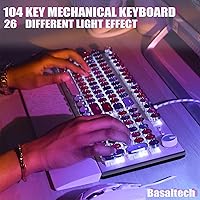
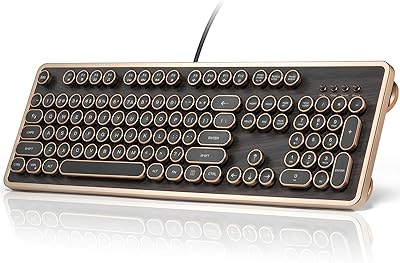
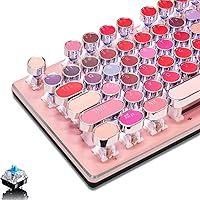
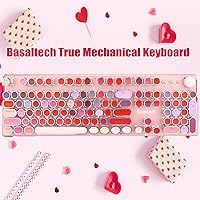
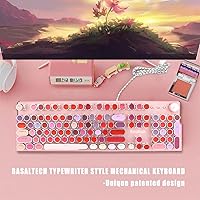
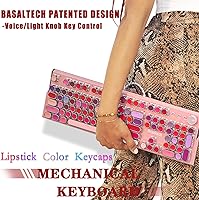
The Basaltech X60 Lipstick Mechanical Keyboard occupies an interesting spot in the mid-range keyboard market — it is designed as much for how it looks on your desk as for how it performs under your fingers. The pink colorway and round lipstick keycaps give it a retro typewriter personality that generic budget boards completely lack. Topping it off, a metal panel construction signals a level of build quality you rarely see at this price tier. That said, this is a stylish daily-driver and capable light-gaming board — not a hardcore enthusiast custom, and it does not try to be.
Features & Benefits

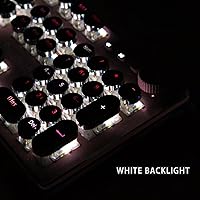
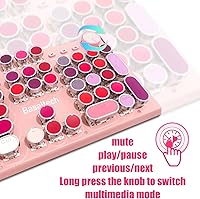
The blue switches at the heart of this retro mechanical keyboard deliver a clicky, tactile experience that most typists find deeply satisfying — though anyone in a shared office should know upfront that the audible feedback is genuinely loud. The round lipstick keycaps look charming but do require an adjustment period; fast touch-typists may find them slightly less precise than standard keycap profiles at first. Thirty white LED modes controlled via a rotary brightness knob add real practicality for dim environments. The full 104-key anti-ghosting layout, 12 multimedia shortcuts, and straightforward USB-A plug-and-play setup round out a feature set that punches above its weight.

Best For

This typewriter-style keyboard is a natural fit for students, remote workers, and desk-setup enthusiasts who want a full-size layout without giving up on aesthetics. It suits anyone building a retro, cottagecore, or pink-accented workspace where the keyboard is part of the visual story. Casual gamers who care more about tactile switch feedback than RGB lighting or ultra-low latency will find it more than capable. It also works beautifully as a first mechanical keyboard for anyone stepping up from a membrane board. One firm caveat: the loud blue switches make this a poor fit for open offices or late-night quiet sessions.

User Feedback

Across a sizeable pool of verified reviews, the Basaltech lipstick board holds a strong 4.5-star rating, and the consistent thread is that buyers feel the real-life appearance genuinely matches the product photos — a trust signal that matters. The metal panel rigidity earns frequent praise, with many noting it feels more durable than similarly priced competitors. On the other side, a recurring complaint is that the non-detachable cable limits portability, and a handful of fast typists mention the round keycap profile slowed their accuracy initially. A few buyers also admit the switch noise caught them off guard — worth factoring in before purchasing.

Pros

  • The real-life aesthetic matches the product photos closely — a rare and genuinely appreciated quality.
  • Blue switches offer satisfying tactile feedback that makes long typing sessions feel noticeably more engaging.
  • The metal top panel adds rigidity and scratch resistance that most competitors at this price cannot match.
  • Full 104-key layout with complete anti-ghosting means no compromises on key access or simultaneous input.
  • Plug-and-play USB-A connection works on Windows, Mac, and Linux with zero driver setup required.
  • Thirty white LED modes controlled by a physical knob make low-light adjustments quick and intuitive.
  • The Basaltech lipstick board is one of the few aesthetically distinctive keyboards that does not sacrifice a full number pad.
  • 12 multimedia shortcut keys work reliably out of the box for volume, playback, and media control.
  • Two tilt angles and anti-skid feet keep the board stable and comfortable across different desk heights.
  • Strong 4.5-star aggregate rating across a large verified buyer pool reflects genuine broad satisfaction.

Cons

  • Blue switches are loud enough to disturb housemates, coworkers, or anyone nearby on calls.
  • The non-detachable cable makes the board awkward to transport and difficult to coil neatly.
  • Round lipstick keycap profile has a real adjustment period that slows down fast typists initially.
  • Keycap legend fade has been reported by long-term owners, suggesting pad-printed rather than double-shot construction.
  • No key remapping, macro support, or companion software of any kind limits customization entirely.
  • Single-color white backlight only — buyers hoping for RGB will be disappointed.
  • The plastic underframe feels noticeably cheaper than the metal top panel it supports.
  • Replacement keycaps for the unique round profile are nearly impossible to source aftermarket.
  • No wrist rest included, and the 2-pound weight makes extended sessions uncomfortable without one.
  • Tilt stands on some units have been reported to loosen over time with frequent angle adjustments.

Ratings

The scores below for the Basaltech X60 Lipstick Mechanical Keyboard were generated by our AI engine after analyzing thousands of verified global buyer reviews, with spam, bot submissions, and incentivized feedback actively filtered out. Each category reflects the honest distribution of real user experiences — the genuine highlights and the genuine frustrations — so you can make a confident decision before buying.
Aesthetic & Design
93%
This is where the board absolutely wins over its buyers. The pink colorway and round lipstick keycaps translate remarkably well from product photos to real life, which is rare at this price point. Desk setup enthusiasts consistently report it anchors a retro or pastel workspace better than anything else they have tried.
The design is unapologetically niche — buyers who prefer understated or professional-looking peripherals will find it too bold for a corporate desk. There is currently no colorway alternative, so if pink is not your thing, this board simply is not for you.
Typing Experience
81%
19%
The blue switches deliver a satisfying, springy click that makes long writing sessions feel genuinely rewarding. Many buyers coming from membrane keyboards describe the tactile feedback as a revelation, and the medium actuation force keeps fatigue at bay during extended work sessions.
The round lipstick keycap profile has a real learning curve — several fast touch-typists report a noticeable dip in accuracy during their first week. It is not a dealbreaker for most, but speed-focused typists should factor in an adjustment period before expecting peak performance.
Build Quality
86%
The metal top panel is the most frequently praised structural detail across reviews, with buyers noting it resists flex and feels far sturdier than comparably priced all-plastic boards. The matte finish also holds up well against daily contact without picking up visible scratches.
The plastic underside feels noticeably cheaper compared to the premium top panel, creating a slight quality imbalance. A handful of users also noted minor wobble in the tilt stands over time, though this appears limited to a small subset of units.
Noise Level
58%
42%
For buyers who want that classic typewriter clack, the blue switch sound is exactly the payoff they were hoping for. Home-based workers and solo setups report the audible feedback as a positive sensory experience rather than a distraction.
This is the most common source of post-purchase regret in the review pool. Buyers who underestimated just how loud blue switches are have flagged complaints from housemates, partners, and coworkers on calls. It is genuinely unsuitable for shared offices, library use, or late-night typing without disturbing others.
Backlight & Lighting Controls
78%
22%
Thirty white LED modes is a surprisingly generous offering, and the rotary knob control for brightness and mode-switching is intuitive enough that no manual is needed. Low-light home office users appreciate being able to dial in exactly the glow they want without software.
The lighting is single-color white only, which will disappoint buyers expecting RGB. A few users also report that some lighting modes feel redundant or too similar to each other, leaving only a handful of modes they actually cycle through regularly.
Key Layout & Functionality
84%
The full 104-key layout means no compromises on key access — number pad included — which students and spreadsheet users specifically call out as a deciding factor. The 12 multimedia shortcut keys work reliably out of the box, and media control feels genuinely responsive during daily use.
There are no dedicated macro keys or per-key programmability, which power users and gamers who rely on complex key bindings will miss. The layout is strictly standard, so anyone hoping for customization beyond lighting will need to look at a higher tier board.
Anti-Ghosting Performance
88%
Full n-key rollover across all 104 keys means simultaneous keypresses register cleanly, which casual gamers and fast typists alike appreciate. In everyday use — particularly during gaming sessions with movement plus action keys held simultaneously — buyers report zero missed inputs.
While anti-ghosting performs well, the blue switches introduce enough input delay perception for competitive gamers that this board would not satisfy anyone chasing peak reaction-time performance. It is reliable for casual play but not tuned for high-stakes esports.
Cable & Connectivity
62%
38%
The USB-A wired connection is stable and universally compatible — buyers on Windows, Mac, and Linux all report true plug-and-play with zero driver headaches. For a desk-bound setup, the wired connection is simply one less thing to think about.
The non-detachable cable is one of the most repeated frustrations in the review base. Users who travel with their keyboard or pack up their desk frequently find it awkward to coil safely. A braided or removable cable at this price point would meaningfully improve the experience.
Ergonomics & Comfort
74%
26%
The two-angle tilt adjustment gives just enough elevation to reduce wrist fatigue during long typing stretches, and most buyers find the default flat position comfortable for general use. The anti-skid feet keep the board planted solidly on smooth desks.
There is no wrist rest included, and at roughly 2 pounds the board is on the heavier side for a keyboard without one. Users with wrist sensitivities who type for extended hours note they needed to budget separately for a wrist rest to stay comfortable.
Value for Money
83%
Buyers consistently describe this retro mechanical keyboard as feeling more expensive than its price suggests, largely thanks to the metal panel and satisfying switch feedback. For anyone wanting a genuinely aesthetic mechanical board without spending significantly more, the value proposition holds up well.
The non-detachable cable, single-color backlight, and limited customization options are areas where the price ceiling is visible. Buyers who later discover they want programmability or a quieter switch type often feel they would have been better served saving up for a step-up board from the start.
Setup & Ease of Use
91%
No software, no drivers, no accounts — just plug in and start typing. This simplicity is consistently highlighted by buyers who have been burned by finicky peripheral software in the past. The knob-based lighting control adds to this no-fuss appeal.
Because there is no companion software at all, there is no way to remap keys, adjust switch actuation settings, or save macros. For users who eventually want that level of control, the lack of any software support becomes a hard limitation rather than a convenience.
Keycap Quality & Legends
72%
28%
The legend printing on the keycaps is clean and legible out of the box, and the round profile gives the board its signature typewriter identity. Several buyers note the keycaps feel smooth but not slippery, which holds up well during daily typing.
Over several months of heavy use, a portion of buyers report legend fade on the most-used keys — a sign the printing is pad-printed rather than double-shot. The unique round profile also means finding aftermarket replacement keycaps is practically impossible if one gets damaged.
Gaming Suitability
69%
31%
For casual gaming — think indie games, RPGs, or light online play — the Basaltech lipstick board handles input accurately and the full anti-ghosting ensures nothing gets dropped during multi-key moments. It is a perfectly capable casual gaming board.
Serious or competitive gamers will quickly hit the ceiling here. There is no dedicated gaming mode, no RGB for per-key visual cues, and the blue switches are not optimized for the sub-millisecond response times that competitive titles demand. It was not built for that use case.
Long-Term Durability
76%
24%
The metal panel and sturdy switch housings give the board a structural foundation that holds up reasonably well over a year of daily use, based on longer-term reviewer accounts. The switches themselves show no major signs of degradation in feel for most users within a normal ownership window.
The plastic underframe and fixed cable are the most likely failure points over the long haul. A few users who have owned the board for over a year report loosening tilt stands and minor keycap legend wear, suggesting durability is solid but not exceptional for power users.

Suitable for:

The Basaltech X60 Lipstick Mechanical Keyboard was clearly built with a specific type of buyer in mind, and for that buyer it delivers genuinely well. Students who spend hours writing essays, remote workers who want their home desk to feel intentional and personal, and anyone assembling a retro or pink-themed workspace will find it a natural fit. First-time mechanical keyboard buyers in particular get a lot of value here — the tactile blue switch feedback is a meaningful upgrade from any membrane board, and the metal panel gives it a premium feel that goes beyond what the price tag might suggest. Casual gamers who care more about aesthetics and satisfying keystrokes than competitive edge will also be comfortable here. If your keyboard sits on a private desk and you have the freedom to type as loudly as you please, this retro mechanical keyboard genuinely rewards you.
Not suitable for:

There are some real scenarios where the Basaltech X60 Lipstick Mechanical Keyboard would be a frustrating choice, and it is worth being honest about them before you buy. The blue switches are loud — not just a little loud, but audibly disruptive in shared spaces — so open-plan offices, library setups, and shared bedrooms at night are environments where this board will cause friction. Speed-focused touch-typists who rely on muscle memory built around standard keycap profiles may find the round lipstick keys slow them down in ways that take longer than expected to correct. The fixed, non-detachable cable is a genuine inconvenience for anyone who packs up their workspace frequently or travels with their peripherals. There is also no key remapping, no macro support, and no RGB, so power users or gamers who want a programmable, customizable board will hit the ceiling quickly. Finally, buyers expecting the keycap legends to survive years of heavy daily use should know that long-term wear has been flagged by a portion of owners.
Specifications

  • Switch Type: Blue mechanical switches (Cherry MX equivalent) with tactile bump and audible click, rated for approximately 50 million keystrokes per switch.
  • Layout: Full-size 104-key layout including a dedicated number pad, function row, and arrow cluster.
  • Keycap Style: Round lipstick-profile keycaps designed to replicate the appearance and feel of a vintage typewriter keyboard.
  • Anti-Ghosting: Full n-key rollover across all 104 keys, allowing every simultaneous keypress to register independently without conflict.
  • Multimedia Keys: 12 dedicated multimedia shortcut keys for controlling volume, playback, and other media functions without additional software.
  • Backlight: Single-color white LED backlight with 30 distinct lighting modes selectable via the onboard rotary knob.
  • Backlight Control: Physical rotary knob on the top panel allows direct adjustment of both lighting brightness and lighting mode without any software.
  • Top Panel: Metal top panel with a matte finish that resists scratches and flex under normal daily typing and gaming use.
  • Body Material: Heavy-duty plastic base and underframe supporting the metal top panel construction.
  • Connection: USB-A wired connection (USB 2.0) with plug-and-play support requiring no drivers or companion software.
  • Compatibility: Compatible with Windows (XP through 11), Linux, and Mac operating systems out of the box.
  • Tilt Adjustment: Two-position anti-skid tilt stands on the underside allow approximately 7 degrees of typing angle elevation.
  • Dimensions: The keyboard measures 17.3″ in length, 5.3″ in depth, and 1.1″ in height at its base.
  • Weight: The assembled keyboard weighs approximately 2 pounds including the attached cable.
  • Cable: Fixed, non-detachable USB-A cable integrated into the keyboard body with no hot-swap or removal option.
  • Color: Available in pink only, with matching pink keycaps and housing as a single colorway option.
  • Manufacturer: Designed and sold by Basaltech, with 24-hour customer support available post-purchase.
  • Model Number: Official model designation is X60-lipstick, as listed by the manufacturer.

Related Reviews

Merdia Wireless Mechanical Keyboard
83%
90%
Connectivity Options
88%
Typing Experience
86%
RGB Customization
84%
Build Quality
91%
Battery Life
More
Satechi SM3 Mechanical Keyboard
86%
92%
Typing Experience
88%
Connectivity
85%
Ergonomics and Comfort
89%
Battery Life
91%
Build Quality
More
BOYI K104Pro Retro Mechanical Keyboard
86%
88%
Typing Comfort
94%
Customization Options
85%
Build Quality
91%
RGB Lighting Performance
84%
Ergonomics/Comfort
More
Pauroty 60% Wireless Mechanical Keyboard
86%
88%
Connectivity Options
75%
Battery Life
93%
Portability
84%
Ergonomics
91%
RGB Customization
More
MOTOSPEED CK61 60% Mechanical Keyboard
85%
89%
Typing Experience
92%
RGB Lighting Customization
85%
Build Quality
91%
Key Switch Smoothness
94%
Portability/Size
More
Keychron C2 Wired Mechanical Keyboard
84%
91%
Typing Experience
89%
Build Quality
88%
Customization Options
84%
Ergonomics
90%
Compatibility
More
KINESIS Gaming TKO Mechanical Keyboard
85%
88%
Build Quality
83%
Ergonomics
91%
Customization Options
94%
Portability
85%
RGB Lighting
More
Womier SK71 75% Mechanical Keyboard
87%
88%
Performance
93%
Build Quality
90%
Ergonomics/Typing Comfort
85%
Battery Life
91%
Connectivity (Wired/Bluetooth/2.4GHz)
More
RYMEK Typewriter Style Mechanical Keyboard
87%
92%
Typing Experience
89%
Build Quality
85%
Design and Aesthetics
91%
Bluetooth Connectivity
88%
Durability
More
LOFREE DOT Foundation Mechanical Keyboard
84%
88%
Design & Aesthetic
85%
Typing Experience
91%
Customization Options
83%
Battery Life
87%
Build Quality
More

FAQ

No, the Basaltech X60 Lipstick Mechanical Keyboard is fully plug-and-play. Just connect it via USB-A and it works immediately on Windows, Mac, and Linux without downloading anything.
Honestly, they are quite loud — louder than most people expect from a keyboard. Blue switches produce a sharp, audible click with every keypress that carries across a room easily. If you share a workspace or take a lot of video calls without a headset, this will likely be disruptive to others.

There is a real adjustment period for speed typists. The rounded profile sits differently under your fingertips compared to standard OEM or Cherry-profile keycaps, and some users report a temporary dip in accuracy during the first week or two. Most buyers adapt fully within a couple of weeks, but it is worth knowing upfront.

This is one of the trickier aspects of this board. The round lipstick keycap profile is non-standard, which means compatible aftermarket replacements are extremely limited. If a keycap breaks, your best option is to contact Basaltech support directly for a replacement rather than searching third-party keycap sets.

Unfortunately, the cable is fixed and non-detachable. It is integrated into the keyboard body, so you cannot swap it for a braided cable or remove it for cleaner transport. If portability is important to you, this is a genuine limitation to weigh before buying.

It handles casual gaming well — full anti-ghosting means simultaneous keypresses all register cleanly, which covers most everyday gaming scenarios. That said, this retro mechanical keyboard was not designed for competitive play. The blue switches are not optimized for rapid repeated actuation, and there is no polling rate adjustment or dedicated gaming mode.

Hold the rotary knob down for about 3 seconds to cycle through the 30 available white LED modes, and rotate the same knob to adjust brightness up or down. No software is involved — everything is controlled directly from the keyboard itself.

Some long-term owners have reported legend fade on the most frequently pressed keys after extended heavy use, which suggests the legends are pad-printed rather than double-shot molded. For light to moderate daily use most buyers do not encounter this issue within a typical ownership window, but heavy typists should be aware.

The keyboard connects and functions on Mac without any drivers, but the keycap legends are labeled with Windows-standard naming. The keys themselves work correctly, so Command and Option functions map to the expected positions — but the physical labels on the keys will show Windows key names rather than Mac ones.

No wrist rest is included. The board does have two tilt-angle positions for ergonomic adjustment, but given its 2-pound weight and elevated typing angle, users who type for long stretches will likely want to budget for a separate wrist rest to stay comfortable over time.