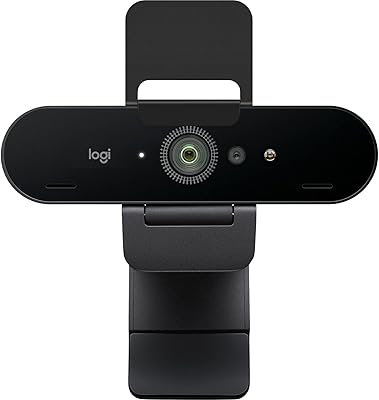
Logitech GROUP


Overview
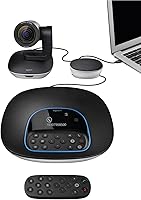
The Logitech GROUP is a purpose-built video conferencing kit designed for the kind of meeting rooms that smaller huddle-room solutions simply cannot handle. Launched in 2016, it has earned a steady reputation among IT buyers and office managers who need something that works reliably without calling in a technician. Everything ships in one box — HD camera, speakerphone unit, and a remote — and the whole system connects via USB plug-and-play, which means most rooms are up and running within minutes. For organizations stepping up from basic webcam setups, this conferencing system represents a meaningful jump in both audio and video capability.
Features & Benefits
The camera relies on Zeiss-certified optics and full 1080p resolution, delivering sharp video that holds up well even on larger display screens. A wide 90-degree field of view means the camera covers the full length of a conference table without anyone needing to nudge a remote. The included remote handles digital pan, tilt, and zoom, giving presenters control without walking to the unit. On the audio side, four integrated omni-directional microphones pick up voices across a surprisingly wide floor area, backed by full-duplex noise cancellation that keeps background hum from bleeding into calls. The system works reliably with Zoom, Microsoft Teams, Skype for Business, and Cisco platforms out of the box.
Best For
This room video solution makes the most sense for companies running regular video meetings in rooms that seat roughly eight to fourteen people — the kind of boardroom where a laptop webcam is simply inadequate. IT departments appreciate the certified platform compatibility and the minimal support burden once it is installed. Organizations built around Microsoft or Cisco workflows will find the integration particularly straightforward. It is also a practical fit for hybrid teams where audio quality matters as much as the picture — remote participants tend to notice poor mic pickup long before they notice video compression. If the room eventually grows, optional expansion microphone pods extend coverage without requiring a full hardware swap.
User Feedback
Owners consistently point to ease of setup as a top strength — many report the kit was functional within minutes of opening the box, with no driver headaches. The microphone range draws particular praise from people in larger rooms, where participants toward the back of the table are still picked up clearly. That said, a few reviewers note that the camera's digital zoom softens the image noticeably at its furthest range, which can matter in deeper rooms. Spaces with hard floors and no acoustic treatment may amplify echo through the speakerphone. On the durability front, long-term owners consistently mention the hardware holds up well over years of daily use, which softens the sting of the upfront cost.
Pros
- USB plug-and-play setup means most rooms are running in under ten minutes, no IT specialist required.
- Zeiss-certified optics deliver sharp 1080p video that holds up well on large room displays.
- Four omni-directional mics capture voices across a wide floor area, including participants far from the unit.
- Full-duplex audio lets both sides of a call speak naturally without cutting each other off.
- Built like professional hardware — long-term owners consistently note it holds up through years of daily use.
- Works out of the box with Zoom, Microsoft Teams, Skype for Business, and Cisco Webex.
- Optional expansion mic pods allow audio coverage to scale as rooms grow, protecting the initial investment.
- The 90-degree camera field of view covers a standard boardroom table without any manual adjustment.
Cons
- Digital zoom softens image quality noticeably when framing distant participants in deeper rooms.
- Expansion microphones for full large-room coverage are sold separately, adding to an already premium cost.
- The speakerphone can pick up room echo and HVAC noise in spaces without acoustic treatment.
- Infrared remote has line-of-sight limitations that make camera adjustments awkward in certain room layouts.
- Cable runs between the camera and hub can be restrictive in rooms with non-standard furniture arrangements.
- No official Linux support limits deployment in engineering or development team environments.
- Newer competitors offer similar video resolution with cleaner, wireless installations at a lower price point.
- The system was designed for a mid-2010s platform landscape, and some newer UC certification features are missing.
Ratings
The Logitech GROUP has been put through its paces by thousands of verified business buyers across corporate offices, educational institutions, and hybrid work environments worldwide. The scores below were generated by our AI engine after analyzing confirmed purchase reviews globally, with spam, bot activity, and incentivized feedback actively filtered out. Both the hardware strengths that keep IT teams loyal and the friction points that frustrate buyers in edge-case rooms are reflected transparently here.
Audio Pickup Quality
Video Clarity
Ease of Setup
Audio Output & Speakerphone
Camera Field of View
Software Compatibility
Build Quality & Durability
Value for Money
Remote Control Usability
Microphone Expandability
Noise Cancellation
Platform Certifications
Physical Footprint
Autofocus Performance
OS & Device Compatibility
Suitable for:
The Logitech GROUP was designed with a specific use case in mind, and it delivers best when that use case is matched precisely: a dedicated conference room seating roughly eight to fourteen people that hosts regular video calls throughout the working week. IT managers will appreciate the certified compatibility with major business platforms and the near-zero ongoing maintenance burden once the system is installed — no firmware drama, no driver headaches, just a USB cable and a laptop. Organizations that have standardized on Microsoft or Cisco communication tools will find the integration particularly friction-free. The conferencing system also suits businesses thinking ahead about room growth, since optional expansion microphone pods can extend audio coverage without replacing the core hardware. For hybrid teams where remote participants are full stakeholders in every meeting — not an afterthought — the combination of wide-angle video and strong microphone pickup range makes a meaningful practical difference in how included those remote voices feel.
Not suitable for:
Buyers who expect a budget-friendly entry point will likely find the price of the Logitech GROUP a significant hurdle, and if the room in question only hosts occasional calls with a handful of people, the investment is genuinely difficult to justify against simpler, cheaper alternatives. Small huddle rooms with two to four participants are underserved by this system — it is built for scale, and its features add complexity and cost that smaller setups simply do not need. Buyers working in acoustically challenging environments — rooms with hard floors, glass walls, or persistent HVAC noise — should be aware that no amount of hardware can fully compensate for poor room acoustics, and this room video solution is no exception. Those who require optical zoom rather than digital zoom will also find the camera limiting in very deep rooms where remote participants need to see individuals clearly at distance. Finally, organizations running Linux-based environments or niche collaboration platforms outside the major certified ecosystems should verify compatibility carefully before committing.
Specifications
- Video Resolution: The camera captures full HD 1080p video, delivering sharp, detailed image quality suitable for display on large conference room screens.
- Camera Optics: Zeiss-certified glass optics minimize distortion and chromatic aberration, producing clearer and more accurate color reproduction than standard conferencing camera lenses.
- Field of View: A 90-degree horizontal field of view covers the width of a standard boardroom table without requiring manual camera repositioning during calls.
- Autofocus: Continuous autofocus adjusts automatically as participants move, stand, or shift positions, keeping the group in sharp focus throughout a call.
- Pan, Tilt & Zoom: Digital pan, tilt, and zoom are controlled via the included infrared remote, allowing flexible camera framing without physically touching the unit.
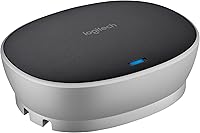
- Microphones: Four integrated omni-directional microphones are built into the speakerphone hub, designed to pick up voices from all directions around a conference table.
- Audio Range: The microphone array is optimized for rooms up to approximately 20 feet in diameter, covering typical mid-to-large boardroom configurations.
- Noise Cancellation: Advanced full-duplex noise cancellation filters background sounds and eliminates audio clipping so both sides of a call can speak simultaneously without interruption.
- Speakerphone: A built-in HD-quality speaker is integrated into the hub unit, providing clear audio output loud enough to fill a standard corporate meeting room.
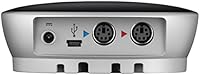
- Connectivity: The system connects to a host laptop via a single USB cable with no proprietary drivers required, making it compatible with any USB-equipped computer.
- Expandability: Optional expansion microphone pods can be added to extend audio pickup coverage for rooms accommodating up to approximately 20 participants.
- Dimensions: The camera unit measures 9.5 x 9.5 x 2.5 inches, providing a compact footprint suitable for placement on a table, credenza, or display shelf.
- Weight: The complete kit weighs approximately 7.9 pounds, making it portable enough to be relocated between rooms when needed.
- OS Compatibility: The system supports Windows 7, 8.1, and 10, as well as macOS 10.10 and higher, covering the vast majority of business laptop configurations.
- Platform Certifications: The kit is certified for Skype for Business and optimized for Microsoft Lync 2013, and is confirmed compatible with Cisco Jabber and Cisco WebEx.
- Power Source: The system draws power through the connected USB hub, eliminating the need for a separate power adapter in most standard deployment configurations.
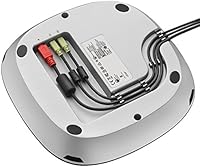
- What Is Included: The retail package includes the HD camera unit, the speakerphone hub, a remote control, a USB cable, and a cable hub for connecting the components.
- Date Available: The product was first made available for purchase in February 2016 and has maintained consistent availability as a business conferencing solution since launch.
Related Reviews

Logitech Wireless Touchpad

Logitech POP Mouse

Logitech X-530

Logitech Pebble M350 Wireless Mouse

Logitech ERGO K860

Logitech M510
Logitech Z205 Laptop Speaker

Logitech M217 Wireless Mouse

Logitech M320 Wireless Mouse