Overview

The LincStation N1 6-Bay NAS Storage is a flat, palm-sized network storage box from LincPlus — a relatively young brand taking aim at a market long dominated by Synology and QNAP. What sets it apart isn't just the compact metal chassis; it's the decision to run Unraid instead of a proprietary OS. Unraid lets you mix drives of different sizes and types without forcing them into a rigid RAID array, a genuine advantage for anyone building storage incrementally. The unit ships diskless, so factor drive costs into your total budget before buying. That said, the included Unraid Starter License — normally a paid add-on — meaningfully offsets that extra spend.
Features & Benefits

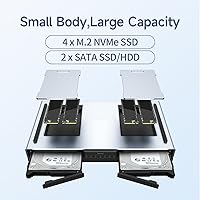
At the heart of this 6-bay NAS sits an Intel Celeron quad-core processor backed by 16GB LPDDR4X RAM — enough headroom to run Plex with hardware-assisted transcoding, a handful of Docker containers, and still leave breathing room. The hybrid bay layout is genuinely practical: four M.2 NVMe slots for fast SSD storage sit alongside two 2.5-inch SATA bays for higher-capacity HDDs, all usable simultaneously without matching drive sizes. A dedicated 128GB eMMC handles the OS, so none of your six bays are consumed by the system partition. The 2.5GbE port delivers real-world throughput sufficient for 4K local streaming and multi-user file access on most home networks.

Best For

This Unraid-based storage device is a natural fit for home media enthusiasts who want Plex or Jellyfin running locally without the noise and bulk of a tower server. It also suits photographers and video creators who need a central archive reachable from any device on their home network. Anyone tired of recurring cloud storage fees will find self-hosted backup here genuinely compelling. The included license and 30-day trial lower the barrier for Unraid newcomers considerably. Small home offices wanting simple shared storage will find it manageable without dedicated IT support, provided the team doesn't consistently saturate a single 2.5GbE connection.

User Feedback

Buyers frequently highlight how approachable the initial setup is — a recurring theme among first-time NAS builders unfamiliar with Unraid. The quiet fan operation and compact metal chassis also draw consistent praise, with most agreeing the build quality holds up well for this price tier. The most common criticism centers on thermals: running all four NVMe slots under sustained load can push temperatures, so where you place the unit matters. Most households find the 2.5GbE speeds adequate, though power users juggling several simultaneous streams occasionally want more. LincPlus support earns mixed reactions — some report fast responses, while others flag a thinner community and knowledge base than established NAS brands offer.

Pros

  • Hybrid bay layout lets you run NVMe SSDs and HDDs simultaneously without matching capacities or types.
  • The included Unraid Starter License adds real value and lowers the barrier to entry for first-time Unraid users.
  • 16GB of LPDDR4X RAM comfortably handles Plex, Docker containers, and basic self-hosted apps running in parallel.
  • The metal chassis and flat form factor fit on a shelf or desk without dominating the space like a tower NAS would.
  • 2.5GbE networking delivers smooth 4K local streaming and fast single-user file transfers without needing a network upgrade.
  • The 128GB eMMC boot drive keeps all six storage bays free for actual data rather than consuming a bay for the OS.
  • Fan noise under normal loads is low enough that living room or bedroom placement rarely becomes a distraction.
  • HDMI 2.0 output lets you connect this 6-bay NAS directly to a display, which tower NAS units typically cannot do.
  • A 2-year warranty and US-based support represent a more substantial commitment than many smaller hardware brands offer.

Cons

  • SATA bays only fit 2.5-inch drives up to 9.5mm — existing 3.5-inch desktop HDDs cannot be used at all.
  • Sustained NVMe load across all four M.2 slots can cause thermal throttling if the unit is placed in an enclosed or poorly ventilated spot.
  • A single 2.5GbE port becomes a bottleneck in households with several users transferring large files simultaneously.
  • LincPlus is a young brand with a thin community — finding third-party tutorials or troubleshooting threads for edge-case problems is genuinely harder than with Synology or QNAP.
  • The total cost rises sharply once drives are purchased; budget-conscious buyers can be caught off guard by the real all-in spend.
  • RAM is soldered and non-upgradeable, so 16GB is a permanent ceiling regardless of how workloads evolve.
  • No second network port means traffic isolation between management and data access is not possible without additional hardware.
  • Fan quality control shows minor variance — a small number of early units produced audible bearing noise that required intervention.
  • Unraid's Docker-centric approach has a learning curve that some buyers underestimate, particularly those new to containerized applications.

Ratings

The LincStation N1 6-Bay NAS Storage earned its scores after our AI model processed verified buyer reviews from across multiple global markets, actively filtering out incentivized, duplicate, and bot-generated submissions to surface what real users actually experience. Ratings reflect both what this Unraid-based storage device genuinely does well and where it falls short, without softening the rough edges. Strengths and frustrations carry equal weight here — the goal is to help you decide, not to sell you something.

Setup & Initial Configuration
83%
Most first-time NAS buyers are pleasantly surprised by how approachable Unraid is out of the box — the web UI walks you through disk assignment logically, and having the license pre-included removes one friction point. Buyers with basic home networking experience consistently report being up and running within an hour.
Users coming from Synology's DSM or QNAP's QTS face a steeper conceptual shift; Unraid thinks about storage very differently, and that adjustment catches some buyers off guard. A handful of reviewers noted the documentation bundled with the unit could be more thorough for complete beginners.
Build Quality & Chassis
78%
22%
The all-metal enclosure feels noticeably more substantial than similarly priced plastic-bodied NAS units, and buyers who place it on a desk regularly comment that it looks sharp for a storage appliance. At under two pounds, it's easy to reposition without feeling flimsy.
A few users noted that the chassis can develop faint vibration resonance when paired with spinning 2.5-inch HDDs, which becomes mildly noticeable in a quiet room. Port placement on the rear also draws occasional criticism for being awkward to access once the unit is tucked against a wall.
Thermal Management
61%
39%
Under typical single-user workloads — a Plex stream running alongside a backup job — temperatures stay within a comfortable operating range and the fan remains barely audible. Casual users rarely encounter issues in everyday mixed use.
Running all four M.2 NVMe slots under sustained sequential write load is where the thermal design shows its limits; several buyers report throttling after extended periods in poorly ventilated spots. Placement on an open shelf rather than inside a cabinet makes a measurable difference, which shouldn't be a requirement at this tier.
Storage Flexibility
91%
The hybrid bay layout — four NVMe slots plus two 2.5-inch SATA bays — is the single feature buyers praise most consistently. Being able to run a fast 1TB NVMe for active projects alongside larger, cheaper HDDs for archival storage in the same box is a real workflow advantage that traditional RAID-only NAS units simply can't match.
The SATA bays only support 2.5-inch drives up to 9.5mm, which rules out 3.5-inch desktop HDDs entirely — a limitation that catches buyers off guard when they try to repurpose existing drives. Maximum raw capacity is therefore lower than a comparable tower NAS of the same bay count.
Networking Performance
74%
26%
The 2.5GbE port delivers a genuine step up from older gigabit NAS boxes; copying a large media library from a 2.5GbE-capable desktop to this unit saturates the connection comfortably, and single-user 4K Plex streaming over the local network runs without buffering.
Households with three or more simultaneous users pushing large file transfers can start to feel the single-port constraint, and there is no link aggregation option to address it. Buyers expecting multi-gigabit throughput equivalent to 10GbE devices will find this a bottleneck in more demanding setups.
Processing Power & RAM
77%
23%
Sixteen gigabytes of LPDDR4X RAM is generous for this class of device — running Plex with hardware-assisted transcoding, a Nextcloud container, and a VPN simultaneously is within reach without the system grinding. The Celeron quad-core handles light parallel workloads better than most entry-level NAS processors.
Direct software transcoding of multiple 4K streams simultaneously pushes the Celeron to its ceiling quickly, and buyers hoping to run heavy AI-assisted photo management tools like Immich at scale may notice processing lag. The RAM is soldered and non-upgradeable, so 16GB is both the starting and ending point.
Software Ecosystem (Unraid)
79%
21%
Unraid's community app store gives access to hundreds of Docker containers — Jellyfin, Home Assistant, Pi-hole, and dozens more install with a few clicks. For home users who want their NAS to do more than just store files, the ecosystem depth is a genuine selling point.
Unraid is a third-party OS, not something LincPlus develops or maintains, which means long-term software continuity depends on a company entirely separate from the hardware vendor. Users unfamiliar with Docker concepts will need to invest time learning before the ecosystem feels natural rather than overwhelming.
Noise Level
86%
Under normal operating loads the fan is virtually inaudible from across a small room, and multiple buyers specifically mention placing this unit in a living room or bedroom without it becoming a distraction during quiet hours. It compares favorably to louder tower NAS alternatives.
At full CPU and storage load the fan does ramp up to an audible level, though it stays far short of being disruptive. A small subset of buyers received units with fan bearings that produced a faint whine from day one, suggesting minor quality control variance in early batches.
Value for Money
72%
28%
The bundled Unraid Starter License alone carries real monetary value that softens the sticker price noticeably when you factor it in. For a diskless unit with this connectivity suite and RAM capacity, the baseline ask sits reasonably within the mid-range NAS market.
Once you add the drives — even a modest pair of 2.5-inch HDDs and two NVMe SSDs — the total investment climbs meaningfully above the unit price, which some buyers feel crosses into territory where more established brands become competitive. The diskless model requires careful budget planning upfront.
Connectivity & Port Selection
82%
18%
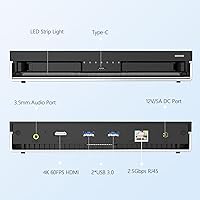
Having USB-C at 5Gbps alongside two USB 3.2 Gen2 Type-A ports means attaching an external drive for a one-time migration or plugging in a USB DAC for the audio output requires no adapters. The HDMI 2.0 port for direct 4K display output is an unusual inclusion that media-focused buyers genuinely use.
There is only a single network port, which limits flexibility for users who want to isolate management traffic from data traffic. A second 2.5GbE port or a built-in Wi-Fi option would have made this a more complete package for users whose routers are not in the same room.
Size & Form Factor
88%
At roughly the footprint of a hardcover book and under 1.4 inches tall, this 6-bay NAS slides onto a shelf beside a router without dominating the space. Buyers in apartments or small offices consistently cite the form factor as a decisive reason they chose it over a tower-style alternative.
The flat design, while desk-friendly, limits internal airflow engineering compared to taller enclosures. There is no mounting system included for under-desk or wall attachment, so placement options beyond flat-surface positioning require third-party solutions.
Brand Support & Community
63%
37%
LincPlus offers a two-year warranty and advertises around-the-clock US-based support, which is a more substantial commitment than many smaller NAS brands make. Some buyers report genuinely quick and helpful responses when reaching out with configuration questions.
The brand is young enough that its community forums, third-party tutorials, and troubleshooting resources are thin compared to Synology or QNAP — when you hit an unusual problem, you may not find an existing thread to guide you. Long-term firmware support cadence remains unproven given the brand's relatively short track record.
Drive Compatibility
69%
31%
The four M.2 slots accept standard 2280 NVMe drives from mainstream brands without reported compatibility issues, and buyers using popular drives from Samsung, WD, and Crucial confirm smooth recognition under Unraid. The SATA bays work reliably with common 2.5-inch HDD and SSD options.
The 9.5mm height limit on the SATA bays is a real constraint that many buyers do not notice until their existing HDDs will not fit. Some users also report that not all M.2 SATA drives (as opposed to NVMe) are recognized, so confirming your drive protocol before purchasing is important.
Power Efficiency
81%
19%
Idle power draw is low enough that leaving this Unraid-based storage device on continuously around the clock adds only modestly to a typical household electricity bill. Buyers running it as an always-on Plex or backup server appreciate that it does not behave like a space heater.
Under full load across all bays the power consumption rises noticeably, and the included adapter is proprietary enough that a replacement in a pinch is not straightforward. A small number of buyers in regions with voltage instability reported sensitivity without an external UPS in the loop.

Suitable for:

The LincStation N1 6-Bay NAS Storage is a strong fit for home media enthusiasts who want a self-hosted Plex or Jellyfin server without the noise, bulk, and power draw of a tower PC. If you're a photographer or video creator who's tired of juggling external drives and wants a single, always-accessible library on your local network, this unit handles that role capably. It's particularly well-suited to anyone curious about Unraid — a storage OS that lets you mix drives of different sizes and types freely — because the included license removes the usual entry cost and the 30-day trial eliminates the financial risk of committing to an unfamiliar platform. People actively moving away from cloud subscriptions for photo or document backup will find the remote download features and self-hosted approach genuinely practical here. Small home offices with a handful of users sharing files will also find it manageable without needing dedicated IT support, provided network demands stay moderate.
Not suitable for:

The LincStation N1 6-Bay NAS Storage is not the right tool for buyers expecting to repurpose a collection of full-size 3.5-inch desktop hard drives — the SATA bays only accommodate 2.5-inch drives up to 9.5mm, which is a firm hardware limitation that no software workaround can fix. Anyone needing raw, high-capacity spinning storage above what 2.5-inch drives offer will hit a ceiling quickly and should look at a traditional tower NAS instead. Power users planning to run multiple simultaneous 4K software transcoding jobs will push the Celeron processor to its limits faster than expected, and the soldered RAM means there is no upgrade path when workloads grow. Buyers who rely on a mature, forum-rich support ecosystem — the kind Synology and QNAP have built over many years — may find LincPlus's comparatively thin community frustrating when troubleshooting unusual issues. Finally, anyone on a tight all-in budget should calculate the total cost carefully: adding four NVMe drives and two HDDs to this diskless unit can more than double the unit price before the first file is saved.

Specifications

  • Processor: Powered by an Intel Celeron quad-core CPU designed for sustained low-power operation across media and containerized workloads.
  • RAM: 16GB LPDDR4X memory is soldered to the board and cannot be upgraded after purchase.
  • Boot Storage: A 128GB eMMC module serves as the dedicated OS drive, leaving all six storage bays free for user data.
  • SATA Bays: Two bays accept 2.5″ SATA HDDs or SSDs with a maximum height of 9.5mm; 3.5″ drives are not compatible.
  • NVMe Slots: Four M.2 slots support 2280 form-factor NVMe SSDs; M.2 SATA drives may not be recognized and are not officially supported.
  • Network: A single 2.5GbE RJ-45 port handles all network traffic with no secondary port or built-in Wi-Fi.
  • USB Ports: Connectivity includes one USB-C port at 5Gbps and two USB 3.2 Gen2 Type-A ports for peripherals and external drives.
  • Display Output: One HDMI 2.0 port supports 4K output for direct connection to a monitor or television.
  • Audio Output: A 3.5mm analog audio jack provides headphone or speaker output from the unit directly.
  • Dimensions: The chassis measures 5.91″ deep by 8.27″ wide by 1.38″ tall, sitting flat like a compact desktop appliance.
  • Weight: The complete unit without drives weighs 1.76 pounds, making it easy to reposition without tools.
  • Chassis Material: The enclosure is constructed from metal, which contributes to passive heat dissipation and overall rigidity.
  • Operating System: Ships with Unraid pre-installed and includes an Unraid Starter License valid for the device lifetime.
  • Diskless: No storage drives are included; all HDDs and NVMe SSDs must be purchased separately before data can be stored.
  • Warranty: LincPlus provides a two-year limited hardware warranty covering manufacturing defects from the date of purchase.
  • Trial Period: A 30-day money-back guarantee is offered, allowing buyers to return the unit if it does not meet their needs.
  • BSR Ranking: Ranked #81 in the Amazon NAS Devices category at the time of listing, indicating strong sales velocity for the segment.
  • Release Date: First made available for purchase on September 14, 2024, positioning it as a recent-generation product in this category.

Related Reviews
Asustor Flashstor 6 FS6706T 6-Bay NAS Storage
85%
86%
Performance
88%
Ease of Setup
90%
Network Speed (Dual 2.5GbE)
81%
Build Quality
83%
Expandability (RAM & Storage)
More
TerraMaster F6-424 Max NAS Storage 6-Bay, Core i5, 8GB RAM
85%
89%
Performance
93%
Data Transfer Speed
85%
Build Quality
70%
Ease of Setup
90%
Noise Level
More
Asustor Lockerstor 6 Gen3 AS6806T 6-Bay NAS
79%
93%
Raw Throughput Performance
91%
NVMe Cache Flexibility
89%
Network Connectivity
88%
CPU & Processing Headroom
86%
Build Quality & Chassis
More
Asustor FLASHSTOR 6 Gen2 FS6806X 6-Bay M.2 SSD NAS
88%
94%
Performance
89%
Ease of Setup
92%
Build Quality
93%
Data Transfer Speed
88%
Storage Flexibility
More
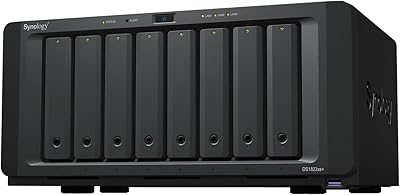
Synology DS620slim 6-Bay NAS Enclosure
82%
91%
Build Quality
93%
Software & DSM Experience
88%
Storage Performance
84%
Drive Bay Flexibility
63%
Value for Money
More
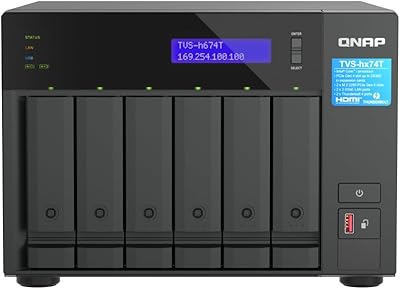
QNAP TVS-h674T-i5-32G 6-Bay NAS
84%
91%
Performance
85%
Ease of Setup
93%
Speed/Connectivity
88%
Build Quality
79%
Software Experience
More
QNAP TS-632X-4G 6-Bay NAS with 10GbE and Quad-Core Processor
85%
91%
Performance
94%
Network Connectivity
88%
Expandability
82%
Ease of Setup
85%
Reliability
More
KCMconmey NAS-411 4+1 Bay DIY NAS Case
84%
85%
Ease of Setup
80%
Build Quality
70%
Cooling Performance
90%
Customization Options
88%
Drive Compatibility
More
KCMconmey NAS-812 8+2 Bay DIY NAS Case
84%
86%
Build Quality
62%
Cooling Performance
88%
Ease of Use
90%
Compatibility with PSU Types
91%
Customization Options
More
Synology DS223
Synology DS223
77%
94%
Software & OS Experience
88%
Setup & Initial Configuration
61%
CPU & Processing Performance
67%
Network Connectivity
83%
Build Quality & Design
More

FAQ

It ships completely diskless — no HDDs or NVMe SSDs are included. You will need to purchase drives separately before you can store anything. When budgeting, make sure to factor in the cost of up to four M.2 NVMe SSDs and up to two 2.5-inch SATA drives, as that total outlay can add significantly to the unit price.

Unfortunately, no. The two SATA bays only fit 2.5-inch drives with a maximum thickness of 9.5mm. Standard 3.5-inch desktop HDDs will not physically fit. If you are planning to repurpose existing drives, make sure to check the physical dimensions before purchasing.

Unraid is a storage operating system that lets you combine drives of different sizes and brands without forcing them into a traditional RAID array. Think of it as a flexible pool where you can add drives incrementally over time. No prior experience is required, but there is a learning curve — especially if you plan to run Docker apps. The included license and the active Unraid community forum are both helpful resources for getting started.

Yes, for most home use cases it handles this well. With hardware-assisted transcoding enabled in Plex, the Intel Celeron manages a single 4K stream or a couple of lower-resolution streams without noticeable lag. Where it starts to strain is software-only transcoding of multiple simultaneous 4K streams — that workload pushes the processor close to its limit.

For a typical home setup — Plex, a few Docker containers, and file sharing — 16GB is genuinely sufficient. The problem is that the RAM is soldered directly to the motherboard, meaning it cannot be upgraded. If you anticipate running increasingly heavy workloads over time, keep in mind that 16GB is a permanent ceiling on this unit.

Under typical workloads the fan is very quiet — most users describe it as nearly inaudible from a few feet away. It does spin up and become noticeable under sustained heavy load, but it stays well short of the kind of noise a tower NAS or desktop PC produces. Living room or bedroom placement is generally fine for everyday use.

It depends on the workload and where the unit is placed. Light to moderate use across all four slots is typically fine. Sustained sequential writes pushing all four drives at once in a poorly ventilated enclosure or shelf can cause thermal throttling. Keeping the unit in an open, well-ventilated spot makes a meaningful difference, and most users who do that report no sustained throttling issues.

For a single user streaming 4K content or running backups, 2.5GbE is more than adequate. Where it becomes a constraint is in households where multiple users are simultaneously transferring large files — say, a video editor copying raw footage while someone else streams. There is only one network port, so there is no option to bond connections for higher throughput.

LincPlus advertises 24/7 US-based customer support, and a fair number of buyers report satisfactory response times for hardware and basic setup questions. That said, the brand is still relatively young, so the community-generated knowledge base — forums, YouTube tutorials, Reddit threads — is thinner than what you will find for Synology or QNAP. For deeper Unraid-specific questions, the official Unraid community forum is often a more reliable resource than the hardware vendor.

Yes — that is actually one of the more unusual features of this unit. The HDMI 2.0 port outputs up to 4K, so you can connect it directly to a display and use it as a lightweight desktop for basic tasks or media playback. It is not a replacement for a proper media player in terms of interface polish, but for tinkerers who want to run a local app directly on the NAS without a separate device, the option is genuinely there.

Where to Buy