Overview

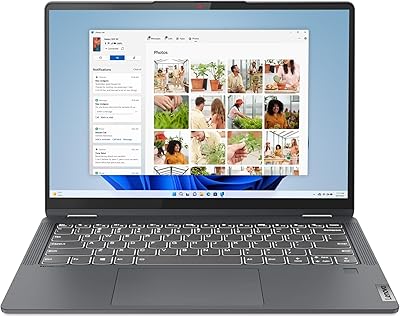
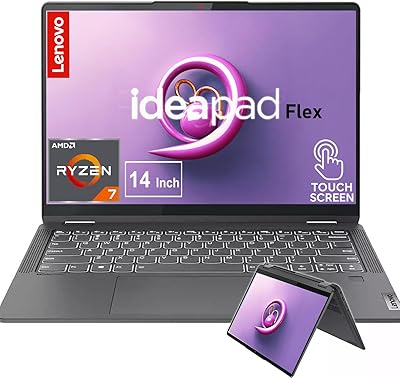
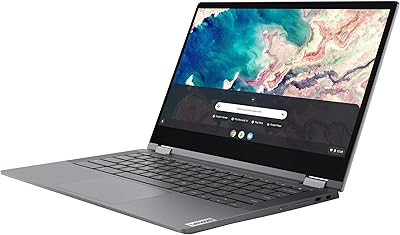
The Lenovo IdeaPad Flex 5i Chromebook Plus Laptop is one of those machines that doesn't try to dazzle you with specs — it just gets on with the job. It's a 14-inch convertible with a 360-degree hinge, so it folds flat into a tablet, props up like a tent for video calls, or sits as a regular laptop depending on what you're doing. Under the hood is an Intel Core i3-1315U paired with 8GB of memory, which is enough for the kind of multitasking most people actually do day to day. It lands in Google's mid-range Chromebook Plus tier, meaning it clears a higher bar for performance than older budget Chromebooks. One thing worth flagging upfront: this particular unit ships resealed, with the SSD upgraded by the seller rather than Lenovo.
Features & Benefits

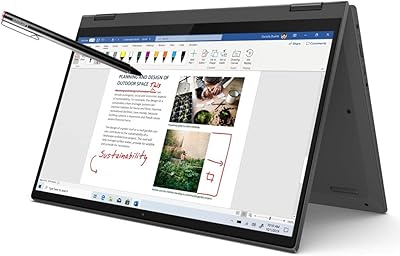
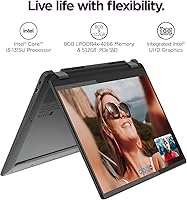
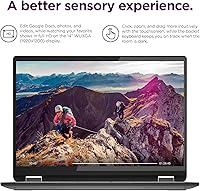
Where this Chromebook actually shines is the screen — a 14-inch WUXGA panel with a matte anti-glare finish that keeps colors true even under harsh ceiling lights. The hinge is the real party trick, folding all the way around so it works as a flat laptop, a tent for streaming a show, or a slate-style tablet for sketching notes by hand. A backlit keyboard means typing in a dim dorm room or on a red-eye flight isn't a guessing game. Lenovo also baked in Gemini AI tools for quick text help across Chrome OS apps, though it's a nice extra rather than a core selling point. Wireless performance holds up well too, with Wi-Fi 6E and Bluetooth 5.3 keeping connections steady, and the dual USB-C ports can drive an external 4K display for a bigger desk setup.

Best For

This 2-in-1 laptop makes the most sense for students juggling online classes, research tabs, and quick notes between lectures — the touch screen and tablet mode genuinely get used rather than sitting as a gimmick. It's also a smart pick for anyone who wants a convertible touchscreen without paying flagship laptop money, since you're getting most of the everyday conveniences at a friendlier price point. If your computer life mostly revolves around browsing, streaming shows, and living inside Google Docs, Sheets, or Gmail, it handles all of that without complaint. The light build makes it easy to toss in a bag and carry between rooms or on short trips. Where it falls short is anything demanding: heavy photo or video editing, or software needing real desktop power will hit Chrome OS's ceiling, so professionals with those needs should look elsewhere.

User Feedback

Real-world reactions to this convertible Chromebook follow a fairly predictable, fair pattern. Portability and hinge versatility usually get mentioned first, since switching modes for a call or a movie feels genuinely useful rather than tacked on. Battery life is rated at up to 10 hours, though that number is best treated as a ceiling rather than a guarantee, since screen brightness and steady Wi-Fi use will pull it down during a typical day. The split storage setup — a smaller SSD paired with SD card capacity — trips up buyers expecting one continuous drive, so checking what's actually usable matters before storing large files. Pushing it toward heavier multitasking or non-Chrome workloads will hit a performance wall sooner than expected. And since this listing ships resealed with an upgraded SSD, reading the warranty terms carefully beats assuming standard coverage applies broadly.

Pros

  • The 360-degree hinge genuinely gets used, switching smoothly between laptop, tablet, tent, and stand modes.
  • The 14-inch WUXGA touchscreen has a matte, anti-glare finish that stays readable under harsh lighting.
  • Backlit keyboard makes typing comfortable in dim dorm rooms, late flights, or low-light offices.
  • Wi-Fi 6E and Bluetooth 5.3 deliver noticeably steadier wireless connections than older Chromebooks.
  • Dual USB-C ports can drive an external 4K monitor for a bigger workspace at a desk.
  • At 3.48 pounds, this Chromebook is easy to carry between classes, meetings, or coffee shops.
  • Pricing sits well below flagship 2-in-1 laptops while still covering everyday computing needs.
  • Chrome OS support runs through June 2032, so this convertible Chromebook stays current for years.
  • Gemini AI tools add handy shortcuts for quick text help inside everyday Chrome OS apps.

Cons

  • Advertised 10-hour battery life drops noticeably once brightness and Wi-Fi use are factored into daily routines.
  • Storage is split between a smaller SSD and an SD card, which confuses buyers expecting one unified drive.
  • Heavier multitasking or non-Chrome workloads expose a performance ceiling that frustrates anyone needing real desktop power.
  • This unit ships resealed with an upgraded SSD, so warranty coverage is split between the seller and Lenovo.
  • Chrome OS still can't run traditional desktop software, which rules out many professional editing or design programs.
  • 8GB of memory feels tight once several browser tabs and Android apps run side by side.
  • Intel UHD integrated graphics struggle with anything beyond casual photo editing or light gaming.

Ratings

These scores for the Lenovo IdeaPad Flex 5i Chromebook Plus Laptop come from an AI analysis of verified buyer reviews collected from real owners around the world, with spam, bots, and incentivized feedback filtered out before any number gets calculated. Each category below reflects both what people genuinely love about this convertible Chromebook and the trade-offs that come with its price point. Nothing here is rounded up to look impressive, the goal is an honest snapshot of where it excels and where it falls short.
Display Quality
86%
The 14-inch WUXGA touchscreen earns consistent praise for its sharp 1920x1200 resolution and matte, anti-glare coating, which keeps colors readable even under bright classroom or office lighting. Buyers note it handles everyday reading, video calls, and light note-taking through the touchscreen comfortably.
It's not a high-brightness panel built for outdoor or sunlit use, so glare can still creep in near windows despite the matte finish. A handful of reviewers also wish for a higher native resolution for fine detail work like photo editing.
Build Quality & Design
81%
19%
The chassis and 360-degree hinge feel solid for this price tier, with reviewers commonly describing it as sturdy enough for daily backpack life between classes or meetings. The grey finish and slim profile also feel less plasticky than typical budget Chromebooks.
It's still a mid-range build, so it lacks the milled-metal feel or rigorous durability testing found on premium ultrabooks. A few buyers mention slight flex in the keyboard deck under firm typing pressure, a common trait at this price point.
Performance
71%
29%
The Intel Core i3-1315U's 6 cores handle typical Chrome OS workloads like browser tabs, video calls, and streaming without noticeable lag. Students and casual users report smooth day-to-day responsiveness for research, writing, and online classes.
Push it toward heavier multitasking, large spreadsheets, or anything resembling desktop-grade software, and the performance ceiling shows up quickly. Reviewers expecting laptop-level speed for editing or resource-intensive apps consistently come away disappointed.
Battery Life
68%
32%
Many buyers confirm the battery comfortably covers a school day or workday of mixed browsing, streaming, and note-taking without needing a midday charge. The efficient Chrome OS platform helps stretch real-world runtime closer to the advertised range than many Windows competitors.
The advertised 10-hour figure is clearly a best-case number, and cranking up screen brightness or running Wi-Fi constantly pulls it down noticeably faster. A subset of reviewers report closer to 6 or 7 hours under heavier daily use.
Keyboard & Typing Comfort
79%
21%
The backlit keyboard gets specific praise for making typing easier during evening study sessions or in dim coffee shops. Key spacing and travel feel comfortable enough for extended note-taking and essay writing sessions.
It's a compact chiclet-style layout, so reviewers transitioning from full-size desktop keyboards mention a short adjustment period. The function-row shortcuts also take some getting used to for anyone new to Chrome OS.
Portability & Weight
88%
At 3.48 pounds, this Chromebook slips easily into a backpack or tote, and reviewers frequently mention carrying it between classes, meetings, or coffee shop visits without feeling weighed down. Its slim 0.78-inch profile adds to the everyday convenience.
It's not the lightest convertible on the market, so anyone comparing it against ultra-thin 2-pound tablets may notice the difference on longer travel days. The 14-inch size also makes it slightly bulkier than 11- or 13-inch alternatives.
Hinge & Convertible Versatility
89%
The 360-degree hinge is consistently the most-mentioned highlight, with buyers actually using laptop, tent, and tablet modes rather than treating them as gimmicks. Switching modes for video calls, movie nights, or sketching notes feels smooth and genuinely useful day to day.
A few reviewers note tablet mode feels a bit heavy to hold one-handed for long stretches compared to dedicated tablets. The hinge mechanism also adds a little extra bulk versus a standard clamshell laptop design.
Connectivity & Ports
76%
24%
Dual USB-C ports that support external 4K displays get praised for making desk setups easy, alongside USB-A ports and a microSD reader covering most everyday accessories. Reviewers appreciate not needing a dongle for common peripherals.
There's no dedicated HDMI port, so anyone wanting a direct monitor connection needs a USB-C adapter or hub. The port selection is also fairly basic compared to larger 15-inch Windows laptops in a similar price range.
Storage Configuration
58%
42%
For users who mainly live in the cloud through Google Drive and Workspace apps, the combined 512GB across SSD and SD card storage comfortably covers offline downloads, photos, and cached files for daily use. That's plenty of headroom for the kind of files most everyday Chromebook owners actually need to keep on hand.
The split between a smaller SSD and SD card storage trips up buyers expecting one continuous drive, leading to confusion about what's actually usable for large files. Reviewers recommend checking the exact SSD-to-SD breakdown before relying on it for sizable media libraries.
Wireless Performance
84%
Wi-Fi 6E and Bluetooth 5.3 keep video calls, streaming, and wireless peripheral pairing noticeably steadier than older Chromebook generations, according to reviewer comparisons. Range and reconnection speed around the house also get consistent praise.
Wi-Fi 6E benefits only show up fully on compatible routers, so users with older home networks won't notice much improvement. A small number of reviewers report occasional Bluetooth dropouts when pairing multiple devices at once.
Software Experience
73%
27%
Chrome OS feels fast, simple, and low-maintenance for buyers focused on browsing, Workspace apps, and streaming, with built-in Gemini AI tools offering a handy assist for quick text help. Long-term update support through 2032 also reassures buyers about longevity.
Reviewers consistently flag that Chrome OS can't run traditional desktop software, ruling out many professional editing or design programs outright. The Gemini AI features, while pleasant, are described more as a nice extra than a meaningful daily upgrade.
Value for Money
82%
18%
Landing in Google's mid-range Chromebook Plus tier, this 2-in-1 laptop delivers a touchscreen, convertible hinge, and decent battery life well below flagship laptop pricing. Reviewers frequently describe it as a smart, low-risk pick for students and casual users on a budget.
Buyers expecting laptop-grade performance at this price point are sometimes let down once they hit the Chrome OS and hardware ceiling for heavier tasks. The resold, resealed nature of this particular listing also makes some shoppers hesitate compared to buying new and sealed.
Warranty & Seller Trust
61%
39%
The seller's three-year warranty on the upgraded SSD adds extra reassurance beyond Lenovo's standard one-year manufacturer coverage on the rest of the machine. Buyers who take time to read the disclosure carefully generally feel informed about exactly what they're getting and why pricing sits below brand-new units.
The resealed, upgraded-SSD disclosure isn't always read carefully, and buyers who skip it can be caught off guard by the split warranty structure between the seller and Lenovo. Some reviewers say they'd have preferred a fully sealed, brand-new unit without any resale history.

Suitable for:

The Lenovo IdeaPad Flex 5i Chromebook Plus Laptop fits best in the hands of students who spend their day bouncing between online classes, research tabs, and quick handwritten notes on the touchscreen. It also works well for budget-conscious shoppers who want the flexibility of a touchscreen convertible without paying flagship laptop prices. Anyone whose computing life mostly revolves around browsing, streaming, and Google Workspace apps like Docs, Sheets, and Gmail will find it handles those tasks without complaint. Its light build and long battery life also make it a practical pick for commuters or travelers who need something easy to carry between classes, meetings, or coffee shops. Parents shopping for a secondary household machine for homework and video calls should find it a sensible, low-risk option too.
Not suitable for:

That said, the Lenovo IdeaPad Flex 5i Chromebook Plus Laptop isn't built for anyone who needs serious computing horsepower. Creative professionals doing heavy photo editing, video editing, or running desktop-grade software will hit Chrome OS's ceiling quickly, since the platform simply isn't designed for that kind of workload. Gamers expecting to run anything beyond casual browser or Android titles will also be disappointed, given the integrated graphics and modest processor. Buyers who specifically want a single, unified storage drive should know this unit splits capacity between a smaller SSD and an SD card, which can complicate file management for large media libraries. Anyone uneasy about buying a resealed unit with an upgraded SSD and a split warranty between the seller and Lenovo should factor that into their decision before purchasing.

Specifications

  • Display: The 14-inch screen is a WUXGA touchscreen panel with a 1920x1200 resolution and an anti-glare matte finish.
  • Processor: It is powered by an Intel Core i3-1315U, a 6-core processor with integrated Intel UHD graphics.
  • Memory: The system includes 8GB of LPDDR4X RAM.
  • Storage: Total storage is listed at 512GB, made up of a 256GB SSD plus additional SD card capacity.
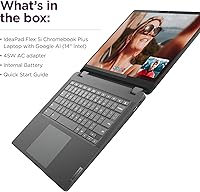
  • Hinge Design: An x360 hinge allows the body to fold into laptop, tablet, tent, and stand modes.
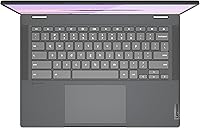
  • Keyboard: The keyboard is backlit to improve visibility in dim or dark rooms.
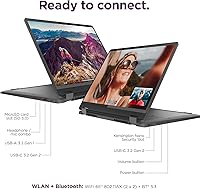
  • Wireless: Wireless support covers Wi-Fi 6E and Bluetooth 5.3 for fast, stable connections.
  • Battery Life: Battery life is rated at up to 10 hours per charge.
  • Ports: Connectivity includes 2 USB-C ports, one with charging and fast data support, plus USB-A ports and a microSD card reader.
  • External Displays: The laptop supports up to 2 external monitors at a maximum resolution of 4K at 60Hz.
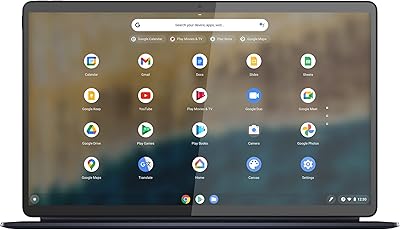
  • Operating System: It runs Chrome OS, with an Auto Update Expiration date set for June 2032.
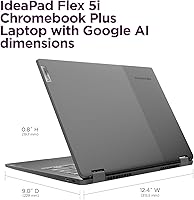
  • Weight: The unit weighs 3.48 pounds.
  • Dimensions: Physical dimensions are 12.42 x 9.02 x 0.78 inches.
  • AI Features: Gemini AI tools are built into Chrome OS to assist with everyday tasks.
  • Warranty Note: This specific listing is a resealed unit with an SSD upgrade performed by the seller, carrying separate warranty terms from Lenovo's standard manufacturer coverage.

Related Reviews

Lenovo IdeaPad Flex 5i 14″ 2-in-1 Laptop, Intel Core i3, 8GB RAM, 256GB SSD
84%
87%
Battery Life
91%
Portability
80%
Performance
72%
Display Quality
85%
Build Quality
More
Lenovo Flex 5i 13 Chromebook, Intel Core i3, 8GB RAM, 64GB Storage
83%
82%
Performance
88%
Battery Life
91%
Portability
85%
Display Quality
80%
Build Quality
More
Lenovo IdeaPad Flex 3i Chromebook 15″
71%
84%
Value for Money
62%
Performance
78%
Display Quality
74%
Touchscreen Responsiveness
61%
Build Quality
More
Lenovo IdeaPad Flex 5 14″ i3-1115G4 4GB 128GB
68%
78%
Value for Money
59%
Performance
44%
RAM Adequacy
52%
Storage
83%
Touchscreen Quality
More
Lenovo IdeaPad Flex 5 14 1TB Laptop
77%
88%
Display Quality
83%
Processor Performance
74%
Battery Life
85%
2-in-1 Versatility
80%
Value for Money
More
Lenovo Chromebook Flex 5 13″ i3 64GB
73%
83%
Build Quality
81%
Display Quality
67%
Performance & Speed
61%
RAM & Multitasking
72%
Storage & Cloud Integration
More
Lenovo IdeaPad Duet 5 Chromebook
77%
93%
Display Quality
88%
Build & Portability
71%
Keyboard & Typing Experience
86%
Battery Life
58%
Performance & Multitasking
More
Lenovo IdeaPad N42-20 14″ Chromebook
68%
83%
Value for Money
88%
Portability
71%
Battery Life
41%
Local Storage
62%
Performance
More
Samsung Chromebook Plus V2 64GB
74%
88%
Portability & Build Quality
83%
Display Quality
91%
Built-in Stylus
67%
Performance for Everyday Tasks
74%
Chrome OS Experience
More
Lenovo IdeaPad 1 Gen 7 15.6″ Laptop
72%
91%
Value for Money
78%
Multitasking Performance
88%
Storage & Speed
67%
Display Quality
63%
Touchscreen Usability
More

FAQ

Yes, this 2-in-1 laptop handles browser-based coursework, video calls, and note-taking through the touchscreen comfortably. Just keep in mind it's not meant for heavier creative software.

Zoom and similar web or Android apps work fine, but full desktop programs like Photoshop won't run on Chrome OS. If you need real desktop-grade software, this isn't the right machine.

Lenovo rates it at up to 10 hours, but that's a best-case number. With screen brightness up and Wi-Fi running constantly, expect something closer to 7 to 8 hours in daily mixed use.

The 512GB total is split between a 256GB SSD and additional SD card capacity, not one continuous drive. It's worth checking how the seller's listing breaks this down if you plan to store large files.

This particular Lenovo IdeaPad Flex 5i Chromebook Plus Laptop ships resealed because the seller upgraded the SSD before reselling it. The SSD itself carries a separate three-year warranty from the seller, while the rest of the machine keeps Lenovo's standard one-year coverage.
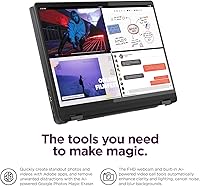
The 360-degree hinge is built for repeated use across laptop, tablet, tent, and stand modes, so it's designed to hold up to regular flipping. As with any convertible hinge, treating it gently rather than forcing it will help it last.

For browsing, streaming, and typical school or office tasks, 8GB is workable, especially since Chrome OS is lighter than Windows. Heavy multitasking with dozens of tabs and several apps running at once will push it toward its limit, though.

Yes, the dual USB-C ports support connecting up to two external monitors, with a maximum resolution of 4K at 60Hz. That makes it a reasonable option for setting up a desk-style workspace at home.

They're a nice bonus for quick text help and content suggestions inside Chrome OS apps, but they're not a core reason to choose this Chromebook on their own. Think of them as a convenience layer rather than a major selling point.

Chrome OS support is scheduled through its Auto Update Expiration date in June 2032, so this convertible Chromebook should keep receiving updates for a good while yet. That's a reasonably long runway for a mid-range device.