Overview

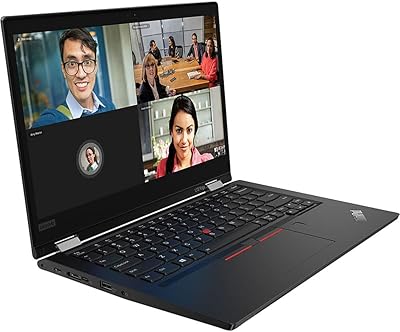
The Lenovo 300W Gen 3 2-in-1 Laptop was built specifically for education — not the general consumer market — and that distinction matters when you are deciding if it is the right fit. Its defining physical feature is the 360-degree convertible hinge, which lets students switch between laptop, tent, and tablet modes depending on the task at hand. At this price point, you are getting a genuinely rugged machine: the chassis resists drops, the keyboard handles the occasional spill, and the hinges are reinforced to survive daily backpack life. This is a capable school tool, not a powerhouse. The inclusion of Windows 10 Pro is a real differentiator for schools that need centralized IT management and device control at scale.

Features & Benefits

The AMD dual-core processor handles everyday school tasks — loading Google Classroom, editing a Word document, joining a video call — without much fuss. Push it harder with a dozen browser tabs open at once, and you will start to feel the ceiling. The touchscreen display is responsive and holds up well in tablet mode, though the resolution is on the modest side; images and text are clear enough for learning, just not particularly sharp. Storage is the most honest conversation to have here: the built-in drive fills up faster than you might expect, making OneDrive, Google Drive, or a microSD card a practical necessity rather than an afterthought. Battery life comfortably covers a full school day, and the port lineup — USB-C, three USB-A, HDMI — is genuinely generous for this category.

Best For

This convertible Chromebook alternative makes the most sense for K-12 students in hybrid or in-person classrooms where durability and all-day battery life matter more than raw speed. Families and school districts looking for a Windows Pro device at a budget-friendly price will find it especially compelling — it supports the kind of centralized IT management tools that Chromebooks handle natively, giving administrators meaningful control over managed deployments. It handles note-taking, research, document work, and video streaming well, and tablet mode adds real flexibility for younger students who prefer drawing or tapping directly on the screen. If processing power is your top priority, look elsewhere. For everyone else, the trade-offs are straightforward to accept.

User Feedback

Parents and teachers who have spent time with the 300W Gen 3 tend to agree that build quality impresses at this price — it feels sturdier than most budget machines, and the battery consistently makes it through a school day without needing a midday charge. The keyboard is compact but workable for younger hands. Recurring criticisms are predictable: storage runs out quickly, and the display can look noticeably dim under bright classroom lighting. Some users report sluggishness when too many apps are running simultaneously. Despite those trade-offs, overall satisfaction skews positive — most buyers knew what they were signing up for and feel the machine delivers squarely on its promise as a dependable, no-drama everyday school device.

Pros

  • Built to take a beating — the drop-resistant chassis and water-resistant keyboard add genuine durability for younger, less careful users.
  • Battery life routinely covers a full school day on a single charge, eliminating midday charging anxiety.
  • Windows Pro sets it apart from Chromebooks by supporting enterprise-grade IT management and device deployment tools.
  • The 360-degree hinge makes switching between laptop and tablet mode fast and intuitive, even for young students.
  • Port selection punches above its weight — USB-C, three USB-A ports, and HDMI reduce the need for dongles.
  • Light enough to slip into a child's backpack without adding noticeable strain across a long school day.
  • The touchscreen is genuinely responsive and adds practical value in tablet mode for sketching, annotating, and interactive apps.
  • For families needing an affordable Windows machine for school, the overall value proposition is hard to argue with.

Cons

  • Built-in storage fills up quickly — cloud storage or a microSD card effectively becomes mandatory, not optional.
  • Performance lags noticeably when multiple browser tabs or applications are open at the same time.
  • The display can look dim in brightly lit classrooms or near windows, making content harder to read comfortably.
  • Four gigabytes of RAM is a tight ceiling for Windows; multitasking beyond the basics often produces sluggishness.
  • Screen sharpness falls behind competing devices in the same price range, which some students may find distracting.
  • Neither the RAM nor the storage can be upgraded after purchase, so what you buy is what you keep.
  • Wi-Fi 5 connectivity is adequate today but already a generation behind devices shipping with Wi-Fi 6.
  • The compact keyboard layout can feel cramped for older students or anyone with larger hands typing for extended periods.

Ratings

The scores below reflect our AI-driven analysis of verified global user reviews for the Lenovo 300W Gen 3 2-in-1 Laptop, with spam, bot-generated, and incentivized feedback actively filtered out before scoring. Each category captures both what real buyers consistently praised and the frustrations that surfaced repeatedly across thousands of honest reviews. Nothing has been smoothed over — the ratings transparently reflect where this student laptop shines and where it genuinely falls short.

Build Quality
83%
Parents and school IT staff consistently point to the chassis as a pleasant surprise at this price point — it handles daily backpack jostle, minor drops, and the general roughness of a K-12 environment noticeably better than comparable budget machines. The water-resistant keyboard has saved more than a few devices from drink spills in classrooms and at kitchen tables.
The plastic construction, while resilient, does show scuffs and surface scratches over time, and some users note the screen lid can flex slightly under pressure. Drop resistance has real limits — a hard fall onto a corner can still cause cosmetic or functional damage, especially to the display.
Battery Life
79%
21%
For a typical school day of browsing, video calls, and document work, the 300W Gen 3 consistently makes it through without needing a charger — a genuine relief for parents who do not want to pack an adapter in an already heavy bag. Most users report six to eight solid hours of real-world screen-on time.
The manufacturer's claimed runtime is optimistic and hard to replicate outside of controlled, light-use testing conditions. Users who run the display at high brightness or multitask more heavily see battery life drop noticeably, and a few longer-term owners flag that capacity degrades faster than expected after a full year of daily school use.
Performance
57%
43%
For the specific tasks this convertible Chromebook alternative was built for — loading Google Classroom, joining a video call, drafting a Word document, or watching an instructional video — the processor gets the job done without complaint. Students who use it as their primary school machine for one task at a time find it perfectly adequate.
Open more than five or six browser tabs simultaneously and slowdowns become noticeable and frustrating; with four gigabytes of RAM, Windows leaves little breathing room for multitasking. Users attempting anything beyond basic school tasks — light photo editing, running multiple apps in parallel, or using certain educational software — consistently report lag and choppy response times.
Storage
44%
56%
The solid-state drive makes boot times and app launches snappy, which is a real practical advantage over older budget laptops built around spinning hard drives. For students who keep their files in OneDrive, Google Drive, or another cloud service, the internal drive rarely becomes a daily obstacle.
Sixty-four gigabytes is the single most-complained-about aspect of this device — Windows, system files, and a handful of installed apps can collectively consume more than half the available space, leaving students scrambling for room. Without a microSD card or disciplined cloud storage habits, the drive fills up within weeks of regular school use.
Value for Money
78%
22%
Among budget education laptops running full Windows Pro, the 300W Gen 3 offers a hard-to-beat combination of durability, battery life, and a strong port lineup for the price. Buyers who set realistic expectations — understanding they are getting a focused school tool, not a general-purpose laptop — consistently walk away feeling the trade-offs were worth making.
The value proposition weakens if storage limitations immediately force buyers to purchase a microSD card or a paid cloud storage subscription, quietly adding to the real total cost. A meaningful share of reviewers feel that slightly more RAM would have made the machine considerably more capable without requiring a significant price increase.
Portability
81%
19%
At just over four pounds and built to a compact footprint, this student laptop disappears into a backpack without adding noticeable weight to a child's daily load. The slim profile slides in and out of bag sleeves easily, and students who move between classes or commute on public transit consistently appreciate the manageable size.
For younger or smaller children, four pounds can still feel like a meaningful addition to an already heavy school bag, especially compared to lighter Chromebook-class devices. The compact overall size also means the keyboard and trackpad are smaller than what older students or adults typically prefer for extended typing sessions.
Keyboard & Touchpad
66%
34%
Younger students in middle school and below tend to find the keyboard comfortable and well-proportioned to their hand size, and key travel feels decent for a machine at this price. The water-resistant treatment means a minor spill during a snack break is not an immediate cause for panic.
Older students and adults find the compact layout cramped after extended typing sessions, and a few specific keys feel mushy or inconsistent in their feedback. The trackpad is functional but not particularly smooth, requiring more deliberate finger control than most mid-range or premium laptop touchpads demand.
Touchscreen & Tablet Mode
74%
26%
The 360-degree hinge works reliably through repeated folding, and the touchscreen responds accurately to taps and swipes, making tablet mode genuinely useful for interactive lessons, drawing apps, and swiping through class presentations. Students who annotate PDFs or use creative drawing apps find the flexibility adds real everyday value.
Without a dedicated stylus included in the box, precise drawing and handwriting input depend on a separately purchased pen, which adds to the overall cost. In tablet mode, the weight of the device becomes more noticeable, making extended one-handed use less comfortable than a purpose-built tablet.
Connectivity & Ports
84%
Three USB-A ports alongside USB-C, a full-size HDMI output, and a headphone jack make for an unusually complete port lineup at this price, and buyers frequently highlight it as a standout advantage. Connecting a wireless mouse, a USB drive, and an external classroom display simultaneously requires no adapters or hubs whatsoever.
Wi-Fi 5 is sufficient for most school networks today but is already a generation behind devices shipping with Wi-Fi 6, which could matter on congested multi-device school networks in the years ahead. There is no dedicated SD card slot, so adding removable storage requires occupying a USB port or using an adapter.
Software & OS
77%
23%
Windows 10 Pro is a genuine differentiator — school IT departments can manage, deploy, and secure these machines using the same enterprise tools they apply to staff computers, which no Chromebook and no Windows Home device can match. For districts running managed device programs, this translates into a meaningful and practical operational advantage.
Windows 10 Pro demands more system resources than Chrome OS, which directly contributes to the performance squeeze experienced on four gigabytes of RAM. Windows 10 also reached its end-of-support milestone in late 2025, meaning buyers should factor in the eventual need to evaluate Windows 11 compatibility for longer-term use.
Display Quality
61%
39%
The screen is clear and color-accurate enough for reading, watching video lessons, and working through standard classroom content, and the touch layer responds reliably without requiring precise or heavy finger placement. For students spending most of their screen time in documents, learning platforms, or video calls, it does not get in the way.
The resolution is noticeably lower than what competing devices at a similar price can offer, and text can look soft when compared side-by-side with sharper panels. Brightness is the more pressing concern — in well-lit classrooms or near windows, the display can wash out and become genuinely difficult to read comfortably.
Thermal Management
71%
29%
Under light-to-moderate school workloads — exactly the kind this device is designed to handle — the machine stays quiet and surface temperatures remain comfortable whether it is sitting on a desk or balanced on a lap. Students using it for browsing, writing, and video calls rarely notice the cooling system engaging at all.
Push the processor with sustained downloads, streaming video, and several open tabs simultaneously, and the chassis warms noticeably, particularly on the underside. A handful of users report the fan spinning up audibly during heavier sessions, which can draw attention in quiet classrooms or school libraries.
Webcam & Audio
58%
42%
The built-in camera and microphone are adequate for the video calls and virtual class check-ins that have become a routine part of the school day. For standard communication platforms — Google Meet, Zoom, Microsoft Teams — most users find it functional enough without needing to purchase any external accessories.
Image quality is noticeably soft in anything other than ideal lighting, and the microphone captures more ambient background noise than users would prefer during group calls. The speakers are functional but thin-sounding, lacking the volume and clarity needed to fill even a small room during a shared lesson without external audio support.
Wi-Fi Reliability
69%
31%
On a standard home or school network, the wireless connection holds steady and delivers speeds fast enough to stream HD video, handle video calls, and access cloud-based learning platforms without frustrating interruptions. Most families and school IT teams report dependable everyday connectivity across typical indoor environments.
On congested school networks with dozens of simultaneously connected devices, some users report inconsistent speeds and occasional drops that a Wi-Fi 6 device would handle more gracefully. Wireless range can also become a limitation in larger school buildings where access points are spaced farther apart or signals must pass through thick walls.

Suitable for:

The Lenovo 300W Gen 3 2-in-1 Laptop was purpose-built for the K-12 classroom, and that focus shows in every design decision. Parents looking for a durable Windows machine that can carry a student through a full day of schoolwork without hunting for a charger will find it hits the mark. It works especially well for students who move between school and home, since the convertible hinge lets them shift into tablet mode for drawing, annotating, or following interactive lessons with a tap rather than a click. School IT administrators will genuinely appreciate the Windows Pro operating system, which supports the same management and deployment tools used in enterprise environments — a capability most Chromebooks and consumer-grade Windows Home devices simply cannot match. Families on a careful budget who primarily need a dependable machine for cloud-based productivity, video calls, and light research will find it strikes a sensible balance between capability and cost.

Not suitable for:

The 300W Gen 3 is a focused, narrowly targeted device, and anyone outside its intended audience is likely to walk away frustrated. The Lenovo 300W Gen 3 2-in-1 Laptop is not the right call for students or users who need real processing headroom — video editing, coding, or running several demanding applications at once will expose its limits quickly. The onboard storage is tight enough to become an ongoing management headache if you depend on locally installed software or regularly work with large files, so buyers who prefer keeping everything local rather than in the cloud should think twice. The display, while adequate for classroom work, is not bright or sharp enough for anyone who cares about image quality, and it can be genuinely difficult to read in well-lit rooms or near windows. Gamers should look elsewhere entirely, and adults seeking a capable primary work machine for professional tasks will find it falls noticeably short of what they need.

Specifications

  • Processor: Powered by an AMD 3015e dual-core chip running at 2.3 GHz, designed for light productivity work rather than compute-intensive tasks.
  • RAM: Comes with 4GB of DDR4 SDRAM, which handles standard school applications comfortably but leaves limited headroom for heavy multitasking.
  • Storage: Internal storage is a 64GB solid-state drive, offering faster read and write speeds than a traditional hard disk but a tight total capacity.
  • Display Size: The touch-enabled screen measures 11.6″ diagonally, keeping the overall footprint compact and backpack-friendly.
  • Resolution: The panel outputs at 1366x768 pixels, delivering clear enough visuals for classroom content, video streaming, and document editing.
  • Graphics: AMD Radeon Vega 8 integrated graphics manage standard video playback, basic image editing, and educational apps without any discrete GPU.
  • Battery Life: Lenovo rates the battery at up to 11.7 hours under typical conditions; real-world runtime varies with screen brightness and workload intensity.
  • Operating System: Ships with Windows 10 Pro, which includes enterprise management features such as BitLocker encryption and domain join not available on Windows Home.
  • Hinge Type: A 360-degree reinforced Sync hinge allows the display to fold fully flat, enabling laptop, tent, stand, and tablet modes.
  • Weight: The unit weighs 4.2 pounds, light enough for a student to carry between classes without strain.
  • Dimensions: Physical footprint measures 11.4 x 7.97 x 0.78 inches, fitting comfortably inside most standard school backpack sleeves.
  • Ports: Connectivity includes one USB-C port, three USB-A ports, one full-size HDMI output, and a 3.5mm combo audio jack.
  • Wireless: Wi-Fi 5 (802.11ac) delivers reliable wireless speeds suitable for video calls, streaming, and cloud-based learning platforms.
  • Durability: The chassis is engineered to withstand accidental drops, and the keyboard carries a water-resistant rating to handle minor liquid spills.
  • Color: Offered in Blue, giving the device a visual identity suited to its student-focused positioning.
  • Model Number: The official Lenovo model identifier is 82J1000HUS, used for warranty registration, IT procurement, and support requests.

Related Reviews

Vantec NexStar JX 3.5″ HDD Enclosure
76%
93%
Ease of Setup
78%
Transfer Speed — USB
86%
Transfer Speed — eSATA
74%
Thermal Management
67%
Build Quality
More
Lenovo Yoga 6 13.3″ 2-in-1 Laptop - Ryzen 5, 8GB RAM, 256GB SSD
85%
85%
Performance
94%
Portability & Weight
92%
Battery Life
88%
Display Quality
90%
Build Quality
More
Vantec NexStar GX 2.5″ USB-C Drive Enclosure
79%
88%
Build Quality
83%
Transfer Speed
91%
Ease of Setup
71%
Heat Management
63%
Drive Fit & Tolerance
More
Vantec NST-371C31-BK NexStar Gx USB 3.1 Gen 2 Type-C 3.5″ SATA HDD/SSD Enclosure
84%
89%
Performance
94%
Ease of Setup
85%
Build Quality
92%
Compatibility with Systems
88%
Data Transfer Speed
More
Lenovo ThinkPad L13 Yoga 2-in-1 Laptop
77%
91%
Build Quality
88%
Keyboard Comfort
79%
Everyday Performance
61%
RAM Adequacy
58%
Storage Capacity
More
Lenovo Yoga 7i 16″ 2-in-1 Laptop, Core Ultra 7 155U, 16GB, 1TB
74%
84%
Display Quality
82%
Performance & Speed
79%
Build Quality & Hinge
81%
Keyboard & Trackpad
67%
Battery Life
More
FIDECO YPZ220C Dual Bay USB 3.2 Gen 1 Hard Drive Docking Station

79%
88%
Offline Clone Functionality
79%
Transfer Speed
92%
Drive Compatibility
91%
Plug-and-Play Setup
63%
Build Quality
More
Lexar 512GB JumpDrive P30 USB 3.2 Gen 1 Flash Drive
86%
91%
Performance
87%
Durability
93%
Security Features
89%
Portability
91%
Compatibility
More
SanDisk Ultra Eco 512GB USB Flash Drive
76%
83%
Read Speed Performance
54%
Write Speed Performance
91%
Portability & Form Factor
86%
Storage Capacity Value
79%
Value for Money
More
SanDisk 128GB Ultra Luxe USB 3.2 Gen 1 Flash Drive
89%
94%
Transfer Speed
90%
Build Quality
88%
Ease of Use
87%
Security Features (AES Encryption)
92%
Portability
More

FAQ

It is tight, and it fills up faster than most people expect — Windows takes up a meaningful portion right out of the box. The most practical approach is to lean on cloud storage like OneDrive or Google Drive for documents and projects, and pick up an inexpensive microSD card if you need offline space for media. Think of the internal drive as a working area, not a permanent archive.

The tablet mode genuinely works for school tasks. The hinge folds all the way back, and the touchscreen is responsive enough for tapping through apps, drawing, or reading. It is heavier than a dedicated tablet, but for annotating notes, using educational apps, or following along in an interactive lesson, it holds up well in practice.

The Lenovo 300W Gen 3 2-in-1 Laptop runs Windows 10 Pro, which is the most significant difference. That means it can run full Windows desktop applications, be managed by school district IT departments using standard enterprise tools, and handle software that simply does not exist on Chrome OS. Chromebooks are often simpler for individual families to manage day-to-day, but if your school or district requires Windows-specific software or needs centralized device management, this machine has a clear advantage.

For most students doing typical classroom work — browsing, video calls, document editing — yes, it gets through the day comfortably. The official rating is generous by nature, but real-world users consistently report six to eight hours of active use, which covers most school schedules. Keeping screen brightness at a moderate level makes a noticeable difference in how far the charge stretches.

No, and that is worth knowing before you buy. The RAM is soldered to the motherboard and cannot be replaced, and the internal storage is not user-serviceable in any realistic sense. Your best options are to use cloud storage for most files and add a microSD card for supplemental local storage — both of which work well in practice.

Better than most laptops at this price point. The chassis is built to handle the minor drops and bumps of school life, and the keyboard can shrug off small spills without damage. It will not survive being sat on or dropped from a desk onto concrete, but for the normal roughness of a student's day — tossing it in a backpack, setting it on a cafeteria table — it is meaningfully more resilient than a standard consumer laptop.

Yes to both. Google Classroom runs in any web browser, so there is nothing special to install. Because this runs full Windows, you can also install the desktop version of Microsoft Office or access Office 365 through a browser. Virtually any school-issued learning management system or productivity app that runs on Windows will work here without issue.

This is a legitimate concern. The display is fine for most indoor classroom settings, but in a sun-drenched room or near a bright window, it can look noticeably washed out. It is not unusable, but students sitting in bright spots may need to adjust their position or tilt the screen. If glare is a regular issue, it is worth keeping in mind.

It fits best in the middle school and high school range, though upper elementary students can use it without trouble. The compact keyboard is actually a benefit for smaller hands. Older teens or adults who type for long stretches may find the layout a bit cramped, but for the core school-age audience it is designed around, the size is appropriate.

Lenovo includes a standard one-year limited warranty that covers manufacturing defects, but it does not cover accidental damage like drops or liquid spills. For a device being used daily by a child, that gap is real. It is worth looking into Lenovo's optional accident protection plans at purchase, or checking whether your homeowner's or renter's insurance covers personal electronics — some policies do.

Where to Buy