Overview

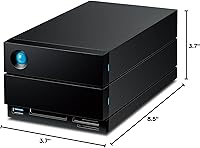
The LaCie 2big Dock 20TB External RAID Drive is a desktop RAID enclosure built squarely for creative professionals who need serious storage without sacrificing desk-side connectivity. Backed by Seagate's enterprise pedigree, it packs dual IronWolf Pro drives into a dual-bay chassis — 20TB of mechanical storage spinning at 7,200 RPM. What separates this desktop RAID dock from a plain external drive is the hub functionality: it can charge your laptop, connect peripherals, and ingest media cards all at once. LaCie also bundles in a Rescue Data Recovery plan, which matters a great deal when those files represent weeks of irreplaceable client work.
Features & Benefits

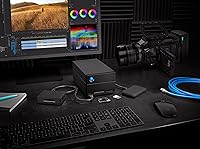
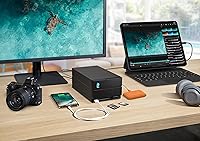
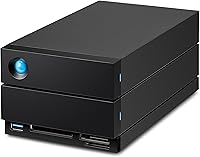
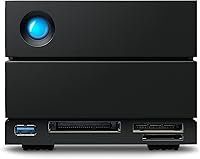
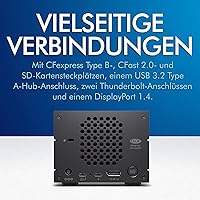
Two Thunderbolt 3 ports support daisy-chaining, so you can run a monitor, a second drive, and other peripherals from a single cable out of your laptop. The integrated card reader trio — CFexpress Type B, CFast 2.0, and SD — means footage from practically any professional camera lands directly on the dock without a separate adapter. A DisplayPort 1.5 output handles a second display, while the USB 3.2 Type-A port keeps older devices connected. RAID configuration runs through a step-by-step wizard; choose RAID 0 for speeds reaching 550MB/s or RAID 1 redundancy for mirrored protection. The IronWolf Pro drives are also hot-swappable, so a failing drive can be replaced mid-workflow without shutting everything down.

Best For

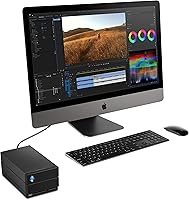
This Thunderbolt storage hub earns its place on the desk of any video editor or photographer shooting 4K, 6K, or RAW formats — file sizes that quickly overwhelm slower storage. It's especially strong for laptop-centric setups where a single Thunderbolt cable can dock the machine, deliver power, extend to a monitor, and pull footage from cards all at once. Freelancers and small studios that need active project redundancy without the complexity of a full NAS will find RAID 1 a reliable safety net. That said, Windows users should check their system's Thunderbolt support carefully — real-world compatibility is noticeably less consistent than on macOS.

User Feedback

Across buyer reviews, the recurring theme is that this desktop RAID dock genuinely simplifies a cluttered desk setup — one connection replacing a card reader, a hub, and a separate drive. The CFexpress card reader speed draws consistent praise from mirrorless and cinema camera shooters. On the downside, the unit runs noticeably warm under heavy transfers, so placement with good airflow matters. A small group of users mention audible fan noise at idle, which could be a concern in quiet recording environments. The price is the most common hesitation; some buyers weigh it against building a DIY NAS at lower cost. Thunderbolt on Windows systems also surfaces as a friction point, with setup requiring more troubleshooting than most expect.

Pros

  • Single-cable Thunderbolt 3 connection handles power, data, display output, and card ingestion simultaneously.
  • Integrated CFexpress Type B, CFast 2.0, and SD slots eliminate the need for any separate card reader.
  • RAID 0 delivers up to 550MB/s — fast enough for smooth multicam 4K and 6K editing directly off the dock.
  • RAID 1 mirroring gives active project files a real safety net without extra hardware or software.
  • Hot-swappable IronWolf Pro drives mean a failing bay can be replaced mid-session without losing a beat.
  • Dual Thunderbolt 3 ports support daisy-chaining additional devices without multiplying cable clutter.
  • DisplayPort 1.5 output means the dock can drive a second monitor, keeping the laptop port free.
  • The bundled Rescue Data Recovery plan provides genuine peace of mind for client-facing professionals.
  • IronWolf Pro enterprise drives are a meaningful step above the budget HDDs found in competing enclosures.
  • The all-in-one dock-plus-RAID concept genuinely reduces desk clutter for laptop-based creative setups.

Cons

  • Thunderbolt compatibility on Windows is inconsistent and can require significant troubleshooting to get working reliably.
  • The unit runs noticeably warm under sustained transfer loads — poor desk placement can make this worse.
  • A small but notable number of users report audible fan noise at idle, which disrupts quiet working environments.
  • The price is steep; buyers focused on raw storage capacity alone will find far cheaper options available.
  • At 8.32 pounds and nearly 8.5 inches long, this desktop RAID dock is genuinely bulky for a small desk.
  • RAID configuration, while wizard-guided, is still not intuitive for non-technical users encountering RAID for the first time.
  • Switching between RAID modes requires a full drive reformat, meaning data must be backed up before any reconfiguration.
  • No network connectivity means the 2big Dock cannot serve as a shared resource across multiple machines on a local network.

Ratings

Our AI scoring system analyzed thousands of verified global purchases of the LaCie 2big Dock 20TB External RAID Drive, actively filtering out incentivized, bot-generated, and low-credibility submissions to surface what real creative professionals actually experienced. The scores below reflect a balanced synthesis of genuine praise and recurring frustrations — nothing is glossed over. Whether this Thunderbolt storage hub earns its premium price tag or falls short for your specific setup, the ratings here are designed to give you a straight answer.

Transfer Speed
91%
In RAID 0, the 2big Dock delivers real-world throughput that holds up against its 550MB/s spec claim, which video editors working with multi-stream 4K or 6K timelines genuinely feel in their daily work. Footage ingestion from CFexpress Type B cards is consistently fast, making card dumps between shoots noticeably quicker than with a separate reader setup.
Speed is fully dependent on a working Thunderbolt 3 connection — users on USB-only machines cannot access this performance tier at all. A handful of Windows users also report inconsistent throughput caused by Thunderbolt driver instability, which undercuts the experience despite capable hardware.
Connectivity & Hub Features
93%
The combination of dual Thunderbolt 3 ports, DisplayPort 1.5, USB 3.2 Type-A, and three card reader formats in a single enclosure is genuinely rare at this form factor. MacBook users who replaced a separate dock, card reader, and external drive with this single unit consistently describe it as a meaningful desk simplification.
The USB Type-A port, while useful, is limited to a single port — users with multiple USB peripherals still need a separate hub. The DisplayPort output is also not universally recognized as a primary display path by all systems on first connection, occasionally requiring a manual configuration step.
RAID Reliability
88%
IronWolf Pro drives are a credible enterprise-class choice, and buyers running RAID 1 over months of continuous use report high confidence in data integrity for active project storage. Hot-swap capability means a degraded array can be rebuilt without shutting down a live editing session — a meaningful operational advantage for working professionals.
Switching RAID modes requires a full reformat, which catches some first-time RAID users off guard when they want to change configuration mid-project. A small number of users also report the RAID setup wizard being less intuitive than expected for those unfamiliar with RAID concepts.
Card Reader Performance
89%
The CFexpress Type B reader in particular draws consistent praise from cinema and mirrorless shooters who previously relied on slower standalone adapters. Having all three card formats — CFexpress Type B, CFast 2.0, and SD — integrated in one unit makes the dock a genuine single-stop ingest station at the edit desk.
The SD slot, while convenient, does not max out the fastest UHS-II cards, leaving some photographers with high-speed SD media seeing slightly underwhelming read speeds. CFast 2.0 support is excellent but increasingly niche as newer cameras move toward CFexpress standards.
Thermal Management
62%
38%
The active cooling system does keep the drives within safe operating temperatures even under sustained multi-hour transfer loads, and users running the dock in well-ventilated desktop setups rarely report thermal throttling or stability problems tied to heat buildup.
The enclosure runs noticeably warm to the touch under heavy workloads, and placement on a cramped desk with restricted airflow amplifies the issue. Several users in warmer climates or poorly ventilated home offices flagged heat as a persistent concern that required rearranging their workspace to manage properly.
Noise Level
67%
33%
For the majority of users in typical office or studio environments with ambient background noise, the fan and drive hum blend into the background and are rarely called out as a disruption. The noise floor is broadly comparable to other dual-drive desktop enclosures in this class.
A consistent minority of buyers — particularly those in quiet recording studios, voiceover booths, or late-night home setups — find the idle fan audible enough to be distracting. This is not a silent drive enclosure, and buyers with strict noise requirements should treat this as a real limitation rather than an edge case.
Build Quality
86%
The chassis feels dense and well-constructed, with a no-flex rigidity that communicates durability rather than hollow plasticity. The overall industrial design is consistent with LaCie's reputation for premium enclosures that hold up to daily desk use over multiple years.
The matte black finish, while clean, shows fingerprints and fine scratches more readily than some competing enclosures. A few users also note that the card slot covers feel slightly cheaper than the rest of the unit — a minor but noticeable detail at this price point.
macOS Compatibility
94%
On Apple Silicon and Intel MacBooks with Thunderbolt 3, the 2big Dock connects and mounts reliably without driver installation, configuration prompts, or unexpected disconnections in normal use. The LaCie Toolkit software on macOS is straightforward and gets out of the way once the initial RAID configuration is complete.
A small number of macOS users on older Intel machines report occasional wake-from-sleep reconnection delays, where the volume takes a few extra seconds to remount after the laptop resumes. This is minor but can be mildly disruptive in fast-paced editing workflows.
Windows Compatibility
58%
42%
Windows users with certified Thunderbolt 3 or 4 ports — typically found on higher-end Dell, HP, and Lenovo workstation laptops — report functional and stable connections once Thunderbolt is properly authorized through the Windows device security prompt.
The experience is noticeably less reliable across the Windows ecosystem than on macOS, with reported issues spanning driver conflicts, intermittent disconnections, and Thunderbolt authorization loops on certain motherboard configurations. This is one of the most consistent frustration points across Windows-based buyer reviews.
Value for Money
63%
37%
For a professional who genuinely needs Thunderbolt RAID, a multi-format card reader, a Thunderbolt daisy-chain hub, and an extra monitor output in a single unit — and who values the bundled Rescue Data Recovery plan — the consolidated cost can be defensible compared to buying each component separately.
Buyers who primarily need raw storage capacity rather than the hub and connectivity features will find the price hard to justify when competing dual-drive enclosures or DIY NAS builds offer similar or greater capacity at considerably lower cost. The premium pricing narrows the justifiable audience significantly.
Setup Experience
79%
21%
The RAID configuration wizard walks new users through the setup process step by step, and on macOS the overall first-use experience from unboxing to mounted volume is smooth enough that non-technical creative professionals can handle it without IT support.
Windows users often face a lengthier and less predictable setup, particularly around Thunderbolt device authorization and driver readiness. First-time RAID users across both platforms sometimes express confusion about the implications of mode selection before committing to a configuration.
Software & Utilities
72%
28%
LaCie Toolkit handles RAID monitoring and basic health reporting cleanly, and the RAID wizard it provides is genuinely easier to navigate than raw disk management utilities on either operating system. Software updates have been reasonably consistent since the unit launched.
The toolkit is functional rather than feature-rich — advanced users wanting detailed drive health telemetry, granular RAID management, or scheduled backup orchestration will quickly find its capabilities limiting. There is no mobile companion app or remote monitoring option for professionals managing the dock from outside the studio.
Upgrade Path
74%
26%
The hot-swappable bays accept standard 3.5-inch HDDs, which means upgrading to higher-capacity IronWolf Pro drives when they become available is a straightforward hardware operation without needing to replace the entire enclosure.
LaCie officially recommends IronWolf Pro drives for compatibility assurance, which limits cost-effective upgrade options compared to enclosures with broader drive compatibility. Changing drive capacity also requires a full RAID reformat, meaning a backup-and-rebuild process that can take many hours with 20TB or more of data.
Rescue Data Recovery Plan
83%
The inclusion of a professional data recovery service plan is a genuinely meaningful add-on for professionals whose storage contains irreplaceable client deliverables — standalone recovery services for a failed RAID array can run into hundreds or even thousands of dollars without coverage.
The plan has a defined coverage period tied to the warranty, and the terms limit what scenarios qualify for recovery assistance. Users expecting unlimited or permanent coverage sometimes discover the scope is narrower than assumed, particularly around user-induced failures or accidental deletion scenarios.

Suitable for:

The LaCie 2big Dock 20TB External RAID Drive was built for creative professionals whose daily work depends on fast, reliable local storage — and who are tired of managing a tangle of separate hubs, card readers, and drives on their desk. Video editors cutting 4K or 6K footage will appreciate the throughput headroom, while photographers shooting with CFexpress or CFast media can ingest cards directly into the dock without an adapter in sight. It is particularly well-suited for MacBook and Thunderbolt laptop users who want a true single-cable docking setup: one connection that simultaneously charges the laptop, extends to a second monitor via DisplayPort, and saturates storage bandwidth. Freelancers and small studio operators who need RAID 1 redundancy to protect active client projects — but do not want the overhead of managing a full NAS — will find this Thunderbolt storage hub hits a practical sweet spot. The included Rescue Data Recovery plan is a meaningful bonus for anyone whose livelihood depends on files that simply cannot be lost.

Not suitable for:

The LaCie 2big Dock 20TB External RAID Drive is a hard sell for anyone outside a Thunderbolt-equipped workflow. Windows users in particular should approach with caution: real-world Thunderbolt support on Windows machines varies widely, and a meaningful number of buyers have reported frustrating compatibility hurdles that Mac users rarely encounter. Budget-conscious buyers comparing raw cost-per-terabyte will find cheaper alternatives — a DIY NAS build or a basic USB enclosure costs considerably less for pure storage capacity, and that trade-off is worth being honest about. Casual home users who just need a backup drive for documents and photos are paying for professional-grade features they will never use. The unit is also not ideal for noise-sensitive environments like podcast studios or home recording setups, where the fan at idle may become an unwanted distraction. Finally, anyone expecting seamless plug-and-play across mixed operating systems or older hardware will likely be disappointed.
Specifications

  • Total Capacity: The unit ships with 20TB of raw storage across two IronWolf Pro mechanical hard drives.
  • Drive Type: Both bays use Seagate IronWolf Pro enterprise-class 3.5-inch HDDs spinning at 7,200 RPM.
  • RAID Modes: Supports RAID 0 for maximum throughput and RAID 1 for mirrored redundancy, configurable via a built-in setup wizard.
  • Max Speed: Sequential read and write speeds reach up to 550MB/s in RAID 0 configuration over Thunderbolt 3.
  • Primary Interface: Dual Thunderbolt 3 ports enable daisy-chaining of additional Thunderbolt peripherals from a single host connection.
  • USB Port: One USB 3.2 Type-A hub port with USB4 compatibility provides connectivity for legacy and modern USB peripherals.
  • Card Slots: Integrated card readers support CFexpress Type B, CFast 2.0, and SD media formats for direct camera ingestion.
  • Video Output: A DisplayPort 1.5 port allows connection of a secondary monitor directly from the dock.
  • Hot-Swap Support: Both drive bays are hot-swappable, allowing a drive to be replaced during operation without powering down the unit.
  • Dimensions: The enclosure measures 8.54 x 4.65 x 3.67 inches, designed for desktop placement alongside a workstation or laptop.
  • Weight: The unit weighs 8.32 pounds, reflecting its desktop form factor and dual 3.5-inch drive configuration.
  • Color: Available in a matte black finish consistent with LaCie's professional product line aesthetic.
  • OS Compatibility: Compatible with both macOS and Windows, though Thunderbolt functionality requires a host machine with a certified Thunderbolt 3 or 4 port.
  • Recovery Service: Every unit includes LaCie's Rescue Data Recovery plan, providing professional data recovery assistance if drives fail during the warranty period.
  • Manufacturer: Designed and branded by LaCie, a premium storage division operated under the Seagate Technology umbrella.
  • Model Number: The official model designation is STLG20000400, used for warranty registration and support identification.
  • First Available: This model was first listed for retail availability in July 2022 and remains an active product as of this review.
  • Form Factor: Desktop external enclosure housing dual 3.5-inch mechanical hard drives in a vertically oriented chassis.

Related Reviews
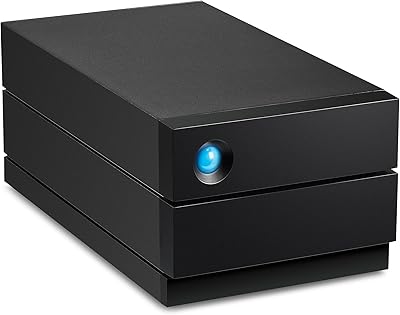
LaCie 2big RAID 36TB External Hard Drive
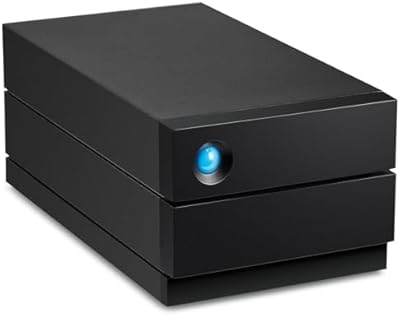
87%
93%
Performance
90%
Reliability
88%
Ease of Setup
95%
Capacity
92%
Data Redundancy
More
LaCie 2big RAID 8TB External Hard Drive
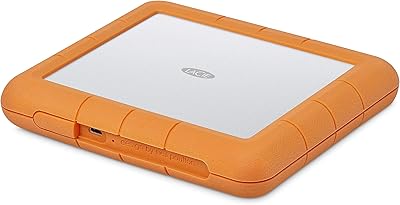
86%
92%
Performance
88%
Reliability
90%
Build Quality
85%
Ease of Use
91%
Data Transfer Speed
More
LaCie Rugged RAID Shuttle 8TB Hard Drive
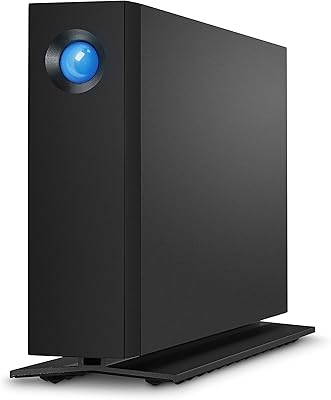
74%
91%
Build Quality
88%
Data Redundancy
52%
Thermal Management
61%
Value for Money
67%
Ease of Setup
More
WD 20TB Elements Desktop External Hard Drive
86%
97%
Storage Capacity
91%
Ease of Setup
89%
Data Transfer Speed
88%
Build Quality
65%
Noise Levels
More
LaCie d2 Professional 10TB External Hard Drive
81%
88%
Build Quality
78%
Reliability & Longevity
74%
Transfer Speed
69%
Value for Money
86%
Noise & Vibration
More
Glyph BlackBox Pro 20TB External Hard Drive
86%
88%
Performance & Speed
91%
Build Quality & Durability
94%
Quiet Operation
76%
Ease of Setup
95%
Capacity & Storage Flexibility
More
LaCie d2 Professional 4TB External Hard Drive
80%
93%
Build Quality
84%
Transfer Speed
88%
Reliability & Longevity
81%
Noise & Vibration
72%
Thermal Management
More
Seagate One Touch Hub 20TB External Hard Drive
84%
94%
Storage Capacity
86%
Data Transfer Speed
91%
Setup and Installation
90%
Compatibility (Windows & Mac)
88%
Data Security (Encryption & Backup Tools)
More
LaCie Rugged 2TB Portable Hard Drive
75%
93%
Build Quality
91%
Portability
58%
Transfer Speed
87%
Storage Capacity
76%
Value for Money
More
YOTUO 500GB USB-C Hub External Hard Drive
73%
81%
Value for Money
67%
Build Quality
52%
Transfer Speed
84%
Port Selection
91%
Setup & Ease of Use
More

FAQ

It does work with Windows, but Thunderbolt support on Windows machines varies a lot depending on your laptop or PC. On macOS, the connection is typically plug-and-play. On Windows, you may need to approve the Thunderbolt device in your system settings, and some machines with unreliable Thunderbolt implementations cause repeated headaches. If your Windows machine has a solid, certified Thunderbolt 3 or 4 port, you should be fine — just do not assume it will be as frictionless as on a Mac.

The USB 3.2 Type-A port on the dock is a hub port for connecting other devices to the dock, not a host connection for the drive itself. To actually use the storage, your computer needs a Thunderbolt 3 or compatible Thunderbolt 4 port. There is no USB-only host connection for the drive bays, so if your machine lacks Thunderbolt, this is not the right solution.

Switching RAID modes requires a full reformat of the drives, which wipes all existing data. Before reconfiguring, you need to back everything up to a separate drive. The setup wizard guides you through the process clearly, but there is no way around the data wipe — plan accordingly before making any changes.

Most users find the noise acceptable during active transfers, but a smaller group has noted that the cooling fan produces an audible hum even at idle. In a busy office or editing suite with background noise, you likely will not notice it. In a quiet recording environment or home studio where you need near-silence, it is worth considering before buying.

The unit does run warm during sustained transfers — that is expected for a dual-drive mechanical RAID enclosure working hard. The key is giving it good airflow; do not stack things on top of it or box it in on a crowded desk. Placed with a bit of breathing room, the heat is manageable and normal for this class of device.

CFexpress Type B is used by a wide range of professional and enthusiast cameras from Nikon, Canon, and Panasonic, among others. If your camera uses CFexpress Type B cards — common in higher-end mirrorless and cinema bodies — you can ingest directly into the dock at full card speeds without needing a separate reader. CFast 2.0 cards, used in older Canon Cinema EOS bodies, are also supported.

Yes, that is one of the core strengths of having dual Thunderbolt 3 ports. You can connect your laptop to the first port, then use the second port to daisy-chain a Thunderbolt display, another storage device, or a second dock. Just keep in mind that bandwidth is shared across the chain, so extremely demanding combinations may see some throughput reduction.

LaCie's Rescue plan provides professional data recovery services if the drives fail during the covered period. In practice, that means you ship the drives to a recovery facility and they attempt to retrieve your data — a service that can cost hundreds of dollars out of pocket otherwise. It does not cover accidental deletion or user error, so it is not a substitute for maintaining your own backup routine.

The bays are hot-swappable and accept standard 3.5-inch HDDs, so physically swapping to higher-capacity drives is possible. LaCie recommends using IronWolf Pro drives for compatibility and reliability, and replacing both drives at the same time if you want to maintain a RAID array. Keep in mind you will need to reformat and reconfigure the RAID after any drive change.

The 2big Dock is available in multiple capacities — you will find configurations ranging from smaller options up to 20TB and beyond depending on the generation. The 20TB version pairs two high-capacity IronWolf Pro drives and sits at the top end of the range, best suited for editors and photographers who regularly work with very large project files and archives.

Where to Buy