Overview

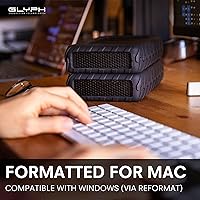
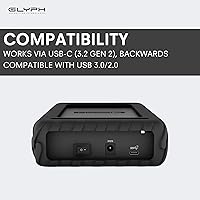
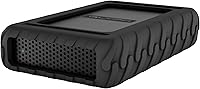
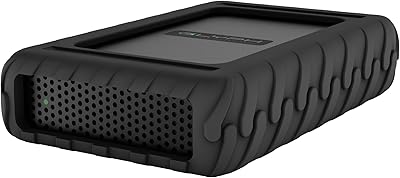
The Glyph BlackBox Pro 20TB External Hard Drive is a desktop unit built around a 7200 RPM mechanical drive, and it shows in how the spec sheet reads compared to typical bus-powered drives on the market. This isn't a slip-it-in-your-bag accessory; it's a sit-on-your-desk workhorse aimed at people who move serious amounts of footage or photo data on a regular basis. Out of the box it arrives formatted for Mac, though switching over to Windows only takes a quick reformat if that's your platform. Connectivity covers USB-C, USB 3.0/2.0, and Thunderbolt 3, so it slots into older and newer machines without much fuss. Glyph has been making professional storage gear for a while, and this drive fits squarely into that lineage, with a fanless build meant to keep things quiet in a studio environment.
Features & Benefits

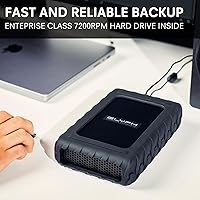
Where this 20TB hard drive earns its keep is in actual throughput. The 7200 RPM spindle beats the 5400 RPM mechanisms in a lot of competing desktop drives, and you can feel it once you're scrubbing through large video files instead of just copying folders. Glyph rates transfer speeds at up to 250 MB/s, plenty of headroom for multi-stream 4K editing without constant buffering. This Glyph drive supports USB-C, USB 3.0/2.0, and Thunderbolt 3, so it adapts to whatever machine you plug it into. The fanless enclosure cuts down on the whirring hum some desktop drives add to a quiet room, useful if you're recording audio nearby. A single 20TB volume also means fewer drives to track and label. It relies on an external power adapter rather than bus power, a fair trade for the performance on tap.

Best For

This external drive makes the most sense for video editors and photographers who regularly work with 4K footage or large RAW image sets and need somewhere to put it all without splitting a project across multiple volumes. Mac-based studios will appreciate the near plug-and-play setup, since formatting is already handled out of the box. It's also a solid pick for anyone building a long-term media archive, where having one large, dependable volume beats managing a shelf of smaller drives. Audio engineers working in treated rooms may like that it skips a built-in fan, avoiding one more source of background noise during recording. Where it makes less sense is for anyone who wants a compact, bus-powered drive to toss in a backpack; this one is built to stay on a desk, not travel with you.

User Feedback

Owner feedback on this 20TB hard drive sits around 4.3 out of 5 across roughly 200 ratings, which is a solid track record for a drive this size. Creative professionals who lean on it for daily, heavy workloads tend to report few issues, with most praising its consistency under sustained use. That said, a handful of reviews point out that the housing isn't fully silent; the fanless design eliminates fan noise, but the drive's spinning platters still produce a faint hum you'll notice in a quiet space. Windows users occasionally mention having to reformat before first use, which is expected but worth knowing ahead of time. A few buyers also weigh the upfront cost against the capacity, and some note the dependency on an external power adapter limits how portable it really is.

Pros

  • Delivers fast 7200 RPM performance that beats typical 5400 RPM desktop drives for large file work.
  • A single 20TB volume means far less juggling between multiple smaller backup drives.
  • Broad connectivity through USB-C, USB 3.0/2.0, and Thunderbolt 3 covers most modern and older setups.
  • The fanless enclosure cuts down on extra noise in quiet edit bays or recording spaces.
  • Mac users get a ready-to-use drive straight out of the box with no setup hassle.
  • Owners report strong reliability under daily, heavy creative workloads according to user feedback.
  • Transfer speeds up to 250 MB/s help keep 4K editing and multi-stream work smooth.
  • Solid overall rating, sitting around 4.3 out of 5 from roughly 200 reviewers.

Cons

  • Requires an external power adapter, so it is not a grab-and-go travel drive.
  • The fanless housing does not fully silence the drive; spinning platters still produce a faint hum.
  • Windows users need to reformat before first use, an extra step Mac owners skip.
  • The desktop form factor and adapter make it a poor fit for frequent travel between locations.
  • Capacity and performance come at a higher upfront cost than basic backup drives.
  • As a mechanical drive, it lacks the shock resistance and speed ceiling of solid-state alternatives.
  • Bulkier dimensions and weight mean it needs a permanent spot rather than a portable bag slot.
  • No mention of included backup or RAID software for buyers wanting built-in data redundancy.

Ratings

Our scores for the Glyph BlackBox Pro 20TB External Hard Drive come from an AI-assisted analysis of verified buyer reviews collected from real purchasers worldwide, with spam, bot activity, and incentivized feedback filtered out before scoring. Each category below reflects a balance of what owners consistently praised and what genuinely frustrated them, so you can see the full picture rather than a polished marketing summary.
Storage Capacity
93%
Owners consistently mention that having 20TB on a single volume eliminates the constant drive-swapping that comes with smaller backup setups. For video editors archiving multiple 4K projects or photographers storing years of RAW files, this much headroom feels genuinely freeing rather than excessive.
A small number of casual users admit they are only using a fraction of the available space, making the capacity feel like overkill for simple backup needs. For them, a smaller and cheaper drive would have covered daily use just fine.
Transfer Speed & Performance
82%
18%
The 7200 RPM mechanism noticeably outpaces the 5400 RPM drives many users compare it to, especially when scrubbing through large 4K timelines or copying big project folders. Multiple reviewers note smoother playback during editing sessions compared to their previous storage setup.
A handful of buyers running multiple simultaneous high-bitrate streams report some slowdown, since 250 MB/s is solid but not in SSD territory. Heavy multi-stream workflows occasionally hit a ceiling that single-stream editors never notice.
Build Quality & Reliability
88%
Creative professionals running this drive daily under heavy workloads frequently mention it holding up well over months of continuous use without errors or failures. The solid desktop housing feels purpose-built rather than flimsy, which matters for people trusting it with irreplaceable footage.
As a mechanical drive, a few owners note it lacks the shock resistance of solid-state alternatives, so accidental bumps or drops carry more risk. Long-term durability beyond the first year or two is harder to gauge from current feedback.
Noise Level
69%
31%
The fanless enclosure genuinely removes the whirring fan noise that plagues a lot of desktop drives, which several audio-conscious users specifically called out as a relief in treated rooms or near microphones.
Multiple reviewers point out that fanless does not mean silent, since the spinning platters still produce a faint, persistent hum. In a very quiet home office or recording booth, that hum becomes noticeable enough to mention.
Value for Money
77%
23%
Buyers who actually need 20TB of fast, reliable storage tend to feel the price is justified once they factor in the capacity, speed, and build quality together, rather than comparing it to bargain-bin backup drives.
Some reviews weigh the upfront cost against the lack of bundled software or RAID redundancy and feel a bit shortchanged. For users who do not need the full 20TB, the price-to-need ratio feels less favorable.
Mac Compatibility & Setup
91%
Mac users repeatedly highlight how the drive works the moment it is plugged in, since it ships pre-formatted and ready to go. That near plug-and-play experience saves time for studios that just want to start working immediately.
There is little negative feedback here specifically from Mac users, though a few mention wishing setup instructions were a bit more detailed for less technical buyers.
Windows Compatibility
63%
37%
Windows users confirm that reformatting is quick and straightforward once they know it is required, and the drive performs just as well afterward as it does on Mac systems.
Several Windows-based reviewers express mild frustration at not realizing reformatting was necessary before first use, leading to a confusing first encounter with the drive showing as unreadable.
Connectivity & Port Versatility
86%
Having USB-C, USB 3.0/2.0, and Thunderbolt 3 support means this drive fits into both older office setups and newer creative workstations without needing extra adapters or dongles.
A few users note that achieving the drive's top rated speeds depends on which port and cable combination you use, which can cause confusion if expectations are not set correctly from the start.
Portability
38%
62%
For its intended desktop role, the form factor is reasonable and stable, sitting securely on a desk without sliding around during regular use.
The external power adapter requirement and overall weight make this a poor choice for anyone who needs to move storage between locations regularly. Several reviewers expecting a more travel-friendly drive were caught off guard by this limitation.
Heat Management
73%
27%
Owners running the drive for extended editing sessions report it staying within reasonable operating temperatures as long as it has decent airflow around it on the desk.
Without a fan, a small number of users in warmer environments or enclosed desk setups mention slightly elevated warmth during long, continuous transfer sessions.
Power Setup Convenience
59%
41%
The included external power adapter is straightforward to use and provides stable power delivery, which several users credit for the drive's consistent performance under heavy loads.
Buyers expecting a simpler bus-powered connection were surprised by the extra cable and outlet requirement, adding one more thing to manage on an already busy desk setup.
Bundled Software
41%
59%
The drive's straightforward, no-frills approach appeals to users who prefer managing their own backup tools rather than relying on proprietary software they would need to learn.
Several reviewers note the absence of included backup or RAID software as a missed opportunity, leaving buyers to set up their own redundancy and backup routines from scratch.
Overall Customer Satisfaction
84%
With an average rating around 4.3 out of 5 from roughly 200 reviewers, most buyers walk away satisfied, particularly those using it for its intended professional, desktop-bound purpose.
Satisfaction dips slightly among buyers who misjudged the drive's portability or noise profile before purchasing, suggesting some of the friction comes from mismatched expectations rather than the drive itself.

Suitable for:

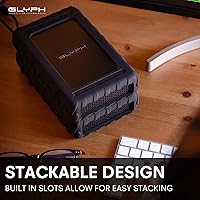
The Glyph BlackBox Pro 20TB External Hard Drive makes the most sense for people who generate a steady stream of large files and need somewhere reliable to put them. Video editors working in 4K, photographers shooting RAW, and anyone managing a long-term media archive will appreciate having a single high-capacity volume instead of juggling several smaller drives. Mac users in particular benefit from the near plug-and-play setup, since the drive arrives ready to go without extra configuration. Audio engineers and anyone working in a quiet recording space will likely appreciate that the enclosure skips a built-in fan, even if the drive itself isn't perfectly silent. For a creative studio or home office that needs serious desktop storage and can dedicate a permanent spot for it, this is a sensible long-term investment.
Not suitable for:

Anyone hoping for a portable, bus-powered drive to carry between locations should look elsewhere, since the Glyph BlackBox Pro 20TB External Hard Drive depends on an external power adapter and is built to live on a desk. Windows-first users should also go in expecting a quick reformat before the drive is usable, a minor step but worth knowing in advance. Buyers sensitive to any background noise should be aware that the fanless design quiets the enclosure but does not eliminate the faint hum of the spinning platters themselves. Casual users who only need a few hundred gigabytes of backup space will likely find the capacity, size, and price tag more than they actually need. Field photographers or videographers who travel often without a dedicated studio setup will probably be better served by a compact SSD instead.

Specifications

  • Storage Capacity: The drive provides 20TB of total storage on a single mechanical volume.
  • Rotational Speed: The internal hard disk spins at 7200 RPM for faster read and write performance than typical 5400 RPM desktop drives.
  • Drive Type: It uses a mechanical hard disk rather than solid-state storage.
  • Hard Disk Interface: The internal drive connects via a Serial ATA-600 interface.
  • External Connectivity: It connects to a computer through USB-C, USB 3.0/2.0, or Thunderbolt 3.
  • Transfer Speed: Rated transfer speeds reach up to 250 MB/s.
  • Form Factor: The enclosure is built around a 3.5-inch desktop form factor.
  • Enclosure Design: The housing uses a fanless design to reduce operating noise.
  • Power Source: An external power adapter is included and required for operation.
  • Default Formatting: The drive ships pre-formatted for Mac and can be reformatted for Windows use.
  • Color: The enclosure is finished in black.
  • Model Number: The model number is BBPR20000ENT.
  • Brand: The drive is manufactured by Glyph Production Technologies.
  • Series: It belongs to Glyph's BlackBox Pro series.
  • Weight: The drive weighs 4.4 pounds.
  • Dimensions: The unit measures 10.24 x 2.76 x 10.24 inches.
  • Device Compatibility: It is compatible with cameras, desktops, gaming consoles, and laptops.

Related Reviews
Glyph BlackBox Pro 8TB
79%
92%
Build Quality
89%
Reliability & Uptime
74%
Transfer Speed
94%
Warranty & Support
61%
Value for Money
More
Glyph BlackBox Pro 16TB External Hard Drive
77%
94%
Storage Capacity
78%
Transfer Speed
91%
Build Quality
88%
Noise Level
93%
Mac Compatibility
More
Glyph BlackBox Pro 12TB External Hard Drive
77%
91%
Build Quality
74%
Transfer Speed
93%
Storage Capacity
88%
Reliability
67%
Value for Money
More
WD 20TB Elements Desktop External Hard Drive
86%
97%
Storage Capacity
91%
Ease of Setup
89%
Data Transfer Speed
88%
Build Quality
65%
Noise Levels
More
ADATA HD710 Pro 5TB External Hard Drive
81%
93%
Build Quality
91%
Waterproof Protection
88%
Shock & Drop Resistance
89%
Storage Capacity
58%
Transfer Speed
More
Seagate One Touch Hub 20TB External Hard Drive
84%
94%
Storage Capacity
86%
Data Transfer Speed
91%
Setup and Installation
90%
Compatibility (Windows & Mac)
88%
Data Security (Encryption & Backup Tools)
More
Oyen Digital Novus 20TB External Hard Drive
74%
83%
Sequential Transfer Speed
92%
Storage Capacity
79%
Build & Enclosure Quality
91%
Setup & Compatibility
69%
Value for Money
More
OWC Mercury Elite Pro 12TB External Hard Drive Enclosure
85%
88%
Performance
91%
Build Quality & Durability
93%
Ease of Setup
89%
Compatibility with Multiple Devices
68%
Noise Levels
More
OWC Mercury Elite Pro 16TB External Hard Drive Enclosure
83%
89%
Performance & Speed
75%
Value for Money
91%
Build Quality & Durability
65%
Noise Levels
88%
Ease of Setup
More
OWC Mercury Elite Pro 6TB External Hard Drive Enclosure
85%
87%
Performance
91%
Build Quality
93%
Data Transfer Speed
90%
Setup & Installation
88%
Compatibility
More

FAQ

It ships pre-formatted for Mac, but it is not Mac-exclusive. You can reformat it for Windows in a few minutes through Disk Management. Just keep in mind reformatting will erase whatever is on it, so do that before loading any files.

Not really. This 20TB hard drive needs an external power adapter, so it is built to live on a desk rather than travel in a bag. If you need something to toss in a backpack, a smaller bus-powered SSD would suit you better.

It is quieter than most desktop drives thanks to the fanless enclosure, but it is not silent. The mechanical platters inside still produce a faint hum, which you will likely notice in a very quiet room but probably will not bother you in a normal office or studio.

Thunderbolt 3 generally gives a bit more headroom for sustained transfers and works well if you are already running a Thunderbolt dock or chain of peripherals. That said, rated speeds top out around 250 MB/s regardless of port, since that is closer to the drive's mechanical ceiling than a cable limitation.

Yes, it lists compatibility with gaming consoles alongside desktops, laptops, and cameras. Just check that your specific console supports external USB drives for storage expansion before relying on it.

For most single-stream 4K work, yes. That speed comfortably handles scrubbing and exporting without much buffering. If you are running multiple high-bitrate streams at once, you might notice more strain than you would on a faster SSD.

There is no mention of bundled backup or RAID software with this drive, so you will want to pair it with your own backup routine, like Time Machine on Mac or a third-party tool on Windows. Since it is a single drive rather than a RAID array, it is worth keeping a second copy of anything truly irreplaceable.

Mechanical drives like this one generate some heat under sustained use, and since there is no fan, the enclosure relies on passive cooling. As long as it has decent airflow around it on your desk, it should run within normal operating temperatures.

It weighs about 4.4 pounds and measures roughly 10.24 x 2.76 x 10.24 inches, so it is solidly built but not something you would want to move around often. Plan on giving it a permanent spot on your desk.

If you only need a few hundred gigabytes for casual backups, this is probably more capacity and cost than you need. It really shines for people working with large 4K footage, RAW photo libraries, or anyone consolidating years of archives onto one dependable volume.