Overview

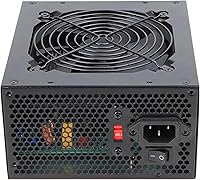
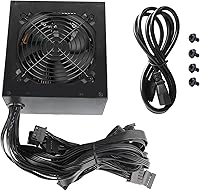
The KYLINTEC KY-700 700W ATX Power Supply is a straightforward, no-frills option aimed squarely at budget-conscious desktop builders who need reliable wattage without spending much. KYLINTEC isn't a household name in the PSU space — brands like Corsair, EVGA, or Seasonic tend to dominate enthusiast builds — so going in with realistic expectations matters. That said, the KY-700 launched in April 2024 and has carved out a respectable spot around #160 in Amazon's Computer Power Supplies category, which suggests it's moving units. The non-modular design means every cable comes pre-attached, permanently. That keeps the price down, but also means you'll be routing and hiding cables you may not even use.

Features & Benefits

The KY-700 runs on a single 12V rail, which is generally preferred for budget builds since it consolidates power delivery to your CPU and GPU rather than splitting it across multiple rails. You get dual 6+2-pin PCIe connectors — enough for most entry-level discrete graphics cards — along with the standard 24-pin motherboard connector, a 4+4-pin CPU plug, four SATA ports, and legacy PATA and FDD connectors for older drives. The 120mm fan adjusts its speed based on system temperature, so at light loads it stays fairly quiet. A manual voltage switch handles both 115V and 230V input, which is handy if you're building internationally. Protections covering overvoltage, undervoltage, overpower, and short circuits are all present, though no 80 PLUS rating is listed.

Best For

This non-modular power supply is a reasonable match for someone assembling their first PC on a tight budget — think a build centered around a mid-range CPU and a card like an RX 6600 or RTX 3060, which sit comfortably within the power envelope. Mid-tower and full-tower cases are a better fit here since you'll have extra room to tuck away the unused PATA and FDD cables that come attached by default. It's less ideal for compact ITX or mATX cases where cable management is already cramped. If you're replacing a dead PSU in a working system and cost is the deciding factor, the KY-700 fits that scenario well. Those planning future GPU upgrades to higher-tier cards should probably budget for a certified unit instead.

User Feedback

Buyers who've picked up this budget ATX PSU tend to appreciate how straightforward it is to install — connectors are labeled clearly and the cable lengths work fine in standard ATX cases. The value-to-wattage ratio draws consistent praise from first-time builders. Where opinions get more divided is around long-term durability. Several users note that without an 80 PLUS certification, there's no independent verification of efficiency or stability under sustained load. Fan noise gets mixed reviews — quiet enough at idle, but reportedly more noticeable when the system is pushed hard. A handful of buyers also flag that the connector fit feels less snug than pricier units. Not a dealbreaker for a budget build, but worth knowing going in.

Pros

  • Offers genuine 700W output at a price point that keeps the overall build budget intact.
  • Single 12V rail design delivers stable, consolidated power to CPU and GPU without splitting loads.
  • Dual 6+2-pin PCIe connectors cover most entry-level and mid-range graphics cards without adapters.
  • The 120mm fan stays notably quiet during light desktop use and low-load gaming sessions.
  • Manual 115V to 230V voltage switching makes it usable across different regions.
  • Includes four SATA connectors, comfortably supporting multiple drives in a standard desktop build.
  • Basic overvoltage, undervoltage, overpower, and short-circuit protections are all present.
  • Cable lengths are adequate for standard mid-tower and full-tower ATX cases.
  • Straightforward installation with clearly labeled connectors suits builders of any experience level.
  • Delivers on its core promise as a get-the-system-running solution without unnecessary complexity.

Cons

  • No 80 PLUS certification means efficiency and stability under load are unverified by any third party.
  • KYLINTEC has little brand history or track record, making long-term reliability hard to assess with confidence.
  • Permanently attached cables create unavoidable clutter, especially the unused PATA and FDD leads.
  • Connector fit reported by some buyers as less snug compared to units from established brands.
  • Fan noise increases noticeably under heavier system loads, which may bother noise-sensitive users.
  • No modular or semi-modular option exists in this product line, limiting cable management flexibility.
  • Warranty terms and after-sales support from a lesser-known brand can be harder to navigate if issues arise.
  • Not suitable as a long-term foundation for a build where GPU upgrades are planned within a year or two.

Ratings

Our AI rating engine analyzed verified global buyer reviews for the KYLINTEC KY-700 700W ATX Power Supply, actively filtering out incentivized, duplicate, and bot-generated feedback to surface what real builders actually experienced. The scores below reflect a balanced picture — where this non-modular PSU genuinely delivers and where it falls short — so you can make a clear-eyed decision before buying.

Value for Money
83%
For budget desktop builds, the price-to-wattage ratio is hard to argue with. Builders pairing this with an entry-level GPU and a mid-range CPU consistently report getting a working, stable system without overspending on the power supply, which is a reasonable call when other components take priority in the budget.
The value calculation changes if the unit fails within the first year or two, since replacement costs eat into initial savings. A few buyers feel that spending slightly more on a certified unit would have been smarter in hindsight, particularly once they factor in the uncertainty around long-term reliability.
Reliability & Longevity
54%
46%
A portion of buyers report the KY-700 running without issues across several months of regular use in light gaming and general desktop workloads. For builds that never push the unit hard, early feedback suggests it holds steady under modest, consistent loads.
The absence of any 80 PLUS certification is a real concern here, and several reviewers flag uncertainty about how the unit performs after extended high-load sessions. KYLINTEC has a limited track record compared to established PSU brands, and that gap in confidence shows up clearly in user sentiment around longevity.
Ease of Installation
88%
First-time builders repeatedly highlight how straightforward the installation process is — connectors are clearly labeled and the cable lengths work well in standard mid-tower cases without awkward stretching or routing. The plug-and-play nature of a non-modular unit actually speeds things up for builders who just want to get the system running.
The permanently attached cable bundle can feel overwhelming to newer builders who are unfamiliar with managing excess cables. PATA and FDD leads, which most modern builds never use, add to the clutter and require bundling out of the way, which takes extra time and patience in tighter builds.
Cable Management
58%
42%
In full-tower cases with generous cable routing channels behind the motherboard tray, most buyers manage a reasonably clean build. Cable lengths are generally adequate for reaching headers and drive bays without stress on the connectors.
The fixed cable harness is a genuine pain point in mid-tower builds where space behind the panel is limited. Unused PATA and FDD cables have nowhere useful to go and frequently end up stuffed awkwardly into the case, which restricts airflow and makes the interior look messier than it needs to.
Fan Noise
71%
29%
During idle desktop use and light tasks, the 120mm auto-thermal fan runs at low speed and most buyers describe the noise level as acceptable or barely noticeable. The thermal control means it is not spinning at full speed unnecessarily, which is appreciated in living room or bedroom setups.
Under sustained gaming loads, several users report the fan ramps up to a level that becomes distracting, particularly in quieter environments. It is not exceptionally loud by budget PSU standards, but buyers expecting near-silent operation under load will likely be disappointed.
Build Quality & Finish
61%
39%
The unit feels solid enough out of the box, and the matte black finish is clean and neutral, fitting unobtrusively into most case aesthetics. For a budget component that sits hidden inside a case, the physical construction meets basic expectations.
Connector snugness is a recurring complaint — some buyers note that plugs seat less firmly than on PSUs from better-known brands, which can cause mild anxiety during installation. The plastic housing feels noticeably lighter and less substantial than comparable units from established manufacturers at a slightly higher price point.
Power Stability
69%
31%
The single 12V rail design is a legitimate advantage for delivering concentrated, stable amperage to the CPU and GPU simultaneously, and users running mid-range configurations report consistent system behavior without unexpected shutdowns or instability under normal gaming sessions.
Without certification data, there is no independent confirmation of how tightly the voltage stays within ATX tolerance during demanding workloads. A handful of builders note occasional system instability under combined CPU and GPU load, though it is unclear whether the PSU or other components were the root cause.
Connector Variety
77%
23%
The connector lineup covers everything a standard desktop build needs — the dual PCIe plugs handle one or two entry-level graphics cards, four SATA ports accommodate multiple drives, and the 4+4-pin CPU connector works with both 4-pin and 8-pin motherboard headers. Most users find they have exactly what they need without hunting for adapters.
The inclusion of PATA and FDD connectors, while occasionally useful for legacy hardware, is largely irrelevant to modern builds and contributes to unnecessary cable bulk. Users building systems with more than two storage drives may also wish there were a fifth SATA connector, though that is a minor concern for most setups.
Thermal Management
67%
33%
The auto-thermal fan control does its job adequately at light-to-moderate loads, keeping internal temperatures in check during everyday desktop use and casual gaming. Buyers in well-ventilated cases report no heat-related issues during typical usage patterns.
There is no published temperature rating or thermal headroom data, so builders running the unit close to its rated wattage in warm environments have no guidance on safe operating limits. A few users in poorly ventilated cases or warm climates mention the unit running noticeably warm after extended sessions.
Safety Protections
72%
28%
Having all four core protections — over-power, over-voltage, under-voltage, and short-circuit — present on a unit at this price is a genuine positive. These safeguards give basic peace of mind that a catastrophic electrical event is less likely to cascade damage through connected components.
Budget PSU protections are rarely subjected to the same rigorous testing as those on certified units, and KYLINTEC provides no published specifications for protection thresholds. Buyers should treat these as a basic safety net rather than a robust defense against prolonged abnormal operating conditions.
Compatibility
84%
Standard ATX form factor means this non-modular power supply drops into virtually any mid-tower or full-tower desktop case without fitment concerns. The switchable 115V to 230V input also makes it usable across North America, Europe, and most of Asia without needing a separate adapter.
The manual voltage switch requires the buyer to set it correctly before first use, and first-time builders occasionally overlook this step. There is no mention of SFX or TFX compatibility, so compact case builders should not assume it will work in their specific form factor without verifying case specifications first.
Brand Trust & Support
43%
57%
KYLINTEC is available through Amazon, which provides a baseline buyer protection framework including returns and A-to-z guarantee coverage during the return window. Buyers who needed to return a unit generally found the standard Amazon process resolved their issue without direct brand involvement.
KYLINTEC has minimal presence outside of Amazon and no established reputation in the PSU community, making it difficult to assess warranty fulfillment or post-purchase support quality. Several reviewers note that buying from an unproven brand means accepting that long-term support channels may simply not be there if the unit develops issues after the return window closes.
Wattage Headroom
74%
26%
For entry-level and mid-range builds, 700W provides comfortable headroom above typical system draw, meaning the unit is not running at its ceiling during everyday use. Builders pairing it with a card in the RX 6600 or GTX 1660 class have room to spare without stressing the unit.
Pushing toward modern mid-to-high-range GPUs that draw 200W or more narrows that headroom quickly, especially when combined with a power-hungry CPU. Without certification data confirming the unit actually delivers its rated 700W consistently, builders are advised to keep real-world system draw well below the stated maximum.

Suitable for:

The KYLINTEC KY-700 700W ATX Power Supply is a sensible pick for first-time PC builders who want to keep their total build cost down without leaving components without power. If you're pairing this with a modest CPU and an entry-level discrete GPU — something in the range of an RX 6600 or GTX 1660 Super — the wattage headroom is comfortable and the dual PCIe connectors cover what you need. It fits naturally into mid-tower and full-tower cases, where the permanently attached cables are easier to bundle and route out of sight behind the motherboard tray. Budget-focused office desktop builds also make good use of it, since those systems rarely push power demands anywhere near the 700W ceiling. It's equally practical as a low-cost replacement in an existing working rig where the original PSU has failed and getting the machine back online quickly and cheaply is the priority.

Not suitable for:

Builders who prioritize long-term reliability and component protection should think carefully before choosing this non-modular power supply, particularly because it carries no 80 PLUS efficiency certification — meaning there's no independent verification of how it performs under sustained, real-world load. Enthusiast builds with power-hungry GPUs like an RTX 4080 or RX 7900 XT are clearly outside what this unit is designed for, and pushing it toward its rated ceiling with uncertified hardware is a gamble not worth taking. Compact ITX and mATX case builders will also struggle here, since the fixed cable harness adds significant bulk that tight cases simply can't absorb gracefully. Anyone planning to upgrade their GPU significantly in the next year or two would be better served investing once in a certified, modular unit rather than potentially replacing this one sooner than expected. The KYLINTEC KY-700 700W ATX Power Supply is honestly not the right foundation for a high-value build where the components it powers cost several times more than the PSU itself.

Specifications

  • Wattage: The unit provides a total continuous output of 700W, suitable for moderate desktop builds.
  • Form Factor: Standard ATX form factor, compatible with the vast majority of mid-tower and full-tower desktop cases.
  • PSU Design: Non-modular design with all cables permanently attached to the unit.
  • 12V Rail: Single 12V rail configuration for consolidated, stable power delivery to CPU and GPU.
  • Main Connector: One 24-pin motherboard connector is included for primary board power.
  • CPU Connector: One 4+4-pin 12V EPS connector supports both 4-pin and 8-pin CPU power headers.
  • GPU Connectors: Two 6+2-pin PCIe connectors are included, supporting one or two entry-level discrete graphics cards.
  • Storage Connectors: Four SATA and four PATA (Molex) connectors are available for drives and legacy peripherals.
  • FDD Connector: One floppy drive (FDD) connector is included for legacy hardware compatibility.
  • Cooling: A 120mm fan with automatic thermal control adjusts speed based on internal temperature load.
  • Input Voltage: Supports switchable input voltage of 115V and 230V via a manual red toggle switch on the rear.
  • Protections: Built-in over-power (OPP), over-voltage (OVP), under-voltage (UVP), and short-circuit (SCP) protections are present.
  • 80 PLUS Rating: No 80 PLUS efficiency certification is listed or claimed for this unit.
  • Dimensions: The unit measures 5.51 x 0.55 x 3.15 inches, fitting standard ATX PSU bays.
  • Weight: The KY-700 weighs 3.39 pounds, which is typical for a non-modular ATX power supply of this wattage.
  • Brand: Manufactured by KYLINTEC, a budget-focused PC component brand launched on Amazon in April 2024.

Related Reviews
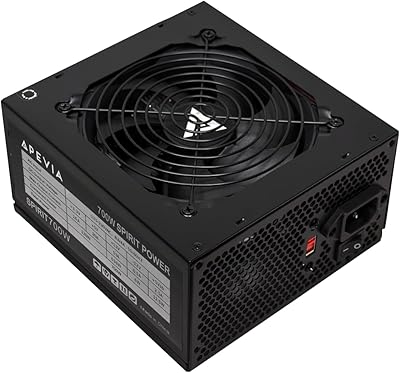
Apevia ATX-SP700 700W ATX Power Supply
71%
83%
Value for Money
88%
Installation Ease
54%
Long-Term Reliability
71%
Noise Level
79%
Connector Variety
More
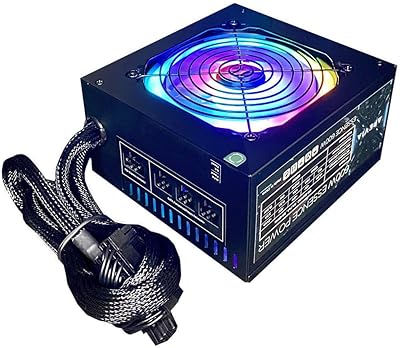
Apevia Essence 700W ATX Power Supply
71%
81%
Value for Money
78%
Cable Management
74%
Power Stability
49%
Efficiency
63%
Build Quality
More
ESGAMING 700W ATX Non-Modular Power Supply
69%
83%
Value for Money
61%
Build Quality
54%
Reliability & Longevity
88%
Connector Variety
74%
Fan Noise
More
KYLINTEC 600W Power Supply ATX PSU
81%
90%
Ease of Installation
85%
Cooling Performance
88%
Power Stability
75%
Cable Management
80%
Build Quality
More
Apevia Essence 600W Semi-Modular ATX Power Supply
72%
78%
Value for Money
81%
Cable Management
74%
Noise Level
86%
Ease of Installation
62%
Build Quality
More
Apevia CAPTAIN550 550W ATX Power Supply
70%
78%
Value for Money
54%
Reliability
83%
Cable Quality & Aesthetics
81%
Connector Compatibility
84%
Ease of Installation
More
Apevia Raptor 500W ATX Power Supply
72%
83%
Value for Money
88%
Ease of Installation
74%
Connector Availability
58%
Reliability & Longevity
79%
Fan Noise
More
Dell H240AS-00 240W Power Supply Unit
73%
91%
Drop-in Fitment
58%
Compatibility Clarity
78%
Build Quality
84%
Value for Money
73%
Power Adequacy
More
Corsair RM1200x Shift 1200W ATX Power Supply
84%
91%
Cable Management Design
88%
Build Quality & Materials
89%
Noise Level & Fan Behavior
92%
Power Delivery Stability
86%
PCIe 5.0 & ATX 3.1 Compatibility
More
Apevia Venus 500W ATX Power Supply
86%
92%
Value for Money
88%
Cooling Efficiency
91%
Protection Features
84%
Build Quality
85%
Compatibility with Components
More

FAQ

Yes, the KY-700 uses a standard ATX form factor, so it will fit in any case with a standard ATX PSU bay. That covers the overwhelming majority of mid-tower and full-tower cases on the market. Just double-check your case specs if you are using something compact or unusual.

Yes, cards in that performance tier typically draw between 130W and 160W under load, which is well within what this budget ATX PSU can handle alongside a mid-range CPU. You have two 6+2-pin PCIe connectors, so you can connect one card directly without needing an adapter. Just be aware that pushing close to the 700W ceiling continuously on an uncertified unit is a risk you should weigh.

Non-modular means every cable comes permanently attached to the PSU — you cannot remove the ones you are not using. In practice, this means you will have extra PATA and FDD cables dangling around even if your build does not need them. In a full-tower with good cable management space behind the motherboard tray, this is manageable. In a tight mATX or ITX case, it can get messy quickly.

No, it is not. KYLINTEC does not list any 80 PLUS certification for this unit, which means its efficiency under load has not been independently verified. Certified PSUs (even Bronze-rated ones) are tested to confirm they waste less energy as heat and maintain stable output. The absence of any rating is a real trade-off to factor in, particularly if you plan to run the system for long hours.

At idle or light desktop use, the 120mm fan runs quietly since it throttles based on system temperature. Under heavier gaming loads, some users report the fan becomes noticeably audible. It is not unusually loud for a budget unit, but if near-silent operation matters to you, this non-modular power supply is not in the same league as premium quiet-focused PSUs.

The KY-700 includes four SATA connectors and four PATA (Molex) connectors, so you can power up to four SATA drives directly. Most modern builds use only SATA, so four ports is plenty for a typical setup with an SSD and one or two mechanical hard drives.

Yes, it handles both 115V (North America) and 230V (Europe, Asia, and elsewhere), but you switch between them manually using a small red button on the back of the unit. Just make sure you set it correctly before powering on — running a 115V setting on a 230V outlet can damage the unit and connected components.

If keeping cost minimal is the main priority and your system is a light-to-moderate build, this budget ATX PSU gets the job done. It installs straightforwardly and has the connectors needed for most standard desktop configurations. Just consider whether your original PSU was a better-quality unit — sometimes it is worth spending a bit more on a certified replacement rather than stepping down in quality.

The KY-700 includes four key protections: over-power (OPP), over-voltage (OVP), under-voltage (UVP), and short-circuit (SCP). These are the basic safety features you would expect on any modern PSU, and they should cut power if something abnormal is detected. That said, protections on budget uncertified units are not as rigorously tested as those on certified models, so they are a safety net, not a guarantee.

Based on user feedback, cable lengths are generally fine for standard mid-tower cases and adequate for most full-tower builds. A few users with extra-large cases or unusual layouts mention the cables run a little short for clean routing behind the motherboard tray. If you have a particularly deep full-tower, it is worth checking cable length specs against your case dimensions before buying.