Overview

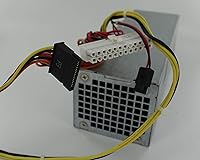
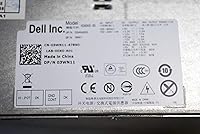
The Dell H240AS-00 240W Power Supply Unit is a genuine OEM replacement pulled straight from Dell's own production line, originally shipped inside OptiPlex and similar business-class desktops. If your office machine goes down because the PSU fails, this 240W unit offers a cost-effective repair path rather than scrapping the whole system. That said, compatibility is everything here. Dell produced several visually similar PSUs across its desktop lineup, and swapping in the wrong one causes real problems. Before ordering, cross-reference your existing unit against the known model numbers — 3WN11, 2TXYM, and 709MT are among the confirmed compatible variants. Get that right, and you have a clean route back to a working machine.
Features & Benefits

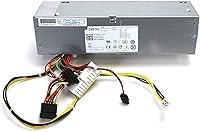
At 240 watts, this 240W unit covers what most integrated-graphics Dell desktops actually need — browsing, spreadsheets, and light multitasking don't push anywhere near that ceiling. The ATX connector fits standard Dell motherboard configurations without adapters or modifications, keeping installation straightforward. Dimensionally, it matches the original chassis footprint at 13 x 6 x 4 inches, so there is no cutting or bracket-work involved. An internal fan handles thermal management quietly in the background. Weighing just under 9 ounces, it is easy to handle inside cramped small-form-factor cases. Worth stating plainly: this is a hard 240W ceiling. Discrete GPU users or anyone running a power-hungry build should look elsewhere entirely.

Best For

This Dell replacement PSU makes the most sense for IT repair professionals and small businesses keeping a fleet of aging OptiPlex machines running. If you manage office desktops and one goes down with a blown PSU, this is a clean, no-drama fix. Home users in the same situation — a functional machine that just needs its power supply swapped — will find it equally practical. What it is not suited for is anything power-hungry. Gaming systems, video editing workstations, or any build running a dedicated GPU will outgrow 240W fast. This unit is purpose-built for low-demand productivity builds where OEM authenticity and exact-fit compatibility matter more than raw overhead.

User Feedback

Verified buyers consistently highlight plug-and-play installation as the standout experience — pull the old unit, slide the H240AS-00 in, and the machine powers up without fuss. Build quality also draws steady positive remarks; most agree it feels and performs like an original part. On the downside, a recurring thread of complaints centers on compatibility mismatches — not because the unit is defective, but because buyers ordered without confirming their exact Dell model first. Packaging feedback is mixed: some report units arriving well-protected, while others mention inadequate padding. Long-term reliability is mostly encouraging, though a small number of verified purchasers noted early-failure issues within the first few months of regular use.

Pros

  • Genuine OEM part ensures exact fitment with no adapter cables or modifications required.
  • Drop-in replacement for compatible Dell OptiPlex desktops saves significant time during repairs.
  • 240W output comfortably handles integrated-graphics office builds without running near its ceiling.
  • Multiple cross-reference model numbers (3WN11, 2TXYM, 709MT) make sourcing and verification straightforward.
  • Compact, lightweight build at under 9 ounces makes handling inside tight chassis easy.
  • Internal air-cooling fan operates quietly, consistent with original Dell system acoustics.
  • Extends the working life of functional hardware at a fraction of the cost of a new machine.
  • Strong verified-buyer consensus around plug-and-play installation with no surprises out of the box.
  • OEM authenticity appeals to repair shops and IT professionals who need reliable, predictable results.

Cons

  • Compatibility is strictly limited — ordering without verifying your exact Dell model often results in a return.
  • 240W ceiling means this 240W unit has zero headroom for discrete GPUs or hardware upgrades.
  • Several buyers reported inadequate protective packaging, with some units arriving with minor shipping damage.
  • A small but consistent number of verified purchasers reported early failures within the first few months.
  • Not a cross-brand solution — this PSU is purpose-built for specific Dell systems and nothing else.
  • Older design dating back to 2013 means no modern efficiency ratings or power-saving certifications.
  • No included installation instructions, which may slow down less experienced users unfamiliar with PSU swaps.
  • Confusingly similar part numbers across Dell's PSU lineup increase the risk of ordering the wrong unit.

Ratings

The scores below for the Dell H240AS-00 240W Power Supply Unit were generated by our AI engine after systematically analyzing verified purchase reviews from buyers worldwide, with spam, incentivized, and bot-flagged submissions actively filtered out before scoring. Each category reflects the honest distribution of real user experiences — including the friction points buyers encountered alongside the genuine strengths. Nothing has been smoothed over to flatter the product.
Drop-in Fitment
91%
For buyers who confirmed compatibility upfront, the installation experience was consistently described as effortless — unscrew the old unit, slide this one in, and the machine boots cleanly. IT technicians handling multiple Dell OptiPlex repairs in a single workday particularly appreciated having zero cable-adaptation work involved.
The high score here comes with a caveat: it only applies when the correct model is ordered. A meaningful subset of buyers who skipped the compatibility check found the fitment experience was anything but smooth, resulting in returns and wasted time.
Compatibility Clarity
58%
42%
The multiple cross-reference part numbers — 3WN11, 2TXYM, 709MT, and H240AS-00 — give technically informed buyers a solid verification path. Repair professionals who know how to use Dell's service tag lookup found matching the right unit to their machine relatively painless.
A recurring complaint across verified reviews involves buyers receiving a unit that looks nearly identical to their original PSU but simply does not work in their specific chassis. Dell's overlapping part number ecosystem creates genuine confusion, and product listings do not always clarify compatible models with enough specificity to prevent costly ordering mistakes.
Build Quality
78%
22%
Most buyers were pleasantly surprised by how closely the unit's construction matched their original Dell PSU — the casing, connector quality, and overall heft felt consistent with a genuine OEM part rather than a budget-tier knockoff. For office environments where reliability over flash matters, this lands well.
A small but notable portion of verified purchasers flagged early-stage quality issues, with a handful reporting fan noise or voltage irregularities appearing within the first few months of regular use. It is not a widespread problem, but it is consistent enough to warrant keeping purchase receipts handy.
Value for Money
84%
When the alternative is retiring an otherwise functional Dell desktop, this 240W unit makes strong financial sense. Repair shops and small business IT departments treating it as a cost-per-repair investment rather than a retail purchase consistently rated it as money well spent.
Buyers who ordered incorrectly and had to return the unit found the value proposition collapsed quickly once return shipping costs were factored in. A few reviewers also noted that similarly priced aftermarket alternatives occasionally offered longer explicit warranty terms, which undercut the OEM premium argument slightly.
Power Adequacy
73%
27%
For the workloads these Dell desktops were designed for — document editing, spreadsheets, light web browsing, and basic data entry — 240W provides comfortable operating headroom. Users running machines in office or reception desk roles reported no power-related instability under normal daily conditions.
Buyers who later decided to add even a modest discrete GPU or additional storage drives discovered 240W left very little margin. This unit does not scale with ambition, and a few verified purchasers expressed frustration that they had to replace it again after a relatively minor hardware upgrade.
Packaging & Arrival
61%
39%
When units arrived in good condition, buyers rarely commented on packaging specifically — which usually means the protection was adequate enough to do its job without drawing attention. Orders fulfilled by more careful sellers generally received positive marks on condition-at-arrival.
A consistent thread in the critical reviews involved inadequate padding inside the shipping box, with some buyers finding the unit had shifted significantly in transit. A small number received units with cosmetic damage to the casing, and at least a few reported functional issues they attributed to rough handling during shipping.
Noise Level
79%
21%
In typical office conditions the internal fan operates at a low, unobtrusive hum that most users found easy to tune out entirely. Buyers replacing a previously quiet Dell system reported the acoustic experience remained consistent with what they were used to.
Under sustained heavier loads — say, a machine handling extended file transfers or running multiple background processes — a handful of users noticed the fan spinning up more audibly than expected. It is not a dealbreaker, but worth noting for anyone placing this unit in a quiet shared workspace.
Thermal Performance
76%
24%
Air cooling via the integrated fan handled routine office workloads without triggering thermal warnings or unexpected shutdowns in the vast majority of verified installs. Users running machines in reasonably ventilated office environments reported stable temperatures over extended use periods.
Buyers running these systems in warm server closets or poorly ventilated desk setups reported marginally higher fan speeds and, in a few cases, thermal-related throttling. The cooling solution is adequate for its intended environment but does not have a lot of tolerance for adverse ambient conditions.
OEM Authenticity
83%
Buyers sourcing this unit through reputable sellers consistently confirmed it behaved exactly as an original factory part should — no BIOS warnings, no power management quirks, and no compatibility flags that sometimes appear with third-party PSU replacements in Dell systems.
The OEM authenticity story is complicated slightly by the presence of third-party sellers offering units under the same part numbers. A small number of buyers suspected their unit was not genuine Dell stock based on minor cosmetic differences, though performance in those cases was generally unaffected.
Ease of Sourcing
72%
28%
The product has maintained active availability since 2013 and ranks well within the Computer Power Supplies category, meaning buyers can usually locate it without a prolonged search. The multiple recognized model number equivalents also help when one variant is temporarily out of stock.
Stock consistency across sellers varies noticeably, and buyers in some regions reported longer-than-expected shipping windows or limited seller options. Pricing also fluctuates depending on whether new old-stock or refurbished pulls are available at a given time, making cost predictability an occasional issue.
Longevity
69%
31%
The majority of verified buyers who provided longer-term feedback reported units still operating normally well beyond the one-year mark, particularly in stable office environments running predictable daily workloads. For a replacement part in an aging system, that tracks reasonably well.
The subset of early failures — units showing signs of degradation within the first two to four months — is just large enough to register as a pattern rather than random variance. Whether this reflects production inconsistencies or shipping damage is unclear, but it is enough to justify monitoring system stability closely after installation.
Installation Documentation
47%
53%
For experienced technicians and IT professionals, the lack of included instructions is a complete non-issue — the swap is intuitive enough that documentation would be redundant. That audience represents a significant portion of buyers and they tend to rate this aspect neutrally.
Home users and first-time builders who expected even a basic guide were left to rely entirely on online resources, which frustrated a noticeable segment of less technical buyers. The absence of any printed compatibility reference card was a particular sticking point given how critical model verification is for this part.

Suitable for:

The Dell H240AS-00 240W Power Supply Unit is the right call for anyone tasked with keeping older Dell OptiPlex desktops alive rather than replacing them outright. IT managers at small businesses, school districts, or nonprofits running fleets of these machines will find this 240W unit a practical, budget-conscious way to extend hardware lifespan by several more years. Home users who have a functioning Dell desktop that simply lost its PSU will also benefit — provided they verify the model numbers match before ordering. Repair technicians servicing Dell equipment regularly should consider keeping one of these on the shelf, since the drop-in OEM fit eliminates guesswork and speeds up turnaround. Anyone running basic office workloads — email, spreadsheets, light web use — has more than enough headroom with 240 watts powering an integrated-graphics system.
Not suitable for:

The Dell H240AS-00 240W Power Supply Unit has real limits that make it a poor fit for a meaningful slice of buyers. Anyone running a dedicated GPU, even a modest one, will quickly find 240W inadequate — this unit was never designed for graphics-intensive workloads, gaming rigs, or video editing stations. It is also not a universal replacement; buyers who assume any Dell PSU will fit any Dell chassis are heading for a frustrating return experience. If your system is not on the confirmed compatibility list — cross-referencing against model numbers like 3WN11, 2TXYM, or 709MT is essential — this unit simply will not work safely. Power users or anyone planning to upgrade their CPU, add storage drives, or expand RAM significantly should size up to a higher-wattage PSU from the start rather than retrofitting later.
Specifications

  • Brand: Manufactured by Dell, a major OEM desktop and peripheral hardware vendor.
  • Model Numbers: Cross-referenced under multiple part numbers including H240AS-00, 3WN11, 2TXYM, and 709MT.
  • Output Wattage: Provides a maximum continuous output of 240W, suitable for integrated-graphics desktop configurations.
  • Form Factor: ATX form factor, matching the physical and electrical standard used in compatible Dell desktop chassis.
  • Connector Type: ATX connector interface for direct compatibility with Dell motherboards requiring no adapter cables.
  • Current Rating: Rated at 4 amps, consistent with the power delivery requirements of low-demand Dell desktop systems.
  • Cooling Method: Air-cooled via an integrated internal fan that manages thermal output during operation.
  • Dimensions: Measures 13 x 6 x 4 inches, sized to fit the original Dell chassis cavities without modification.
  • Item Weight: Weighs approximately 8.8 ounces (roughly 250 grams), making it easy to handle during installation.
  • Compatible Devices: Designed specifically for compatible Dell desktop PCs, including select OptiPlex and similar business-class models.
  • Availability: First listed in May 2013 and confirmed as not discontinued by the manufacturer as of the latest listing data.
  • Market Rank: Ranks #278 in the Computer Power Supplies category, reflecting consistent demand in the replacement parts segment.
  • Manufacturer: Dell Technologies, headquartered in Round Rock, Texas, produces and supplies this unit as an OEM replacement component.
  • Input Voltage: Designed to operate on standard AC input voltages typical for Dell desktop systems sold in North America and compatible regions.
  • Workload Class: Intended for low-to-moderate demand workloads including office productivity, web browsing, and light data processing tasks.

Related Reviews
Arcity 1201 Multi-Voltage Switching Power Supply
76%
88%
Output Voltage Stability
84%
Output Noise & Ripple
71%
Build Quality
86%
Value for Money
74%
Ease of Installation
More
be quiet! Straight Power 12 1000W PSU
84%
91%
Acoustic Performance
89%
Build Quality
68%
Cable Quality
93%
Connector Compatibility
71%
Value for Money
More
be quiet! Pure Power 13 M 1000W PSU
84%
93%
Acoustic Performance
89%
Build Quality
88%
Efficiency & Heat Output
91%
PCIe 5.1 Compatibility
87%
Voltage Stability
More
be quiet! Pure Power 13M 850W PSU
85%
93%
Acoustic Performance
88%
Build Quality
91%
Voltage Stability
94%
Future Compatibility
79%
Value for Money
More
be quiet! Dark Power Pro 13 PSU
84%
96%
Voltage Stability & Regulation
93%
Noise Level
94%
Efficiency (80 Plus Titanium)
91%
PCIe 5.0 & 12VHPWR Compatibility
83%
Rail Configuration Flexibility
More
LC-Power LC1200P 1200W Modular Power Supply
81%
84%
Build Quality
88%
Power Delivery Stability
83%
Efficiency
87%
Noise Level
91%
Cable Management
More
be quiet! Straight Power 12 1500W PSU
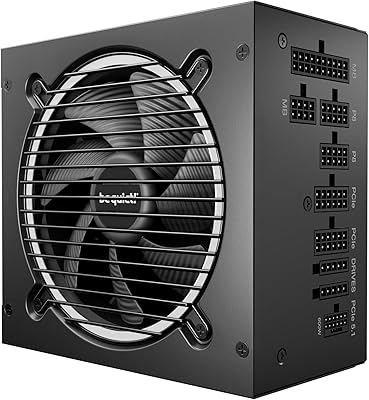
86%
96%
Noise Level
93%
Efficiency & Heat Management
91%
Power Stability & Transient Response
88%
Cable Quality & Modularity
94%
PCIe 5.0 & Modern GPU Compatibility
More
be quiet! Pure Power 13 750W PSU
86%
93%
Noise Level
88%
Build Quality
86%
Value for Money
74%
Wattage & Power Headroom
84%
Cable Quality & Modularity
More
be quiet! Pure Power 12 M 1200W PSU
85%
91%
Noise Level
93%
Power Stability
67%
Cable Quality & Flexibility
88%
Efficiency & Heat Output
84%
Installation Experience
More
be quiet! Pure Power 12 M 1000W
85%
93%
Noise Level
89%
Efficiency & Power Delivery
91%
Build Quality
86%
Cable Quality & Flexibility
88%
Modular System Usability
More

FAQ

The safest approach is to physically check the label on your existing power supply and match it against the confirmed model numbers: H240AS-00, 3WN11, 2TXYM, or 709MT. You can also look up your Dell system's service tag on Dell's support site to identify which PSU was originally installed. Do not rely on wattage alone — Dell used several visually similar PSUs across its desktop lineup that are not interchangeable.

Many users have successfully used this 240W unit in OptiPlex 390 and 790 models, but you should verify by matching the part number on your existing PSU before ordering. Dell made both small form factor and mini-tower variants of those machines, and PSU fitment can differ between them.

No, this would not be a smart move. At 240W total output, there is very little headroom once the CPU, RAM, storage, and motherboard are drawing their share. Most entry-level discrete GPUs alone require 75W or more, which would push this unit dangerously close to or over its limit. If you are planning a GPU upgrade, look for a higher-wattage replacement instead.

That depends entirely on the seller. Some listings are new old-stock OEM units, while others are pulls from refurbished machines. Always check the seller's product condition description carefully before purchasing, and buy from sellers with clear return policies in case the unit does not perform as expected.

If you are comfortable working inside a desktop case, it is a straightforward swap. Disconnect the old unit, unscrew the mounting bracket, plug in the new one, and you are done — no cable modifications required. If you have never opened a PC before, watching a quick teardown video specific to your Dell model is worth the few minutes it takes.

Warranty coverage varies by seller, so there is no single answer here. OEM replacement parts like this one typically do not carry Dell's standard new-product warranty when purchased through third-party channels. Check the specific seller's listing for warranty or return terms before committing.

It might, but random shutdowns can have several causes including overheating, failing RAM, a faulty hard drive, or a dying PSU. A PSU that is struggling will often cause unexpected shutdowns under load, so it is a reasonable thing to test. Before ordering, try running Dell's built-in diagnostics or checking the system event log for power-related errors to narrow down the cause.

If your machine originally shipped with an H240AS-00 or one of the confirmed equivalent models, the dimensions are a direct match at 13 x 6 x 4 inches. This is an OEM part, so the chassis mounting points and connector positions align with the original design. If you are uncertain, photograph your existing unit before removing it.

Most verified buyers report that the fan noise is consistent with the original Dell unit it replaces, which is to say — quiet during light use and audible under heavier sustained loads. It is not a silent unit, but it is not disruptively loud either. If your old PSU was quiet, you should expect similar behavior from this one.

Contact the seller immediately and document the condition with photos before attempting any further installation steps. Most reputable sellers will process a return or replacement for a unit that arrives non-functional. Avoid forcing a damaged unit into operation, as a faulty PSU can potentially damage other components in your system.