Overview

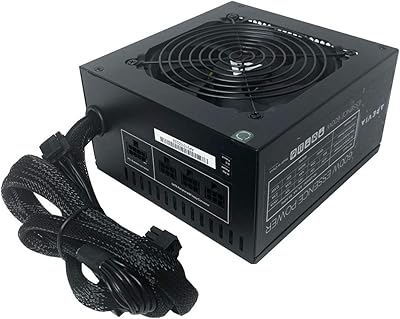
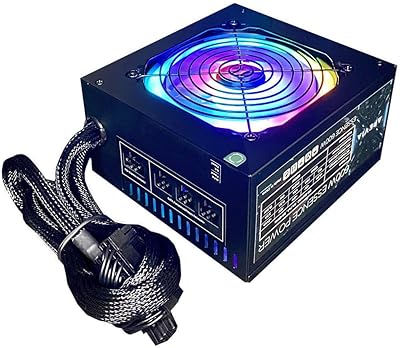
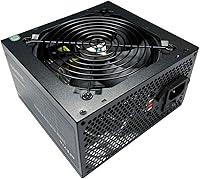
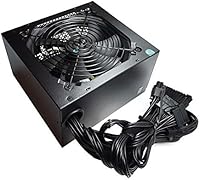
The Apevia CAPTAIN550 550W ATX Power Supply is a no-frills option aimed at budget-conscious builders who need something functional without draining their wallet. Apevia isn't a household name in the PSU space, but this unit has held a solid position in its category since its 2020 debut. The all-black cable aesthetic is a genuine visual differentiator at this price — most competitors at this tier ship with a mix of colors that complicate cable management. The standard ATX form factor ensures broad case compatibility. One caveat worth flagging early: no 80 Plus efficiency certification is listed, which efficiency-minded buyers should weigh before committing.
Features & Benefits

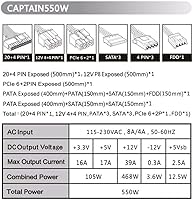
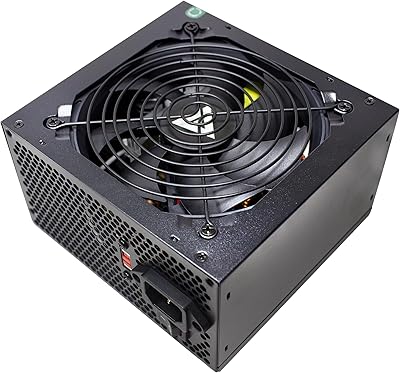
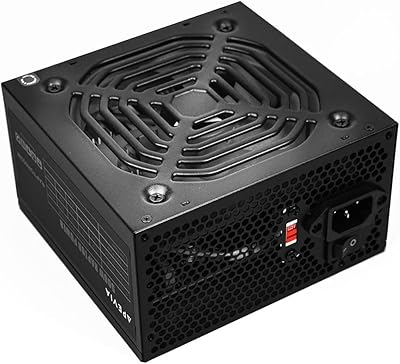
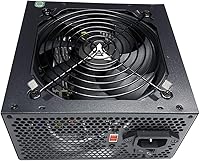
The connector lineup here covers the essentials for a typical build. The split connector design is a nice practical touch — the 8-pin CPU connector separates into a 4+4 configuration, and the PCIe connector splits into a 6+2 arrangement, so you aren't locked out of boards or GPUs that use the smaller variants. The +12V rail delivers 39A, which is enough headroom for a budget discrete GPU and everyday components. Thermal management comes from a 120mm auto-controlled fan that stays relatively quiet under light loads. Three SATA and three peripheral connectors handle the storage and accessory side of things, and the manual 115/230V input switch is useful if you're building or operating outside North America.

Best For

This Apevia unit makes the most sense for first-time builders putting together an office PC or a light gaming rig on a tight budget. If your build doesn't include a power-hungry GPU — think anything meaningfully above an RTX 3060 class card — the 550W output gives you comfortable headroom. It's also a reasonable pick if you're replacing a dead PSU in an older ATX case and just need something that works without much fuss. The all-black cables are a genuine bonus for anyone who cares about interior presentation but can't justify spending more for a true modular unit. High-performance workstation or gaming builds should look elsewhere.

User Feedback

Opinions on the CAPTAIN550 follow a fairly predictable pattern for a budget PSU. Most buyers who received a working unit are happy — installation is straightforward, and the clean cable presentation gets consistent praise. Value satisfaction runs high among people running basic desktops. The trouble shows up in the lower-rated reviews: a notable minority report units arriving DOA or failing within a few months, which is a real concern at any price. Fan noise stays manageable under light workloads but becomes audible when the system is pushed harder. One recurring point of confusion: this PSU will not power on unless all cables are properly connected to the PC — it's stated in the documentation, but still catches new builders off guard.

Pros

  • All-black sleeved cables keep builds looking tidy without the hassle of aftermarket cable replacements.
  • Split connectors — 4+4 CPU and 6+2 PCIe — make this budget PSU compatible with a wide range of boards and GPUs.
  • Standard ATX dimensions mean it fits virtually any mid-tower or full-tower case without modification.
  • The 120mm fan stays quiet under light and moderate workloads, which matters for a desk-side PC.
  • 39A on the +12V rail provides adequate power delivery for integrated graphics and entry-level discrete GPUs.
  • Three SATA connectors cover most basic storage setups right out of the box.
  • Manual 115/230V input switch makes it usable in different countries when adjusted correctly.
  • For a simple office or home desktop build, this Apevia unit delivers functional reliability at an accessible price point.
  • Installation is consistently described as straightforward, even by first-time builders.

Cons

  • No 80 Plus efficiency certification is listed, meaning power waste and heat output are harder to predict under load.
  • A notable share of user reviews mention units arriving dead or failing within the first few months of use.
  • Fan noise becomes noticeably audible during sustained heavy workloads, which can be distracting in quiet environments.
  • The PSU will not power on unless all internal cables are fully connected — a non-obvious behavior that trips up new builders.
  • Only one PCIe connector limits options for anyone wanting to run two storage or accessory devices off PCIe power.
  • Long-term durability is a legitimate question mark given the pattern of early failures reported in lower-rated reviews.
  • Apevia's brand reputation and support infrastructure are thin compared to established PSU manufacturers.
  • Three peripheral connectors may feel tight in builds with multiple older-style accessories or fan hubs.

Ratings

The scores below for the Apevia CAPTAIN550 550W ATX Power Supply were generated by AI after analyzing verified global user reviews, with spam, bot-submitted, and incentivized feedback actively filtered out. Each category reflects the real balance of buyer experiences — strengths and recurring frustrations included — so you can make a clear-eyed decision before purchasing. Where this budget PSU genuinely delivers, the scores show it; where it falls short, that's reflected too.
Value for Money
78%
22%
For budget-conscious builders, the price-to-functionality ratio holds up well for basic desktop use. Buyers assembling office PCs or casual home systems consistently report feeling they got what they paid for, especially given the all-black cables typically found only on pricier units.
The value calculation shifts if you receive a DOA unit or experience an early failure, since replacement costs and downtime erode the initial savings quickly. Without efficiency certification, ongoing electricity costs may also quietly offset the low upfront price over time.
Reliability
54%
46%
The majority of buyers who received a functional unit report it working without issue for the duration of light, everyday use. For low-stress builds like office PCs left running standard workloads, many users log months of trouble-free operation.
A notable minority of reviews describe units arriving non-functional or failing within the first few months — an unusually high pattern for even a budget PSU. Long-term durability confidence is genuinely low here, and anyone depending on their PC for critical work should factor that risk into their decision.
Cable Quality & Aesthetics
83%
The all-black sleeved cables are one of the most frequently praised aspects across buyer reviews. Builders working on glass-panel cases especially appreciate not having to buy aftermarket cables just to avoid the multicolor tangle common at this price tier.
The cables are non-modular, meaning unused connectors remain inside the case regardless. In smaller mid-tower builds with limited space, routing the extra peripheral and SATA lines neatly takes more effort than the clean exterior suggests.
Connector Compatibility
81%
19%
The split-connector design covers a genuinely wide range of hardware without adapters — the 4+4 CPU and 6+2 PCIe connectors handle both older and current motherboard and GPU configurations out of the box. First-time builders in particular find this flexibility reassuring.
Only one PCIe connector is included, which is a real limitation if your GPU requires two power inputs or if you ever want to add a second card. Three SATA ports can also feel tight in builds with multiple drives and a few accessories competing for the same connectors.
Ease of Installation
84%
Buyers consistently describe the installation process as smooth and intuitive, even for those building their first PC. The labeled connectors and standard ATX sizing mean it drops into most cases without any fitment surprises.
One recurring pain point undermines the otherwise clean experience: the PSU will not power on unless all required cables are fully connected to the system, which confuses a meaningful number of new builders who assume the unit is defective. Better in-box documentation would eliminate most of these support headaches.
Noise Level
69%
31%
Under light workloads — web browsing, document editing, media playback — the 120mm thermally controlled fan stays unobtrusive and blends into typical room ambient noise. For an office build that never gets pushed hard, most users simply don't notice it.
Sustained heavier loads cause the fan to ramp up audibly, which becomes noticeable in quieter environments. It doesn't reach an obnoxious level, but users who expected near-silence under gaming workloads report being disappointed once their system is under pressure.
Power Output Headroom
71%
29%
The 39A on the +12V rail gives a basic build with an entry-level discrete GPU enough overhead to operate stably without regularly bumping against the ceiling. For integrated graphics or lightweight GPU configurations, it feels comfortable and unhurried.
There is little buffer for system upgrades — adding a more demanding GPU or additional storage without revisiting the PSU is a risk. Users who planned to upgrade their build incrementally often find this unit becomes the bottleneck sooner than expected.
Thermal Management
67%
33%
The auto-thermally controlled fan does its job adequately under normal conditions, keeping internal temperatures in check for modest workloads. Buyers running home media centers or productivity machines rarely mention heat as a concern.
Without efficiency certification, the unit likely generates more heat than a comparable certified PSU under load, putting more strain on the thermal system. In warm environments or poorly ventilated cases, this can compound over time and contribute to component stress.
Build & Component Quality
58%
42%
The external construction feels solid enough during installation, and the connectors seat firmly without feeling flimsy. For a component at this price tier, the physical fit and finish are acceptable and won't disappoint on first contact.
Internal component quality is harder to verify without teardown, and the DOA and early failure reports suggest corners may have been cut in capacitor or circuitry selection. The lack of any listed certifications reinforces the sense that quality control is inconsistent across production batches.
Form Factor & Case Compatibility
88%
Standard ATX dimensions mean this unit fits virtually any mid-tower or full-tower case without measurement anxiety. Drop-in replacement buyers upgrading aging systems especially benefit from the no-surprises sizing.
Compact or specialty cases requiring SFX or TFX form factors are completely out of scope, and the unit offers no flexibility there. Full-tower builds with longer cable routing distances may also find a handful of connector runs just barely sufficient in length.
Efficiency
47%
53%
The unit does convert power and run stable systems under appropriate loads, which is the baseline function any PSU must deliver. For very short daily usage cycles in a basic office setting, efficiency losses may not translate into meaningfully higher electricity bills.
No 80 Plus or equivalent certification is listed, which means there is no independent verification of how efficiently this PSU converts AC to DC power. Under sustained load, uncertified units in this class commonly waste 20% or more as heat — a genuine cost over months of regular use.
Safety Protections
72%
28%
The unit ships with standard ATX safety protections covering overvoltage, overcurrent, and short-circuit scenarios, providing a basic safety net for connected components. For a straightforward office build, these protections handle the common failure modes adequately.
The protection suite is functional but not exceptional — higher-tier units offer more granular and responsive protection circuitry. Given the reliability concerns noted elsewhere, buyers with expensive CPUs or GPUs may want the added insurance of a PSU from a brand with a stronger track record.
Documentation & Unboxing Experience
61%
39%
The physical packaging is adequate and the unit arrives without obvious shipping damage in most cases. The split-connector functionality is mentioned in the product documentation, which at least provides the information buyers need if they read it carefully.
The documentation does not do nearly enough to flag the non-obvious startup behavior — that all cables must be connected before the PSU will power on — in a way that new builders will actually notice before their first power attempt. This single documentation gap drives a disproportionate share of negative first impressions.

Suitable for:

The Apevia CAPTAIN550 550W ATX Power Supply is a practical pick for anyone assembling a basic desktop on a lean budget who doesn't need top-tier efficiency or long-term brand assurance. First-time builders will appreciate the straightforward installation and the split connectors that adapt to different motherboard and GPU configurations without requiring adapters. It fits naturally into office desktop builds, home media PCs, and modest gaming rigs that rely on entry-level or mid-range discrete GPUs. Anyone replacing a failed PSU in an older ATX case will find the standard form factor drops right in without compatibility headaches. The all-black cable aesthetic is a genuine bonus for builders who want a tidy interior without paying a premium for a fully modular unit.
Not suitable for:

Builders planning a performance-oriented system should think carefully before choosing the Apevia CAPTAIN550 550W ATX Power Supply. The absence of any listed 80 Plus efficiency certification is a real gap — at higher sustained loads, an uncertified unit wastes more power as heat, which matters both for electricity costs and system thermals over time. Anyone pairing this with a high-draw GPU, particularly cards that push well past the RTX 3060 tier in power consumption, would be pushing the unit harder than is advisable. The reported pattern of DOA units and early failures in user reviews is also a legitimate concern if you're building a system you depend on for work or where downtime is costly. Users outside North America who aren't comfortable manually switching the input voltage selector between 115V and 230V before powering on should also exercise caution, as setting it wrong can cause immediate hardware damage.

Specifications

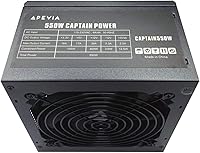
  • Wattage: This unit delivers a maximum continuous output of 550W, suitable for basic and mid-range desktop builds.
  • Form Factor: Standard ATX form factor measuring 5.9″ x 5.5″ x 3.4″ (L x W x H), compatible with most mid-tower and full-tower cases.
  • Weight: The unit weighs 2.9 pounds, typical for a non-modular ATX power supply in this wattage class.
  • +12V Rail: The primary +12V rail is rated at 39A, providing up to 468W of power for the CPU and GPU combined.
  • +3.3V Rail: The +3.3V rail is rated at 16A, supporting system memory and motherboard logic components.
  • +5V Rail: The +5V rail delivers up to 17A, powering USB devices, storage controllers, and other onboard components.
  • -12V Rail: A minor -12V rail rated at 0.3A is included, primarily for legacy motherboard serial port compatibility.
  • +5Vsb Rail: The standby rail supplies 2.5A at +5V, maintaining power to wake-on-LAN and USB charging functions when the PC is off.
  • Main Connector: Includes a 20+4 pin main motherboard connector that can be separated to fit both modern 24-pin and older 20-pin boards.
  • CPU Connector: One 4+4 pin (8-pin split) EPS CPU power connector accommodates both 8-pin and 4-pin motherboard CPU power sockets.
  • PCIe Connector: One 6+2 pin PCI Express connector supports both 8-pin and 6-pin GPU power requirements without a separate adapter.
  • SATA Connectors: Three SATA power connectors are provided, sufficient for a typical build with two or three storage drives.
  • Peripheral Connectors: Three 4-pin Molex peripheral connectors support older HDDs, optical drives, case fans, and accessories.
  • Cooling: A single 120mm fan with automatic thermal control adjusts its speed in response to internal temperature and system load.
  • Input Voltage: Features a manual 115/230V slide switch on the rear panel for selecting the correct input voltage based on your region.
  • Cable Style: All cables are fully sleeved in black, providing a consistent, clean appearance inside the PC chassis.
  • Efficiency Rating: No 80 Plus efficiency certification is listed for this unit; actual efficiency under load has not been independently verified by the manufacturer's listing.
  • Brand: Manufactured by Apevia Corp, a budget-oriented PC components brand based in the United States.

Related Reviews

Apevia ATX-SP700 Spirit 700W ATX Power Supply
85%
93%
Power Output
88%
Build Quality
85%
Cooling Performance
90%
Value for Money
80%
Ease of Installation
More
Apevia ATX-ES600W Essence 600W ATX Semi-Modular Power Supply
85%
88%
Value for Money
84%
Performance under Load
87%
Cooling Efficiency
90%
Cable Management Ease
82%
Build Quality
More
Apevia ATX-ES700-RGB Essence 700W ATX Semi-Modular Power Supply
81%
85%
Performance & Power Output
78%
Cooling & Noise Control
82%
Build Quality
90%
Installation & Cable Management
87%
RGB Customization & Aesthetics
More
Apevia Venus 450W ATX Power Supply
70%
83%
Value for Money
88%
Installation Ease
81%
Noise Level
74%
Connector Availability
62%
Build Quality
More
Apevia Raptor 500W ATX Power Supply
72%
83%
Value for Money
88%
Ease of Installation
74%
Connector Availability
58%
Reliability & Longevity
79%
Fan Noise
More
Apevia Venus 500W ATX Power Supply
86%
92%
Value for Money
88%
Cooling Efficiency
91%
Protection Features
84%
Build Quality
85%
Compatibility with Components
More
Apevia ATX-JP600W Jupiter 600W Power Supply
87%
89%
Performance
93%
Power Efficiency
85%
Cooling Efficiency
88%
Build Quality
87%
Cable Management
More
Mars Gaming MPB550SI 550W ATX Power Supply
87%
89%
Performance Under Load
91%
Noise Levels
95%
Energy Efficiency
85%
Build Quality
72%
Cable Management
More
Apevia TFX-AP300W 300W Flex ATX Power Supply
80%
83%
Performance
89%
Value for Money
78%
Build Quality
75%
Cooling Efficiency
60%
Noise Level
More
Apevia ATX-PR1000W-WH 1000W 80+ Gold Power Supply
85%
89%
Performance Under Load
94%
Energy Efficiency
85%
Build Quality
78%
Cooling and Noise
90%
Installation and Setup
More

FAQ

Almost certainly yes, if you have a standard ATX motherboard. The 20+4 pin main connector splits apart so it fits both older 20-pin boards and modern 24-pin ones. The CPU connector also splits into a 4+4 configuration, covering boards that use either a 4-pin or 8-pin CPU power socket.

This is one of the most common issues buyers run into. The Apevia CAPTAIN550 550W ATX Power Supply will not power on unless every required cable is properly plugged into the motherboard, including the 24-pin main connector and the CPU power connector. Double-check that all connections are fully seated before concluding there's a fault with the unit.
It depends heavily on your GPU. For builds using entry-level or mid-range graphics cards — roughly in the range of an RX 6600 or RTX 3060 — 550W gives you reasonable headroom. If you're running a power-hungry card like an RTX 4080 or RX 7900 XT, this unit isn't the right fit and you should look at a higher-wattage certified supply.

That switch sets the input voltage to match your local power grid. In North America, the standard is 115V, so if you're in the US or Canada the switch should stay at 115V. If you're in Europe, Australia, or most of Asia where the grid runs at 230V, flip it to 230V before powering on. Using the wrong setting can damage the unit or your components, so it's worth checking before your first boot.

No — there is no 80 Plus certification listed for this unit. That means you can't verify exactly how efficient it is under load from the spec sheet alone. For a basic office PC or casual desktop, this probably won't matter much in practice. But if you're running the system for long hours daily and care about electricity consumption, a certified unit would give you more confidence.

Under light loads — web browsing, office work, light media playback — the fan stays relatively quiet and most users won't find it intrusive. Push the system harder with sustained gaming or rendering workloads and you will notice it spin up and get louder. It's not exceptionally noisy for its class, but it's not a silent unit either.

Unlikely. This is a standard ATX-sized unit at 5.9″ x 5.5″ x 3.4″, so it won't fit in cases designed for SFX or TFX power supplies. Most Mini-ITX cases either require a smaller form factor PSU or have a dedicated ATX PSU mount — check your case specs carefully before ordering.

A small but notable share of buyers have reported receiving non-functional units or experiencing early failures. If your unit arrives DOA, contact the seller or Apevia's customer support as soon as possible. Keep your purchase receipt and packaging, as you'll likely need them for a return or warranty claim. Given the reported pattern, it's worth testing the PSU immediately after installation rather than waiting.

For mid-tower cases, cable length is generally not a problem based on buyer feedback. Full-tower builds can be more challenging depending on how your case routes cables — particularly for the CPU power connector, which needs to reach from the PSU bay to the top of the motherboard. It's worth checking a few build logs for your specific case before assuming the cables will reach comfortably.

No — there is only one PCIe power connector included, which rules out any dual-GPU configuration. Even single high-end GPUs that require two 8-pin connectors won't be fully supported. This budget PSU is designed for single-GPU builds with moderate power requirements, and that's where it should stay.

Where to Buy