Apevia Essence 600W Semi-Modular ATX Power Supply
Apevia Essence 600W Semi-Modular ATX Power Supply — image 1
Apevia Essence 600W Semi-Modular ATX Power Supply — image 2
Apevia Essence 600W Semi-Modular ATX Power Supply — image 3
Apevia Essence 600W Semi-Modular ATX Power Supply — image 4
Apevia Essence 600W Semi-Modular ATX Power Supply — image 5
Apevia Essence 600W Semi-Modular ATX Power Supply — image 6

Apevia Essence 600W Semi-Modular ATX Power Supply — image 7
Apevia Essence 600W Semi-Modular ATX Power Supply — image 8
72%
28%

Overview

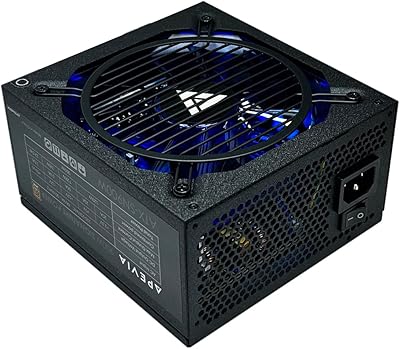
The Apevia Essence 600W Semi-Modular ATX Power Supply sits squarely in the value segment, aimed at builders who want something functional and reasonably tidy without overspending. Apevia is not a name you will find in enthusiast forums alongside Seasonic or Corsair, and that is fine — it was never trying to be. What this budget PSU does offer is a semi-modular cable layout that keeps unused cables out of the case, a genuine advantage at this price point. The sandblasted black casing looks clean enough to not embarrass itself in a windowed build. Just keep your expectations grounded: this is a light-to-mid workload unit, not a platform for a high-end GPU.

Features & Benefits

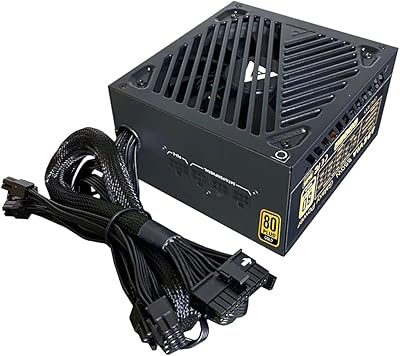
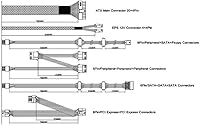
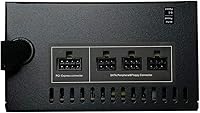
The semi-modular design is the headline feature here — you get a fixed main power harness and detachable cables for everything else, which cuts down meaningfully on case clutter. The single +12V rail delivers 45A of output, enough to keep mid-range components stable under sustained load. Cooling comes from a 120mm fan that ramps up with internal temperature rather than spinning at full tilt constantly, so idle and light-load noise stays low. The connector lineup covers the basics: dual PCIe 6+2-pin for graphics, four SATA, and a 4+4-pin CPU connector that splits apart for boards needing just a 4-pin. There is also a manual 115/230V voltage switch — check it before you power on.

Best For

This budget PSU makes the most sense for builders who are not chasing top-tier performance. If you are assembling a first PC around a mid-range CPU and a GPU like an RX 6600 or RTX 3060, the power headroom is perfectly adequate — total system draw on those builds rarely exceeds 350W under load. It also works well as a replacement PSU for an aging office machine or a secondary rig where cost is the primary concern. Students and new builders will find the wiring approachable. Where this Apevia unit starts to feel inadequate is in demanding configurations, so anyone planning a power-hungry GPU should look further up the stack.

User Feedback

Buyer sentiment around the Essence 600W skews cautiously positive for a value unit. Most owners highlight how straightforward the installation was and appreciate that the fan stays quiet during everyday tasks. The tip about splitting the CPU connector into a 4-pin adapter also gets mentioned frequently — new builders find it genuinely useful. On the flip side, long-term reliability is the most common concern, with a handful of users reporting failure after a year or more of regular use. There are also scattered reports of DOA units straight out of the box, which is not unusual at this price tier but worth factoring in. Buyers who match it to appropriate hardware generally come away satisfied.

Pros

  • Semi-modular cabling keeps the inside of your case clean without a significant cost premium over fully non-modular options.
  • The auto-thermally controlled fan stays genuinely quiet during light use, which matters in a home office or bedroom build.
  • Connector selection is broad enough to cover a typical mid-range build with room to spare on storage and peripherals.
  • The split 4+4-pin CPU cable handles both modern and older motherboard configurations without needing an adapter.
  • Six hardware protections provide a reasonable safety net for your components against common electrical faults.
  • Installation is straightforward, making this budget PSU a solid learning platform for first-time builders.
  • The sandblasted black casing looks presentable in a windowed case without adding cost for aesthetics.
  • The manual 115/230V voltage switch adds flexibility for users in dual-voltage environments or international settings.

Cons

  • Long-term durability is a real concern, with some owners reporting failures after 12 to 18 months of regular use.
  • No 80 Plus efficiency certification means higher energy waste under load compared to certified alternatives at modest price differences.
  • Scattered reports of dead-on-arrival units suggest quality control is inconsistent at the manufacturing level.
  • Apevia carries limited brand trust in the PC building community, which can make warranty support feel uncertain.
  • The manual voltage switch can cause a non-starting unit if accidentally set wrong, and the labeling is easy to overlook.
  • Cable lengths may feel tight in larger full-tower cases where routing distance to the motherboard is greater.
  • With no modular CPU or main power cable, the fixed harness adds some unavoidable bulk regardless of your build size.
  • The unit is not well-suited for builds that will expand later with additional storage drives or a more demanding GPU upgrade.

Ratings

The scores below reflect AI analysis of verified global buyer reviews for the Apevia Essence 600W Semi-Modular ATX Power Supply, with spam, incentivized, and bot-flagged submissions actively filtered out before scoring. Each category captures what real builders experienced day-to-day, from first-boot impressions to long-term reliability observations. Both the strengths and the recurring frustrations are represented transparently so you can make a genuinely informed call.

Value for Money
78%
22%
For builders working with a tight budget, this unit delivers a semi-modular experience that most competitors at this price tier simply do not offer. The connector selection covers a complete mid-range build without needing adapters, and buyers consistently note they got more than they expected for what they paid.
The absence of an 80 Plus efficiency certification means you are paying a little more on electricity over time compared to certified alternatives that sometimes cost only a few dollars more. Buyers who later upgraded their GPU often felt the unit's limitations sooner than the price justified.
Cable Management
81%
19%
The semi-modular layout is the standout practical advantage here — being able to leave unused SATA and peripheral cables out of the case makes a real difference in airflow and build cleanliness. First-time builders especially praised how much easier routing felt compared to the fully non-modular PSUs they had seen in older machines.
The fixed main and CPU cables add some unavoidable bulk near the motherboard area, particularly in compact cases where space behind the motherboard tray is limited. A few builders noted the fixed harness was stiffer than expected, making tight bends toward the cable routing holes more awkward.
Noise Level
74%
26%
During everyday tasks like web browsing, video playback, and light office work, the thermally controlled fan stays at a low enough RPM that most users reported not noticing it at all. In a reasonably quiet room it blends into background noise without drawing attention.
Under sustained gaming loads the fan audibly spins up, and some buyers felt it became noticeable enough to be distracting in quieter environments. A handful of reviews mentioned the fan produced a faint coil whine under specific load conditions, which is not unusual at this price point but worth knowing.
Ease of Installation
86%
The build process was consistently described as approachable even by complete beginners, with the connector labeling clear enough to follow without constantly checking a manual. The splitTable 4+4-pin CPU cable design received particular praise for eliminating a common source of confusion for first-time builders.
A recurring frustration among new builders was the PSU not powering on after initial connection — caused by not having all cables fully seated, which is a design behavior rather than a defect but was not clearly communicated in the included documentation. The manual voltage switch also tripped up a small number of buyers who did not notice it before their first boot attempt.
Build Quality
62%
38%
The sandblasted black casing feels solid enough for the price and does not flex or rattle when handled. For a budget unit, the exterior finish is cleaner than expected and holds up well to the normal handling involved in a standard PC build.
Internal build quality is harder to assess from the outside, but the longevity reports from buyers using this budget PSU under moderate to heavy load for over a year raise legitimate concerns. The overall construction reflects the price tier honestly — functional, but not built to the tolerances of a premium unit.
Connector Variety
83%
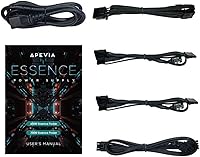
The included connector set covers everything a standard mid-range build needs: dual PCIe 6+2-pin for graphics, four SATA for storage, four Molex for legacy accessories, and a flexible CPU connector that works with both 4-pin and 8-pin motherboard sockets. Most buyers found no need for third-party adapters.
With only two PCIe connectors, this Apevia unit is limited to a single-GPU configuration in any realistic power budget. Builders planning even modest multi-drive setups with four or more SATA devices will exhaust the available connections quickly.
Reliability
54%
46%
For builders who matched this unit to appropriate low-to-mid power draws and used it in a well-ventilated case, a solid number of owners reported trouble-free operation across the first year of use. Light office builds and secondary machines appear to be where it holds up most consistently.
Longevity beyond the 12 to 18 month mark under heavier use is a genuine concern based on aggregated buyer feedback, with a measurable rate of failure reports appearing in that window. Scattered DOA reports also indicate quality control is not as consistent as buyers would hope at any price.
Thermal Performance
71%
29%
The auto-thermally controlled fan does a reasonable job of keeping internal temperatures in check during moderate gaming sessions, and the six built-in protection circuits provide a functional safety layer against thermal runaway conditions. Builders in well-ventilated mid-tower cases reported stable operation across typical gaming workloads.
In smaller cases with restricted airflow, thermal headroom shrinks faster than users expected, and the fan response under those conditions was described as aggressive. The lack of third-party thermal efficiency testing makes it difficult to know exactly where the unit's thermal limits sit under sustained load.
Protection Suite
77%
23%
Having all six standard protections — covering short-circuit, over-current, over-voltage, over-power, under-voltage, and over-temperature conditions — is a meaningful inclusion at this budget tier and gives builders reasonable confidence that a component fault will not cascade into wider system damage.
Without independent certification or third-party validation of these protection circuits, it is difficult to know how quickly and accurately they trigger under real-world fault conditions. Budget PSUs sometimes list protections that function only at the margins of safe operation rather than as a primary defense layer.
Compatibility
79%
21%
Standard ATX form factor and a 20/24-pin main connector mean this unit drops into the overwhelming majority of mid-tower and full-tower cases without any fitment surprises. The dual-voltage switch also makes it usable in international contexts where most budget PSUs are hard-locked to a single voltage.
The manual voltage switch, while a plus for flexibility, introduces a compatibility failure point if set incorrectly — and a small but consistent group of buyers reported connecting to mains power without checking it first. Compatibility with very high-draw modern GPU configurations is also a practical constraint.
Aesthetics
68%
32%
The sandblasted matte black finish looks noticeably cleaner than the shiny stamped-metal casings common on competing budget units, and in a build with a windowed side panel it presents without embarrassment. Buyers who cared about visual presentation at this price point generally came away satisfied.
The fixed cable harness is black but not sleeved, so in a windowed build the visible wiring looks functional rather than polished. Buyers upgrading from a fully modular unit in a showcase build will find the aesthetics a step down in terms of cable presentation.
Documentation & Setup
58%
42%
The included guide is sufficient for experienced builders and covers the basic connection steps without being overly technical. The physical connector labeling on the unit itself is clear and reduces the need to reference the manual at every step.
New builders were consistently let down by the documentation failing to clearly explain that the PSU will not switch on without all internal cables connected, leading to unnecessary troubleshooting confusion on first boot. The voltage switch is also not prominently flagged in the setup instructions, which caused avoidable problems for a subset of buyers.
Fan Longevity
61%
39%
Under light use conditions the fan runs infrequently enough that wear accumulates slowly, and buyers running this budget PSU in secondary or office machines reported the fan remaining smooth and quiet well into the second year of ownership.
In builds where the fan runs at higher RPM consistently — small cases, warm rooms, sustained gaming — some buyers noted the fan developing a rattle or increased noise signature within the first 18 months. At this price tier, fan replacement is not a realistic option the way it might be with a modular premium unit.

Suitable for:

The Apevia Essence 600W Semi-Modular ATX Power Supply is a practical choice for budget-conscious builders who need a functional, no-frills foundation for a first PC or a secondary machine. If your build is centered around a mid-range CPU paired with a GPU in the RX 6600 or RTX 3060 class, total system draw will sit comfortably within what this unit handles reliably. The semi-modular design is a genuine perk at this price tier, making cable routing tidier without requiring a significant financial stretch. Students, hobbyists, and anyone piecing together an affordable office workstation will find this budget PSU hits the right balance of features and cost. It also makes a sensible replacement for a failed unit in an older rig where efficiency ratings and premium certifications simply are not worth the added expense.

Not suitable for:

Builders planning around power-hungry modern hardware should look elsewhere before considering the Apevia Essence 600W Semi-Modular ATX Power Supply. High-end GPUs like the RTX 4080 or RX 7900 XTX can push total system draw well past what this unit is designed to sustain without risk, and pairing it with that class of hardware would be a poor decision regardless of the cost savings. Apevia operates in the value segment of the market, and that comes with honest trade-offs around long-term reliability that more demanding or always-on workloads will expose over time. Content creators running render nodes, small business servers, or anyone building a machine expected to operate under heavy load for extended hours daily would be better served by a unit from a more established enthusiast brand with documented efficiency ratings. The lack of an 80 Plus certification is not a dealbreaker for casual use, but for efficiency-sensitive environments it is a real gap.

Specifications

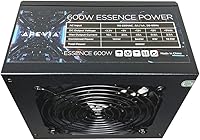
  • Wattage: This unit delivers a continuous output of 600W, suitable for mid-range PC builds with total system draw well under 500W.
  • Form Factor: Standard ATX form factor ensures compatibility with the vast majority of mid-tower and full-tower PC cases on the market.
  • Modularity: Semi-modular design keeps the main power and CPU cables fixed while allowing all other cables to be attached or removed as needed.
  • Main Connector: Includes one 20/24-pin main power connector that supports both modern 24-pin motherboards and older 20-pin configurations.
  • CPU Connector: One 4+4-pin 12V CPU connector is provided, and it physically splits into two separate 4-pin sections for boards requiring that configuration.
  • PCIe Connectors: Two 6+2-pin PCIe connectors are included, supporting a single mid-range discrete GPU or two lower-power graphics cards.
  • SATA Connectors: Four SATA power connectors are available for connecting solid-state drives, hard drives, or optical drives within the system.
  • Peripheral Connectors: Four 4-pin Molex peripheral connectors are included for older devices, fans, or accessories that require that legacy connector type.
  • +12V Rail: The single +12V rail is rated at 45A, providing up to 540W on the primary rail that powers the CPU and GPU under load.
  • +3.3V Rail: The +3.3V rail is rated at 16A, sufficient for powering RAM, low-power expansion cards, and motherboard logic circuits.
  • +5V Rail: The +5V rail outputs up to 20A, covering USB ports, storage devices, and other components drawing from this voltage line.
  • Cooling: An auto-thermally controlled 120mm black fan adjusts its speed based on internal temperature, reducing noise during low and moderate loads.
  • Protections: Six hardware-level protections are built in: short-circuit, over-current, over-voltage, over-power, under-voltage, and over-temperature.
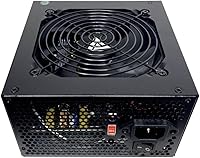
  • Voltage Switch: A manual 115/230V selector switch on the rear allows the unit to be configured for North American or international wall outlet voltages.
  • Casing: The exterior uses a sandblasted black finish that gives the unit a clean, matte appearance suitable for builds with windowed side panels.
  • Dimensions: The unit measures 6.3″ long by 5.91″ wide by 3.35″ tall, conforming to standard ATX PSU mounting dimensions.
  • Weight: At 4.12 pounds, this budget PSU sits within the typical weight range for entry-level ATX power supplies without heavy internal shielding.
  • Efficiency Rating: No 80 Plus efficiency certification is listed for this unit, which is common at this price tier but means efficiency under load is unverified by third-party testing.

Related Reviews
Apevia Essence 700W ATX Power Supply
71%
81%
Value for Money
78%
Cable Management
74%
Power Stability
49%
Efficiency
63%
Build Quality
More
Apevia ATX-SN900 900W Semi-Modular Power Supply
77%
88%
Value for Money
91%
Wattage Headroom
82%
Cable Management
61%
Long-Term Reliability
74%
Noise Level
More
Apevia ATX-GX1000W 1000W Semi-Modular Power Supply
74%
83%
Value for Money
67%
Build Quality
58%
Long-Term Reliability
88%
Ease of Installation
79%
Cable Management
More
Apevia ATX-PM650W 650W 80+ Gold Semi-Modular Gaming Power Supply
87%
88%
Performance
85%
Ease of Installation
91%
RGB Aesthetics
90%
Cable Management
92%
Energy Efficiency
More
Apevia ATX-GX850W Galaxy 850W 80+ Gold Certified Semi-Modular Power Supply
87%
94%
Power Delivery Stability
91%
Efficiency (80+ Gold)
88%
Noise Reduction
89%
Cooling Performance
85%
Build Quality
More
Apevia Galaxy 650W Semi-Modular Power Supply
71%
84%
Value for Money
81%
Efficiency Rating
79%
Cable Management
63%
Build Quality
77%
Fan Noise
More
Apevia Jupiter 600W ATX Power Supply
72%
81%
Value for Money
58%
Long-Term Reliability
63%
Voltage Stability
86%
Installation Experience
78%
Noise Level
More
Apevia ATX-PM1200W 1200W Modular Gaming Power Supply
77%
78%
Value for Money
83%
Power Delivery
67%
Build Quality
61%
Reliability & Longevity
88%
Cable Management
More
Apevia Prestige 600W ATX Power Supply
73%
83%
Value for Money
88%
Efficiency & Thermals
81%
Noise Level
61%
Build Quality
86%
Installation Experience
More
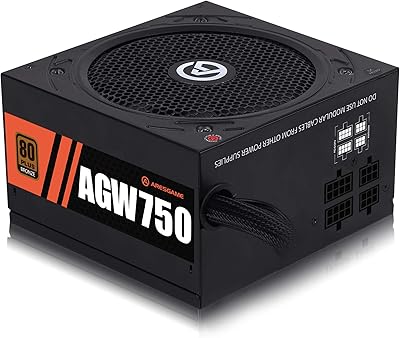
ARESGAME AGW750 750W Semi-Modular ATX Power Supply
81%
88%
Value for Money
83%
Power Delivery Stability
91%
Cable Management
86%
Noise Level
79%
Efficiency
More

FAQ

Yes, those GPUs are a reasonable match for this budget PSU. A typical mid-range build with one of those cards draws somewhere between 250W and 350W under full load, which leaves a comfortable buffer below the 600W ceiling. Just make sure your total component list stays well under 500W to avoid stressing the unit over long gaming sessions.

Not necessarily. The Apevia Essence 600W Semi-Modular ATX Power Supply will not power on unless the power supply cables are fully connected to the motherboard and other components inside the PC. It does not switch on from the wall alone. Double-check that the 24-pin main connector, the CPU connector, and any other required cables are firmly seated before concluding the unit has a problem.

Semi-modular means that some cables are permanently attached to the PSU while others can be plugged in only when needed. On this unit, the main 24-pin motherboard cable and the 4+4-pin CPU cable are fixed and cannot be removed. The PCIe, SATA, and peripheral cables are detachable, so you can leave them out of the case if your build does not need them.

Yes. The CPU cable on this unit is a 4+4-pin design, meaning it physically splits into two separate 4-pin connectors. You simply push apart the two halves and plug just one 4-pin section into your motherboard. The other half stays disconnected inside the case.

Only if you are outside North America or using a different wall voltage. In the United States and Canada, the switch should be set to 115V. If you are in a region with 230V mains power, flip it to 230V before powering on. Connecting a unit set to 115V to a 230V outlet can permanently damage the PSU, so it is worth taking ten seconds to confirm before your first boot.

Technically it has two PCIe 6+2-pin connectors, so it can physically connect to two GPUs. In practice, running dual GPUs on a 600W value-tier unit is not advisable. Two mid-range cards under combined load can easily exceed what this PSU can reliably sustain, and the absence of an efficiency certification adds uncertainty. Dual-GPU setups are better served by a higher-wattage, certified unit.

At light to moderate loads, the fan is quiet enough that most users will not notice it over their case fans. The thermal controller keeps the fan running slowly until internal heat builds up, so during everyday tasks like browsing, streaming, or light gaming it stays quite unobtrusive. Under heavier sustained loads the fan does spin up, but it is not unusually loud for a budget unit.

It is not ideal for always-on workloads. This Apevia unit is designed for standard home-use patterns, not continuous operation. Some owners have noted reliability concerns after extended heavy use, and without an efficiency certification, running it at sustained load around the clock puts more stress on its components than a certified unit would face. For servers or PCs that never sleep, a more robust option is a worthwhile investment.

The detachable cable set includes four SATA power connectors and four 4-pin Molex peripheral connectors, so you can connect up to four SATA drives and several additional accessories or older devices. For a typical home or gaming build with one or two SSDs and a hard drive, that is more than enough coverage.

The unit includes six protection circuits covering short-circuit, over-current, over-voltage, over-power, under-voltage, and over-temperature conditions. These are standard safety features designed to shut the unit down before damage reaches your components if something goes wrong. For a value-tier PSU, having all six present is a positive sign, though the quality of their implementation varies by manufacturer and is not independently certified here.

Where to Buy