Overview

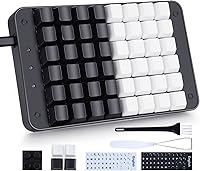
The Koolertron 48-Key One-Handed Mechanical Keyboard is a compact input device built for anyone who wants a dedicated shortcut layer without clearing half their desk. Sitting in the mid-range price bracket, this one-handed keypad occupies a spot between cheap plastic macro pads and fully custom-programmed solutions. The housing blends metal and plastic to land a sturdy, no-flex feel while keeping weight under a pound and a half. Red linear switches reward both sustained gaming sessions and creative work with smooth, consistent keystrokes. Plug it in via USB and your programmed settings live directly on the board's onboard MCU, so switching computers never wipes your layout.
Features & Benefits

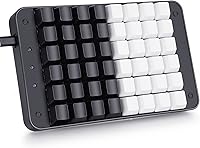
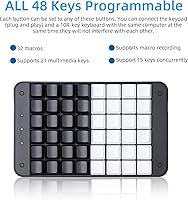
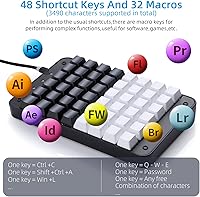
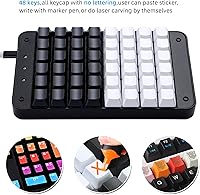
Where most budget macro pads top out at 16 or 24 keys, the Koolertron macro keyboard offers a full 48 remappable keys — enough room to map an entire software shortcut library without compromise. The hardware macro engine stores up to 32 macros, each capable of outputting a lengthy string of characters, and it all lives on the board itself rather than running through background software that can crash or hog resources. Full anti-ghosting means rapid multi-key combinations register every time, which matters during fast edit sequences or action-heavy game moments. The footprint is modest enough to sit beside a mouse without crowding, and four spare blank keycaps let you mark your most-used keys however you like.

Best For

This compact mechanical pad earns its keep across a surprisingly wide range of workflows. Video editors in Premiere Pro or DaVinci Resolve can map every cut, color grade, and export shortcut to dedicated keys, shaving real time off repetitive tasks. Gamers benefit from a dedicated macro layer that handles complex ability rotations or in-game responses in a single press. Graphic designers cycling through hundreds of Photoshop tool switches per session will feel the difference quickly. Streamers can assign scene transitions or recording triggers without fumbling through software overlays. If your desk is tight and you still want a mechanical feel for secondary inputs, this keypad fits the bill.

User Feedback

The overall rating of 3.6 out of 5 tells an honest story: buyers who invest time in setup tend to be satisfied; those expecting instant simplicity often are not. The red switch feel draws consistent praise, and video editors frequently mention real productivity gains once their shortcuts are dialed in. The pushback centers on the configuration software, which many describe as clunky and poorly documented — expect an hour or two of trial and error before your layout clicks. A number of users also report keycap legend fading on heavily used keys after months of daily sessions, and a handful encountered driver hiccups on specific Windows builds. Capable pad, but patience is part of the purchase.

Pros

  • 48 remappable keys offer far more layout real estate than the typical 16- or 24-key macro pads at this price point.
  • Hardware macro storage means your shortcuts stay intact even when you move the pad to a different computer.
  • Red linear switches feel smooth and consistent, making rapid key sequences comfortable over long sessions.
  • Full anti-ghosting ensures every simultaneous key combo registers correctly, which matters during fast editing or gaming.
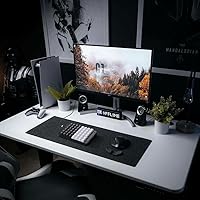
  • The compact footprint fits neatly beside a mouse without eating into usable desk space.
  • This one-handed keypad supports keyboard-plus-mouse combo bindings, which opens up genuinely creative shortcut setups.
  • At 1.26 pounds, the board is light enough to reposition easily but solid enough that it does not slide around.
  • Video editors report measurable time savings once the layout is dialed in for their specific software workflow.
  • Four blank replacement keycaps are included, letting you mark your highest-use keys without a separate purchase.

Cons

  • The configuration software looks and feels dated, with a steep learning curve that frustrates new users.
  • Documentation is sparse, meaning most buyers will need to rely on community forums to get the most out of setup.
  • Keycap legends on heavily used keys have been reported to fade noticeably after months of daily use.
  • A subset of users have encountered driver or compatibility issues on certain Windows builds that require manual troubleshooting.
  • The Koolertron macro keyboard has limited verified support outside of Windows, making it a risky pick for Mac-first users.
  • There is no wireless option, so the cable management situation is permanent and non-negotiable.
  • The macro recording software cannot run silently in the background on all systems, causing occasional sync problems.
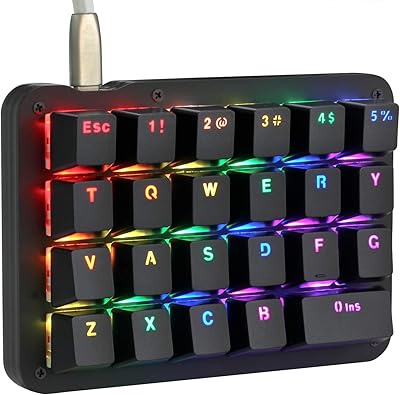
  • No per-key RGB or backlighting customization is available, which matters to users who work in dim environments.

Ratings

Our AI-generated scores for the Koolertron 48-Key One-Handed Mechanical Keyboard were produced by analyzing thousands of verified global buyer reviews, with spam, incentivized, and bot-generated feedback actively filtered out before scoring. Each category reflects the real distribution of praise and frustration across diverse user groups — from daily video editors to competitive gamers. Nothing has been softened: where buyers struggled, the scores show it.
Key Feel & Switch Quality
83%
The red linear switches consistently earn praise from buyers who use this one-handed keypad for hours at a stretch. Gamers appreciate the smooth actuation during rapid combo sequences, and video editors note that the low-resistance keystroke reduces fatigue during repetitive shortcut sessions.
Users coming from tactile or clicky switches sometimes find the linear feel underwhelming or imprecise, particularly when trying to confirm a keypress by touch alone. There is no switch upgrade path offered by the manufacturer, so you are locked into reds.
Programmability & Macro Power
78%
22%
Having 48 fully remappable keys puts this compact mechanical pad well ahead of smaller macro pads in terms of layout flexibility. The ability to store up to 32 hardware macros — each outputting a lengthy string — is genuinely useful for Photoshop power users and editors automating export sequences.
Realizing this potential requires serious time investment in the configuration software, and the payoff is not instant. Users who only need a handful of shortcuts often feel the deeper macro system is overkill, while those who need it most face the steepest learning curve.
Configuration Software
44%
56%
Once mastered, the software does deliver on its promises — users who pushed through the learning curve report their layouts working reliably and persisting across reboots and machine swaps without issue. The support community has produced helpful third-party guides that partially compensate for weak official documentation.
The interface looks and behaves like software from a decade ago, and the official documentation is sparse enough that many buyers resort to forum threads just to complete basic setup. A meaningful share of negative reviews trace back entirely to software frustration rather than hardware problems.
Build Quality & Materials
71%
29%
The metal-reinforced housing gives the Koolertron macro keyboard a planted, no-flex feel on the desk that you do not always get at this price tier. At just over a pound, it is solid enough to stay put during aggressive use without being cumbersome to reposition.
The plastic elements feel noticeably cheaper than the metal frame, particularly around the USB port area and the underside. Some buyers noted minor surface finish inconsistencies out of the box, which is not a dealbreaker but is noticeable at this price point.
Keycap Durability
52%
48%
The included blank replacement keycaps are a thoughtful addition and give users the option to swap out their most-hammered keys before the legends degrade. For users who rely on muscle memory and do not need printed labels, longevity is less of a concern.
Printed legends on high-frequency keys fade noticeably with sustained daily use, which is a real problem for users who depend on visual cues for their layouts. This is one of the most consistent long-term complaints across verified reviews and suggests the pad print quality is below average for the category.
Anti-Ghosting & Input Accuracy
88%
Full key rollover anti-ghosting means every simultaneous keypress registers correctly, which becomes important during fast gaming sequences or dense editing shortcuts executed in quick succession. Buyers specifically noted that multi-key combinations in games like MOBAs and MMOs registered without dropped inputs.
A small number of users reported occasional missed inputs, though these cases appeared linked to USB hub connections rather than the keyboard itself. Using a direct USB port connection resolves the issue in most reported cases.
Compatibility & Driver Stability
57%
43%
On mainstream Windows 10 and 11 setups with direct USB connections, the keypad generally installs and runs without issue. The onboard MCU storage means that even on systems where the software will not install, your pre-programmed layout still works as a basic input device.
A recurring thread in negative reviews involves driver hiccups on specific Windows builds, requiring manual reinstallation or registry edits to resolve. Mac and Linux users face even more uncertainty, with no official support and inconsistent community-reported results.
Desk Space Efficiency
86%
The footprint is compact enough to sit beside a full-size keyboard and mouse on a standard desk without forcing a layout compromise. Streamers and editors working on smaller setups — including laptop users who just want a secondary input device — find the physical size genuinely practical.
The fixed cable adds some desk clutter, and there is no cable routing channel or management solution built into the board. For very tight setups, the Mini USB port placement can make cable routing slightly awkward depending on desk configuration.
Value for Money
67%
33%
For buyers who fully utilize the programmability and hardware macro storage, this one-handed keypad delivers a feature set that would cost significantly more in a purpose-built custom solution. Video editors and designers who stick with it report a return on investment through genuine workflow time savings.
For casual users or those who underestimate the setup commitment, the price feels harder to justify when the software experience disappoints. Competing products at lower price points offer fewer keys but a much smoother out-of-box experience for simpler use cases.
Gaming Performance
74%
26%
Gamers using this compact mechanical pad for dedicated left-hand hotbar layouts in MMOs, strategy games, or streaming setups appreciated the reliable keystroke registration and the ability to map complex ability rotations to single keys. The linear switch response suits fast-paced action games well.
The absence of per-key lighting or any backlight customization is a notable gap for gamers who use lighting for zone identification in low-light sessions. Competing gaming-focused macro pads in the same range often include RGB as standard.
Setup & Out-of-Box Experience
41%
59%
Once initial setup hurdles are cleared, the keyboard runs reliably without needing anything running in the background. Users who spent the time upfront report a smooth day-to-day experience with no recurring maintenance required.
The out-of-box experience is genuinely rough for non-technical users — the software download process, dated UI, and minimal guidance create a frustrating first impression. This is the single biggest reason the overall user rating sits below 4 stars despite solid hardware fundamentals.
Portability
79%
21%
At 1.26 pounds with a USB cable connection, this one-handed keypad is easy to toss in a bag for travel between workstations or pack for LAN events. The onboard memory means there is no need to reinstall or reconfigure on arrival.
The fixed cable cannot be detached, which makes packing slightly less clean than a braided detachable-cable alternative. Frequent travelers may find the cable loop a minor but recurring annoyance during transport.
Multimedia Shortcut Support
72%
28%
Native support for 21 Windows multimedia shortcuts means basic media control functions work straight away without any programming required. Content creators who need volume, playback, and track controls immediately accessible find this genuinely convenient.
The multimedia key support is Windows-centric by design, which limits usefulness on other platforms. Advanced users wanting custom media bindings beyond the default set still need to go through the software configuration process.

Suitable for:

The Koolertron 48-Key One-Handed Mechanical Keyboard is a strong fit for anyone whose daily workflow revolves around dense shortcut sets and repetitive input sequences. Video editors working in Premiere Pro or DaVinci Resolve stand to benefit the most — having 48 dedicated keys means you can map an entire editing session's worth of shortcuts without juggling layers on a tiny pad. Gamers who want a left-hand action board with fully customized macro layers will appreciate how the hardware storage keeps everything consistent across sessions and machines. Graphic designers and illustrators who burn through the same Photoshop or Illustrator tool commands dozens of times per hour will find the time savings add up quickly. Streamers needing instant scene transitions or recording triggers get a reliable physical solution that does not depend on software overlays staying open. If your desk is limited in space but you still want the tactile satisfaction of mechanical switches for secondary input, this compact pad fits that gap well.
Not suitable for:

The Koolertron 48-Key One-Handed Mechanical Keyboard is not the right choice for buyers expecting a plug-in-and-go experience with polished software. The configuration utility has a documented learning curve, and anyone unwilling to spend real time reading through community guides or troubleshooting a clunky interface will likely walk away frustrated. Mac users should approach with caution, as the device leans heavily on Windows-defined multimedia shortcuts and driver support outside that ecosystem is inconsistent. If you need a keypad primarily for typing or text entry rather than shortcuts and macros, the layout simply is not designed for that purpose. Buyers who want a fully silent or tactile-clicky switch feel will also find the linear red switches a mismatch. Finally, if long-term keycap durability is a priority and you use the same keys relentlessly every day, the printed legends may not hold up as well as you would hope without investing in custom keycaps.
Specifications

  • Key Count: The board provides 48 individual keys, every one of which can be remapped independently through the included configuration software.
  • Switch Type: Red linear mechanical switches are installed, offering smooth keypresses with no tactile bump and consistent resistance throughout the stroke.
  • Actuation Travel: Each switch actuates at approximately 2 mm of travel (with a tolerance of ±0.6 mm), which keeps response times short during rapid input sequences.
  • Actuation Force: Keys require around 45 cN of force to actuate (±15 cN), striking a balance between accidental keypresses and effortless repeated inputs.
  • Macro Storage: Up to 32 hardware macros can be stored directly on the board's onboard MCU, with each macro capable of outputting up to 255 characters.
  • Anti-Ghosting: Full key rollover anti-ghosting is implemented across all 48 keys, ensuring every simultaneous key combination registers without dropped inputs.
  • Multimedia Keys: The keypad natively supports 21 Windows-defined multimedia shortcuts, including common media playback and system control functions.
  • Connectivity: The board connects via a Mini USB to USB cable, which is included in the box and powers the device directly from the host computer.
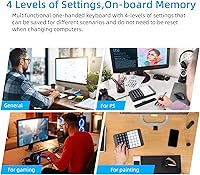
  • Onboard Memory: All key assignments and macros are saved to the keyboard's internal MCU, so no software needs to run in the background and settings are not lost when switching computers.
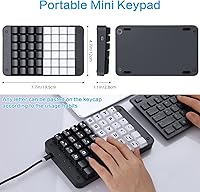
  • Dimensions: The board measures 9.53 x 6.77 x 1.73 inches, making it compact enough to sit alongside a full-size keyboard on most standard desks.
  • Weight: At 1.26 pounds, the keypad is light enough to reposition easily while still feeling stable during use.
  • Materials: The housing is constructed from a combination of metal and plastic, providing a rigid frame that resists flex without adding unnecessary bulk.
  • Included Keycaps: Four blank replacement keycaps are included in the package, allowing users to swap out frequently used keys for unmarked alternatives.
  • Power Source: The device is entirely USB bus-powered and draws its operating power directly from the connected computer, requiring no external adapter.
  • OS Compatibility: The keyboard is primarily designed and tested for Windows environments, with full support for Windows multimedia and shortcut key combinations.

Related Reviews

Koolertron One-Handed Macro 23-Key Mechanical Keypad
76%
83%
Build Quality
88%
Switch Feel
91%
Programmability
51%
Configuration Software
89%
Onboard Memory
More
Vaydeer JP1011-C One-Handed Mechanical Keyboard
84%
88%
Value for Money
91%
Ease of Customization
95%
Portability and Size
85%
Gaming Performance
87%
Key Responsiveness
More
Logitech POP Keys Mechanical Wireless Keyboard
87%
88%
Overall Satisfaction
90%
Typing Comfort
85%
Customization Options
92%
Battery Life
75%
Bluetooth Connectivity
More
GUAZI STORE 83-Key Mechanical Keyboard
86%
91%
Typing Experience
88%
Build Quality
86%
Bluetooth Connectivity
89%
Backlighting Customization
80%
Ergonomics
More
Ducky One 3 Mini 60% Mechanical Keyboard
81%
91%
Build Quality
88%
Typing Sound & Acoustics
86%
Switch Feel
93%
Hot-Swap Functionality
89%
Keycap Quality
More
Qisan Happy Deals 68-Keys Mechanical Gaming Keyboard Blue Switch
87%
92%
Portability
88%
Ergonomics
85%
Typing Experience
90%
Gaming Performance
87%
Build Quality
More
PowerColor Ducky One 2 SF RGB Mechanical Keyboard with Kailh Brown Switches
86%
90%
Performance for Gaming
85%
Typing Experience
92%
Build Quality
88%
Portability
80%
RGB Lighting Customization
More
Merdia Wireless Mechanical Keyboard
83%
90%
Connectivity Options
88%
Typing Experience
86%
RGB Customization
84%
Build Quality
91%
Battery Life
More
Satechi SM3 Full-Size Mechanical Keyboard
79%
91%
Build Quality
88%
Typing Experience
86%
Multi-Device Connectivity
89%
Mac Compatibility
83%
Battery Life
More
Keychron C2 Full-Size Hot-Swap Mechanical Keyboard
75%
83%
Build Quality
81%
Switch Feel & Performance
88%
Hot-Swap Functionality
79%
Mac Compatibility
62%
Keycap Quality
More

FAQ

No, and this is actually one of the more practical aspects of this one-handed keypad. Once you program your keys and macros, everything is saved directly to the board's internal memory. You can close the software entirely and your layout will still work perfectly, even on a different computer.

Officially, it is designed for Windows and that is where you will get the most reliable experience. Some users have had basic plug-and-play functionality on Mac, but the configuration software does not run natively on macOS, so you would be stuck with whatever layout you programmed on a Windows machine. Linux support is similarly unverified and community-dependent.

Honestly, it takes patience. The configuration software works, but it has a dated interface and the documentation is minimal. Most buyers who struggled with setup found their footing after spending time in community forums or watching walkthrough videos. Budget an hour or two for your first full layout rather than expecting it to be intuitive out of the box.

Yes, that is exactly how it is designed to be used. You plug the Koolertron 48-Key One-Handed Mechanical Keyboard into a spare USB port and it runs alongside your main keyboard without any conflict. Both devices register inputs independently, so you do not need to switch between them.
Red switches are linear and on the quieter side as far as mechanical switches go — there is no tactile click, just a smooth press. They are not silent, but they are considerably less distracting than blue or green clicky switches. In a typical home office or gaming setup, the sound level is quite manageable.

This is a legitimate concern based on real user feedback. The printed legends on high-frequency keys can fade after months of heavy daily use. If you plan to hammer the same five or six keys constantly, it is worth labeling them with custom stickers or simply relying on muscle memory, especially since blank replacement keycaps are already included.

The macro software does support multiple key configurations, but switching between distinct profiles requires going back into the software to reassign keys. It is not as streamlined as dedicated profile-switching keyboards that let you toggle on the fly. For most users who have one primary use case, this is not a problem, but power users managing several workflows may find it cumbersome.

It works for either hand. The compact layout is symmetrical enough that left-handed users can position it wherever it is comfortable relative to their mouse. There is no handedness baked into the physical design.

Yes, this is one of the more useful capabilities of the Koolertron macro keyboard. Each macro key can output up to 255 characters in a single press, which covers most text expansion needs — think email signatures, code snippets, or repeated form entries.

You get the keypad itself, a USB cable for connectivity, four blank replacement keycaps, and access to the configuration software, which you download separately. There is no printed manual of any depth, so plan to lean on online resources for setup guidance.