Overview

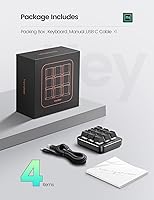
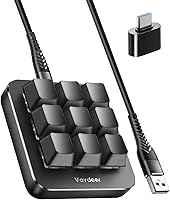
The Vaydeer JP1011-C 9-Key Macro Mechanical Keypad is a compact, purpose-built tool that sits on your desk without demanding much space — its 2.83 x 2.83-inch frame weighs just 3.2 ounces, so you can toss it in a bag without a second thought. Since its April 2022 launch, it has climbed to #318 in Computer Keyboards, which says something real about sustained buyer interest. This macro keypad connects via USB-A, meaning zero pairing headaches and no batteries to chase. It is not trying to replace your main keyboard — it complements it, adding a dedicated layer of one-handed control that fits naturally into gaming, creative, or office workflows.
Features & Benefits

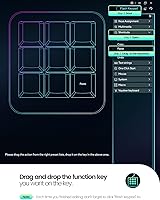
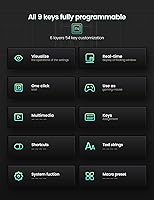
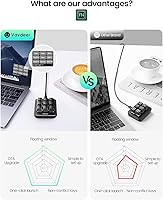
The Vaydeer keypad's most practical trick is its 6 functional layers — distinct profiles you can switch on the fly by scrolling within the floating window, or that swap automatically when you jump between apps. That floating window itself is genuinely useful: it shows your current key mappings on screen at all times, so you never waste time hunting through a settings menu mid-session. NKRO support means every simultaneous keypress registers cleanly, which matters in fast-paced gaming just as much as rapid shortcut sequences in Premiere or After Effects. Layered on top, OTA firmware updates arrive with push notifications, and settings can be exported and moved to another machine in seconds.

Best For

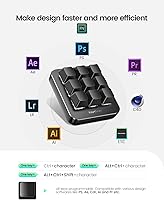
This one-handed pad makes the most sense as an add-on for people who already have a decent keyboard and want to stop reaching for the same shortcuts hundreds of times a day. Gamers grinding CS:GO or OSU will appreciate having combos and multi-key sequences mapped to a single press. Video editors and designers working in Adobe or DaVinci can dedicate entire layers to their most-used tools without touching their main board. Coders and remote workers benefit from one-click file navigation and system shortcuts that shave real minutes off repetitive tasks. It also makes a thoughtful gift for anyone who spends serious hours at a PC.

User Feedback

Buyers who stick with the Vaydeer keypad tend to call out two things above all: the floating window clarity and the satisfying tactile feel of the keys, both of which hold up well after months of regular use. Setup earns mostly positive marks — most users get their first profile running quickly. That said, the companion software does carry a learning curve, and a handful of reviewers describe it as unintuitive until you invest real time in it. Build quality comments are broadly favorable, though a few buyers flag the cable length as shorter than expected. Customer support responses are generally described as prompt and helpful.

Pros

  • Six switchable layers mean one small pad can serve completely different workflows without any re-wiring.
  • The floating window overlay shows live key assignments on screen, so nothing needs to be memorized.
  • NKRO support ensures every simultaneous keypress registers cleanly, even during fast gaming sequences.
  • At under three ounces, this macro keypad slips into any bag and travels without adding noticeable bulk.
  • OTA firmware updates are pushed automatically, keeping the pad current without hunting for downloads.
  • Settings can be exported and imported in seconds, making multi-PC setups genuinely painless.
  • One-click macros handle complex multi-step actions — folder opens, paste chains, web launches — in a single press.
  • USB-A wired connection means stable, low-latency input and no battery management whatsoever.
  • The key feel earns consistent praise from buyers who use the pad daily across extended work sessions.
  • Customer support is widely described as responsive, with issues typically addressed within a reasonable window.

Cons

  • The companion software carries a real learning curve that frustrates buyers who expect instant usability.
  • The USB cable is shorter than many users anticipate, which can limit desk placement flexibility.
  • Only nine keys means power users with complex workflows may hit the ceiling of what one layer can hold.
  • Single-color backlighting offers no per-key color customization, which may disappoint RGB enthusiasts.
  • Auto app-detection for layer switching does not always work reliably across all software environments.
  • Two macro modes — trigger and sequence — are listed as upcoming features, meaning they are not yet available at purchase.
  • No wireless or Bluetooth option exists, locking you into a tethered connection at all times.
  • macOS compatibility is not officially confirmed, making it a risky buy for Mac-primary users.
  • The mid-range build quality, while adequate, does not convey the premium feel some buyers expect at this price point.
  • Initial firmware setup can feel overly involved for users who just want basic hotkey functionality out of the box.

Ratings

The scores below reflect an AI-driven analysis of verified global buyer reviews for the Vaydeer JP1011-C 9-Key Macro Mechanical Keypad, with spam, incentivized, and bot-generated feedback actively filtered out before scoring. Each category is rated independently, weighing both the enthusiasm of satisfied users and the frustrations raised by those who encountered real limitations. Nothing is glossed over — the strengths and the friction points are given equal weight.

Key Feel & Tactility
84%
Buyers consistently single out the key feel as one of the first things they notice and enjoy. The mechanical switches deliver a satisfying tactile response that holds up during long editing or gaming sessions, and repeated daily use does not seem to dull that experience noticeably over time.
A portion of users feel the switches are on the lighter side and would prefer a more pronounced actuation force. Those coming from high-end mechanical keyboards may find the feedback adequate but not particularly exceptional by enthusiast standards.
Software & Setup Experience
61%
39%
Once users invest the time to learn the companion app, the payoff is genuine — complex macros, layer configurations, and one-click shortcuts all come together in a way that feels powerful. The ability to export settings and flash them to the pad directly means your work is not lost when you switch machines.
The companion software is the most consistently criticized aspect across verified reviews. New users frequently describe the interface as unintuitive, and getting through the first full configuration — including flashing the keyboard — can take significantly longer than expected, especially without a clear tutorial.
Macro Functionality
81%
19%
The depth of macro support genuinely impresses users who take the time to explore it. Gamers running multi-step combos and editors chaining copy-paste or export sequences report real, measurable time savings once their profiles are dialed in. NKRO ensures inputs are never dropped mid-sequence.
Two of the four advertised macro modes — trigger and sequence — are not yet available and remain listed as upcoming firmware features. Buyers who purchased specifically for those modes have expressed frustration that they received an incomplete feature set at launch.
Portability & Form Factor
89%
At 3.2 ounces and a near-perfect square footprint under three inches per side, this one-handed pad genuinely disappears into a bag. Users who move between a home office and a coworking space appreciate that it adds no meaningful weight and takes up almost no desk real estate at either location.
The compact size, while a strength in most contexts, means nine keys is the hard ceiling — there is no room to grow within the pad itself. Users whose workflows eventually expand beyond what nine keys per layer can handle will find themselves constrained fairly quickly.
Floating Window Interface
83%
The real-time floating window overlay earns praise from users across skill levels, particularly those managing multiple layers for different software. Being able to glance at the screen and immediately see current key assignments removes a real cognitive load, especially when first building out a new profile.
Some users report that the floating window can feel visually intrusive on smaller monitors or during full-screen applications where it does not minimize or hide automatically. A few reviewers also noted occasional display glitches where the overlay fails to update when switching layers rapidly.
Build Quality & Materials
67%
33%
For a mid-range peripheral, the pad holds together well under the kind of daily hammering that gaming and editing workflows produce. Most long-term users report no structural issues after months of consistent use, and the keycaps show reasonable resistance to shine and wear.
The materials do not project confidence the way a premium peripheral would — the plastic housing feels functional rather than substantial, and the overall finish can look a little plain on a well-appointed desk setup. Users expecting a flagship-tier build at this price point will likely be underwhelmed.
Layer Switching Speed
76%
24%
Manual layer switching via the floating window scroll is smooth and responsive, and users who primarily toggle between two or three profiles find it intuitive after a short adjustment period. Gamers switching between a desktop layer and a game-specific layer mid-session report no frustrating delays.
Automatic app-based layer switching is less reliable, with several users reporting that it misses triggers or switches to the wrong profile when multiple apps are competing for focus. It works well in clean, single-app scenarios but struggles in complex multi-window workflows.
Cable & Connectivity
62%
38%
The wired USB-A connection is rock-solid in terms of latency and consistency — there are no dropouts, no pairing rituals, and no firmware handshake issues. Plug it in and it works, which is exactly what most users want from a peripheral they rely on for precise input.
The cable length draws repeated criticism in buyer reviews, with many users finding it too short for comfortable desk placement away from a tower PC. Since the cable is not detachable, there is no straightforward workaround beyond using a USB extension, which adds clutter.
OTA Firmware Updates
78%
22%
The push-notification-driven OTA update system is a genuine convenience that sets the Vaydeer keypad apart from competitors that require manual firmware downloads. Users appreciate being informed of updates without having to check a manufacturer website, and the update process itself is generally smooth.
A small number of users report that updates occasionally introduce minor software bugs or reset certain settings, requiring them to re-flash their configurations afterward. The frequency and content of updates also varies, with some buyers waiting longer than expected for promised features to actually arrive.
Settings Portability
86%
The export-and-import system works reliably and is one of the more thoughtful features on this pad. Users who split time across a work laptop and a home desktop particularly appreciate being able to carry their full configuration as a small file rather than rebuilding it from scratch each time.
The exported file format is proprietary, which means settings cannot be transferred to a different macro pad brand or easily edited outside the companion app. Users who upgrade to a different device in the future will not be able to carry their configurations forward.
Value for Money
77%
23%
For users who commit to exploring its full feature set, the price-to-capability ratio is genuinely compelling. Six layers, NKRO, OTA updates, and a floating window overlay in a package this compact is a strong offering for productivity-minded buyers who do not need premium materials.
Buyers who expect immediate out-of-box value without a meaningful time investment in software setup often feel the price is harder to justify. If the companion app experience were more polished, the value perception would likely be considerably stronger across a broader audience.
Backlighting
54%
46%
The single-color backlight is functional and provides enough illumination to see the key legends in a dim room. For users who just want the keys to be visible during late-night sessions, it does the job without any fuss.
In a market where per-key RGB has become nearly standard even at budget price points, the single-color backlight feels like a notable omission. RGB enthusiasts and users who like to color-code their key functions by layer will find this limitation genuinely frustrating.
Customer Support
74%
26%
Vaydeer's support team receives fairly positive marks in verified purchase feedback, with most buyers describing response times as reasonable and agents as willing to work through configuration issues step by step. The 24/7 availability claim appears to hold up for the majority of users who tested it.
Responses can occasionally be templated or miss the specific nuance of a software bug the user is reporting, requiring multiple back-and-forth exchanges to resolve. Users dealing with firmware-related issues in particular sometimes find that support escalations take longer than the initial contact suggests.
Compatibility & Platform Support
58%
42%
On Windows, the pad and its companion software work without any major issues for the vast majority of users, covering the primary target audience effectively. The broad range of supported use cases — gaming, creative software, business tools — means Windows users across different workflows can find a viable configuration.
The absence of confirmed macOS support is a meaningful gap given how many creative professionals run Macs. Users who tried the pad on macOS reported inconsistent behavior with the companion software, and the official documentation provides no guidance or workaround for that platform.

Suitable for:

The Vaydeer JP1011-C 9-Key Macro Mechanical Keypad is a strong fit for anyone who spends long hours at a PC and finds themselves hammering the same keyboard shortcuts dozens of times a day. Gamers who play reflex-heavy titles will genuinely benefit from having combos and quick-access macros sitting right under one hand, ready to fire without disrupting their main keyboard grip. Creative professionals — video editors cutting in DaVinci Resolve, designers cycling through tools in Photoshop, or animators relying on frame-stepping shortcuts — can dedicate entire layers to their workflow and switch between them instantly. Remote workers and coders who live inside file systems, terminals, and browser tabs will find the one-click launch and paste macros surprisingly addictive once set up. It also works well as a considerate, practical gift for a tech-oriented friend who already has a solid keyboard setup and would appreciate a meaningful upgrade to their daily routine.
Not suitable for:

The Vaydeer JP1011-C 9-Key Macro Mechanical Keypad is not the right choice for buyers expecting a plug-and-play experience with zero configuration — getting real value out of this pad requires sitting down with the companion software and spending time mapping your workflows deliberately. If you are a casual user who only occasionally needs a shortcut or two, nine programmable keys with six layers is likely more complexity than the task warrants. Mac-first users should approach with caution, as the device is listed as compatible with iOS and Windows, and macOS support is not clearly guaranteed or documented. Anyone who wants a wireless setup will need to look elsewhere, since this pad is wired-only with no Bluetooth option. Finally, buyers who prioritize RGB lighting or premium build materials may find the single-color backlighting and mid-range construction underwhelming compared to pricier competitors in the macro pad space.
Specifications

  • Brand: Manufactured by Vaydeer, a company focused on compact peripheral accessories for PC users.
  • Model Number: The official model designation is JP1011-C.
  • Key Count: Features 9 fully programmable mechanical keys arranged in a compact 3x3 grid layout.
  • Functional Layers: Supports 6 customizable profile layers, each independently configurable for different applications or workflows.
  • Key Rollover: Full NKRO (N-Key Rollover) ensures every simultaneous keypress is registered accurately without ghosting.
  • Connectivity: Connects via a wired USB-A interface, providing stable, low-latency input with no pairing or battery requirements.
  • Dimensions: The pad measures 2.83″ x 2.83″ x 1.1″, making it one of the more compact macro pads in its category.
  • Weight: Weighs just 3.2 ounces, light enough to carry in a laptop bag without any noticeable added bulk.
  • Backlighting: Equipped with single-color LED backlighting; per-key RGB customization is not supported on this model.
  • Macro Modes: Currently supports two active macro trigger modes — no-repeat and repeat-by-holding — with trigger and sequence modes listed as upcoming via firmware update.
  • Floating Window: A real-time on-screen floating overlay displays the current key assignments for the active layer at all times.
  • Firmware Updates: Supports OTA (over-the-air) firmware upgrades delivered via push notifications through the companion software.
  • Settings Portability: User configurations can be exported and imported as files, enabling fast setup across multiple computers or easy sharing with others.
  • Layer Switching: Layers can be switched manually by scrolling within the floating window, or automatically triggered by the active application on-screen.
  • Compatible OS: Officially compatible with Windows and iOS; macOS compatibility is not explicitly confirmed in product documentation.
  • Compatible Devices: Designed for use with PC; compatibility with other device types such as tablets or smart TVs is not documented.
  • Use Cases: Intended for gaming, graphic design, video editing, programming, multimedia control, and general business productivity tasks.
  • First Available: The product was first listed for sale on April 2, 2022, and has maintained a top-400 rank in Computer Keyboards since then.

Related Reviews
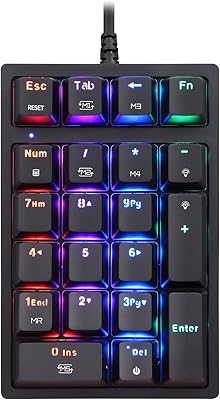
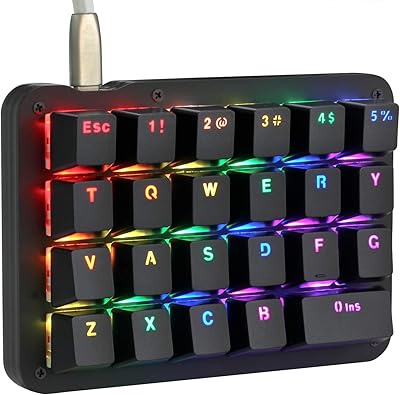
MOTOSPEED MSK24 21-Key Mechanical Numpad
78%
88%
Typing Feel
91%
Value for Money
67%
Build Quality
83%
RGB Lighting
54%
Software & Programmability
More
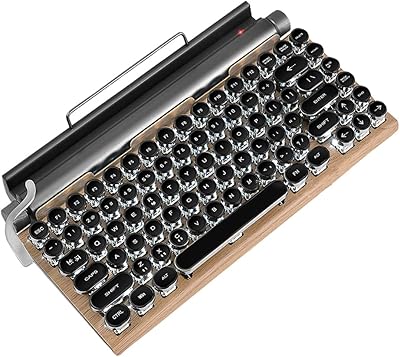
GUAZI STORE 83-Key Mechanical Keyboard
86%
91%
Typing Experience
88%
Build Quality
86%
Bluetooth Connectivity
89%
Backlighting Customization
80%
Ergonomics
More
KEYCOOL K21 Wireless Mechanical Numeric Keypad
80%
88%
Build Quality
91%
Typing Experience
79%
Wireless Connectivity
93%
Hot-Swap Switch Support
82%
Battery Life
More
BOYI TD21 Mechanical Numeric Keypad
76%
83%
Wireless Reliability
89%
Hot-Swap Experience
86%
Keycap Quality
72%
Build & Construction
58%
Software & Customization
More
Koolertron One-Handed Macro 23-Key Mechanical Keypad
76%
83%
Build Quality
88%
Switch Feel
91%
Programmability
51%
Configuration Software
89%
Onboard Memory
More
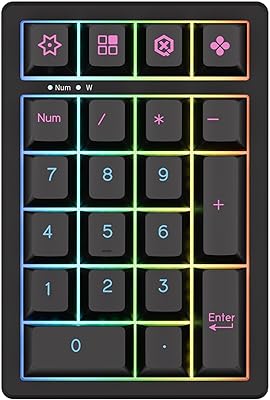
KZZI K20 Mechanical Wireless Numeric Keypad
80%
83%
Build Quality
88%
Typing Feel
79%
Wireless Connectivity
91%
Hot-Swap Feature
77%
Battery Life
More
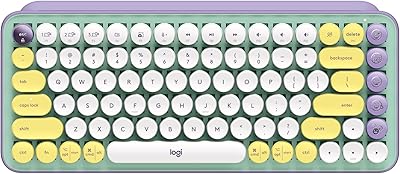
Logitech POP Keys Mechanical Wireless Keyboard
76%
88%
Typing Feel
84%
Build Quality
81%
Wireless Reliability
91%
Battery Life
93%
Design & Aesthetics
More
Stratia C+C Vitamin C Serum 15% – 1 Fl Oz
87%
89%
Effectiveness in Brightening
84%
Anti-Aging Performance
91%
Skin Sensitivity Compatibility
92%
Texture and Feel
94%
Absorption Rate
More
Koolertron 48-Key One-Handed Mechanical Keyboard
69%
83%
Key Feel & Switch Quality
78%
Programmability & Macro Power
44%
Configuration Software
71%
Build Quality & Materials
52%
Keycap Durability
More
NEEWER 25W 12.9″ Streaming Key Light GL25B
86%
91%
Lighting Quality
88%
Ease of Setup
93%
Adjustability and Flexibility
84%
Wireless Control Experience
96%
Color Accuracy (CRI Rating)
More

FAQ

You will need to install the companion software to get the most out of it — that is where you assign macros, configure layers, and flash your settings to the pad. Basic keypresses may register without setup, but without configuring it through the app, the keys will not do anything particularly useful. Budget 30 to 60 minutes for your first proper setup session.

The official compatibility list covers Windows and iOS only, so macOS is not guaranteed. Some users have reported partial functionality on Mac, but without official support, you may run into issues with the companion software or layer switching. If you are primarily on a Mac, it is worth reaching out to Vaydeer directly before purchasing.

It is fairly quick once you are familiar with it. You can scroll within the floating window to cycle through layers manually, or set up automatic switching based on which application is in focus. The auto-switch feature is convenient but does not always behave perfectly across every app, so some users prefer manual switching for more predictable control.

Yes, NKRO support means the pad handles simultaneous key inputs cleanly without ghosting or missed presses. It sits alongside your main keyboard without any conflict, and since it is a separate USB device, the two operate independently. Gamers using it for combo macros in titles like CS:GO have reported reliable response times.

The floating window is a small on-screen overlay that shows your current layer and key assignments in real time. Most users find it helpful rather than intrusive, especially when they are still learning a new layer layout. You can reposition it on your screen, and once you have memorized your mappings, it fades into the background fairly naturally.

Yes, that is one of the more practical features on this one-handed pad. You can link specific layers to specific applications, so when you alt-tab into Premiere Pro or launch a game, the pad switches its active profile to match. It does not work perfectly with every app, but for the major ones most users target, it tends to be reliable.

The cable length is not officially specified in product documentation, but buyer feedback suggests it is on the shorter side — some users find it restrictive depending on desk layout. The cable does not appear to be detachable on this model, so placement relative to your PC port is worth thinking through before you commit to a spot on your desk.

No, and this is one of the Vaydeer keypad's more underrated features. You can export your entire configuration as a file, then import it on any other machine in seconds. The settings are also flashed directly to the pad's memory, so the device itself retains your layer assignments regardless of which PC it is plugged into.

The general consensus from regular users is that it holds up fine for daily use — keys remain consistent and nothing feels particularly fragile. That said, it is a mid-range peripheral, not a premium one, so do not expect the heft or materials of a high-end mechanical device. For the price bracket it occupies, the build quality is considered fair and appropriate.

You do not have to hunt for them manually. The companion software sends push notifications when a new firmware version is available, and the OTA update process is handled through the app. It is a relatively painless experience compared to many peripherals that require downloading files from obscure manufacturer websites and flashing them manually.