Overview

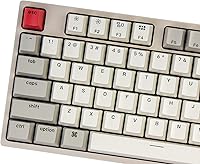
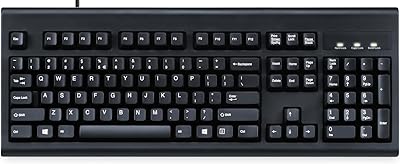
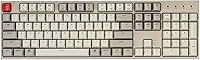
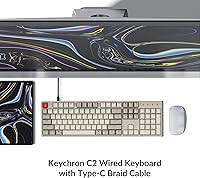
The Keychron C2 Full-Size Hot-Swap Mechanical Keyboard is Keychron's straightforward answer for Mac and Windows users who want a genuine 104-key board with switch customization at an approachable price. The Keychron C2 sits in a focused lane: no wireless, no RGB, just a reliable wired board that does its job without fuss. What makes it stand out visually is the retro color scheme, a warm vintage palette that looks refreshingly different next to the sea of all-black office keyboards. The braided USB-C cable feels more durable than you'd expect at this tier, and the overall build has a reassuring solidity. This review covers the Red linear switch version specifically.
Features & Benefits

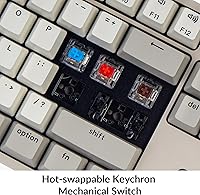
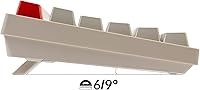
The standout feature here is hot-swap capability — the MX-style sockets accept both 3-pin and 5-pin switches, so swapping in Gaterons, Kailhs, or Cherry MX stems takes a few minutes and a puller tool, no soldering required. The pre-installed Red linears are smooth and light, well-suited for fast typing or casual gaming where you want minimal resistance. A full 104-key layout means the numpad is present and accounted for, and Keychron includes extra keycaps for both Mac and Windows, plus dedicated Siri and Cortana keys. The dual-angle tilt feet at 6° and 9° give you real control over wrist positioning, which pays off noticeably during longer sessions.

Best For

This full-size hot-swap board is a natural fit for Mac power users who want all the function row media keys working correctly without remapping hassles. It's equally useful on Windows desks — the included keycap set handles that transition without any friction. Anyone getting into the mechanical keyboard hobby will appreciate being able to experiment with different switches without needing a soldering iron. It holds its own for light gaming, though calling it a dedicated gaming board would be a stretch; the Red linears feel satisfying for quick keystrokes, but the lack of backlight means it won't suit most gaming setups. For desk-bound users who want a dependable wired board, it delivers.

User Feedback

Across a solid rating pool, buyers consistently highlight build quality and the ease of the hot-swap process as the top positives — people appreciate that swapping switches genuinely requires no expertise beyond a puller tool. Stock stabilizers also draw praise, coming in better than expected for the price tier. On the downside, the ABS keycaps will visibly develop shine with heavy daily use; upgrading to a PBT keycap set is the most common community fix. The absence of a backlight is the other consistent criticism — several reviewers flag it upfront as a dealbreaker. Mac users report solid out-of-box compatibility but note that some key remapping may still be needed depending on their specific workflow.

Pros

  • Genuine hot-swap sockets work with virtually all MX-style switches — no soldering station needed.
  • Ships with both Mac and Windows keycap sets, so either platform is covered immediately.
  • The Keychron Red linears feel smooth and light, reducing finger fatigue during long writing sessions.
  • Braided USB-C cable is noticeably more durable than the rubber cables most competing boards include.
  • Full 104-key layout means the numpad is present for anyone who uses it seriously.
  • Retro color scheme stands out visually and looks more considered than the typical all-black board.
  • Dedicated Mac function row works out of the box, including media keys and a Siri shortcut.
  • Two tilt angle options give you real control over wrist positioning without any accessories.
  • Build quality feels solid and rattle-free for the price tier — no meaningful chassis flex during use.
  • No software installation required; plug in and the board works immediately on both operating systems.

Cons

  • No backlight at all — a hard dealbreaker for dim-light typists or anyone wanting RGB.
  • ABS keycaps develop a shiny, worn look on heavy-use keys within a few months of daily typing.
  • Stock stabilizers on the spacebar rattle noticeably until lubed — an extra step most beginners do not expect.
  • No wireless option means the board is tied to a cable, which limits desk flexibility.
  • Full-size footprint is a real space commitment that can crowd out mouse room on smaller desks.
  • No onboard remapping or macro support without relying entirely on third-party software.
  • Some unit-to-unit quality control variance has been reported, including occasional off-center stabilizers.
  • Hot-swap sockets can develop slight looseness after many repeated switch changes over time.
  • Linear switches divide opinion sharply — buyers who prefer tactile or clicky feedback will want a different variant.
  • No cable routing channels on the underside, making tidy desk cable management harder to achieve.

Ratings

The Keychron C2 Full-Size Hot-Swap Mechanical Keyboard earns its ratings from a global synthesis of verified buyer experiences, processed by AI to filter out incentivized reviews, spam, and outlier feedback that skews the real picture. Scores reflect what everyday users — from Mac-based professionals to hobbyist modders — actually reported after sustained use, not just first-impression unboxings. Both the genuine strengths and the recurring frustrations are weighted honestly, so you know exactly what you are getting into before you buy.
Build Quality
83%
For the price tier, the chassis feels noticeably solid — users consistently describe the frame as having no meaningful flex during aggressive typing sessions. The braided USB-C cable also draws regular praise for holding up far better than the thin rubber cables that ship with competing boards in this range.
The plastic bottom panel shows scuff marks over time, and a handful of reviewers noted that the keycap legends on ABS caps start looking worn after several months of heavy daily use. It does not feel flimsy, but it is clearly not a premium aluminum-bodied board either.
Switch Feel & Performance
81%
19%
The pre-installed Red linears are smooth out of the box with a light actuation force that suits both fast typists and users who spend long hours drafting documents. Several reviewers noted that finger fatigue is noticeably reduced compared to heavier tactile switches they had used before.
Linear switches divide opinions sharply — users who prefer tactile or clicky feedback find the Reds too light and imprecise. A few buyers also noted minor inconsistency in stem wobble between individual switches, though this is largely a cosmetic feel issue rather than a functional one.
Hot-Swap Functionality
88%
This is where the board earns its most enthusiastic feedback. Swapping out switches takes under ten minutes even for first-timers, and the sockets hold 3-pin and 5-pin MX-style stems from virtually every major brand without any adapter. Beginners especially appreciate being able to experiment with different switch feels without buying a second board.
A small number of users reported that socket pins felt slightly loose after repeated swapping over many months, which can affect switch registration if not reseated carefully. The included switch puller is functional but basic — a better tool from a third-party vendor makes the process smoother.
Mac Compatibility
79%
21%
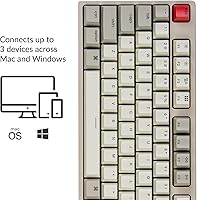
Mac users get a dedicated function row with working media controls, brightness keys, and a Siri key right out of the box — a rarity at this price point. Switching between Mac and Windows layouts takes only a physical keycap swap plus a mode toggle, which most users find straightforward.
Some Mac users reported needing to remap a few modifier keys to match their muscle memory, particularly those coming from Apple Magic Keyboards. The keyboard does not support per-key Mac system-level customization without third-party software, which adds a small friction point for power users.
Keycap Quality
62%
38%
The retro color scheme is genuinely appealing and consistently praised for making a desk setup feel more characterful. At first use, the legends are crisp and the surface texture is pleasant enough for everyday typing without feeling slippery.
ABS plastic shines with extended use — high-frequency keys like the home row and spacebar develop a noticeable gloss within three to six months of daily typing. Buyers wanting long-term keycap quality are routinely advised by the community to budget for a PBT replacement set, which adds to the overall cost.
Typing Sound Profile
74%
26%
The Red linears produce a relatively quiet, low-pitched thock that works reasonably well in shared office environments. Users who have lubed the stock switches report a meaningful improvement in sound quality, and the board responds well to foam dampening mods for those who want to go further.
Stock stabilizers on the larger keys — spacebar in particular — can rattle noticeably until broken in or lubed. Some reviewers found the overall sound profile slightly hollow compared to boards with gasket mounts or sound-dampening layers built in.
Ergonomics & Typing Angle
77%
23%
The two tilt positions at 6° and 9° cover the most common wrist preference range, and the slight built-in incline means the board sits at a comfortable angle even without the feet extended. Long typing sessions feel manageable without an external wrist rest for most users.
The tilt feet have no intermediate positions, so users with specific ergonomic requirements may find neither angle quite right. There is no negative tilt option, which can be a drawback for users who type with wrists below desk level or follow strict ergonomic setups.
Cable & Connectivity
86%
The braided USB-C cable resists tangling and feels robust enough to survive being repeatedly unplugged and replugged without fraying at the connector. Having a wired-only connection means zero latency concerns and no charging routines to think about — plug in and it just works.
The cable is on the longer side, which creates desk clutter if your tower or hub sits close to the keyboard. There is no cable routing channel on the underside of the board, so cable management depends entirely on your own setup.
Layout Completeness
84%
A true 104-key layout means the numpad is present, which is genuinely appreciated by data entry users, accountants, and anyone who works with spreadsheets daily. Having both Mac and Windows keycap sets in the box means the board is immediately usable on either platform without a separate purchase.
The full-size footprint is a real space commitment — users with smaller desks or who use a low-sensitivity mouse with wide sweeps report the keyboard pushing their mouse pad further right than they would like. There is no compact or TKL version of this exact hot-swap retro model.
Backlight & Aesthetics
53%
47%
The retro color palette is a deliberate and well-executed design choice that stands out from the generic black-or-white office keyboard crowd. Users who work in well-lit environments find the keycap legends easy to read and the overall desk presence more visually interesting than expected.
There is no backlight of any kind — not even single-color illumination — which is a hard dealbreaker for anyone who types in dim lighting or wants RGB for gaming atmosphere. This is probably the single most common disappointment mentioned in negative reviews, and it is worth knowing upfront.
Value for Money
82%
18%
Genuine hot-swap sockets, a well-known brand, and solid daily usability in a single package at this price tier is a combination that is hard to match. Users who factor in the included dual keycap sets feel they are getting measurably more than competing boards charge for less.
If you factor in likely future spending — a PBT keycap upgrade and switch lubing supplies — the real cost climbs somewhat. Buyers who want the board to be fully satisfying out of the box without any modification may feel the value equation is slightly less compelling.
Software & Programmability
58%
42%
There are no proprietary software dependencies to install, which means the board works immediately on any system. Mac and Windows mode switching is handled via a simple hardware toggle, keeping the experience clean and straightforward for users who dislike managing keyboard utilities.
There is no onboard reprogramming and no dedicated software for remapping keys or creating macros. Power users who want per-key customization or layer switching will need to rely entirely on third-party tools like Karabiner-Elements on Mac, which adds complexity Keychron does not officially guide users through.
Stabilizer Quality
71%
29%
Several reviewers noted the stock stabilizers perform above expectations for a board in this range, with the larger keys feeling reasonably balanced and consistent without any immediate modification. For users coming from cheap membrane boards, the difference in key evenness is very noticeable.
Enthusiast-level buyers who have used lubed and clipped stabilizers on higher-end boards will find the stock units rattly and inconsistent under harder keystrokes. The spacebar in particular tends to attract criticism, and lubing the stabilizers is widely recommended as the first mod to perform.
Durability & Longevity
76%
24%
The Red switches carry a 50 million keystroke rating, and the general consensus from longer-term owners is that the board holds up well with normal daily use over one to two years. The braided cable shows no signs of early degradation in most user reports.
ABS keycap wear and hot-swap socket loosening after extensive switch changes are the two most cited long-term concerns. A small percentage of reviewers also mentioned quality control inconsistencies — a sticky key or a slightly off-center stabilizer — suggesting some unit-to-unit variance exists.

Suitable for:

The Keychron C2 Full-Size Hot-Swap Mechanical Keyboard is an excellent match for Mac users who have long been frustrated by the lack of affordable full-size keyboards with a proper, out-of-the-box Mac function row. If you work primarily at a fixed desk — whether at home or in a private office — and have no real need for wireless connectivity, this wired board removes all the friction that comes with pairing, charging, and connectivity dropouts. It is particularly well-suited for anyone curious about the mechanical keyboard hobby but not yet ready to invest in soldering equipment; the hot-swap sockets let you test different switch feels at your own pace without any technical barrier. Data entry professionals, writers, and spreadsheet-heavy workers will appreciate having a full numpad back after years of compact or tenkeyless compromises. Budget-conscious buyers who want a board from a reputable brand — rather than a no-name import — will find the value proposition here genuinely compelling.
Not suitable for:

The Keychron C2 Full-Size Hot-Swap Mechanical Keyboard is a poor fit for anyone who types regularly in low-light conditions, since there is no backlight of any kind — not even a single-color option. If RGB lighting is a priority for your gaming setup or your desk aesthetic depends on illumination, this board will disappoint you regardless of how good everything else about it is. Wireless users who have grown accustomed to a clean, cable-free desk will also find the wired-only setup a step backward, especially if you frequently move between a laptop and a desktop. Buyers expecting premium, long-lasting keycaps out of the box should temper expectations; the ABS material will develop a noticeable shine on high-frequency keys within months of daily use, and a PBT replacement set is almost inevitable if longevity matters to you. Finally, enthusiasts who want deep onboard programmability, per-key remapping, or macro layers without third-party software will quickly hit a ceiling with this board.
Specifications

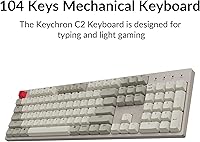
  • Layout: Full-size 104-key layout with a dedicated numpad, function row, and navigation cluster.
  • Switch Type: Keychron Red linear mechanical switches, pre-installed and hot-swappable without soldering.
  • Socket Compatibility: MX-style hot-swap sockets supporting both 3-pin and 5-pin switches from most major manufacturers.
  • Switch Lifespan: Pre-installed Red switches are rated for up to 50 million keystrokes under normal operating conditions.
  • Connectivity: Wired USB-C connection via a braided detachable cable; no wireless or Bluetooth support.
  • OS Compatibility: Compatible with macOS and Windows; includes dedicated keycap sets and a hardware toggle for both platforms.
  • Keycap Material: Double-shot ABS plastic keycaps with a retro-inspired color scheme and printed legends.
  • Backlight: No backlight of any kind; this version ships without any illumination.
  • Tilt Adjustment: Two-position adjustable tilt feet offering 6° and 9° angles in addition to the built-in base incline.
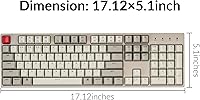
  • Dimensions: The board measures 17.1″ in length, 5.1″ in width, and 1.5″ in height.
  • Weight: Complete unit weighs 3.3 pounds, which is typical for a full-size board with an ABS chassis.
  • Frame Material: Acrylonitrile Butadiene Styrene (ABS) plastic construction for both the top plate and bottom frame.
  • Included Keycaps: Box includes extra keycap sets for both Mac and Windows layouts, covering key legend differences between platforms.
  • Special Keys: Dedicated Siri key for Mac mode and Cortana key for Windows mode are included on the function row.
  • Cable Type: Detachable braided USB-C to USB-A cable; USB-C end connects to the keyboard.
  • Actuation Force: Keychron Red switches have a light linear actuation requiring approximately 45g of force with no tactile bump.
  • Numlock Support: Num Lock key is functional on Windows only; macOS does not natively support Num Lock toggling.
  • Model Number: Official model identifier is C2-A3, corresponding to the hot-swappable Red switch non-backlight variant.

Related Reviews

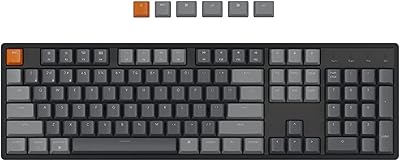
Keychron K10 Full Size Wireless Mechanical Keyboard
83%
91%
Typing Experience
89%
Build Quality
87%
Bluetooth Connectivity
85%
Battery Life
82%
Ergonomics
More
YMDK GH60 GK61 RGB Hot Swap Mechanical Keyboard Kit
85%
89%
Value for Money
91%
Ease of Assembly
94%
Customization Options
85%
Switch Compatibility
88%
Build Quality
More
Keychron K8
Keychron K8
80%
91%
Typing Feel & Switch Quality
88%
Noise Level
86%
Multi-Device Connectivity
67%
Build Quality & Materials
72%
Battery Life
More
Keychron K2 V2 Wireless Mechanical Keyboard
87%
88%
Overall Performance
85%
Typing Experience
90%
Battery Life
92%
Build Quality
80%
Portability
More
Keychron V1 75% Mechanical Keyboard
82%
83%
Build Quality
81%
Typing Feel
74%
Switch Performance
93%
Customization & Firmware
91%
Hot-Swap Functionality
More
Keychron K4 Bluetooth Wireless Mechanical Keyboard
86%
91%
Build Quality
88%
Battery Life
85%
Typing Experience
90%
Connectivity & Versatility
82%
RGB Backlighting
More
Samsers KF08S Foldable Bluetooth Keyboard
80%
93%
Portability
81%
Typing Comfort
78%
Build Quality
84%
Multi-Device Connectivity
74%
Battery Life
More
Perixx Periboard-106 Ergonomic Full-Size Keyboard
79%
88%
Typing Comfort
83%
Build Quality
81%
Key Feel
91%
Value for Money
87%
Comfort for Long Sessions
More
Amazon Basics Wireless Keyboard and Mouse Combo
74%
94%
Ease of Setup
88%
Value for Money
63%
Typing Experience
61%
Mouse Comfort & Usability
57%
Build Quality
More
Arteck HA305-3B USB Wired Backlit Keyboard
80%
97%
Ease of Setup
83%
Typing Experience
74%
Backlight Quality
71%
Build Quality & Durability
92%
Value for Money
More

FAQ

Not really. The Keychron C2 Full-Size Hot-Swap Mechanical Keyboard includes a basic switch puller in the box, and the process is straightforward enough for a first-timer. You pull out the old switch, line up the pins on the new one, and press it firmly into the socket — no soldering, no disassembly required. A third-party switch and keycap puller makes the job even easier if you plan to swap frequently.
The hot-swap sockets support both 3-pin and 5-pin MX-style switches, which covers the vast majority of popular options including Cherry MX, Gateron, Kailh, and Boba U4, among others. The only switches that will not fit are those using a proprietary footprint, like Alps or Topre. If you are buying aftermarket switches specifically for this board, just confirm they use the standard MX stem and you will be fine.

No software installation is needed. There is a physical switch on the side of the board that toggles between Mac and Windows modes, and the included extra keycaps let you swap the legends to match. The function row works correctly with macOS media controls, brightness, and Mission Control right out of the box. Some users do choose to use Karabiner-Elements to remap modifier keys to their personal preference, but that is entirely optional.

It handles light gaming comfortably — the Red linears are responsive and the full numpad is useful for games that use it. That said, the lack of any backlight is a real limitation for gaming setups, and the board does not have anti-ghosting or N-key rollover marketing behind it. Think of it as a productivity keyboard that is also fine for casual gaming, rather than the other way around.

The retro color scheme genuinely looks good when the board is new, but ABS plastic has a known tendency to develop a shiny, worn look on the most-used keys over time — usually the home row and spacebar first. If you type heavily every day, you will likely notice shininess within three to six months. The good news is that PBT keycap sets are widely available and drop right onto the MX stems, and many users consider that a worthwhile upgrade once the stock caps show wear.

Yes, it works with any Mac that has a USB-A port or USB-C port with an adapter. The braided cable uses USB-C on the keyboard end and USB-A on the host end, so you will need a USB-C to USB-C cable or a USB-A to USB-C adapter if you are plugging into a modern MacBook. The function row compatibility is the same regardless of which Mac you connect it to.

Honestly, yes. There is no backlight at all on this version, so if you regularly type in low-light conditions and are not a touch typist, it will be frustrating. This is probably the most common reason people return the board after receiving it. If you need illumination, Keychron does offer backlit variants in their lineup — it is worth checking those before committing to this one.

That is a common observation and completely fixable. The stock stabilizers on the spacebar and larger keys come unlubed from the factory, which causes the rattle. Opening the board and applying a small amount of dielectric grease or Krytox 205g0 to the stabilizer wires and housings quietens things down significantly. It takes about 20 minutes and is widely considered the single best modification you can make to this board.

It can work with an iPad or Android tablet that supports USB OTG, provided you have the right adapter — USB-A to USB-C or USB-A to Lightning depending on your device. Keep in mind that the Mac and Windows layout toggle will not translate meaningfully on mobile platforms, and some function keys may behave differently or not at all. For occasional use it is fine, but this board is really designed around desktop operating systems.

Most users are pleasantly surprised by how sturdy the chassis feels. There is no meaningful flex in the frame during normal typing, and the overall weight gives it a planted feel on the desk. The bottom panel is plastic and will pick up scuffs over time, but nothing about it feels flimsy or hollow. For an entry-level board in this price range, the build quality is genuinely one of its stronger selling points.

Where to Buy