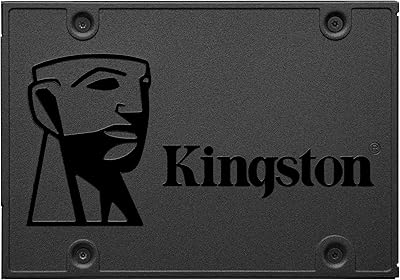
Overview

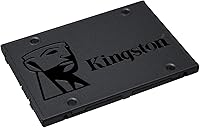
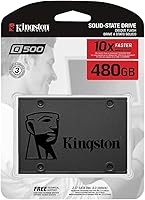
The Kingston Q500 480GB SATA SSD has been a quiet fixture in the entry-level storage market since its release in late 2018, and its staying power says a lot. This is not a drive chasing benchmark glory — it sits firmly in value territory, designed for everyday users who want to escape the crawl of a spinning hard drive without overspending. With a 4.5-star rating drawn from nearly 10,000 buyers and a top-650 rank among internal SSDs on Amazon, the credibility is hard to dismiss. Just know what you are buying: a reliable, no-frills upgrade, not an NVMe speed demon.

Features & Benefits

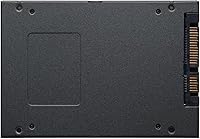
The Q500 SSD runs on a SATA III interface, which means it works straight out of the box in virtually any desktop or laptop with a standard drive bay — no M.2 slot required. The 480GB capacity hits a practical middle ground: enough room for your operating system, core applications, a decent photo library, and still space left over. At just 1.45 ounces and under a third of an inch thick, installation is genuinely painless. No moving parts means it runs cool and silent compared to the clunky mechanical drives it typically replaces. Kingston's established warranty support adds a reassuring layer of confidence for value-tier pricing.

Best For

This budget SATA upgrade is best suited for anyone dragging along an old laptop or desktop with a spinning hard drive — the difference in boot and load times alone makes the switch worthwhile. It also works well as a secondary drive in a home build, or as the primary OS disk when cost is the main constraint. IT professionals and refurbishers equipping batches of machines will find this Kingston drive particularly practical. One honest caveat: if your workload involves heavy video editing or sustained large file transfers, the DRAM-less design will show its ceiling. For light to moderate daily use, though, it delivers well above expectations.

User Feedback

Across nearly 10,000 reviews, a consistent pattern emerges. Buyers repeatedly praise the plug-and-play installation — most describe swapping out their old drive in under 30 minutes with zero driver headaches. The most frequently mentioned win is boot times shrinking from well over a minute to under 15 seconds. On the critical side, a handful of users flagged concerns about long-term endurance, and a few reported friction during warranty claims. Power users also note that without a DRAM cache, sustained write speeds drop during large transfers. Even so, the overwhelming majority feel they received solid, dependable everyday storage at a fair price — and that consensus is hard to overlook.

Pros

  • Dramatically faster boot and load times compared to any mechanical hard drive it replaces.
  • 480GB hits a practical capacity sweet spot for everyday computing without wasted overhead.
  • The SATA III interface makes the Q500 SSD compatible with virtually any older desktop or laptop.
  • Weighing just 1.45 ounces, installation takes minutes and requires no special tools or adapters.
  • Silent and cool operation — no spinning platters, no vibration, no mechanical noise.
  • Kingston's brand backing means accessible warranty support and a straightforward RMA process if needed.
  • Nearly 10,000 buyer ratings averaging 4.5 stars signals consistently reliable real-world performance.
  • Buyers regularly report a dramatic transformation in system responsiveness immediately after installation.
  • Excellent value for budget builds where cost per gigabyte matters more than peak throughput.
  • Sustained bestseller ranking since 2018 reflects proven longevity and dependable supply availability.

Cons

  • No DRAM cache means sustained write speeds drop noticeably during large or prolonged file transfers.
  • Not a competitive choice for users whose machines already support faster NVMe M.2 drives.
  • Long-term endurance under heavy daily write workloads has drawn concern from a portion of buyers.
  • Some users have reported friction and delays when navigating the warranty claim and RMA process.
  • 480GB may feel limiting within a year or two for users who shoot video or work with large media files.
  • Performance gap versus even mid-range NVMe drives is significant and will only grow over time.
  • No included mounting bracket or adapter, which can be a minor extra cost for some desktop cases.
  • Not well-suited for use as a primary drive in any workstation or performance-focused build.

Ratings

Our AI-generated scores for the Kingston Q500 480GB SATA SSD were produced by analyzing thousands of verified global buyer reviews, with spam, bot-submitted, and incentivized feedback actively filtered out before scoring. The ratings below reflect both what this budget SATA upgrade genuinely gets right and where real buyers consistently ran into friction. No category was softened — if users flagged a limitation, you will see it reflected honestly in the score.

Value for Money
91%
Buyers across multiple markets consistently call this one of the best cost-per-gigabyte options in the SATA SSD category. For users on a fixed budget — students, home office workers, or refurbishers equipping older machines — the price-to-performance ratio relative to mechanical drives is hard to beat.
A small segment of buyers who later discovered NVMe options at marginally higher prices felt the value proposition weakened in hindsight. For systems that support M.2, the cost difference versus an NVMe drive may not justify choosing this drive.
Boot & Load Speed
88%
The single most praised upgrade experience across the review pool is the dramatic reduction in boot times after replacing a mechanical hard drive. Users regularly describe systems going from 60-plus seconds to under 15 seconds at startup, which feels transformative in everyday use.
Power users familiar with NVMe benchmarks will notice the SATA ceiling quickly — sequential read speeds are nowhere near what a mid-range M.2 drive delivers. The speed gain is relative to HDDs, not a genuine high-performance storage experience.
Installation Ease
93%
Reviewers consistently highlight how straightforward the physical swap is — the 2.5-inch form factor fits directly into standard laptop bays and desktop cages with no adapters needed. Most users report completing the entire hardware installation in under 20 minutes.
A handful of buyers noted that no mounting bracket is included for desktop cases that require a 3.5-inch adapter, which adds a small unexpected cost. First-time builders occasionally underestimated the software side — cloning or reinstalling an OS still requires separate preparation.
Sustained Write Performance
54%
46%
For light workloads like document editing, web browsing, and app launches, the Q500 SSD performs consistently and without hesitation. Day-to-day responsiveness for typical home and office tasks is solid and noticeable compared to any spinning drive.
The absence of a DRAM cache is a real and measurable limitation when writing large files continuously — transfer speeds drop noticeably mid-task. Users who move large video files or run backup jobs regularly report frustrating slowdowns that undercut the drive's otherwise decent reputation.
Long-Term Reliability
67%
33%
For light to moderate daily use over two to three years, most buyers report no failures or data integrity issues. The drive's sustained bestseller status since 2018 and large review sample suggest a baseline of reasonable durability under normal conditions.
A recurring thread of concern involves endurance under heavier write cycles — some users reported drive health declining faster than expected when monitored via S.M.A.R.T. tools. Warranty claim experiences have been mixed, with a portion of buyers describing the RMA process as slower than expected.
Compatibility
94%
The SATA III interface and 2.5-inch form factor make this Kingston drive one of the most universally compatible internal SSDs available — it works in virtually any laptop or desktop built in the last 15 years. Buyers rarely report any detection or compatibility issues across Windows and Linux systems.
Machines with only M.2 NVMe slots and no 2.5-inch bay cannot use this drive at all, making it irrelevant for many modern ultrabooks and newer mini-ITX builds. Mac compatibility exists on older models but requires reformatting, which some users found unintuitive.
Operating Temperature & Noise
89%
Without moving parts, this budget SATA upgrade runs completely silently and stays noticeably cooler than the mechanical drives it replaces. Users in compact laptop enclosures appreciate that it does not add to thermal load, even during sustained use.
A small number of users running the drive in poorly ventilated external USB enclosures noted slightly elevated temperatures during long transfer sessions. This is more an enclosure issue than a drive fault, but it's worth noting for those planning external use cases.
Random Read Performance
79%
21%
For the workloads most buyers actually run — launching browsers, switching between apps, opening documents — random read performance is responsive and perceptibly snappy. The improvement over any HDD in this area is immediately obvious to everyday users.
Compared to mid-range SATA SSDs with DRAM buffers, random read performance under queue depth falls behind in synthetic benchmarks. Users who check specs closely before buying may find the numbers less competitive than similarly priced alternatives from other brands.
Build Quality
76%
24%
The slim black enclosure feels sturdy enough for internal installation, and the drive sits firmly once mounted without any flex or rattling. Kingston's industrial reputation gives buyers reasonable confidence that the physical construction will hold up under normal conditions.
The casing is plastic rather than the brushed aluminum used on premium SSDs, which some buyers found underwhelming when handling the drive before installation. While functionally fine, it does not inspire the same confidence as higher-tier alternatives.
Warranty & Support
61%
39%
Kingston does offer an active warranty and global RMA program, which matters for buyers who want some safety net on a budget purchase. Having a named brand behind the product — rather than a no-name white-label drive — gives peace of mind that support infrastructure exists.
The actual warranty claim experience has drawn consistent criticism from a notable subset of buyers, who describe slow response times and drawn-out RMA processes. The warranty terms themselves are not always clearly communicated at point of sale, leading to confusion about coverage duration.
Packaging & Unboxing
72%
28%
The drive arrives in minimal, no-frills packaging that protects it adequately during shipping. Budget-focused buyers appreciate that cost is not being spent on elaborate presentation, keeping the focus on the drive itself.
There are no accessories included — no mounting screws, no installation guide, no SATA cable — which can leave first-time upgraders scrambling. Buyers expecting even a basic quick-start card will find the box notably sparse.
Software & Extras
44%
56%
For buyers who only need the hardware and plan to use third-party cloning tools like Macrium Reflect or their OS installer, the lack of bundled software is a non-issue. The drive works plug-and-play without any proprietary software requirements.
Unlike competitors such as Samsung and Crucial, Kingston does not bundle any migration or health monitoring software with the Q500 series. Buyers who expected a bundled cloning tool or SSD management utility were consistently disappointed, especially those upgrading for the first time.
Form Factor Versatility
86%
The 2.5-inch size fits an enormous range of machines — older ThinkPads, budget gaming desktops, home servers, and NAS enclosures with 2.5-inch bays all accept this drive without modification. It is genuinely one of the most physically flexible internal storage formats still in wide use.
The form factor advantage flips into a limitation for users with newer hardware — slim ultrabooks and modern motherboards with only M.2 slots simply cannot use this drive. Its versatility is real but increasingly tied to older machine generations.

Suitable for:

The Kingston Q500 480GB SATA SSD is a strong match for anyone whose primary goal is rescuing an aging laptop or desktop from the frustrating sluggishness of a mechanical hard drive. If your machine has a standard 2.5-inch drive bay — common in older laptops and mid-tower desktops — this drive slots right in without needing adapters or specialty hardware. Students, home office users, and casual everyday computer users will find the 480GB capacity more than adequate for storing a full operating system, productivity software, a browser with a dozen tabs, and a reasonable media library without constantly managing space. IT administrators and refurbishers who need to upgrade a fleet of older machines on a controlled budget will appreciate the consistent pricing and Kingston's accessible warranty and RMA process. Light creative users who work with smaller files, photo collections, or standard office documents will also get genuine daily value here without paying for performance headroom they would never use.

Not suitable for:

The Kingston Q500 480GB SATA SSD is not the right tool for buyers who need fast, sustained data throughput for demanding workloads. Video editors working with large raw files, developers running heavy compilation tasks, or gamers loading massive open-world environments will quickly hit the ceiling of what this drive can deliver — the absence of a DRAM cache means sustained write speeds degrade meaningfully under pressure, which is a real and noticeable limitation. Users with machines that already support NVMe via an M.2 slot should seriously weigh spending more for that interface, as the performance difference in day-to-day use is substantial. Anyone who expects to fill the drive frequently with large video exports or database files will likely find the endurance ratings underwhelming over a multi-year horizon. If your storage needs are growing rapidly or your workflow is IO-intensive, this budget SATA upgrade will feel like a constraint sooner than you would like.

Specifications

  • Brand: Manufactured by Kingston Technology, one of the most established names in consumer and enterprise memory and storage products.
  • Model Number: The exact model identifier is SQ500S37/480G, part of the Kingston Q500 series launched in November 2018.
  • Capacity: Provides 480GB of raw storage, sufficient for a full operating system installation, core applications, and a moderate media library.
  • Interface: Uses a SATA III (6Gb/s) interface, backward compatible with SATA II ports at reduced throughput.
  • Form Factor: Follows the standard 2.5-inch form factor, fitting directly into laptop drive bays and desktop drive cages without adapters.
  • Dimensions: Measures 3.94 x 2.75 x 0.28 inches (L x W x H), a slim profile suited for tight enclosures.
  • Weight: Weighs just 1.45 ounces, making it one of the lighter internal storage options available in this capacity range.
  • Drive Type: A NAND-based solid state drive with no moving mechanical parts, offering quieter and cooler operation than traditional hard disk drives.
  • Cache: This drive does not include a dedicated DRAM cache, which can result in reduced sustained write speeds under heavy workloads.
  • Installation Type: Designed for internal installation only, compatible with both desktop PCs and laptops that feature a 2.5-inch drive bay.
  • Hardware Platform: Compatible with standard PC desktops and laptops running Windows or Linux operating systems via the SATA interface.
  • Color: Housed in a matte black enclosure with a low-profile, tool-friendly design for straightforward swaps.
  • User Rating: Holds a 4.5 out of 5 star average rating based on 9,682 verified buyer ratings on Amazon as of the latest available data.
  • Bestseller Rank: Ranked #642 in the Internal Solid State Drives category on Amazon, reflecting consistent and sustained consumer demand.
  • Warranty: Kingston provides a limited warranty with RMA support available through their global service network; buyers should verify current terms on Kingston's official site.
  • Release Date: First made available to consumers in November 2018, giving this drive a well-documented multi-year performance and reliability track record.
  • Manufacturer: Kingston Technology Company, Inc., headquartered in Fountain Valley, California, manufactures and supports this product globally.
  • Discontinuation: As of the latest available product data, this drive has not been discontinued by the manufacturer and remains actively available.

Related Reviews
Kingston A400 480GB 2.5″ Internal SSD
84%
93%
Value for Money
78%
Read/Write Performance
91%
Installation Ease
82%
Build Quality
74%
Long-Term Reliability
More
Kingston Q500 960GB Internal SSD
83%
93%
Value for Money
78%
Read/Write Performance
91%
Installation Ease
88%
Reliability & Longevity
89%
PS4 Compatibility
More
Kingston A400 240GB SATA SSD
79%
91%
Value for Money
93%
Boot Speed Impact
61%
Write Performance
83%
Long-term Reliability
54%
Workload Suitability
More
SanDisk SSD Plus 480GB Internal SSD
83%
91%
Value for Money
86%
Read Performance
67%
Write Performance
94%
Installation Ease
71%
Long-term Reliability
More
Kingston XS1000 2TB SSD
88%
94%
Performance
90%
Portability
93%
Speed (Read/Write)
88%
Build Quality
91%
Ease of Use (Plug & Play)
More
Crucial BX500 480GB Internal SSD
82%
91%
Value for Money
83%
Read Speed Performance
67%
Write Speed Consistency
88%
Long-Term Reliability
93%
Installation Ease
More
Kingston A400 240GB M.2 Internal SSD
81%
88%
Value for Money
82%
Read Performance
67%
Write Performance
93%
Installation Ease
79%
Build Quality
More
GIGABYTE GP-GSTFS31480GNTD 480GB SATA SSD
79%
88%
Value for Money
81%
Read Performance
63%
Write Performance
93%
Installation Ease
74%
Build Quality
More
Kingston XS2000 500GB Portable SSD
76%
88%
Transfer Speed
91%
Build Quality
96%
Portability & Form Factor
67%
Thermal Performance
83%
Value for Money
More
Kingston KC600 512GB mSATA Internal SSD
82%
83%
Read/Write Performance
78%
Compatibility
91%
Ease of Installation
88%
Build Quality & Durability
86%
Hardware Encryption
More

FAQ

In most cases, yes. The vast majority of laptops manufactured in the last 15 years use a standard 2.5-inch drive bay, which is exactly what this drive is built for. Just power down, remove the old drive, slide this one in, and you're set. If you're unsure, a quick search of your laptop model's specs will confirm the drive bay size.

Generally, no. The Q500 SSD connects directly to your existing SATA data and power cables in a desktop, or slots into the same connector your old laptop drive used. A small Phillips screwdriver is usually all you need to remove the drive caddy. No external power source or adapter is required for a standard installation.

It works fine for storing and launching games, and you will notice faster load times compared to a mechanical drive. That said, if you have a motherboard with an M.2 slot, an NVMe drive will deliver meaningfully better performance for gaming workloads. This drive is best suited for systems that do not have that option.

Realistically, you can fit a full Windows or Linux installation, a suite of everyday applications, a large photo library, and several games or a modest video collection. It is not a drive for storing terabytes of raw footage, but for general daily computing, 480GB is a practical and comfortable amount of space.

The drive itself is hardware-agnostic — it connects via SATA, which Macs with 2.5-inch drive bays support. However, you will need to format the drive to a macOS-compatible file system (APFS or HFS+) during setup. Older MacBook Pros and Mac minis are the most common Mac candidates for this type of upgrade.

Kingston has a solid track record in the storage space, and the Q500 series has accumulated nearly 10,000 reviews over several years with a strong average rating. That said, no storage drive is immune to failure, which is why maintaining a backup of important data is always a smart habit regardless of which drive you use.

No drivers are needed. Modern operating systems detect SATA SSDs automatically. For a fresh installation, just boot from your OS installer. If you're cloning your existing drive, you'll want free cloning software like Macrium Reflect or Clonezilla before you swap drives.

The main trade-off is the lack of a DRAM cache, which limits how fast the drive can sustain performance during large, back-to-back write operations. For everyday tasks like web browsing, document editing, and standard app use, you won't notice this. It becomes relevant if you regularly move large files or do intensive write-heavy work.

Yes, you can place it inside a 2.5-inch USB-to-SATA enclosure and use it as portable external storage. Performance will be capped by the USB interface speed, but for file transfers and backups it works perfectly well. Just make sure the enclosure supports SATA III for the best results.

Kingston does offer warranty support and an RMA process, though some buyers have noted that the experience can take patience. The key step is registering your purchase and keeping proof of purchase. Visiting Kingston's official support page directly is the fastest way to initiate a claim and get current turnaround time estimates.