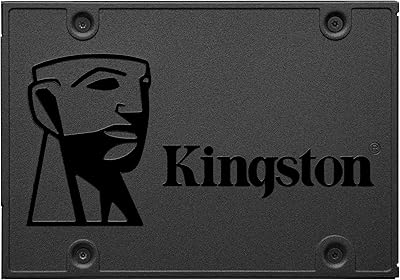
Kingston IronKey Vault Privacy 80 960GB SSD

Overview
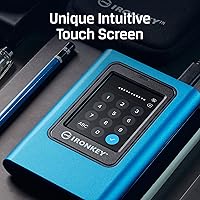
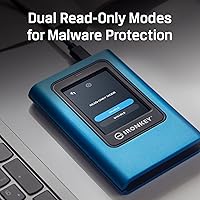
The Kingston IronKey Vault Privacy 80 960GB SSD isn't trying to compete on price — it's built for people who genuinely can't afford a data breach. What separates it from software-encrypted alternatives is the touchscreen PIN pad, which means unlocking requires no app, no driver, and no involvement from the host machine at all. That matters when you're constantly moving between operating systems or locked-down enterprise environments. The FIPS 197 certification isn't just a badge — it means the encryption has been independently validated, not self-declared. At 960GB, there's enough headroom for real, demanding workloads without the need to carry multiple drives.
Features & Benefits
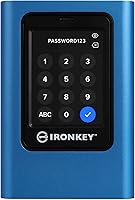
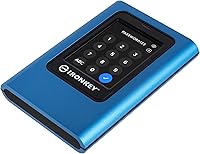
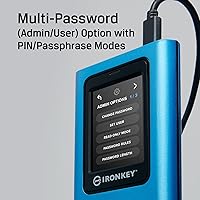
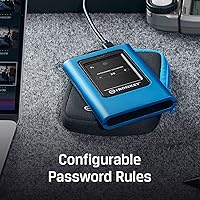
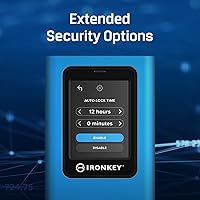
The encryption is handled entirely in hardware — meaning the XTS-AES 256-bit process happens on the drive itself, never touching the host system's memory. That's a meaningful upgrade over software-based solutions like BitLocker. The touchscreen supports both Admin and User passwords with configurable complexity rules, so weak PINs can be blocked outright. Two separate read-only modes prevent any writes to the drive — handy when you're working on an untrusted machine or passing the drive to a colleague. Physically, it's 4.82 x 3.32 x 0.73 inches and about 10 ounces — portable and solid in hand. One note: the product listing shows USB 1.1, which is almost certainly a data entry error; the actual interface should be USB 3.2.
Best For
This secure drive was designed with a specific type of user in mind. IT professionals, compliance officers, and sysadmins who routinely handle sensitive client data will find the role-based password system genuinely practical. Healthcare providers, legal teams, and government contractors dealing with regulated data — think HIPAA or ITAR requirements — will appreciate that FIPS 197 certification can satisfy formal audit requirements. Journalists protecting source materials and researchers working with embargoed data are also strong candidates. The fact that it requires no software installation is a significant advantage for anyone working across multiple machines or operating systems. This is not a drive for someone who just wants extra storage; it's for those who need documented, verifiable security.
User Feedback
With around 70 ratings and a 4.1 out of 5 average, the IronKey VP80 has a relatively small but generally favorable review base — worth noting before drawing firm conclusions. Build quality and the touchscreen experience tend to draw consistent praise, with buyers appreciating how intuitive the PIN entry feels in daily use. On the other side, some users mention the setup process can feel involved for anyone not already familiar with encrypted drive workflows. A handful of reviews flag the price as steep for individual buyers, which tracks — this drive is priced for professional or organizational budgets, not casual use. No major hardware failures appear in the current reviews, which is reassuring given what's typically at stake with this type of drive.
Pros
- Hardware encryption means your data is protected at the chip level, independent of the host computer or operating system.
- FIPS 197 certification provides third-party validated proof of encryption strength — not just a self-declared spec.
- The capacitive touchscreen PIN entry is intuitive and requires zero software installation on any machine.
- Separate Admin and User password roles make this encrypted SSD genuinely practical for IT teams managing shared devices.
- Configurable PIN complexity rules let administrators enforce minimum security standards across an organization.
- Dual read-only modes add a meaningful layer of protection against malware or accidental writes on untrusted systems.
- At 960GB, the IronKey VP80 offers enough capacity for substantial sensitive workloads without carrying multiple drives.
- Cross-platform compatibility means it works without drivers on Windows, macOS, and Linux out of the box.
- The 2.5-inch form factor and 10.1 oz build strike a practical balance between portability and a solid, durable feel.
- Ranked #124 in External Solid State Drives on Amazon with a 4.1 average suggests a generally satisfied, if niche, user base.
Cons
- The price point is firmly in professional-budget territory, making it hard to justify for individual or personal use.
- Initial setup and password configuration can feel involved for users unfamiliar with encrypted storage workflows.
- The product listing shows USB 1.1 as the interface — almost certainly a listing error, but it needs verification before purchase.
- With only around 70 ratings, the review base is too small to draw confident conclusions about long-term reliability.
- No cloud backup or recovery option exists if both Admin and User passwords are lost — data is permanently inaccessible.
- The touchscreen, while intuitive for most, adds a physical component that could become a failure point over heavy field use.
- Organizations needing centralized remote wipe or fleet management will find this secure drive lacks those enterprise features.
- Heavier than a basic flash drive at 10.1 oz, which may be a minor but real consideration for ultra-light travel setups.
Ratings
The Kingston IronKey Vault Privacy 80 960GB SSD scores below were generated by AI after systematically analyzing verified buyer reviews from around the world, with spam, bot activity, and incentivized feedback actively filtered out. The review pool is relatively modest at around 70 ratings, and that context is factored into the confidence level behind each score. Both the strengths that make this encrypted SSD compelling for its intended audience and the genuine frustrations reported by real buyers are transparently reflected throughout.
Encryption Strength
Compliance Readiness
Touchscreen Usability
Ease of Setup
Value for Money
Build Quality
OS Compatibility
Transfer Speed
Portability
Password Management
Write Protection
Storage Capacity
Documentation & Support
Durability
Suitable for:
The Kingston IronKey Vault Privacy 80 960GB SSD was purpose-built for professionals and organizations where a data breach carries serious consequences — legal, financial, or reputational. IT administrators who provision and manage portable storage across teams will find the Admin and User password structure genuinely useful, since it allows centralized control without sacrificing individual access. Healthcare workers, legal professionals, and government contractors operating under compliance frameworks like HIPAA or federal data-handling mandates will appreciate that FIPS 197 certification provides independently validated proof of encryption quality — not just a marketing claim. Journalists, researchers, and investigators who carry sensitive source materials or embargoed data while traveling between locations also fit squarely in the target audience. Critically, because the drive requires no software installation and works across operating systems, it's an ideal choice for anyone who moves between Windows, macOS, or Linux environments and needs security to follow the hardware, not the machine.
Not suitable for:
If you're looking for affordable extra storage for photos, backups, or everyday files, the Kingston IronKey Vault Privacy 80 960GB SSD is the wrong tool entirely — you'd be paying a significant premium for security infrastructure you simply don't need. Casual home users or students who haven't encountered compliance requirements or worked with genuinely sensitive data will find the setup process more involved than expected, with little practical payoff. The multi-password system and configurable PIN rules, while valuable in professional contexts, can feel unnecessarily complex for anyone who just wants to plug in a drive and copy files. Budget-conscious buyers should also weigh alternatives carefully: software-encrypted drives or cloud-based solutions with strong access controls may meet lighter security needs at a fraction of the cost. Finally, if real-world transfer speeds are a priority for large file workflows, the USB interface spec listed on the product page warrants verification before purchasing, as the stated USB 1.1 listing appears to be a data entry error that could create false expectations.
Specifications
- Brand: Manufactured by Kingston Digital, Inc., a well-established company in flash storage and security-focused hardware.
- Model Number: The official model identifier is IKVP80ES/960G.
- Storage Capacity: Provides 960GB of solid state storage suited for sensitive files, compliance archives, and professional workloads.
- Encryption Type: Uses XTS-AES 256-bit hardware encryption processed entirely by the drive's onboard controller, keeping data isolated from the host system.
- Certification: Holds FIPS 197 certification, meaning the AES encryption implementation has been independently tested and validated by a recognized federal standards body.
- USB Interface: Connects via USB; the product listing states USB 1.1, which is widely believed to be a data entry error — the actual interface is likely USB 3.2 Gen 2, and buyers should verify directly with Kingston before purchasing.
- Form Factor: Designed as a 2.5-inch external SSD, compact enough for pocket or bag carry during frequent travel.
- Dimensions: Measures 4.82 x 3.32 x 0.73 inches (L x W x H).
- Weight: Weighs 10.1 oz, providing a solid, durable feel without adding meaningful bulk to a travel kit.
- PIN Input Method: Features a built-in capacitive touchscreen for PIN and passphrase entry, requiring no keyboard or host software interaction at any point.
- Password Roles: Supports two distinct access levels — Admin and User — each with independently configurable PIN complexity and length requirements.
- Write Protection: Offers dual read-only modes that prevent any data from being written or modified on the drive, protecting against malware and accidental overwrites.
- OS Compatibility: Functions across Windows, macOS, and Linux without requiring any driver installation or companion software on the host machine.
- Color: Available in black with a compact, professional-looking enclosure finish.
- Sales Rank: Ranked #124 in the External Solid State Drives category on Amazon at the time of this review, with a 4.1 out of 5 average across approximately 70 ratings.
Related Reviews
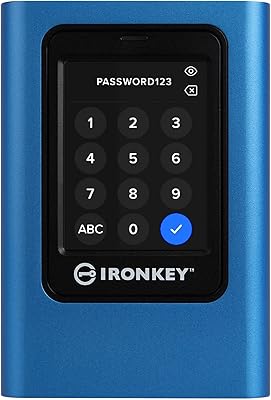
Kingston IronKey Vault Privacy 80 1.92TB External SSD
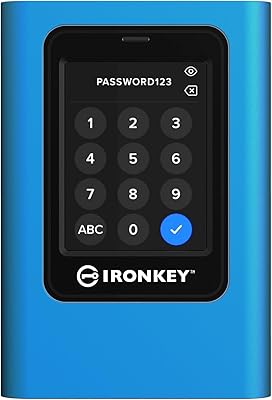
Kingston IronKey Vault Privacy 80 7.6TB SSD
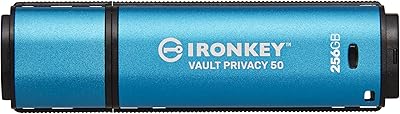
Kingston IronKey Vault Privacy 50 256GB Drive
Kingston IronKey Vault Privacy 50 128GB Drive
Kingston IronKey Vault Privacy 50C 16GB Drive
Kingston IronKey Vault Privacy 50 USB-C 512GB Encrypted Flash Drive
Kingston Q500 960GB Internal SSD
Kingston A400 240GB M.2 Internal SSD
Kingston XS1000 2TB SSD