Overview

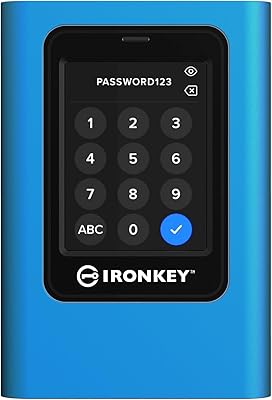
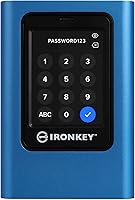
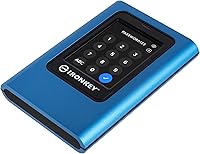
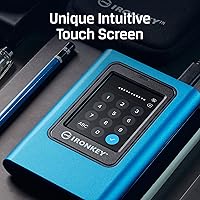
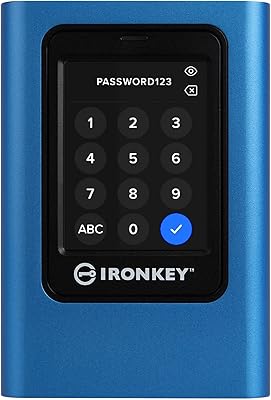
The Kingston IronKey Vault Privacy 80 1.92TB External SSD occupies a very specific corner of the storage market — one where security is not a bonus feature, it is the entire point. Unlike most encrypted drives that rely on a small physical keypad, this encrypted SSD uses a capacitive touch screen for PIN and passphrase entry, which makes a genuine difference in daily use. It carries FIPS 197 certification, which matters enormously if you work in a regulated industry or need to demonstrate compliance to clients or auditors. At roughly the size of a standard 2.5-inch drive, it slips into a bag without fuss — practical for anyone moving sensitive data between locations regularly.
Features & Benefits

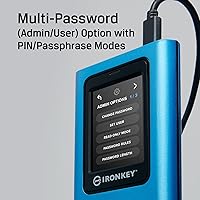
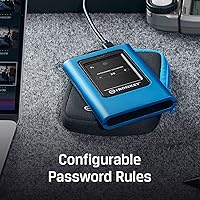
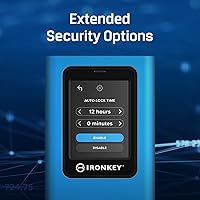
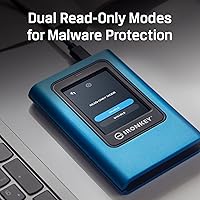
What separates the IronKey VP80 from cheaper alternatives is not just a spec on a box — it is that the encryption happens entirely in hardware, with no software agent to install, patch, or accidentally leave disabled. The XTS-AES 256-bit encryption runs at the drive level, meaning data stays protected even if someone physically removes the storage chips. The dual-role password system is genuinely useful in practice: an Admin can set master credentials and enforce configurable password rules, while a User operates independently without ever touching the Admin setup. Add dual read-only modes into the mix, and you have a real layer of defense against malware writing to the drive without your knowledge.

Best For

This secure drive is not trying to win over the average consumer looking for extra backup storage. It is built for people whose job description includes the words data protection, or whose industries carry real legal consequences for a breach. Think IT administrators deploying encrypted drives across a team, healthcare professionals transporting patient records, or journalists protecting source files while traveling. The 1.92TB capacity is a genuine advantage here — large enough to consolidate sensitive project files without juggling multiple drives. Anyone who has dealt with the aftermath of a lost USB drive carrying unencrypted data will understand immediately why hardware-level protection is worth the investment.

User Feedback

With a 4.1 out of 5 rating across 70 reviews, the IronKey VP80 earns its marks but is not without honest criticism. Buyers consistently praise the touch-screen interface as a step up from cramped physical keypads, and several note that the build quality and certification credentials justify what is undeniably a premium outlay. That said, a recurring concern involves transfer speeds — some users feel the USB interface limits throughput when moving large volumes of data quickly, which is worth factoring in if speed is a priority. The Admin and User setup also has a learning curve; a handful of buyers found the initial configuration less intuitive than expected. A solid choice, but not without trade-offs.

Pros

  • Hardware-level XTS-AES 256-bit encryption works without any software installation or configuration on the host machine.
  • FIPS 197 certification satisfies compliance requirements in government, healthcare, and financial procurement processes.
  • The capacitive touch screen makes PIN and passphrase entry noticeably more comfortable than physical keypad alternatives.
  • Admin and User password roles allow organizations to deploy this secure drive across staff without exposing master credentials.
  • Dual read-only modes provide a practical malware defense when connecting to shared or untrusted computers.
  • At 1.92TB, the IronKey VP80 offers enough capacity to consolidate sensitive files across a single certified device.
  • No driver or companion software is required, making it compatible across Windows, macOS, and Linux environments.
  • Compact 2.5-inch form factor fits easily into a laptop bag or jacket pocket for daily travel.
  • Configurable password complexity rules give IT teams consistent security policy enforcement across a deployed fleet.

Cons

  • Transfer speeds lag behind unencrypted NVMe and USB 3.2 Gen 2 alternatives, which frustrates users moving large files.
  • The Amazon listing incorrectly states USB 1.1 as the interface spec, creating unnecessary confusion before purchase.
  • Initial Admin and User role configuration has a genuine learning curve that trips up non-technical first-time buyers.
  • No IP rating for dust or water resistance is published, despite the premium price and professional positioning.
  • No companion app means there is no remote wipe or centralized fleet management dashboard available out of the box.
  • The cost-per-gigabyte is difficult to justify for anyone who does not specifically need certified hardware encryption.
  • Screen readability drops in direct sunlight, which is a practical annoyance for outdoor or field use.
  • With only 70 ratings at time of review, the sample size is too small to draw firm conclusions about long-term reliability.

Ratings

The Kingston IronKey Vault Privacy 80 1.92TB External SSD has been scored by our AI system after analyzing verified global buyer reviews, with spam, bot activity, and incentivized feedback actively filtered out. Across categories ranging from encryption reliability to everyday usability, the scores reflect both where this secure drive genuinely excels and where real buyers have run into friction. Nothing has been smoothed over — the strengths and the trade-offs are represented as honestly as the data allows.
Encryption & Security
96%
Users in regulated industries — legal, healthcare, government contracting — repeatedly single out the hardware-based XTS-AES 256-bit encryption as the core reason they chose this drive. The fact that protection is baked into the hardware, with no software to install or forget to enable, gives professionals genuine peace of mind when crossing borders or handing drives to colleagues.
A small number of technically advanced users noted that without independent third-party audit reports beyond the FIPS 197 certification, they felt they were trusting Kingston's implementation on faith. This is a minor concern for most buyers, but it matters to the most security-conscious segment of the audience.
Touch Screen Interface
88%
The capacitive touch screen drew consistent praise from buyers who had previously used drives with cramped physical PIN pads. Entering a passphrase on a proper screen rather than cycling through digits on a rubber keypad feels significantly less frustrating, especially when unlocking the drive multiple times in a working day.
Some users reported that the screen is sensitive enough to register accidental touches, which occasionally required re-entry. A few buyers also noted that the display is harder to read clearly in direct sunlight, which becomes an annoyance when working outdoors or in bright environments.
Build Quality & Durability
83%
The drive feels dense and purposeful in hand — not plasticky or hollow like many portable SSDs at lower price points. Buyers who carry it daily in laptop bags alongside other gear report no signs of wear on the chassis or screen after extended use, which is reassuring for a device handling irreplaceable data.
There is no IP rating published for dust or water resistance, which surprised a few buyers given the premium positioning of this secure drive. For fieldwork in genuinely harsh environments, the lack of a confirmed ruggedized rating is a gap that competitors with military-grade certifications do not have.
Transfer Speed & Performance
61%
39%
For typical file transfers — documents, spreadsheets, PDFs, moderate-size archives — the drive performs without any noticeable bottleneck. Users moving compliance records or encrypted project folders found day-to-day operation perfectly acceptable for professional workflows.
Buyers who need to transfer large video files, disk images, or multi-gigabyte database backups ran into real frustration. The USB interface, which the Amazon listing oddly specifies as USB 1.1 (almost certainly a listing error — actual speeds are far higher, but still not top-tier), means throughput lags behind unencrypted NVMe alternatives, and several users flagged this as a meaningful limitation.
Password & Access Management
79%
21%
The Admin and User role separation is a well-thought-out feature for organizations deploying multiple drives across staff. IT administrators appreciated being able to set password complexity rules centrally without exposing master credentials to end users, which is exactly the kind of access control that enterprise environments demand.
Individual consumers and small teams found the dual-role setup unnecessarily complex when they simply wanted to set a password and use the drive. The initial configuration process has a meaningful learning curve, and the documentation, while present, did not walk first-time users through edge cases clearly enough for everyone.
Capacity & Storage Value
74%
26%
At 1.92TB, the IronKey VP80 stands out in the encrypted portable SSD category where most competitors top out at lower capacities. For professionals consolidating sensitive project files, client records, or encrypted backups, having this much space in a single secure drive reduces complexity and the risk of managing multiple devices.
When measured purely as cost-per-gigabyte against unencrypted external SSDs, the price premium is steep. Buyers who do not specifically need hardware encryption or compliance certification will find the value proposition hard to justify, and a few reviewers admitted they underestimated how much of the cost is tied to certification rather than raw storage.
Portability & Form Factor
86%
The 2.5-inch footprint and 10.2-ounce weight make this encrypted SSD genuinely pocketable in a jacket or easily stowed in a laptop bag. Buyers who travel frequently for work — consultants, auditors, field researchers — appreciated that it does not add meaningful bulk to their daily carry.
Compared to truly compact thumb-drive-style encrypted storage options, the IronKey VP80 is noticeably larger. For buyers who wanted something that sits flush in a laptop's USB port or slips into a shirt pocket, the 2.5-inch form factor is a compromise they have to consciously accept.
Software Independence
92%
One of the most consistently praised aspects across buyer reviews is that this secure drive requires zero software installation — unlock it, plug it in, and it appears as a standard drive on any compatible system. For IT environments with strict policies around third-party software, this is not a small thing; it is a significant operational advantage.
The flip side of having no companion software is that there is no cloud-based management dashboard or remote wipe feature available through an app. Organizations that want centralized fleet management will need to handle that through other means, which a handful of enterprise buyers flagged as a missing capability.
Compliance & Certification
94%
FIPS 197 certification is a hard requirement in many procurement processes — government contractors, healthcare organizations, and financial institutions often cannot legally use storage that lacks it. Buyers in these sectors repeatedly noted that the IronKey VP80 cleared vendor approval processes that ruled out cheaper, non-certified alternatives without discussion.
FIPS 197 certifies the cryptographic algorithm, not the overall security implementation of the product. A small number of enterprise security reviewers pointed out that buyers sometimes conflate FIPS 197 with the more comprehensive FIPS 140-2 or 140-3 validation, and Kingston should communicate the distinction more clearly in product materials.
Ease of Initial Setup
58%
42%
For buyers who set it up purely in User mode with a single password, the out-of-box experience is relatively straightforward. The touch screen guides entry clearly enough that solo users without a complex IT environment can get up and running without reading through a manual in detail.
Configuring the Admin and User roles simultaneously, setting password complexity rules, and understanding how the read-only modes interact is where setup becomes genuinely challenging for non-technical buyers. Multiple reviews mentioned spending more time than expected on configuration, and a few gave up on the Admin features entirely and used only basic User mode.
Value for Money
67%
33%
For the buyer this drive is designed for — a compliance-driven professional or IT administrator who needs certified hardware encryption and cannot risk a data breach — the investment is considered reasonable by the majority of verified purchasers in that segment. The certification alone has tangible legal and procurement value that generic SSDs cannot replicate.
For anyone outside that specific professional context, the pricing is difficult to defend against the alternatives. Buyers who primarily wanted a fast, large-capacity portable drive and treated encryption as a nice-to-have felt the cost was hard to stomach, and several acknowledged in reviews that they were partly paying for features they were unlikely to fully use.
Malware & Write Protection
81%
19%
The dual read-only modes received specific praise from IT professionals who routinely connect drives to machines they do not fully control — shared workstations, client computers, or lab equipment. Being able to lock the drive against any writes before plugging it into an unknown system is a practical, well-implemented safeguard that users in the field genuinely relied on.
The write-protect modes are manually activated, meaning a user who forgets to toggle the setting before connecting to a compromised machine loses that layer of protection entirely. A few buyers suggested an auto-lock or always-on read-only option when connecting to unrecognized hosts would strengthen this feature meaningfully.
Compatibility
77%
23%
The drive worked across Windows, macOS, and Linux systems without driver installation in the majority of reported use cases, which is a practical advantage for buyers operating in mixed-OS environments. Cross-platform reliability is something reviewers in academic and research settings specifically called out as important.
A handful of buyers encountered recognition issues on certain older systems or specific USB hub configurations, requiring a direct port connection to resolve. The Amazon listing's USB 1.1 specification notation caused additional confusion for buyers trying to assess compatibility before purchase, even though real-world performance clearly exceeds that standard.

Suitable for:

The Kingston IronKey Vault Privacy 80 1.92TB External SSD was built for a specific kind of buyer, and for that buyer it is close to the ideal tool. IT administrators deploying encrypted storage across a team will appreciate the Admin and User password architecture, which allows centralized control without handing over master credentials to every employee. Legal, healthcare, and financial professionals who operate under strict data-handling regulations — HIPAA, GDPR, or government procurement requirements — will find the FIPS 197 certification is often the deciding factor that gets this drive approved through compliance review. Journalists and field researchers who carry sensitive source material or unpublished findings while traveling will value having hardware-level protection that does not depend on remembering to enable a software vault. Organizations that have previously dealt with a lost or stolen drive carrying unencrypted data will understand intuitively why paying a premium for hardware encryption that cannot be accidentally disabled is money well spent.
Not suitable for:

If your primary concern is fast transfer speeds for large files, the Kingston IronKey Vault Privacy 80 1.92TB External SSD is likely not the right tool for that job, and buying it for that purpose would mean overpaying significantly for a capability it does not prioritize. The USB interface, while almost certainly not the USB 1.1 the Amazon listing oddly states, is still not in the same performance tier as modern USB 3.2 Gen 2 or Thunderbolt alternatives, and buyers who regularly move multi-gigabyte video projects or disk images will feel that gap. Casual home users who want extra backup storage and have no compliance obligations or serious security concerns will find the price hard to rationalize when straightforward external SSDs offer more speed for considerably less money. The dual Admin and User setup, while powerful in the right hands, adds a layer of configuration complexity that solo consumers with no IT background often find unnecessarily cumbersome. If encryption is a nice-to-have rather than a hard requirement, there are faster and more affordable options worth considering first.
Specifications

  • Storage Capacity: The drive provides 1.92TB (1920GB) of usable encrypted storage space.
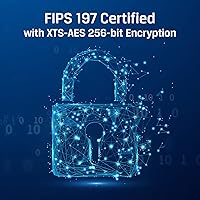
  • Encryption Standard: Data is protected using XTS-AES 256-bit hardware encryption, which operates independently of the host system's software.
  • Certification: The drive carries FIPS 197 certification, confirming that the AES cryptographic implementation meets U.S. federal standards.
  • Input Method: A capacitive touch screen on the drive body is used to enter PINs or passphrases directly, with no keyboard required.
  • Password Modes: Two distinct access roles are supported: an Admin mode for master credential management and a User mode for day-to-day access.
  • Entry Options: Both PIN (numeric) and alphanumeric passphrase entry modes are available, selectable based on organizational preference.
  • Write Protection: Dual read-only modes allow the drive to be locked against any write operations, helping guard against malware on untrusted systems.
  • Form Factor: The drive uses a 2.5-inch external SSD form factor, housed in a compact rigid enclosure.
  • Dimensions: Physical dimensions are 4.82 x 3.32 x 0.73 inches (LxWxH).
  • Weight: The drive weighs 10.2 ounces, making it portable enough for daily carry in a laptop bag.
  • Color: The enclosure is finished in black.
  • Interface: The drive connects via USB; the Amazon listing notes USB 1.1, though this is widely believed to be a listing error and actual interface performance is considerably higher.
  • OS Compatibility: The drive functions as a standard USB mass storage device and is compatible with Windows, macOS, and Linux without requiring driver installation.
  • Password Policy Control: Admins can configure password complexity rules — including minimum length and character requirements — to enforce consistent security standards across a deployed fleet.
  • Manufacturer: The drive is manufactured by Kingston Digital, Inc., a well-established U.S.-based storage hardware company.
  • Model Number: The exact model identifier for this 1.92TB variant is IKVP80ES/1920G.
  • Availability Date: This product was first made available for purchase on May 23, 2022.
  • Market Rank: At time of review, the drive holds a position of #108 in the External Solid State Drives category on Amazon.
  • User Rating: The drive carries an average rating of 4.1 out of 5 based on 70 verified ratings.
  • Discontinuation Status: Kingston has confirmed this product is not discontinued and remains in active production.

Related Reviews
Kingston IronKey Vault Privacy 80 960GB External SSD
87%
94%
Data Security
88%
Ease of Use
74%
Performance
90%
Portability
89%
Build Quality
More
Kingston IronKey Vault Privacy 80 7.6TB External SSD
84%
93%
Data Security
90%
Storage Capacity
85%
Ease of Use
70%
Setup & Installation
88%
Performance Speed
More
Kingston IronKey Vault Privacy 50 256GB Encrypted USB
87%
95%
Data Protection & Security
85%
Performance & Speed
80%
Ease of Use
70%
Setup & Installation
90%
Portability & Design
More
Kingston IronKey Vault Privacy 50 128GB Encrypted USB
86%
95%
Data Security
89%
Read Speed Performance
75%
Write Speed Performance
84%
Build Quality
90%
Ease of Use
More
Kingston Ironkey Vault Privacy 50 USB-C 16GB Flash Drive
86%
93%
Data Security
89%
Data Transfer Speed
85%
Build Quality
90%
Portability
88%
Ease of Use
More
Kingston IronKey Vault Privacy 50 USB-C 512GB Encrypted Flash Drive
87%
94%
Security & Encryption
88%
Performance (Speed)
85%
Build Quality & Durability
82%
Portability & Size
90%
Ease of Use
More
Intel D3-S4510 1.92TB SSD
88%
93%
Performance in Data Transfer
90%
Reliability and Durability
88%
Value for Money
85%
Ease of Installation
86%
Power Consumption
More
Patriot Burst Elite 1.92TB SSD
87%
85%
Performance
92%
Value for Money
88%
Build Quality
90%
Compatibility
91%
Installation Ease
More
Buffalo SSD-SCH250U3BA/N 250GB External SSD
85%
94%
Performance (Speed)
90%
Portability & Size
87%
Build Quality & Durability
78%
Compatibility with Devices
92%
Ease of Use
More
Kingston Q500 960GB SSD
86%
92%
Value for Money
88%
Performance
85%
Read/Write Speed
93%
Installation Ease
82%
Reliability
More

FAQ

Yes, and that is actually one of its strongest practical advantages. The encryption is handled entirely by the drive's own hardware, so you just plug it into any USB port and it appears as a standard external drive once you have authenticated on the touch screen. No drivers, no companion apps, nothing to install.

This is where hardware encryption gets serious. If the User password is entered incorrectly too many times, the drive locks down. If the Admin password is also lost, the drive performs a cryptographic erase and all data is permanently destroyed — there is no backdoor, no recovery service, and no way to retrieve the contents. That is by design, but it means password management is not optional; it is critical.

Yes. Because it operates as a standard USB mass storage device without requiring any software installation, it works on macOS just as it does on Windows and Linux. You may need to format it for the file system your Mac expects if you plan to use it exclusively in an Apple environment.

Admin mode gives you master control over the drive — you set the password policies, configure complexity rules, and can reset the User password if needed. User mode is the day-to-day access role. If you are the sole user of this secure drive, you can technically operate purely in User mode and keep things simple. The dual-role setup is most valuable for organizations deploying multiple drives across staff where separation of control matters.

Real-world speeds are noticeably faster than the USB 1.1 specification noted in the Amazon product listing, which appears to be a data entry error on the listing rather than a genuine spec. That said, throughput is not the drive's primary selling point — users moving large video files or multi-gigabyte backups regularly have noted that it does not match the speeds of top-tier unencrypted USB 3.2 or NVMe alternatives, so if raw speed is your priority, factor that in before buying.

Absolutely, and this is one of the more practical features for field use. Before plugging into any machine you do not fully control, you can activate one of the two read-only modes on the drive itself. This prevents anything on that computer — including malware — from writing to the drive. It is a simple toggle but a genuinely useful safeguard in real-world scenarios.

Kingston has not published an official IP rating or drop-resistance specification for this drive, which is worth noting given its premium price. The build feels solid in hand, but if you need a drive rated for genuinely harsh environments — wet conditions, extreme drops, or dusty fieldwork — you would want to verify current specifications directly with Kingston or look at alternatives with explicit ruggedization ratings.

Yes, that is exactly what the Admin mode is designed for. Whoever sets up the drive in Admin mode can configure minimum password length, character complexity requirements, and the number of allowed incorrect attempts before lockout. This makes it practical for organizations that need consistent security policies across a fleet of drives issued to different employees.

Capacitive touch screens generally do not respond well to standard non-conductive gloves, and this drive is no exception. If you regularly work in cold environments or wear protective gloves, you would likely need to remove them to interact with the screen reliably. It is a minor but real consideration for anyone doing fieldwork in demanding physical conditions.

The IronKey VP80 is bus-powered, drawing what it needs directly from the USB connection. You do not need a separate power cable or adapter, which makes it straightforward to use with a laptop in the field. Just be aware that some older USB ports or low-powered hubs may not provide sufficient current — connecting directly to a host port rather than through a passive hub is always the safer approach.