Overview

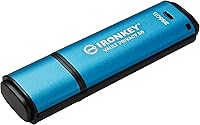
The Kingston IronKey Vault Privacy 50 256GB Drive is built for one purpose: keeping sensitive data out of the wrong hands. Unlike most USB drives that treat encryption as an afterthought, this encrypted USB drive puts security at the center of every design decision. It carries FIPS 197 certification, a credential that holds real weight in regulated industries like healthcare, finance, and government. With 256GB of capacity and a USB 3.2 Gen 1 interface, it handles serious workloads comfortably. Just know going in — if raw transfer speed is your priority, this is not your drive. It is a security-first device, and it makes no apologies for that.
Features & Benefits

The encryption is hardware-based XTS-AES 256-bit, meaning your data is protected at the drive level — no software to install, no third-party app to trust, no vulnerability window when that app is not running. BadUSB attack protection, enforced through digitally signed firmware, closes one of the nastier attack vectors that cheaper drives leave exposed. Password management is genuinely flexible: Admin, User, and One-Time Recovery credentials are all supported, and the passphrase mode lets you authenticate with a memorable sentence rather than a cryptic character string. Two independent read-only modes — one hardware, one software — give individuals and IT teams a practical way to block unauthorized writes. Both USB Type-A and Type-C connectors are included, covering virtually any modern setup.

Best For

This hardware-encrypted flash drive makes the most sense for people whose data carries real consequences if it ends up in the wrong place. IT administrators managing endpoints in regulated environments, compliance officers who need an audit-friendly storage option, and healthcare or legal professionals bound by strict data protection laws are the natural fit. Consultants and freelancers who carry confidential client files between locations will also find it well-suited — these are people who cannot afford a lost drive to turn into a reportable breach. The hardware-level encryption removes any dependence on software that may not be present on every machine encountered. Frequent travelers operating in high-risk environments will appreciate the tamper-resistant design for exactly the same reason.

User Feedback

Buyers who pick up the IronKey VP50 tend to stay loyal to it. Build quality draws consistent praise, and the FIPS certification gives compliance-focused users confidence the drive has been independently validated — not just marketed as secure. A few honest caveats worth noting: the drive gets noticeably warm during sustained, large-batch transfers, which is a real consideration for heavy users. Transfer speeds are adequate rather than impressive, and most reviewers accept that trade-off knowingly. The initial configuration — setting up Admin credentials, choosing password modes — has a learning curve that non-technical buyers sometimes find frustrating. Those who push through it, however, rarely feel compelled to switch. Repurchase intent among security-focused buyers is notably high.

Pros

  • FIPS 197 certification meets real compliance requirements in healthcare, legal, and government sectors.
  • Hardware-based XTS-AES 256-bit encryption protects data without relying on any host software.
  • BadUSB attack protection via signed firmware blocks a serious and often overlooked attack vector.
  • Passphrase mode makes secure authentication far more practical for day-to-day use.
  • Admin, User, and One-Time Recovery credentials give IT teams meaningful access control.
  • Dual read-only modes — hardware and software — prevent unauthorized writes in sensitive environments.
  • Both USB Type-A and Type-C connectors are included, covering virtually any modern device.
  • 256GB capacity is generous enough to handle substantial professional workloads.
  • Build quality is consistently praised by real buyers, with strong long-term repurchase intent.
  • Works entirely independently of the host machine, making it reliable across different operating systems and setups.

Cons

  • Transfer speeds are adequate but noticeably behind non-encrypted drives of similar capacity.
  • The drive gets warm during sustained large-batch transfers, which may concern heavy users.
  • Initial setup — configuring Admin credentials and choosing password modes — has a real learning curve.
  • Non-technical users may find the multi-password system confusing without IT guidance or documentation.
  • The premium price is hard to justify for buyers with no compliance requirement or sensitive data.
  • No cloud backup or recovery option if all password credentials are lost or forgotten.
  • Slightly bulkier than standard flash drives, which can be awkward with closely spaced USB ports.
  • Passphrase and complex password modes, while flexible, require upfront decisions that are not easy to reverse later.

Ratings

Our AI rating system analyzed verified global user reviews for the Kingston IronKey Vault Privacy 50 256GB Drive, actively filtering out incentivized submissions, bot patterns, and outlier feedback to surface what real buyers consistently experience. Scores reflect both the strengths this hardware-encrypted flash drive delivers and the genuine trade-offs buyers encounter in day-to-day use. Nothing has been smoothed over — the pain points are scored as honestly as the standout qualities.

Encryption Strength
97%
Buyers with compliance obligations — particularly in healthcare, legal, and government roles — repeatedly cite the XTS-AES 256-bit hardware encryption as the core reason they chose this drive over software-based alternatives. The fact that protection is enforced at the drive level, with no host software dependency, gives professionals confidence that data stays protected on any machine.
A very small number of advanced users have noted that the encryption implementation, while industry-leading, does not support some newer post-quantum standards being discussed in regulated sectors — though this is an emerging consideration rather than a current shortcoming for most buyers.
Security Certifications
94%
The FIPS 197 certification carries real institutional weight, and compliance-focused buyers consistently describe it as a decisive purchasing factor. IT administrators in regulated environments report that the certification significantly simplifies vendor approval processes within their organizations.
Some buyers operating under stricter government frameworks note that FIPS 197 differs from FIPS 140-2 or 140-3 Level 3, which are required in certain defense and intelligence contexts — so it is worth verifying exactly which certification your organization mandates before purchasing.
Build Quality
91%
The physical construction earns consistently strong praise — users describe it as noticeably more solid than typical consumer USB drives, with a casing that handles daily bag-tossing, airport security trays, and repeated connection cycles without showing wear. Several long-term owners report using their drives for over a year with no structural issues.
A handful of buyers find the drive slightly bulkier than they expected, particularly when connecting to laptops with closely spaced ports — it can physically block an adjacent USB slot depending on the host device layout.
Password & Authentication
86%
The multi-credential system — Admin, User, and One-Time Recovery tiers — is genuinely well-designed for organizational use, and the passphrase mode is singled out repeatedly as a practical improvement over traditional complex password requirements. Professionals who carry the drive daily find the passphrase option makes repeated authentication far less tedious.
Non-technical buyers frequently describe the initial credential setup as confusing, particularly the distinction between Admin and User roles. A few users also report anxiety around the irreversible lockout policy, which — while a core security feature — creates real friction for those unfamiliar with hardware encryption workflows.
Transfer Speed
63%
37%
For the type of work this drive is designed for — copying legal documents, patient records, financial reports, or confidential project files — the real-world read and write speeds are generally sufficient. Most professional users transferring files in the hundreds of megabytes report no practical frustration with throughput during normal use.
Anyone expecting performance comparable to a standard high-speed USB drive will be disappointed. The encryption overhead is real, and sustained large-batch transfers — moving tens of gigabytes in a single session — take meaningfully longer than on unencrypted alternatives, with the drive also running warm during those sessions.
Ease of Setup
61%
39%
Users with IT backgrounds or prior experience with encrypted storage devices report that the initial configuration process is logical and well-documented. Kingston provides clear setup instructions, and technically confident buyers generally describe the experience as straightforward once they understand the credential tier structure.
Non-technical buyers consistently flag the setup process as the steepest part of owning this drive. Choosing between password modes, configuring Admin credentials, and understanding the lockout policy upfront requires patience and careful reading — something buyers expecting a plug-and-play experience are often not prepared for.
BadUSB Protection
93%
Security professionals specifically call out the digitally signed firmware as a feature they actively look for, and it is rarely found on drives at any price point outside the enterprise segment. For IT teams managing devices that travel into untrusted environments, this protection addresses a legitimate and often underappreciated threat vector.
For buyers who are unfamiliar with BadUSB-class attacks, this feature may feel abstract or difficult to evaluate. Its value is real but effectively invisible in everyday use — meaning non-technical buyers sometimes discount it, even though it may be one of the most practically significant security layers on the drive.
Connector Versatility
88%
Including both USB Type-A and Type-C connectors is a practical decision that buyers genuinely appreciate — especially those who alternate between a modern laptop with USB-C only ports and older office desktop systems. Eliminating the need to carry a separate adapter is a small but consistently mentioned convenience.
The physical design means the Type-C adapter is a separate piece that can be misplaced over time. A few users who primarily use USB-C devices wish the drive defaulted to Type-C natively rather than treating it as an attachment.
Read-Only Modes
89%
IT administrators managing distributed teams highlight the dual read-only modes as a standout organizational feature. Being able to lock a drive at the hardware level — so that not even Admin software can override it — is the kind of control that enterprise buyers genuinely value for distributing pre-loaded reference materials or audit records.
For individual buyers with no organizational use case, the read-only functionality feels like a feature they pay for but rarely use. The hardware write-protect mode in particular requires some understanding of when and why to engage it, which casual users may never fully explore.
Thermal Performance
58%
42%
Under light to moderate use — connecting, authenticating, and transferring typical professional file sets — the drive stays at a comfortable temperature and raises no concerns. Occasional use throughout a workday is perfectly manageable for the vast majority of buyers.
During extended, high-volume transfer sessions, the drive runs noticeably warm — warm enough that several buyers mention it in their reviews as something that caught them off guard. While no reported cases of heat-related failure exist in the feedback set, it is a reasonable concern for users who run long automated backup routines.
Value for Money
67%
33%
For compliance-driven buyers in regulated industries, the price is widely considered justified — even reasonable — given the FIPS 197 certification, hardware encryption, and multi-credential architecture. Organizations that have priced out enterprise encrypted storage solutions often describe the IronKey VP50 as strong value relative to alternatives.
For buyers without a specific security requirement, the price is a genuine barrier. Standard 256GB drives cost a fraction of the price, and users who simply want portable storage without regulatory obligations will reasonably struggle to justify the significant premium this hardware-encrypted flash drive commands.
Compatibility
84%
Cross-platform compatibility is broadly reliable — users on Windows, macOS, and Linux all report consistent performance without driver headaches. The drive behaves as a standard USB mass storage device once unlocked, which simplifies deployment in mixed-OS environments.
A small number of users report occasional recognition delays when connecting to certain USB hubs or older systems, requiring a direct port connection to resolve. This is uncommon but worth noting for buyers whose workflow depends on hub-based setups.
Portability
82%
18%
At under three-quarters of an ounce and with a slim profile, this hardware-encrypted flash drive disappears comfortably into a pocket, bag, or laptop sleeve without adding meaningful bulk. Frequent travelers and commuters consistently note its size as a non-issue in daily carry scenarios.
The drive is slightly longer and thicker than ultra-compact flash drives, and some users find it blocks neighboring ports on compact laptops. It is not large by any standard measure, but buyers with tight port spacing should check clearance before assuming perfect fit.

Suitable for:

The Kingston IronKey Vault Privacy 50 256GB Drive is purpose-built for anyone whose professional or personal data carries serious consequences if lost or stolen. IT administrators and compliance officers in regulated industries — healthcare, legal, finance, government — will find the FIPS 197 certification directly relevant to their data governance obligations, not just a reassuring badge. Freelancers and independent consultants who regularly transport confidential client files between offices or across borders get hardware-level protection that does not depend on the host machine having any particular software installed. Healthcare workers handling patient records, lawyers carrying privileged documents, or executives traveling to high-risk regions will appreciate that the drive enforces its own security regardless of where it is plugged in. For organizations issuing drives to staff and needing Admin-level oversight — including the ability to set read-only policies or recover access — the multi-password architecture makes fleet management genuinely practical.
Not suitable for:

The Kingston IronKey Vault Privacy 50 256GB Drive is a poor fit for anyone whose primary concern is raw transfer performance. If you are regularly moving large video files, disk images, or bulk media and you need the fastest possible speeds, this hardware-encrypted flash drive will feel like a bottleneck — the security overhead is real, and the drive is not designed to compete with speed-optimized alternatives. Casual users who just need a convenient way to move documents between home and office will likely find the price point hard to justify and the initial setup unnecessarily complex. Non-technical buyers who are not comfortable configuring Admin and User credentials, or managing password recovery options, may find the onboarding process genuinely frustrating without IT support. If you have no compliance requirement and no sensitive data at stake, the trade-offs here — cost, setup complexity, moderate speeds — simply do not pay off against a standard USB drive.
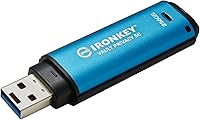
Specifications

  • Capacity: The drive offers 256GB of usable hardware-encrypted storage, suitable for substantial professional data workloads.
  • Encryption: Data is protected using XTS-AES 256-bit hardware encryption, operating entirely at the drive level with no host software required.
  • Certification: The drive holds FIPS 197 certification, independently validating its encryption implementation for use in compliance-sensitive environments.
  • Read Speed: Sequential read speeds reach up to 250MB/s under USB 3.2 Gen 1 conditions.
  • Write Speed: Sequential write speeds reach up to 180MB/s, reflecting the performance trade-off inherent in hardware encryption.
  • Interface: The drive uses a USB 3.2 Gen 1 interface, backward compatible with USB 2.0 ports at reduced speeds.
  • Connector: Both USB Type-A and USB Type-C connectors are included, allowing direct connection to modern and legacy host devices.
  • Password Support: Three credential tiers are supported — Admin, User, and One-Time Recovery — across both complex password and passphrase authentication modes.
  • Attack Protection: Digitally signed firmware prevents BadUSB-style reprogramming attacks, a vulnerability present in many unprotected USB devices.
  • Read-Only Modes: Two independent write-protection modes are available: one enforced at the hardware level and one configurable via software by an Admin.
  • Dimensions: The drive measures 3.06 x 0.9 x 0.47 inches (77.9 x 22.2 x 12.0mm), making it compact enough for everyday carry.
  • Weight: The drive weighs 0.705 ounces (approximately 20g), light enough for keychain or lanyard attachment.
  • Color: The drive is finished in blue with a durable outer casing designed to withstand routine handling and travel conditions.
  • Manufacturer: Designed and manufactured by Kingston Digital, Inc., a company with an established track record in encrypted storage hardware.
  • Model Number: The official model designation is IKVP50/256GB, which should be used when referencing the drive for warranty or enterprise procurement purposes.
  • Brute Force Protection: The drive enforces an automatic lockout and cryptographic erasure policy after a defined number of consecutive incorrect password attempts.
  • OS Compatibility: The drive functions as a platform-independent storage device, compatible with Windows, macOS, Linux, and other systems supporting standard USB mass storage.
  • Date Available: The drive was first made commercially available on May 30, 2022.

Related Reviews

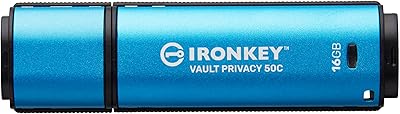
Kingston IronKey Vault Privacy 50C 16GB Drive
83%
97%
Data Security
91%
Build Quality
63%
Ease of Setup
61%
Value for Money
78%
Transfer Speed
More
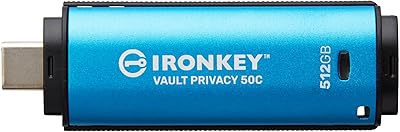
Kingston IronKey Vault Privacy 50 USB-C 512GB Encrypted Flash Drive
87%
94%
Security & Encryption
88%
Performance (Speed)
85%
Build Quality & Durability
82%
Portability & Size
90%
Ease of Use
More
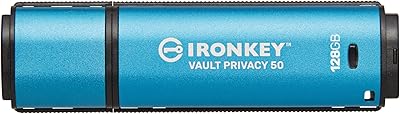
Kingston IronKey Vault Privacy 50 128GB Drive
79%
96%
Encryption Strength
88%
Build Quality
57%
Ease of Setup
72%
Value for Money
76%
Transfer Speed
More
Kingston IronKey D500S 256GB Encrypted Flash Drive
85%
94%
Security Features
88%
Data Transfer Speed
92%
Build Quality
90%
Durability
85%
Ease of Use
More
Kingston IronKey Keypad 200 256GB Flash Drive
82%
97%
Hardware Encryption Security
94%
OS Compatibility
89%
Build Quality & Durability
78%
Keypad Usability
61%
Value for Money
More
Kingston IronKey Vault Privacy 80 960GB SSD
79%
96%
Encryption Strength
93%
Compliance Readiness
84%
Touchscreen Usability
67%
Ease of Setup
58%
Value for Money
More
Kingston IronKey Locker+ 50 32GB USB Drive
82%
94%
Encryption & Security
88%
Build Quality
76%
Ease of Setup
89%
Cloud Backup Feature
86%
Password Flexibility
More
Kingston IronKey Vault Privacy 80 1.92TB External SSD
80%
96%
Encryption & Security
88%
Touch Screen Interface
83%
Build Quality & Durability
61%
Transfer Speed & Performance
79%
Password & Access Management
More
Kingston IronKey Vault Privacy 80 7.6TB SSD
79%
94%
Hardware Encryption
88%
Touch-Screen PIN Interface
91%
Build Quality
92%
Security Feature Depth
62%
Value for Money
More
Kingston Ironkey D500S 16GB Encrypted Flash Drive
83%
94%
Security Features
88%
Ease of Use
85%
Transfer Speed
90%
Build Quality/Durability
60%
Price vs. Capacity
More

FAQ

It works on both, along with Linux. The IronKey VP50 functions as a standard USB mass storage device once unlocked, so the operating system only needs to support basic USB storage — which virtually all modern systems do. No proprietary drivers are required on the host machine.

This is one of the most important things to understand before buying. After a set number of consecutive failed password attempts, the drive activates a brute-force lockout and ultimately performs a cryptographic erasure of all stored data. There is a One-Time Recovery password option, but if all credential options are exhausted, data recovery is not possible — by design. That is the point of hardware encryption, so make sure you store your credentials somewhere safe from the start.

Honestly, there is a learning curve. The initial configuration asks you to set up Admin credentials and choose your authentication mode before you can start using the drive. It is well-documented, but someone unfamiliar with concepts like Admin versus User access may need to read through the instructions carefully. Give yourself 15 to 20 minutes the first time and do not rush it.

Yes. The Kingston IronKey Vault Privacy 50 256GB Drive ships with both a USB Type-A adapter and a USB Type-C connector, so you can plug directly into either port type without needing a separate adapter. This makes it practical across modern slim laptops and older desktops alike.
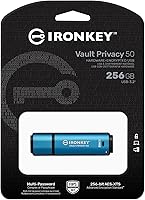
The FIPS 197 certification and XTS-AES 256-bit hardware encryption put it in a strong position for compliance-sensitive use cases including healthcare and legal contexts. However, compliance decisions depend on your specific regulatory environment and organizational policies — always confirm with your compliance officer or legal team before relying on any device for regulatory purposes.

During short file transfers it stays close to room temperature and you would barely notice. During sustained, large-batch transfers — think copying tens of gigabytes in one session — it gets noticeably warm to the touch. It is not alarming, but it is worth knowing if you plan to run long backup operations regularly.

Complex password mode requires a mix of character types — uppercase, lowercase, numbers, symbols — in the traditional sense. Passphrase mode lets you authenticate with a longer, memorable sentence or phrase, which many users find easier to remember while still being highly secure. You choose your preferred mode during setup, and it makes a real difference in day-to-day usability.

Yes. The dual read-only modes are specifically designed for this scenario. An Admin can activate write protection at the hardware level, preventing any files from being written to the drive regardless of what the connected computer tries to do. This is particularly useful for organizations distributing drives preloaded with reference materials or sensitive read-only content.

Kingston does not officially rate this drive to a specific IP waterproofing standard, so submerging it is not something we would recommend. The casing is solid and handles normal everyday handling and travel well, but treat it as a precision electronic device rather than a rugged field tool if you need guaranteed environmental resistance.

Most USB devices can have their firmware reprogrammed after manufacture, which opens the door to attacks where a compromised device pretends to be something it is not — like a keyboard injecting malicious commands. This hardware-encrypted flash drive uses digitally signed firmware that the drive itself verifies on every connection. If the firmware does not pass that verification, the drive will not operate, making that class of attack essentially ineffective against it.

Where to Buy