Overview

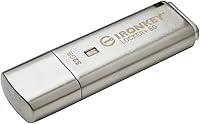
The Kingston IronKey Locker+ 50 32GB USB Drive sits in an interesting spot — it brings genuine hardware-level encryption to everyday users without requiring enterprise infrastructure or IT support. Unlike software-encrypted drives that can be bypassed with the right tools, the IronKey Locker+ 50 processes its encryption entirely on the device itself. The metal casing immediately signals that this isn't a throwaway drive; it feels solid in hand and holds up to the kind of daily pocket or bag carry that would scuff cheaper plastic alternatives. Security and practicality coexist here in a way that isn't always guaranteed at this price tier.
Features & Benefits

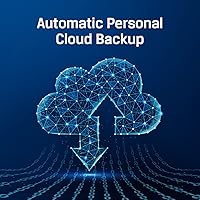
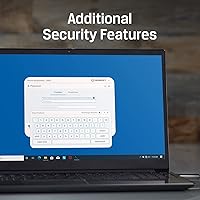
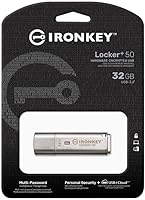
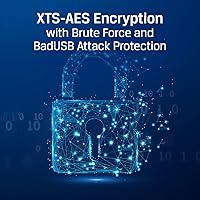
The encryption engine inside this encrypted flash drive uses XTS-AES, a standard trusted by security professionals, and it's hardware-based — meaning it doesn't rely on software that can be removed or cracked. What makes it practical day-to-day is the multi-password setup, which allows an Admin account to manage a separate User account, each supporting either a traditional complex password or a longer passphrase. A virtual keyboard built into the unlock interface protects against keyloggers on compromised machines. Transfer speeds reach up to 145MB/s read and 115MB/s write — fast enough that encryption doesn't feel like a penalty. The automatic cloud backup is a standout inclusion; most encrypted drives offer no such fallback if the physical drive is lost.

Best For

This secure USB drive makes the most sense for people whose data genuinely needs protection, not just a basic password gate. Traveling professionals — consultants, lawyers, healthcare workers — who regularly plug into hotel business centers or client machines will appreciate the virtual keyboard and the brute-force lockout that wipes the drive after too many failed attempts. Remote workers carrying contracts or proprietary files between locations get real peace of mind here. Small business owners who can't justify enterprise security tools will find the Admin and User permission structure surprisingly capable. The 32GB capacity is enough for documents and working files, though anyone moving large media libraries should look at higher-capacity alternatives.

User Feedback

Buyers are broadly satisfied with the IronKey Locker+ 50, and most note the setup process is less intimidating than expected for a drive with this many security layers. The cloud backup feature earns repeated praise — it's something most competing encrypted drives simply don't offer, and users treat it as a meaningful safety net against physical loss. Build quality also draws consistent compliments. On the flip side, the 32GB capacity surfaces as a real limitation for anyone managing larger files or wanting a portable backup solution. A smaller group of reviewers found the initial software configuration somewhat involved, particularly those less comfortable with security settings. Once configured, though, everyday use gets very few complaints.

Pros

  • Hardware XTS-AES encryption processes entirely on the drive — no software to install, crack, or accidentally uninstall.
  • Brute-force lockout wipes the drive after repeated failed attempts, making physical theft a non-issue for the data itself.
  • Automatic cloud backup sets this encrypted flash drive apart from nearly every competing option in its category.
  • The virtual keyboard actively protects against keyloggers on shared or public machines, not just password-guessing attacks.
  • Admin and User account separation gives small teams or shared-drive scenarios a surprisingly capable permission structure.
  • Metal casing holds up to daily bag and pocket carry without the scuffs and flexing that plague cheaper plastic drives.
  • Passphrase mode lets users set long, memorable unlock phrases instead of struggling with complex character strings.
  • Transfer speeds are fast enough that the encryption overhead is effectively invisible during normal working file transfers.
  • Setup process is more approachable than buyers expect given the depth of security features on offer.
  • BadUSB attack protection means the drive's firmware cannot be reprogrammed by a malicious host machine.

Cons

  • 32GB fills up fast for anyone who carries more than documents — media files and large backups will push the limit quickly.
  • No password recovery path exists by design, so forgetting credentials means permanent, irreversible data loss.
  • USB Type-A connector requires an adapter on modern laptops and tablets that have moved to USB-C only.
  • Initial software configuration involves enough steps to genuinely confuse less tech-comfortable users on first use.
  • Cloud backup requires registering a third-party account, which some privacy-focused buyers find counterintuitive.
  • Price premium over standard unencrypted drives is steep if security is not your actual primary concern.
  • No option to disable the virtual keyboard on trusted personal machines, adding minor friction to every unlock session.
  • Linux support is limited, which is a real gap given that privacy-conscious users are disproportionately likely to run it.

Ratings

The Kingston IronKey Locker+ 50 32GB USB Drive has been scored by our AI system after processing verified global buyer reviews, with spam, bot-generated, and incentivized feedback actively filtered out. The scores below reflect a genuine cross-section of real-world experiences — where this secure USB drive earns strong marks and where it falls short. Both the strengths and the frustrations are represented honestly.
Encryption & Security
94%
Users who deal with sensitive files professionally — lawyers, consultants, medical staff — consistently report high confidence in the drive's hardware encryption. The XTS-AES implementation and brute-force lockout give buyers peace of mind that software-based alternatives simply cannot match.
A small number of technically advanced users wish for more transparency around the encryption firmware and independent audit documentation. For most buyers this is a non-issue, but security researchers may want more verifiable assurances.
Build Quality
88%
The metal casing earns frequent praise from users who carry the drive daily in pockets, bags, or laptop cases. It resists the kind of scuffing and flexing that ruins cheaper plastic drives after a few months of regular use.
A handful of reviewers noted the cap fits snugly but can feel slightly loose over time with heavy use. Nothing structural fails, but it is a minor tactile complaint from detail-oriented buyers who expect perfection at this price point.
Ease of Setup
76%
24%
Most buyers are pleasantly surprised by how approachable the initial configuration is, given the layered security options on offer. The step-by-step software walkthrough is clear enough that non-technical users can get up and running without consulting a manual.
A recurring minority of reviewers — particularly those less comfortable with security software — find the Admin and User account setup confusing on first use. The virtual keyboard and password mode options can feel overwhelming before the logic behind them clicks.
Cloud Backup Feature
89%
The automatic personal cloud backup is one of the most discussed differentiators among buyers, and it resonates strongly with users who have lost data on a previous drive. Knowing a copy of critical files exists offsite adds a practical layer of protection most competing encrypted drives lack entirely.
Some users report the cloud backup setup requires additional account registration that they did not anticipate. A few noted uncertainty around long-term cloud storage availability, which is a fair concern when relying on a third-party sync service for important data.
Password Flexibility
86%
The option to use either a traditional complex password or a longer passphrase is genuinely useful and gets called out positively by buyers who prefer memorable passphrases over hard-to-type character strings. The Admin and User role separation also suits small teams sharing a single drive.
Users who forget both their Admin and User passwords have no recovery path — by design — which has caught a small number of buyers off guard. The security model is sound, but the consequences of credential loss are severe and not always clearly communicated upfront.
Transfer Speed
81%
19%
At up to 145MB/s read, moving working documents, PDFs, and compressed archives onto the drive feels fast and unobtrusive. Users transferring typical professional file sets rarely notice any speed penalty from the on-the-fly encryption happening in the background.
Buyers who compare this drive against non-encrypted USB 3.2 drives at similar price points occasionally note the write speeds feel slightly below expectations for large batch transfers. The 115MB/s write ceiling is respectable but not class-leading.
Storage Capacity
58%
42%
For storing contracts, spreadsheets, presentations, and sensitive documents, 32GB is genuinely sufficient for most professional use cases. Buyers focused on document security rather than media storage report the capacity rarely becomes a real-world constraint.
This is the most frequently cited limitation in negative reviews. Users who want a portable encrypted backup solution for photos, videos, or large project folders find 32GB inadequate quickly. Competing non-encrypted drives offer dramatically more storage for less money, making the capacity trade-off feel sharp.
Portability & Size
91%
At under an ounce and barely over two inches long, the IronKey Locker+ 50 disappears into a keychain, jacket pocket, or laptop bag without adding noticeable bulk. Frequent travelers in particular appreciate that it clears airport security and daily carry without any hassle.
The USB Type-A connector means users with modern ultrabooks or tablets that only offer USB-C ports will need an adapter. This is not unique to this drive, but it is worth noting for buyers whose primary devices have moved away from Type-A entirely.
Keylogger Protection
87%
The virtual keyboard for password entry is a thoughtful inclusion for users who regularly access the drive on shared or public computers. Hotel business centers, library terminals, and client machines are exactly the environments where this protection matters most.
The virtual keyboard adds a few extra seconds to each unlock session, which some users find mildly tedious when accessing the drive multiple times per day on a trusted personal machine. There is no option to disable it selectively for known-safe environments.
BadUSB Attack Protection
83%
The drive's firmware is digitally signed and locked against BadUSB-style reprogramming, which is a meaningful protection layer for security-conscious buyers who are aware of this class of attack. It signals that Kingston has thought beyond just encryption when designing the security model.
Most general consumers will never knowingly encounter a BadUSB attack, so this feature goes unnoticed and unappreciated by a large portion of the buyer base. It contributes to the price without delivering a benefit most users can tangibly evaluate.
Software & Driver Experience
72%
28%
The bundled security software works reliably across Windows and macOS for the majority of users, and regular buyers report that once the drive is configured, day-to-day use requires minimal interaction with the software interface itself.
A subset of reviewers encountered friction with software updates or compatibility on less common operating system versions. A few Linux users noted limited native support, which is a genuine gap for that segment of the privacy-focused audience this drive targets.
Value for Money
74%
26%
For buyers who genuinely need hardware encryption and the cloud backup feature, the price is considered fair given the security credentials and Kingston's reputation. Professionals who treat data protection as a non-negotiable expense rarely balk at the cost.
Buyers comparing this drive to standard high-capacity USB drives on raw storage-per-dollar find the value proposition harder to justify. The 32GB ceiling makes the premium feel steep for anyone whose primary concern is capacity rather than security.
Durability Over Time
84%
Extended ownership reviews are positive overall, with the metal body holding up well after months of regular use. Users who carry it on a keyring or in a work bag report no meaningful physical degradation over time.
A small number of longer-term owners noted the USB connector showing minor wear after very frequent insertion and removal cycles. This is a common wear pattern for heavily used flash drives and is not unique to this model.

Suitable for:

The Kingston IronKey Locker+ 50 32GB USB Drive is a strong fit for anyone whose portable storage needs are defined by security first and capacity second. Professionals in legal, healthcare, financial, or consulting fields who regularly carry contracts, case files, or client records between offices will find the hardware encryption and brute-force lockout genuinely reassuring rather than just a marketing checkbox. Remote workers and freelancers who plug into shared hotel, coworking, or client machines get meaningful protection from the virtual keyboard feature, which actively blocks keyloggers that software-encrypted drives do nothing to address. Small business owners who need a portable secure storage solution but cannot justify enterprise-level IT infrastructure will appreciate the Admin and User account structure — it is more capable than it sounds for a drive this size. Privacy-conscious individuals and researchers handling confidential data will also find the automatic cloud backup a compelling differentiator, since losing the physical drive does not have to mean losing the data entirely.
Not suitable for:

The Kingston IronKey Locker+ 50 32GB USB Drive is a harder sell if your primary concern is raw storage capacity or cost-per-gigabyte value. Users who want to carry large photo libraries, video projects, or full system backups will run into the 32GB ceiling quickly and find it a genuine daily frustration rather than a theoretical limitation. Buyers who compare this drive against standard unencrypted USB drives on price alone will feel the premium sharply, especially since non-encrypted alternatives at the same price often offer four to eight times the storage. The USB Type-A connector is also worth flagging — users whose primary devices are modern ultrabooks or tablets with only USB-C ports will need an adapter on hand, which undercuts the convenience of a compact portable drive. Linux users or anyone working on less common operating systems may also encounter software compatibility gaps that require workarounds, and that friction is real enough to matter if your workflow depends on it.
Specifications

  • Storage Capacity: The drive provides 32GB of usable encrypted storage, suitable for documents, spreadsheets, presentations, and compressed files.
  • Interface: It connects via USB 3.2 Gen 1, offering broad compatibility with both older USB 3.0 ports and current-generation systems.
  • Read Speed: Sequential read speeds reach up to 145MB/s, making file access and transfers fast enough for typical professional workloads.
  • Write Speed: Sequential write speeds reach up to 115MB/s, keeping encryption overhead effectively invisible during normal file transfers.
  • Encryption Standard: XTS-AES hardware encryption is implemented entirely on the drive's controller, requiring no host software to maintain data protection.
  • Password Modes: Users can choose between a traditional complex password and a longer passphrase mode, giving flexibility based on personal preference and security policy.
  • User Roles: The drive supports separate Admin and User accounts, allowing an administrator to manage access permissions and recover User-level credentials independently.
  • Brute-Force Protection: After a defined number of consecutive failed password attempts, the drive automatically wipes all stored data to prevent unauthorized access.
  • Virtual Keyboard: An on-screen virtual keyboard is available at login to prevent hardware and software keyloggers from capturing password input on compromised machines.
  • Cloud Backup: The drive includes automatic personal cloud backup functionality, syncing protected data to a cloud destination to guard against physical loss or damage.
  • BadUSB Protection: The drive's firmware is cryptographically signed and locked, preventing BadUSB-style attacks that attempt to reprogram the device controller.
  • Casing Material: The outer shell is constructed from metal, providing resistance to everyday physical wear compared to standard plastic-bodied flash drives.
  • Connector Type: The drive uses a USB Type-A connector, compatible with the majority of desktop and laptop USB ports currently in use.
  • Dimensions: The drive measures 2.38 x 0.73 x 0.38 inches, making it compact enough to carry on a keychain or slip into a shirt pocket.
  • Weight: At 0.704 ounces, the drive adds negligible weight to a bag, briefcase, or set of keys during daily carry.
  • OS Compatibility: The drive and its security software are designed primarily for use with Windows and macOS; Linux compatibility is limited and may require workarounds.
  • Manufacturer: The drive is designed and sold by Kingston Digital, Inc., a long-established manufacturer of flash storage and memory products.
  • Model Number: The official model identifier for this 32GB variant is IKLP50/32GB, which can be used to verify authenticity and locate firmware updates.
  • Release Date: This specific variant was first made available in June 2022 and remains an active, non-discontinued product in Kingston's lineup.
  • UPC: The product's Universal Product Code is 740617329339, useful for verifying you are purchasing the correct variant through any retail channel.

Related Reviews

Kingston Ironkey Vault Privacy 50 USB-C 16GB Flash Drive
86%
93%
Data Security
89%
Data Transfer Speed
85%
Build Quality
90%
Portability
88%
Ease of Use
More
Kingston IronKey Vault Privacy 50 USB-C 512GB Encrypted Flash Drive
87%
94%
Security & Encryption
88%
Performance (Speed)
85%
Build Quality & Durability
82%
Portability & Size
90%
Ease of Use
More
Kingston IronKey Vault Privacy 50 256GB Encrypted USB
87%
95%
Data Protection & Security
85%
Performance & Speed
80%
Ease of Use
70%
Setup & Installation
90%
Portability & Design
More
Kingston IronKey Vault Privacy 50 128GB Encrypted USB
86%
95%
Data Security
89%
Read Speed Performance
75%
Write Speed Performance
84%
Build Quality
90%
Ease of Use
More
Kingston Ironkey D500S 16GB Encrypted Flash Drive
83%
94%
Security Features
88%
Ease of Use
85%
Transfer Speed
90%
Build Quality/Durability
60%
Price vs. Capacity
More
Kingston IronKey D500S 128GB Encrypted Flash Drive
85%
94%
Security & Encryption
88%
Build Quality & Durability
87%
Performance (Speed)
82%
Ease of Use & Setup
80%
Portability & Size
More
Kingston IronKey D500S 256GB Encrypted Flash Drive
85%
94%
Security Features
88%
Data Transfer Speed
92%
Build Quality
90%
Durability
85%
Ease of Use
More
Kingston IronKey Keypad 200 64GB Encrypted Flash Drive
85%
92%
Encryption & Security
88%
Performance & Speed
80%
Ease of Use & Setup
90%
Build Quality & Durability
85%
Keypad Security Functionality
More
Kingston IronKey Keypad 200 256GB Flash Drive
82%
97%
Hardware Encryption Security
94%
OS Compatibility
89%
Build Quality & Durability
78%
Keypad Usability
61%
Value for Money
More
Kanguru FlashBlu30 32GB USB 3.0 Flash Drive
85%
81%
Performance (Speed)
90%
Build Quality
88%
Write Protection
85%
Portability/Size
89%
Compatibility (Cross-Platform)
More

FAQ

Unfortunately, no. The Kingston IronKey Locker+ 50 32GB USB Drive is designed so that there is no backdoor or recovery key. If both the Admin and User passwords are forgotten, the data is permanently inaccessible. This is by design — it ensures that no third party, including Kingston, can ever unlock the drive. Write your credentials down somewhere secure when you first set it up.

It works on both Windows and macOS for the core encryption and password functionality. The companion software runs on both platforms without issue for most users. Linux support is limited, so if you primarily use a Linux machine you may encounter compatibility gaps that require manual workarounds.

The automatic cloud backup syncs your drive's contents to a personal cloud account as a safety net against physical loss. You will need to register for the associated cloud service during setup. It is worth noting that this is an additional account registration step, which some privacy-conscious users find unexpected — but it is entirely optional and the drive functions fully without enabling the backup feature.

The drive uses a USB Type-A connector, so you will need a USB-A to USB-C adapter or hub to use it with modern ultrabooks and tablets that have dropped standard USB-A ports. The adapter itself does not affect the encryption or security features in any way.

After the configured maximum number of failed login attempts, the drive triggers an automatic data wipe and resets to factory state. This brute-force protection is built into the hardware and cannot be bypassed by removing the drive mid-attempt or connecting it to a different machine. The threshold is configurable by the Admin account during setup.

For storing contracts, legal documents, research files, presentations, and similar professional data, 32GB is genuinely workable for most users. Where it gets tight is if you want to use the drive as a portable media library or a full backup destination — in those cases the capacity ceiling will frustrate you fairly quickly. The IronKey Locker+ 50 is available in larger capacities if you need more room without sacrificing the security features.

Yes — that is exactly what the Admin and User account system is designed for. The Admin sets up the drive and can manage or reset the User password if needed, while the User account provides day-to-day access. Both accounts can unlock the same encrypted storage, which makes it practical for shared use cases in a small business or team context.

The virtual keyboard routes your password entry through an on-screen interface rather than through the physical keyboard driver, which blocks most software keyloggers and screen-capture malware from recording what you type. You do use it on every unlock, which adds a few seconds each time. There is no option to skip it on trusted machines, so it is a minor but consistent part of every login session.

The metal body holds up well to the kind of daily wear that cracks or scuffs plastic drives within a few months. Users who carry this secure USB drive on a keychain or loose in a laptop bag report it remaining in good physical condition over extended periods. The USB connector itself can show minor wear after very frequent insertion cycles, but that is normal for any heavily used flash drive.

The IronKey Locker+ 50 uses XTS-AES hardware encryption and includes BadUSB protection and brute-force lockout, all of which are substantive security features — not just marketing. However, this specific model targets the consumer and prosumer market rather than government or highly regulated enterprise environments, so it does not carry FIPS 140-3 certification. If your use case requires FIPS-certified hardware, Kingston's higher-tier IronKey models are the appropriate step up.

Where to Buy