Overview

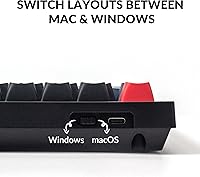
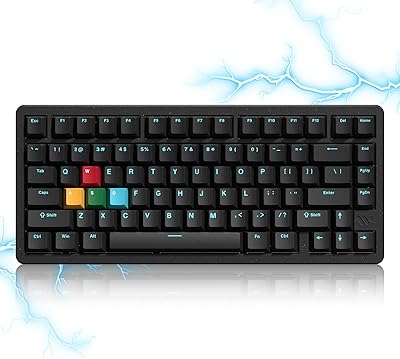
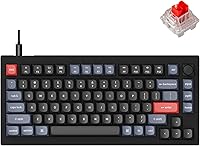
The Keychron V1 75% Mechanical Keyboard sits in a sweet spot for anyone curious about the custom keyboard hobby but not ready to spend big. With 81 keys, it keeps the dedicated function row and a compact navigation cluster — so you lose the numpad but nothing you actually rely on daily. Keychron chose wired-only via Type-C, which keeps latency low and the build focused. It runs on Mac, Windows, and Linux right out of the box with a physical toggle switch. The chassis is solid ABS with a steel plate inside, giving it more heft than its price might suggest.
Features & Benefits

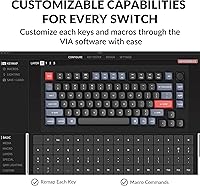
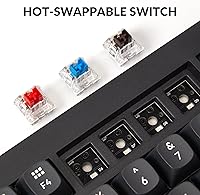
What makes this 75% board worth a closer look is how much control it hands you. QMK and VIA support means you can remap every key, build macros, and tweak lighting layers — all through a browser-based interface, no programming background needed. The hot-swappable PCB lets you pull out switches and try something new without touching a soldering iron. Sound-wise, the acoustic silicone pad noticeably dampens the hollow ping common in cheaper boards, and the south-facing RGB lights up under your keycaps properly. The screw-in stabilizers on the spacebar and shift keys are a step above what you'd expect here — less wobble, smoother feel right away.

Best For

This compact mechanical keyboard makes the most sense for a few distinct types of users. It's the obvious pick for someone who's been eyeing the custom keyboard world but doesn't want to drop serious cash on a first board. Mac users in particular will appreciate having a proper function row and the ability to remap keys without third-party software workarounds. Developers and writers who spend hours typing will find QMK layer programming genuinely useful for shortcuts and workflows. And if you like to tinker — trying different switches, chasing a different sound — the hot-swap socket means the board grows with your preferences over time.

User Feedback

Owners consistently point to the out-of-box sound and typing feel as standout strengths for a board at this price — many say it punches above what they paid. The VIA software gets particular praise from users who aren't technically inclined; it's approachable in a way that similar boards often aren't. On the flip side, the tray mount design draws criticism from enthusiasts who've used gasket-mount boards and notice the difference in flex and feel. The stock red switches divide opinion — smooth and consistent, but a bit light for heavy-handed typists, and many owners end up swapping them. A handful of buyers also note the stabilizers need lubing out of the box for best results.

Pros

  • Hot-swappable PCB supports nearly all MX switches — no soldering, no hassle, just pull and replace.
  • VIA firmware remapping works entirely in a browser and takes minutes to learn, even for non-technical users.
  • Ships with dual keycap sets for Mac and Windows, making OS switching genuinely convenient.
  • Screw-in stabilizers reduce spacebar and shift key rattle noticeably compared to most boards at this price.
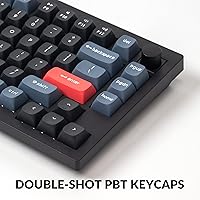
  • Double-shot PBT keycaps resist shine and legend fade far better than ABS alternatives.
  • South-facing RGB actually illuminates legends cleanly without the interference issues common on north-facing boards.
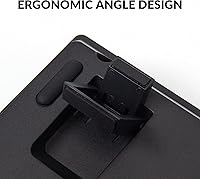
  • Three adjustable typing angles give meaningful wrist positioning flexibility for different desk setups.
  • The steel plate and silicone pad combination produces a fuller, less hollow sound than bare-PCB competitors.
  • Cross-platform compatibility with macOS, Windows, and Linux works reliably without third-party software.
  • The 75% layout retains the function row and nav cluster, so daily productivity workflows stay intact.

Cons

  • Tray mount design produces a stiff, firm typing feel that enthusiasts used to gasket boards will find noticeably less satisfying.
  • Stock red switches feel too light for heavy-handed typists and frequently get swapped out, adding extra cost.
  • Stabilizer lubrication is often needed out of the box — inconsistency across units means some buyers get lucky and others do not.
  • No wireless option at all; if a clean, cable-free desk is a priority, this board will not deliver it.
  • The ABS plastic exterior shows fingerprints easily and lacks the premium tactile feel of aluminum-chassis alternatives.
  • Full QMK flashing beyond what VIA covers has a steep learning curve with limited official documentation.
  • The OSA keycap profile limits aftermarket replacement options compared to boards using more standard profiles like Cherry or OEM.
  • No wrist rest is included, and longer sessions at higher tilt angles can be uncomfortable without one.

Ratings

The Keychron V1 75% Mechanical Keyboard earned its scores through AI analysis of thousands of verified global buyer reviews, with spam, bot activity, and incentivized feedback actively filtered out before any scoring was applied. Both the genuine strengths and the real frustrations owners encountered are reflected here — nothing has been smoothed over to make this compact mechanical keyboard look better than it is. If you want an honest read on where this 75% board excels and where it asks for compromise, these scores give you that picture.
Build Quality
83%
For a board in this price range, the combination of a steel plate and solid ABS chassis gives the Keychron V1 a density and rigidity that surprises most first-time buyers. It does not flex under heavy typing sessions, and the overall assembly feels intentional rather than cost-cut.
The ABS plastic exterior picks up fingerprints quickly and lacks the premium feel of aluminum-bodied competitors. A few users noted minor seam inconsistencies around the case edges, which become more visible under direct light.
Typing Feel
81%
19%
Out of the box, the acoustic silicone pad and screw-in stabilizers give this compact mechanical keyboard a noticeably more refined sound profile than most boards at a similar price. Longer typing sessions feel consistent, and the OSA keycap profile sits at a comfortable angle for flat typists.
The tray mount design limits the amount of flex in the board, which enthusiasts who have used gasket-mount keyboards will notice immediately. It produces a stiffer, sharper impact feedback that some typists find fatiguing over very long sessions.
Switch Performance
74%
26%
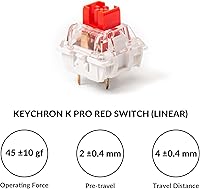
The stock Keychron K Pro Red switches are smooth for linear switches at this tier, with minimal scratching and a light actuation that keeps fatigue low during extended typing or coding work. They feel well-suited to fast typists who prefer a feather-light touch.
Heavy-handed typists frequently find the stock reds too light, leading to accidental keypresses during fast input. A significant portion of owners end up swapping them within a few weeks — the hot-swap PCB makes that easy, but it is an added cost to factor in.
Customization & Firmware
93%
QMK and VIA support at this price point is genuinely rare, and the browser-based VIA interface makes remapping keys, building macros, and adjusting lighting layers accessible even to users with zero programming background. It is one of the clearest advantages this 75% board holds over similarly priced competitors.
QMK flashing requires a bit more technical comfort and can be intimidating for complete beginners who just want plug-and-play. Documentation quality varies, and users without prior keyboard customization experience may need to rely on community forums to get the most out of the firmware.
Hot-Swap Functionality
91%
The hot-swappable PCB supports virtually all 3-pin and 5-pin MX switches on the market, which means buyers are not locked into the stock experience. Swapping switches takes minutes, and the socket retention feels solid — no wobble or misfires after multiple rounds of switch changes.
A small number of users reported socket wear after frequent hot-swapping, particularly when using switches with slightly thicker pins. This is an edge case for most buyers, but dedicated switch enthusiasts who swap often should be aware of long-term socket durability.
Stabilizer Quality
71%
29%
The screw-in PCB stabilizers are a meaningful upgrade over the typical clip-in stabs found on boards in this category. The spacebar and shift keys feel noticeably less rattly right out of the box, which contributes to a more polished overall typing sound.
Stabilizer consistency is not uniform across all units — some buyers receive boards where the stabs feel great immediately, while others need to apply lubrication before the rattle is acceptable. It is a fixable issue, but it should not require extra work at this price.
Keycap Quality
84%
Double-shot PBT keycaps resist shine and legend fade far better than the ABS caps bundled with most competing boards. The OSA profile has a slightly curved shape that feels natural under the fingers, and the texture strikes a nice balance between grip and smoothness.
The OSA profile is not a standard one, which means finding aftermarket replacements that match the aesthetic and fit perfectly takes more research. Some users also find the legends slightly thicker than they prefer visually.
Sound Profile
79%
21%
Thanks to the silicone dampening pad and decent stock stabilizers, this compact mechanical keyboard produces a fuller, lower-pitched sound than most bare-PCB boards in its class. Office users and streamers who care about microphone pickup have noted it as a genuinely quiet option with the right switches installed.
The steel plate contributes a slight metallic resonance on certain keys that the silicone pad does not fully eliminate. Buyers chasing a deep, thocky sound will likely need to add case foam or switch to POM plates — modifications that push past stock configuration.
RGB Lighting
77%
23%
The south-facing RGB orientation is a thoughtful design choice that directs light toward the typist rather than bleeding sideways. Shine-through on the legends is noticeably cleaner than boards with north-facing LEDs, especially when using standard keycap profiles.
Brightness and color uniformity are decent but not exceptional — at maximum brightness, lighter colors tend to wash out and some keys appear inconsistent at certain viewing angles. Users who invest heavily in RGB aesthetics may find the output less impressive than wireless boards from competitors with backlit keys as a focal feature.
Cross-Platform Compatibility
88%
The physical OS toggle and the included macOS and Windows keycap sets mean the Keychron V1 genuinely works well on both platforms without software intervention. Linux users also report solid plug-and-play functionality, which is rarer than it should be at this price tier.
Saving two separate key layouts on the board requires understanding the QMK layer system, which is not immediately intuitive for Mac-to-Windows switchers. The included instructions for managing layouts across operating systems could be more clearly written.
Value for Money
87%
For a board that ships with hot-swap sockets, QMK/VIA support, PBT keycaps, and screw-in stabilizers simultaneously, the pricing sits well below what comparable custom-ready keyboards typically cost. It represents a strong starting point for the hobby without demanding a large upfront investment.
Once you factor in the cost of replacement switches and potential stabilizer lubing supplies, the total spend creeps noticeably higher than the sticker price suggests. Buyers who want a truly polished out-of-box experience may feel the board asks a little too much tinkering to get there.
Software & Programmability
86%
VIA's web-based interface is among the most approachable remapping tools in the mechanical keyboard space. Non-technical users consistently single it out as the reason they chose this board over alternatives — you can reassign a key in under a minute without reading a manual.
VIA works well for basic remapping, but advanced QMK features like tap-dance and combos require stepping outside the GUI entirely. Users who outgrow VIA quickly will find the learning curve for full QMK flashing steeper than the onboarding experience prepared them for.
Ergonomics & Adjustability
72%
28%
Three typing angle options — 3.5, 7.08, and 9.52 degrees — give users meaningful control over wrist positioning, which is more flexibility than many boards at this size offer. The weight of just under one kilogram keeps it planted during heavy use without making it uncomfortable to move.
There is no wrist rest in the box, and the 75% layout combined with the taller typing angles can strain wrists during prolonged sessions without one. Users coming from low-profile keyboards may need an adjustment period before the ergonomics feel natural.
Packaging & Unboxing
76%
24%
Keychron packages the board thoughtfully, including the extra OS-specific keycaps, a keycap puller, a switch puller, and a USB cable — all the basics you need to get started are present. The presentation feels considered rather than bare-bones for the category.
The documentation included in the box is thin, and first-time mechanical keyboard buyers may feel underserved when it comes to guidance on features like VIA setup or switch swapping. A more comprehensive quick-start guide would reduce the learning curve for new buyers significantly.

Suitable for:

The Keychron V1 75% Mechanical Keyboard is the right call for anyone who wants a genuine foothold in the custom keyboard hobby without committing to a high-end budget. Mac users especially will appreciate that it works out of the box with a proper function row and physical OS toggle — no driver headaches, no compromised layouts. Developers and writers who spend most of their day typing will get real mileage from VIA's remapping tools, whether that means custom macros, layer switching, or workflow shortcuts that actually save time. Office workers upgrading from a membrane keyboard will notice an immediate improvement in typing feel and sound, particularly since the silicone dampening keeps noise at a reasonable level for shared spaces. If you have any interest in experimenting with different switches down the road, the hot-swappable PCB makes this 75% board a long-term platform rather than a one-and-done purchase.
Not suitable for:

The Keychron V1 75% Mechanical Keyboard is a harder sell if you already have experience with gasket-mount keyboards and have grown attached to that soft, cushioned flex — the tray mount design simply does not replicate that feel, and no amount of modding will fully close that gap. Buyers who want a completely wireless desk setup will need to look elsewhere, as this compact mechanical keyboard is wired-only with no Bluetooth option. If you are a heavy-handed typist, the stock red switches are likely to frustrate you — they are light enough that accidental keypresses become a real issue during fast, forceful typing, and factoring in replacement switches adds to the total cost. Users who want a premium, no-tinkering-required experience right out of the box may also feel short-changed; the stabilizers on some units need lubrication before they meet the standard that the rest of the board sets. Finally, anyone who relies on a numpad for data entry or spreadsheet work will find the 75% layout a non-starter regardless of the other merits.
Specifications

  • Layout: 75% compact layout with 81 keys, retaining the full function row and a right-side navigation cluster.
  • Dimensions: The board measures 12.93″ long by 5.85″ wide by 1.02″ tall.
  • Weight: Fully assembled unit weighs approximately 970 g, giving it a solid, planted feel on the desk.
  • Body Material: Outer case is constructed from solid ABS plastic with an internal steel switch plate.
  • Mount Style: Tray mount design secures the PCB directly to the base of the case.
  • Connectivity: Wired-only connection via Type-C USB port; no Bluetooth or wireless mode is available.
  • Polling Rate: Operates at a 1000 Hz polling rate for responsive, low-latency input.
  • Processor: Powered by an STM32L432 ARM Cortex-M4 32-bit MCU with 128 KB of onboard flash memory.
  • Switches: Ships with Keychron K Pro Red linear switches, rated for up to 50 million keystrokes, pre-lubed from the factory.
  • Hot-Swap: PCB supports tool-free hot-swapping of most 3-pin and 5-pin MX-compatible switches, including Cherry, Gateron, and Kailh.
  • Firmware: Fully compatible with both QMK open-source firmware and the browser-based VIA remapping interface.
  • Keycaps: Double-shot PBT keycaps in the OSA profile ship standard, with an additional set of OS-specific legends included.
  • Stabilizers: Screw-in PCB-mount stabilizers are fitted on all larger keys including spacebar, shift, enter, and delete.
  • Backlight: South-facing RGB LEDs illuminate legends from the typist-facing angle to minimize keycap interference.
  • Typing Angles: Three selectable typing angles are available: 3.5°, 7.08°, and 9.52°.
  • OS Support: Compatible with macOS, Windows, and Linux out of the box via a physical OS toggle switch on the side.
  • Dampening: An acoustic silicone pad sits beneath the PCB to reduce hollow resonance and lower overall typing noise.
  • Cable: Ships with a detachable Type-C to USB-A braided cable suitable for immediate use on most systems.

Related Reviews
Womier SK71 75% Mechanical Keyboard
87%
88%
Performance
93%
Build Quality
90%
Ergonomics/Typing Comfort
85%
Battery Life
91%
Connectivity (Wired/Bluetooth/2.4GHz)
More
Keychron K8
Keychron K8
80%
91%
Typing Feel & Switch Quality
88%
Noise Level
86%
Multi-Device Connectivity
67%
Build Quality & Materials
72%
Battery Life
More
Keychron C2 Wired Mechanical Keyboard
84%
91%
Typing Experience
89%
Build Quality
88%
Customization Options
84%
Ergonomics
90%
Compatibility
More
Keychron K4 Bluetooth Wireless Mechanical Keyboard
86%
91%
Build Quality
88%
Battery Life
85%
Typing Experience
90%
Connectivity & Versatility
82%
RGB Backlighting
More
Keychron K2 V2 Wireless Mechanical Keyboard
87%
88%
Overall Performance
85%
Typing Experience
90%
Battery Life
92%
Build Quality
80%
Portability
More
Keychron K10 Full Size Wireless Mechanical Keyboard
83%
91%
Typing Experience
89%
Build Quality
87%
Bluetooth Connectivity
85%
Battery Life
82%
Ergonomics
More
MageGee MK-Star 75% Mechanical Keyboard
79%
91%
Value for Money
88%
Switch Feel & Performance
83%
Build Quality
84%
Typing Experience
86%
Gaming Performance
More
Merdia Wireless Mechanical Keyboard
83%
90%
Connectivity Options
88%
Typing Experience
86%
RGB Customization
84%
Build Quality
91%
Battery Life
More
Satechi SM3 Mechanical Keyboard
86%
92%
Typing Experience
88%
Connectivity
85%
Ergonomics and Comfort
89%
Battery Life
91%
Build Quality
More
Redragon K710 Wireless Typewriter Mechanical Keyboard
76%
88%
Build Quality
84%
Wireless Reliability
81%
Typing Experience
52%
Noise Level
77%
RGB & Lighting
More

FAQ

Yes, it works out of the box on macOS. There is a physical toggle on the side of the board to switch between Mac and Windows modes, and the package includes a separate set of Mac-specific keycaps so the legends match what you see on screen.

You can. The hot-swappable PCB lets you pull switches out with the included switch puller and press new ones in by hand. It works with most 3-pin and 5-pin MX-compatible switches from brands like Gateron, Cherry, and Kailh — no heat gun, no soldering iron needed.

It holds up well for long typing sessions. The silicone dampening pad keeps the sound profile reasonable for shared spaces, and the screw-in stabilizers mean the larger keys feel smooth rather than rattly. That said, if you find the stock red switches too light, swapping to something with more tactile feedback or a heavier actuation force makes a noticeable difference in comfort.

VIA is genuinely easy to use — you open a browser, load the VIA web app, plug in the board, and drag-and-drop key assignments. Most users figure it out in under 15 minutes. If you want to go deeper with macros, layers, or tap-dance functions, that requires QMK firmware flashing, which is more involved but well-documented by the community.

No — this compact mechanical keyboard is wired only. If wireless connectivity is important to you, Keychron does offer Bluetooth models in their K and Q series lineups, but the V1 specifically was designed as a wired board.

Some units ship with stabilizers that need a bit of lubrication before they reach their best feel and sound. Applying a small amount of dielectric grease or Krytox 205g0 to the stabilizer wires usually resolves the rattle quickly. It is a common first mod in the keyboard hobby and takes about 20 minutes once you have the right supplies.

The PCB accepts most standard MX-footprint switches in both 3-pin and 5-pin configurations. Popular upgrades include Gateron Yellow or Black for a smoother linear experience, Boba U4 for silent tactile typing, or Holy Pandas for those who want strong tactile feedback. The only switches that will not fit are Alps, low-profile, or proprietary non-MX designs.

Yes. Key assignments and layer configurations are stored directly on the board's onboard flash memory, so your custom layout travels with the keyboard. You do not need VIA or any software installed on the host computer for your remaps to work.

The 75% layout is smaller than a tenkeyless but keeps more keys than a 65%. You still get the full function row across the top and a condensed navigation cluster on the right side, which covers most productivity and coding needs. What you lose is the numpad and some spacing between key clusters that full-size users are accustomed to.

It is visible in normal indoor lighting, though it is most impressive in dimmer environments. The south-facing LED orientation does a better job illuminating the keycap legends than most competing boards, but users expecting the vivid per-key lighting found on dedicated gaming keyboards may find the output more subtle than expected.