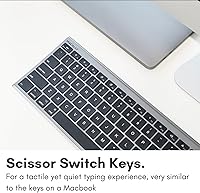
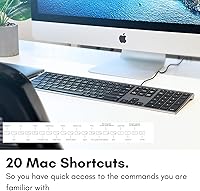
Overview

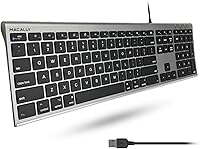
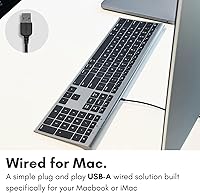
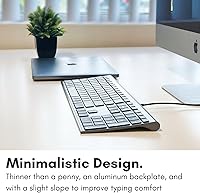
The Macally ACEKEYSG is a full-size wired keyboard built for anyone who wants a clean, no-fuss typing setup on both Mac and Windows. At just 0.4 inches thick — genuinely thinner than a penny — it sits flat on your desk without demanding visual attention. The Space Gray finish was clearly designed with Apple hardware in mind, and it looks the part next to a Mac mini or iMac. There are no drivers to hunt down and no Bluetooth rituals to endure; plug it into a USB-A port and it simply works. For the price, it's a compelling alternative to Apple's own keyboard.

Features & Benefits

The keyboard ships with 20 Mac shortcut keys covering Mission Control, Spotlight, and media controls — everything you'd expect from a proper Mac keyboard, without the Apple tax. Windows users aren't left out either; dedicated multimedia shortcuts make it equally functional on a PC. One of the more practical strengths here is the full numeric keypad. Many slim keyboards drop it entirely, so having it on this wired Mac keyboard is a genuine bonus for anyone doing spreadsheet work or data entry. The wired connection means zero input lag and no batteries to swap. Mace Group also backs it with a one-year warranty and lifetime customer support.

Best For

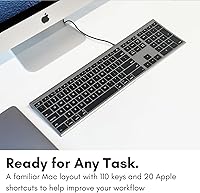
This wired Mac keyboard is a natural fit for Mac mini or iMac desktop users who want a full-size layout without overspending. Students and office workers who regularly handle numbers will appreciate the dedicated numeric keypad — something many Apple-adjacent keyboards simply skip. It also makes good sense for people moving from a laptop to a desktop, since the low-profile key feel won't seem foreign. If you split time between Mac and Windows machines, the slim USB keyboard handles both without any reconfiguration. And if wireless keyboards frustrate you — dead batteries, pairing dropouts — the plug-and-play connection here is a straightforward fix.

User Feedback

Across nearly 3,500 ratings, this Macally keyboard holds a 4.3-star average, and reading through the reviews, the satisfaction feels earned. Buyers consistently highlight how well the Space Gray finish pairs with Apple hardware, and many describe the typing experience as quiet and comfortable for long sessions. That said, the shallow key travel is a real trade-off — if you're used to mechanical switches or even a standard membrane board, it takes adjustment. A handful of users found the USB cable a touch short for certain desk configurations. There is also scattered mention of keycap legends fading over time with very heavy use, which is worth keeping in mind if longevity matters to you.

Pros

  • Full numeric keypad included — a real differentiator among slim keyboards at this price tier.
  • Works out of the box on both macOS and Windows with zero driver installation.
  • Ultra-slim 0.4-inch profile keeps desks looking clean and uncluttered.
  • 20 dedicated Mac shortcut keys cover Mission Control, Spotlight, and media controls reliably.
  • Wired connection means zero latency and no battery replacements, ever.
  • Space Gray finish pairs naturally with Apple hardware without looking like an afterthought.
  • This wired Mac keyboard is genuinely quiet — a practical advantage in shared or open-plan office spaces.
  • Windows multimedia shortcuts are included, making cross-platform use genuinely practical.
  • Backed by a one-year warranty plus lifetime customer support from Mace Group.
  • Broadly well-reviewed across nearly 3,500 buyer ratings, reflecting consistent real-world satisfaction.

Cons

  • Shallow key travel is a real adjustment for anyone used to mechanical or even standard membrane keyboards.
  • No backlighting at all — a notable gap for users who work in dim environments.
  • USB-A only; MacBook and newer Mac mini users without a hub will need a separate adapter.
  • Cable length is on the short side for setups where the computer sits far from the keyboard.
  • Keycap legends have been reported to fade with heavy long-term use, raising durability questions.
  • Single color option limits appeal for users with non-Apple or custom-colored desk setups.
  • The wide full-size footprint can feel cramped on smaller or more minimal desk configurations.
  • No wireless or Bluetooth option exists if your preference or setup ever changes.

Ratings

The Macally ACEKEYSG has been scored by our AI system after analyzing thousands of verified global buyer reviews, with spam, bot-generated, and incentivized feedback actively filtered out. The result is an honest snapshot of how this wired Mac keyboard performs in real daily use — covering everything from typing comfort to long-term durability. Both the standout strengths and the recurring frustrations are reflected transparently in the scores below.

Typing Comfort
78%
22%
Most buyers find the low-profile keys easy to adapt to, especially those coming from a MacBook. The quiet keystroke is a consistent positive in office and shared-space settings where noise matters.
The shallow key travel is a clear compromise for anyone who prefers tactile feedback or types heavily for hours. Power typists accustomed to mechanical boards frequently note finger fatigue over long sessions.
Build Quality
72%
28%
The slim chassis feels sturdy enough for daily desk use and the overall fit and finish is solid at this price tier. Most users report no flexing or creaking in normal conditions.
Occasional reports of keycap legends wearing down with intensive use suggest the printing process is not the most durable. This is more of a long-term concern than something buyers notice early on.
Mac Compatibility
91%
The 20 dedicated Mac shortcut keys work out of the box without any software — Mission Control, Spotlight, brightness, and media controls all respond correctly. iMac and Mac mini users in particular find this a near-perfect drop-in replacement.
A small number of users on newer macOS versions report occasional key-mapping quirks, though these appear rare and are typically resolved with simple system preference adjustments.
Windows Compatibility
83%
The included Windows multimedia shortcuts make this genuinely useful on a PC, not just a Mac afterthought. Users who switch between operating systems appreciate not needing a second keyboard on their desk.
The keyboard's design language leans Mac-first, so the Windows key labeling and layout can feel slightly unfamiliar to users who have never used an Apple-style board.
Numeric Keypad
88%
Having a full numeric keypad is a meaningful advantage over many slim keyboards in this category that simply omit it. Accountants, data entry workers, and spreadsheet-heavy users repeatedly single it out as the deciding factor in their purchase.
The keypad adds notable width to the board, which can feel crowded on smaller desks. Users who rarely need number input may find the added footprint unnecessary.
Plug-and-Play Setup
93%
Virtually every reviewer mentions how effortless the setup is — plug in the USB-A cable and the keyboard is immediately recognized on both Mac and Windows. There are no driver downloads, no pairing sequences, no configuration screens.
The USB-A connector is the only option, so users with modern MacBooks that have only USB-C ports will need an adapter. That extra step, while minor, does interrupt the otherwise friction-free experience.
Cable Quality & Length
61%
39%
The cable itself is reasonably tidy and does not get in the way on a standard desk setup. For most tower or monitor setups with rear USB ports, the length is workable.
A recurring complaint is that the cable feels short for desks where the computer sits on the floor or at a distance. There is no braiding or reinforcement, which raises some durability questions over extended years of use.
Aesthetic & Design
86%
The Space Gray colorway is genuinely well-matched to Apple hardware and looks polished next to an iMac or alongside a MacBook on a desk. The ultra-flat profile gives workstations a clean, uncluttered appearance.
Color options are limited, and users who run non-Apple setups may find the Apple-centric design language slightly out of place. The minimalist look also means no backlighting, which some buyers discover only after purchase.
Backlighting
41%
59%
The absence of backlighting is not a dealbreaker for users who work in well-lit offices or home setups with consistent lighting. The key legends are clear and legible under normal conditions.
Users who work in dim environments or at night find the lack of any key illumination a genuine limitation. At this price point, some buyers feel at least single-color backlighting should be included.
Key Stability & Accuracy
77%
23%
The flat keycaps register inputs reliably under normal typing conditions, and most users report low misfire rates during everyday writing and browsing. The key spacing is consistent across the board.
Fast typists occasionally note that the flat profile offers less guidance for finger placement compared to sculpted keycap designs. This can lead to slightly higher error rates during rapid input until full muscle memory develops.
Noise Level
84%
Quiet operation is one of the most frequently praised qualities by buyers in open offices or shared rooms. The keystroke sound is subdued without being completely silent, giving just enough feedback without disturbing others.
A handful of users describe a faint hollow resonance when bottoming out keys, likely from the slim chassis. It is not disruptive but worth noting for buyers in very acoustically sensitive environments.
Value for Money
82%
18%
Relative to Apple's own keyboard and many competing full-size wired Mac options, this wired Mac keyboard delivers a strong feature set at a noticeably lower price. The inclusion of a numeric keypad at this tier strengthens the case considerably.
A few buyers feel that the build materials and keycap durability do not quite justify the asking price when compared to similarly priced alternatives from other peripheral brands. The value perception varies depending on individual expectations.
Durability & Longevity
66%
34%
Under regular office-use conditions, most buyers report consistent performance over one to two years without hardware issues. The wired connection removes the common failure point of wireless components.
Keycap legend fading under heavy use is the most cited long-term concern. Combined with an unbraided cable, buyers who type intensively throughout the workday may find wear signs appearing sooner than expected.
Cross-Platform Flexibility
81%
19%
The ability to move this keyboard between a Mac and a Windows machine without any reconfiguration is genuinely useful for households or offices running mixed systems. Both shortcut sets work independently and intuitively.
Users who need to switch between platforms very frequently may find the Mac-centric key labeling a mild cognitive friction point on the Windows side. It is a minor issue but worth acknowledging for truly mixed-OS power users.

Suitable for:

The Macally ACEKEYSG is a strong match for Mac desktop users — particularly those running a Mac mini or iMac — who want a full-size keyboard that looks like it belongs in the setup without paying Apple's premium. Students and office workers who spend meaningful time in spreadsheets or accounting software will find the numeric keypad especially practical, since many slim keyboards at this price skip it entirely. If you are transitioning from a MacBook to a desktop environment, the low-profile key feel will be immediately familiar rather than jarring. It also works well for anyone managing both a Mac and a Windows machine on the same desk, since the keyboard handles both operating systems without any reconfiguration. And if you have grown tired of wireless keyboards — the dead batteries, the occasional pairing dropout — the wired connection here removes all of that friction instantly.

Not suitable for:

The Macally ACEKEYSG is not the right choice for anyone who genuinely loves the tactile punch of a mechanical keyboard, since the shallow key travel here is a fundamentally different experience that does not suit heavy or fast typists well. Users with modern MacBooks or Mac minis that lack USB-A ports will need a USB-C adapter, which adds a small but real inconvenience that slightly undercuts the plug-and-play appeal. If you work in dim or low-light environments, the complete absence of backlighting will be a daily frustration — there is no illumination option at all. Those expecting a keyboard to hold up under very intensive, years-long daily hammering may be disappointed by reports of keycap legends fading over time. Finally, buyers who prioritize desk space will want to measure carefully, as the full-size layout with numeric keypad is noticeably wide for compact workstations.

Specifications

  • Brand: Manufactured by Mace Group Inc, marketed under the Macally Peripherals brand.
  • Model: The exact model number is ACEKEYSG, identifying the Space Gray full-size USB variant.
  • Dimensions: The keyboard measures 17″ wide, 4.5″ deep, and just 0.4″ tall at its thinnest point.
  • Weight: The unit weighs 1.15 pounds, making it light enough to reposition on a desk without effort.
  • Connectivity: Connects via a built-in USB-A cable; no wireless, Bluetooth, or USB-C option is available.
  • Layout: Full-size layout with a dedicated numeric keypad on the right side and standard function row.
  • Mac Shortcuts: Includes 20 dedicated Mac shortcut keys covering Mission Control, Spotlight, screen brightness, and media playback.
  • Windows Support: Windows multimedia shortcut keys are included and function without any additional software installation.
  • Key Type: Low-profile flat keycaps with scissor-style mechanism and shallow key travel suited to light typing.
  • Backlighting: No backlighting is present; this is a fully non-illuminated keyboard.
  • Color: Available in Space Gray, designed to complement Apple iMac, Mac mini, and MacBook hardware aesthetics.
  • OS Compatibility: Officially compatible with macOS and Windows operating systems via standard HID USB protocol.
  • Plug and Play: No drivers or software are required; the keyboard is recognized immediately upon plugging in on both supported operating systems.
  • Warranty: Backed by a one-year limited warranty with lifetime customer support provided by Mace Group Inc.
  • Release Date: The product was first made available in May 2018 and remains an active, non-discontinued listing.
  • Language: Keys are labeled in English only; no alternative language keycap sets are included.
  • Power Source: Draws power directly from the connected USB port; no batteries or external power supply are needed.

Related Reviews
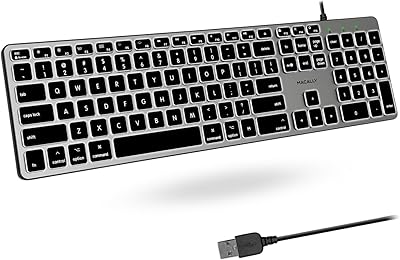
Macally SLIMKEYCA Wired Keyboard
88%
87%
Typing Comfort
90%
Build Quality
93%
Compactness & Space Saving
95%
Ease of Setup
85%
Key Responsiveness
More
Macally Wireless Bluetooth Mouse
86%
93%
Quiet Operation
89%
Battery Life
91%
Comfort and Ergonomics
75%
Bluetooth Connectivity
92%
Cross-Device Compatibility
More
Macally Backlit Mac Keyboard
87%
91%
Backlighting Performance
85%
Key Typing Experience
88%
Build Quality and Durability
90%
MacOS Shortcut Keys
92%
Compatibility with Mac Devices
More
Macally BTBLERGO2A Bluetooth Ergonomic Split Keyboard
85%
91%
Ergonomics & Comfort
88%
Ease of Use & Setup
90%
Bluetooth Connectivity
87%
Battery Life
85%
Backlit Keys Visibility
More
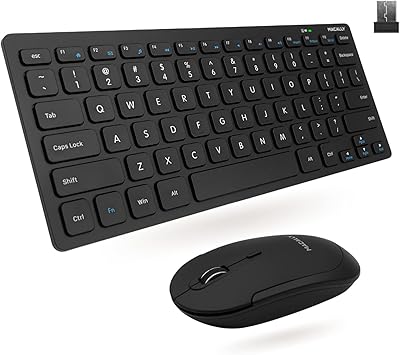
Macally RFCOMPACTKEYCB Wireless Keyboard and Mouse Combo
79%
83%
Typing Feel
67%
Mouse Comfort & Ergonomics
78%
Wireless Reliability
91%
Value for Money
72%
Build Quality & Durability
More
Macally Premium Bluetooth Keyboard and Mouse Combo
87%
88%
Ease of Use
83%
Ergonomics/Comfort
90%
Design & Aesthetics
87%
Typing Experience
85%
Battery Life
More

FAQ

Yes, completely. Plug the USB-A cable into your Mac and the keyboard is recognized instantly. There are no drivers to download and no setup screens to navigate through — it just works from the moment it is connected.

They function properly. Keys for Mission Control, Spotlight, screen brightness, volume, and media playback all respond correctly on macOS without any third-party software. It behaves like a native Mac keyboard in everyday use.

Absolutely. The Macally ACEKEYSG includes Windows multimedia shortcuts alongside the Mac keys, and it is recognized by Windows via standard USB HID protocol. If you share a desk between a Mac and a PC, this keyboard handles both without any reconfiguration.

It will work, but you will need a USB-A to USB-C adapter since the keyboard uses a fixed USB-A cable. Most inexpensive adapters handle this fine, though it does add one extra piece to your setup.

It is quite similar in terms of key height and travel depth — low-profile and flat, with a short keystroke. If you are used to typing on a MacBook, the adjustment period is minimal. That said, it is noticeably different from a mechanical keyboard and some people find it less satisfying for long writing sessions.

Yes, most users find it quite subdued. The low-profile scissor mechanism produces a soft click rather than a loud thud, and it is generally considered office-friendly. It is not completely silent, but it is unlikely to bother nearby colleagues.

The cable is fixed and built into the keyboard rather than detachable. Some users find the length adequate for standard desk setups, but if your computer tower sits on the floor or at a distance, you may find it a touch short. Using a USB extension cable is a simple workaround.

No, there is no backlighting of any kind. The key legends are clear and easy to read under normal lighting, but if you regularly work in low-light environments, this is a genuine limitation to be aware of before buying.

For light to moderate use, the legends hold up well. However, a portion of long-term users have noted that the key printing can show wear after extended heavy use — particularly on high-frequency keys. It is not an immediate concern but worth keeping in mind if you type intensively every day for years.

Macally offers a one-year limited warranty covering manufacturing defects, and they pair it with lifetime customer support through Mace Group. In practice, buyers generally report responsive service, and the lifetime support commitment means you are not left without help after the warranty period ends.