Overview

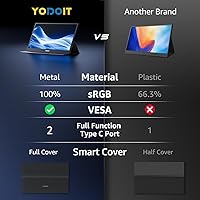
The Yodoit PTM17 17.3″ Portable Monitor occupies an interesting spot in the portable display market — bigger than most rivals, but still light enough to slide into a laptop bag without drama. At 17.3 inches, the screen size alone sets this apart when most portable monitors top out at 15 inches. It’s aimed squarely at remote workers, students, and casual gamers who want a genuine productivity upgrade on the road. Plug-and-play connectivity and wide device compatibility are real draws. The metal build and included stand cover feel like thoughtful additions at this price tier, though buyers should know upfront this isn’t a display for color-critical creative tasks.

Features & Benefits

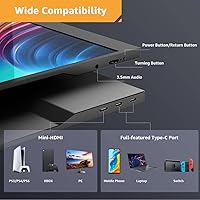
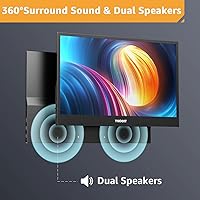
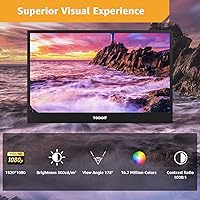
This portable monitor’s IPS panel delivers a 1920×1080 FHD resolution with a 178° viewing angle, keeping colors consistent whether you’re working alongside a colleague or watching from an off-angle. At 400 nits, brightness is adequate indoors, though HDR support is more of a checkbox feature at this level — budget IPS panels can’t match the contrast of a true HDR display. The two full-featured USB-C ports genuinely matter: single-cable power and video is supported, and you can use either port depending on your setup. Mini HDMI adds flexibility. The low blue light mode earns its keep during late-night sessions. The built-in speakers handle alerts and casual video well enough, but they’re not a substitute for headphones.

Best For

This travel-friendly screen is a natural fit for hybrid workers and students who regularly shift between offices, cafes, libraries, and co-working spaces — anyone who finds a single laptop screen limiting but doesn’t want to pack a full-size external monitor. Console gamers who travel with a Switch, Xbox, or PS5 will also find it useful as a portable display that connects without fuss. Frequent travelers who prioritize productivity without bulk will appreciate the size-to-weight balance. Where it falls short: this isn’t the right pick for photographers or video editors needing accurate color reproduction, anyone working primarily outdoors in bright sunlight will struggle with the glossy panel, and 4K enthusiasts will need to look elsewhere.

User Feedback

Buyers consistently praise the screen size — 1.54 pounds for a 17.3-inch display is a common highlight, and setup is repeatedly described as refreshingly simple. The included foldable cover earns positive mentions for build quality and practicality. On the downside, the built-in speakers draw the most criticism: volume and audio quality are modest at best. The glossy screen is a recurring sticking point for anyone using the Yodoit 17.3-inch display near windows or under strong overhead lighting. A notable subset of buyers with older laptops report that non-full-featured USB-C ports don’t deliver the expected plug-and-play experience. The metal chassis durability gets consistent approval, and overall value sentiment is strong — most buyers feel the size-to-price ratio represents a solid deal.

Pros

  • At 17.3 inches, this travel-friendly screen offers significantly more workspace than most portable monitors in its class.
  • The metal chassis feels solid and premium relative to the price, with buyers consistently praising its build quality.
  • Plug-and-play setup via USB-C or mini HDMI works reliably with modern laptops and consoles — no driver headaches.
  • Dual full-featured USB-C ports allow flexible single-cable connections or daisy-chaining without hunting for adapters.
  • The IPS panel delivers consistent colors and a wide 178° viewing angle, making shared viewing comfortable.
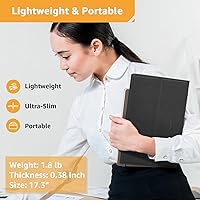
  • At roughly 1.54 pounds, it is light enough to carry daily without meaningfully adding to bag weight.
  • The included foldable stand cover protects the display in transit and doubles as an adjustable stand out of the box.
  • Low blue light mode is a genuine quality-of-life feature for long work sessions or late-night use.
  • Broad device compatibility — laptops, PCs, Macs, smartphones, and game consoles — makes it a versatile single purchase.
  • The size-to-price ratio is competitive, offering more screen real estate than pricier rivals in the portable monitor segment.

Cons

  • The glossy screen surface causes distracting reflections in bright rooms or near windows, limiting where it can comfortably be used.
  • HDR support exists on paper, but the real-world HDR performance is underwhelming and unlikely to impress anyone familiar with proper HDR displays.
  • Built-in speakers are thin and low in volume — functional in a quiet room, but barely adequate in any ambient noise environment.
  • USB-C compatibility depends on the host device having a full-featured port; older or budget laptops may not support single-cable use.
  • The glossy panel can be harder to clean and shows fingerprints and smudges more readily than matte alternatives.
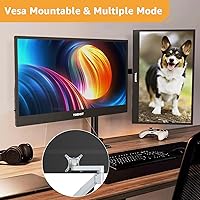
  • No height or tilt adjustment beyond what the bundled stand cover allows, which may not suit all desk ergonomic setups.
  • Color accuracy is adequate for general use but lacks factory calibration, making it unreliable for any color-sensitive creative work.
  • The 60Hz refresh rate is a ceiling, so users hoping to use this Yodoit PTM17 17.3″ Portable Monitor for competitive gaming will find it limiting.
Ratings

The Yodoit PTM17 17.3″ Portable Monitor has been evaluated by our AI rating system after analyzing thousands of verified global buyer reviews, with spam, incentivized posts, and bot activity actively filtered out. The scores below reflect a balanced picture — real strengths earned by real users alongside honest pain points that prospective buyers deserve to know before purchasing. From daily commuters to student cafe-dwellers and weekend console gamers, here is what the broader ownership experience actually looks like.
Screen Size & Usability
91%
For a monitor you can actually slip into a backpack, 17.3 inches delivers a genuinely spacious workspace that users consistently describe as transformative compared to working off a laptop screen alone. Remote workers doing spreadsheet-heavy tasks or students writing long-form papers repeatedly call this the standout feature of the whole package.
The larger footprint is a double-edged sword — it will not fit in slim 13-inch or 14-inch laptop sleeves, and some travelers find it occupies more bag real estate than they anticipated. For anyone prioritizing ultra-compact portability over screen canvas, this size may feel like a compromise.
Image & Color Quality
76%
24%
The IPS panel delivers noticeably better color consistency than cheaper TN alternatives at this price point, with wide viewing angles that hold up whether you are sitting directly in front or sharing the screen with a colleague beside you. For everyday productivity, video streaming, and casual browsing, most users find the picture quality more than satisfying.
Color accuracy is decent but not calibrated — creative professionals doing photo retouching or video color work will notice visible shifts compared to a proper reference display. The panel is built for general-purpose use, and treating it as anything beyond that will lead to disappointment.
Brightness & Glare
62%
38%
At 400 nits, the display holds up well in typical indoor settings like offices, hotel rooms, libraries, and dim cafes, where most portable monitor users actually spend their time. Buyers working predominantly in controlled lighting rarely flag brightness as a problem.
The glossy panel finish becomes a real liability in bright environments — sunlit coffee shops, open-plan offices near windows, and outdoor patios all produce noticeable glare and reflections that disrupt the viewing experience. Users in consistently bright workspaces should factor this in as a genuine usability concern.
HDR Performance
54%
46%
HDR mode does produce a subtle uplift in color tone and contrast on compatible content, and for users who have never owned an HDR-capable display before, the difference on streaming platforms can feel like a modest improvement over standard output.
This is where expectations need to be kept firmly in check — the panel lacks the local dimming zones and peak brightness required for meaningful HDR impact, so highlights do not pop the way they would on a proper HDR display. Experienced buyers who already own a quality screen are unlikely to be impressed by the HDR implementation here.
Connectivity & Compatibility
83%
Dual full-featured USB-C ports are a practical advantage — users with modern MacBooks, recent Windows laptops, and USB-C-equipped Android devices can connect a single cable that handles both video and power simultaneously, keeping desk setups clean and travel kits minimal. The addition of mini HDMI ensures console gamers and users with older laptops are not left out.
The plug-and-play promise has a notable asterisk: USB-C ports that are charging-only or data-only — common on older laptops and budget Windows machines — will not carry a video signal, leaving some users troubleshooting connections they expected to just work. Buyers with legacy hardware should verify their USB-C port specifications before assuming single-cable compatibility.
Setup & Ease of Use
88%
When connected to a compatible device, the monitor requires no driver downloads or software configuration — it simply appears as an extended display within seconds. Users who switch between multiple devices throughout the day, such as a MacBook in the morning and a gaming laptop at night, appreciate how frictionless the swapping process is.
The occasional USB-C incompatibility issue — particularly with older or non-standard ports — can make the initial setup experience frustrating for users who were not expecting any complications. A brief compatibility check beforehand resolves most issues, but the out-of-box experience is not quite as universal as the marketing implies.
Build Quality
82%
18%
The metal chassis genuinely distinguishes this monitor from the majority of budget portable displays that feel hollow and creak under light pressure. Users who have owned cheaper plastic alternatives consistently comment on how solid and well-assembled this unit feels when handled, even after extended travel use.
While the overall construction inspires confidence, a small number of users have noted that the stand cover hinges loosen over time with frequent folding and repositioning. It is not a widespread failure point, but the durability of the cover mechanism over a multi-year lifespan remains an open question.
Stand & Viewing Angles
73%
27%
The foldable cover transitions into a usable stand with enough tilt range to find a comfortable viewing angle on most flat surfaces, and the fact that it doubles as protection during transport makes it a genuinely clever inclusion at this price tier. Most desk and table setups are covered without needing a third-party stand.
The angle adjustment range is limited compared to a dedicated monitor arm or an articulating stand — users who prefer a more upright or dramatically tilted orientation may find the fixed-range cover frustrating. Working on uneven surfaces or from a lap also exposes the stand cover's stability limits fairly quickly.
Built-in Speakers
58%
42%
Having speakers built into a portable monitor is a genuine convenience for video calls, quick YouTube sessions, and system audio when headphones are not practical — especially in hotel rooms or temporary workspaces where setting up external speakers is impractical.
Volume output is modest and the audio quality is thin, with limited bass and a tendency to sound strained at higher volume levels. Anyone planning to use this for movie nights, gaming audio, or music will want to supplement with Bluetooth speakers or headphones, as the built-in speakers are clearly a secondary consideration in the design.
Eye Comfort
79%
21%
The low blue light mode is a practical feature for users who spend long hours in front of screens — students pulling late-night study sessions and remote workers clocking extended video call days frequently mention noticeably less eye fatigue when the mode is enabled. The warmth it adds to the image is a fair trade-off for many.
The color temperature shift introduced by blue light reduction is visible enough that some users toggle it off during daylight hours, finding the warmer tones distracting for design work or color-sensitive tasks. It is a useful option rather than a set-and-forget solution for everyone.
Portability & Weight
84%
At roughly 1.54 pounds, this is a display that genuinely disappears into a loaded backpack — users report taking it on planes, trains, and daily commutes without it meaningfully changing the weight burden of their bag. For a 17.3-inch screen, the weight-to-size ratio earns consistent praise in user reviews across all buyer segments.
The physical footprint — nearly 16 inches wide — means it only fits comfortably in larger bags, and ultra-minimalist travelers packing a slim messenger bag may find it does not slot in as easily as smaller 13-inch or 15-inch portable monitors. Weight is not the issue; dimensions are.
Value for Money
86%
The size-to-price ratio is the most consistently praised aspect of the ownership experience across global reviews — buyers feel they are getting significantly more screen real estate than competing portable monitors in the same bracket, and the metal build reinforces the perception that this is not a disposable product.
Buyers expecting flagship-grade image performance or premium audio for the price will inevitably feel shortchanged — the value proposition holds firmly for productivity and casual use but starts to wobble if the purchase is motivated by media or gaming quality alone.
Gaming Performance
67%
33%
Console gamers using this as a travel screen for a Switch, Xbox, or PS5 generally report a satisfying experience — the screen size is genuinely enjoyable for gaming in hotel rooms, and HDMI connectivity keeps the setup simple. Response times are adequate for casual and mid-paced gaming genres.
Competitive or fast-paced gaming reveals the panel's limitations — response time and refresh rate are not specified at high-performance levels, which can produce subtle motion blur in action-heavy games. This is a solid casual gaming companion, not a monitor for frame-rate-sensitive competitive players.
Long-Term Reliability
71%
29%
The metal chassis and overall build quality create a positive foundation for longevity, and the majority of users who have owned the monitor for six months or more report no significant hardware degradation. The durable feel at purchase generally holds up through regular travel use.
The long-term track record for this relatively newer brand is still being established, and a subset of users has reported issues with the stand cover hinge and port connectivity after extended daily use. Buyers who depend on the monitor professionally may want to keep this in mind when weighing the absence of a premium warranty program.

Suitable for:

The Yodoit PTM17 17.3″ Portable Monitor is an excellent match for remote workers, hybrid professionals, and students who regularly set up in cafes, libraries, co-working spaces, or client sites and want a genuinely usable second screen without hauling heavy gear. At 1.54 pounds with a slim metal chassis, it slots into a laptop bag without dominating the space, making it a practical daily companion for anyone whose office changes by the day. The 17.3-inch screen gives a noticeably larger canvas than most portable monitors in this category, which translates to real productivity gains when working across multiple windows or documents. Students tackling research-heavy assignments or spreadsheet work will appreciate the extra real estate compared to working off a single laptop display. Console gamers traveling with a Switch, Xbox, or PS5 will also find this a capable plug-and-play companion, delivering a full 1080p image without needing a TV or dedicated gaming monitor nearby.
Not suitable for:

Buyers doing color-critical work — photographers editing RAW files, video editors matching footage, or graphic designers checking print accuracy — should look elsewhere, as this is a value-tier IPS panel that does not offer factory color calibration or wide color gamut coverage. The glossy screen surface, while vivid indoors, reflects ambient light noticeably in bright offices or near windows, making it a frustrating choice for anyone who works primarily in well-lit or outdoor environments. HDR is listed as a supported feature, but on a panel at this price point the practical HDR experience is modest at best and should not be a purchasing driver. Users with older laptops or non-full-featured USB-C ports may find the single-cable setup does not work as advertised, requiring them to use the mini HDMI cable alongside a separate power source. Anyone expecting a premium audio experience from the built-in speakers will be disappointed — they serve as a convenience fallback, not a substitute for external audio. Finally, users who need 4K resolution or high-refresh-rate gaming above 60Hz should consider a more specialized portable display.

Specifications

  • Screen Size: The display measures 17.3″ diagonally, making it one of the larger options available in the portable monitor category.
  • Resolution: Native resolution is 1920x1080 Full HD, delivering sharp, detailed imagery suitable for productivity tasks, video streaming, and casual gaming.
  • Panel Type: An IPS (In-Plane Switching) panel is used, which provides consistent color reproduction and wide viewing angles compared to TN alternatives.
  • Viewing Angle: The IPS panel supports up to 178° horizontal and vertical viewing angles, meaning colors and contrast remain stable even when viewed from off-center.
  • Brightness: Peak brightness is rated at 400 nits, which is adequate for indoor and dimly lit environments but may struggle against direct sunlight or very bright rooms.
  • HDR Support: HDR mode is supported at a software level, though real-world HDR performance is limited by the panel's contrast range, as is typical of budget IPS displays.
  • Connectivity: The monitor includes two full-featured USB-C ports and one mini HDMI port, supporting both single-cable power-plus-video and traditional HDMI connections.
  • Weight: The unit weighs approximately 1.54 pounds (700g), keeping it light enough to slip into a backpack alongside a laptop without significant added bulk.
  • Dimensions: Physical dimensions are 15.87 x 10.39 x 2.09 inches, which accounts for the included stand cover in its closed protective position.
  • Built-in Speakers: Dual integrated speakers are included for basic audio output, covering system sounds, video calls, and casual media playback without requiring external speakers.
  • Eye Care Mode: A low blue light filter mode is built in, reducing high-energy blue light emissions to help minimize eye fatigue during extended work or viewing sessions.
  • Stand Cover: A foldable stand cover is included in the box, serving as both a protective shell during transport and an adjustable-angle stand during use.
  • Build Material: The chassis is constructed from metal, giving the monitor a more solid, premium feel compared to all-plastic portable displays in the same price range.
  • Screen Surface: The screen uses a glossy finish, which enhances color vibrancy and contrast but can produce noticeable reflections in brightly lit environments.
  • Aspect Ratio: The display uses a standard 16:9 aspect ratio, which is ideal for widescreen video content and mirrors the layout of most modern laptop screens.
  • Driver Requirement: No software drivers or additional installations are needed — the monitor is recognized and activated automatically when connected to a compatible device.
  • USB-C Standard: Both USB-C ports are full-featured, meaning they carry video signal, data, and power delivery simultaneously over a single cable when paired with a compatible host device.

Related Reviews

Kenowa HD-133 13.3-inch Portable Monitor
68%
91%
Setup & Ease of Use
47%
Display Resolution
83%
Portability & Form Factor
76%
Connectivity & Compatibility
68%
Brightness & Visibility
More
Verbatim 17.3″ Portable Touchscreen Monitor
70%
78%
Display Quality
71%
Touchscreen Performance
86%
Connectivity & Setup
59%
Portability
83%
Build Quality
More
CAPERAVE 17.3-inch 4K Portable Monitor
87%
92%
Display Quality
89%
Portability
88%
Ease of Setup
91%
Color Accuracy
85%
Compatibility with Devices
More
UPERFECT 17.3-inch 4K Portable Monitor
86%
94%
Display Quality
88%
Portability
90%
Gaming Performance
93%
Color Accuracy
85%
Ease of Setup
More
CAPERAVE CF17H 17.3″ Portable Gaming Monitor
73%
88%
Portability
79%
Display Quality
63%
Refresh Rate Performance
86%
Connectivity
77%
Build Quality
More
ALOGL 17.3-inch Portable Monitor FHD 1080P 144Hz
84%
89%
Display Quality
92%
Performance (Gaming)
95%
Portability
88%
Compatibility
85%
Build Quality
More
UPERFECT 2K 144Hz 17.3-inch Portable Monitor
74%
91%
Display Clarity
83%
Color Accuracy
88%
Refresh Rate & Gaming
62%
Portability & Weight
74%
USB-C Connectivity
More
ASUS ROG Strix XG17AHP 17.3″ Portable Monitor
77%
93%
Display Smoothness
91%
Portability
89%
Included Accessories
58%
Battery Life
82%
Connectivity
More
MagicRaven 17.3″ 2.5K 144Hz Portable Gaming Monitor
72%
91%
Image Sharpness
88%
Refresh Rate Performance
84%
Color Accuracy
61%
Brightness & Glare Handling
73%
Connectivity & Compatibility
More
KRK GoAux 3
KRK GoAux 3
77%
83%
Sound Accuracy
91%
Portability
78%
Bluetooth Reliability
72%
Room Correction Performance
58%
Bass Response
More

FAQ

Yes, as long as your MacBook has a Thunderbolt or full-featured USB-C port — which all modern MacBooks do — you can power the display and send video through a single cable. Just plug in and you are good to go, no adapters needed.

This is the most common compatibility hiccup with portable monitors. Not every USB-C port supports video output — some are charging-only or data-only ports. Check your laptop specs to confirm your USB-C port supports DisplayPort Alt Mode or Thunderbolt. If it does not, use the included mini HDMI cable instead and power the monitor via its second USB-C port.

They are serviceable for video calls, YouTube, and background audio, but do not expect much bass or volume in a noisy environment. Think of them as a convenience feature rather than a real audio solution — for anything beyond casual listening, a Bluetooth speaker or headphones will be noticeably better.

It can be. Glossy panels produce more vivid colors but they also act like a mirror in bright rooms or near windows. If your workspace is well-lit or sun-facing, you may want to reposition your setup or use a monitor hood. For dim offices, cafes with controlled lighting, or hotel rooms, the glossy finish is rarely an issue.

Honestly, the improvement is modest. The Yodoit PTM17 17.3″ Portable Monitor supports HDR at a signal level, but like most budget IPS panels, it lacks the local dimming and peak brightness needed for dramatic HDR contrast. You will see a slight enhancement in color tone on HDR content, but do not expect the cinematic pop you would get from a high-end OLED or Mini-LED display.
Yes, consoles connect cleanly via the mini HDMI port, which is the most reliable route for game consoles. The Switch works especially well since it also supports USB-C video output. Just note that the monitor still needs a power source in this setup, so you will use one USB-C port for power while the HDMI handles video.

Users generally describe it as solid for the price — it holds the monitor upright without wobbling and offers a reasonable range of tilt angles. It is not infinitely adjustable like a dedicated monitor arm, but for a built-in cover-turned-stand, it does the job well in most desk or table setups.

It depends on your bag, but this is genuinely one of the larger portable monitors out there. At just under 16 inches wide, it will fit in most 17-inch laptop sleeves and larger backpacks, but it will not slide into a slim 13-inch or 14-inch laptop bag. Check your bag dimensions before buying if portability is a priority.

The low blue light mode reduces the intensity of high-frequency blue wavelengths emitted by the screen, which some studies link to eye fatigue during long sessions. It does warm up the color temperature slightly, making whites look a bit more yellow — which some people find odd for daytime use. A common approach is to leave it off during normal hours and switch it on in the evening or during marathon work sessions.

It is fine for casual editing and general creative work, but not recommended as a primary tool for color-critical professional work. The IPS panel has solid color coverage for everyday tasks, but it has not been factory calibrated for sRGB accuracy, and the glossy finish can affect color perception depending on ambient lighting. If precise color grading matters to your workflow, a dedicated calibrated display would serve you better.