Overview

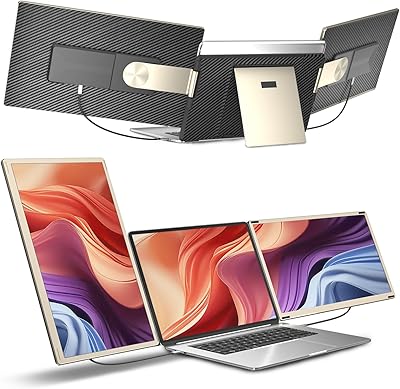
The KEFEYA S6 15.6″ Triple Laptop Screen Extender is a mid-to-premium portable workstation expansion that clips two full-size IPS panels onto your existing laptop, giving you three screens without a desk full of monitors. Released in mid-2024, the S6 is KEFEYA's current generation and represents a noticeable step up from the flimsy clip-on extenders that flooded the market a few years back. The magnetic frame design makes folding and packing genuinely fast — no fiddling with screws or loose brackets. If you've been hunting for a portable triple monitor setup that actually feels intentional rather than cobbled together, this screen extender is worth a serious look.
Features & Benefits

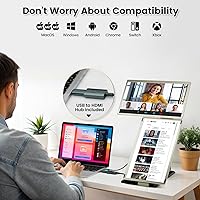
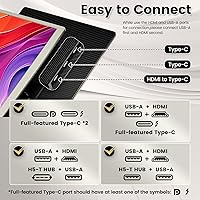
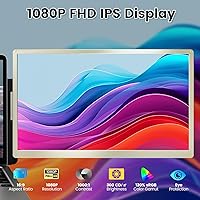
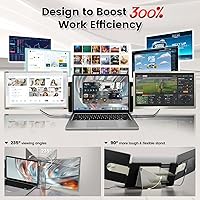
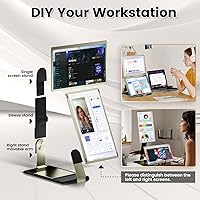
Each of the two 15.6-inch IPS panels runs at 1920x1080 with 120% sRGB coverage, producing colors noticeably richer than most laptop displays — useful for reading dashboards or comparing data side by side. The rotation system supports seven layout combinations, including portrait mode, so you're not locked into one arrangement. On Windows, setup is refreshingly direct: a single USB-C drives one screen, or pair USB-A with HDMI if you're short on USB-C ports. The built-in USB hub recovers some of those ports with four additional connections. One important note before you buy: MacBook M-series users must purchase a separate proprietary hub to get video output working, and that's not bundled in the box.

Best For

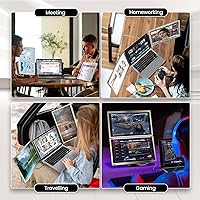
This triple monitor setup was clearly built with mobile professionals in mind. Analysts and developers who need to track multiple windows simultaneously will get the most out of it, as will remote workers who regularly move between home offices and co-working spaces. Stock traders monitoring live feeds across several tabs will also find the expanded screen real estate genuinely useful. That said, if you do color-critical creative work — photo retouching, video grading — 120% sRGB won't cut it, and this isn't a 4K product. At 4.15 pounds total, this screen extender is a meaningful addition to any carry-on, so frequent travelers should factor that in carefully.

User Feedback

The general consensus among buyers centers on a few consistent themes. Build quality earns reasonably positive marks — hinges feel sturdy enough for daily folding, though some users note slight wobble at the widest angles after extended use. Connection reliability on Windows is broadly praised, with the USB-C single-cable path working as advertised for most people. Mac compatibility, however, is a recurring sore spot: a number of buyers mention discovering the M-series hub requirement only after the package arrived. Customer support appears responsive, which softens that frustration for many. Weight surfaces in virtually every travel-focused review — 4.15 pounds is the trade-off you make for dual full-size screens, and buyers land on different sides of whether it's worth it.

Pros

  • Dual 15.6-inch IPS panels offer a noticeably sharper, more colorful image than most laptop displays.
  • Seven layout combinations give real flexibility — portrait, landscape, and angled setups are all supported.
  • Windows plug-and-play setup works without installing drivers on most modern laptops.
  • The magnetic frame snaps shut cleanly, making it much faster to pack up than older screw-bracket designs.
  • A built-in USB hub returns four ports, so you are not left port-starved after connecting the extender.
  • 300-nit brightness handles typical office and indoor lighting without washing out.
  • Each panel weighs around 2.1 pounds independently, so the load is reasonably distributed in a bag.
  • Customer support is reported to be responsive, which matters when troubleshooting connection issues on the road.
  • Compatible with Windows, Android, and Mac (with the appropriate hub), covering most users' existing hardware.

Cons

  • MacBook M-series users must buy a separate proprietary hub to get video output — this is not included or clearly advertised upfront.
  • At 4.15 pounds total, this triple monitor setup is a noticeable addition to any travel bag.
  • Glossy screen surfaces pick up glare in bright environments, limiting usability near windows or outdoors.
  • Some users report slight hinge wobble at the widest rotation angles after prolonged daily use.
  • Single USB-C power may not work reliably on all laptops — some setups require the USB-A plus HDMI combination instead.
  • 1080p resolution on a 15.6-inch panel can appear soft at close viewing distances compared to higher-density displays.
  • The extra hub requirement for Mac adds cost that is not reflected in the initial price shown at checkout.
  • Connection setup order matters (USB-A before HDMI) — skipping this causes display failures that are easy to misdiagnose.

Ratings

The scores below reflect an AI-driven analysis of verified global buyer reviews for the KEFEYA S6 15.6″ Triple Laptop Screen Extender, with spam, bot activity, and incentivized feedback actively filtered out to ensure accuracy. Ratings cover the full spectrum of user experience — from standout strengths to recurring frustrations — so you get an honest picture before committing to a purchase. Both the highs and the genuine pain points are represented here with equal weight.

Display Quality
83%
Users consistently praised the IPS panels for delivering noticeably richer colors than their laptop screens, particularly when working with spreadsheets, dashboards, or side-by-side browser windows. The 120% sRGB coverage makes a visible difference when comparing documents or tracking color-coded data in real time.
At 1080p on a 15.6-inch glossy panel, pixel density is just adequate — text looks slightly soft at close working distances compared to higher-resolution displays. Glossy coatings also draw complaints from users working near windows, where reflections become genuinely distracting.
Build Quality
76%
24%
The magnetic frame design earned real appreciation from buyers who had previously dealt with screw-bracket extenders — packing and unpacking is noticeably faster and less fiddly. Hinges feel solid during the first months of use, and the overall construction conveys a step up from budget-tier options in this category.
Some users report increased hinge wobble after several weeks of daily folding, especially when pushing panels to their widest angles. A few buyers noted minor flex in the frame under heavier rotation, which can feel less reassuring when the unit is set up on an uneven surface like a café table.
Portability
71%
29%
For a product that effectively adds two full-size screens, the folded footprint is impressively compact — it fits cleanly alongside a 15-inch laptop in most padded sleeves. Travelers moving between cities with rolling luggage found it a practical alternative to shipping or renting external monitors at their destination.
At 4.15 lbs total, daily commuters carrying the setup in a shoulder bag or lightweight backpack feel the weight by mid-afternoon. This is not a grab-and-go accessory — it requires deliberate packing decisions, and users who underestimated the weight before purchase are among the most vocal with regret.
Setup & Ease of Use
86%
Windows users almost universally describe setup as fast and painless — plug in the USB-C or the USB-A plus HDMI combo and the screens are recognized within seconds, no driver hunting required. For anyone who has wrestled with display drivers on older portable monitors, this reliability is a genuine upgrade.
The strict connection order for the USB-A and HDMI method (USB-A first, then HDMI) catches a meaningful number of users off guard, leading to failed initializations that get misdiagnosed as hardware defects. The instructions covering this sequence are easy to miss, and it surfaces repeatedly in support interactions.
Mac Compatibility
52%
48%
Once the H5 hub is properly sourced, installed, and the required driver is downloaded, Mac users report that the extender does function correctly alongside MacBooks. For users who knew about the extra hub requirement before purchasing, the additional setup was manageable and the end result was positive.
The H5 hub requirement for M-series MacBooks is the single most common source of buyer frustration in the entire review pool — it is not bundled, not clearly advertised at the point of sale, and adds both cost and a multi-step setup process that Windows users never face. Several Mac buyers describe feeling misled, which is a significant trust problem regardless of how well the product performs afterward.
Connection Reliability
78%
22%
Single USB-C connections on Thunderbolt-capable Windows laptops are broadly reported as stable and consistent across long work sessions, with no dropout issues during video calls or data-heavy workflows. The dual-cable method via USB-A and HDMI also earns solid marks once users learn the correct plug-in sequence.
Laptops with USB-C ports that lack full DisplayPort or Thunderbolt capability create unpredictable results — some screens initialize, others do not, and diagnosing the cause requires users to already understand their own port specifications. This ambiguity generates a disproportionate share of support tickets and one-star reviews from otherwise compatible setups.
Brightness & Visibility
69%
31%
At 300 nits, the panels perform comfortably in typical office lighting, meeting rooms, and home setups — most productivity use cases land well within this brightness range. Users working primarily indoors report no issues with legibility during full workdays.
Outdoor or bright-daylight use exposes the 300-nit ceiling quickly, with glossy panels compounding the problem by adding surface reflections on top of the lower peak brightness. Several users specifically call out this limitation for rooftop decks, airport lounges with floor-to-ceiling windows, or any south-facing home office.
Layout Flexibility
88%
The seven supported layout combinations genuinely expand how people work — traders running portrait mode on one screen and landscape on another, developers keeping a terminal open at an angle, and presenters flipping panels toward an audience all cite the rotation range as a standout feature. This is one of the areas where the S6 extender outperforms simpler fixed-position competitors.
Memorizing which combination works best for a given context takes a few sessions to figure out, and the magnetic frame does not lock decisively at intermediate angles — some users find themselves readjusting panel positions when moving the laptop between desks. Documentation for the layout combinations could be more visual and accessible.
USB Hub Utility
74%
26%
The four-port built-in USB hub was a pleasant surprise for buyers who had mentally written off their spare ports to power the extender. Being able to keep a USB drive, a mouse dongle, and a charging cable plugged in simultaneously while running the screens proved genuinely useful in daily practice.
The hub ports are USB-A only, which limits utility for users with newer accessories that use USB-C connectors. Bandwidth is also shared across the hub, so running high-speed storage devices while simultaneously driving the screens can occasionally produce slower-than-expected transfer rates.
Value for Money
67%
33%
For Windows and Android users who set it up cleanly and travel frequently, the S6 extender justifies its mid-to-premium price point — replacing the need for hotel business center monitors or renting desk space with a proper dual-screen setup has tangible productivity value. Buyers in this scenario tend to rate it as fairly priced.
Mac users who discover the H5 hub requirement post-purchase understandably recalibrate their value assessment upward in total cost, which shifts the equation. Users who only occasionally need extra screens also struggle to justify the price relative to lighter, cheaper single-panel alternatives that cover the same occasional-use case.
Customer Support
77%
23%
Response times are consistently described as faster than expected for a third-party seller, with most buyers receiving useful troubleshooting guidance within 24 hours. Buyers who proactively included their laptop model in the initial message report noticeably faster and more accurate support resolutions.
Support quality varies when the issue involves Mac-specific configuration — some users received conflicting guidance on the H5 hub setup process, which prolonged resolution times unnecessarily. The reliance on contacting support to purchase the Mac hub, rather than having it available as a listed product add-on, is a friction point that damages first impressions.
Durability Over Time
66%
34%
Units used primarily as a home or office desk setup — folded and unfolded once a day — hold up reasonably well over the first three to six months based on buyer follow-up comments. The magnetic frame maintains its snap-shut function reliably within this usage pattern.
Users who pack and unpack the extender multiple times daily for on-the-road work report faster hinge degradation and occasional loosening of the panel attachment points. The build, while better than budget alternatives, does not appear to be engineered for high-cycle durability beyond standard once-daily use.
Brightness Uniformity
72%
28%
For most day-to-day tasks like document work, spreadsheets, and video calls, brightness uniformity is consistent enough that users do not consciously notice variation across the panel surface. The IPS panel technology helps maintain reasonable color consistency even at off-center viewing angles.
Close inspection during dark-background work — coding with a dark IDE theme, for example — reveals mild backlight bleed in the lower corners on some units. It is not universal, but enough users flag it specifically that it appears to be a manufacturing tolerance issue rather than an isolated incident.

Suitable for:

The KEFEYA S6 15.6″ Triple Laptop Screen Extender is a strong match for professionals whose work demands constant visibility across multiple data streams or applications. Remote workers and freelancers who split their week between a home desk, a coffee shop, and a client's office will appreciate having a triple-screen setup that packs down into a bag without requiring a separate monitor shipment. Data analysts, developers, and stock traders benefit most directly — the ability to keep a terminal, a dashboard, and a reference document open simultaneously without alt-tabbing is genuinely useful, not just a novelty. Windows and Android users will find setup refreshingly low-friction, with a single USB-C cable handling one screen on most modern laptops. If your priority is maximizing visible workspace while staying mobile, this screen extender competes seriously at its price point.
Not suitable for:

The KEFEYA S6 15.6″ Triple Laptop Screen Extender has real limitations that certain buyers should weigh carefully before purchasing. Creative professionals doing color-accurate photo editing, video grading, or print production work will find the 120% sRGB color gamut insufficient — this is not a display for critical color decisions. Anyone expecting 4K sharpness will also be disappointed; the screens top out at 1080p, which starts to look soft on 15.6-inch panels at close range. MacBook users with M1, M2, or M3 chips face a particularly important hurdle: getting video output requires a separate proprietary hub that does not come in the box, adding both cost and setup complexity. At a combined 4.15 pounds, travelers packing ultralight will feel the weight — this extender is more suited to someone with a rolling carry-on than a minimalist backpack commuter. Finally, buyers hoping for a pure USB-C single-cable solution should verify their laptop's port output specs first, since not all USB-C ports deliver enough bandwidth to drive an additional screen reliably.
Specifications

  • Screen Size: Each of the two extension panels measures 15.6″ diagonally, giving you two full-size additional displays alongside your laptop screen.
  • Resolution: Both panels run at 1920x1080 (Full HD), delivering standard 1080p clarity across each screen.
  • Panel Type: IPS (In-Plane Switching) technology is used on both displays, providing wider viewing angles and more consistent color compared to TN panels.
  • Color Gamut: The displays cover 120% of the sRGB color space, producing noticeably more vibrant colors than the typical laptop screen.
  • Brightness: Peak brightness is rated at 300 nits, which is adequate for indoor and office environments but may wash out in direct sunlight.
  • Aspect Ratio: Both panels use a standard 16:9 widescreen aspect ratio, matching the proportions of most modern laptops.
  • Screen Surface: The display surface is glossy, which enhances color vibrancy but can produce reflections in bright or backlit environments.
  • Rotation Range: Each panel rotates up to 235° and supports seven documented layout combinations including portrait, landscape, and angled configurations.
  • Connectivity: The S6 extender connects via a single full-featured USB-C port per screen, or alternatively through a USB-A plus HDMI combination.
  • USB Hub: A built-in USB hub provides four additional USB ports, partially offsetting the ports used by the extender's own connection cables.
  • Total Weight: The complete unit weighs approximately 4.15 lbs (1.88 kg), with each individual panel weighing around 2.1 lbs.
  • Dimensions: Folded unit dimensions are 14.21 x 9.69 x 1.81 inches, making it sized similarly to a large laptop for bag storage.
  • Voltage: The screens operate at 5V DC, drawing power directly from the connected laptop via the USB connection.
  • Compatibility: The extender is compatible with Windows and Android laptops natively; MacBook users with M1, M2, or M3 chips require the separately sold H5 hub for video output.
  • Frame Design: A magnetic folding frame holds the panels in place during storage and travel, replacing the screw-based brackets found on older-generation extenders.
  • Model: This unit is the S6 model, representing KEFEYA's current generation of dual-panel laptop screen extenders as of mid-2024.
  • Manufacturer: Designed and manufactured by Shenzhen Baijiayoupu Technology Co., Ltd., based in Shenzhen, China.
  • Driver Requirement: No driver installation is required for most Windows systems; Mac users connecting via the H5 hub will need to download a driver after the hub is linked.

Related Reviews

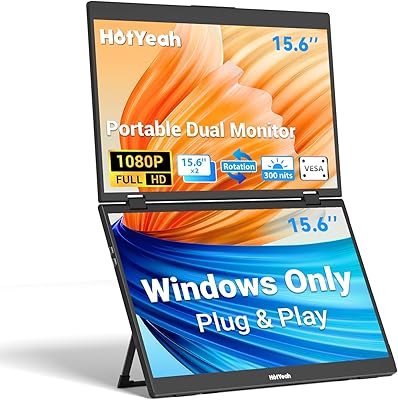
HotYeah Triple Laptop Screen Extender 15.6″
85%
88%
Display Quality
92%
Ease of Setup
90%
Portability/Size
85%
Build Quality
89%
Screen Rotation Flexibility
More
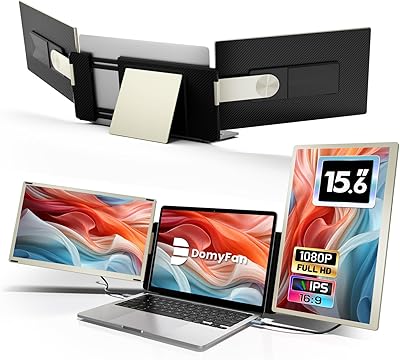
domyfan S6 15.6″ Laptop Screen Extender
84%
88%
Display Quality
95%
Ease of Setup
90%
Portability
75%
Compatibility
85%
Build Quality
More
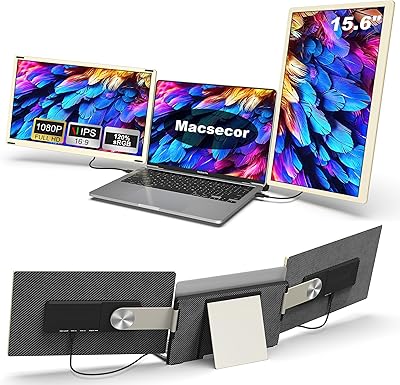
Macsecor 15.6″ Triple Laptop Screen Extender
83%
91%
Value for Money
88%
Display Quality
85%
Portability
92%
Ease of Setup
65%
Brightness in Well-Lit Environments
More
InnoView 15.6″ Laptop Screen Extender
85%
88%
Value for Money
91%
Portability
92%
Ease of Setup
89%
Display Quality
64%
Power Consumption
More
LXU S10 15.6″ Laptop Screen Extender
86%
88%
Display Quality
91%
Portability & Design
93%
Ease of Setup
85%
Rotating Screen Flexibility
82%
Build Quality & Durability
More
FOPO 15.6″ Laptop Screen Extender Monitor
85%
88%
Value for Money
92%
Ease of Setup
90%
Display Quality
75%
Portability & Weight
85%
Compatibility with Laptops
More
siaviala S6 15.6″ Portable Laptop Monitor
86%
91%
Portability
89%
Display Quality
93%
Ease of Setup
87%
Build Quality
75%
Compatibility
More
Redalf 15.6″ FHD Portable Triple Monitor for Laptop
85%
89%
Portability
91%
Screen Clarity and Display Quality
93%
Ease of Setup
88%
Ergonomics and Comfort
78%
Compatibility with Devices
More
Sitrunda S8Ultra 14.2″ Triple Screen Laptop Extender
84%
94%
Portability and Design
91%
Ease of Setup
89%
Display Quality
88%
Multitasking Efficiency
85%
Compatibility with Devices
More
FOPO 14″ Triple Monitor Laptop Screen Extender S7
85%
89%
Performance & Functionality
92%
Ease of Setup
91%
Portability & Design
88%
Display Quality
74%
Compatibility with Laptops
More

FAQ

For most Windows machines, no — you just plug in and it works. The S6 extender is designed to be plug-and-play on Windows 10 and 11. The only exception is if your laptop has unusual display output settings, in which case a quick settings adjustment usually resolves it.

Not quite out of the box, unfortunately. The KEFEYA S6 15.6″ Triple Laptop Screen Extender requires an additional proprietary hub called the H5 if your MacBook uses an M1, M2, or M3 processor. The H5 is not included in the standard package, so you will need to contact the seller to purchase it separately. Once connected via the H5, you also need to download a driver — plan for about 15 to 30 minutes of extra setup time.
Yes, provided your laptop's USB-C port is a full-featured Thunderbolt or DisplayPort-capable port with sufficient power output. Some USB-C ports, particularly on older or budget laptops, are charge-only and cannot carry a video signal — in that case, you would need to use the USB-A plus HDMI combination method instead.

The order matters here: connect the USB-A cable first, then the HDMI. Reversing the order is a common cause of the screen failing to initialize. Once both cables are in, the display should appear within a few seconds.

The full setup weighs 4.15 lbs total, which is roughly the same as adding a second laptop to your bag. For a rolling carry-on or a padded laptop bag with a trolley sleeve, that is manageable. For a minimalist daypack or a light commuter bag, it will be noticeable. Each panel is about 2.1 lbs on its own, so the weight is spread evenly but it does add up.

Yes. The two panels operate independently, so you can connect only one if you need a dual-screen setup rather than triple, or if your laptop only has one available output port. This also helps if you want to keep the overall weight down on a lighter travel day.

It is reasonably good for that purpose. The IPS panels have decent color reproduction at 120% sRGB and 1080p resolution, so video content looks solid. The glossy surface can make reflections distracting in bright rooms, but for indoor viewing this screen extender handles media well enough for regular use.

Based on general user feedback for this type of product, the hinges hold up well for the first several months of daily use. Some users do report a slight increase in wobble at the widest angle settings after extended use, particularly if the extender is opened and closed multiple times a day. Handling it at moderate angles rather than pushing to the full rotation limit helps preserve hinge tension longer.

The S6 extender officially supports seven layout combinations. Portrait mode is included, which is useful for reading long documents or monitoring code. You can also run both screens in standard landscape, offset them at different angles, or fold one forward and one back depending on your working environment.

KEFEYA advertises 24-hour customer support availability, and buyer feedback generally confirms that responses come through within a reasonable window. The most important thing to do when reaching out is to include your specific laptop model — the team reportedly diagnoses connection issues much faster with that information in hand. For MacBook-related issues especially, specifying your chip generation (M1, M2, M3) will save you back-and-forth time.